




Opus 5.5 vs Opus 5 is about as easy as a model upgrade decision gets. Anthropic launched Opus 5.5 on September 22, 2026, 60 days after Opus 5. It is cheaper on every price line and scores higher on every benchmark in the launch table.
The useful question is where the gains are real and where the headlines overreach. This guide compares the two on Anthropic's numbers and on independent testing at every effort level. It also draws on our own Emergent benchmark of nine app briefs, plus two apps built from the same brief. For a plain-language overview of the model itself, see our guide to what Claude Opus 5.5 is. [INTERNAL LINK PLACEHOLDER: link "what Claude Opus 5.5 is" to the What Is Claude Opus 5.5 article once it's live]
It ends with the few cases where staying on Opus 5 still makes sense.
Opus 5.5 vs Opus 5 at a glance: cheaper on every price line
Opus 5.5 keeps Opus 5's context window and output limit and lowers every price. The other changes are in how it thinks by default.
Table 1: Claude Opus 5.5 and Claude Opus 5 specifications and API list pricing, as of September 2026. Sources: Claude Platform documentation.
Nothing breaks if you stay put for now. Opus 5 moved to legacy status, but Anthropic commits to keeping it available until at least July 2027.
Opus 5.5 beats Opus 5 on all 9 launch benchmarks, most in agentic work
Opus 5.5 scores higher than Opus 5 on every row of Anthropic's launch table. The gains are largest on multi-step agent tasks and smallest on reasoning and chart-reading tests.
Table 2: Claude Opus 5.5 vs Claude Opus 5 on Anthropic's launch benchmarks. Anthropic-published; AutomationBench results were run by Zapier. Source: Anthropic, "Introducing Claude Opus 5.5."
Keep three things in mind when reading this table:
- The two biggest gains sit well beyond the reported error margins: Terminal-Bench-Science gains 29.7 points against Anthropic's reported standard error of ±3.5 to 5 points per model. Terminal-Bench 4.0 gains 14.1 points against ±2.6 points for Opus 5.5 and ±1.6 to 2 points for the other Claude models. On that benchmark, Anthropic's run of Opus 5 (52.3%) also lands within noise of the public leaderboard (51.8%).
- The smallest gains are on reasoning and chart reading: Humanity's Last Exam moves 4.1 points and Chartography 5.6. The upgrade shows up most in long, tool-heavy work.
- The settings aren't fully matched: Opus 5.5 ran at max effort on everything except Terminal-Bench 4.0, which used xhigh, and Anthropic doesn't state Opus 5's setting. Opus 5.5 also ran with its production safeguards on, and Anthropic says the fallbacks likely lowered its scores.
For what each benchmark measures and how Opus 5.5 compares with other frontier models, see our Opus 5.5 benchmarks breakdown.
At matched effort levels, Opus 5.5 scores higher on every rung
Effort is the setting that controls how long a model thinks before it answers, and the two models use it differently. Opus 5 defaults to high, while Opus 5.5 defaults to medium. According to Anthropic's prompting guide, level names don't mean the same amount of thinking across models, and Opus 5.5 tends to think more per turn at the same level.
That makes default-versus-default comparisons unreliable, so the fairest check is independent testing at every level. Artificial Analysis runs both models on the same harness, and its Opus 5 results cover all five effort levels. Its Opus 5.5 results do the same.
Table 3: Artificial Analysis Intelligence Index v4.3.2 and weighted average cost per index task at each effort level, independently verified, as of September 2026. Default API efforts are medium for Opus 5.5 and high for Opus 5. Source: Artificial Analysis.
Three results matter most:
- Opus 5.5 wins every rung: it leads by three points at low effort and by six or seven points at every level above that.
- At the defaults, it scores higher for 37% of the cost: Opus 5.5 at medium scores 51 against Opus 5 at high's 48, for $1.34 per task against $3.61.
- Its medium setting matches Opus 5's best on the composite index: Opus 5.5 at medium equals Opus 5 at max (51 each) for about 23% of the cost per task.
Speed moves the same way. Artificial Analysis measured Opus 5.5 at 78 output tokens per second at medium effort, against 55 for Opus 5 at high. That fits Anthropic's claim of more than 30% faster output. Cost per task here is a weighted average across Artificial Analysis's index tasks, so read it as a like-for-like benchmark cost, not a forecast of your own bill.
Opus 5.5 costs less per task, except at max effort
Opus 5.5 is 20% cheaper than Opus 5 on input and output tokens, and 60% cheaper on cache reads. Cache writes, batch pricing, and fast mode are all 20% cheaper as well.
The cache-read cut matters most for agents. An agent re-reads its instructions, files, and conversation on nearly every step, and when that context is cached, those re-reads bill at the cache-read rate. By Anthropic's account, cache reads make up the majority of agentic and coding costs, which is why a 60% cut there moves the total bill far more than the headline 20%.
The widely repeated claim from Anthropic is that Opus 5.5 costs about 40% less to run than Opus 5 on typical workloads at default settings. That figure combines the lower prices with the model finishing tasks in fewer tokens. The independent default-setting comparison above points to an even larger drop on benchmark tasks.
Max effort is the exception. At that setting, Artificial Analysis puts Opus 5.5 at $5.98 per task against $5.86 for Opus 5, roughly even, because Opus 5.5 does much more thinking at max. You still get a higher score for the money (58 vs 51), but the savings come from running Opus 5.5 at medium or high. Long coding-agent runs can tip the other way. On Artificial Analysis's Coding Agent Index, which runs the models inside Claude Code at max effort, Opus 5.5 cost 21% more per task ($13.04 against $10.79). For the full rate card and what a real session costs, see our Claude Opus 5.5 pricing guide. [INTERNAL LINK PLACEHOLDER: link "Claude Opus 5.5 pricing guide" to the Claude Opus 5.5 pricing article once it's live]
Our Emergent builds: half the cost per turn and a more polished app
We ran our own benchmark on Emergent to see how the pricing and benchmark picture holds up on real app builds. The cost figures come from nine product briefs, written the way customers write them. They range from a claims desk for a health insurer and an online shop with Stripe checkout to a spreadsheet app and a kids' chess game. Every run used the same system prompt, tools, and helper agents, and only the model and effort level changed. The wallet apps compared in the second part come from a separate build that shared one brief.
1. Opus 5.5 cost 49% less per turn at the same effort level
With both models at medium effort, Opus 5.5 cost $1.06 per user turn against $2.09 for Opus 5. Opus 5 ran at medium, one step below its API default of high, so this is a same-setting comparison. Opus 5.5 came in cheaper on all nine briefs, at every effort level we tested.
Table 4: Emergent internal benchmark, nine product briefs and 21 user turns per configuration, September 2026. Averages per user turn. Cost counts only the model under test; the helper agents for testing and design were identical across runs and are excluded.
Even at high effort, Opus 5.5 cost a third less per turn than Opus 5 at medium. Most of the saving comes from doing the work in about half as many steps: 10.2 model round-trips per turn at medium, against 20.3 for Opus 5. Each turn also finished 22% faster, 16.0 minutes against 20.4, as measured by our eval harness including environment setup.
The savings grew on longer projects. Three of the briefs arrived as five rounds of follow-up requests, the way real builds evolve. On those multi-round briefs, Opus 5.5 at medium cost 61% less than Opus 5, against 30% less on the six single-request briefs. Across all nine briefs, total spend at medium came to $22.16 against $43.82.
Two caveats keep these numbers honest:
- Low effort tested less: Opus 5.5 at low effort called the testing agent 10 times across 21 turns and skipped testing on three of the nine briefs. The other configurations called it 21 to 22 times, which is part of why low effort is the cheapest.
- Quality wasn't fully measured: browser tests were switched off for these runs, so the only quality measure was a static code-quality score. Scores were close (0.57 for Opus 5.5 at medium against 0.53 for Opus 5), and with one run per brief, differences that small aren't conclusive.
2. The same brief produced a more polished, multi-user app on Opus 5.5
We gave both models the same brief and prompt for a crypto and fiat wallet app, changing nothing but the model. Both delivered a working demo wallet with the same eight assets (BTC, ETH, USDT, and five fiat currencies), live market prices, and send, receive, and convert flows. Both also included a searchable activity feed with CSV export and a recovery-phrase flow. The differences are in the kind of product each model built.
Table 5: The biggest differences between two wallet apps built on Emergent from the same brief and prompt, September 2026.
Opus 5 built the more detailed ledger. Its send and convert flows show fees and totals before you confirm, and its receive screen can simulate an incoming payment, which is handy for testing a demo.
Opus 5.5 built the more complete consumer product. Its users can pay each other by handle, and its filters handle an empty result gracefully. Its sample data was also clean, while the Opus 5 feed still showed test transactions left over from the build.
The dashboards show the two approaches at a glance.
The Opus 5 dashboard reads like a ledger. A single demo user sees a total balance split into crypto and fiat, plus four action buttons: Send, Receive, Convert, and Request.
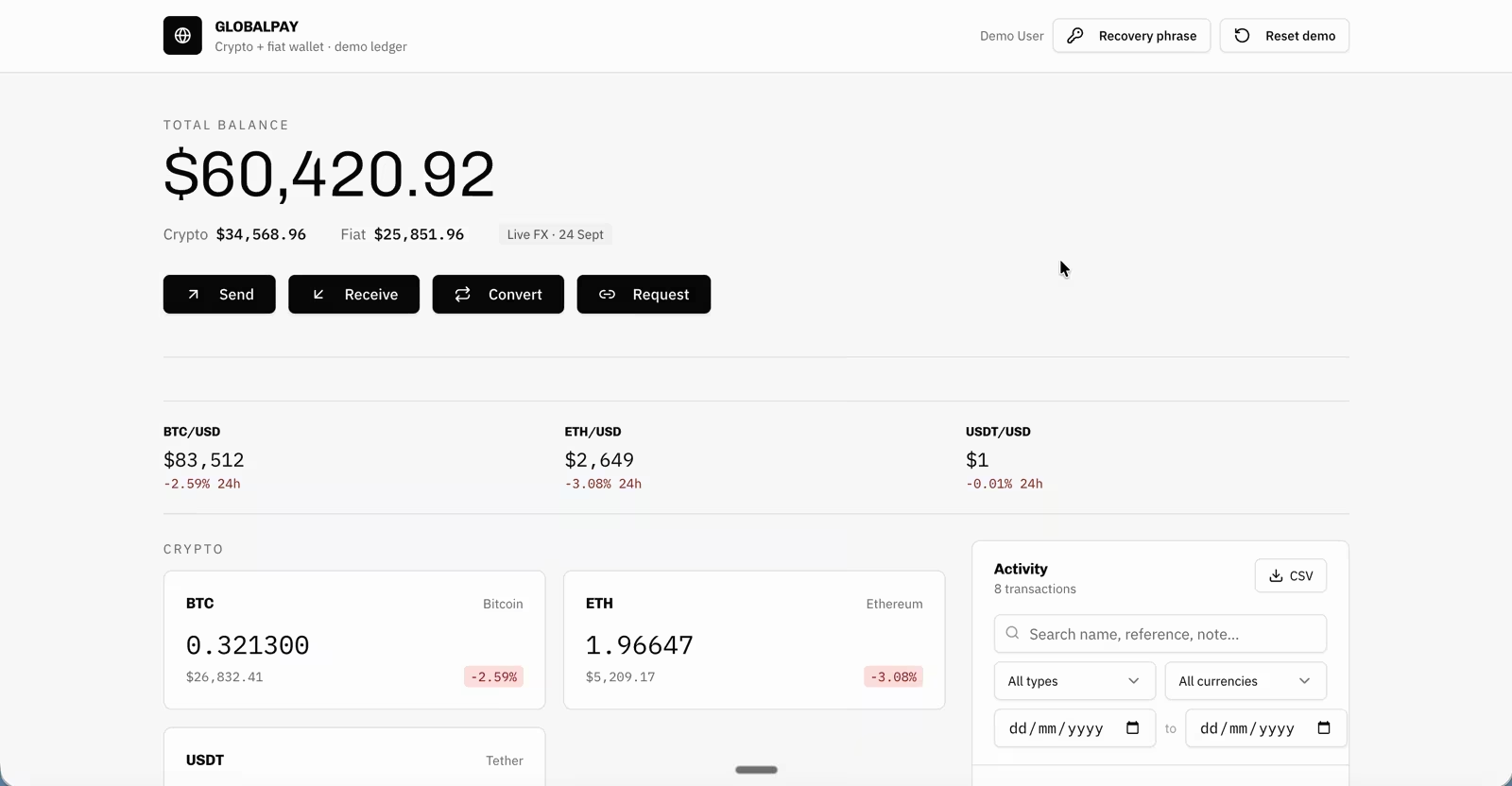
Below them runs a row of live price tickers with 24-hour changes. Balance cards sit on the left, and a filterable activity panel with CSV export runs down the right side.
The Opus 5.5 dashboard is built around the user instead. The balance card shows who is signed in, their country and handle, and a bar splitting crypto from fiat, with the whole view priced in the selected currency.
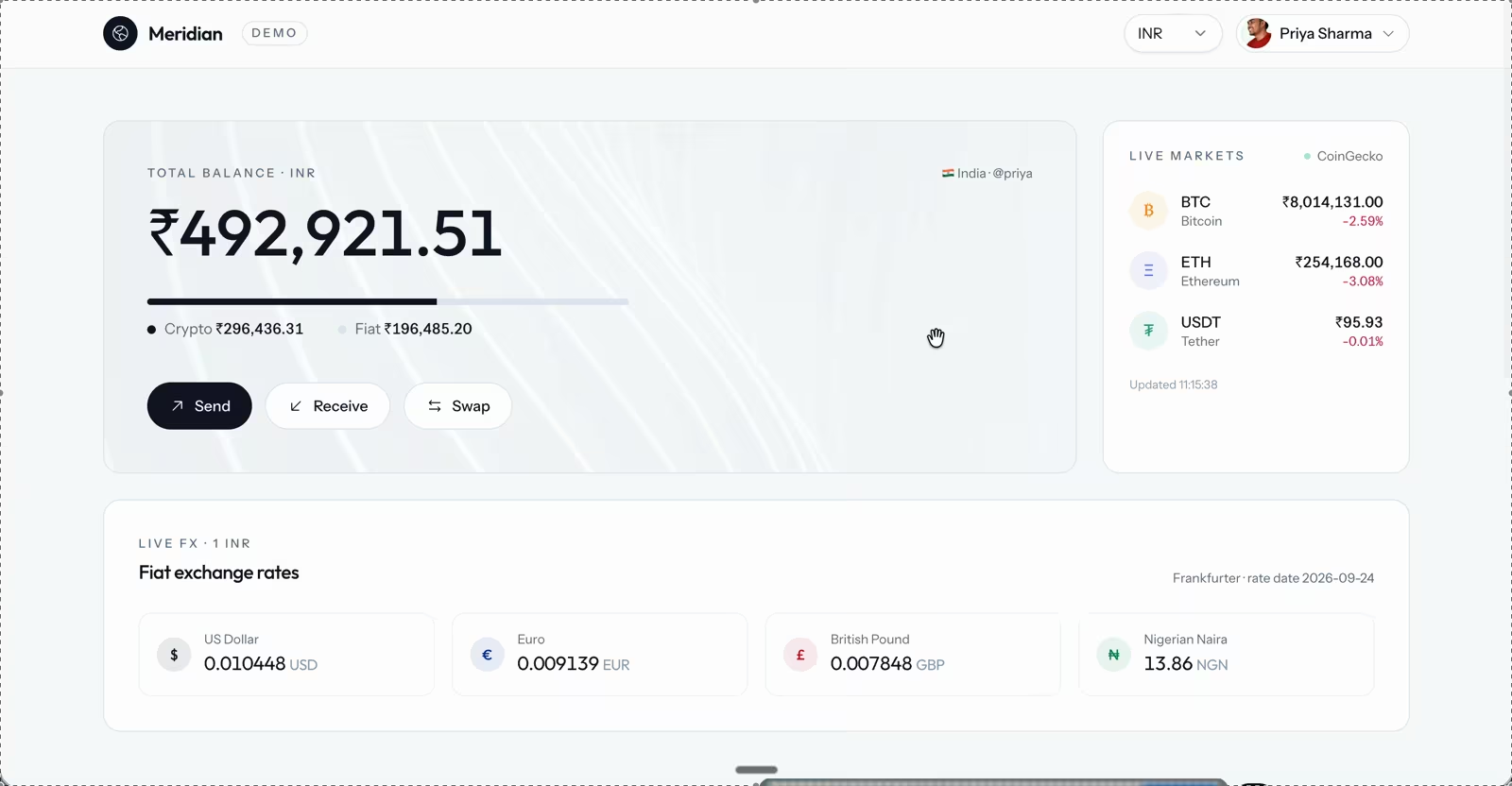
Live crypto prices sit in a side panel with an update time, and a separate panel lists exchange rates with their source and rate date.
The send forms reveal the biggest difference in how each app thinks about payments.
The Opus 5 send form works like a bank transfer. You pick a currency, enter an amount and the recipient's name, address, or IBAN, and choose a destination country.
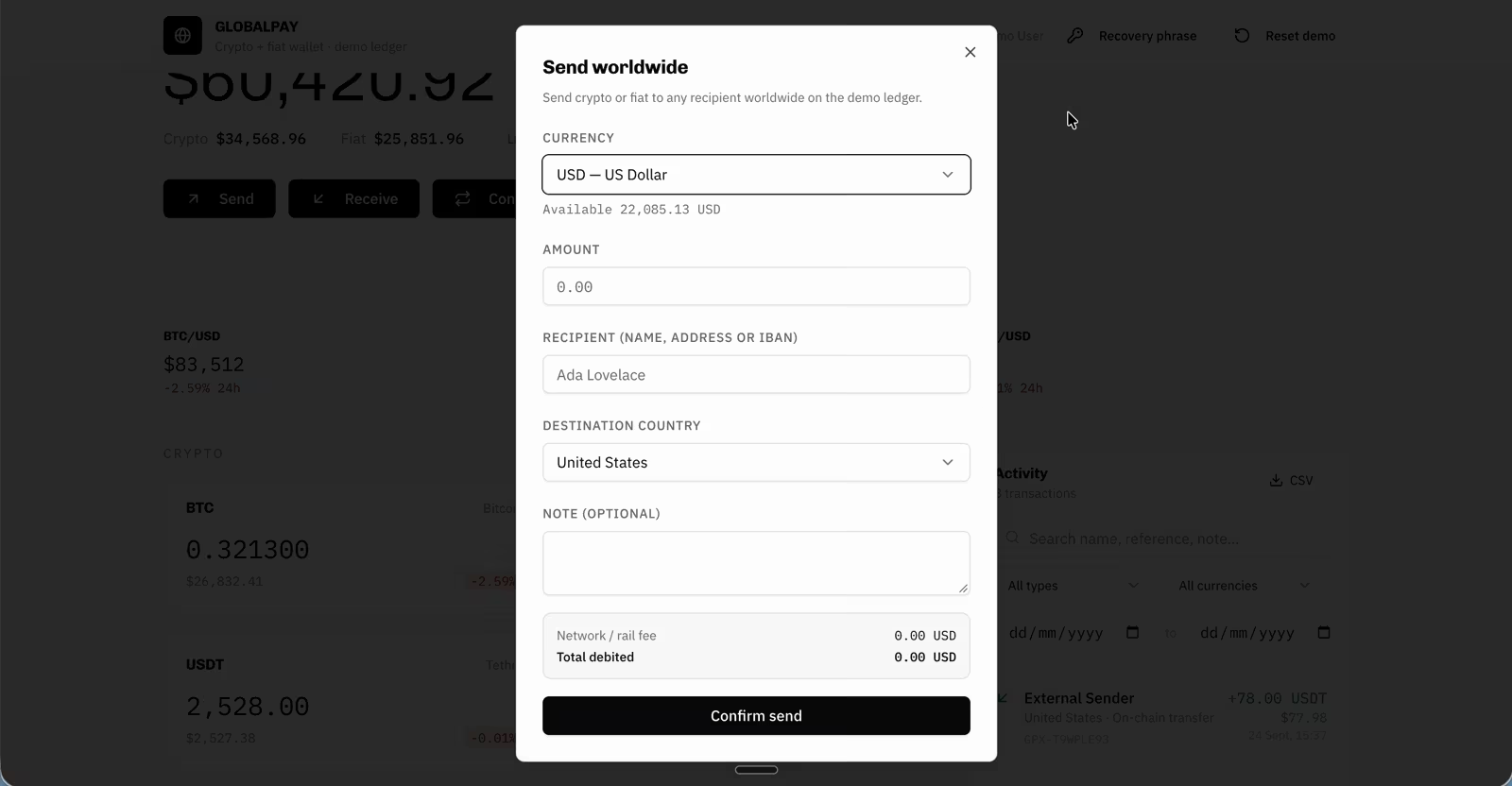
Before you confirm, a summary shows the network or rail fee and the total amount debited.
The Opus 5.5 send form works like a payments app. You type an @handle or tap one of the suggested contacts, then enter what you send and see what the recipient gets, each in its own currency.
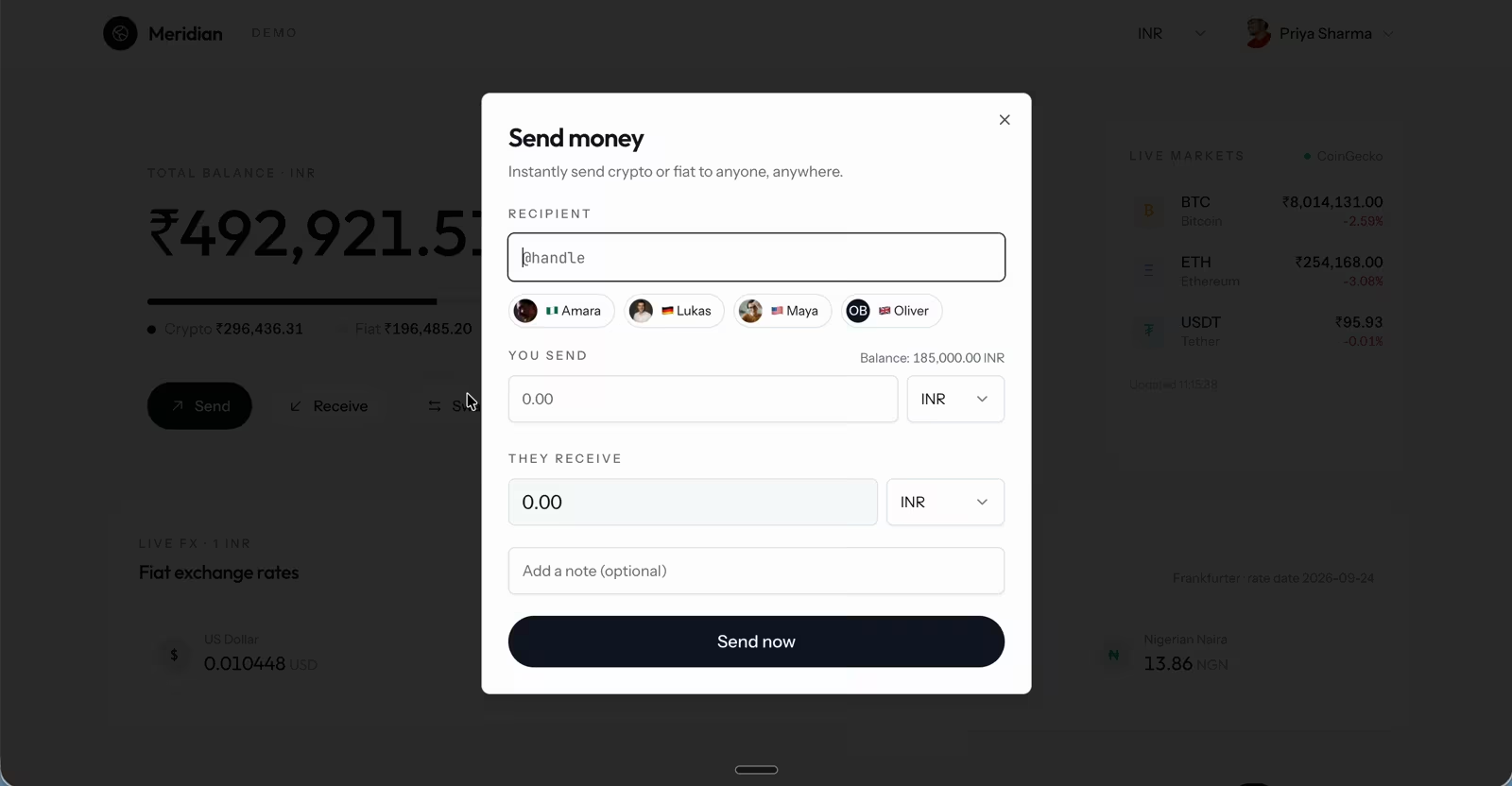
Your available balance sits next to the amount, and an optional note goes with the payment.
Both builds put a QR code on the receive screen, but for different jobs.
The Opus 5 receive screen is built for crypto deposits and testing. You pick a currency to get its wallet address and QR code, with a button to copy the address.
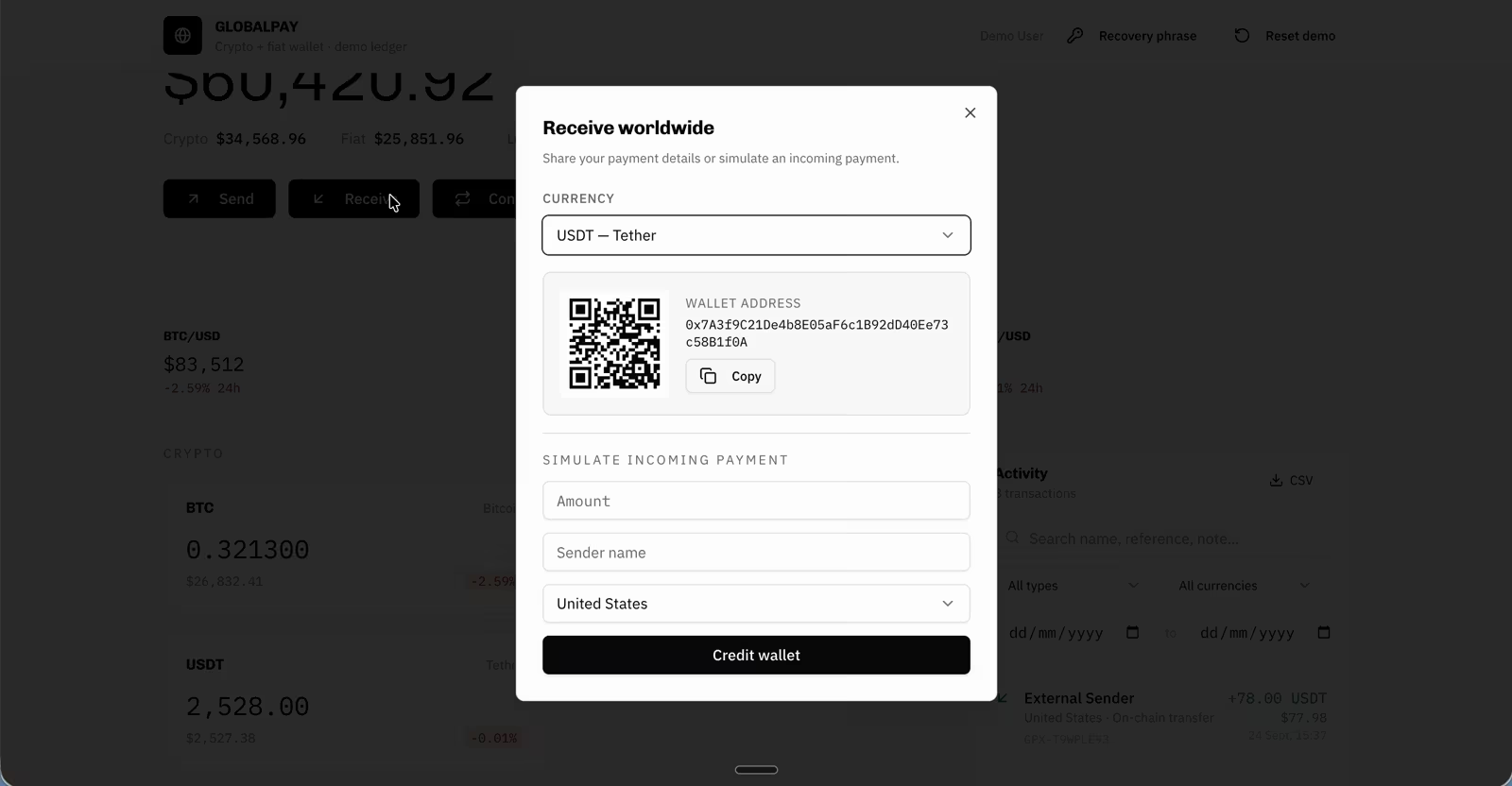
Below that, a simulate-incoming-payment form lets you credit the wallet with an amount, sender name, and country, which is useful for demoing the app.
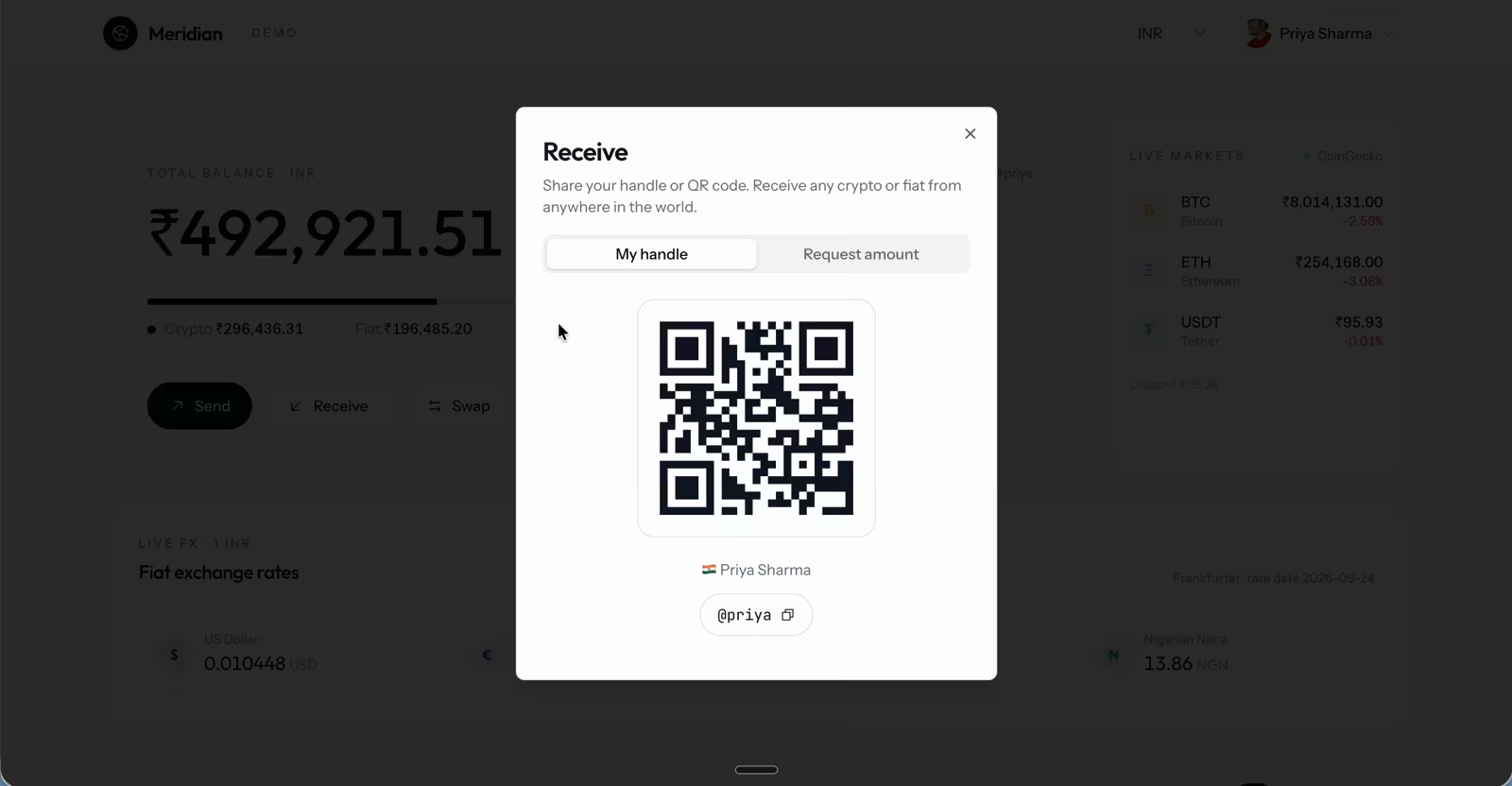
The Opus 5.5 receive screen is built for people. It shows the user's QR code, name, and @handle, ready to share, and a second tab lets them request a specific amount instead.
The profile switcher is the one feature only Opus 5.5 built. The menu lists five demo users across Nigeria, Germany, the United States, the United Kingdom, and India, along with recovery-phrase options and a reset button. Picking a different profile updates the balances, wallets, and activity feed, and the profiles' payments to each other show up in their histories.
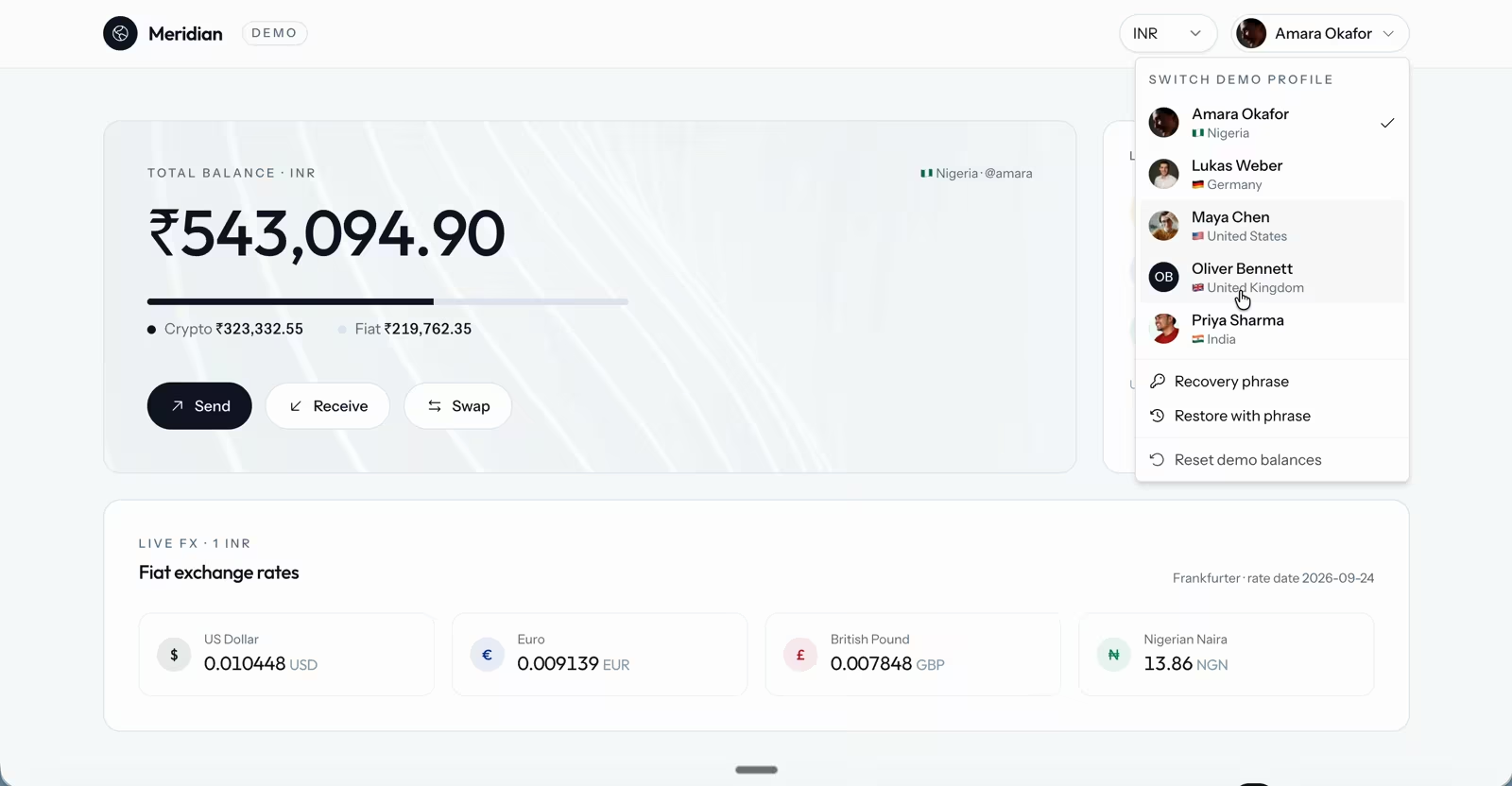
One important change is that only the Opus 5.5 build added switchable demo profiles, each with its own balances and history.
Reported real-work tests favor Opus 5.5, and Snorkel finds one exception
Anthropic's same-task tests show the largest gains on long, sprawling jobs. All four are vendor-reported, run by Anthropic or its early testers:
- Codebase audit: a tester audited and fixed a 200,000-line codebase in under three hours on Opus 5.5. The same work took Opus 5 more than 20 hours and 2.5 times as many tokens.
- App performance: asked to cut load times across every page of a web app, Opus 5.5 succeeded 39 of 40 times. The Opus 5 fixes were smaller and also changed how the app behaved.
- Financial analysis: both models built a merger model and executive presentation. Opus 5.5 finished in 63 minutes against 93, cost 50% less, and avoided the minor errors in Opus 5's version.
- Research reports: across effort settings, 16 of 18 Opus 5.5 reports passed a grader that checked every figure and quote. None of Opus 5's attempts passed.
Independent coding results mostly agree. On Snorkel AI's task set of expert-built terminal tasks, Opus 5.5 passed 68% of its attempts against 61% for Opus 5. Reasoning mistakes also fell sharply, from 35% of Opus 5's failures to 20% of Opus 5.5's.
The exception is repeated attempts. The two models tie on first attempts (60.7% each), and when Snorkel gave each model five tries per task, Opus 5 edged ahead, 79.3% to 76.7%. It's a narrow gap, but the one performance result in this comparison where Opus 5 comes out on top.
Opus 5.5 writes more clearly, addressing a common complaint about Opus 5
Anthropic says the way Opus 5 wrote and communicated was one of the most common areas of feedback it received. In response, Opus 5.5 puts the most important information first, uses less jargon, and follows the writing rules you give it.
Early testers quoted by Anthropic back this up. Box reported that Opus 5.5 used a third of the tokens Opus 5 did, with answers 40% less verbose and no loss of accuracy. For builders, clearer writing means progress updates, summaries, and explanations that are easier to check at a glance.
Moving to Opus 5.5 on Anthropic's API takes a few code changes
For teams calling Anthropic's API directly, Opus 5.5 isn't a pure drop-in replacement. Anthropic's what's new guide lists four breaking changes for code written for Opus 5:
- Thinking is always on: requests that turn thinking off now return an error, so effort is the only way to control it.
- Forced tool use is retired: requests that force the model to call a specific tool now return an error.
- Thinking blocks are tied to the model and conversation: they must be passed back unchanged, editing earlier turns can invalidate them, and only Fable 5.1 and Mythos 5.1 can read Opus 5.5's thinking.
- An older computer-use tool is rejected: on the Claude API and Google Cloud, it must be replaced with the newer toolset.
The guide also flags changes that don't cause errors, such as the model's notes between tool calls now arriving inside thinking blocks. Re-test any interface that streams an agent's progress updates.
Prompts carry over more easily. Existing Opus 5 prompts should perform well without changes, according to Anthropic, which also recommends setting effort explicitly instead of relying on the new medium default.
Opus 5 still makes sense for a few specific workloads
Opus 5.5 is the better model for almost everything, but a few situations favor waiting:
- Biology research and security work: Opus 5.5 is the first Opus model to launch with a similar class of safeguards to Fable 5.1. Flagged offensive security work, like exploit generation or penetration testing, moves to Opus 4.8, while dual-use biology and some frontier AI development requests move to Opus 5. Secure coding, including scanning your own code for vulnerabilities, stays on Opus 5.5. Opus 5.5 isn't yet in Anthropic's Cyber Verification Program, though organizations already in it can use Opus 5 with fewer cyber restrictions. Vetted organizations can apply to the Life Sciences Verification Program now.
- Integrations built around thinking off or forced tools: those need code changes before they run on Opus 5.5.
- Max-effort-only workloads: at max, Opus 5.5 still scores higher, but the cost per task is about the same, and higher on long coding-agent runs. The upgrade buys quality without savings.
None of these is urgent. With Opus 5 available until at least July 2027, there's time to test Opus 5.5 on your own work first.
Upgrade to Opus 5.5 for almost everything
The Opus 5.5 vs Opus 5 verdict is clear: upgrade. Opus 5.5 wins all nine benchmarks in Anthropic's launch table and every effort level on independent testing, while costing 37% as much per task at default settings. In our Emergent benchmark, it cost 49% less per turn at the same effort level, and it turned a shared brief into a more polished, multi-user app. Opus 5 keeps a narrow case only for biology research that Opus 5.5 reroutes, security work affected by its stricter safeguards, and integrations that depend on thinking off.
Both models are available on Emergent, and our launch note covers how Opus 5.5 went live on the platform. Pick Opus 5.5 when you start your next project, describe the app or tool you want, and let it build. Start Building on Emergent.

Most AI app builders stop at prototypes. Emergent creates production-ready apps you can actually launch.
- Production-ready apps
- Web & mobile apps
- Deploy in minutes







