



I spent three weeks running six no-code AI platforms through the same booking app test to see which ones produce software a business can depend on. The shortlist covers Emergent, Lovable, Bolt, Replit, Bubble, and Webflow, ranked by what each one does best.
6 Best No-Code AI Platforms: Quick Comparison
How I Tested These No-Code AI Platforms
I gave every platform the same test project: a booking tool for a small service business with client sign-in, an appointment calendar, and online payments. Here's what I scored each platform on:
- Features: Whether the platform could handle sign-in, data storage, and payments without me touching code or wiring up outside services.
- Usability: How far a first-time builder gets before hitting a wall, and how clear the path forward is when something breaks.
- Pricing: What the free plan covers, what the first paid tier costs, and where hidden usage charges creep in.
- Code ownership: Whether you can take your app with you if you outgrow the platform or hire a developer later.
- Use cases: How each platform performs on the projects its users build most, from booking tools to client portals to marketing sites.
This hands-on approach showed me which platforms can run an app that paying customers rely on every day, and which ones are only good for demos. If a conversational tool is closer to what you need, our guide to the best no-code chatbot builders covers that category separately.
1. Emergent: Best for Building Full Web and Mobile Apps From One Prompt
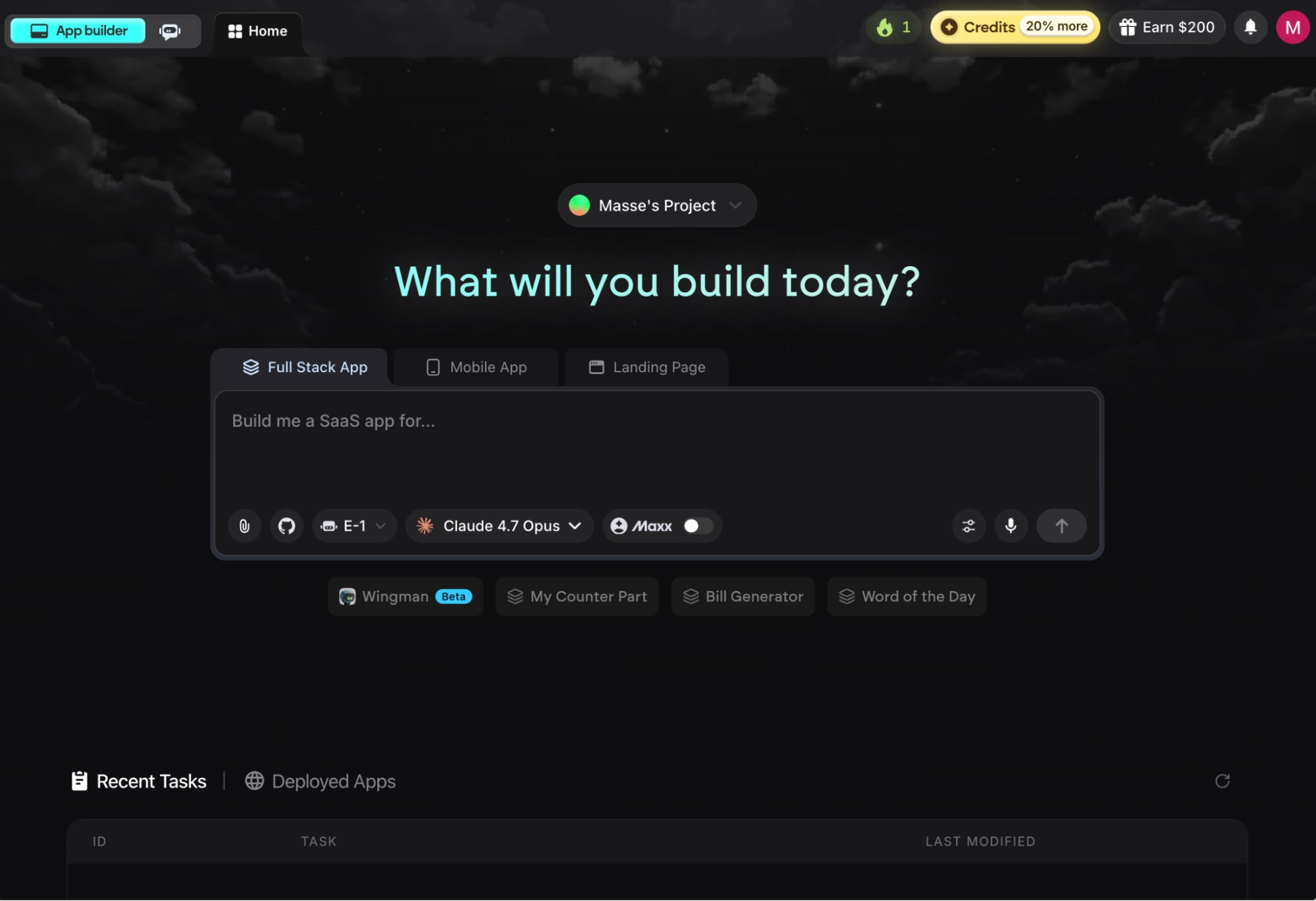
What it does: Emergent turns a plain-English description into a complete, working app, handling design, data storage, sign-in flow, and testing for you.
Best for: Business owners and founders with no programming experience who want a finished product, including the parts users never see, when hiring a developer isn't an option.
I finished my booking tool faster on Emergent than anywhere else because the platform asked me clarifying questions before building anything. Instead of making assumptions about what I wanted, it asked who would log in, how appointments should work, and whether I needed payments.
Strictly speaking, Emergent goes past the no-code label. It generates standard code (React, Python, and MongoDB) that you own, which means a developer can pick up your project later without starting over.
Key Features
- A team of specialized agents: Emergent splits the work across agents that run in parallel, where some plan and design, others handle the build, and testing agents check the work before it ships. That way, a complex app doesn't fall apart the way it can when one agent does everything.
- Built-in testing that fixes its own bugs: Testing agents run end-to-end checks on your app and rewrite broken code before you ever see it, which kept my debugging rounds to a minimum.
- Mobile apps included: Emergent builds mobile apps using React Native and Expo, the same technology behind many App Store apps, so your booking tool can live on phones without a separate project.
- Sign-in and payments scaffolded for you: Emergent provides built-in Google sign-in, and the agent scaffolds payment checkout through platforms like Stripe, set up in test mode so you can check the flow before going live.
Pros and Cons
Pros:
- Builds the part users see and the part that handles data, so your app works end to end without outside services
- You own the generated code, with GitHub sync available on the Standard plan and up
- Hosting is managed for you on emergent.host, and you can connect a custom domain, either one you already own or a new one purchased through IONOS, a registrar Emergent partners with, free for the first year
- A large integrations library spanning AI, databases, CRMs, e-commerce, and communication tools, so connecting tools like Google Sheets doesn't require workarounds
Cons:
- Credit usage can be hard to predict, and several users report wanting more transparency on what each task costs
- PDF generation is weak, so skip Emergent if your app's main job is producing report documents
- No Apple Watch or iPad app deployment, and it isn't built for complex games.
What Users Say
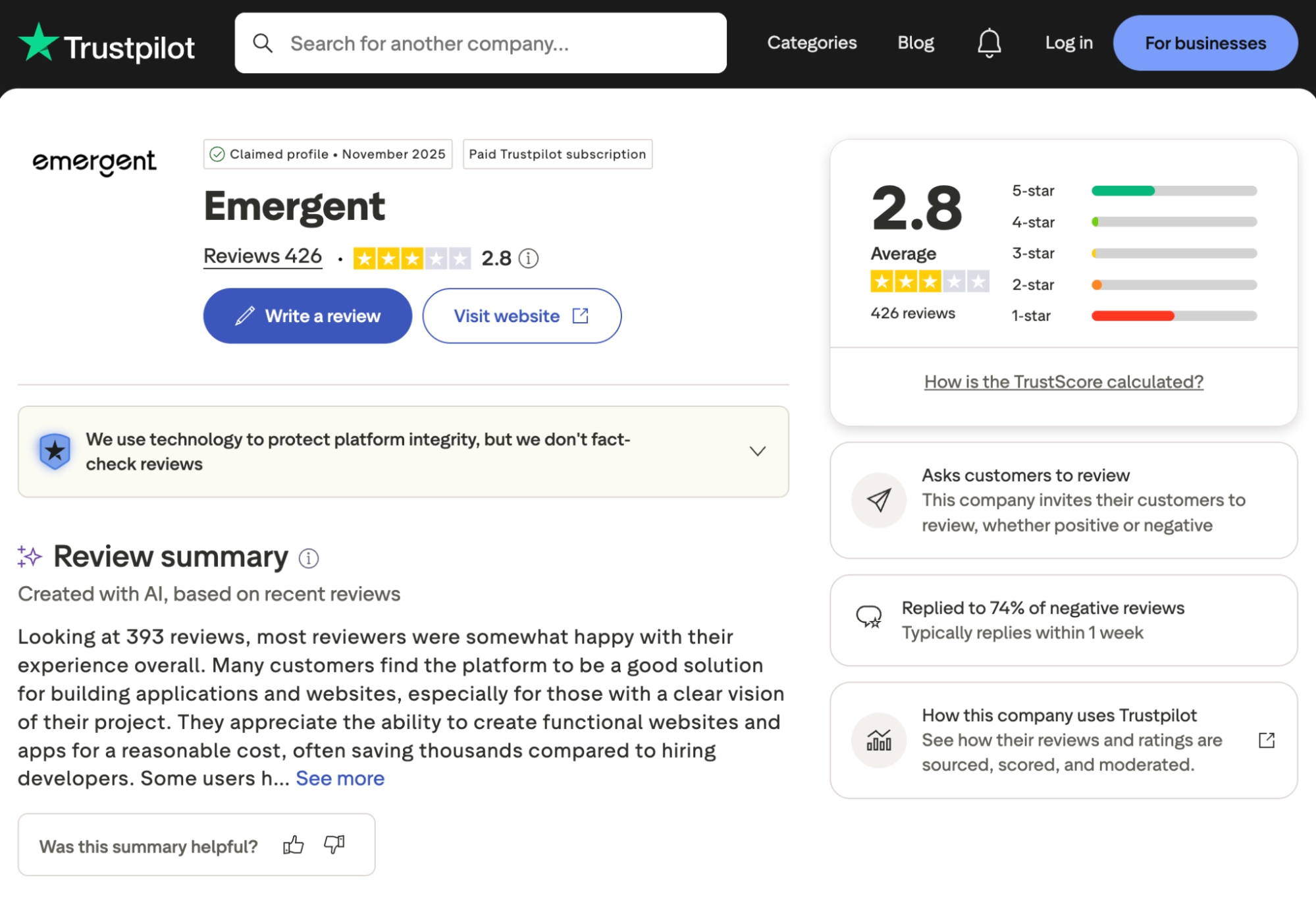
The most positive Trustpilot reviews come from people who have never written code. One reviewer started with zero coding knowledge and had an app in testing on Google Play within a month. The criticism clusters around credits, including one user whose agent got stuck in a loop and wasted 200 credits, which matches the smaller version of it I hit in my own test.
Pricing
Emergent uses credit-based pricing, with current plans listed on Emergent’s pricing page:
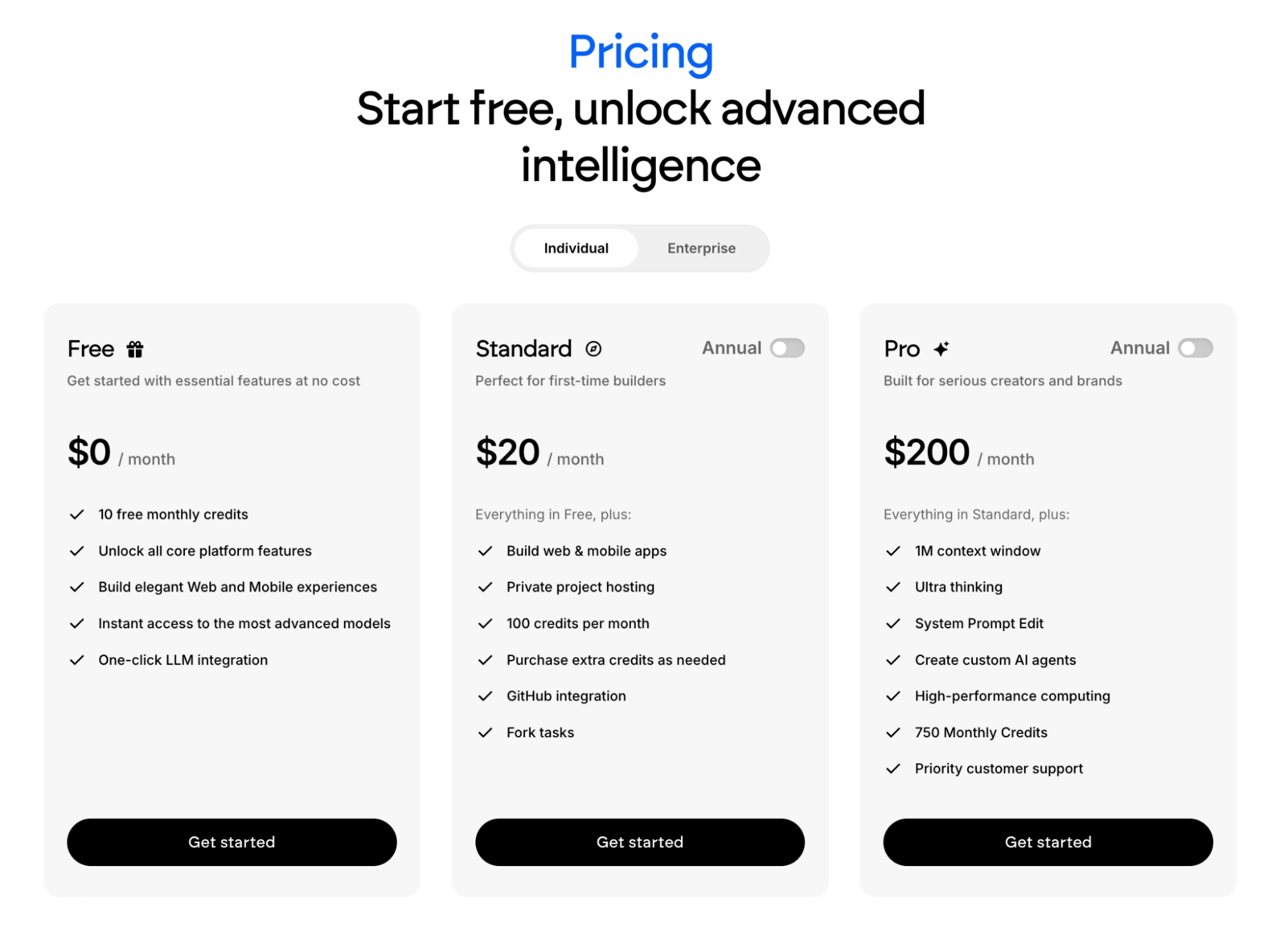
- Free: $0/month with 10 monthly credits, enough to test the platform on a small project
- Standard: $20/month ($17/month billed annually) with 100 credits, private project hosting, and GitHub integration
- Pro: $200/month ($167/month billed annually) with 750 credits, custom AI agents, and priority support
- Enterprise: Custom pricing with SSO and higher usage limits
Bottom Line
I'd recommend Emergent to anyone who wants a complete, working app, especially if mobile matters. Budget your credits the way experienced users do: Write one detailed opening prompt covering who logs in, what they see, and what the app stores, because 20 small corrections cost far more than one clear brief. If your project is a marketing site or a quick mockup, a lighter tool further down this list will cost you less.
2. Lovable: Best for Fast, Good-Looking Prototypes
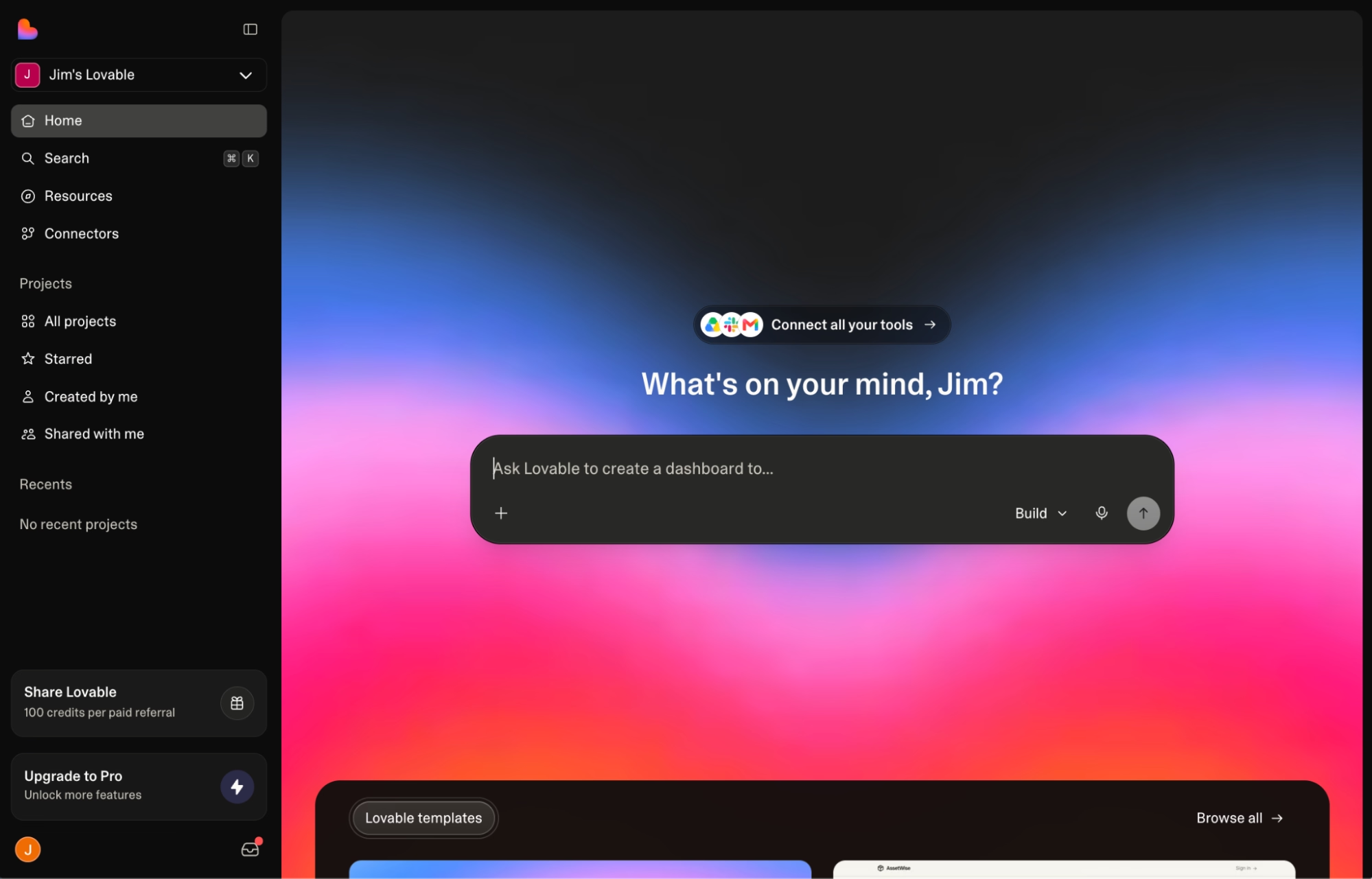
What it does: Lovable generates web apps from text prompts, with a strong eye for design and a built-in connection to Supabase for data storage.
Best for: Anyone who needs an impressive demo to show investors or early users this week. Reviewers in design and marketing roles rate it especially highly, since the output looks client-ready without a designer's pass.
Lovable produced the best-looking first draft in my test. My booking tool's calendar and landing page came out clean and modern without a single design instruction from me. Where it slowed down was the behind-the-scenes work: getting sign-in and payments stable took more back-and-forth prompting than the front end did, and each prompt costs credits.
Key Features
- Design-quality output by default: Generated pages follow modern design patterns and adapt to phone screens automatically, so demos look professional without tweaking.
- Visual editing on top of AI: You can click an element and adjust it directly, with no prompt needed, which saves credits on cosmetic fixes.
- GitHub sync on every plan: Your project lives in a code repository under your account, so a developer can take over or contribute at any point.
- Credit rollover on paid plans: Unused monthly credits carry over to the next month, which softens the cost of a slow month.
Pros and Cons
Pros:
- A quick way to turn an idea into a demo app you can share
- Approachable for complete beginners, with prompts in plain English
- Code export means no lock-in if you outgrow it
Cons:
- Credits drain quickly when the AI misfires, because fixing its mistakes costs more credits
- Complex business logic gets shaky, with users reporting that one change can break another feature
- No custom agent builder, so you can't create your own specialized AI helpers inside your app the way tools like Emergent allow
What Users Say
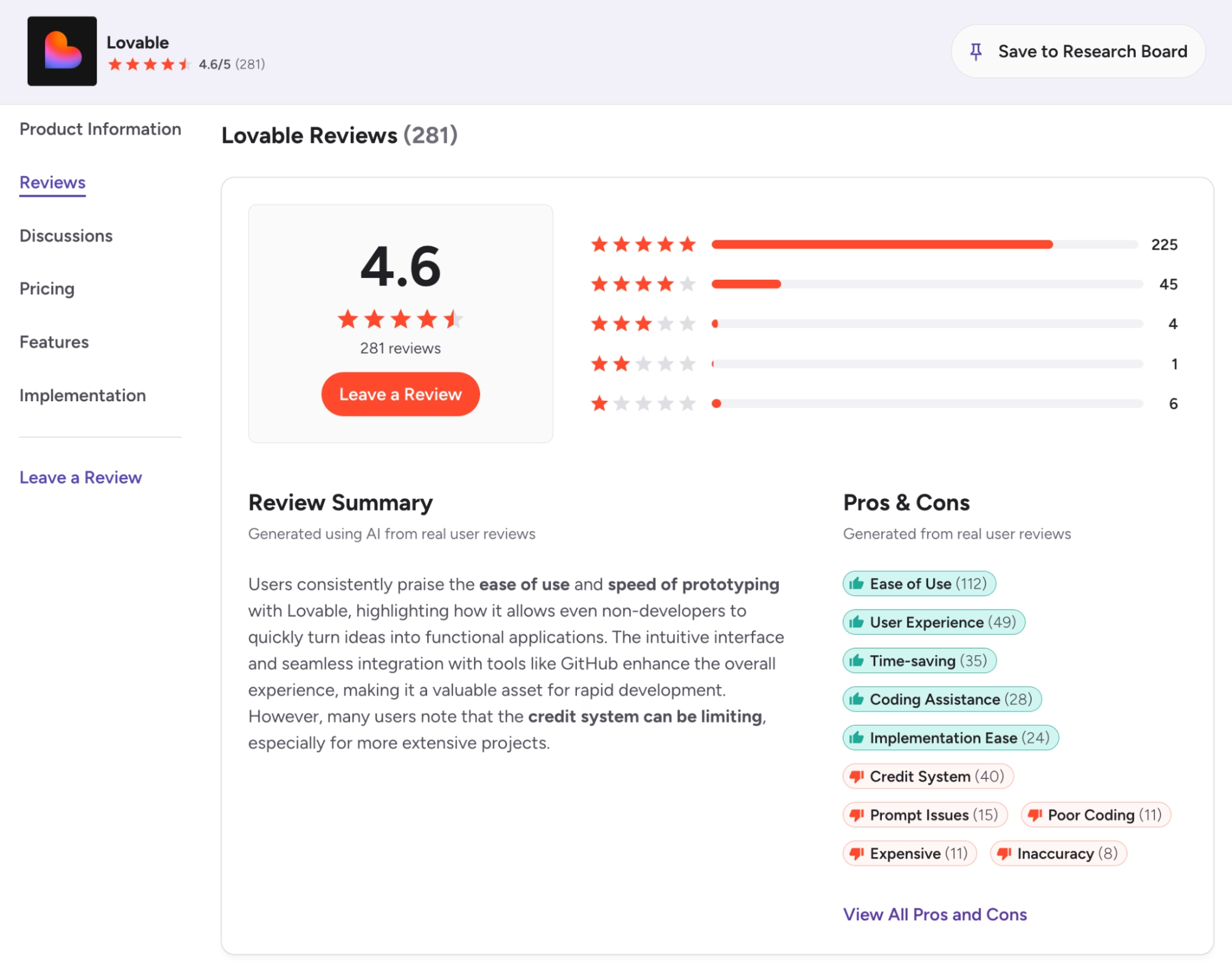
Ease of use is the most-tagged strength in Lovable's G2 reviews, and a solo builder on Product Hunt described launching two live apps with it while staying focused on the product instead of technical setup. The same reviewer flagged the most common complaint: credits go fast, with 400 Pro credits lasting him about two weeks of serious building.
For a fuller breakdown of where it shines and where it falls short, read our Lovable review.
Pricing
Lovable's plans are listed on its pricing page:
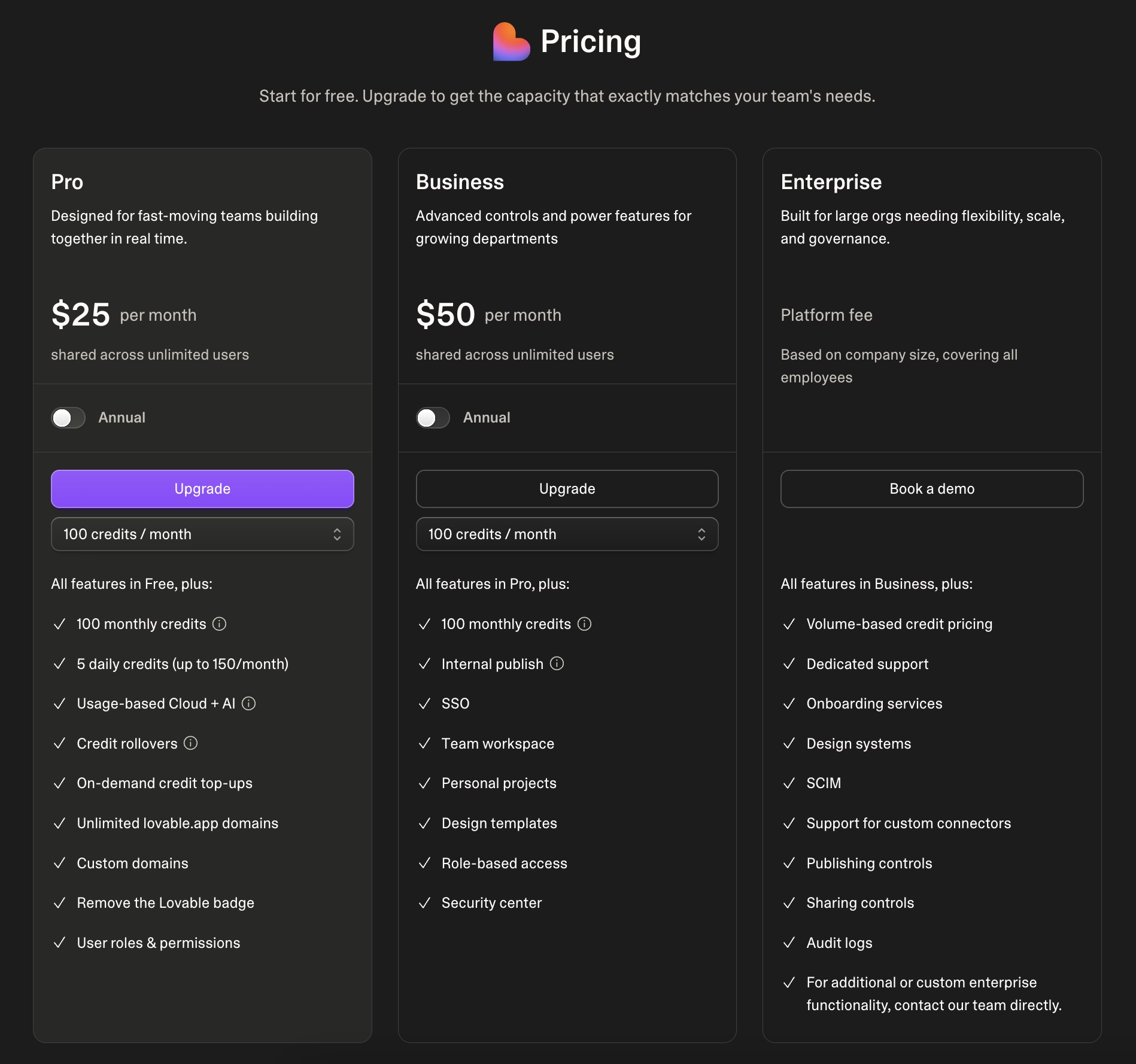
- Free: $0/month with five daily credits (up to 30 per month) and public projects only
- Pro: From $25/month ($21/month billed annually) with 100 monthly credits, private projects, custom domains, and credit rollover
- Business: From $50/month ($42/month billed annually), adding SSO (single sign-on through your company account) and the option to keep your data out of AI training
- Enterprise: Custom pricing
Bottom Line
Choose Lovable when speed to a presentable demo matters more than a complex and stable app. One habit borrowed from experienced users saved me credits: Outline the whole app in a separate document first, then paste it as your opening prompt, so you're not paying credit by credit to discover your own requirements. For an app with heavier logic or a mobile version, I'd start elsewhere.
3. Bolt: Best for Quick Web App Builds in the Browser
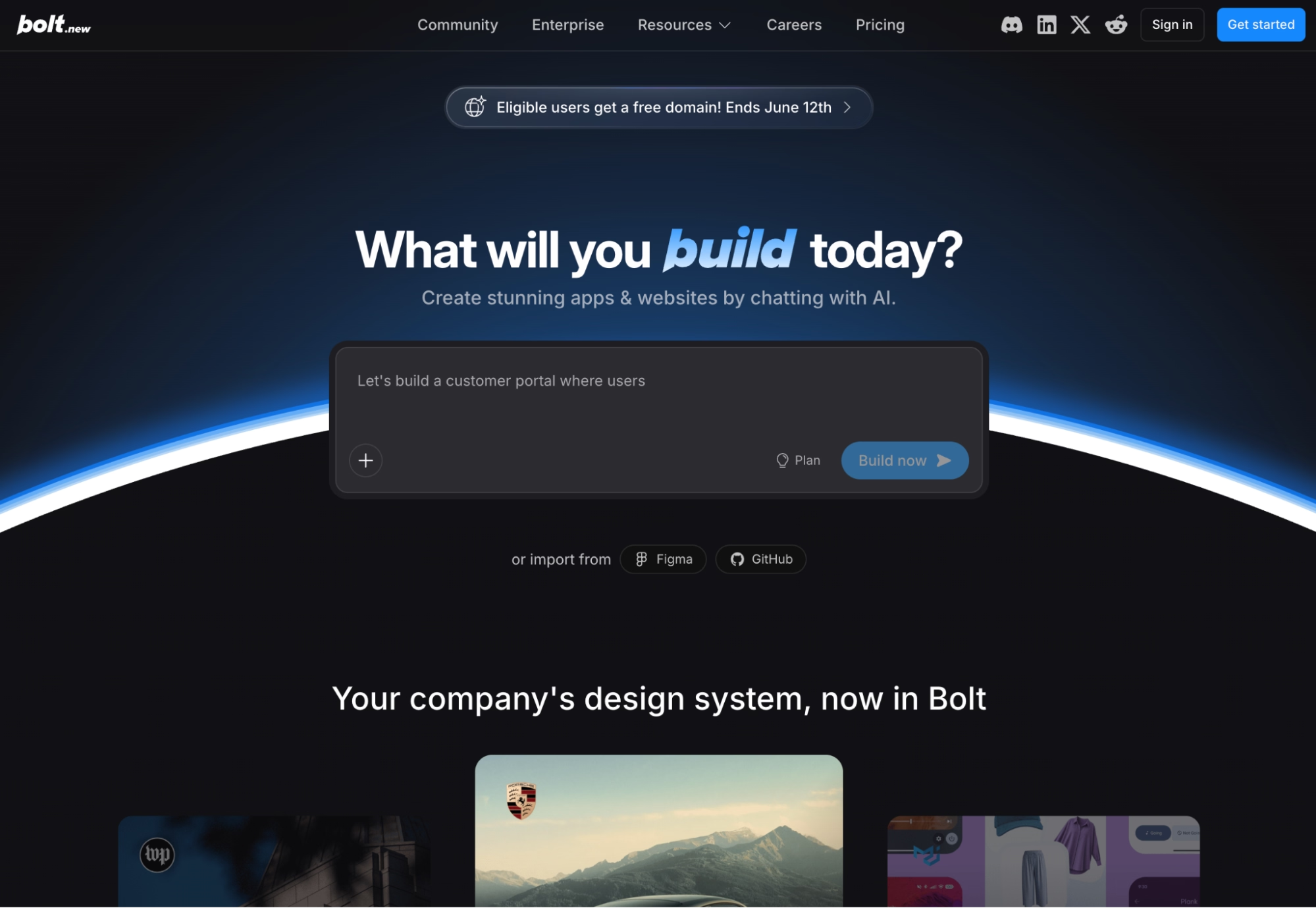
What it does: Bolt is a browser-based building workspace from StackBlitz that builds, runs, and publishes full web apps from plain-English prompts.
Best for: Builders who want the shortest possible distance between an idea and something clickable.
Bolt runs entirely inside your browser tab. Its WebContainers technology (a StackBlitz invention) puts a complete development environment in the tab itself, so it can install the pieces your app needs, show live previews, and write code with nothing installed on your computer.
I typed my booking tool prompt and had a working draft in the same window within minutes. The trade-off showed up later: Bolt charges by tokens (chunks of AI usage), and bigger projects burn through them fast because every revision re-reads more of your project.
Key Features
- Everything runs in the browser: There's nothing to install or configure, which makes Bolt the easiest platform here to try in a spare 10 minutes.
- One-click publishing: Your app goes live on a shareable link as soon as it's ready, useful for getting fast feedback.
- Token rollover on paid plans: Unused tokens stay valid for an extra month, so a quiet month isn't wasted money.
Pros and Cons
Pros:
- Zero setup, and the first working draft arrives in minutes
- Clean, approachable interface that won't overwhelm newcomers
- Solid for landing pages, small tools, and weekend projects
Cons:
- Token costs climb steeply on larger projects, since revisions consume more as the app grows
- Only builds with JavaScript behind the scenes, while Replit supports more than 50 programming languages, which rules out some app types
- When a prompt breaks something, Bolt shows you the raw code and leaves you to fix it by hand, where Lovable and Emergent guide the repair
What Users Say
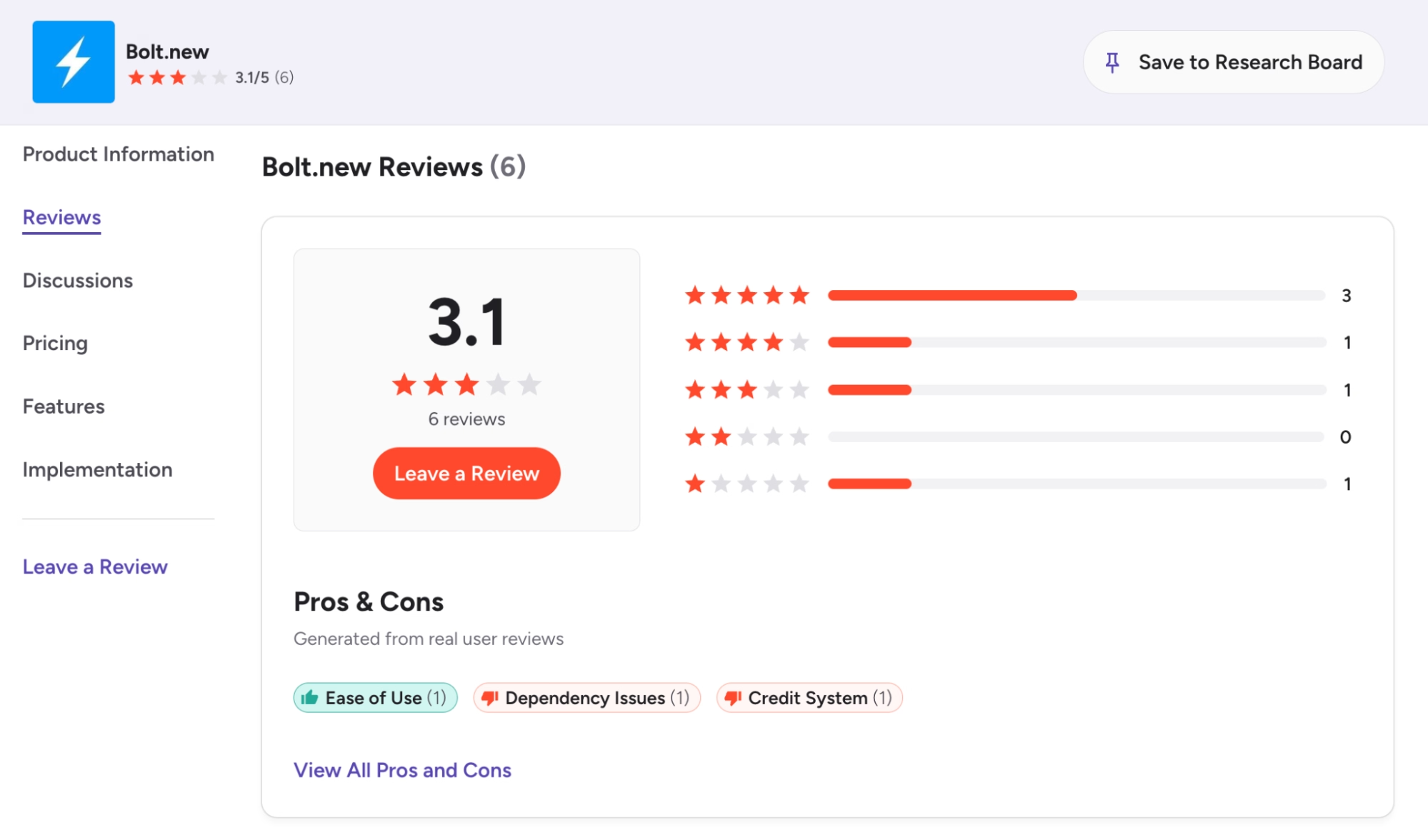
Reviewers on G2 like Bolt for the same reason I did: clean interface, painless setup, working on a project within minutes of signing up. The most common complaint on Trustpilot is tokens burned on repeated fixes for the same issue, with some users spending most of a month's allowance on corrections alone.
Pricing
Bolt's plans are listed on its pricing page:
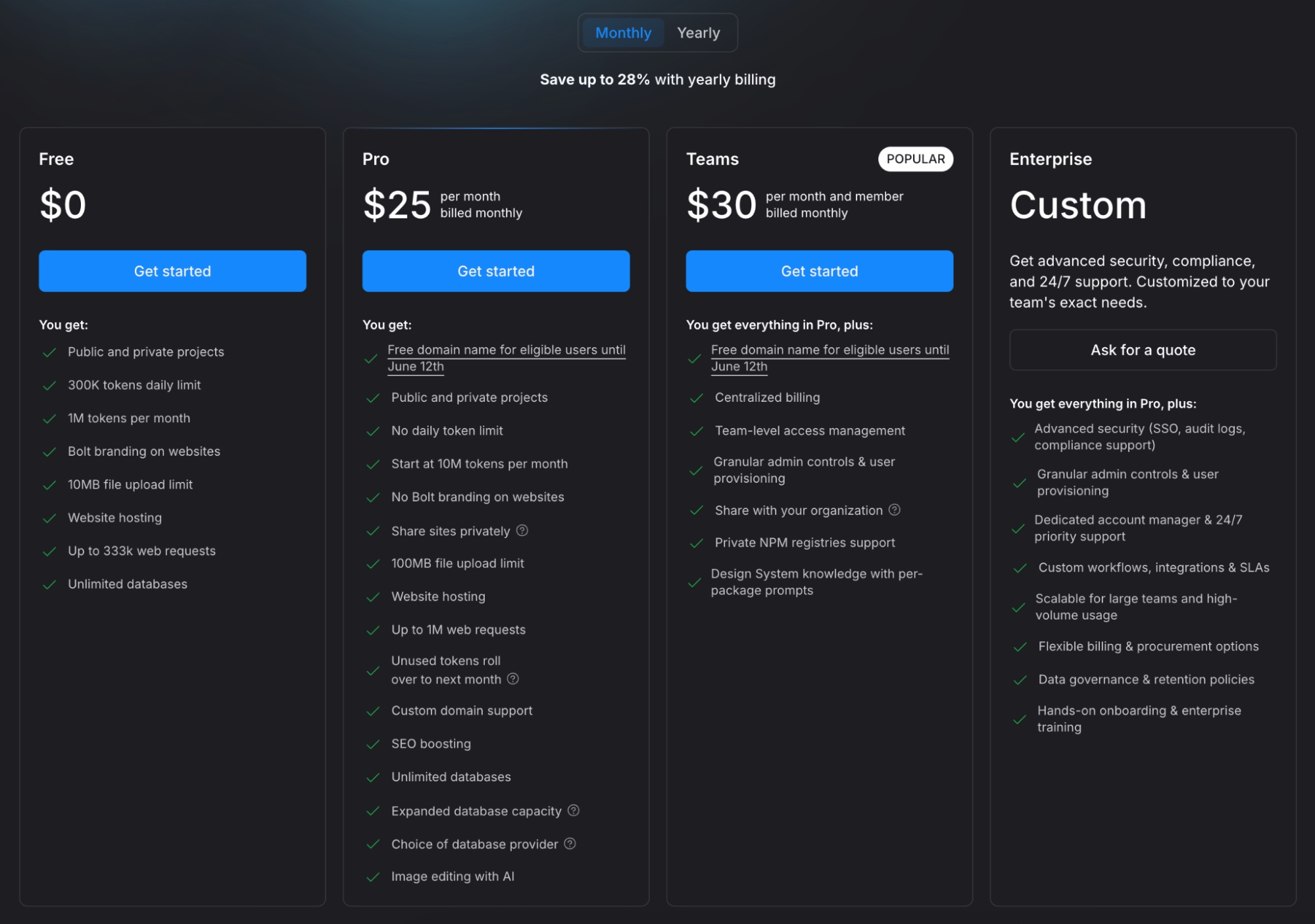
- Free: $0/month with 1M tokens per month (capped daily)
- Pro: From $25/month ($18/month billed annually) with 10M tokens and token rollover
- Teams: $30/member/month ($27/member/month billed annually), with each member getting their own token allotment
- Enterprise: Custom pricing
Bottom Line
Bolt is my pick for trying an idea today with zero friction. If you use it, keep an eye on the token meter under My Subscription and bundle several small changes into one prompt, since every prompt re-reads your project and bills you for it. I wouldn't build my main business app on it, because token costs grow with your project, and debugging falls back on you.
4. Replit: Best for Builders Who Want Room to Grow Into Code
What it does: Replit pairs an AI agent that builds complete apps with a full development environment, so you can start with prompts and end up editing code.
Best for: Builders who suspect they'll eventually want to learn what's under the hood, or teams with one semi-technical person.
Replit's agent took a more independent approach than the others in my test. It built, checked its own work, and fixed several errors before showing me anything, which meant fewer back-and-forth rounds but a longer wait for the first version. The environment around the agent is the deepest here, and also the most intimidating for a first-time builder.
Key Features
- An agent that debugs itself: Replit's AI detects and fixes many of its own errors during the build before they ever reach you.
- A complete coding environment: When you're ready to look at the code, the editor, the data storage, and the publishing tools are all in the same place.
- Collaboration on the entry plan: The Core plan now includes up to five collaborators, which used to require a separate team subscription.
- Mobile publishing workflows: Replit supports packaging apps for the App Store and Google Play, though some manual configuration is still required.
Pros and Cons
Pros:
- No setup on your computer, since everything runs on the web
- Scales with your skills, from pure prompting to hands-on code editing
- Strong checkpoint system, so you can roll back when a change goes wrong
Cons:
- Usage charges stack on top of the subscription, and heavy agent use gets expensive fast
- The interface leans developer-first, which can overwhelm non-technical builders
What Users Say
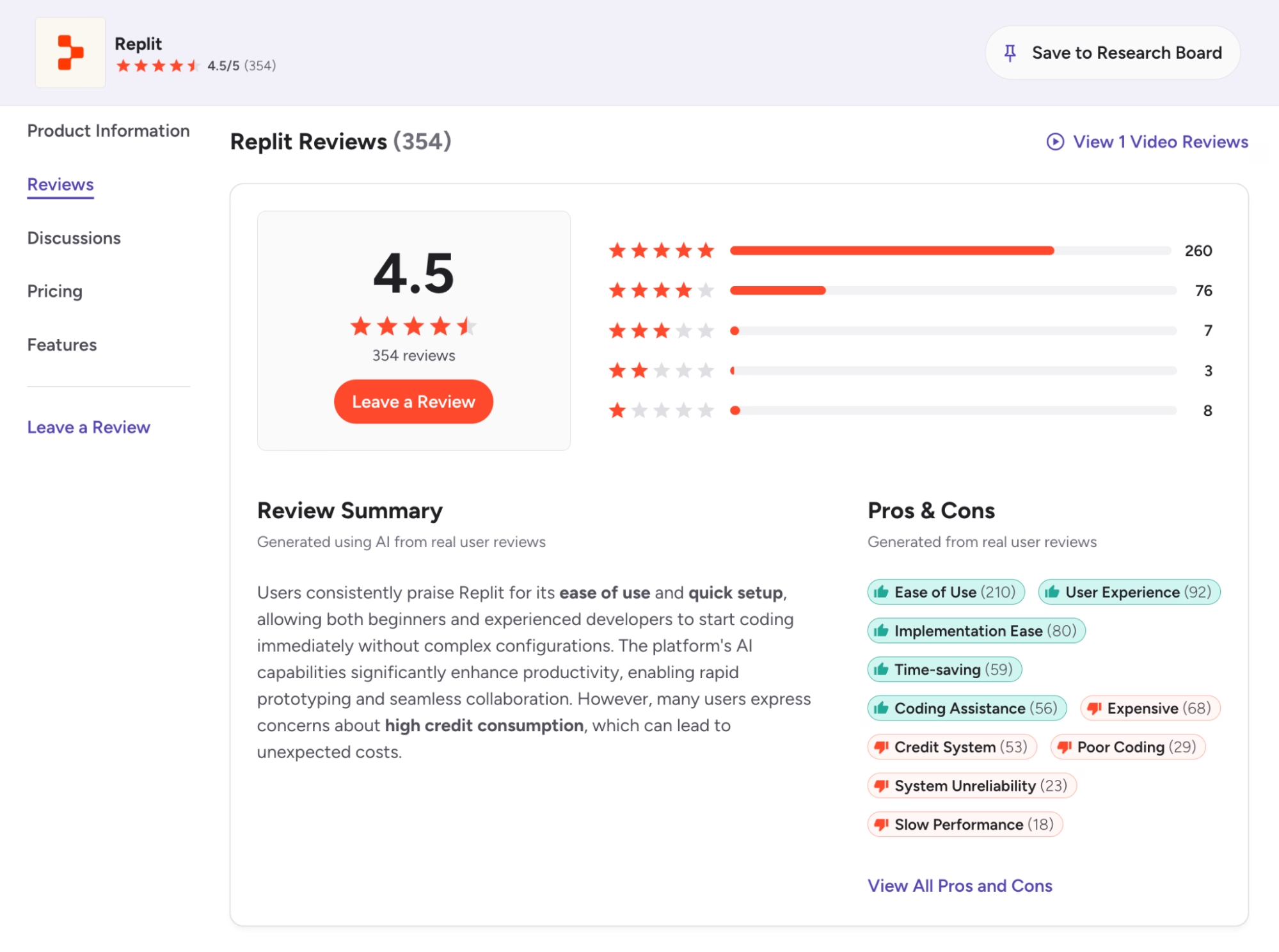
The praise in Replit's G2 reviews centers on convenience: nothing to install, so reviewers log in and start prompting right away. The sharpest criticism is about money, with one reviewer on Software Advice describing being charged while the agent was stuck in an error loop.
Pricing
Replit restructured its plans in February 2026, with details on its pricing page:
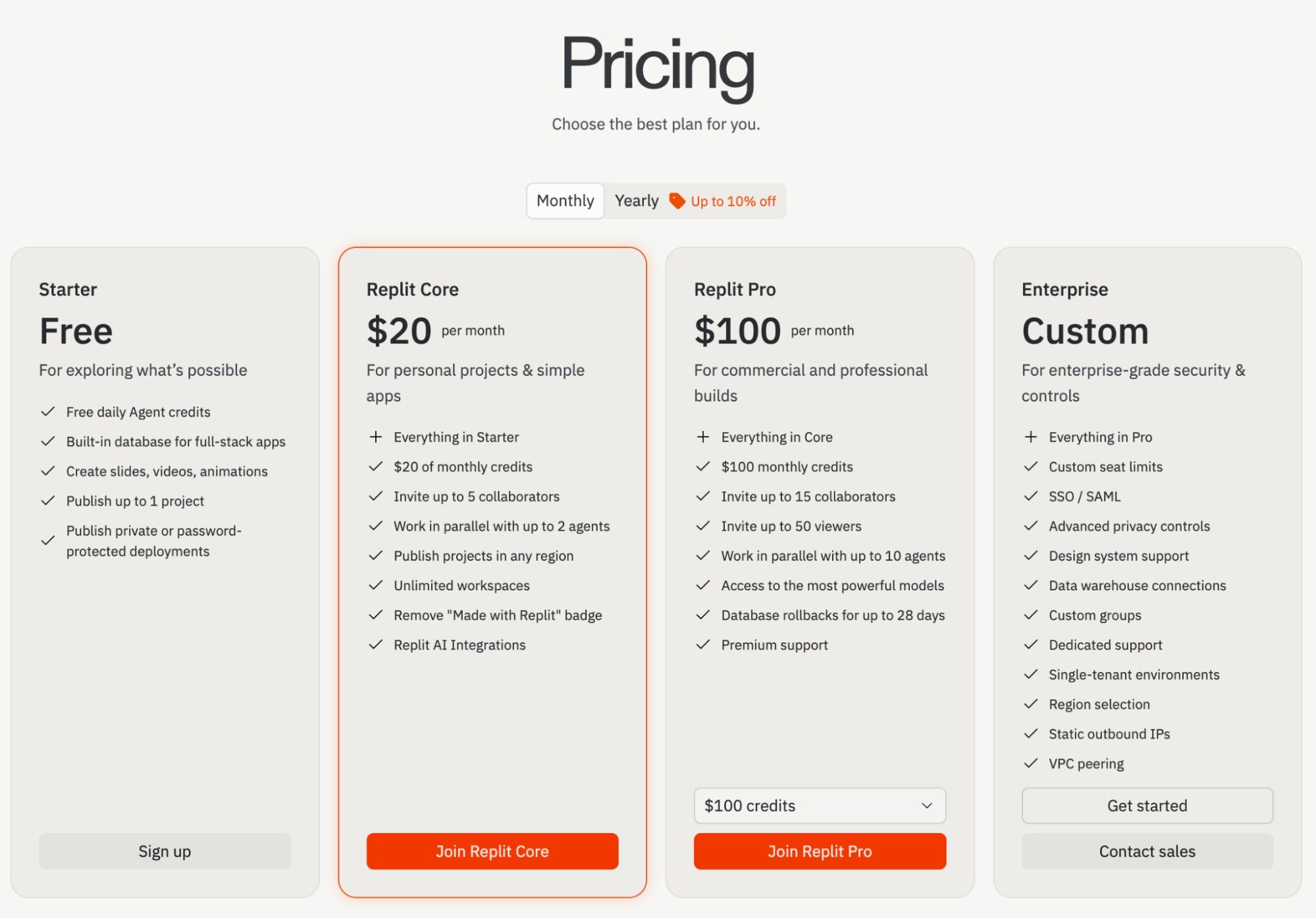
- Starter: Free, with limited daily agent credits
- Core: $20/month ($18/month billed annually) with $20 in monthly usage credits and up to five collaborators
- Pro: $100/month ($90/month billed annually) with $100 in monthly usage credits for up to 15 builders, with credit rollover and priority support
- Enterprise: Custom pricing with SSO and compliance controls
Bottom Line
Pick Replit if you see yourself growing from prompting into light coding, or if a teammate already codes. Set a spending alert before your first serious build, because the loudest complaints in reviews come from people who learned about usage charges from their bill. If you never want to see a line of code, Emergent or Lovable will feel friendlier.
Not sure Replit is the right fit for your skill level or budget? Our Replit alternatives breakdown covers the closest options worth trying.
5. Bubble: Best for Complex Logic With Full Visual Control
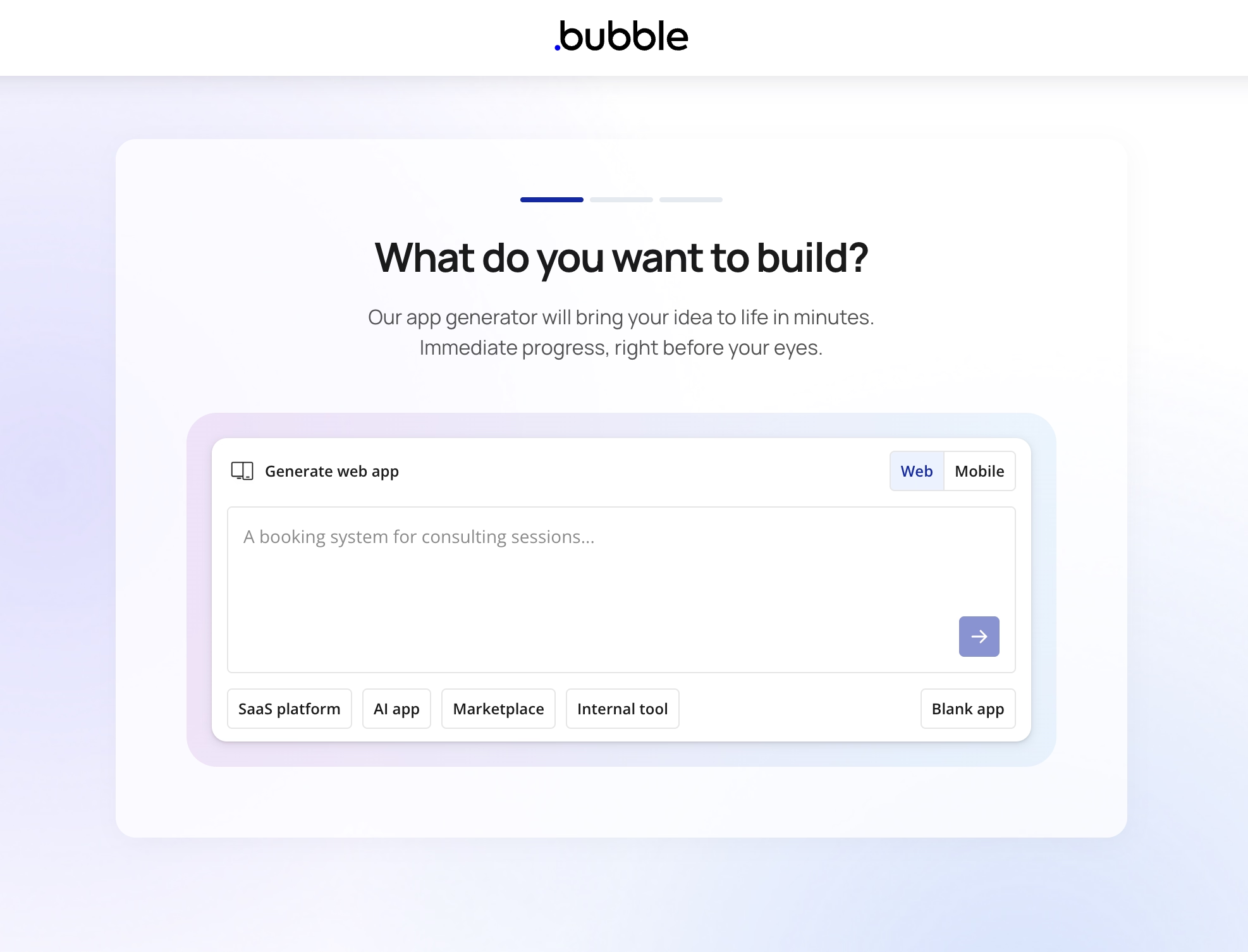
What it does: Bubble is a visual app builder where you design pages and define logic by hand, with AI generation now available to give you a starting point.
Best for: Builders with complicated workflows, marketplaces, or multi-role apps who want to control every detail without writing code. Entire agencies build client products on Bubble full-time.
Bubble was the slowest start in my test and the most capable ceiling. Its AI generated a usable skeleton of my booking tool in minutes, but turning that skeleton into the finished product meant learning Bubble's workflow system, which took me longer than every other platform combined. Once I understood it, though, I could build logic that the prompt-based tools struggled with.
Key Features
- Visual workflow logic: You define exactly what happens on every click, which suits apps with rules the AI builders tend to fumble, like multi-step approvals.
- AI-generated starting points: Bubble's AI builds an app skeleton with sign-in, data structure, and workflows in five to seven minutes, so you no longer start from a blank canvas.
- Mature plugin ecosystem: Years of community plugins cover most features you'd otherwise build by hand.
- Native mobile publishing: Bubble added mobile app plans, so web and mobile versions can share one back end.
Pros and Cons
Pros:
- Handles complex, multi-role apps that break prompt-only builders
- Huge community, courses, and templates after a decade in the market
- Predictable visual control, since nothing changes unless you change it
Cons:
- Steep learning curve despite the no-code label, with workflows and data privacy rules taking weeks to master
- No code export, so leaving Bubble means rebuilding from scratch
- Workload-unit charges (Bubble's measure of server usage) rise as your app grows, which makes costs harder to project
What Users Say
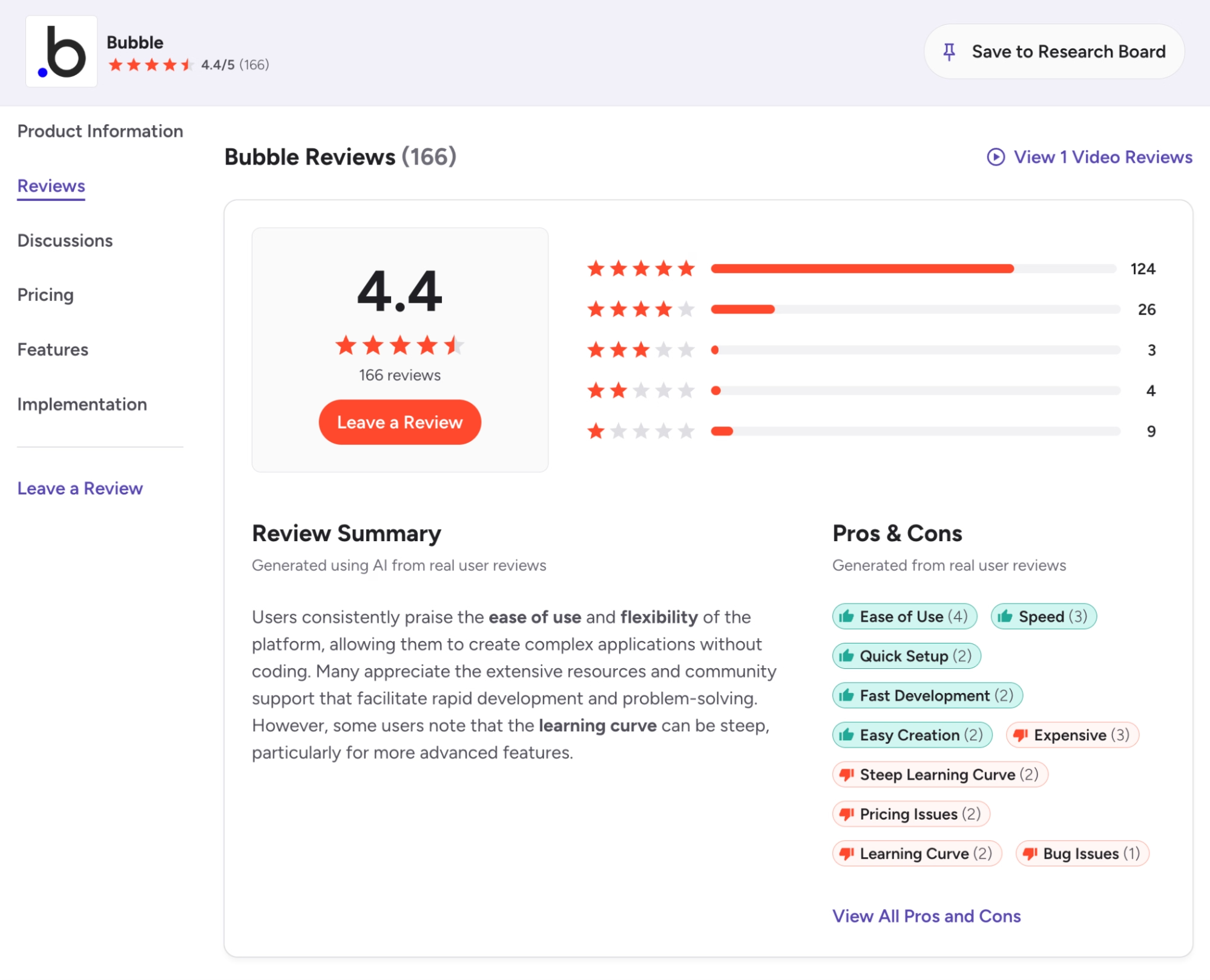
Long-term users on G2 describe building software they had no business being able to build, from internal tools to full customer-facing products. The learning curve is the most-mentioned drawback by a wide margin, with reviewers describing quirks in how Bubble expects logic to be written that you only learn by hitting them.
Pricing
Bubble charges per app, with plans on its pricing page (web pricing listed below):
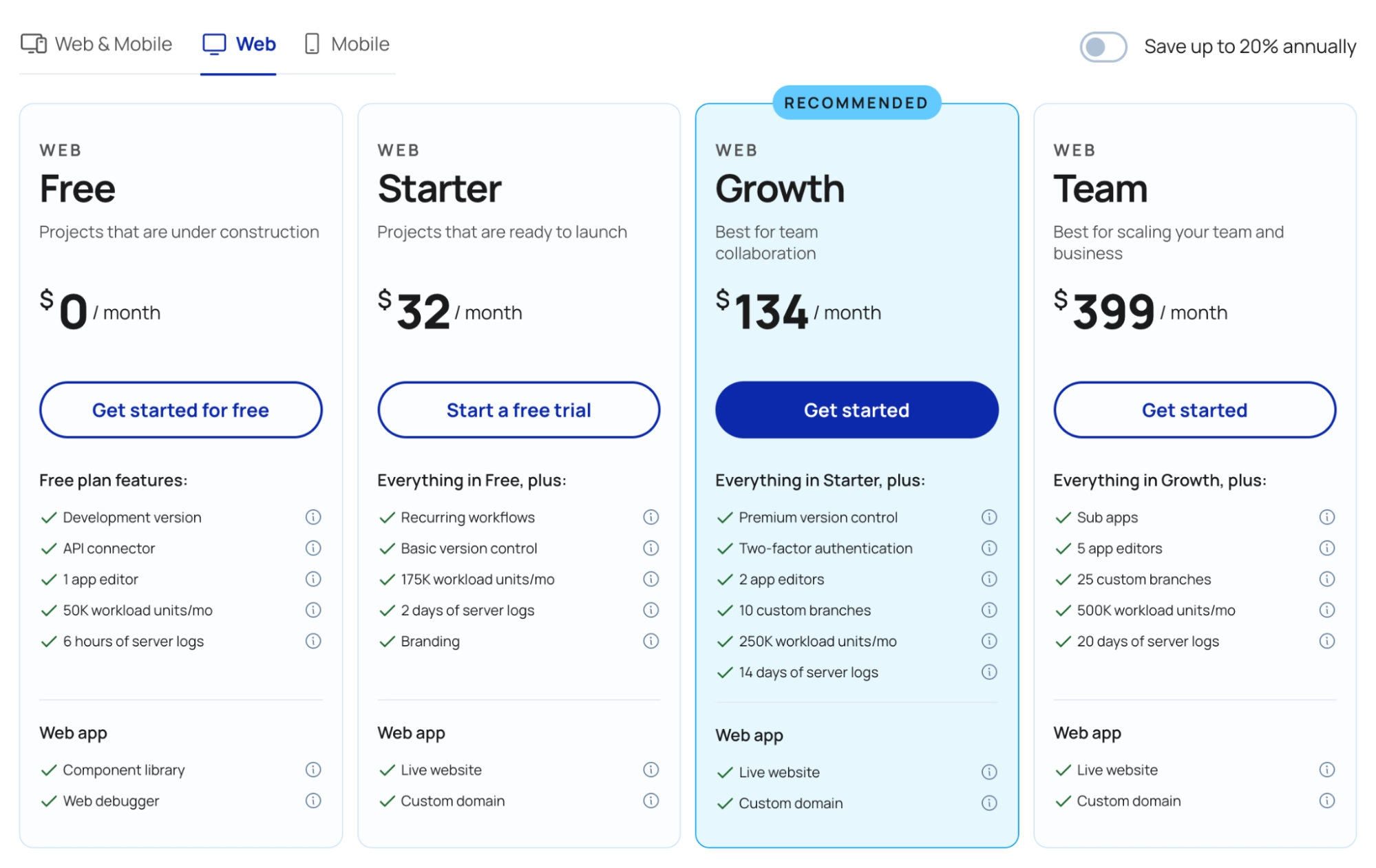
- Free: $0/month to learn and build, but you can't publish a live app
- Starter: $32/month ($29 billed annually) with a custom domain and 175K workload units
- Growth: $134/month ($119 billed annually), adding a second editor and more capacity
- Team: $399/month ($349 billed annually) for up to five editors
Mobile plans start at $49/month ($42 billed annually).
Bottom Line
Choose Bubble when your app's logic is too complicated for prompt-based builders, and you're willing to invest weeks learning the platform. Veteran users keep giving newcomers the same advice: plan your data structure before you design a single page, because most beginner pain traces back to setting up the data wrong. For most first apps, the AI-first builders above get you further faster.
Not ready to invest weeks into the learning curve? Our best Bubble alternatives breakdown covers what gets you further faster.
6. Webflow: Best for Marketing Websites
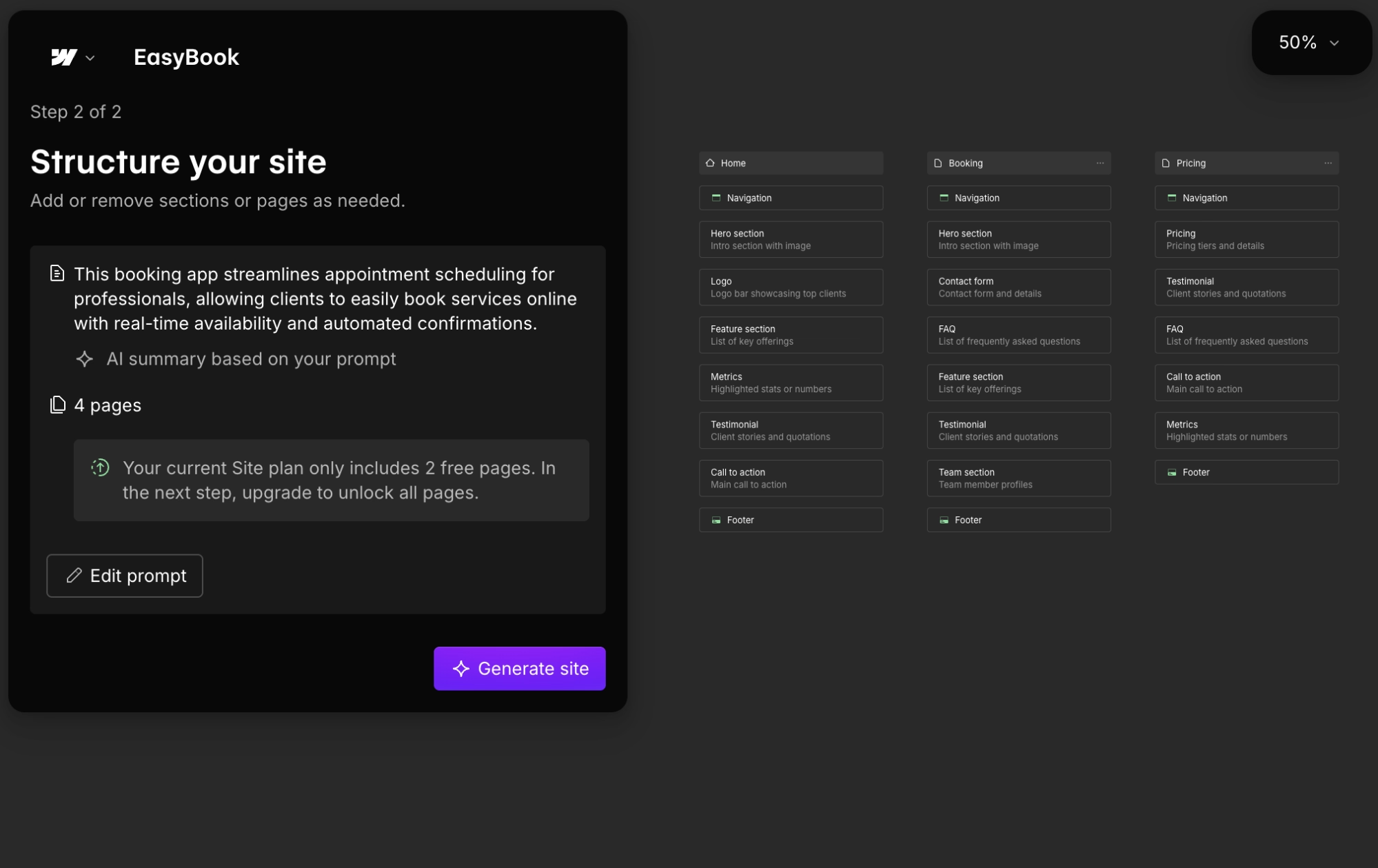
What it does: Webflow is a visual website builder with professional design control, a content management system, and AI features for generating pages and content.
Best for: Businesses that need a beautiful marketing site, a blog, or a portfolio rather than an app with user accounts.
Webflow is in a different category from the other five, and that's exactly why it earns a spot here. Many people searching for a no-code AI platform need a website instead of an app. My booking tool was the wrong project for it, since user sign-in and custom payment logic aren't what Webflow is for. But the landing page I built alongside the test was the best-designed page of my three weeks.
Key Features
- Professional design control: You adjust layout, spacing, and animations visually, with a precision template builders can't match.
- AI built into the workflow: Webflow's AI tools generate page sections and content from prompts, and AI credits now come included with every Workspace plan.
- A content system for marketing teams: Blog posts, case studies, and landing pages live in one structured system your whole team can edit.
- Clean code export: Webflow generates standard website code you can export and host anywhere.
Pros and Cons
Pros:
- The strongest pure design tool on this list, by a wide margin
- Excellent learning resources through Webflow University
- Reliable, fast hosting with no maintenance on your end
Cons:
- Not built for apps, so user accounts, dashboards, and custom logic require third-party workarounds
- Pricing gets confusing, with separate site plans, workspace plans, and add-ons
What Users Say
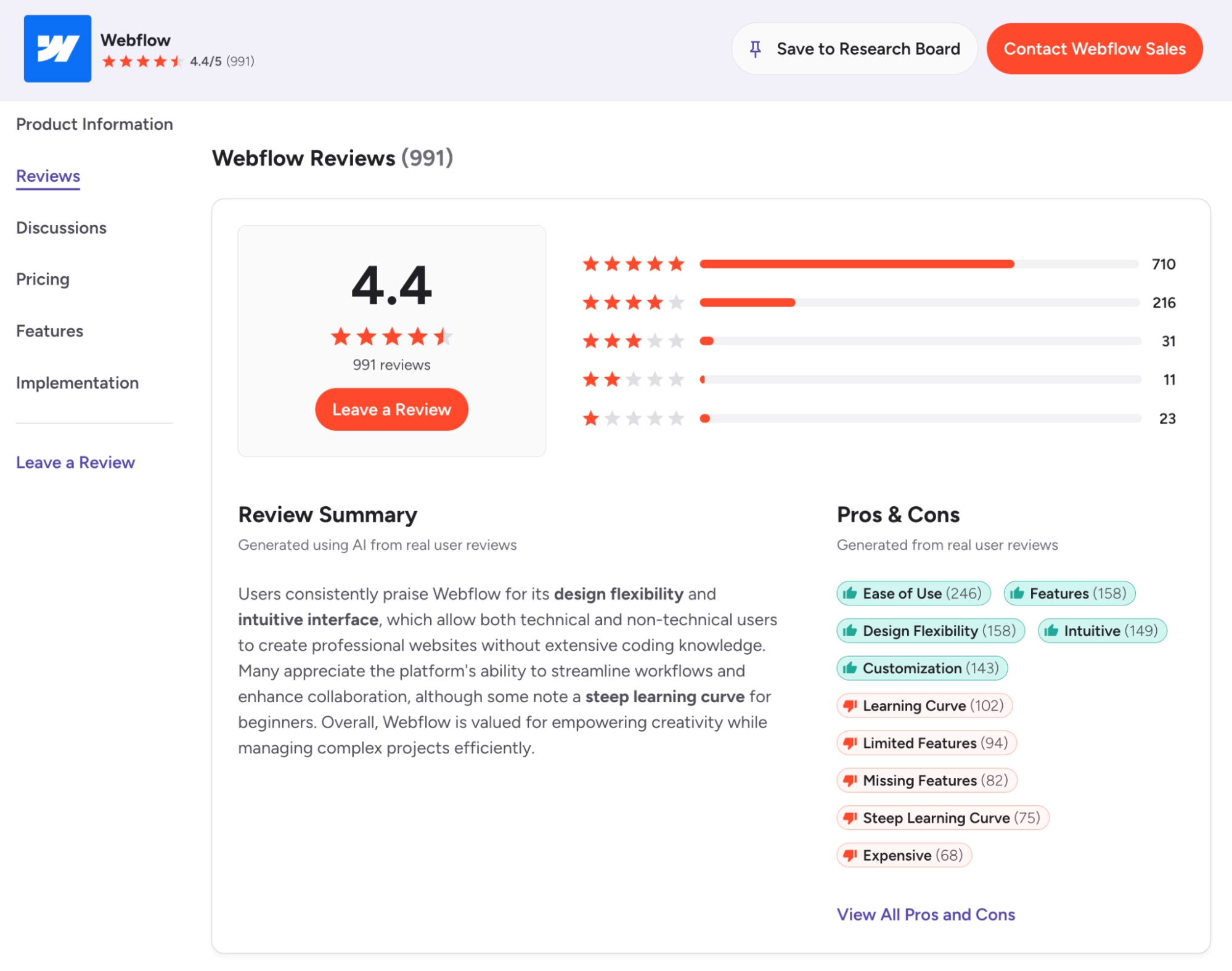
Design flexibility is among the most-mentioned strengths in Webflow's G2 reviews, with designers comparing it to Photoshop for websites: hard at first, then total control once it clicks. The most common complaints are the learning curve and pricing, which reviewers describe as confusing and quick to grow as a site adds team seats and add-ons.
Pricing
Webflow simplified its plans in May 2026, with current details on its pricing page:
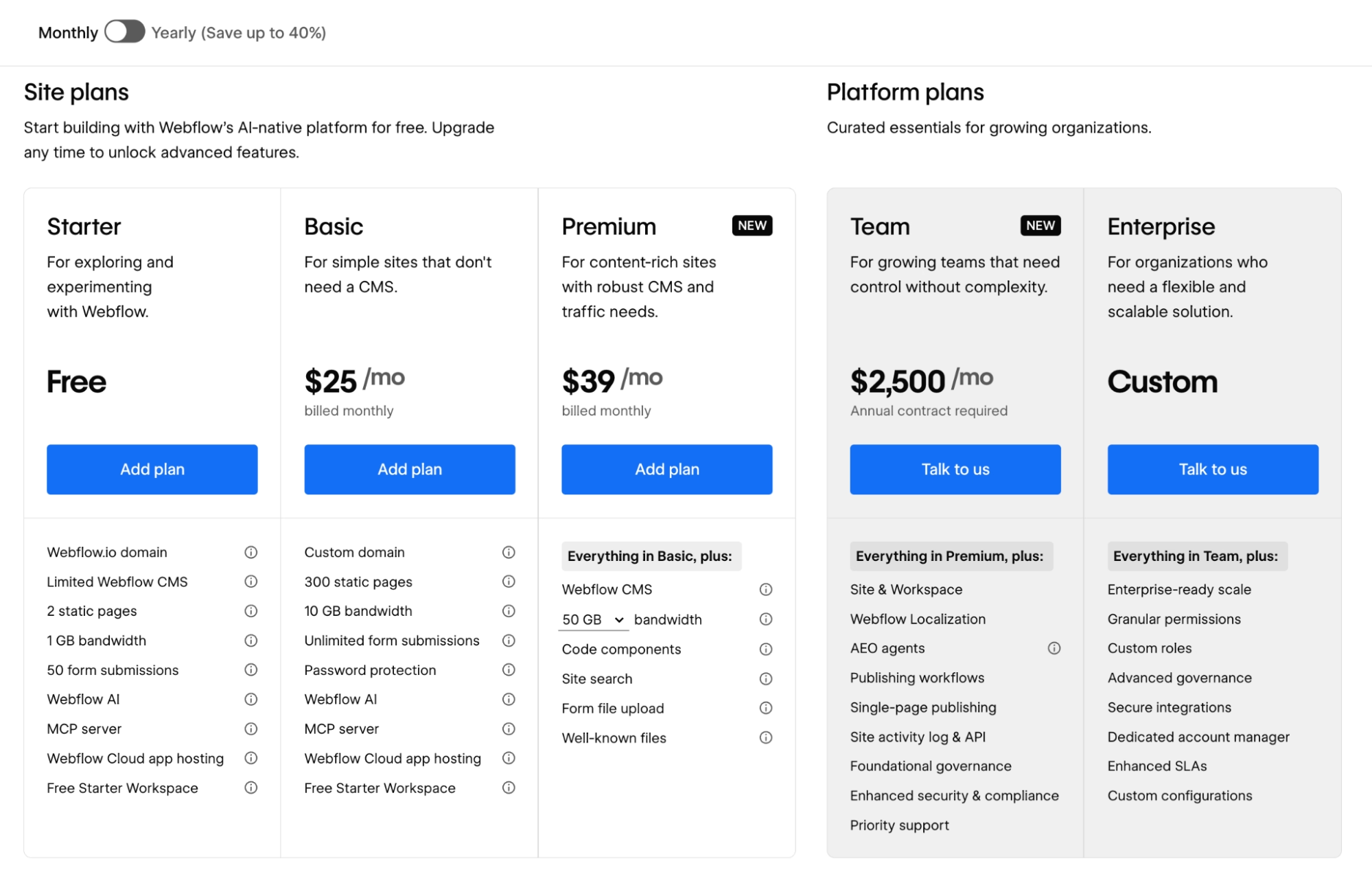
- Starter: Free, publishing to a webflow.io address
- Basic: $25/month ($15/month billed annually) for a simple site on a custom domain
- Premium: $39/month ($25/month billed annually), combining the old CMS and Business plans for content-heavy sites
- Team: A newer tier for growing teams that have outgrown self-serve ($2,500/month billed annually) with added collaboration features
- Enterprise: Custom pricing
Workspace plans for team collaboration are priced separately, and AI credits are included with Workspace plans.
Bottom Line
Choose Webflow if the thing you're building is a website. Start with the free Webflow University crash course, which reviewers credit with flattening most of the learning curve. If users need to log in and do something, pick one of the app builders above and use Webflow for your marketing site later.
Which No-Code AI Platform Should You Choose?
The right platform depends on whether you're building an app or a website, and how complex the app needs to be.
Choose Emergent if you:
- Want an app where logging in, saving data, and taking payments work from day one
- Plan to offer a mobile app alongside the web version
- Want to own your code so a developer can edit it later
Choose Lovable if you:
- Need something impressive to show investors by Friday
- Care most about how the front of your app looks
Choose Bolt if you:
- Want to test an idea today with zero setup
- Are building something small, like a landing page or an internal tool
Choose Replit if you:
- Want to learn some coding along the way
- Have a semi-technical teammate who'll work alongside the AI
Choose Bubble if you:
- Have complicated workflows the prompt-based builders fumble, like a marketplace or multi-role approval system
- Can invest a few weeks learning the platform before launching
Choose Webflow if you:
- Need a marketing website, blog, or portfolio, with no user sign-in involved
Skip this category entirely if:
- Your product handles regulated data or needs guarantees these platforms can't make, in which case, hire a developer
- You're building a video game or hardware-connected software, which none of these platforms handles well
Final Verdict: Emergent for Complete Apps, Lovable for Fast Demos
After weeks of building apps with AI, Emergent is the platform I'd hand to someone with no coding background, because it was the only one that delivered working sign-in, payments, and a mobile path without me touching code or third-party services.
Lovable wins on design speed, Bubble wins on logical depth for those willing to learn it, and Webflow remains the best choice for the many searchers who need a website rather than an app.
No platform on this list gets everything right on the first try. Every one of them produced at least one broken build during my test, and the fix was better prompting or clearer instructions far more often than it was a platform bug.
Expect a few rounds of trial and error, and pick the platform that can grow with your project instead of the one with the flashiest demo.
Ready to Build Your First App Without Writing Code?
If the booking tool I described sounds like something your business could use, here's what makes Emergent the place I'd start:
- Get a complete app from one prompt: Emergent's specialized agents work in parallel, where some plan and design, others handle the build, and testing agents check the work before it ships, so you describe the app once and review a working version, with no assembly on your end.
- Keep full ownership of your code: On the Standard plan and up, every project syncs to a GitHub repository under your account, so you can hire a developer or move hosts whenever you want.
- Skip the sign-in and payment plumbing: Emergent scaffolds Google sign-in and Stripe checkout in test mode, so you review a working flow and connect your own account rather than building it from scratch.
- Reach customers on their phones: Emergent builds mobile apps with React Native and Expo, so your web app and mobile app come from the same project.
Try building your first app on Emergent.

Describe what you want and Emergent builds it. A real, production-ready app you can launch the same day.
- One prompt to build
- Zero code required
- Deploy in minutes







