
TL;DR
- What it is: Claude Duet is Anthropic's proactive AI agent. It sends a morning brief, finishes tasks in the cloud, and asks before it acts.
- Access: Research preview started on October 21, 2026. US Claude Pro,Max and Ultra users can join the waitlist.
- Price: No extra fee. Duet uses your plan limits. Pro costs $20/month, Max starts at $100/month and Ultra costs $200/month.
- Versus ChatGPT Dots: Duet has no browser view and checks apps every few hours. Dots lets you open its computer.
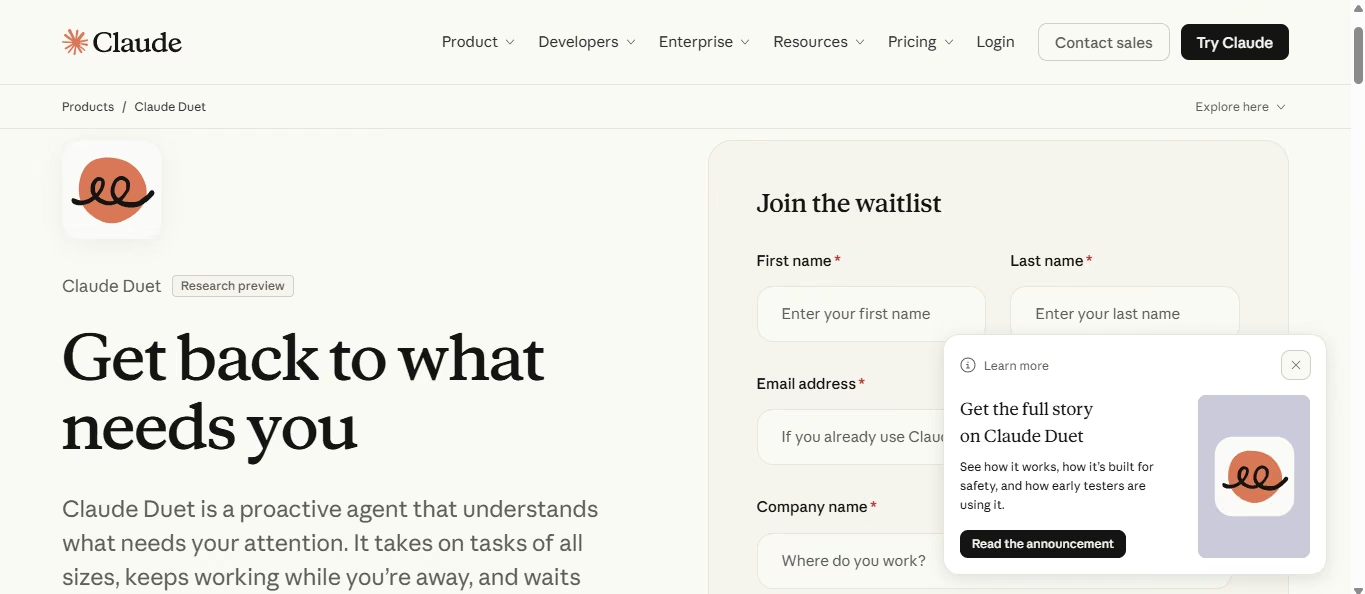
Claude Duet is Anthropic’s proactive AI agent. Instead of waiting for a prompt, Claude reaches out to you. It reads your connected apps, picks what needs attention, and works on tasks while you are away. This guide explains how Duet works, what it costs, who can use it, and where it falls short.
We have not tested Duet hands-on because access is waitlist-only. Every claim below comes from Anthropic's pages and press coverage, current as of October 26, 2026.
What Is Claude Duet?
Claude Duet is a standalone app where Claude works as a proactive agent. Anthropic announced it on October 21, 2026, as a research preview on its product page. "Proactive" means the agent starts the conversation. It tells you what needs attention each morning, takes tasks you send by message, and reports back when one is done.
Anthropic built Duet for professionals and small business owners who have more to track than they can manage. It runs on Claude Opus 5.5. You use it through an iOS or Android app, or on claude.ai.
During the preview, Duet stays separate from the regular Claude chat app. The table shows the split.
Also Read: Claude Opus 5.5 benchmarks, a score-by-score look at the model behind Duet.
| Feature | Claude app | Claude Duet |
|---|---|---|
| Starting point | You open a chat and ask | Duet brings items to you |
| Daily rhythm | You prompt when you need help | Morning brief plus alerts |
| Model choice | You pick a model | Fixed to Opus 5.5 |
| Setup | Starts from your own prompts | Imports your memory, skills, and connected apps |
How Does Claude Duet Work?
Duet connects to your apps, checks them on a schedule, and does the prep work on its own cloud computer. The process has four parts.
1. It carries over your Claude setup
Duet reuses your Claude memory, skills, and connected apps, so setup takes little time. It can also search your past conversations. You do not repeat context you already gave Claude.
2. It checks your apps every few hours
Duet checks your email and calendar a few times a day. It picks out important items and can draft replies or start other tasks. Since it doesn't check all the time, it may not catch urgent messages right away.
3. It works on its own cloud computer
Duet has a virtual machine with its own browser. It uses a connector when one exists, and the browser when it doesn't. Anthropic lists more than 6,000 connectors and plugins in its marketplace. The machine keeps running after you close the app.
4. It reports back in one thread
The Tasks tab shows what Duet is doing and which tasks need your attention. It updates the main chat when a task is done or needs your input. Duet can suggest that a task is finished, but you must mark it complete yourself.
Claude Duet Features
Duet decides what needs your attention, what can wait, and what it should check first. The table shows what it can do now.
| Feature | What it does |
|---|---|
| Morning brief | Summarizes the most important items across email, calendar, and connected apps |
| Tasks by message | Takes text or voice requests, such as setting up a meeting or building a dashboard |
| Draft replies | Prepares responses for your review before anything is sent |
| Business chores | Finds unpaid invoices, drafts reminders, and prepares payroll for your review |
| Make outputs | Produces briefs, decks, dashboards, forecasts, and web apps |
| Plugins | Supports plugins, including a small business plugin, and suggests ones that fit your work |
| Purchases | Pays through Link or Shop Pay with a one-time card for each purchase |
You need to set up payments first. Link uses Stripe, and Shop Pay uses Shopify. Set up each one separately. Link requires a US payment method and doesn't support recurring payments.
Claude Duet Use Cases
Duet is useful for people who manage many tasks, such as client emails, invoices, and deadlines. TechCrunch reports that Anthropic is targeting professionals and small businesses. The examples below are illustrative.
Prepare for client meetings
Duet prepares a brief for the next day's meetings. Sarah runs a consulting firm in Denver. She asks Duet to prepare her for the next day's client calls. It checks her calendar and related emails, then lists unanswered questions and promises she needs to follow up on.
Duet also drafts replies where one would help. Sarah reviews each draft, and nothing sends until she approves it. She connects only her calendar and email for this job.
Chase unpaid invoices
Duet finds overdue invoices and drafts the reminders. Mike owns a small HVAC shop in Phoenix. He connects his invoicing tool and asks Duet to flag unpaid bills. Duet lists each overdue invoice and writes a reminder for each customer.
Mike reads every draft before it goes out. Anthropic lists this task among Duet’s business chores, next to payroll prep for review.
Keep a founder’s week in order
The morning brief shows a founder what needs attention first. Emma is a startup founder in Austin. Her brief lists a hiring deadline, a contract renewal, and a board meeting. She starts with the nearest deadline.
Emma can send a request to Duet whenever she needs help. Duet checks her email every few hours, so an urgent email could sit unnoticed until the next check.
Build a quick dashboard or forecast
Duet builds dashboards and forecasts from your connected data. Anthropic says it can produce financial and sales forecasts, dashboards, decks, and small web apps. A sales lead asks for a pipeline view by message. Duet works on its own cloud computer and shares the result in the Make tab when it finishes.
Check the numbers against the source before you share them. These builds support your own work.
Know where Duet stops
Duet manages your work. A CRM, booking system, or client portal that customers log into needs a production build with a real backend, database, logins, and payments. That's the point where you stop managing work and start building a product, and an AI web app builder can turn the customer records and logins you describe into a live app. If the customer side is the main job, you can build a CRM around your own pipeline.
Claude Duet vs ChatGPT Dots: What's the Difference?
Both products are always-on agents with their own cloud computers. The gaps show up in browser visibility, where you reach the agent, and who can sign up. OpenAI launched Dots on September 29, 2026.
| Features | Claude Duet | ChatGPT Dots |
|---|---|---|
| Maker | Anthropic | OpenAI |
| Model | Claude Opus 5.5 | GPT-6 Astra |
| Connected apps | 6,000+ connectors and plugins | 4,000+ apps through plugins |
| Where you reach it | Duet app on iOS and Android, claude.ai | ChatGPT on desktop, web, and mobile; Slack; Teams |
| Browser view | Not available in the preview | You can open the Dot's computer |
| Background work | Checks connected accounts every few hours and continues assigned work in the cloud | Continues assigned and scheduled tasks; proactive research uses read-only tools |
| Access | US Pro,Max and Ultra, waitlist | Pro, Business Premium in select markets and Enterprise users can access beta with admin approval. |
Sources: Anthropic's help article and Engadget's Dots report.
Where they differ most
- Visibility: Dots lets you check what its computer is doing at any time. Duet shows your tasks and results but not its browser.
- Reach: Dots also works inside Slack and Microsoft Teams. Duet lives in its own app and on the web.
- Positioning: OpenAI describes Dots as built to handle everything. Anthropic aims Duet at work management for professionals and small businesses.
- Rollout: Pro is available in eligible markets, Business Premium in supported ChatGPT regions, and Enterprise users can access the beta with admin approval. The rollout is gradual.
How to choose
If you have a US Claude Pro,Max or Ultra account, you can join Duet’s waitlist, but you'll need an invitation before you can use it. Dots access depends on your ChatGPT plan, region, and rollout status; Enterprise beta access also requires administrator approval. Start with a task like putting together your morning brief. Once you see how well it handles the task, you can decide whether to trust it with more work.
Claude Duet Pricing and Availability
Pricing
Duet does not cost extra, but it uses the limits of your Claude plan. Its background checks count toward those limits, and bigger tasks, such as building a financial model, use more.
| Claude plan | Price per month (USD) | Billing | Duet access |
|---|---|---|---|
| Pro | $20 monthly, or $17 monthly (billed annually) | Monthly or annual | Yes, by waitlist |
| Max | From $100 | Monthly only | Yes, by waitlist |
| Ultra | $200 | Monthly only | Yes, by waitlist |
Team and Enterprise plans are not currently eligible for Claude Duet during the research preview.
Prices come from Claude's pricing page, checked on October 26, 2026. Tax is not included, and prices may change.
Anthropic also offers users admitted to the Claude Duet research preview a one-time reset of their five-hour session and weekly usage limits. They can claim it anytime before November 30, 2026.
Availability
You need three things to use Duet today:
- A Claude Pro, Max or Ultra plan.
- A Claude account in the US.
- An invitation from the waitlist.
Invitations go out in waves, and joining does not guarantee a date. Anthropic has not named a second country or a date for Team and Enterprise plans. Your waitlist email must also match your Claude account and the Apple or Google account on your phone.
Claude Duet Safety and Limitations
Safety
- Approval first: Duet shows you what it wants to do and asks for your approval before sending a message, making a payment or deleting anything.
- Passwords: It never sees your passwords directly. You type them into a separate form on your device, which passes them to the browser.
- Leak checks: Anthropic says a safety system checks outgoing messages to help prevent sensitive-information leaks.
- Hidden instructions: Emails and web pages can carry text meant to mislead an agent. Anthropic says no defense is perfect, so important actions need your approval.
- Hard limits: Duet does not trade securities or move money between accounts.
Limitations
Anthropic lists the preview's gaps in its help article. The main ones:
- No model choice. Duet picks its own effort level on Opus 5.5.
- No view of its browser, and no way to take control.
- No access to local files or all of your Claude projects.
- No phone calls or texts.
- Microsoft 365 is unavailable, and Slack works with limits.
- Personal errands, such as booking tickets, are weaker than work tasks.
- It can misread a thread or misjudge urgency, and it can miss items that arrive between checks.
Keep time-critical alerts on your calendar or phone. Treat Duet's brief as extra help.
How to Get Started With Claude Duet
Join the waitlist first, then give Duet one small job.
- Open the Claude Duet product page and select Join the waitlist.
- Enter your name and email. Use the email on your Claude account.
- Choose your Claude plan and phone type. Add what you would hand off first.
- Wait for the invitation email.
- Open the invitation email on your phone and follow the setup instructions using the Apple or Google account linked to your invitation email. Then open Duet and sign in with your Claude account.
Once you are in, connect only the apps your first job needs. A meeting brief needs calendar and email, not payments. Ask for sources next to each item, then compare the brief with the original thread. Correct any mistake before you ask Duet to repeat the work.
A starter message:
Prepare me for tomorrow's customer meetings. List open questions and anything I promised. Draft replies for my review. Do not send anything.
Conclusion
Use Claude Duet to manage the work you already have. Key takeaways
- Duet is Anthropic’s proactive agent. It briefs you each morning, works in the cloud, and waits for approval.
- It needs a US Claude Pro, Max, or Ultra plan and a waitlist invite.
- It has no browser view, checks apps only every few hours, and is less useful for handling personal tasks.
Claude Duet works well as a ready-made agent for your inbox, calendar, and routine business chores. If you need capabilities it doesn’t offer, such as following your own workflow or working beyond the preview’s limits, you can build a custom AI agent with Emergent.

Describe it. Build it. Launch it.
- End-to-End Creation
- No Code Needed
- Live in Minutes
Most AI app builders stop at prototypes. Emergent creates production-ready apps you can actually launch.
- Production-ready apps
- Web & mobile apps
- Deploy in minutes