




The OpenAI Decisions API never writes a word back. You define a question and its allowed answers, and it returns one with a probability attached, about 10x faster than a standard GPT-6 Luna call by OpenAI's numbers.
That's a bigger shift than it looks. Most AI work inside apps is small judgment calls, like routing a ticket, that used to run through essay-writing models and get parsed back into labels. AI in software is now being built for code to read, and TypeSafe's Jev reached the same idea two weeks earlier. Below, we cover how requests work, how to write questions that hold up, real costs, beta limits, the Jev comparison, and how to test it yourself.
What is the OpenAI Decisions API?
The OpenAI Decisions API is an OpenAI endpoint that evaluates text, images, or both and returns typed answers to questions you define. Each answer is a probability that a condition is true, a choice from a fixed list, or a score against ordered levels. It never generates prose, so software can act on the output directly.
OpenAI introduced the API at its DevDay 2026 event on September 29, 2026, as a limited preview. It opened to all developers in public beta on October 6, 2026.
Under the hood, the API runs on GPT-6 Luna, which you can also call as a general model through the Responses API. OpenAI describes the Decisions API as focusing Luna on questions whose answers you have already defined.
The headline claim is speed. OpenAI says the Decisions API returns answers about 10x faster than calling Luna through the Responses API. That figure is OpenAI's own, and we found no independent benchmark confirming it.
In our view, speed is the bigger story than price. A decision that takes over a second is fine in a nightly batch job. It isn't fine inside a checkout flow or a support queue, where a person is waiting on the result.
How a Decisions API request works
A Decisions API request has 3 parts: the model, the input, and your questions. You send all three to the POST /v1/decisions endpoint, and the API returns one answer per question in a single response.
Parts of an OpenAI Decisions API request, per OpenAI's Decisions guide
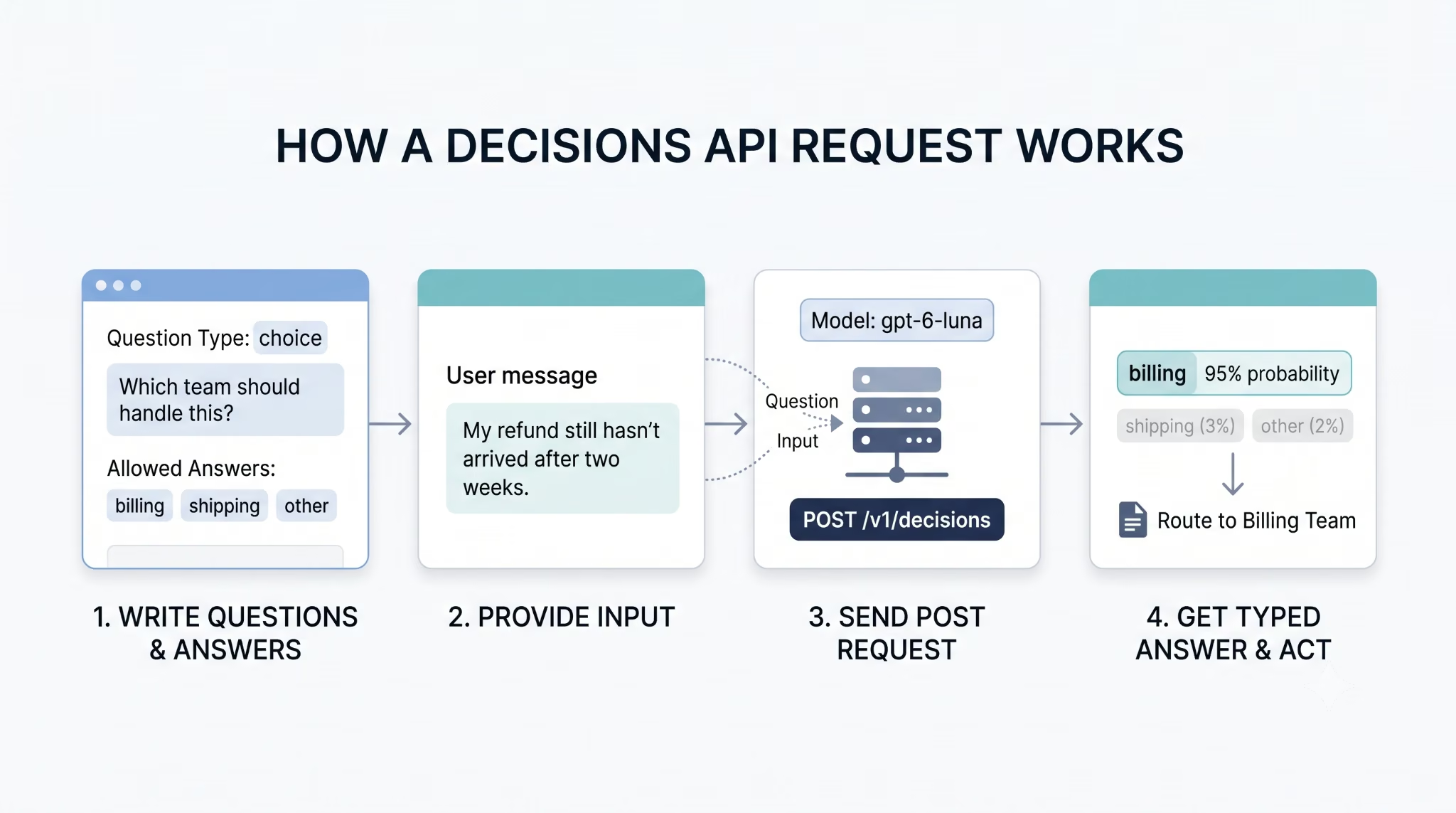
The flow from question to action looks like this:
- Write each question with a unique name, a type, and plain-language instructions.
- List the answers your app can act on, including a fallback such as "other."
- Send the input and questions together in one request.
- Read the answers array, matched to your questions by name, and act on the result or send it for review.
Here is a trimmed example that routes a customer message to a team:
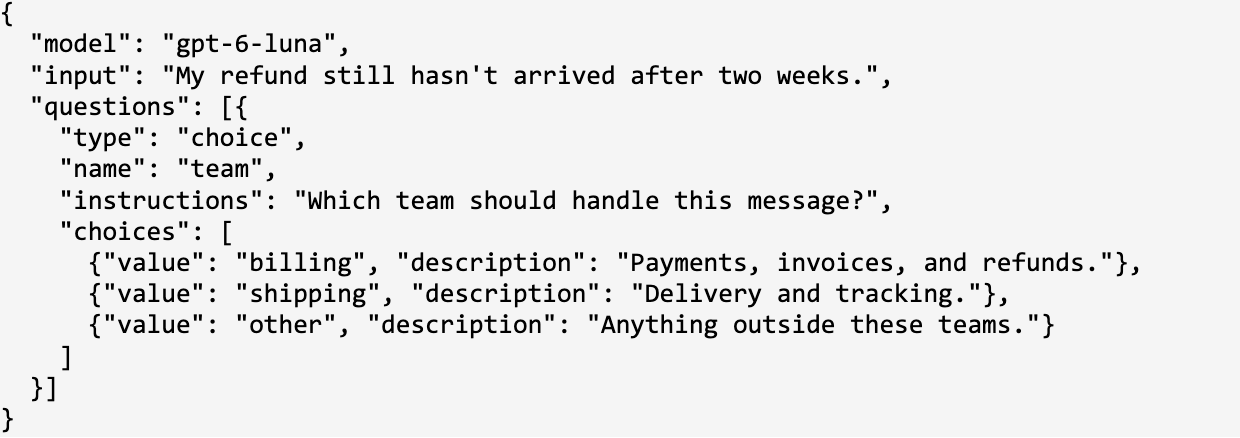
The response names the winning value, gives a probability for every option, and adds a separate confidence field. Your code reads one word, "billing," instead of parsing a sentence.
You can also ask several independent questions about the same input in one request. For a product photo, one question can check for damage while another picks the product category, and each question can use a different type.
The 3 question types: predicate, choice, and score
Every question you send is one of 3 types, and the type decides the shape of the answer. Picking the right one matters more than wording the prompt cleverly.
OpenAI Decisions API question types, per OpenAI's Decisions guide
1. Predicate: is this true?
A predicate checks one condition and returns the probability that it holds. OpenAI's own example inspects a product photo for a crack, tear, or dent. A result of 0.92 means the model thinks damage is very likely, and your app decides what probability is high enough to flag the photo.
2. Choice: which one of these?
A choice question returns exactly one value from the list you supply. It also returns a probability for every option and a confidence field, so you can see how close the runner-up was. Use it for categories with no natural order, such as departments or document types.
3. Score: how much, on this scale?
A score question rates the input against levels you arrange from lowest to highest. The result is a probability-weighted average of the level numbers, which start at 0, so it can land between levels.
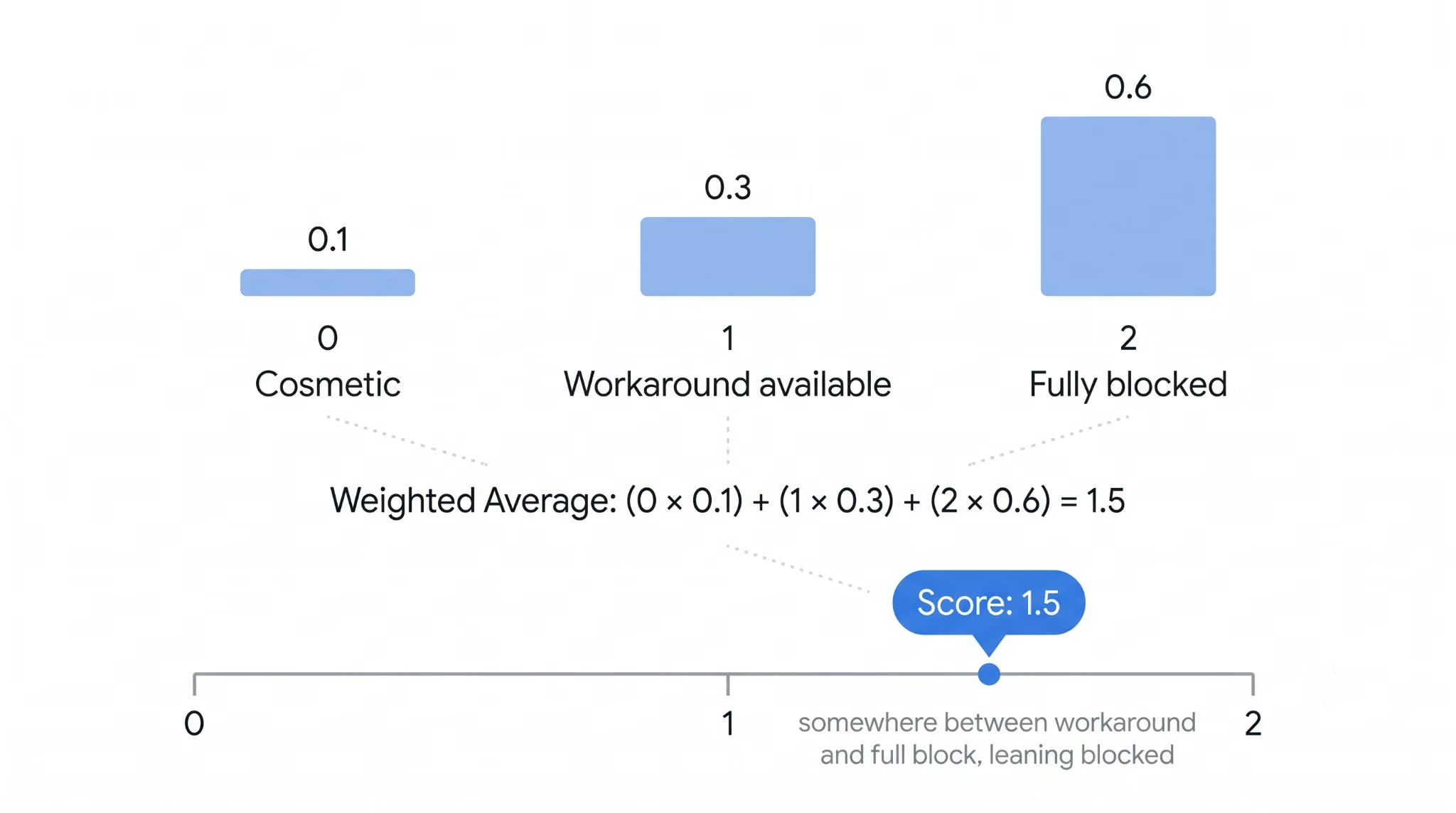
Say your severity levels are 0 for cosmetic, 1 for workaround available, and 2 for fully blocked. If the model assigns probabilities of 0.1, 0.3, and 0.6, the score is 1.5. That reads as "somewhere between a workaround and a full block, leaning blocked." If you need one hard category instead of a position on a scale, OpenAI recommends a choice question.
How to write questions that get reliable answers
The quality of a decision depends mostly on how you write the question, because the model can only judge what your instructions make checkable. OpenAI's guide reduces this to a few rules, shown here with examples.
Writing Decisions API questions, based on OpenAI's Decisions guide
Every choice list also needs a fallback option such as "other." Real inputs always include cases your categories didn't anticipate, and a fallback lets your app send those to a general review queue instead of forcing a wrong label.
Once a question works, treat its wording like code. Give it a stable name, avoid rewording it after you have tuned thresholds against it, and change one thing at a time when you test.
Decisions API vs Structured Outputs and function calling
Use the Decisions API when your app needs a judgment, and Structured Outputs when it needs a generated object. OpenAI draws the line the same way in its guide, with function calling reserved for cases where the model should request a tool call.
When to use each OpenAI output method
The practical difference is what comes back with the answer. Structured Outputs generates a value that fits your schema, and that's all you get. The Decisions API also tells you how likely each allowed answer was, which is what you need to decide when to act automatically and when to ask a person.
A simple test helps here. If the next line of your code is an if-statement or a switch on the model's answer, you probably want the Decisions API. If the next step is showing text to a person or storing extracted details, use Structured Outputs.
OpenAI Decisions API pricing and availability
The OpenAI Decisions API costs $0.10 per 1M input tokens with GPT-6 Luna, and you pay for nothing else. OpenAI charges no output tokens, no cache reads, and no cache writes on /v1/decisions requests.
OpenAI Decisions API pricing and availability, pricing as of October 2026
For scale, take a decision with 500 input tokens. One million of those decisions add up to 500M input tokens, or about $50 at the base rate. That's our arithmetic on OpenAI's published price, before any regional or long-context premium.
The free output matters because decisions are short. Generating even a one-word label through a normal model call bills output tokens, and reasoning models can spend many more before they answer. Here, the bill depends only on how much evidence you send.
OpenAI published this pricing alongside the public beta in its developer community post.
Limitations to know in the public beta
The Decisions API is narrow by design, and the beta adds a few constraints most coverage skips. Check these before you plan a build around it.
- One model: gpt-6-luna is the only supported model, so you can't trade cost for accuracy by switching models.
- Inline images only: images must be sent as base64 data URLs inside the request. Hosted image links and file IDs are not supported.
- No chained questions: questions in one request are evaluated independently. If a question depends on an earlier answer, send it as a separate request.
- A fixed answer space: the model can only pick from what you listed. Without a fallback option, inputs you didn't plan for get forced into the wrong bucket.
- Probabilities are estimates: a 0.92 is not a guarantee. OpenAI advises setting thresholds with labeled examples from your own app.
- Vendor-only speed data: the 10x figure compares against OpenAI's own Responses API, and we found no independent head-to-head.
The threshold point deserves more than a bullet. Set it by what a mistake costs. If a false "damaged" flag only sends a photo to a human reviewer, a low bar such as 0.6 is cheap. If the flag triggers an automatic refund, you want a much higher bar and a review queue for everything below it.
It's also a beta. Plan for request details or pricing to change before general availability, and keep your integration thin enough to adjust.
What the Decisions API is good for
The Decisions API fits any step in a business app where software has to sort, flag, or rank something before it moves on. OpenAI pitches it for classifying content, routing requests, and prioritizing work, plus choosing the next model, tool, or action for an AI agent.
In day-to-day terms, those decision points look like this:
- Support inboxes: send each incoming message to billing, shipping, or a general queue.
- Returns and claims: check a customer's product photo for visible damage before a person reviews it.
- Bug and issue triage: rate each report from cosmetic to fully blocked so urgent ones surface first.
- Booking and sales requests: flag messages that ask to cancel or reschedule so they reach the right person.
- AI agents: pick the next step from a fixed set of actions instead of letting the model improvise one.
Each of these is a short question with answers you can list in advance. That's the test for whether the Decisions API fits.
It doesn't fit work that needs the model to produce something. Writing a reply to the customer, summarizing a document, or pulling an order number out of an email all need a generative call, usually with Structured Outputs. Many real workflows use both: a decision call routes the message, then a generative call drafts the answer.
OpenAI Decisions API vs Jev: which one fits your use case?
If any of your inputs are images, use the OpenAI Decisions API, because Jev can't read them. If your decisions are all text and cost per call matters most, Jev is about 2.4 times cheaper per input token.
Jev is a decision model from TypeSafe AI, launched in early access on September 15, 2026. That's two weeks before OpenAI previewed its API, and the two ask the same kinds of questions. Jev's Noul primitive answers true-or-false questions like OpenAI's predicate, and both offer choice and score.
OpenAI Decisions API vs TypeSafe Jev, pricing as of October 2026. Jev details from TypeSafe's model docs
The design difference explains most of the table. TypeSafe says it trains Jev to return calibrated decisions, and it bills only for input. OpenAI's API runs on GPT-6 Luna, a general model that already reads images.
Fit with your stack matters as much as price. Teams already on OpenAI keep the same API key, SDK, and compliance setup, including HIPAA eligibility and EU data residency. Choosing Jev means adding a second vendor, and TypeSafe's docs note that English is where its accuracy is currently best.
We can't tell you which one is more accurate, and we found no independent test that can. The two speed claims are measured differently, so they don't compare directly. TypeSafe's published accuracy figures come from its own benchmark, which doesn't include OpenAI's Decisions API. Until an independent test runs both on the same tasks, your own labeled examples will tell you more than any vendor chart.
Neither product is finished. OpenAI's API is in public beta and Jev is in early access, so expect prices and limits on both to keep moving.
How to try the Decisions API
The fastest way to judge the Decisions API is to run it on your own data before writing production code. These five steps take you from a first test to a working integration.
- Get API access: the public beta is open to all developers, so any OpenAI API account can use it.
- Start in the Playground: OpenAI's guide points new users to the Playground to experiment with questions and inputs. Paste a real input from your app and write one question.
- Build a labeled test set: collect about 100 real inputs and write down the answer you expect for each.
- Run the set and pick thresholds: compare the API's answers with your labels, then set cutoffs based on what a mistake costs, as covered in the limitations section.
- Move to code: update the OpenAI SDK to Python 3.26.0, JavaScript 7.30.0, Go 3.73.0, Ruby 0.101.0, Java 4.78.0, or later, then call POST /v1/decisions with gpt-6-luna.
If you're weighing Jev too, run the same labeled set through both. It's the only fair comparison available until an independent benchmark appears.
Use the Decisions API when your app needs a call, not a paragraph
The OpenAI Decisions API is the right tool when software has to sort, flag, or rate something and move on. It returns answers you wrote yourself, with probabilities attached, at $0.10 per 1M input tokens and no output charges. Choose it over Jev when images are involved or you want to stay on OpenAI's stack, and test both on your own labeled examples before committing.
A decision call is only one piece of a working product, though. The app around it still needs screens, a database, logins, and the integrations your business runs on.
Emergent builds that full-stack app from a plain-language description, whether it's a CRM, a booking system, or an internal tool. Claude, GPT, and Gemini models are available through the Universal Key, so you can choose the model that suits your workflow.

Most AI app builders stop at prototypes. Emergent creates production-ready apps you can actually launch.
- Production-ready apps
- Web & mobile apps
- Deploy in minutes







