



TL;DR
- HubSpot CRM: Best free option, and the easiest to grow into if you'll eventually want marketing and service tools on the same platform.
- Pipedrive: Best for a small sales team that wants to be productive on day one with minimal training.
- Zoho CRM: Best feature-for-price if you don't mind a steeper learning curve.
- Freshsales: Best low-cost paid CRM with built-in calling and communication tools.
- monday CRM: Best for the smoothest setup of any tool tested, or for a team already on monday.com for project work.
- OnePageCRM: Best for the simplest setup of any tool tested, with little complexity to fight through.
- Salesforce Starter Suite: Best if you want a genuine free tier, not a trial, with room to grow into Salesforce's wider suite later.
- Zite: Best if no off-the-shelf CRM fits how your team works, and you want to build one that does.
- Emergent: Best if you want the whole app, hosting and sign-in included, built on a domain you control, beyond a CRM view alone.
A lead comes in while you are busy with client work. You jot down the details, plan to follow up on Monday, and by Wednesday the note is buried under everything else competing for your attention. The prospect who was ready to buy never hears back.
A CRM should stop that from happening, but choosing one means sorting through dozens of tools with different prices, features, and setup requirements. I reviewed around 20 options and selected nine of the best CRMs for closer evaluation.
Every CRM here is general-purpose and works in any industry, from real estate to professional services. To keep the comparison consistent, I tested them using a residential real estate workflow with eight leads and a five-stage pipeline. Each tool had to handle the same core jobs most small businesses rely on a CRM for, including importing contacts, tracking deals, recording lead sources, and scheduling follow-ups.
You’ll see which tools handled those jobs well, where setup got in the way, and which option best fits different small-business needs.
Why the Wrong CRM Creates More Work
A CRM should make follow-up easier, not give a small team another system to manage. In a 2024 survey of 2,000 U.S. small business owners, three in ten said they waste time searching for information in the wrong places, while 29% repeat messages across platforms.
The wrong CRM can recreate the same problem inside a new tool. Important details end up in separate fields, follow-up steps require manual work, and the team spends more time adapting its process to the software.
I tested for that friction using the same residential real estate workflow in every tool. Each one had to import eight leads, track deals through a five-stage pipeline, record where each lead came from, and schedule follow-ups without creating more administrative work.
I divided the final shortlist into two groups:
Seven ready-made CRMs: Each comes with prebuilt contact records, deal pipelines, fields, and follow-up tools that you configure to suit your workflow.
- HubSpot CRM
- Pipedrive
- Zoho CRM
- Freshsales
- monday CRM
- OnePageCRM
- Salesforce Starter Suite
Two build-your-own platforms: Each generates a CRM from your written brief, giving you more control over the fields, stages, permissions, and user views.
- Zite
- Emergent
How I Researched and Tested These CRMs
I started with around 20 CRM options for small businesses, then narrowed the list to nine tools: seven ready-made CRMs and two build-your-own platforms.
For the seven CRMs, I used the same residential real estate scenario, with a five-stage pipeline and eight imported leads.
Zite and Emergent follow a different setup process from ready-made CRMs, so I gave each a written brief for the residential real estate scenario and compared how closely each generated CRM matched its requirements.
I checked each tool against the following criteria:
- Setup: How quickly a nontechnical user could move from signup to a working pipeline.
- Fit: How well the tool's field names and stages matched the real estate workflow.
- Pricing: What the free or entry-level plan included beyond the headline price.
- Import: How cleanly the leads and deals transferred into the system.
- Security and AI: Which verified certifications the tool held and what type of AI-building features it offered.
- Build-your-own fit: For Zite and Emergent, how closely the generated CRM matched the brief and how much rework it required.
9 Best CRMs for Small Business: Quick Comparison
Here's how the nine stack up at a glance, before the full breakdown below.
| Tool | Best For | Core Strength |
|---|---|---|
| HubSpot CRM | Teams that want to grow into marketing + service | Permanent free tier, with an industry-matched pipeline in testing |
| Pipedrive | Sales-focused teams that want a simple pipeline | Visual deal management with a short learning curve |
| Zoho CRM | Budget-conscious teams who'll configure it themselves | Broad customization and automation at a low entry price |
| Freshsales | Teams that want a low-cost CRM with built-in communication tools | Chat, email, and phone from Growth, with AI contact scoring on Pro |
| monday CRM | Teams that want a smooth setup or already use monday.com | Cleanest import in testing, plus post-sale project management |
| OnePageCRM | Salespeople who need a clear follow-up list each day | Simplicity; prioritizes contacts by the next action due |
| Salesforce Starter Suite | Teams that want sales, marketing, and customer service in one CRM | A free starting point with access to Salesforce's wider suite as needs grow |
| Zite | Teams that need a custom CRM or internal workflow tool | Generates apps with connected data and workflows |
| Emergent | Teams that need a CRM with a customer-facing app | Builds apps with sign-in, data, and testing |
1. HubSpot CRM: Best for Growing Into Marketing and Service
HubSpot is the household-name CRM that anchors a broader marketing, sales, and service platform. Its free tier has no time limit and no credit card requirement, and everything else (marketing automation, service tickets, content tools) sits on the same database, ready to layer on later.
Pricing:
- Free: $0 for two users. Contact and deal management.
- Starter: $20 monthly, or $15 with annual billing. Everything in Free, plus simple automation.
- Professional: $100 monthly, or $90 with annual billing. Everything in Starter, plus sequences and forecasting.
- Enterprise: $150 monthly or annually. Everything in Professional, plus custom objects.
Professional has a $1,500 onboarding fee; Enterprise has a $3,500 fee.
HubSpot periodically runs limited-time promotional annual pricing on Starter for new customers, as low as $9/seat, so the rate at signup may be lower than the standard $15/seat annual rate above.
Quick Facts:
- Setup time: About 60 minutes, AI onboarding detour included
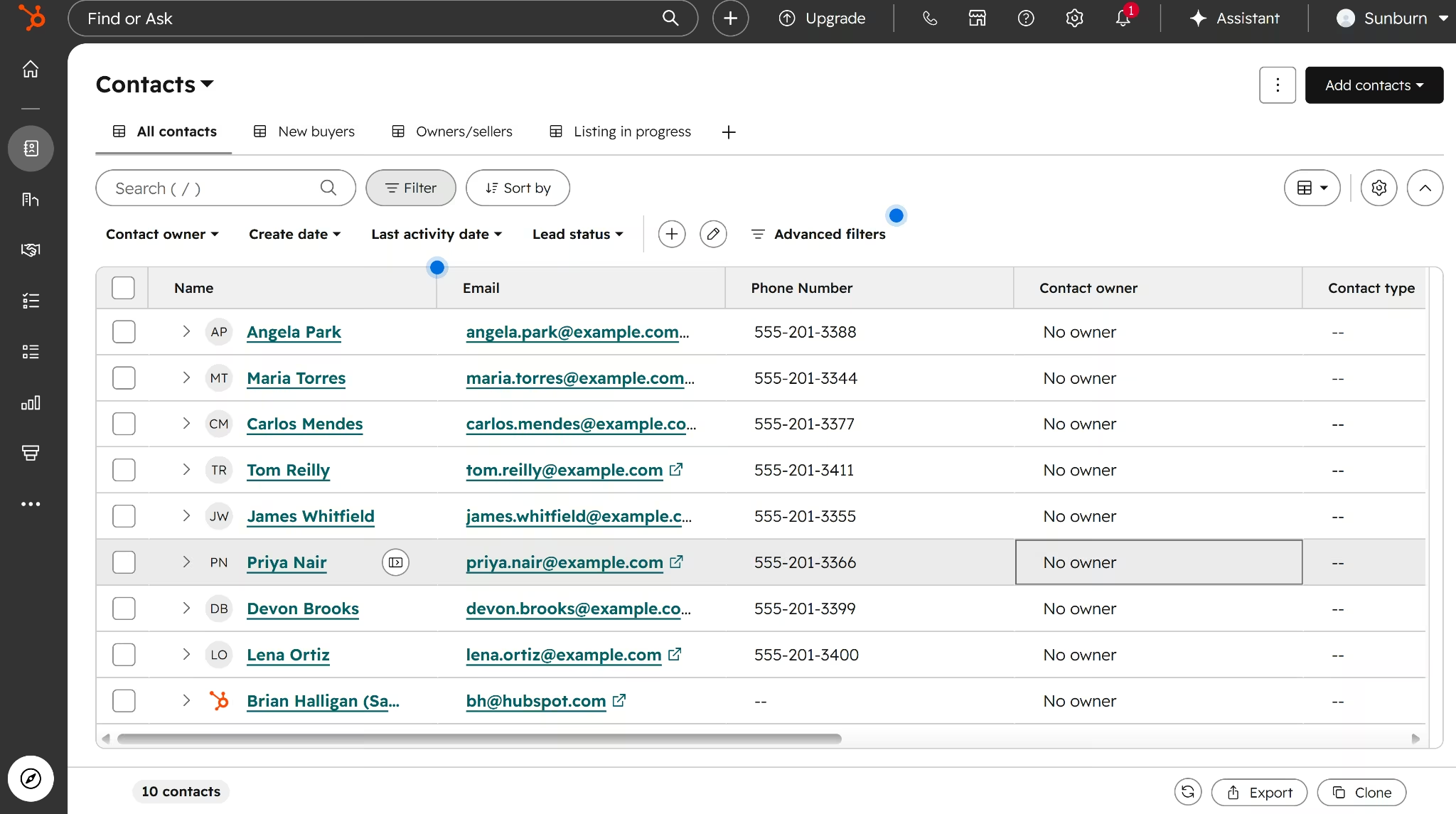
- Contacts and deals: 8 of 8 contacts imported cleanly once the custom lead-source property was in place; deals were added manually, one by one.
- Trial: Not applicable, tested directly on the free tier
The test: HubSpot's AI onboarding assistant asks about the business, picks a goal, and proposes a matching workspace, but it wouldn't let me edit earlier answers, and a corrected tool connection didn't visibly take. I deleted the account and started over manually.
The manual route worked much better. Once I changed the company name to a real estate business ("Sunburn Real Estate," for this test), HubSpot generated a "Buyers pipeline" with stages already shaped for property sales, right down to "Property Viewing" and "Loan Approval."
Importing my leads was where the smooth run ended. HubSpot has source-related fields, but the two closest (Latest Traffic Source, Original Traffic Source) track marketing attribution, not where a buyer came from, so I had to build a custom property from scratch mid-import.
Bulk-importing deals failed outright without a Deal Name column already in the file, so I ended up adding all 8 deals one at a time on the board.
Key features:
- Industry-matched pipeline templates: Editing the company info field triggers a pipeline shaped for that business type, real estate included.
- Marketing, sales, and service on one database: Contacts, deals, tickets, and email campaigns all live in the same system if the team layers those tools on later.
- Native migration importer: Smart Transfer supports self-serve migration from Zoho, Salesforce, Pipedrive, and others.
- Security: SOC 2 Type II certified, with infrastructure hosted on providers that carry ISO 27001.
- Custom AI agent builder: Breeze Studio lets you build assistants from a prompt, similar to Zoho's Zia Agents.
- Mobile app and integrations: iOS and Android, with native connections to Gmail, Outlook, Slack, and Zapier.
Pros:
- Free tier has no time limit, unlike a standard trial.
- Matches its pipeline template to your actual business type instead of forcing a generic one.
- Keeps marketing and service data in the same system if you add those later.
Cons:
- Free plan caps at 2 users and 1,000 contacts.
- Automation for growing teams (sequences, deal-stage triggers) sits behind Starter or higher.
- The AI onboarding assistant only runs one way, a wrong setup is easier to abandon than correct.
- Fitting your field names, like lead source, to HubSpot's terms takes patience.
What Users Say
G2 reviewer Valerie K. said “navigation saves me time and makes the platform easier to use.” Pricing caused problems for another reviewer, who said “the cost scales up quickly, particularly when add [sic] more seats for growing users.”
Bottom Line
I'd recommend HubSpot to a team that wants a free CRM matched to their actual business type from day one, and I'd tell them to skip the AI onboarding assistant entirely and go straight to manual setup. Budget some setup time to remap field names, like lead source, if your team's terms don't already match HubSpot's.
2. Pipedrive: Best for a Sales-Only Team
Pipedrive is a sales-focused CRM built around one thing: a visual, drag-and-drop deal pipeline that dominates the interface rather than sitting behind menus. It skips the marketing and service depth of HubSpot and Zoho in favor of speed and clarity for a team that just wants to close deals.
Pricing:
- Lite: $24 monthly, or $14 with annual billing. Pipeline and contact management.
- Growth: $49 monthly, or $39 with annual billing. Everything in Lite, plus email sync and automation.
- Premium: $79 monthly, or $59 with annual billing. Everything in Growth, plus lead scoring and e-signatures.
- Ultimate: $99 monthly, or $79 with annual billing. Everything in Premium, plus stronger security and sandbox testing.
Quick Facts:
- Setup time: 33 minutes
- Contacts and deals: Both imported, but the deals import created duplicate contact records instead of linking to existing ones; merge took 5 clicks per pair
- Trial: 14 days, defaults to Premium, not the entry Lite tier
The test: Pipedrive's trial started on Premium, its upper-mid tier, rather than the entry Lite plan, so testing the entry tier meant switching plans first.
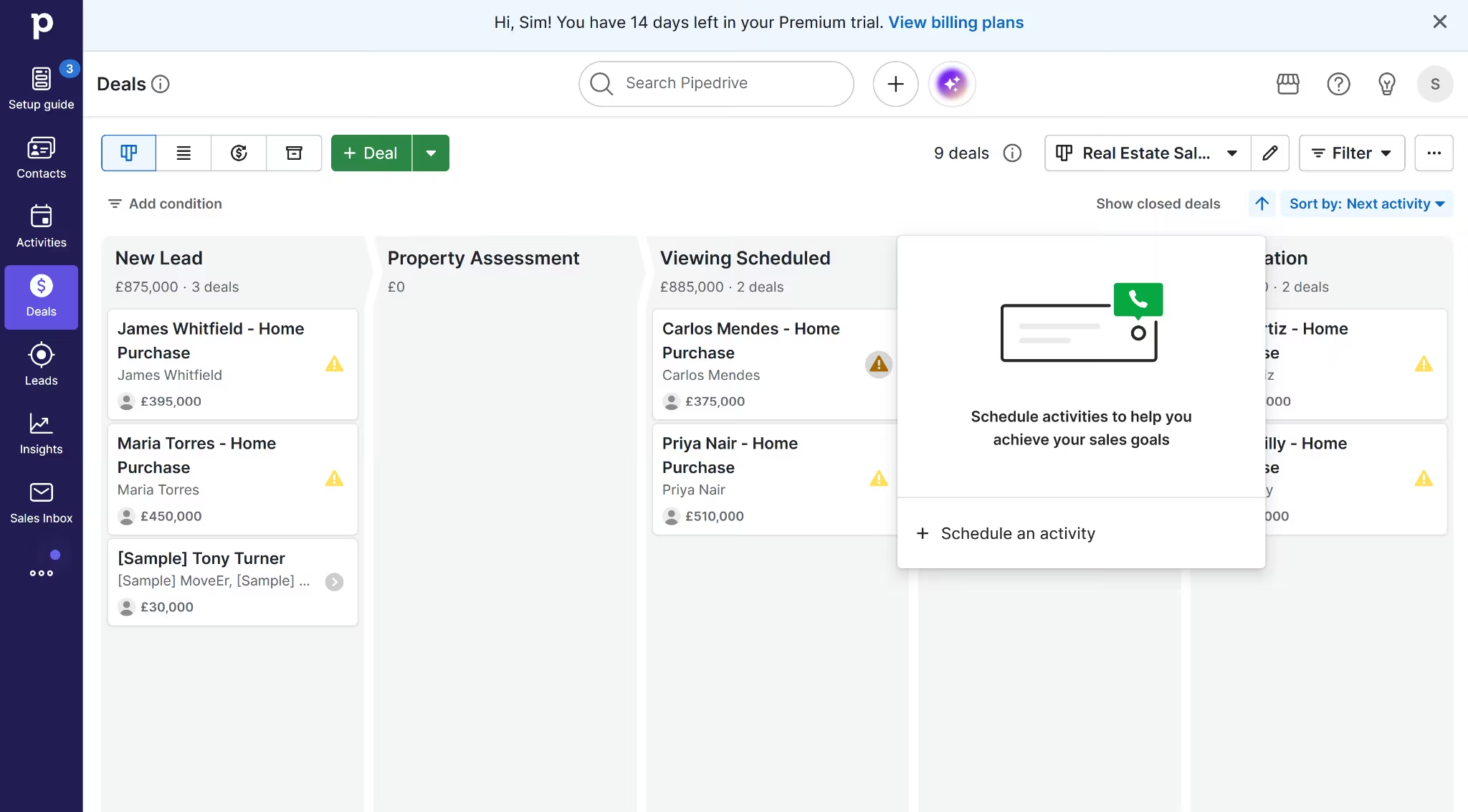
Setting up the pipeline turned out easier than expected. Pipedrive had a real estate template ready to go, complete with stages like "Property Assessment" and "Viewing Scheduled."
The worst friction showed up in the deals import. It didn't recognize my already-imported contacts and created duplicate person records for all 8. Cleaning that up meant five clicks per duplicate pair, with no bulk merge option, so a larger contact list would make this a lot more work.
Two smaller issues compounded the same import. There's no numbered Won stage in the pipeline itself; closing a deal is a separate status action on each card, and the CSV importer refused to skip a single unmapped value without voiding the whole Stage column, so Tom Reilly's "Closed" row landed in Negotiation until I moved it by hand afterward.
Lead source has a dedicated field, which is more than HubSpot could say, but Pipedrive locks it to a fixed taxonomy (Prospector, Lead Suggestions, Web visitors). My plain labels (Zillow, Referral, Open House) had to be translated into whichever category matched closest, more of a vocabulary mismatch than a bug.
Key Features:
- Visual pipeline: The drag-and-drop board is the whole product, not a buried tab.
- Contact and deal management: Included from the entry tier, plus integration access.
- Real estate pipeline template: Ships with industry-shaped stages out of the box, no renaming needed.
- Security: GDPR, SOC 2, SOC 3, and ISO 27001 certified.
- AI Sales Assistant: A fixed AI helper, no custom agent builder.
- Mobile app and integrations: iOS and Android app, with connections to Gmail, Outlook, and Slack.
Pros:
- The pipeline view lets a team glance at a board and know what needs attention today.
- Fast to learn, minimal training needed for a nontechnical user.
- Offered a pipeline template already shaped for real estate, no renaming required.
Cons:
- No free plan; a 14-day trial that starts on the Premium tier, not the cheapest one.
- Email sync isn't included on the entry tier, so a team living in email needs the next plan up.
- No numbered Won stage in the pipeline itself; closing a deal is a separate status action on the deal card.
- Deals imported by CSV create duplicate contacts instead of linking to existing ones, and merging them back down takes five clicks per pair with no bulk option.
What Users Say
Capterra reviewer Lucas P. praised Pipedrive’s “clean and intuitive design.” While Contact cleanup caused trouble for a G2 reviewer, who found it “confusing on how to merge or delete contacts when you have multiple.”
Bottom Line
Pipedrive is the pick for a small sales team that wants a visual pipeline it can start using with little training. The real estate template reduced setup in my test, but the broader advantage was how quickly the board made every deal’s status clear. Budget time for contact cleanup if you plan to import deals in bulk, since the import created duplicate contacts in my test.
3. Zoho CRM: Best for Feature-for-Price
Zoho CRM is one piece of a much larger business software family (Zoho Books for accounting, Zoho Desk for support, Zoho Mail for email, and dozens more) that share a single login and pricing umbrella.
Its selling point is feature-per-dollar: the free tier supports 3 users, and paid tiers undercut HubSpot and Salesforce meaningfully.
Pricing:
- Free: $0 for three users. Basic lead and deal management.
- Standard: $20 monthly, or $14 with annual billing. Everything in Free, plus cadences and multiple pipelines.
- Professional: $35 monthly, or $23 with annual billing. Everything in Standard, plus Blueprint and inventory tools.
- Enterprise: $50 monthly, or $40 with annual billing. Everything in Professional, plus advanced customization.
- Ultimate: $65 monthly, or $52 with annual billing. Everything in Enterprise, plus higher usage limits.
Zoho also offers a 15-day trial of its paid editions.
Quick Facts:
- Setup time: 44 minutes, pipeline and contacts together
- Contacts and deals: Contacts imported cleanly; deals import wasn't attempted, since the required Account Name field blocked it for an individual buyer with no company
- Trial: 15 days, defaults to Enterprise, not the Free plan
The test: Signup was refreshingly quick, phone number verification, and I was in. Then I noticed I'd been dropped into a 15-day trial of Enterprise rather than the free tier I'd signed up for.
Building the pipeline was the first friction point. In HubSpot, renaming a pipeline stage is a one-click edit. In Zoho, creating a custom stage means also setting a probability percentage and a forecast category, more setup than I wanted to do just to change some labels.
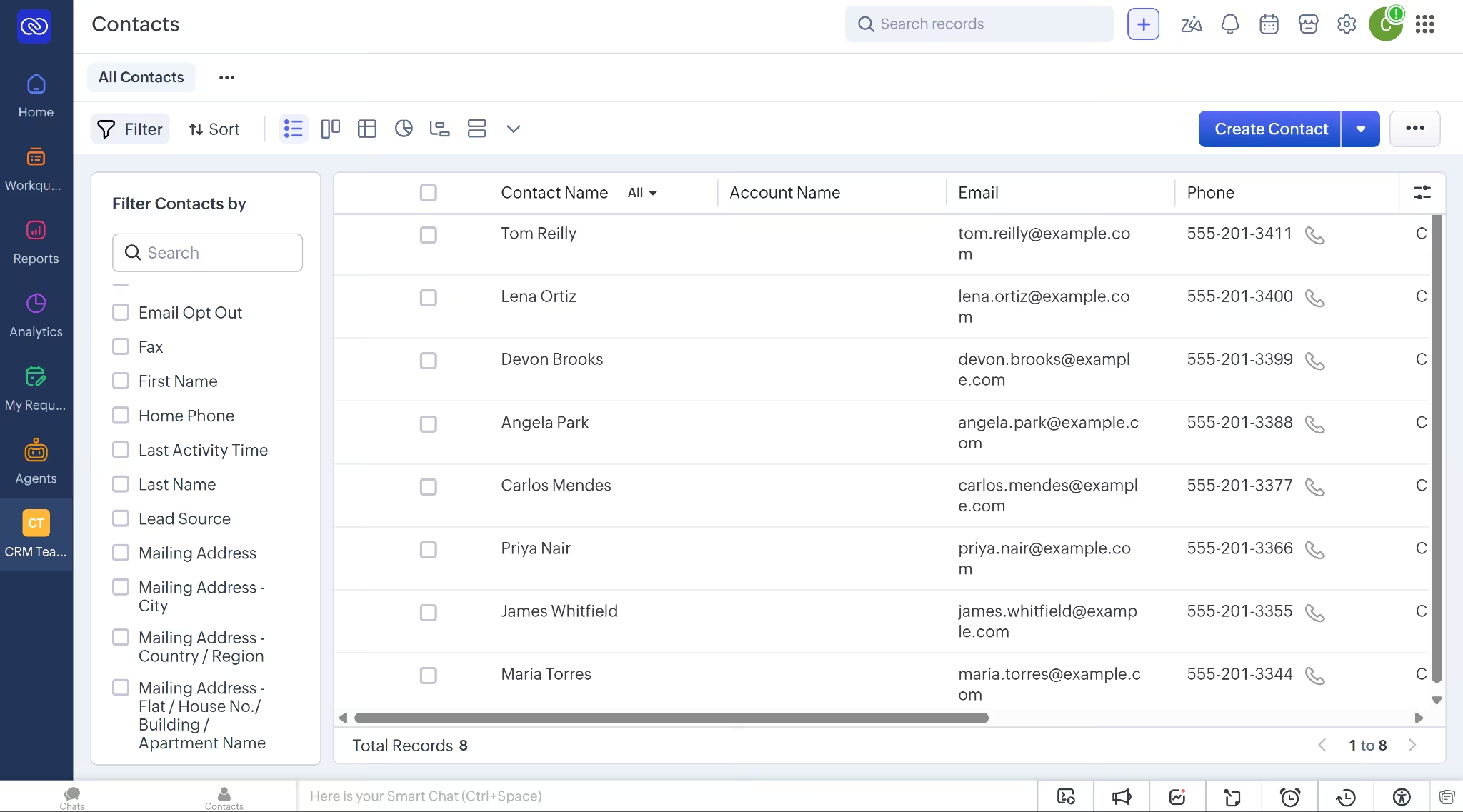
I used Zoho's default pipeline instead of building a custom one, then mapped my CSV's stages onto its existing names. It worked, but it meant trading my plain-language stage names for Zoho's. Contacts imported cleanly and Notes mapped to a "Description" field without issue.
Deals were where I hit the wall. In the setup I tested, creating a deal manually requires an Account Name, which means Zoho expects the "deal" to belong to a company, even though it was one person buying a house from another with no company involved.
I could have generated fake company records to force it through, but the point of the test was to see how the tool behaved with realistic data, so I stopped at contacts. Total time: 44 minutes.
Key Features:
- Multiple pipelines: Available on Standard, a tier where some competitors still gate this.
- Custom fields and workflow automation: Included from the entry paid tier
- Built-in migration tool: Import screen lists one-click transfers from 13 other CRMs, including HubSpot, Salesforce, and Pipedrive.
- Security: ISO 27001, ISO 27701, and SOC 2 Type II certified, the same tier as Pipedrive and Freshworks.
- Custom AI agent builder: Zia Agents lets you build a custom AI agent from a prompt, the same idea as HubSpot's Breeze Studio.
- Mobile app and integrations: iOS and Android app, with connections to Gmail, Outlook, and Slack.
Pros:
- Hard to beat on feature-for-price, especially alongside other Zoho products like Zoho Books.
- Free tier supports 3 users, one more than HubSpot's free tier.
- Default pipeline covered a real estate flow well enough to use without renaming anything.
Cons:
- More menus and settings than Pipedrive or OnePageCRM, slower to get productive in.
- Creating a custom pipeline stage requires setting a probability and forecast category first, more setup than HubSpot's rename-in-place approach.
- In the configuration I tested, deals required an Account Name, meaning every individual buyer needed a company record.
What Users Say
G2 reviewer Deepak K. liked “the ecosystem around Zoho CRM,” especially how its apps connect and keep customer information together. Brad B had a rougher experience, with “confusion and duplication of services” across the modules.
Bottom Line
Zoho makes sense for teams that care more about features per dollar than a quick setup. Pipedrive or OnePageCRM is a better match when the priority is getting a usable pipeline in place fast.
4. Freshsales: Best Cheap Paid Tier
Freshsales is the CRM inside the Freshworks suite (Freshdesk for support, Freshmarketer for marketing). Higher Freshsales tiers add Freddy AI features such as contact scoring and outreach assistance. Its paid tiers undercut HubSpot and Zoho on price at every comparable level.
Pricing:
- Free: $0 for three users. Contact and deal management.
- Growth: $11 monthly, or $9 with annual billing. Everything in Free, plus chat, email, and phone.
- Pro: $47 monthly, or $39 with annual billing. Everything in Growth, plus contact scoring and sequences.
- Enterprise: $71 monthly, or $59 with annual billing. Everything in Pro, plus custom modules and audit logs.
Quick facts:
- Setup time: 12 minutes, signup to deals imported
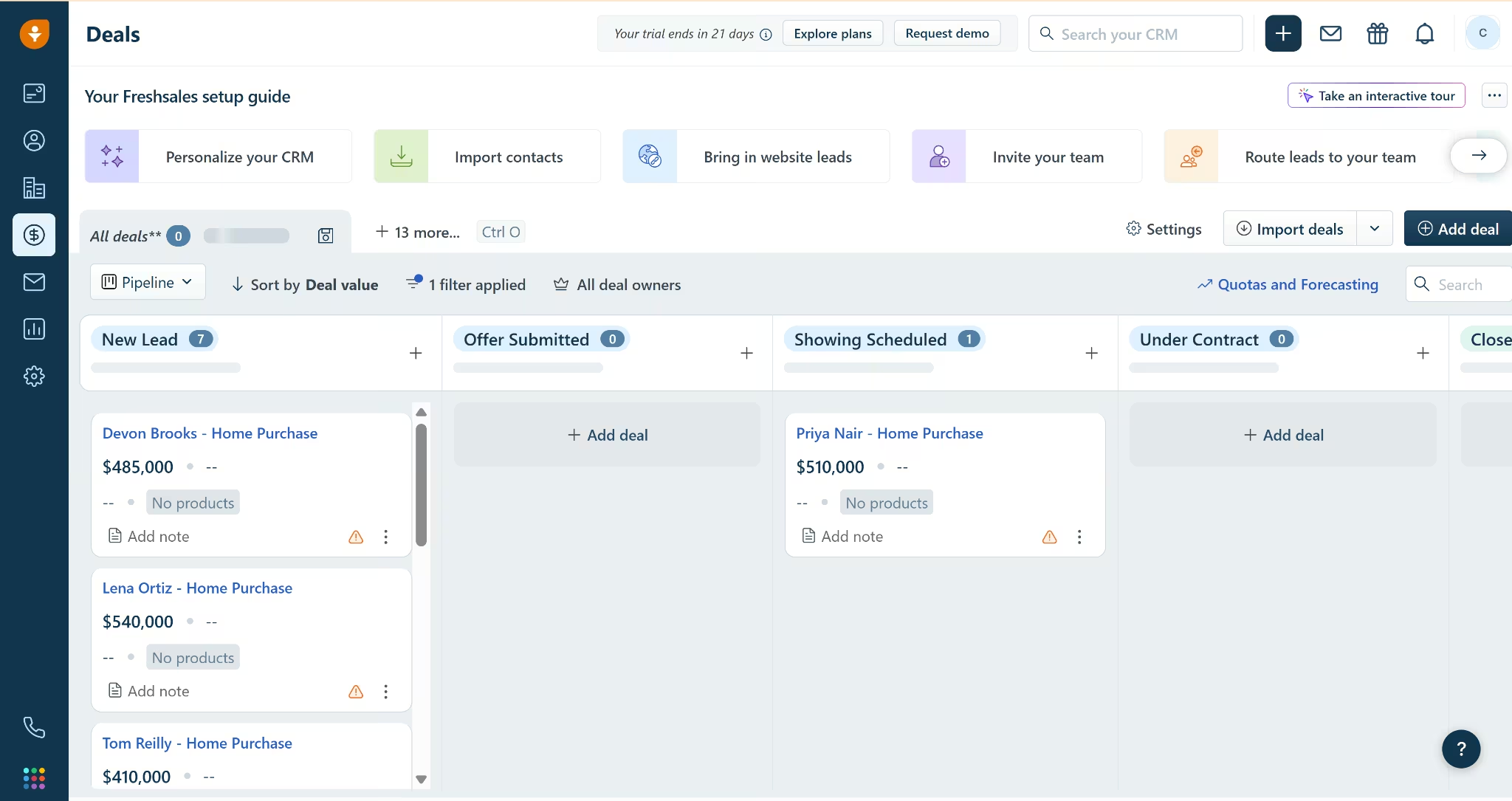
- Contacts and deals: Contacts imported cleanly; deals imported but all landed in one stage, because I imported before renaming the pipeline stages
- Trial: 21 days, defaults to Enterprise, not the Free plan
The test: Signup was quick, but Freshsales dropped me into a 21-day Enterprise trial rather than the free plan I'd signed up for.
Contacts imported cleanly with a column-replace prompt, though the Notes column didn't auto-match, same gap I'd hit on Zoho.
The pipeline shipped with generic sales stages (New, Qualification, Discovery, Demo, Negotiation) rather than an industry template. Renaming them to match my real estate stages was mercifully simple, closer to HubSpot's inline-rename than Zoho's probability-mapping detour.
Deals were where I got tripped up, but the cause was mine, not the product's. I imported the CSV before renaming the stages, so all 8 deals landed in the same stage instead of spreading across the board. The stage names have to exist in the pipeline before an import can map to them.
Moving each deal to the right stage by hand would have added a few minutes, but the main setup result was already clear. Freshsales went from signup to imported deals in 12 minutes, the fastest setup time of any ready-made CRM I tested.
Key features:
- Freddy AI contact scoring: Ranks contacts by how likely they are to convert. Available from the Pro plan.
- Built-in calling: Lets you make and receive calls inside Freshsales.
- Security: SOC 2 Type II, ISO 27001, ISO 27701, and PCI DSS certified, plus GDPR and CCPA.
- Custom AI agent builder: Freddy AI Agent Studio includes a no-code Skills Builder for building custom agents, the same idea as HubSpot and Zoho.
- Mobile app and integrations: iOS and Android app, with a marketplace of third-party connections.
Pros:
- Cheapest paid entry tier of the mainstream CRMs tested here.
- Calling built in, one less tool for a two-person team to juggle.
- Renaming default pipeline stages was simple, no extra fields required like Zoho's setup.
Cons:
- Less brand recognition than HubSpot or Zoho, thinner third-party integrations.
- Defaults new signups into a 21-day Enterprise trial rather than the free plan.
- Importing deals before the target pipeline stages exist dumps everything into one stage, a sequencing issue worth planning around rather than a general import defect.
What Users Say
Capterra reviewer Jose J G. liked the “simplicity of the CRM,” the flexibility available on each contact record, and its connection with Freshdesk. Mannu, a G2 reviewer, found “detailed reporting” too limited and had to create a separate dashboard to track email performance.
Bottom Line
Freshsales gives small teams calling, email, and chat inside a low-cost CRM. AI contact scoring requires the Pro plan, and the smaller integration catalog may be limiting for teams that rely on a wide mix of third-party tools.
5. monday CRM: Best for the Smoothest Setup
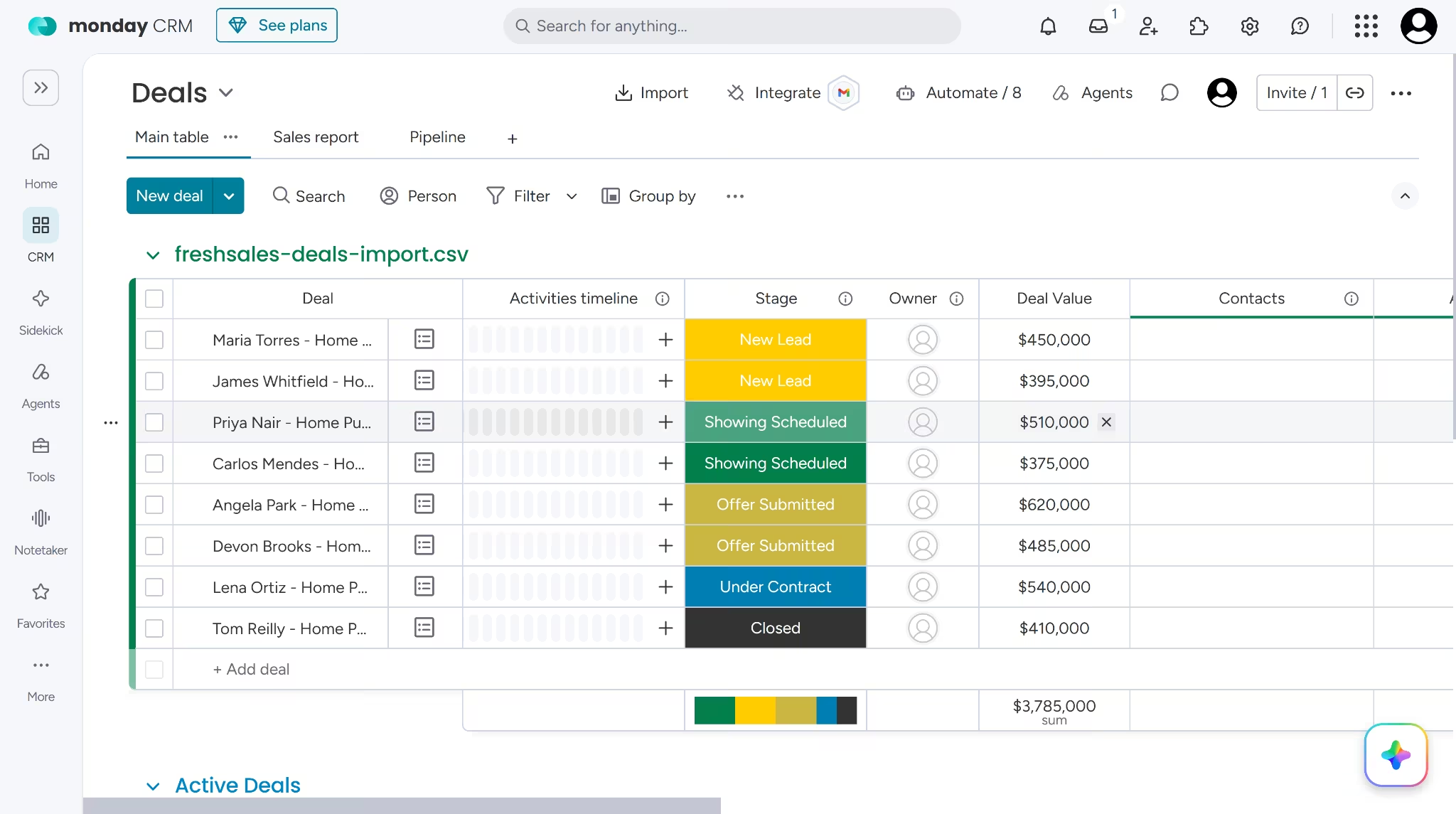
monday CRM is the customer-facing product from monday.com, the same work-management platform used for projects, tasks, and workflows. Every board (contacts, deals, activities) looks and behaves like a monday.com board, which makes it feel instantly familiar to any team already using the parent product elsewhere.
Pricing:
- Basic: $18 monthly, or $12 with annual billing. Contact and deal boards.
- Standard: $25 monthly, or $17 with annual billing. Everything in Basic, plus email tools and automations.
- Pro: $41 monthly, or $28 with annual billing. Everything in Standard, plus sequences and mass email.
- Ultimate: Custom pricing. Everything in Pro, plus unlimited records and advanced permissions.
Paid plans have a three-seat minimum.
Quick facts:
- Setup time: 22 minutes, the smoothest import of any tool tested
- Contacts and deals: Both matched fields automatically, no renaming needed
- Trial: Defaults to Pro, the second-highest tier, not Basic
The test: Onboarding asked what I wanted to focus on first, and I picked "Sales pipeline" to match what this test was built around. The trial started on Pro, the second-highest tier, not Basic.
Contacts imported and mapped First Name, Email, and Phone automatically. Last Name and Lead Source came in as new columns.
Deals imported just as cleanly; every field matched straight through, no renaming, no field-mapping detour, no duplicates.
Twenty-two minutes from signup to a fully populated CRM board was the smoothest import of anything tested. For a team weighing "which CRM is best" against "which CRM won't cost half a Tuesday afternoon to set up," monday makes a case for itself on the second question alone.
Key features:
- monday.com board interface: Contacts, pipelines, and automations look like any other board.
- Deal-to-project handoff: A closed deal can spin up a project board automatically.
- AI Notetaker and automation marketplace: Transcribes meetings and layers AI actions (sentiment detection, custom prompts) onto any board.
- Notes and updates on every contact: The same follow-up safety net OnePageCRM offers.
- Security: SOC 1 and 2, ISO 27001 and several extensions, GDPR, CCPA, and HIPAA.
- Custom AI agent builder: You can build one from scratch, beyond several pre-built agents shown by default.
- Mobile app and integrations: iOS and Android app, with a large integrations list including Gmail, Slack, Stripe, Zoom, and Asana.
Pros:
- Useful post-sale handoff if the same team also manages onboarding, delivery, inspections, or closing paperwork.
- Familiar interface for any team already using monday.com elsewhere.
- Both contacts and deals imported cleanly with no field-mapping detours.
Cons:
- 3-seat minimum means a two-person team pays for a seat it isn't using.
- Google Calendar sync requires Standard, Pro, or Ultimate, not available on the entry tier.
What Users Say
G2 reviewer Elina C. found monday CRM “very visual and straightforward,” which helped her team start using it without much training and stay aligned through shared boards, automations, and updates. Lyudmil S. found that “a lot of the best features” were locked behind a paywall or required paid marketplace apps.
Bottom Line
monday CRM handled both contact and deal imports cleanly, so existing monday.com users are not the only teams that should consider it. Its three-seat minimum makes less sense for a two-person team, which would pay for an unused seat.
6. OnePageCRM: Best for Simplicity Over Features
OnePageCRM is a smaller, action-focused CRM built on a simple idea. Every contact has one Next Action, the single thing to do next to move that relationship forward. It's built for simplicity over a full sales-ops platform, one clear action per contact instead of a maze of settings and stages.
Pricing:
- Professional: $15 monthly, or $9.95 with annual billing. Next Actions and sales pipelines.
- Business: $29 monthly, or $19.95 with annual billing. Everything in Professional, plus email sync and more automation.
- Max: $45 monthly, or $29.95 with annual billing. Everything in Business, plus sequences and unlimited automation.
Every plan includes unlimited contacts, deals, fields, and tags.
Quick Facts:
- Setup time: 19 minutes, signup to trial start
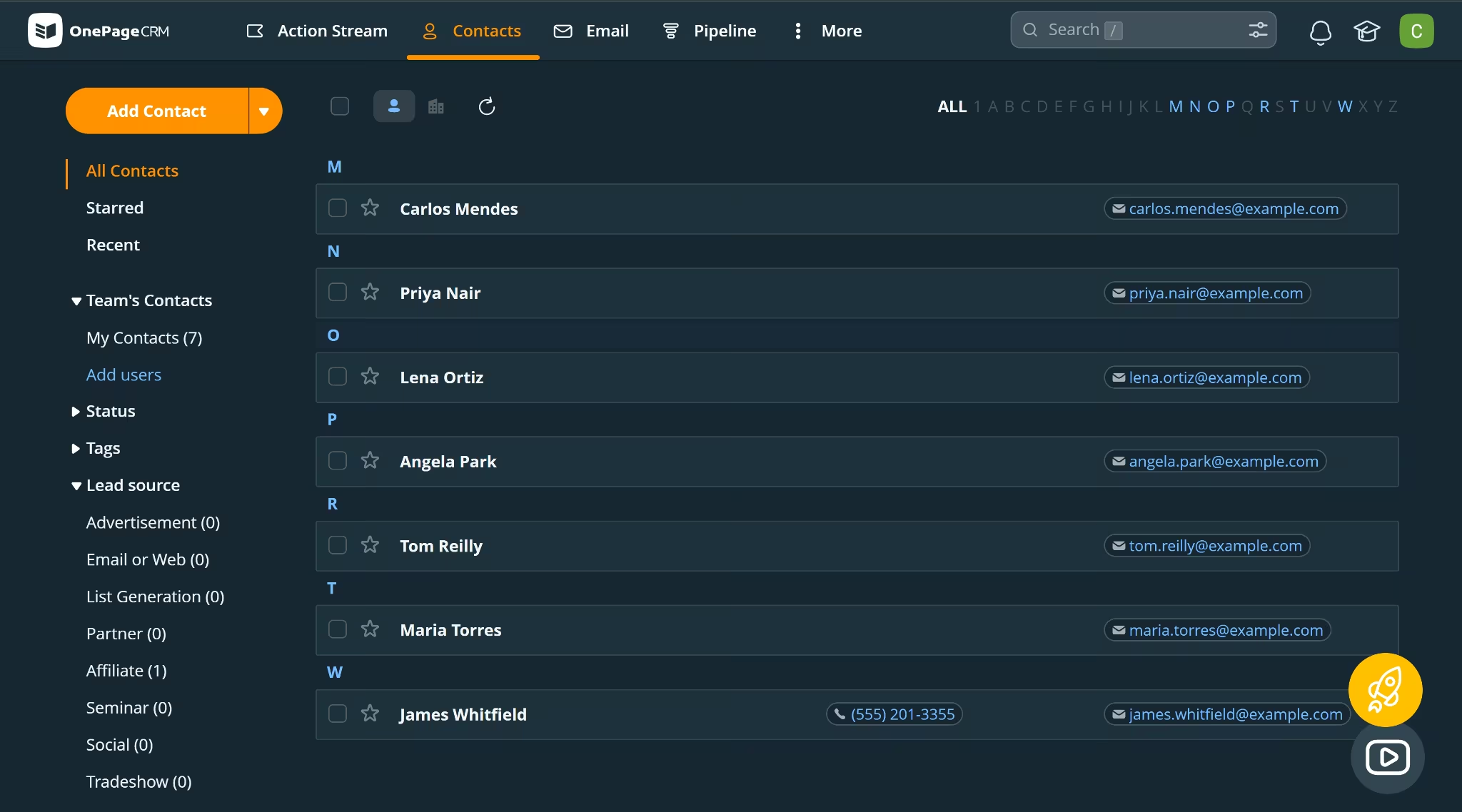
- Contacts and deals: Contacts imported without friction; bulk deal import requires a contact email match, so deals were added manually instead
- Trial: starts on Max, the priciest tier, not the entry Professional one
The test: Onboarding opened with a question I hadn't seen phrased quite this directly on any other tool. It asked how much CRM experience I had. I picked "no experience" and found OnePageCRM had switched to a simplified interface in response, with fewer buttons and plainer language.
The trial itself started on Max, OnePageCRM's priciest tier, rather than the entry Professional plan.
OnePageCRM ships with a real estate-shaped pipeline out of the box, with stages like "Property Viewed" and "Contract Signed."
Contacts imported without friction. Every contact card also included notes and next-action reminders directly, the exact follow-up safety net the article's opening scene is about.
Then deals brought me back to reality. Bulk import exists, but only after digging under a "More" menu I didn't spot until I'd wasted 10 minutes hunting. When I found it, it strictly required a contact email address to link each deal, a name wasn't enough. Setting that field to "ignore" still blocked the whole import. I added the deals manually rather than fight it further.
Key Features:
- Next Action list: Centers on one action per contact, separate from the deal pipeline itself.
- Real estate pipeline template: Qualified, Meeting Arranged, Property Viewed, Negotiation, Contract Signed, Won, shaped for the industry without renaming.
- Unlimited contacts: On every plan, no tier-gating on contact count.
- Adaptive onboarding: Interface simplifies for users who report no CRM experience.
- Security: Relies on AWS's SOC 2 infrastructure rather than holding a direct certification. That puts it in the same position as Salesforce Starter Suite, which Salesforce's documentation also excludes from its platform-wide SOC and ISO certifications, so this isn't unique to OnePageCRM among the tools tested here.
- Mobile app and integrations: iOS and Android app with a field-sales-specific AI route planner and business card scanner, integrating directly with Gmail, Outlook, and Mailchimp, plus Zapier for everything else.
Pros:
- "What do I do next" beats "what stage is this deal in" for a team this size.
- Notes and action items on every contact directly address the follow-up problem CRMs exist to solve.
- Onboarding adapts the interface based on stated CRM experience, a non-technical-friendly touch none of the other tools offer.
Cons:
- No permanent free plan.
- Pipeline stages can be renamed but not expanded beyond the default set.
- Bulk deal import requires a contact email match, not a name, and a missing email blocks the whole import even if that field is set to be ignored.
- You can move data into OnePageCRM from a file, Highrise, or Google Contacts, but not directly from Salesforce, HubSpot, Zoho, or Pipedrive.
- Its AI features (route planner, business card scanner) are fixed, not something you build yourself.
What Users Say
G2 reviewer Vanessa W. liked the “clarity and simplicity of the interface,” especially how the Next Action view keeps follow-ups visible and the tagging system organizes contacts across projects. Karthick P. found the feature set limited compared with larger CRMs, with “advanced reporting and analytics” and deeper automation missing.
Bottom Line
OnePageCRM keeps follow-up simple by giving every contact a clear Next Action alongside the deal pipeline. Frequent bulk deal imports are its weak point because each deal needs a matching contact email before it will import.
7. Salesforce Starter Suite: Best Free Tier With Room to Grow
Salesforce Starter Suite is the small-business entry point into Salesforce, the enterprise-CRM giant that defined the category. Starter offers a free plan for up to 2 users and sits on the same underlying platform a business would grow into if it ever needs the full Salesforce Sales Cloud later.
Pricing:
- Free Suite: $0 for two users. Lead, opportunity, and case management.
- Starter Suite: $25 monthly or annually. Everything in Free, plus sales flows and lead routing.
- Pro Suite: $100 with annual billing. Everything in Starter, plus quoting and forecasting.
Pro requires an annual contract, and transaction fees may apply.
Quick Facts:
- Setup time: 63 minutes, the longest of any tool tested
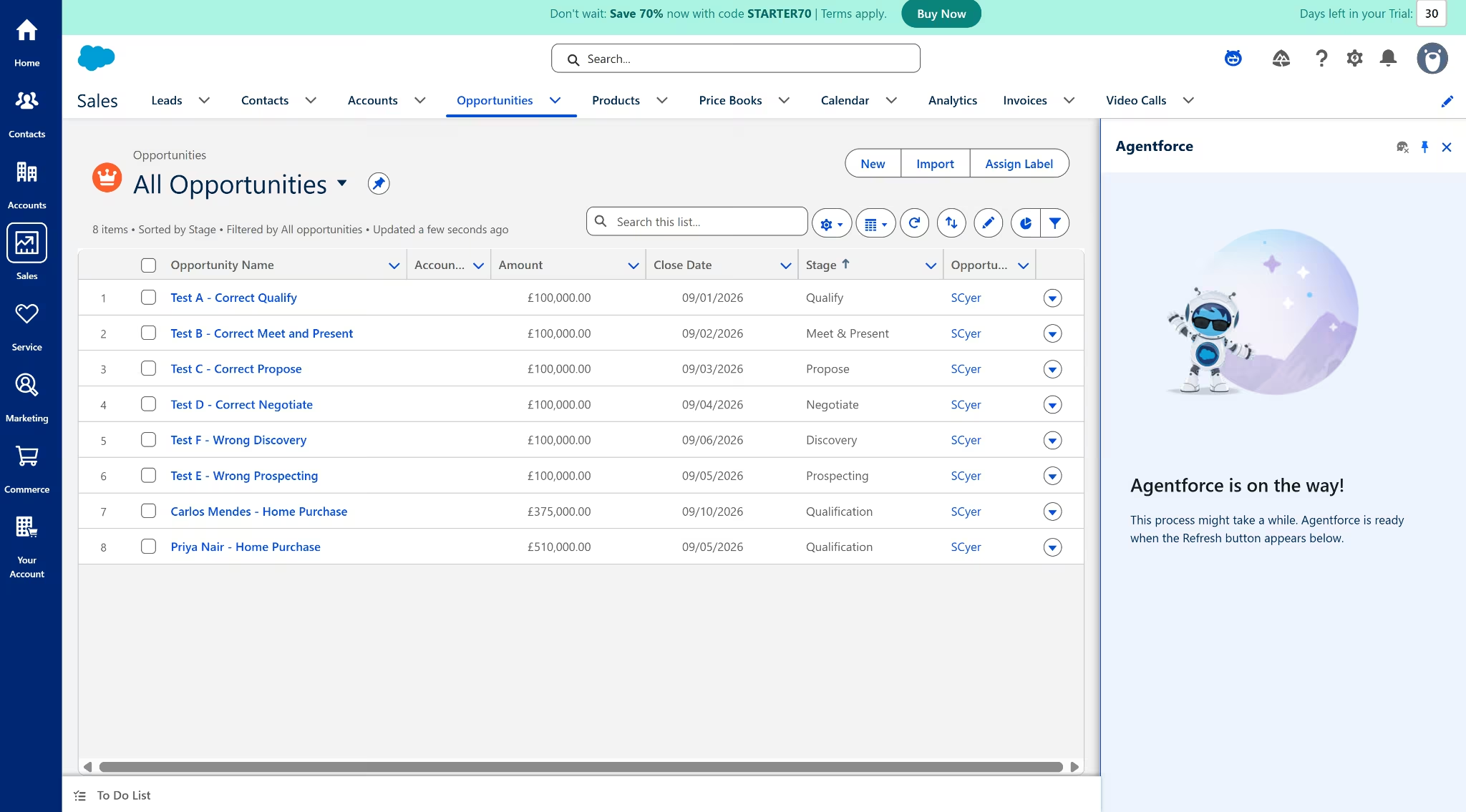
- Contacts and deals: Contacts imported cleanly; 5 of 5 fields matched; deals (Opportunities) failed for 6 of 8 rows with no error message; cause never identified
- Trial: not applicable, tested directly on the Free Suite
- Agentforce: Failed to load for over 30 minutes when asked for help
The test: Onboarding asked which problem felt familiar, and I picked "Follow-ups don't seem to happen" to match the actual scenario this article is about. Contacts imported cleanly, 5 fields found and 5 fields matched, no friction.
Deals were where the trouble started. Salesforce calls them Opportunities, and the setup area threw several similarly named tools at me before I found the right import path. The import itself asked for a name, Account Name, Close Date, and Stage. Account Name meant giving every individual home buyer a company record, the same requirement I'd hit on Zoho.
I filled it in and hit Import. Six of my 8 rows disappeared; only Carlos Mendes and Priya Nair showed up in the Opportunities list, with no error and no notification.
I spent 40 minutes testing possible causes. I tried skipping Account Name, mapping it to Description instead, deliberately wrong Stage values to rule that out, and asking Agentforce for help, which sat on a loading screen for over 30 minutes without resolving.
None of it surfaced a cause. Sixty-three minutes to import 2 records was the longest setup of any tool tested.
Key Features:
- Free Suite: Lead, opportunity, and case management, simple email marketing, connected Slack conversations.
- Starter Suite: Adds an assistive AI agent, sales flows and lead routing, and payment links.
- Same platform as Salesforce Sales Cloud: A business that outgrows Starter migrates by tier upgrade rather than switching products.
- Security: The broader Salesforce platform holds SOC 1/2/3 and ISO 27001, but Salesforce's documentation scopes Starter outside that certification, worth confirming against your compliance needs before assuming coverage.
- Custom AI agent builder: Agentforce exists and is well known industry-wide for this, but it never finished loading in this session's 30-plus minutes of testing.
- Mobile app and integrations: iOS and Android app, with connections to Slack, Gmail, and Outlook.
Pros:
- Free tier removes the cost objection entirely, unlike a time-limited trial.
- Starter Suite is the same platform a business grows into, not a separate product to migrate to.
- Contacts import was clean and fast, the smoothest part of testing this tool.
Cons:
- Free tier caps at 2 users, so a growing team hits the paywall fast.
- Deeper automation still sits behind the $100-a-seat Pro Suite.
- Bulk Opportunity import dropped 6 of 8 rows with no error or notification, and no cause found in 40 minutes of troubleshooting.
- Salesforce's documentation scopes Starter outside the platform's SOC and ISO certifications, worth verifying for your compliance needs.
- Agentforce never finished loading when asked for help in this test.
What Users Say
Software Advice reviewer Tammy W. valued the “ability for Salesforce Starter to be customized,” which may suit a team with unusual fields or workflows. But that same flexibility can add more administration. One Capterra reviewer felt the platform required a “dedicated specialist,” making it a harder fit for a small team that wants to manage the CRM without extra help.
Bottom Line
Salesforce's free tier is genuine and worth trying for that reason alone. But bulk importing anything beyond contacts was the roughest experience of any tool here, with no error message and an AI assistant that never loaded. Budget extra troubleshooting time if you go this route.
8. Zite: Best If No Off-the-Shelf CRM Fits
Zite takes a build-your-own approach to CRM software. Instead of adapting preset fields and pipeline stages, you describe the system you need and let Zite generate the interface, database, and workflows.
The platform focuses on business apps, internal tools, portals, dashboards, and operational workflows.
For this test, I gave Zite a custom CRM brief. This is a shortened version of the original prompt:
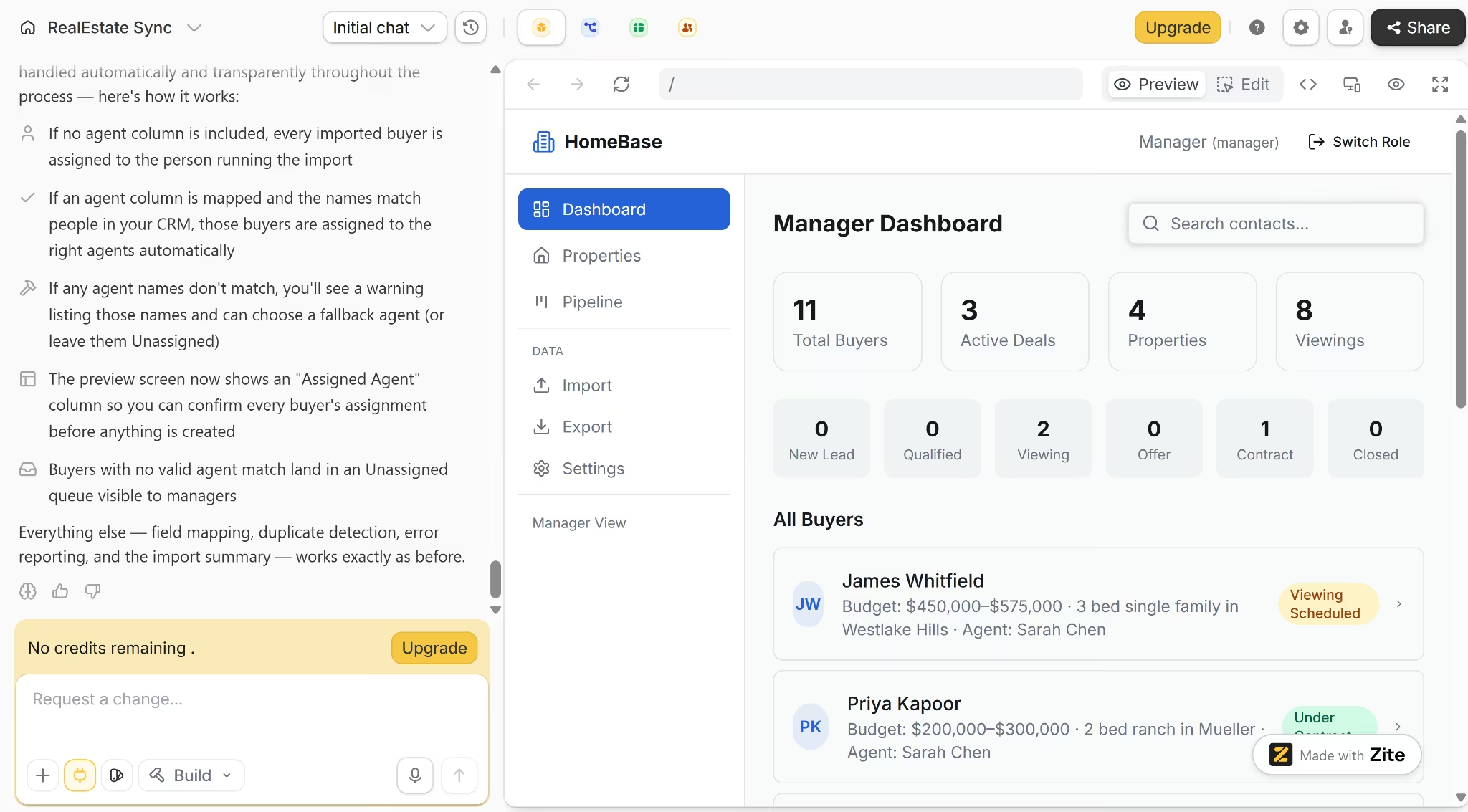
“Build a residential real estate CRM with separate agent, buyer, and manager views. Include contacts, properties, viewings, a deal pipeline, private notes, property matching, viewing requests, buyer feedback, and transaction updates. Buyers should see only their own data, while managers should see the full team.”
Later prompts asked Zite to fix the property-matching logic, connect the buyer feedback flow, link active deals to properties, and add CSV import and export, field mapping, duplicate handling, and rules for assigning imported records
Pricing:
- Free: $0. Includes 50 credits, 5,000 records, and 1,000 monthly workflow runs.
- Pro: $19 monthly, or $15 monthly on annual billing. Includes 100 credits, 100,000 records, and one custom domain.
- Business: $69 monthly, or $55 monthly on annual billing. Includes 200 credits, 250,000 records, and unlimited custom domains.
Zite uses credits for AI-assisted building and modifications, while database records, workflow runs, and published-app usage have separate allowances.
Quick Facts:
- Active planning and build time: 15 minutes
- Total elapsed time (including corrections): 47 minutes
- Initial build: 15.9 of 50 free credits
- CSV import: 8 of 8 contacts imported
- Final credit use: all 50 credits after several correction prompts
The build test: The first version of the app took 15 minutes to build.
Role separation worked better than I expected. Buyers saw only their own properties and updates, agents saw their assigned buyers, and the manager dashboard pulled the whole operation into one place.
The most convincing parts were the connected workflows:
- Moving a deal to Under Contract updated the buyer record, added a dated history entry, and showed the same update in that buyer’s portal.
- Marking a property as Interested or requesting a viewing sent the action back to the correct buyer and property record in the CRM.
- The manager view brought buyers, properties, viewings, agents, and pipeline stages together without exposing private notes to buyers.
A few problems appeared once I started changing the data. Property-match scores did not update after I changed a buyer’s budget or preferences. Buyers could also read seeded viewing feedback, but there was no form for submitting their own, even though the workflow existed in the backend.
The first CSV import also exposed a problem with ownership. Zite brought in all eight contacts and correctly combined separate First Name and Last Name columns, but the records were not assigned to the right agent.
I prompted Zite to fix that logic error. The correction added two rules: follow the Assigned Agent column when the file includes one, and assign the contacts to the person uploading the file when it does not.
This solved the issue, and imports now mapped correctly. I had other corrections to make, but by then I had used up my credit allocation.
Key Features:
- Plan mode: Creates a downloadable screen and database plan before the build starts.
- Connected staff and buyer views: Shares selected property, viewing, and deal data across separate interfaces.
- Connected records: Supports linked records, CSV import and export, permissions, bulk operations, and connections to other tools.
- Automated actions: Can read and write data, process information, and connect external services.
- Visual editor: Lets you adjust components, branding, and layout without another generation prompt.
- PWA support: Publishes the app as an installable web app for phones and desktops.
Pros:
- Built a custom CRM and buyer portal from one brief.
- Kept agent, buyer, and manager data separate.
- Synced deal changes and buyer actions across both sides of the app.
- Imported all eight contacts and handled split name columns correctly.
- Accepted several substantial corrections without restarting the project.
Cons:
- Property matching and feedback submission needed correction prompts.
- Imported records lacked a clear default owner in the first version.
- Imported test records could not be deleted from the visible app.
- Exported apps don't run outside Zite yet; you can move a Zite app between Zite accounts, but there's no GitHub export or a download that runs on its own hosting.
- Multiple revisions eventually used the full free credit allowance.
- Zite creates web apps and PWAs, but does not build native iOS or Android apps
What Customers Say
Reddit user AdPsychological4432 was “unbelievably impressed” after using Zite to prototype a company system and complete a website in about an hour thuongtran689 found the AI credits were “spent quickly” and had manual text edits replaced after running a new build.
Bottom Line
Zite makes sense when a ready-made CRM cannot match the workflow. It built an internal CRM, property database, buyer portal, and connected transaction flow from one brief, although the first version needed corrections. Native app-store publishing and independently hosted source code remain outside its current scope.
9. Emergent: Best for a Custom App With the CRM Built In
Emergent is a vibe coding platform, which means you build software by having a conversation rather than writing code or placing elements on a canvas. Emergent builds the whole app, including a client-facing view, with hosting, sign-in, and stored data included from the start.
You describe the CRM you want in a conversation, and Emergent's agents build the pipeline, client-facing view, sign-in, and hosting from that description.
For this test, I gave Emergent a written brief for the residential real estate CRM and checked the finished app against its requirements.
Quick Facts:
- Build time: 16 minutes, prompt to finished app
- CSV import: 8 of 8 leads imported, ownership rules applied correctly
- Checks passed: all 20 items from the brief's testing checklist passed on the first pass
- Credits used: 19
The build test: Emergent asked five setup questions before writing anything. It wanted to know whether a simple role selector was fine instead of full login, how to source property photos, whether to auto-generate a logo, how much to defer for a first pass, and whether any integrations needed to be wired live.
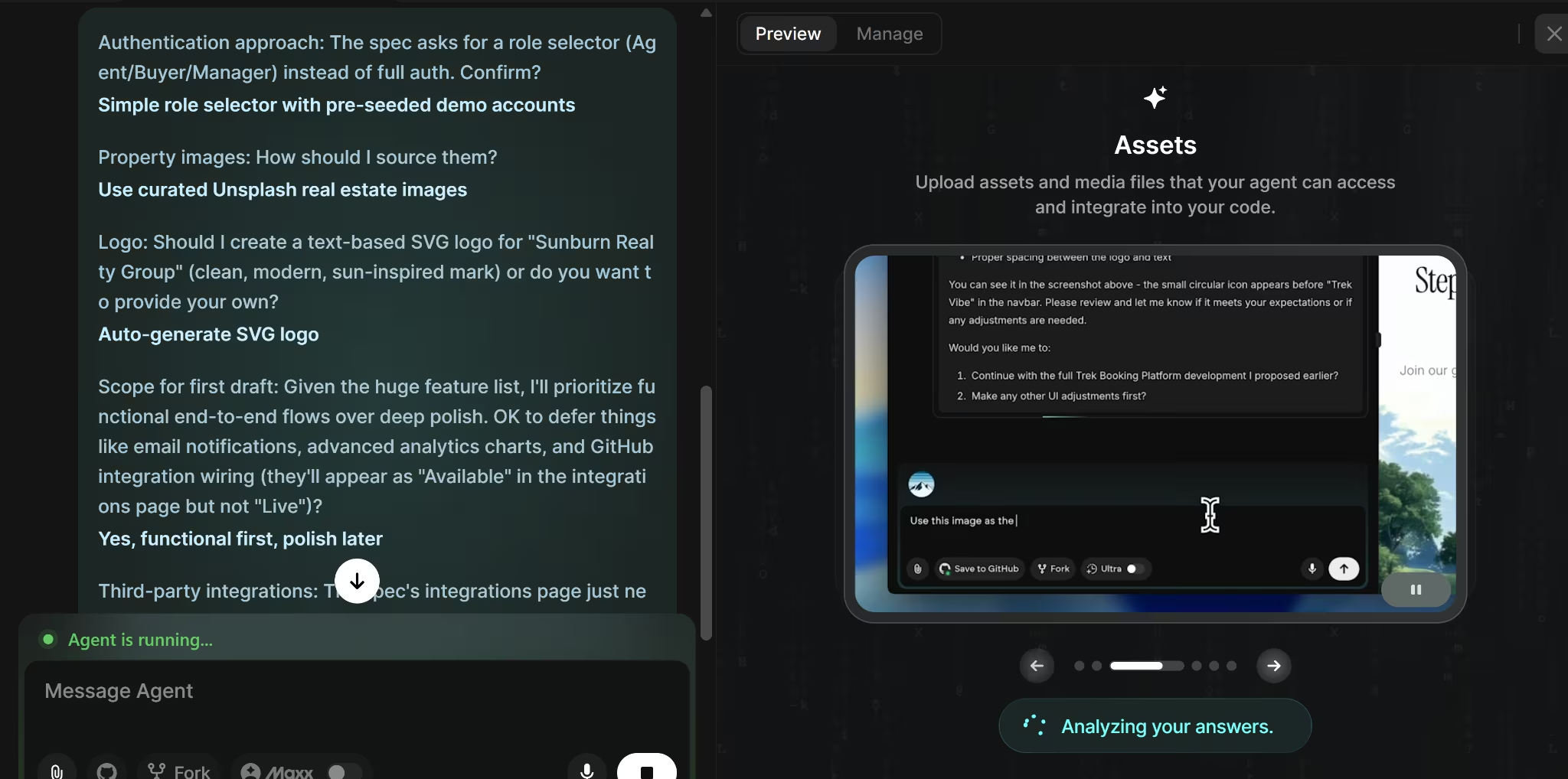
Zite took a different approach and built straight from the brief, which meant catching any gaps afterward instead. Emergent front-loading these decisions meant fewer surprises later.
I said yes to the fast option on all five. Sixteen minutes and 19 credits later, it handed back a working app with three roles (agent, buyer, manager) and a generated sun-and-roof logo across every screen.
Property matching recalculates on its own. Changing a buyer's preferences moved one property's match score from 35% to 90% in the same session, no re-import or refresh needed.
A testing agent ran through the 20 items on the brief's testing checklist on its own before calling the build done. Checks included whether a deal moved to the right stage or a showing request linked to the correct buyer.
I went back through the same 20 myself afterward to confirm them.
All 20 passed, including the CSV ownership logic (a named agent in the file overrides the uploader, a blank column falls back to whoever imported it, an unmatched name lands in an Unassigned queue with a warning) and the delete cascade on buyer records, no orphaned showings or notes left behind.
This build skipped real authentication and dynamic manager-dashboard charts on purpose, since the brief was for a demo, not a production launch. Worth knowing if you build one yourself. Ask for real login and live charts explicitly in your prompt. Emergent won't add either by default just because the CRM handles real data.
Key Features:
- Native mobile apps: On paid plans, Emergent can also build a proper phone app, not just a website that works on phones, as a separate project from the web version. This build only tested the web app.
- Downloadable and GitHub-exportable code: You own the code and can download it or push it to GitHub to host anywhere, available from the Standard tier up.
- MCP connector: Connects the app to outside tools through Emergent's MCP connector, for integrations beyond what's built in by default.
- Specialized agents: Split the build across the interface, pipeline logic, testing, and getting it live, among other parts of the process.
Pros:
- Built the entire three-role app, buyer portal included, for 19 credits, inexpensive for the scope it covers.
- Property matching updated instantly when preferences or pricing changed, confirmed both by the testing agent and by hand afterward.
- Changing a buyer's preference or a property's price re-scores every match immediately, not on the next import.
- CSV ownership logic worked exactly as specified. A named agent overrides the uploader, a blank column falls back to the uploader, and an unmatched name lands in an Unassigned queue with a warning.
- Deleting a buyer record cleaned up linked showings, feedback, and notes with nothing orphaned.
Cons:
- A vague prompt produces a vague CRM here just as it would anywhere else.
- Credit-based pricing makes the cost harder to budget upfront than a flat CRM subscription, since the price depends on what you build.
- Every future change (a new field, a new stage) costs more credits and another prompt, rather than a settings toggle in an existing CRM.
Pricing:
- Standard: $20 per month. Everything is Free, plus 100 monthly credits, private project hosting, GitHub integration, and the option to purchase extra credits.
- Pro: $200 per month. Everything in Standard, plus 750 monthly credits, a larger context window, Ultra Thinking, system prompt editing, custom AI agents, high-performance computing, and priority support.
- Business: Custom pricing. Adds role-based access, SSO, shared team workspaces, and real-time co-editing.
- Enterprise: Custom pricing. Adds audit logs, user-level credit limits, self-hosted database support, VPC deployment, priority support, and usage reporting.
Prices, billing options, and plan features may change. Check Emergent’s current plans and pricing before choosing a plan.
Emergent's pricing is credit-based rather than a flat monthly fee, so actual cost depends on what you build.Check the current pricing, since credit amounts and tier details change.
What Users Say
A Product Hunt reviewer said: "I especially appreciated the automated testing before publishing functions." A G2 reviewer was more critical: "It took a while to understand how best to use at first."
Bottom Line
Emergent suits teams that need a custom CRM and customer-facing app built together. In this test, it completed and checked the buyer portal, pipeline, sign-in, and data rules in one pass.
Ready to build a CRM that fits your exact workflow? Try our CRM builder for small business to get started without writing a line of code.
Which CRM Should You Choose?
Most teams should start with an off-the-shelf CRM and only consider building one when a specific workflow step keeps getting forced into the wrong field. Which off-the-shelf tool depends on which tradeoff matters most to you, since no single tool won on every axis tested here.
When speed and simplicity matter most:
- Freshsales had the fastest setup of any ready-made CRM tested (12 minutes) and the cheapest paid entry tier of the group.
- OnePageCRM was close behind at 19 minutes. Its simpler interface and ready-made pipeline reduced setup, though it costs more than Freshsales and has no permanent free plan.
- monday CRM had the cleanest import of any tool, contacts and deals both matched automatically with no renaming. No free tier at all, and a 3-seat minimum even for a two-person team.
When a permanent free tier matters most:
- HubSpot matched its pipeline template to the business type automatically and costs nothing at that tier, but the AI onboarding assistant failed in this test; manual setup worked better.
- Salesforce Starter's free plan isn't a trial, but bulk-importing anything beyond contacts was the roughest experience of any tool tested; 6 of 8 rows disappeared with no error.
When price-per-feature matters most:
- Zoho packed in the most for the price, at the cost of more menus and a slower first setup (44 minutes) than Pipedrive or OnePageCRM.
Build instead of configuring if:
- No off-the-shelf CRM names your workflow step the same way
- You want buyers or clients to see their own view into the pipeline, not just an internal tool for staff
Zite and Emergent both handled the brief well. Zite built a usable internal CRM, property database, and buyer portal from one prompt, showing how a custom builder can connect staff and customer workflows when a ready-made CRM does not fit.
Emergent took 16 minutes to complete the app in one pass, while Zite produced its first version in 15 minutes but needed another 32 minutes of corrections. Zite suits teams that want a custom web app or internal tool, while Emergent is the better fit when the project also requires a native mobile app or code that can be exported and hosted elsewhere.
Skip a CRM entirely if you have fewer than 2-3 leads a week and haven't missed a follow-up yet, a shared spreadsheet may still be enough
Final Verdict
Based on this test, Freshsales is the best CRM for small business teams that care most about setup speed and price. It took 12 minutes to set up and had the lowest paid entry price among the ready-made CRMs.
OnePageCRM comes close for teams that value a simpler interface and clear next actions over a larger feature set, although it has no free plan.
For a team whose workflow no off-the-shelf template fits, Emergent built a complete app, customer-facing portal included, in a single 16-minute pass. That's where Emergent earns its place, especially for a team that also wants a real client-facing mobile app or the ability to take the code and host it yourself.
Describe the CRM your team needs, and see what Emergent builds from it.
Build on Emergent today!

Most AI app builders stop at prototypes. Emergent creates production-ready apps you can actually launch.
- Production-ready apps
- Web & mobile apps
- Deploy in minutes







