TL;DR
- Use low effort for simple, checkable work. Use high effort for hard coding, research, and long agent runs.
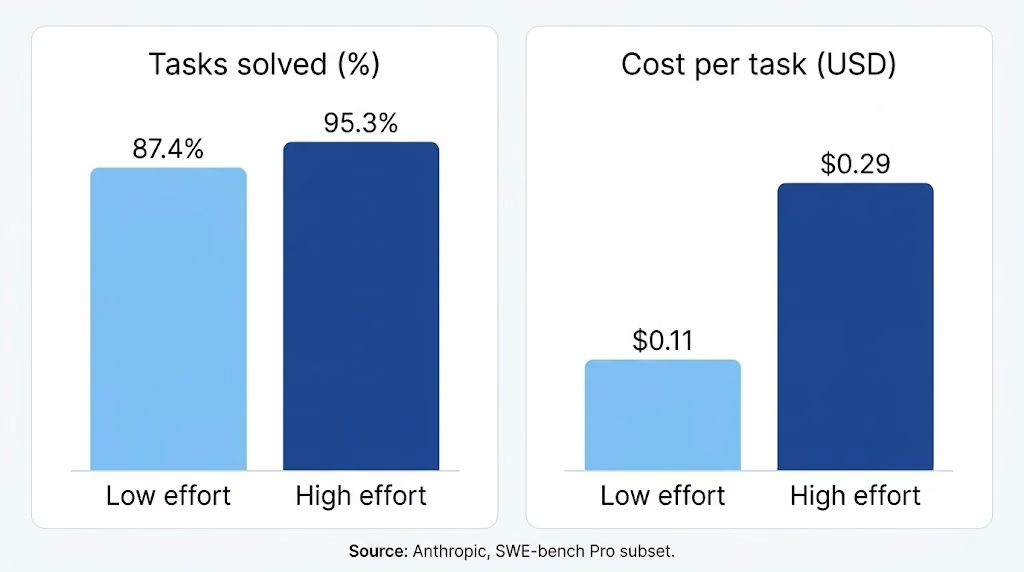
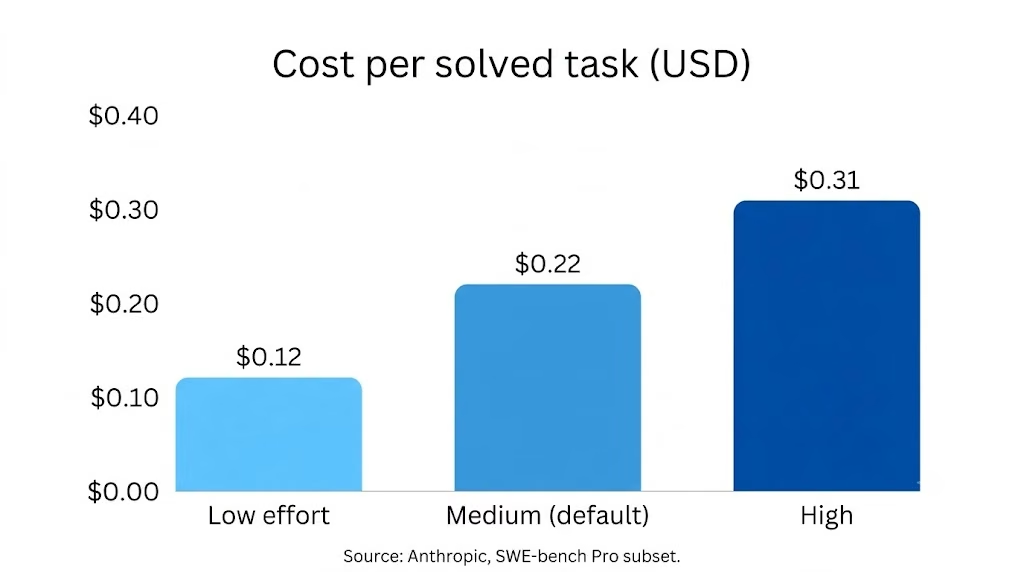
- In Anthropic’s coding test, low solved 87.4% of tasks at $0.12 per solved task. High solved 95.3% at $0.31 per solved task.
- Token prices stay at $4 input and $20 output per million at every level.
- Medium is the default, so test it before you move up or down.
A wrong effort setting wastes money or wait time. Claude Opus 5.5 high vs low effort is a real trade-off. In Anthropic’s coding test, high cost is about 2.6 times more per solved task than low.
This guide shows how Claude Opus 5.5 effort levels change reasoning, coding, speed, and cost per task. If you plan to build an internal tool with AI, this setting also shapes your running costs.
Anthropic made medium the default on Opus 5.5, one step below Opus 5. Any request that skips the setting now runs at medium.
Opus 5.5 High and Low Effort at a Glance
High effort scores higher in every row below, and low effort costs less. The table pulls from Anthropic’s published tests and from Artificial Analysis, an independent benchmark firm.
| Measure | Low effort | High effort |
|---|---|---|
| Anthropic’s description | Most efficient, with some capability loss | Spends as many tokens as the task needs |
| Coding tasks solved (SWE-bench Pro subset) | 87.4% | 95.3% |
| Cost per solved task (same test) | $0.12 | $0.31 |
| Artificial Analysis Index v5 score | 35 | 52 |
| Artificial Analysis cost per Index task | $0.98 | $3.46 |
| Token price per million (input/output) | $4 / $20 | $4 / $20 |
Artificial Analysis moved to Index v5 on October 27. Its launch article says effort settings matter more in v5 than in the earlier version.
What Effort Changes and What It Does Not
Effort tells Claude how hard to work on a request. It does not change the model or its price.
Anthropic’s effort documentation says the setting affects every output token. That covers reply text, tool calls, and thinking.
It works as a behavior signal, not a strict token budget. Low effort still thinks on hard problems, just less.
Opus 5.5 supports five effort levels. This guide compares the two ends, low and high, with medium as the baseline.
- Low: most efficient, with some capability loss
- Medium: a balanced mix of speed, cost, and quality, and the default
- High: spends as many tokens as the task needs
- Xhigh: extended capability for long-horizon work
- Max: no limit on token spending, for the deepest reasoning
What effort changes:
- How long Claude thinks before it answers
- How often it calls tools such as search or file reads
- How much detail it adds to explanations and summaries
What effort does not change:
- The price per token, which is $4 input and $20 output per million
- Whether thinking runs, because Opus 5.5 always thinks and rejects requests that turn it off
You can set the level yourself in the Claude app. Click the model name next to the send button, choose Effort, and pick a level. According to Claude’s help center, the change applies from the next response, and low or medium stretches your usage further.
Reasoning and Complex Work Compared
High effort wins on hard reasoning, but Opus 5.5 low effort performance holds up better than the label suggests.
On Artificial Analysis’s Intelligence Index v5, Opus 5.5 scores 35 at low, 52 at high, and 58 at max. High lands within six points of max. It also costs about a third as much per task: $3.46 versus $10.04.
Low effort can also outperform older settings. Deloitte’s CIO reported that low effort found 72% of known bugs during code reviews, compared with 56% for Opus 5 at high effort.
Rogo also found that low effort outperformed Opus 5 at high effort on its finance test, using about 60% fewer output tokens.
Higher settings catch what low misses.
Walleye Capital said Opus 5.5 largely solved its quant task at the lowest setting. At higher settings, it spotted an off-by-one error in the firm’s own instructions. No earlier model had caught it.
Choose high when:
- A wrong answer could cause serious problems.
- The task involves several steps or details that are easy to miss.
- The instructions need a closer look rather than being followed as written.
Choose low when:
- You can check the answer quickly.
- You only need to pull out information, add tags, or rewrite a short piece of text.
Also Read: Claude Opus 5.5 benchmarks, a score-by-score look at where it leads and where it trails.
Coding and Agentic Performance Compared
Opus 5.5 high-effort performance solves more coding tasks, at 2.6 times the cost of low.
Anthropic ran its main test on 478 problems from SWE-bench Pro. The table shows what each level solved and what it cost.
| Effort | Tasks solved | Cost per solved task |
|---|---|---|
| Low | 87.4% | $0.12 |
| Medium (default) | 92.8% | $0.22 |
| High | 95.3% | $0.31 |
Effort also affects how Claude uses tools. At low effort, it makes fewer tool calls, skips the introduction, and gives short updates. At high effort, it makes more calls, explains its plan first, and provides longer summaries with more code comments.
Low effort can be a good fit for simple helper agents, such as a subagent that renames files or performs one narrow, checkable operation. That matters if you want to learn how to build AI agents from scratch. A helper that renames files needs less thinking than the agent that plans the whole job. To build that split yourself, a coding agent builder lets you define the lead agent, the helper, and where a person reviews.
Anthropic’s general effort table points to xhigh for agentic runs over 30 minutes. Its Opus 5.5 guide says to start at medium and test from there.
Anthropic also reports that Opus 5.5 at medium matches or beats Opus 5 at high on coding and knowledge-work tests. That makes medium a stronger starting point than its name suggests.
Speed, Token Use, and Cost Compared
Effort affects your total cost by changing how many tokens you use. The per-token price stays the same.
Anthropic’s launch post lists the rates as $4 per million input tokens and $20 per million output tokens. These rates are the same at every effort level. Cache reads cost $0.20 per million tokens.
Batch processing takes half off for work that can wait up to 24 hours.
Opus 5.5 cost per task is clearer when you divide by wins. A failed task still bills its tokens.
In Anthropic’s coding test, low cost is $0.12 per solved task and high cost is $0.31. For a wider view of running agents, see our guide to AI agent cost.
High effort adds wait. In Artificial Analysis’s latency test, Claude Opus 5.5 at high effort took about 34.5 seconds to its first answer token. That measurement includes thinking time before the first visible answer token. Thinking time counts toward that wait.
Fast mode is a separate lever. It gives up to 2.5 times faster output at $8 input and $40 output per million tokens. Low effort saves time by doing less work, while fast mode pays double for speed.
One cost trap sits in the API. Changing effort at the top level breaks the prompt cache, while changing it per message preserves it. Per-message effort is in beta.
Effort also affects your plan limits in the Claude app. Higher effort uses more tokens, so you reach your usage limits sooner. Anthropic raised the five-hour limits on Pro, Max, Team, and seat-based Enterprise plans when Opus 5.5 launched.
Search, Retrieval, and Computer-Use Behavior at Low Effort
At low effort, Claude makes fewer tool calls, so it does less searching and reading before answering.
This matters for research. Broad questions often need many searches, but low effort reduces the number of searches.
Retrieval from your own files follows the same rule. Opus 5.5 gets to work fast on loosely defined jobs. Anthropic’s guide suggests one system prompt line that tells it to explore emails, documents, and tabs before it acts.
If you run out of room, test it yourself. A short instruction cannot give Claude more time to think, but it can help it find the right sources first.
Computer use is harder to judge. Anthropic reports 81.8% on OSWorld 2.1, but that score uses max effort. At its default level, Opus 5.5 matched an Opus 5 result that needed a much higher setting.
Anthropic’s launch post and docs do not give a computer-use score for low effort. Each screen action depends on the last, so a missed click can affect the whole task. Use medium effort for long screen-based tasks and test low effort on short tasks that use only one screen.
Where Each Effort Level Falls Short
Low effort
Low effort solves fewer hard coding tasks: on Anthropic’s SWE-bench Pro subset, it solved 87.4% of tasks, compared with 95.3% at high effort.
It also needs a checker. Anthropic notes that a re-run policy only works when you have a failure signal, such as tests. Without one, a weak low-effort answer looks the same as a good one.
High effort
High effort costs more for small gains over the default. Anthropic found medium scored about 2.5 points lower than high for about 70% of the cost per task.
High effort can also cut off your reply. Thinking counts toward the max_tokens limit even when you never see it. Anthropic recommends raising the cap to 64,000 for long agentic turns; in its tests, only 2 of about 14,000 turns exceeded that limit.
Opus 5.5’s thinking tokens count toward max_tokens, so long agentic turns may need a higher output cap. If you carry over a high setting from Opus 5, expect longer turns.
Which Effort Level Should You Choose?
Start with medium effort and test the other levels on your actual tasks.
| Your task | Start with | Why |
|---|---|---|
| Tagging, extraction, short rewrites, helper agents | Low | Fast, cheap, and easy to check |
| Everyday drafting and well-scoped coding | Medium | Anthropic’s default; balances speed, cost, and quality for everyday work. |
| Multi-file bug fixes, long reports, deep research | High | Higher solve rate and more searching |
| Agent runs over 30 minutes | Xhigh | Listed in Anthropic’s effort table |
If you can check the results, run tasks at low effort first. Move only the ones that fail to high effort. Run every task at low, then re-run only the failures at high.
Anthropic found that running at low effort and rerunning only failures at high cost about 40% less than running everything at high, at the same pass rate.
The catch is time. Every failure takes two runs, so those tasks wait longer. You also need tests or another way to flag a bad result.
Test a small set of tasks before choosing an effort level:
- Pick 20 to 50 real tasks and decide how you will check if each one passes or fails.
- Run them at medium effort first. Then test the easy tasks at low and the failed ones at high.
- Compare the cost of completing each task, not the cost of each token.
Avoid these mistakes during testing:
- Relying on one run: Anthropic ran each setting twice on its 478-problem SWE-bench Pro test set because results can vary between runs.
- Changing the main effort setting during a session: This clears the prompt cache and may make that request more expensive. Use a new session or change the effort level for each message instead.
- Skipping the pass-or-fail check: Without it, you cannot tell a cheap win from a cheap miss.
Effort is often a better lever than switching models.
Anthropic found Opus 5.5 at low solved about the same share of coding tasks as Sonnet 5.5 at its default. It cost about 7% more per solved task.
Use low effort to sort daily notes and high effort to review contracts.
Also Read: Claude Sonnet 5.5 pricing for how its rates compare.
Conclusion
Keep medium as your usual setting. Low is worth trying on tasks with easy-to-check results. Use high when medium cannot handle the work.
In Anthropic’s coding tests, high solved 95.3% of tasks, while low solved 87.4%. The cost per solved task was $0.31 at high and $0.12 at low. Token prices are fixed, but the number of tokens used affects the final bill.
Since low effort searches less, test it carefully on research and long screen-based tasks.
Anthropic found that starting at low and rerunning only failed tasks at high costs about 40% less than running everything at high, with the same success rate. These effort settings also matter when building AI-powered workflows and agents. If you're exploring ways to create AI agents without coding, Emergent can help you get started.
Describe it. Build it. Launch it.
- End-to-End Creation
- No Code Needed
- Live in Minutes

Most AI app builders stop at prototypes. Emergent creates production-ready apps you can actually launch.
- Production-ready apps
- Web & mobile apps
- Deploy in minutes