



TL;DR
- GPT-6.1 Terra costs $1 per million input tokens and $5 per million output tokens.
- Cached input costs $0.05 per million tokens, while Batch and Flex processing offer lower rates.
- Actual expenses depend on reasoning effort, context length, caching, and processing mode.
- Terra costs less per standard input and output token than GPT-5.6 Terra, but businesses should compare total costs per completed task.
OpenAI launched GPT-6.1 Terra on October 26, 2026, introducing a new model that balances performance, speed, and cost. With improved visual reasoning and computer-use capabilities, the model gives businesses and developers another option for handling complex professional tasks.
The model's standard API pricing starts at $1 per million input tokens and $5 per million output tokens, with cached input tokens costing just $0.05 per million. However, the exact cost can vary based on token consumption, processing modes, caching, and task complexity.
In this guide, we'll break down GPT-6.1 Terra pricing, explain how token-based billing works, calculate costs using practical examples, and compare its pricing with other leading AI models.
What Is GPT-6.1 Terra?
GPT-6.1 Terra is a successor to GPT-5.6 Terra and belongs to OpenAI's GPT-6.1 model family. It can process text and images, interpret complex documents, generate code, and interact with software interfaces to complete tasks.
For example, a business could use the model to extract information from invoices, organize customer queries, or assist with data analysis. Its computer-use capabilities also make it suitable for workflows involving multiple applications, although actual automation depends on the tools and integrations available.
The model also supports adjustable reasoning-effort settings, allowing users to choose how much reasoning it applies to different tasks. Its large context capacity makes it suitable for working with extensive documents and information-heavy workflows.
GPT-6.1 Terra Pricing: Complete Breakdown
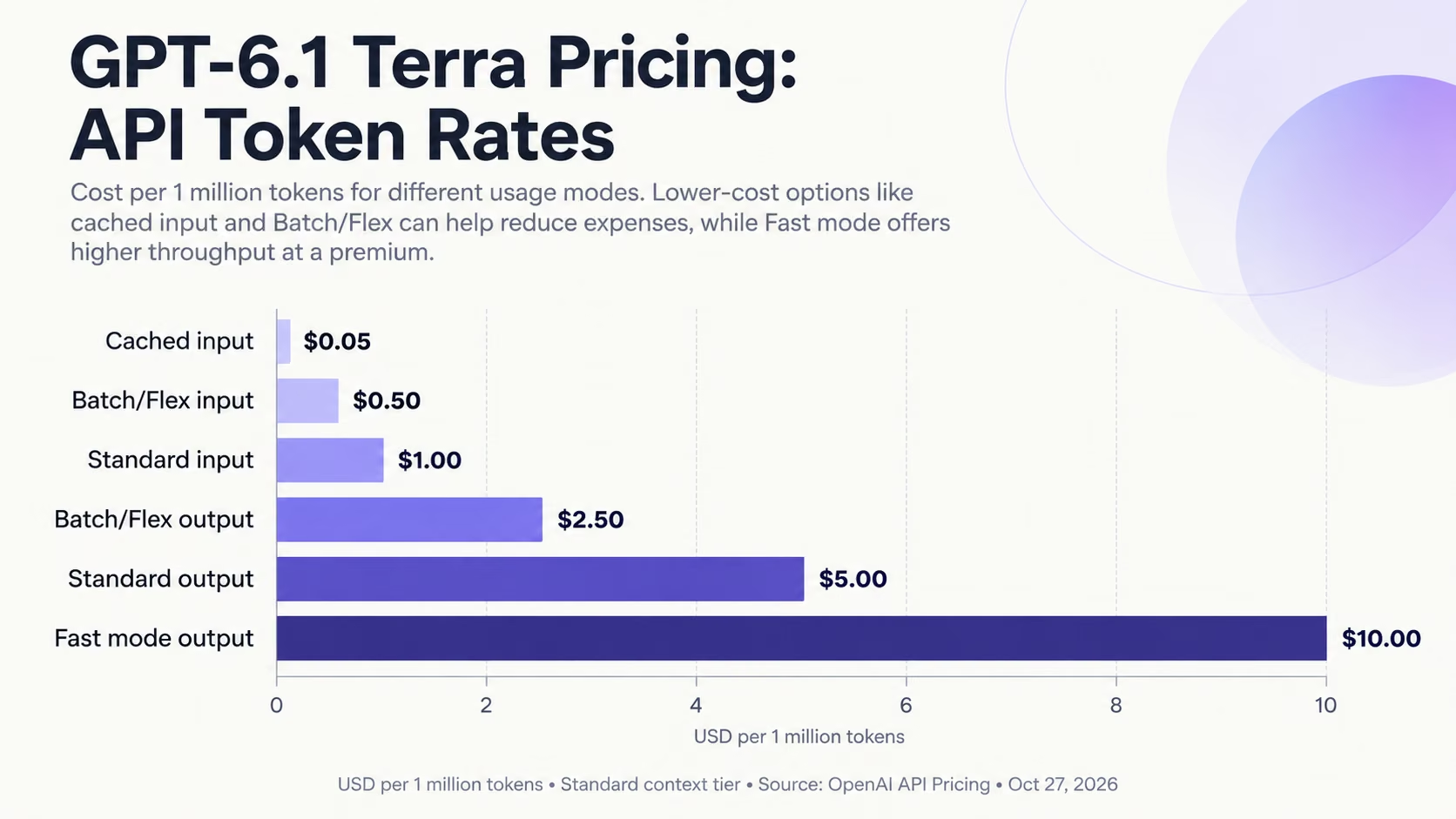
GPT-6.1 Terra API pricing comparison across different processing modes (USD per million tokens). Source: OpenAI, October 2026.
The following table provides a detailed breakdown of GPT-6.1 Terra's API pricing as of October 27, 2026, including cache-write charges and alternative processing modes.
| Pricing category | Cost per 1 million tokens |
|---|---|
| Standard input | $1.00 |
| Standard output | $5.00 |
| Cached input | $0.05 |
| Cache writes (30-minute retention) | $1.25 |
| Cache writes (12-hour retention) | $2.50 |
| Batch/Flex input | $0.50 |
| Batch/Flex output | $2.50 |
| Fast mode input | $2.00 |
| Fast mode output | $10.00 |
Source: OpenAI API Pricing. Rates are in USD and apply to the standard context-length tier. Additional charges or pricing adjustments may apply depending on the request.
While the table provides the published token rates, actual API expenses depend on how an application processes requests, reuses cached information, and generates responses. Understanding these differences is essential when estimating usage costs.
GPT-6.1 Terra API Pricing Explained
Understanding how OpenAI charges for different token types can help users choose the right processing option and manage AI expenses.
Input and Output Token Pricing
Input tokens represent the information sent to GPT-6.1 Terra, including prompts, instructions, conversation history, and documents. Output tokens include the model's generated response and any billable tokens used for reasoning.
For example, when you ask the model to summarize a 10-page report, the document and your instructions count as input tokens, while the generated summary counts as output tokens.
Because output tokens cost five times as much as standard input tokens, longer responses can increase a request's overall cost.
Cached Input and Cache-Write Pricing
Prompt caching allows applications to reuse previously processed information instead of repeatedly processing the same content at standard input rates.
For instance, an AI customer support application might reuse the same product information and support instructions across hundreds of conversations.
However, caching involves two distinct charges:
- Cache writes: The cost of processing and storing eligible information for future reuse. OpenAI offers 30-minute and 12-hour minimum retention options. These rates replace standard input charges for the tokens being written to the cache rather than being added to them.
- Cached input: The discounted rate applied when previously cached information is successfully reused.
Caching is particularly useful for applications that repeatedly reference the same instructions, documents, or other information. However, the actual savings depend on how frequently the cached content is reused.
Batch, Flex, and Fast Mode Pricing
OpenAI offers alternative processing options depending on how quickly an application needs its results.
Batch processing suits tasks that can run asynchronously, such as processing large collections of documents or generating reports.
Flex processing offers discounted rates for workloads that can tolerate slower responses or occasional resource unavailability.
Fast mode prioritizes faster processing and more consistent response times, making it suitable for applications where users expect quick responses.
The appropriate option depends on whether an application prioritizes lower costs or faster response times.
How Much Does GPT-6.1 Terra Cost in Practice?
Published API rates show how much OpenAI charges per million tokens, but most businesses want to know what that means for their actual expenses.
Let's look at three hypothetical use cases to see how GPT-6.1 Terra pricing translates into real-world costs.
GPT-6.1 Terra API Cost Examples
| Use case | Input tokens | Output tokens | Estimated cost per request |
|---|---|---|---|
| Customer support response | 1,000 | 500 | $0.0035 |
| Document analysis | 20,000 | 2,000 | $0.0300 |
| Detailed research report | 50,000 | 5,000 | $0.0750 |
These are illustrative calculations based on standard API pricing, assuming no cached tokens, additional tool charges, or regional pricing adjustments. Output-token estimates include any billable reasoning tokens.
For example, consider a business using GPT-6.1 Terra to answer customer queries. If each interaction consumes 1,000 input tokens and 500 output tokens, the calculation would be:
Input cost: (1,000 ÷ 1,000,000) × $1 = $0.001
Output cost: (500 ÷ 1,000,000) × $5 = $0.0025
Total cost per interaction = $0.0035
If the business processes 10,000 similar interactions every month, its estimated monthly API expense would be $35.
This estimate covers model-token charges only; hosting, application infrastructure, integrations, and other services may add to the total operating cost.
However, these calculations assume fixed token consumption. Actual expenses can vary depending on conversation length, reasoning effort, repeated requests, and any additional tools used.
Businesses can estimate their monthly costs using the following formula:
Monthly API cost = Number of requests × Average cost per request
Tracking average token consumption across representative tasks can provide a more reliable estimate than relying solely on published per-token prices.
GPT-6.1 Terra vs Other AI Models: Pricing Comparison
GPT-6.1 Terra is positioned between OpenAI's lower-cost GPT-6 Luna and its more advanced GPT-6.1 Sol model. But how does its pricing compare with its predecessor and competing Anthropic models?
The following table compares standard API pricing across five AI models.
| AI model | Input cost per 1M tokens | Output cost per 1M tokens |
|---|---|---|
| GPT-6 Luna | $0.10 | $0.50 |
| GPT-6.1 Terra | $1.00 | $5.00 |
| GPT-5.6 Terra | $2.00 | $12.00 |
| GPT-6.1 Sol | $2.00 | $10.00 |
| Claude Sonnet 5.5 | $2.00 | $10.00 |
Sources: OpenAI and Anthropic. Prices are in USD and reflect standard API rates for eligible requests as of October 27, 2026.
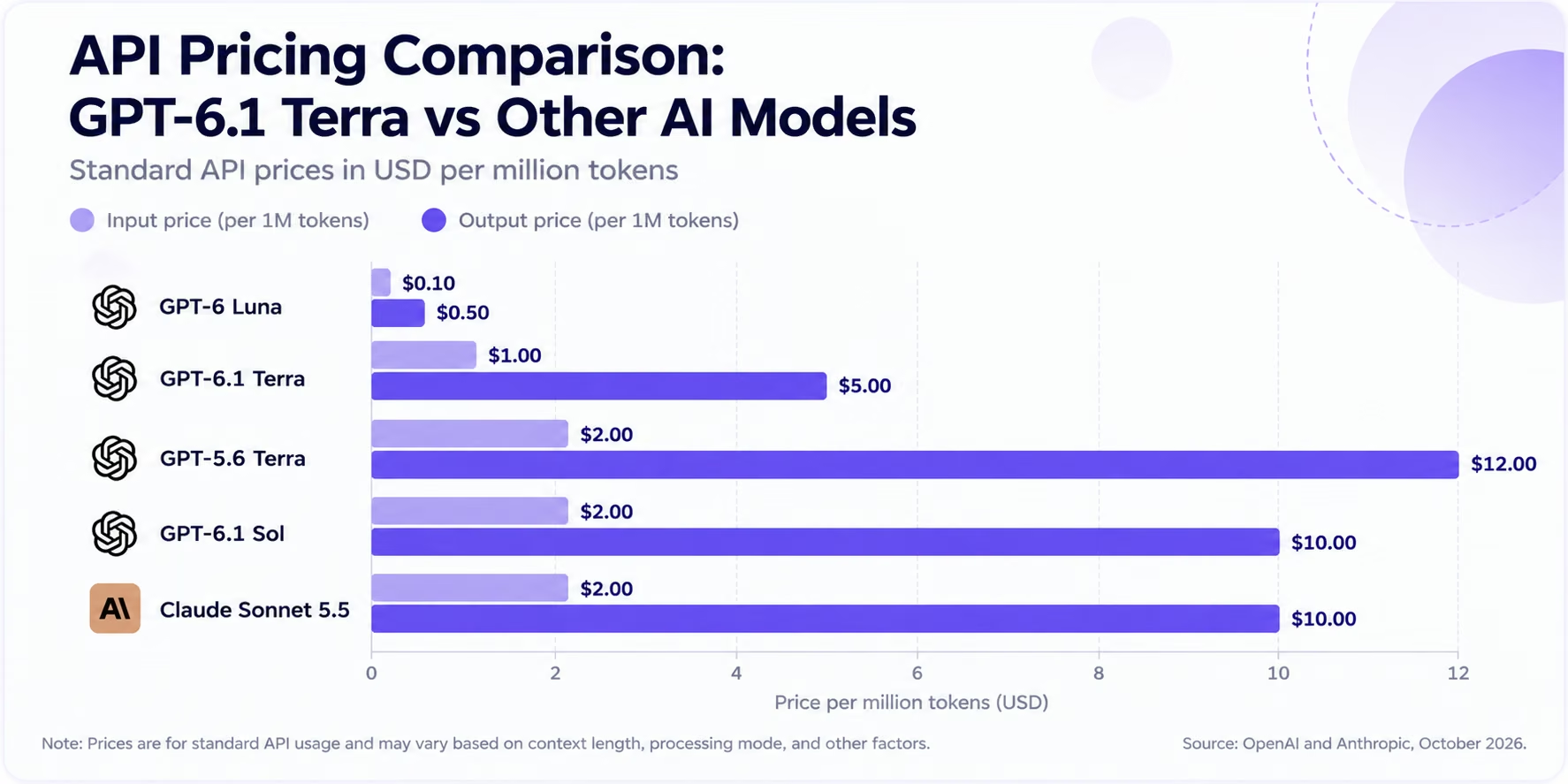
Comparison of standard API input and output costs for GPT-6.1 Terra and selected competing AI models (USD per million tokens). Sources: OpenAI and Anthropic, October 27, 2026.
Compared with its predecessor, GPT-5.6 Terra, GPT-6.1 Terra costs 50% less for input tokens and approximately 58% less for output tokens. It also offers lower standard token rates than GPT-6.1 Sol and Claude Sonnet 5.5, although GPT-6 Luna remains considerably cheaper. However, lower token rates do not necessarily translate into lower costs per completed task, as actual expenses depend on token consumption, reasoning requirements, and response quality.
If cost is the priority, our GPT-6 Luna benchmarks guide shows where the cheaper model holds up and where it falls behind.
Is GPT-6.1 Terra Available for Free?
GPT-6.1 Terra is not currently available through OpenAI's free API tier. Users who want to integrate the model into their applications need a paid API account, where usage is billed by token consumption.
However, GPT-6.1 Terra is also available through other OpenAI products.
According to OpenAI, GPT-6.1 Terra is available through ChatGPT Work and Codex for eligible Plus, Pro, Business, Enterprise, and Edu subscribers. However, access may depend on the subscription plan, workspace settings, and applicable availability restrictions.
The model is not available for selection in regular ChatGPT conversations. Users who want to access Terra through ChatGPT should use the supported Work or Codex interfaces.
Importantly, ChatGPT subscriptions and API usage are billed separately. Paying for a ChatGPT subscription does not automatically provide free GPT-6.1 Terra API credits.
What Affects GPT-6.1 Terra API Costs?
Your GPT-6.1 Terra costs depend on more than the number of requests your application processes. Two applications handling the same number of requests can have different expenses depending on how they use the model.
Here are five factors that can influence your final API bill.
1. Reasoning Effort
GPT-6.1 Terra supports six reasoning-effort settings: none, low, medium, high, xhigh, and max.
Higher reasoning settings allow the model to spend more effort working through complex problems. However, they can also increase billable reasoning tokens, potentially raising the cost of completing a task.
For straightforward activities such as text classification or extracting basic information, lower reasoning settings may be sufficient. More complicated tasks may benefit from higher settings.
2. Context Length
GPT-6.1 Terra supports a large context window, but using more of it can increase costs.
OpenAI applies higher rates when a request exceeds 272,000 input tokens. In such cases, input and cache rates double, while output rates increase by 50%. These higher rates apply to the entire request, not just the tokens exceeding the threshold.
Businesses processing lengthy documents or extensive conversation histories should account for this pricing difference.
3. Cache Reuse
The financial benefit of caching depends on how frequently an application reuses stored information relative to the cost of creating and maintaining that cache.
Applications with stable instructions and frequently repeated content may achieve greater savings than those where information changes regularly. Businesses should monitor cache-hit rates and actual token charges to determine whether caching is reducing their expenses.
4. Additional Tools and Services
Applications using GPT-6.1 Terra may require services beyond basic text generation.
For example, an AI assistant that searches the web, retrieves information from uploaded files, or executes code may generate additional tool-related charges.
These expenses depend on the tools used and their applicable billing rates.
5. Regional Processing
Businesses with specific data residency requirements may incur additional charges when using supported regional processing endpoints. OpenAI applies a 10% pricing premium to eligible regional processing requests.
However, regional availability depends on the model, processing mode, and supported location. Organizations should confirm eligibility before including regional processing in their API cost estimates.
How to Reduce GPT-6.1 Terra API Costs
Businesses can manage GPT-6.1 Terra expenses by monitoring actual token usage and optimizing how applications process requests. Some practical approaches include:
- Use appropriate reasoning settings: Reserve higher reasoning effort for tasks that genuinely require it.
- Reduce unnecessary context: Avoid repeatedly sending lengthy documents or conversation histories when only a small portion is relevant.
- Monitor caching performance: Review cache-hit rates to determine whether stored information is generating meaningful savings.
- Choose suitable processing modes: Consider Batch or Flex processing for tasks that don't require immediate responses.
- Track cost per successful task: Compare total token consumption and output quality rather than relying only on the published price per token.
GPT-6.1 Terra Context Window and Pricing Implications
GPT-6.1 Terra supports a context window of 1.05 million tokens, with a maximum output limit of 128,000 tokens. While the context window determines how much information the model can handle within a request, the output limit restricts how much content it can generate in a single response.
This capacity makes Terra suitable for tasks involving lengthy contracts, multiple research documents, extensive conversation histories, and large codebases.
However, processing substantial amounts of information can become expensive. As discussed earlier, OpenAI applies higher rates when requests exceed the long-context pricing threshold. Even below this threshold, larger inputs consume more tokens and increase overall expenses.
For businesses handling large documents, selectively retrieving relevant information or dividing complex tasks into smaller requests may help control costs without unnecessarily consuming the model's available context capacity.
Ultimately, the goal should be to use the context required to complete a task effectively rather than maximizing token consumption.
How to Get Started With GPT-6.1 Terra
If you're planning to use GPT-6.1 Terra for your business or an AI-powered application, you can access it through OpenAI's API. Here's how to get started.
Step 1: Create an OpenAI API Account
Visit the OpenAI API Platform and sign in or create an account. Set up billing and review your account's usage limits before making API requests.
Step 2: Generate an API Key
Open the API dashboard and create an API key. This key authenticates requests made by your application.
Keep it secure and avoid sharing it publicly or including it directly in client-side application code.
Step 3: Select GPT-6.1 Terra
Use gpt-6.1-terra as the model identifier when making API requests.
OpenAI supports the model through its Responses API and Chat Completions API. However, applications requiring tool calling must use the Responses API.
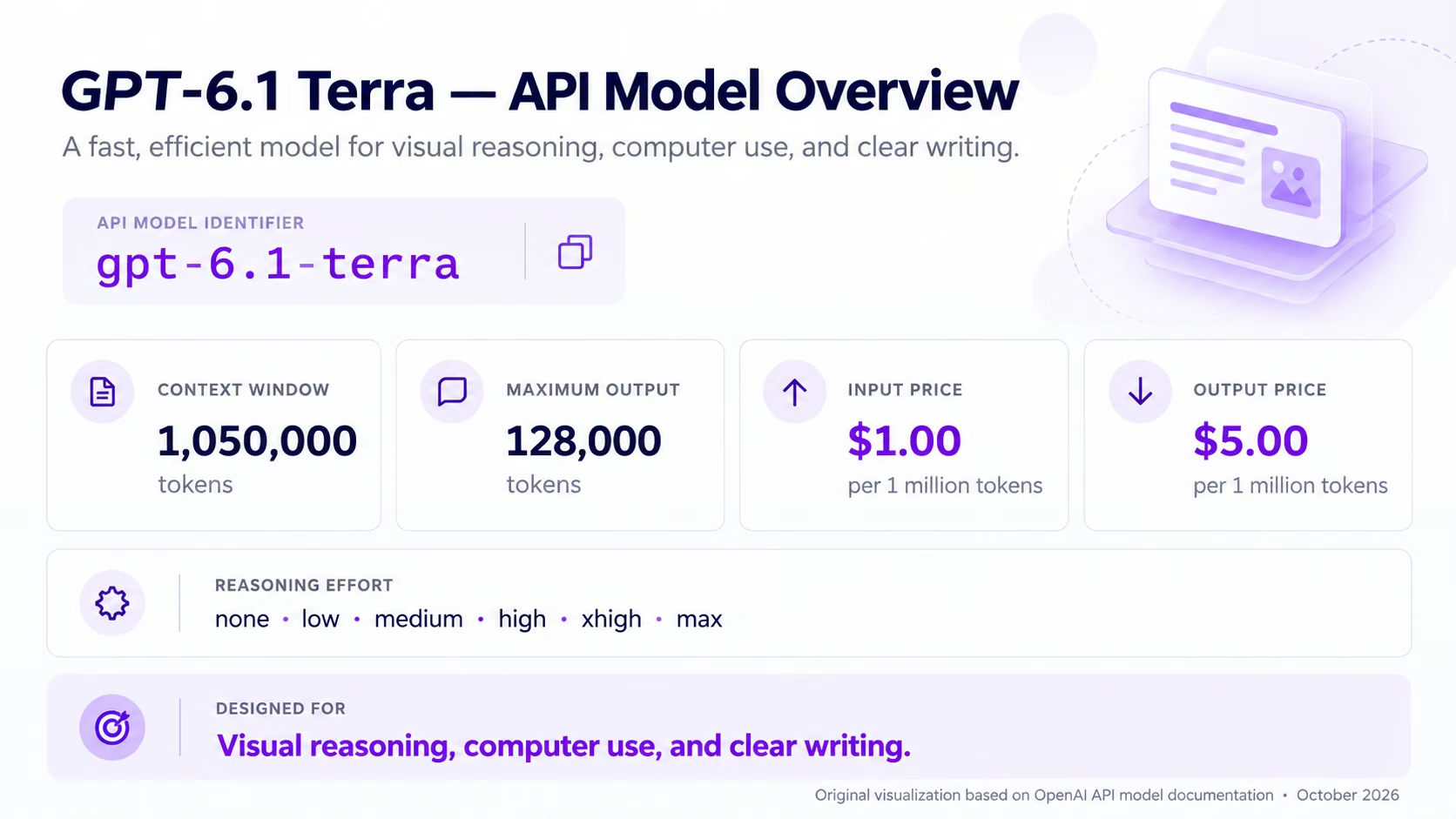
GPT-6.1 Terra's API model identifier, pricing, context window, and reasoning settings. Original visualization based on OpenAI's official model documentation (October 2026).
You can also adjust the model's reasoning-effort setting according to your task requirements.
Step 4: Test and Monitor Your Usage
Start with a few representative tasks to evaluate response quality, processing time, and token consumption.
You can monitor your API spending through OpenAI's usage dashboard and establish spending controls to help manage costs as your application scales.
Testing different reasoning settings and reviewing actual token consumption can help you determine whether Terra suits your workload.
Is GPT-6.1 Terra Worth Its Price?
GPT-6.1 Terra's pricing makes it worth evaluating for businesses that need capable AI without paying premium-model rates. However, evaluating its affordability requires looking beyond published token rates.

Estimated cost per benchmark task across selected AI models. Original visualization based on Artificial Analysis Intelligence Index data, October 2026. Results reflect standardized benchmark workloads and specified reasoning settings, not fixed API charges.
According to Artificial Analysis, GPT-6.1 Terra (Max) scores 48 on its Intelligence Index, with an average cost of $0.40 per benchmark task. This provides an independent measure of its performance relative to the cost of completing standardized tasks.
Importantly, the $0.40 figure is not a fixed charge for using Terra. It represents the weighted average cost of completing tasks within Artificial Analysis's evaluation framework. Actual expenses depend on the workload and reasoning settings.
For businesses, Terra may be worth considering for document processing, visual analysis, and application automation. However, organizations should test it against their existing models to determine whether its output quality, reliability, and total task costs justify switching.
Conclusion
GPT-6.1 Terra gives businesses another option for managing AI workloads without relying exclusively on premium-priced models. Its suitability ultimately depends on how well it handles the tasks an organization needs to complete.
Before adopting the model, businesses should evaluate it using representative workloads and compare the results against their existing solutions. This provides a more reliable basis for decision-making than API pricing alone.
For businesses that want to build AI-powered applications without managing the underlying development process, platforms like Emergent offer an alternative approach. Emergent enables users to build and deploy full-stack applications using natural language instructions, making application development more accessible to people without traditional coding experience.
Ultimately, the right approach depends on whether you need direct control over an AI model through its API or a platform that simplifies the broader application development process.

Most AI app builders stop at prototypes. Emergent creates production-ready apps you can actually launch.
- Production-ready apps
- Web & mobile apps
- Deploy in minutes







