
Choosing a powerful AI model is only part of getting good results. The amount of reasoning applied to a task may also affect accuracy, response time, and operating costs.
GPT-6 Astra makes this configurable through reasoning effort. Developers can choose how much work the model should put into a request without switching to a different model.
But does High effort always produce better results? Can Low effort handle coding, research, and computer-use tasks? And how much does the effort setting affect the cost of an AI-powered application?
This guide compares GPT-6 Astra low vs. high effort across reasoning, coding, agentic workflows, browsing, computer use, speed, and cost per task. It also explains how to choose the right setting for different workloads.
Two Settings, One Model: How Astra’s Effort Dial Works
GPT-6 Astra is OpenAI’s most capable model for demanding work, including intricate reasoning, coding, research, computer use, and document creation.
Its API supports five reasoning effort levels:
- Low: Routine tasks, extraction, classification, and simple edits.
- Medium: Tasks that require judgment, planning, or comparisons.
- High: Difficult debugging, deeper analysis, and careful review.
- Extra High: More demanding tasks where High may not provide enough reasoning.
- Max: The highest available effort setting for tasks that justify additional reasoning.
The effort setting controls how much reasoning the model applies. It does not change the underlying model or give it a different set of fundamental capabilities.
For example, consider an application that processes customer support requests.
A Low-effort configuration can classify incoming messages, extract customer details, and route requests to the correct department. A High-effort configuration can investigate recurring complaints, compare customer histories, and identify possible causes of an increase in support tickets.
Both configurations use GPT-6 Astra. The difference is how much reasoning the model applies to the work.
OpenAI recommends matching reasoning effort to task complexity instead of using the highest setting for every request. Low is suitable for routine work, while High is intended for deeper analysis and difficult debugging. Extra High and Max should be tested when High falls short.
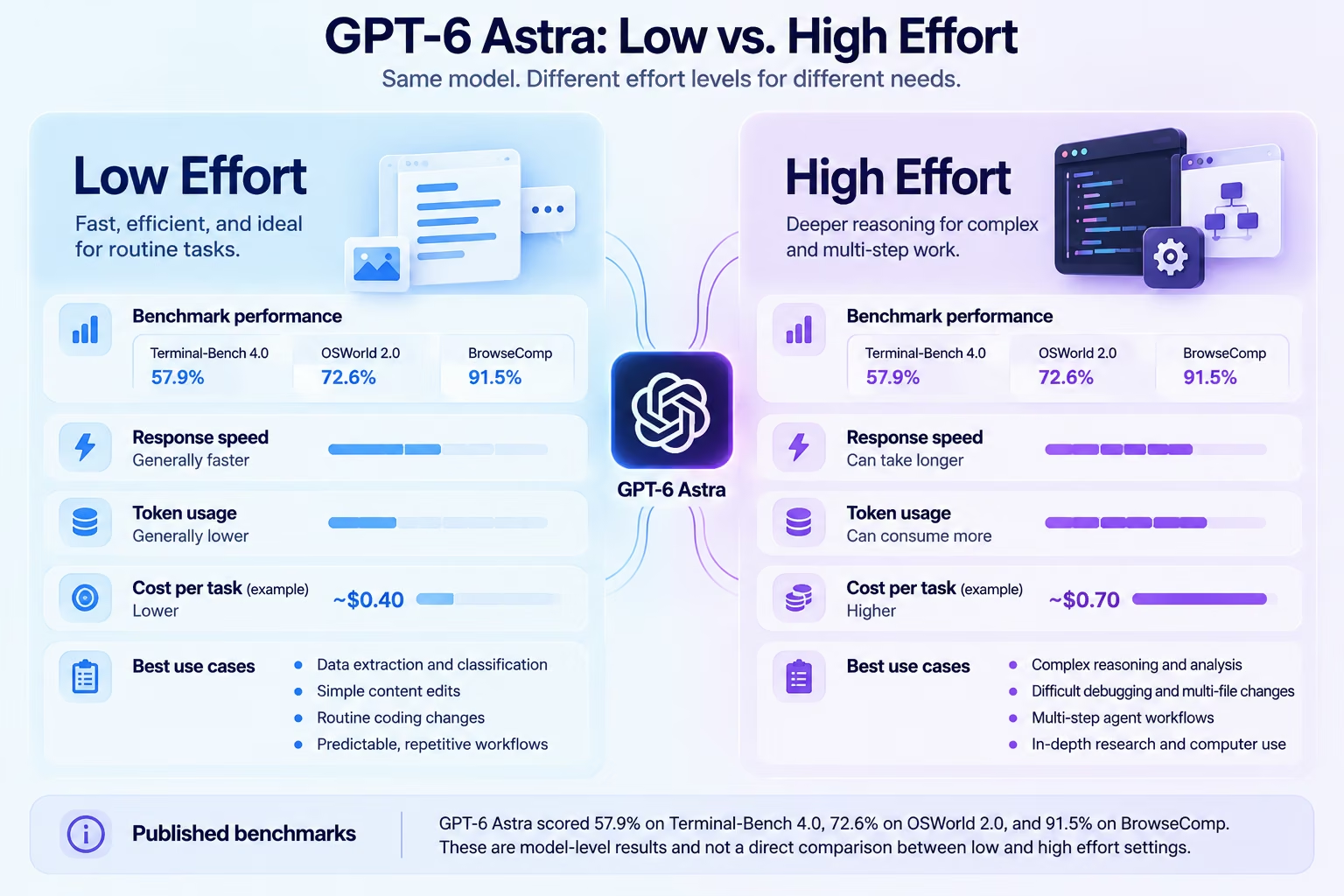
GPT-6 Astra Low vs High at a glance
The comparison is a general guide, not a guarantee of identical results across every workload. Prompt quality, tool availability, context size, and task complexity also affect performance.
When Low Effort Is Enough-and When It Is Not
Low effort is useful when a task has a clear objective, predictable steps, and an output that is easy to verify.
The model does not need to explore several feasible solutions or spend extensive time evaluating alternatives. It can focus on completing the requested operation.
Where Low effort works well
1. Data extraction and classification
A business may receive thousands of customer messages every day. Each message needs to be assigned to a category, such as billing, technical support, account access, or product feedback.
Low effort is a practical starting point because the task follows a predictable pattern. If the messages are support tickets, a customer support agent builder lets you define the categories and handoff rules around that pattern.
2. Routine content operations
Low effort can carry out tasks such as:
- Extracting information from documents.
- Rewriting short passages.
- Summarising straightforward content.
- Correcting basic grammar.
- Converting information into structured formats.
These operations usually have clear requirements and limited dependencies.
3. Simple coding changes
Developers do not need extensive reasoning for every code change. Updating a button label, correcting a simple syntax issue, or adding a simple form field may not require High effort.
4. Repeated business workflows
Applications that process similar requests at scale can benefit from lower reasoning consumption. Examples include categorizing support tickets, extracting invoice details, and routing customer inquiries.
An AI app builder can help teams create applications around these workflows without building every component from scratch.
Where Low effort can fall short
Low effort becomes less suitable when a request contains hidden dependencies as well as requires several stages of investigation.
Consider an agent asked to investigate why a website’s checkout process is failing.
The task may include reviewing application logs, inspecting source files, reproducing the issue, checking API responses, and testing a correction.
A straightforward response may identify one possible cause without investigating the complete workflow.
Low effort can also be less suitable when the model needs to compare several sources, verify an action, or make decisions that depend on earlier results.
The takeaway: Low effort is a good starting point for predictable work. Move to a higher setting when the task requires deeper investigation, more planning, or additional verification.
Where High Effort Pays for Itself
High effort is designed for tasks that benefit from more extensive reasoning. It gives GPT-6 Astra more room to analyze complex instructions, evaluate alternatives, and work through dependent steps.
The additional reasoning can be useful when an incomplete result creates significant downstream problems.
Intricate reasoning and analysis
Consider a business analyst investigating a sudden decline in customer retention.
The task may require comparing customer segments, examining purchase histories, reviewing support complaints, and identifying patterns across several datasets.
A High-effort configuration is better suited to this type of work because it can spend more resources evaluating possible explanations.
High effort is particularly useful for:
- Analyzing detailed datasets.
- Comparing competing explanations.
- Reviewing lengthy technical documents.
- Planning projects with multiple dependencies.
- Producing recommendations from several sources.
- Investigating problems that call for careful verification.
Difficult software engineering
Complex development work frequently involves more than writing a piece of code.
A developer may ask an AI agent to investigate a production bug, identify the underlying cause, modify several files, execute tests, and review the final implementation.
Higher effort can support additional iterations and more extensive verification.
Long-running agent workflows
An AI agent may need to:
- Understand the user’s objective.
- Search relevant files and information.
- Call external tools.
- Analyze the returned results.
- Make decisions based on those results.
- Execute actions and verify completion.
Each step can affect the next. Higher effort is useful when the agent must coordinate several dependent actions and preserve consistency throughout the workflow.
Teams learning how to build AI agents from scratch should consider effort selection as part of workflow design.
However, High effort is not automatically the right choice for every agent action. A well-designed application can use Low for routine operations and High for complex decisions.
Reasoning Depth: What the Benchmarks Actually Show
Benchmarks help evaluate GPT-6 Astra’s capabilities across coding, reasoning, browsing, and computer use. However, benchmark results need to be interpreted carefully.
OpenAI publishes model-level benchmark results, but these should not automatically be treated as direct comparisons between Low and High effort.
The published evaluation scores are the maximum achieved at any effort level unless a specific setting is identified. Therefore, a benchmark score for Astra does not establish that Low or High independently achieved that result.
Selected GPT-6 Astra benchmark results
The following results illustrate Astra's performance across various tasks. These results do not prove a certain percent improvement by putting in more effort.
What can be concluded about Low and High?
The practical distinction comes from how the model approaches a task.
- Low effort: Prioritizes efficiency for clearly defined requests.
- High effort: Allows more extensive planning, reasoning, and verification.
- Extra High and Max: Worth testing when representative evaluations show that High is insufficient.
For example, a model may complete a simple classification task successfully at Low. Increasing the effort may consume more resources without improving the result.
If the debugging job is hard, then High might be helpful since there are several files, causes, and tests involved.
So, the most appropriate comparison should not be about which configuration reaches a better benchmark value. It should be about which configuration provides the necessary task quality at an acceptable level of latency and cost.
For a wider model comparison, see Claude Opus 5.5 vs GPT-6 Astra. Teams comparing different model families can also explore what Claude Sonnet 5.5 is.
Coding and Practical-World Agent Tasks
Coding is one of the areas where the difference between Low and High effort is especially important.
A simple code edit and a multi-stage software engineering task place very different demands on a model.
Low effort for routine coding
Low effort can be useful for:
- Fixing simple syntax errors.
- Updating existing text or labels.
- Adding basic form fields.
- Writing small utility functions.
- Making straightforward CSS changes.
- Explaining short code snippets.
These tasks generally have clear outcomes and fewer dependencies.
For example, a developer updating a form validation message may not need the model to analyze the entire application architecture.
High effort for complex coding
High effort is better suited to tasks that involve several connected stages.
Consider a request to fix a database-related issue in an existing application. The agent may need to inspect the schema, review application logic, identify dependencies, implement a correction, and run tests.
Higher effort can support more extensive reasoning and additional iterations before the task is complete.
It is useful for:
- Multi-file code changes.
- Complex debugging.
- Refactoring existing applications.
- Database migration tasks.
- Building features with several dependencies.
- Testing and reviewing larger changes.
OpenAI’s published Astra results include a 57.9% score on Terminal-Bench 4.0. These results demonstrate coding-agent capability, but they should not be presented as direct Low-versus-High scores.
Choosing effort for AI agents
An AI agent may perform several operations within one workflow. Not every operation needs the same reasoning level.
For example, an internal commercial application could use:
This approach avoids using expensive reasoning for simple operations while preserving deeper analysis for important decisions. To build that split yourself, you can build a coding agent and set which steps run at Low and which at High.
An AI dashboard builder can help organize the operational data generated by these workflows. Teams can also build an internal tool with AI to manage requests, automate repetitive tasks, and monitor business activity.
Browsing and Computer-Use Workflows
GPT-6 Astra provides utilities that can assist in browsing and use of computer by taking advantage of the Responses API. Such capabilities allow it to browse through different sites, analyze data, launch applications and more.
The level of effort may affect how much planning and validation the model performs in these processes.
Low effort for straightforward browser tasks
Low effort can be a suitable starting point for simple, well-defined actions, such as:
- Finding a specific record.
- Retrieving a particular value from a webpage.
- Completing a straightforward form.
- Locating a document.
- Updating a clearly identified field.
These tasks have limited decision-making requirements.
High effort for complex computer use
More demanding computer-use workflows can involve several screens, changing application states, and dependent actions.
For example, updating a customer record in a CRM may require checking the customer’s identity, reviewing existing information, changing multiple fields, and confirming that the update was saved correctly.
High effort is more appropriate when the workflow requires careful planning or verification.
OpenAI reports a 72.6% score on OSWorld 2.0 and 92.7% on ScreenSpot-Pro for GPT-6 Astra. Its launch evaluation also reports a 59.3% score on Agents’ Last Exam.
These are model-level results. They do not show the exact performance difference between Low and High effort.
For teams building browser-based business workflows, an internal tool builder can help connect repetitive operations into custom applications. An internal dashboard builder can also bring important metrics and workflow information into one place.
The Real Cost per Task, Not per Token
GPT-6 Astra uses the same standard API token prices at Low and High effort. The difference in total cost comes from how many tokens a request consumes and which tools the workflow uses.
Higher effort can consume more reasoning tokens. It may also require additional output tokens when the model produces a more detailed response.
However, the increase is not fixed. A simple request may use almost the same resources at both settings, while a difficult task may require considerably more reasoning at High.
GPT-6 Astra API pricing
OpenAI’s published standard API rates are:
Batch and Flex processing are priced at 50% of standard rates. Fast mode costs twice the applicable standard rates. Tool-specific usage may incur separate charges.
Example: Low vs High cost per task
Look at two imaginary requests of equal input size but with different output token consumption.
Here, the High-effort request is priced $0.30 higher because it uses more output tokens.
These numbers are sample computations, and not real measures of average usage in each effort level. Actual costs will vary depending on reasoning tokens, output generated, caching, context size, and tools used.
Why cost per successful task matters
The cheapest request is not necessarily the most economical workflow.
Suppose Low effort completes a task for $0.40 but requires manual correction. High effort completes the same task for $0.70 with fewer corrections.
The second option may offer better overall value if it reduces human review, repeated requests, or downstream errors.
For a more detailed breakdown of operating expenses, read the guide to AI agent cost.
Firms developing AI applications should consider the cost of successfully completing the task instead of simply comparing the token prices.
A Practical Decision Framework
Choosing between GPT-6 Astra Low and High effort depends on task complexity, risk, response-time requirements, and the cost of an incorrect result.
Use the following framework as a starting point.
Choose Low effort when:
- The task follows a predictable pattern.
- You are extracting or classifying information.
- You need a small code edit.
- The output is easy to verify.
- Response speed and token efficiency are priorities.
Choose High effort when:
- The task requires complex reasoning.
- You are debugging code across multiple files.
- An agent must complete several dependent actions.
- The workflow involves detailed research.
- The result needs careful review or verification.
- An incomplete result could cause significant problems.
When should you use Medium, Extra High, or Max?
Low and High are not the only available settings.
Medium can provide a useful balance when a task needs some planning but does not require extensive reasoning. Extra High and Max are worth evaluating when a difficult task still falls short at High.
The best setting should be determined through representative testing.
Compare each configuration using:
- Task completion rate.
- Accuracy and output quality.
- Response latency.
- Reasoning and output token consumption.
- Human correction requirements.
- Total cost per successful task.
Applying effort levels in AI-powered applications
A single business application may handle both routine operations and complex investigations. Using High for every request can increase costs without adding meaningful value to simpler tasks.
Now think about a sales operations application. Low effort might involve classifying leads, extracting customer data, and routing inquiries. Medium effort could include comparing regional sales performance against each other. High effort could examine an unanticipated drop-off in conversion rates using multiple datasets.
An AI app builder can help teams create custom applications around these workflows. Businesses can also build custom internal software to connect data, automate operations, and manage business processes.
The same principle applies to teams that want to build software without coding. Matching effort to task complexity can help balance output quality, response time, and operating costs.
Conclusion
Choosing between GPT-6 Astra Low and High effort comes down to the complexity of the task, the level of accuracy required, and the cost of getting it right.
Low effort is an appropriate method to employ for performing standard activities, for fast replies, for information gathering, and for easy programming. In case of complicated reasoning, debugging, and multiple-step procedures, high effort is more efficient. The right way of approaching any task would be to start with low or medium effort and then proceed to high effort only if necessary.
For teams building applications, internal tools, or AI-powered workflows, choosing the right reasoning effort can make a meaningful difference to development efficiency and output quality. Emergent helps turn ideas into functional applications and internal tools using AI, making it easier to move from planning to building without managing every part of the development process manually. Explore Emergent's AI app builder to see how AI can help accelerate application development.
The goal is not to use the highest effort setting for every task. It is to use the level that delivers the best results for the work at hand.


Most AI app builders stop at prototypes. Emergent creates production-ready apps you can actually launch.
- Production-ready apps
- Web & mobile apps
- Deploy in minutes