
TL;DR
- Ideal for: Individuals who frequently do repetitive actions on various websites and business software programs.
- Features: Persistent cloud computer, web automation, background processes, memory, scheduling, and cooperation between bots.
- Performance: The platform is designed to handle complex flows; however, its reliability in real life has yet to be tested.
- Pricing: Subscription access to the product is available through eligible Cursor and Grok subscription services.
- Disadvantages: Human interaction is sometimes needed on some websites, costs of usage are hard to predict, and being in beta means extra care.
- Verdict: It is worth considering for workflows that involve the Web, but only under your supervision.
Grok Bot integrates AI agents capable of interacting with each other via the cloud environment. The main functions of this tool are browser automation, persistent memory, background processes, and collaboration between different bots.
Nevertheless, its usefulness is limited by the necessity of subscribing to this service and by the efficiency of completing tasks by the agents. For people who are acquainted with other programs like Claude Code or Codex, certain principles of Grok Bot will be familiar; however, the program implements them in a persistent cloud environment.
In this Grok Bot review, we will consider the features, pricing, security options, limitations, and potential applications of this product.
What Is Grok Bot?
Grok Bot is the interface through which you will create a team of bots in the xAI system. Imagine a better version of OpenClaw and Hermes. Each of the bots will be equipped with Grok, and then each bot will be responsible for certain tasks, for example, coding, research, Google search, or content writing.
The key point is that these bots operate collectively. You will have the opportunity to communicate between them, share files, and run them even if your computer is turned off. This is possible due to the fact that they all use a single virtual computer running in the cloud.
It should be noted that there are many videos in which people say that bots use their computers. This is wrong; they use one virtual computer and exchange files among themselves thanks to it.
Grok Bot supports the majority of popular applications: Google Workspace, Slack, GitHub, Vercel, etc. Bots have skills and routines, the same as Claude Code. In addition, bots become smarter, looking through the history and adjusting themselves. There is also an iOS application for them.
According to the official Grok Bot documentation, the system includes a browser, filesystem, and terminal. It can also retain preferences, files, and browser sessions across tasks.
Grok Bot vs Grok Chatbot
The standard Grok chatbot is designed for conversational tasks such as answering questions, researching information, and generating content.
Grok Bot focuses on task execution. It can use a browser and connected tools to work through a sequence of actions, retain context between sessions, and run certain tasks in the background.
For example, the chatbot could explain how to research potential customers. Grok Bot is designed to help carry out the research using available websites and tools.
The distinction is important when choosing between a conversational AI assistant and an agent intended to perform work.
Grok Bot Features: What Can It Do?
1. Persistent Cloud Computer
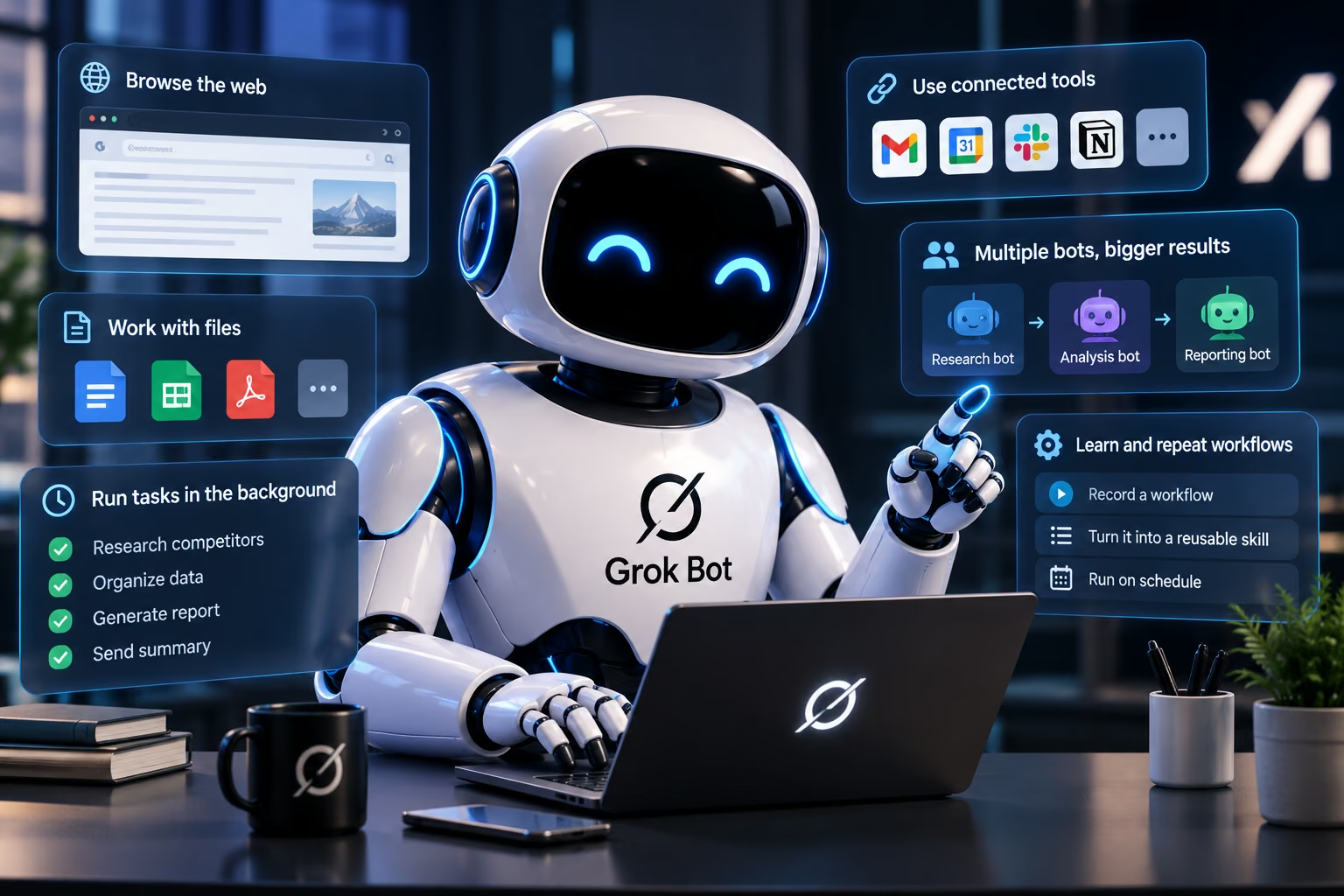
Each Grok Bot runs on an independent cloud computer. Here, the environment includes a web browser, file system, and terminal through which the software can engage with websites and handle files.
Since the environment is cloud-based, operations are not disrupted even when you shut down your laptop or app.
It is helpful for long-term processes but cannot assure continuous processing because there is the possibility of automation being blocked by websites, session expirations, and certain steps requiring human intervention.
2. Browser Automation and Connected Apps
Grok Bot can interact with browser-based services, including websites that do not have a dedicated integration. Where supported, it can also use connected apps to carry out tasks.
Potential applications include researching leads, updating information, preparing reports, and moving data between online tools.
Browser access makes the agent flexible, but it also introduces risks. A page may change, an instruction may be misinterpreted, or an action may affect the wrong record. Review important changes before allowing them to proceed.
3. Persistent Memory and Context
Grok Bot is able to store role guidelines, preferences, files, browsing session data, and information about previous work done.
This minimizes the necessity to provide the same context each time. For example, a bot designated for researching competitors would have the research guidelines stored along with previous results.
It is worth noting that memory is not a substitute for verification, which, according to the official documentation, is highly recommended.
4. Scheduled Routines and Background Tasks
Grok Bot supports background execution and routines, allowing it to work without requiring the user to remain in the conversation.
A routine might involve gathering information, preparing a report, or repeating a defined workflow on a schedule.
These capabilities are useful for recurring tasks, but users should confirm that the workflow completed successfully. A scheduled task can still encounter errors or require approval before taking action.
5. Multiple Bots Working Together
Grok Bot allows multiple bots to work in parallel, exchange messages, and coordinate tasks through group conversations and handoffs.
For example, one bot could gather information while another organizes the findings into a report.
This method could save some manual effort in workflows that consist of several steps. But breaking up tasks among different bots is not necessarily an accuracy booster. The output will have to be verified again, even if it serves as an input for another bot.
6. Teach-A-Task Features
Grok Bot can learn some tasks through demonstration. A user can demonstrate how to perform a series of actions on the browser, and the bot would then transform this demonstration into a reusable skill.
This would make the task setup easier. However, some extra instructions for decision making and error handling may be required to be learned. This feature availability may depend on the roll-out stage.
Grok Bot Performance Review: What Do Reviews Say?
Grok Bot’s documentation describes its capabilities, while third-party reviews offer insight into its limitations and practical value.
A review by eesel AI examined the published documentation and early user reports. It found that persistent cloud execution, memory, and coordination between bots were among the product’s notable capabilities. It also highlighted gaps involving testing environments, action-level auditing, and administrative controls.
The review was based primarily on documentation and early reports rather than extensive independent hands-on testing. Its findings should therefore be treated as an assessment of the product’s documented state, not a definitive benchmark.
Where Grok Bot Looks Promising
Grok Bot’s strongest use case is repetitive work that involves moving between websites and applications.
For example, a user might need to research companies, collect information, organize the results, and prepare a summary. A persistent agent can potentially handle multiple stages without requiring a separate prompt for every action.
Its cloud computer is particularly relevant when a workflow depends on browser interactions rather than a clean API or dedicated integration.
Where It Falls Short
Complex workflows introduce several failure points. A bot might misunderstand an instruction, encounter a blocked website, make an incorrect change, or stop when it needs human verification.
The eesel review also flags the lack of a sandbox for safely rehearsing workflows. This matters because a test run can perform real actions rather than operating in a completely isolated simulation.
Before using Grok Bot for important work, test it on low-risk tasks. Measure task completion, accuracy, time saved, and the number of corrections required. Do not assume that a successful demonstration proves the workflow will remain reliable at scale.
Grok Bot Pricing: How Much Does It Cost?
Grok Bot's value depends partly on the subscription required to access its cloud-computing and automation capabilities. According to the pricing information reviewed for this article, access to the cloud-computer feature is associated with Cursor Ultra, priced at $200 per month.
The subscription also includes access to Cursor, so the cost should be evaluated against the broader package rather than Grok Bot alone. However, users primarily interested in persistent AI agents may find the price difficult to justify if they do not need the additional Cursor features.
Before subscribing, confirm the current plan requirements, feature availability, usage allowances, and any additional costs. Access may depend on subscription eligibility and rollout status, so check the official pricing pages before making a purchase.
Cost is not the only consideration. Users should also account for the time needed to configure workflows, review results, handle errors, and approve sensitive actions.
For users already working with tools such as Claude Code or Codex, the decision also depends on whether Grok Bot's persistent cloud environment and multi-agent coordination offer enough additional value to justify the subscription.
Grok Bot Security and Privacy: Is It Safe?
Grok Bot can interact with logged-in websites and connected services, making permission management important.
The official security documentation describes approval controls and rules that determine which actions a bot can perform automatically. Users can require approval for actions such as sending messages, publishing content, making purchases, deleting data, or changing permissions.
These controls help users define boundaries, but an approval prompt is only useful when the proposed action is clear. Review the target, scope, and expected effect before authorizing it.
The persistent browser environment also deserves attention. Saved sessions can make recurring tasks more convenient, but anyone with access to the bot’s working environment may potentially be able to reuse those sessions within the permissions available.
Remember separate bots are not a security boundary. Because all bots on a user's account share the same cloud computer, file system, and browser cookies, spinning up a "separate" bot for a sensitive task provides no actual isolation. If one bot is logged into your bank, all your bots theoretically have access to that logged-in session.
For safer usage:
- Grant the bot only necessary permissions regarding the accounts.
- Ensure that purchases, messaging and destructive operations need permission to be performed.
- Analyze the actions prior to approving them.
- Refrain from using the bot for sensitive operations until you understand its behavior.
- Consider privacy policies and data retention policies.
- Track the bot usage and investigate any suspicious activity.
For corporate implementations, analyze the bot security, administration and compliance documentation prior to integrating the bot with your company systems.
Grok Bot Pros and Cons
| Pros | Cons |
|---|---|
| Persistent cloud computer for browser-based work | Website automation can fail |
| Tasks can continue in the background | Some workflows need human intervention |
| Retains context between sessions | Stored sessions require careful access management |
| Supports multiple bots and task handoffs | Coordinating bots does not guarantee accuracy |
| Can learn certain workflows from demonstrations | Reusable skills may need refinement |
| Supports approval controls | Users must supervise consequential actions |
| Works across desktop and mobile platforms | Pricing and usage allowances need careful review |
Grok Bot’s main advantage is its ability to perform work across browser-based tools. Its main concern is the gap between performing actions and reliably completing them without supervision.
What to Consider When Comparing Grok Bot Alternatives
The right alternative depends on the work you want to delegate.
| Comparison factor | What to evaluate |
|---|---|
| Task execution | Can the agent complete an entire workflow? |
| Browser access | Can it navigate websites and handle forms? |
| Memory | Does it retain useful context between sessions? |
| Integrations | Does it work with your essential applications? |
| Safety | Can you restrict and approve sensitive actions? |
| Pricing | Are usage allowances and additional costs predictable? |
Grok Bot can be reviewed if you work in a browser-centric environment or need some persistence in your tasks. Meta Muse can be considered another choice for automating personal tasks, whereas some other AI assistants can prove to be more useful for business processes.
Test out both platforms with the help of the same tasks instead of comparing their features blindly. Measure the rate of completion, mistakes, time spent, and number of human interventions in the process.
Who Should Use Grok Bot?
Professionals Engaged in Repetitive Tasks on the Web
Researchers, operations managers, and other professionals who regularly transfer data between websites can find browser automation useful.
Users Involved in Repetitive Workflows
Users who regularly carry out the same series of tasks can find persistent state, scheduling, and reusable abilities useful.
Groups Investigating Multi-Agent Workflows
Groups requiring concurrent research or task delegation will appreciate coordination between multiple bots, provided there is an established review and permission process for them.
When Can Users Consider Other Options?
Grok Bot may not be the best choice for users who need guaranteed execution, compliance assurance, predictable costs of usage, or extensive administration that has not been verified for their plan.
It may also be excessive for simple tasks that a standard chatbot, spreadsheet, or existing automation tool can handle more easily.
Final Verdict: Is Grok Bot Worth Trying?
Grok Bot is worth considering in case you have to carry out repetitive browser activities, continuous processes, or even coordination of multiple AI agents. With cloud computing, memory, and background processing, it may be possible for you to eliminate manual management of all steps involved.
Nevertheless, there is no guarantee that tasks will be carried out successfully since browser issues, permissions required, problems in workflow, and human interactions will still take some time. The subscription fee is worth examining especially when you are going to use just a few automation capabilities.
Begin with a safe process and test it in terms of its success rate, accuracy of completion, time saved, and costs involved before implementing it in other complicated activities. Check out the security measures and approval processes before attaching sensitive accounts.
If you need a purpose-built application rather than a general-purpose agent, Emergent's AI agent builder offers another approach. You can describe an application in natural language and use AI to build its frontend, backend, and database.
Try Emergent to build an AI-powered tool tailored to your business workflow, with the functionality and controls your use case requires.
Most AI app builders stop at prototypes. Emergent creates production-ready apps you can actually launch.
- Production-ready apps
- Web & mobile apps
- Deploy in minutes
Most AI app builders stop at prototypes. Emergent creates production-ready apps you can actually launch.
- Production-ready apps
- Web & mobile apps
- Deploy in minutes