You can build an AI-powered real estate CRM that saves you time and money. Define your idea, conditions, design and workflow and test the application to ensure it meets your requirements. AI development tools can reduce manual coding, while your team can manage workflows, permissions, and business rules.
This guide explains how to build a real estate CRM with AI, the features you need to incorporate into an AI tool, and how to build it without writing code for everything. Its AI CRM builder also covers integrations, expenses and security issues that can affect a real estate CRM project.
What Is a Real Estate CRM?

A real estate CRM helps agents, brokers, and property owners manage leads, clients, communications, properties, and transactions throughout the sales process.
It connects client information with property preferences, schedules appointments, and helps agents offer and close deals. AI-powered CRMs stand out from general contact managers. It can also handle repetitive tasks, summarize interactions, and help teams prioritize follow-ups.
For instance, an agent can record buyers' preferences for a property’s cost, location and type. The CRM can organize suitable listings, track property visits and remind the agent to follow up on the processed leads.
A real estate CRM includes the following:
- Contact management: Stores buyers, sellers, tenants, landlords and investors' details in an organized manner.
- Lead management: Captures leads from websites and online platforms, referrals, advertisements, and other sources, and keeps them organized.
- Property management: Organizes property listings by location, cost, availability and specifications.
- Activity tracking: Records emails, calls, meetings, visits, and follow-up tasks.
- Deal management: Tracks negotiations, offers, contracts and transaction stages.
- Reporting: Monitors lead conversion, pipeline view, agent activity, and sales performance.
AI helps the team by adding another layer to agent processes and automating work. For examples of what finished systems look like, see our CRM system examples guide.
Why Does a Real Estate Business Need a CRM?
A real estate company needs a CRM to streamline client data, avoid missed follow-ups, and give agents a clearer view of their sales funnel.
Using spreadsheets, messaging apps, and separate contact lists can make it hard to find important information. A CRM provides a unified history of customer communications and property needs, with appropriate permissions.
Here are the major advantages.
Better lead management
A CRM tracks where leads come from, what properties they're interested in, and what the agent needs to do next. Teams can assign leads to agents and track progress.
More consistent follow-ups
Agents can set reminders and follow-up activities on specific events. For instance, when a property is viewed as completed, a reminder can be set for the next day to contact the buyer.
Clearer sales pipelines
A visual pipeline helps brokers spot leads at every stage, from early inquiry to negotiation and closing. Managers can identify unmet opportunities and agent workload.
If your brokerage runs its own stages, such as Viewing Scheduled and Offer Made, you can build a CRM around that exact pipeline with a sales CRM builder.
Less repetitive administration
AI can summarise conversations, draft standard emails, and extract key information from notes. Agents can save time on manual record updates, but should still check AI-provided details before using them.
More useful business reporting
A CRM can tell you the sources of leads, appointments, and closed deals. These reports let teams analyze performance with consistent definitions and trustworthy data.
Must-Have AI Features in a Real Estate CRM
Most AI features should address workflow errors first, not add automation for its own sake. Start with features that improve data quality, lead response, and agent productivity.
These features require different levels of implementation. It uses a simple language model, reliable, automated responses require valid historical data, appropriate evaluation methods, and ongoing procedures.
A lead score should support the agent, not replace them. Property recommendations should be based on current, diverse information. The AI agent should verify a property's availability and suitability before contacting a client.
How to Build a Real Estate CRM With AI: Step-by-Step
To create a real estate CRM, follow seven steps. These steps range from generating an idea to building an app for your business. The steps to create a real estate CRM are as follows:
Step 1: Define Your CRM Requirements
First, identify your users, the problems your CRM should solve, and the processes it needs to support. By exploring these requirements, you can avoid building features your team doesn't need.
List the system's beneficiaries, such as agents, brokers, sales managers, and administrators. Then record their duties.
For example:
- Agents require contact records, property preferences, viewing schedules, and follow-up reminders.
- Brokers need pipeline reports, deal tracking, and agent assignments.
- Administrators require user management, permissions, and configuration settings.
Map your current sales process. A real estate brokerage may go through the following stages:
New Lead → Contacted → Qualified → Viewing Scheduled → Negotiation → Closed
Output: A document describing the user(s), key features, pipeline stages and success criteria.
Step 2: Choose the MVP Features
Your initial CRM version should include the core functionality agents need for daily work. Create a working 'minimum viable product' first, then add more sophisticated AI and reporting features.
Add the following optional modules:
- Contacts and lead records
- Property & listing management
- Manage leads, including who has been assigned to each lead and which lead is currently being worked on.
- Reminders, appointments, and tasks.
- Buyer and seller channels
- Basic dashboards and reports are provided.
- Auto login and user rights and privileges
Avoid adding every feature at launch. For example, you could consider implementing predictive lead scoring once you've gathered enough data to determine whether it is beneficial.
Output: Feature list prioritized and broken down into items that need to be in the product for launch and items that can be added later.
Step 3: Design the Database and User Interface
Model the database according to the relationships among people, properties, activities, and deals. A structured data model eliminates duplicate records and simplifies reporting.
A good starting model combines these entities:
- Contacts: Name, email, phone, contact type, preferences.
- Property data: Listing ID, location, price, property type, status.
- Leads: Source, assigned agent, stage, priority.
- Activities: Activity type, date, notes, next action.
- Deal properties: Property, buyer or seller, stage, expected value.
- Users: Role, team, permissions.
Use a unique ID to link records. A contact may want more than one property, and a property may receive multiple leads. These relationships should be reflected in your data model.
Next, design the primary screens: the lead inbox, contact profile, property directory, deal pipeline, calendar, and reporting dashboard.
Keep navigation simple. Agents should be able to find a contact, review the most recent interaction, and log the next action without navigating through unnecessary screens.
Output: A database schema and screen layout to mimic your real estate workflow.
Step 4: Build the Core CRM Workflows
Eliminate repetitive administrative processes through a clear, rule-based process. Then consider predictable events before introducing AI-driven decisions.
For instance, a new lead flow might look something like this:
- A visitor to your site asks you a question.
- The CRM creates a lead record and records the inquiry source.
- The system routes the lead according to your routing rules.
- It generates a follow-up task for the assigned agent.
- The agent reaches out to the buyer and documents the outcome.
- The CRM updates the lead stage and sets the next step in the process.
You can set up similar workflows for property viewings, seller updates, open house sign-ups, and deal milestones.
Specify a failure action for a workflow. The CRM should flag the issue if the notification fails or the lead lacks contact information.
Output: Repeatable processes that minimize manual data entry and make follow-up tracking easier.
Step 5: Add AI Features to Your Real Estate CRM
Use AI for tasks that save time or help agents interpret information. Keep routine business rules separate from AI-generated suggested business rules.
Begin with three practical skills.
- Lead qualification using AI: Summarize a lead's needs based on the information they provided and the specific business criteria. Do not change a lead's priority without agent confirmation.
- Emails created with AI: Draft emails and review confirmations and follow-up emails using verified CRM data. Where accuracy, consent, or business policy requires it, require agent review before sending messages.
- Property matching powered by AI: Match a buyer's budget to current property listings, location, property type, and other stated requirements. Return matched properties and indicate which properties match.
Later, you can delve into conversation summaries, natural-language reporting, and predictive lead scoring.
Identify failure cases, inputs, and outputs for each feature. For instance, if an AI assistant says it doesn't have enough information, it should state that rather than making up a property's price or availability.
Output: AI functions that support specific tasks and help verify critical decisions.
Step 6: Integrate External Tools and MLS Data
Integrate your CRM with the systems your team uses, but verify the availability, permissions, and data requirements for each integration before development.
Potential integrations include:
- Management of communication and appointments via email and calendar.
- Web-based forms and lead generation sites for inquiry collection
- An SMS service to send permitted notifications.
- Deals administration, accounting or transaction systems.
- Advertising data providers or MLS systems for information about properties
“Can an AI real estate CRM connect to an MLS?”
Yes, if a relevant MLS or an authorized data provider offers a suitable integration and grants access. MLS data isn’t available through a single open API. Access, permitted uses, display rules, and technical requirements vary by provider and by agreement.
Before building the integration, verify the API, authentication, data fields, refresh frequency, and any restrictions on data display or redistribution. Test listing updates and the addition, removal, and expiration of CRM properties.
Direct MLS access may be unavailable and require an authorized third-party provider or a permitted alternative data source.
Output: Ensured connections keep the data up to date without requiring access rights you don't have.
Step 7: Test, Secure, and Deploy the CRM
Test the CRM with sample records and workflows before launch; a working prototype may not be secure or production-ready. Check:
- Functionality: Create, edit, search, assign, and update records.
- Workflows: Reminders, notifications, assignments, and exceptions.
- AI: Message analysis, summaries, property matches, and improper or incomplete entries.
- Permissions: Confirm users can access only authorized records and actions.
- Integrations: Authentication, synchronization, API failures, and duplicates.
- Security: Authentication, encryption, backups, logging, and data retention.
Install the application in the target environment, load fresh data, and hold a small user-training session. Track errors and feedback before opening access.
Outcome: A tested CRM package that is documented, has suitable security measures in place, and has a rollout plan.
Build Your Real Estate CRM Without Code Using Emergent
Emergent offers an AI tool that lets you build your real estate CRM in plain English by describing the app you want. Its real estate CRM builder includes workflows for lead management, listing management, client follow-up, showing coordination, and deal tracking.
This section explains how to build a real estate CRM with Emergent, from defining requirements to testing and deployment.
You can build a real estate CRM in three ways: use an AI app builder, hire a real estate app developer, or build one from scratch. Custom development takes more time and requires more resources, but it gives you more control.
Step 1: Describe your CRM requirements
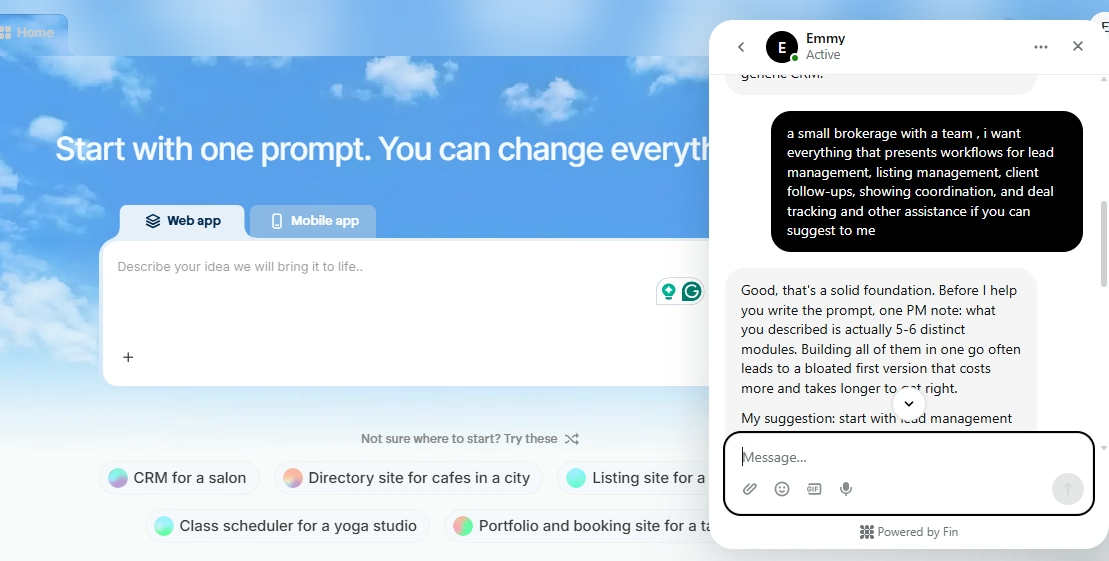
First, draft the CRM requirements before finalizing the prompt. Decide what your interface will look like, what your dashboard should include, and what other features will support smooth operations. You can also use Emmy, Emergent’s assistant, for brainstorming.
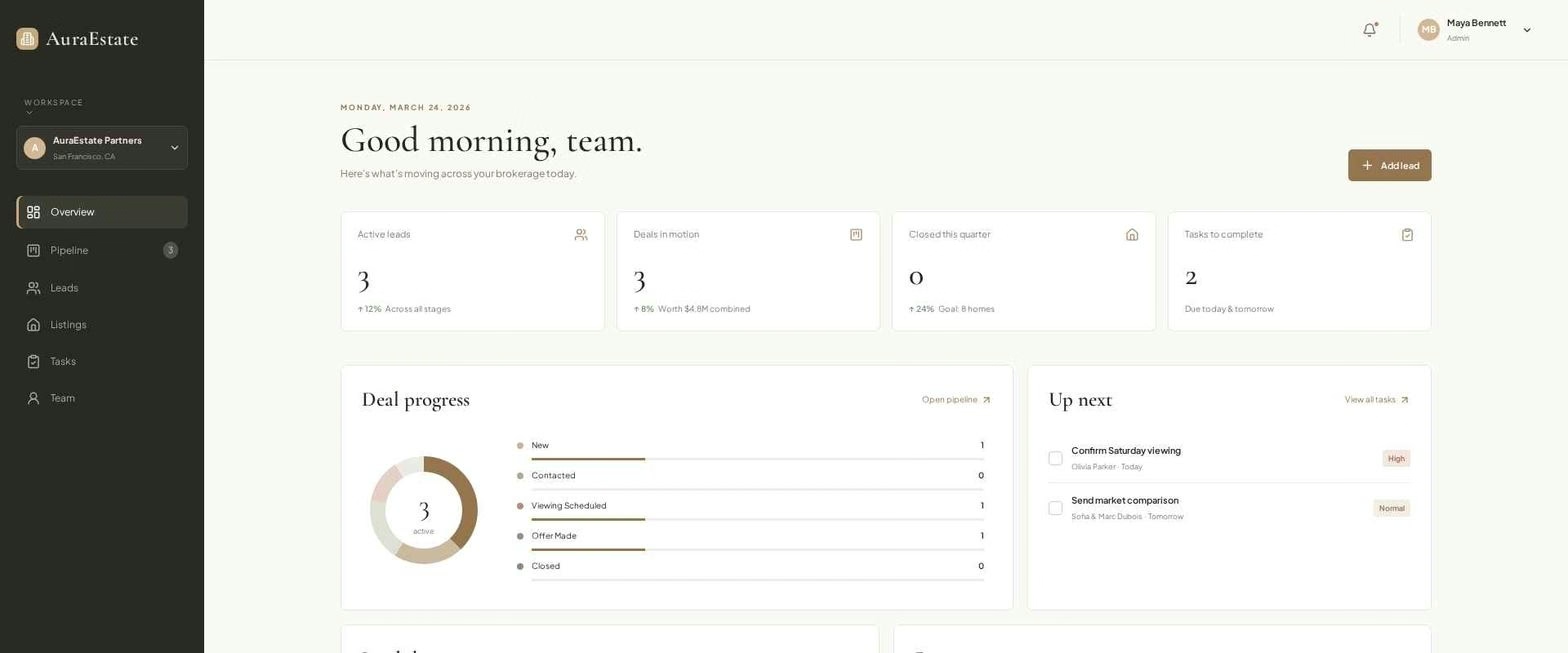
“Build a Real Estate CRM for a small brokerage team. The app should let team members log and track leads, assign leads to agents, and move deals through a pipeline with stages like New, Contacted, Viewing Scheduled, Offer Made, and Closed. Each lead should have a profile with contact details, property interests, and a notes/activity log. Include a listings section where agents can add properties with details, status, and link them to interested leads. Add a task and follow-up system so agents get reminders for client check-ins. Show a team dashboard with deal progress, lead counts per agent, and upcoming tasks. The experience should feel clean and fast for a non-technical sales team.”
Step 3: Give the CRM prompt to Emergent
After reviewing Emmy's recommendations, submit a prompt to Emergent to create a real estate CRM for a small brokerage. The prompt included lead profiles, agent assignments, property listings, activity logs, follow-ups, deal stages and a team dashboard.
The prompt also specified a simple interface that helps agents complete daily tasks without navigating unnecessary screens.
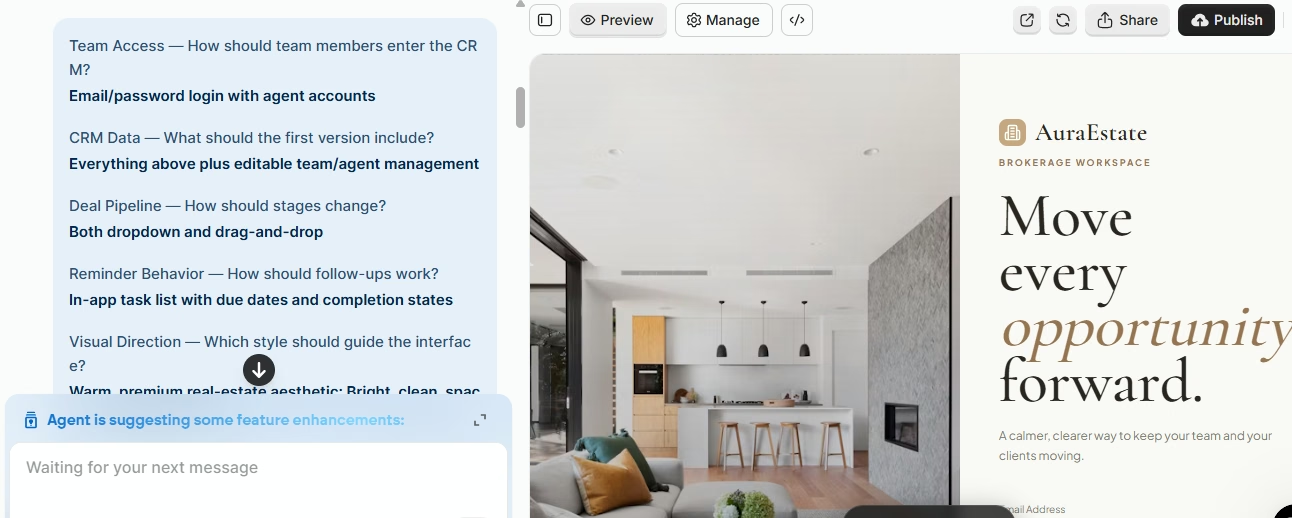
Emergent may ask clarifying questions about team access, initial data, pipeline stages, and reminders. Since these questions apply to every property, decide on them in advance:
- First, on team access: “How should team members enter the CRM?”
- Second, on CRM Data: “What should the first version include?”
- The second-to-last, on Deal Pipeline: “How should stages change?”
- And the final one, on Reminder Behavior: “How should follow-ups work?”
Step 4: Review and Refine the Generated CRM
Once Emergent develops the first application, see whether the agents can enter leads, connect properties to potential buyers, and move deals through the funnel.
Utilize follow-up prompts to handle missing data, navigation confusion, and workflow problems before adding new features.
During testing, test the login screen and sign-in process to ensure the dashboard loads successfully.

Step 5: Customize AI Features and Automations
After validating the core CRM, add AI-supported drafts, lead summaries, and recommended next steps. Automated task reminders and lead prioritization based on specific criteria can also be explored.
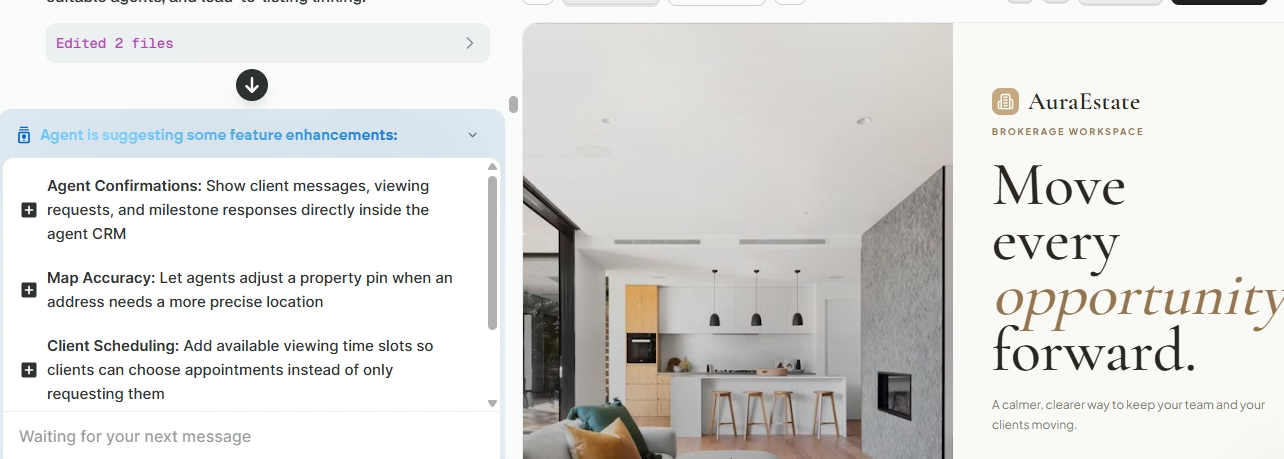
Step 6: Test and Deploy the CRM
Test lead generation, agent assignment, property listings, reminders, and deal updates using test data before inserting actual client data. Ensure that team members have access to the data that is allowed for their roles only.
The AI review, authentication, data management and backups were completed, and all issues were corrected before deploying the app in your brokerage.
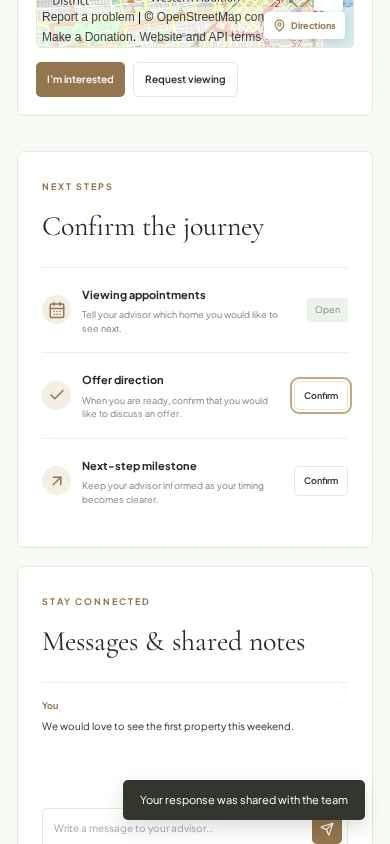
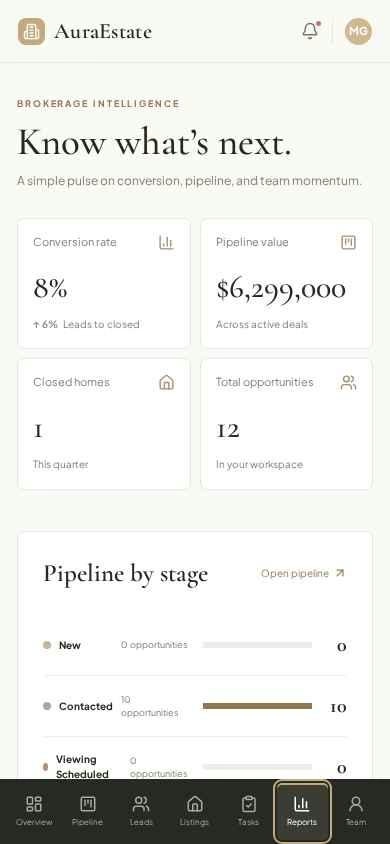
Test the client login from the mobile viewport and ensure that map, viewing, messaging, and milestone actions appear correctly.
“Google Maps with address pins and directions; OpenStreetMap, without paid map keys” and
Step 7: Enhance the CRM based on team feedback
After your CRM is in good shape to be used internally, have the agents use samples or approved live leads as per the regular procedure. Observe the gaps in the data entry, procedures that don’t need to be done, and any shortcomings in reporting. Then use this feedback to further enhance the software.
Final Verdict
The first step in developing a real estate CRM with AI is to establish a clear workflow, not a lengthy list of features. Know what you need, prioritize lead and property management, automate lead follow-up and property management, and add AI only when it delivers measurable value.
If you need extensive architectural control or specialized integrations, traditional development may be a better fit. Another option for teams who want to prototype and tweak an application using natural language instructions is an AI app builder.
Have a vision for building your own real estate CRM but don't know where to begin? Use Emergent's real estate CRM builder to outline your workflow, create a baseline application, and tweak it to meet your team's needs. Validate integrations and security before using it with live client data.

Describe it. Build it. Launch it.
- End-to-End Creation
- No Code Needed
- Live in Minutes
Most AI app builders stop at prototypes. Emergent creates production-ready apps you can actually launch.
- Production-ready apps
- Web & mobile apps
- Deploy in minutes