



10 Examples of CRM Systems: TL;DR
- HubSpot CRM: Best free starting point when you want sales, marketing, and service data in one system.
- Pipedrive: Best for keeping sales representatives focused on deal stages and next activities.
- Zoho CRM: Best value when you need deeper customization without Salesforce-level pricing.
- Salesforce Sales Cloud: Best for large sales organizations with complex processes and dedicated administrators.
- monday CRM: Best when sales work needs to stay connected to projects and operations.
- Freshsales: Best for smaller teams that want email, phone, and chat inside the CRM.
- Close: Best for high-volume outbound sales using calls, email, and text messages.
- Microsoft Dynamics 365 Sales: Best for organizations already working in Microsoft 365.
- Creatio: Best for larger companies that need deep process automation.
- Copper: Best for teams that want their CRM closely tied to Google Workspace.
A lead replies to an old email. One rep checks Gmail, another opens a spreadsheet, and the sales manager looks at a dashboard. All three see a different version of the customer’s history.
That is the problem a good CRM should solve. I reviewed the current product pages, official pricing, plan limits, workflow features, and user discussions across 10 leading CRM system examples. Everything here comes from close research of each vendor's own pages and real user discussions, rather than a hands-on build in every tool.
The four strongest choices are HubSpot for an accessible free starting point, Pipedrive for a focused visual pipeline, Zoho CRM for value and customization, and Salesforce for complex enterprise sales. The other six serve narrower workflows that still make sense for the right business.
Why Good CRM Software Still Fails
Customer relationship management (CRM) software keeps lead, customer, communication, deal, and follow-up information in one shared system. The software helps, but the setup determines whether your team will use it well.
Sales professionals discussing their CRM problems repeatedly described the same failures: too many required fields, disconnected integrations, incomplete activity histories, and systems designed for management reports rather than daily selling.
Several Salesforce comments blamed poor configuration rather than the underlying platform, while smaller teams wanted simple email logging, notes, reminders, templates, and a clear record of every interaction.
A CRM should pass three basic tests:
- A representative can understand the next action without opening five records.
- Customer emails, calls, notes, and meetings appear in one history.
- Management gets useful reports without forcing the sales team to enter unnecessary data.
Choose the smallest CRM that handles your real sales process. More fields, dashboards, automations, and AI features won’t fix an unclear pipeline.
How I Researched These CRM System Examples
I reviewed each vendor’s official product and pricing pages. I compared the free plan or trial, starting cost, contact and pipeline management, communication capture, workflow automation, reporting, integrations, customization, and the administrative work required to keep the system useful.
I also reviewed the r/sales thread “What CRM you use and what are your biggest hitches with it?” to identify problems that vendor pages rarely emphasize. Those comments led to one central question: How much extra work will this CRM create before it starts saving work?
I selected four primary recommendations because they cover the clearest buying paths:
- HubSpot for an easy entry point and connected customer tools.
- Pipedrive for straightforward pipeline execution.
- Zoho CRM for cost-conscious customization.
- Salesforce for enterprise control and scale.
The remaining tools solve more specialized problems, but they aren’t the strongest default recommendation for most readers.
10 CRM System Examples: Quick Comparison
Prices are in US dollars per user or seat per month, depending on the vendor. Annual prices are monthly equivalents paid annually.
| CRM | Best for | Free Plan and Starter Paid Plan |
|---|---|---|
| HubSpot | Free all-in-one start | Free: $0/month for up to two users; Starter: $20/seat/month |
| Pipedrive | Visual sales pipelines | No free plan; Lite: $24/seat/month ($14/seat/month billed annually) |
| Zoho CRM | Value and customization | Free: $0/month for three users; Standard: $20/user/month ($14/user/month billed annually) |
| Salesforce | Complex enterprise sales | Free Suite: $0/month for two users; Starter Suite: $25/user/month |
| monday CRM | Sales plus project work | No free plan; Basic: $18/seat/month ($12/seat/month billed annually); three-seat minimum |
| Freshsales | Built-in communication | Free: $0/month for three users; Growth: $11/user/month ($9/user/month billed annually) |
| Close | Outbound calls and email | No free plan; Solo: $19/user/month ($9/user/month billed annually) |
| Dynamics 365 Sales | Microsoft organizations | No free plan; Professional: $65/user/month, paid yearly |
| Creatio | Process automation | No free plan; Growth + Sales: $40/user/month + $15/user/month; $10,000 annual minimum |
| Copper | Google Workspace | No free plan; Basic: $29/seat/month ($23/seat/month billed annually) |
1. HubSpot CRM: Best Free CRM Starting Point
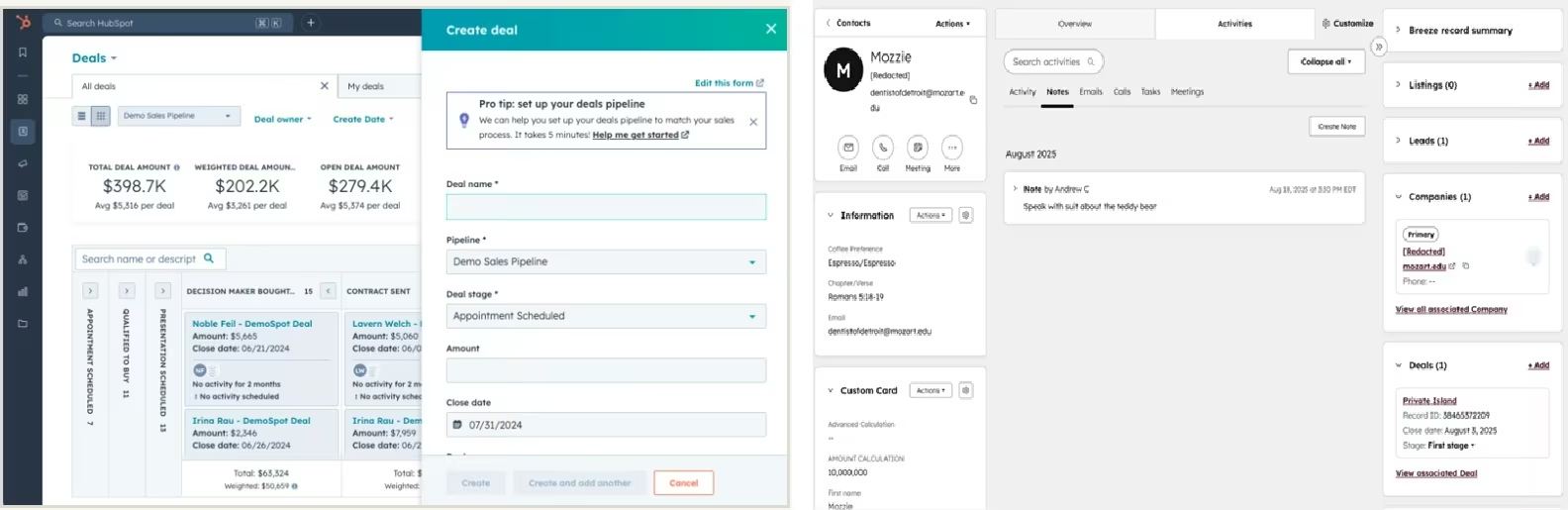
What it does: HubSpot CRM connects contact records, deals, email activity, meeting scheduling, sales tasks, marketing tools, and customer service data.
Best for: Startups, agencies, consultants, and small businesses that want to begin free and add more sales automation later.
HubSpot is the strongest first CRM for a business that has outgrown spreadsheets but hasn’t mapped every part of its sales process.
Its free tools give two people a shared contact database, one deal pipeline, email templates, meeting scheduling, and reporting dashboards. That is enough to establish basic ownership and follow-up rules before paying for a larger system.
Consider a five-person agency receiving leads from a website form, referrals, and booked discovery calls. The first problem is basic: who owns each lead, when someone last replied, what service the prospect wants, and what happens next. Advanced forecasting can wait.
HubSpot handles that starting workflow without requiring an enterprise implementation.
The upgrade path is clear. Starter removes several free-tool limits and provides two deal pipelines.
Professional adds 15 pipelines, more sales automation, forecasting, playbooks, and custom reporting. Enterprise expands the system to 100 deal pipelines and adds controls suited to larger sales organizations.
That growth path is also HubSpot’s main risk. A business can start free, connect more departments, and later discover that the features it wants sit in Professional or Enterprise. Professional and Enterprise also carry mandatory onboarding fees. Budget for the system you expect to need in 12 to 18 months, not only the free account you can open today.
Key Features
- Contact and company records: Keep customer details, activities, notes, and deal history together.
- Deal pipelines: Move opportunities through defined stages and assign clear owners.
- Email and meeting tools: Track one-to-one outreach and let prospects book time.
- Connected customer platform: Add marketing, service, content, and data tools around the same records.
- Reporting and forecasting: Give managers a shared view of pipeline activity and expected revenue on higher plans.
Pros and Cons
Pros
- The free plan covers the basic CRM needs of two people.
- The interface and starter workflow suit businesses moving away from spreadsheets.
- Sales, marketing, service, and content tools can share one customer record.
- The plan structure supports growth from a simple pipeline to a larger revenue operation.
Cons
- Professional and Enterprise become expensive as the number of paid sales seats grows.
- Professional requires a $1,500 onboarding fee, while Enterprise requires $3,500.
- Valuable automation, forecasting, and reporting tools sit on higher plans.
- Connecting several HubSpot products can make the final cost harder to compare with a sales-only CRM.
What Users Say
A Reddit discussion on r/sales shows mixed HubSpot sentiment. Commenters praised its interface, automation, mobile app, email marketing, and pipeline dashboards. Others said HubSpot lacks some important sales-process features and that reporting or list creation can feel unintuitive.
One Salesforce user even created a separate HubSpot account for notes, tasks, communication records, and contacts after their company’s Salesforce implementation fell short. G2 reviewers praise its ease of use and centralized communication, but frequently flag higher-tier costs and feature limits.
Treat the free plan as a starting point, then map the exact automation and reporting features you’ll need before upgrading.
Pricing
HubSpot pricing includes Free at $0/month for up to 2 users; Starter at $20/seat/month; Professional at $100/seat/month ($90/seat/month billed annually); and Enterprise at $150/seat/month on an annual contract.
HubSpot currently discounts Starter to $7/seat/month with annual billing.
Professional has a required one-time onboarding fee of $1,500, while Enterprise has a required one-time onboarding fee of $3,500.
Bottom Line
If you'll add marketing or service later, HubSpot is the safest first move. The one thing to watch is cost. A sales-only team on a tight future budget will feel the jump to Professional.
2. Pipedrive: Best for a Focused Visual Sales Pipeline
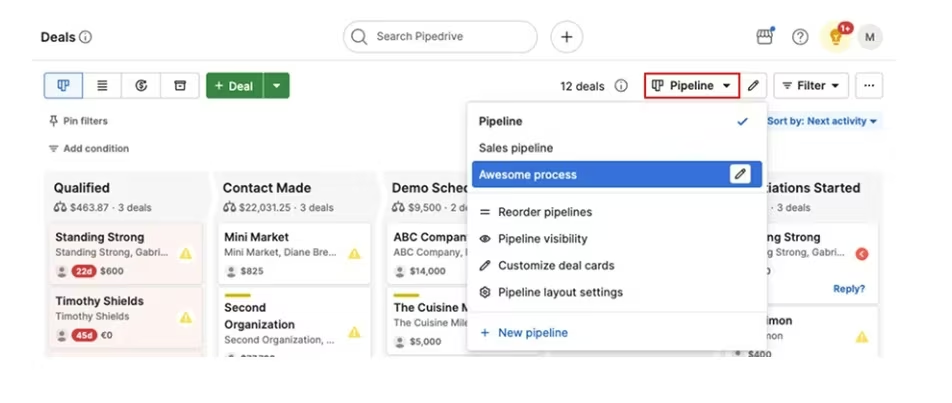
What it does: Pipedrive organizes leads, deals, contacts, activities, emails, and sales forecasts around a visual pipeline.
Best for: Sales teams that already understand their stages and want representatives to focus on the next action.
Pipedrive has the clearest job of the four primary recommendations: move deals forward. Its pipeline board makes stage, ownership, value, and stalled opportunities visible without forcing representatives through a large suite of marketing and service tools.
That approach works well for a sales process built around repeatable activities. A roofing company might move an opportunity from new inquiry to site visit, estimate sent, negotiation, and won or lost.
A business-to-business consulting firm might use discovery call, proposal, review, contract, and closed stages. In both cases, Pipedrive keeps every opportunity attached to a next activity.
Lite covers lead, contact, calendar, and pipeline management, AI-assisted report creation, activity feeds, and integrations. Growth adds email synchronization, tracking, automations, follow-up sequences, forecasts, and scheduling.
Premium adds lead routing, scoring, data enrichment, multiple email accounts, contracts, and electronic signatures. Ultimate adds stronger security controls and a sandbox for testing changes.
Pipedrive’s focused design also defines its limit. It isn’t the best choice when you need a broad marketing platform, customer service operation, or highly customized enterprise data model in the same product. Add-ons for lead generation, projects, campaigns, web visitors, and documents can also increase the real bill beyond the base subscription.
Key Features
- Visual pipelines: See every active opportunity and move deals between stages.
- Activity-based selling: Attach calls, meetings, emails, and deadlines to deals.
- Email synchronization: Keep email history and engagement connected to customer records on Growth and above.
- Automations and sequences: Trigger follow-ups and repeatable sales actions.
- Forecasting and reporting: Track pipeline value, subscriptions, activity, and expected revenue.
- 500-plus integrations: Connect common communication, scheduling, lead, and productivity tools.
Pros and Cons
Pros
- Representatives can understand the pipeline quickly.
- The workflow keeps attention on activities that advance a deal.
- Every plan includes customizable pipelines and core deal management.
- Growth adds the communication and automation features most active sales teams need.
Cons
- There is no permanent free plan.
- Marketing, project delivery, lead capture, and document features can require add-ons.
- The product is less suitable for complex cross-department customer operations.
- The lowest annual price requires a full-year payment.
What Users Say
Comments in the r/sales thread were broadly positive about Pipedrive. Users praised its ease of use, sales-focused design, and value, although one commenter said it relies too heavily on third-party integrations that should be built in.
That feedback supports Pipedrive’s position as a focused sales CRM: users value its simplicity, but some teams may need outside tools to fill integration gaps.
G2 reviewers also praise the visual pipeline and ease of use, while advanced reporting, customization, and built-in marketing tools appear among the common limitations.
Pricing
Pipedrive pricing includes Lite at $24/seat/month ($14/seat/month billed annually), Growth at $49/seat/month ($39/seat/month billed annually), Premium at $79/seat/month ($59/seat/month billed annually), and Ultimate at $99/seat/month ($79/seat/month billed annually). Every plan includes a 14-day free trial, and optional add-ons carry separate charges.
Bottom Line
Pipedrive keeps representatives focused on deal stages, next actions, and follow-ups. Look elsewhere when marketing automation, customer support, or company-wide customization carries equal weight.
3. Zoho CRM: Best Value for Custom Sales Processes
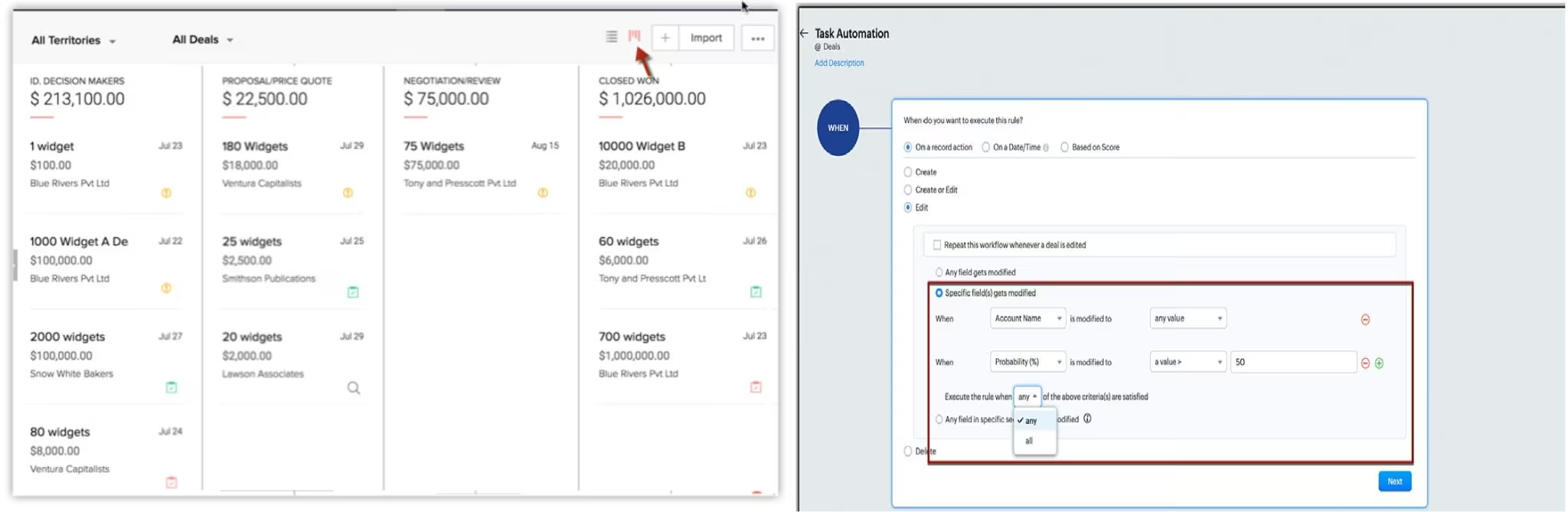
What it does: Zoho CRM manages leads, contacts, accounts, deals, activities, automations, reports, territories, and customized business processes.
Best for: Small and midsize businesses that need more control than a basic CRM provides but want to keep per-user pricing below major enterprise platforms.
Zoho CRM is the strongest value choice in this list because it gives a small business room to customize before the price reaches enterprise territory. The free plan covers three users, while Standard costs $20/user/month ($14/user/month billed annually).
This flexibility helps when your process has extra steps. A property management company might need separate pipelines for prospective owners, properties being onboarded, and active tenant placements.
A tax firm might track inquiry type, document status, assigned preparer, filing deadline, and review status. A generic contact list won’t handle either workflow for long.
Zoho supports the core sales records expected from a CRM, including leads, accounts, contacts, deals, tasks, calls, and meetings. Paid editions add more workflow automation, forecasting, customization, scoring, approval processes, territories, portals, sandboxes, and AI capabilities as you move up the plan structure.
The tradeoff is setup discipline. Zoho offers a large range of options and connects with a wider suite of Zoho business applications. That flexibility can turn into clutter when a company enables fields, modules, or automations without a clear process. Assign one person to own field definitions, pipeline stages, permissions, and data cleanup.
Key Features
- Lead, account, contact, and deal management: Cover the standard sales record structure.
- Workflow automation: Trigger assignments, tasks, updates, and notifications.
- Customization: Adapt modules, fields, layouts, reports, and processes to your business.
- Sales forecasting and scoring: Help managers prioritize opportunities and review expected results.
- Territories and permissions: Support more structured teams on higher editions.
- Zoho product suite: Connect CRM data with finance, support, marketing, analytics, and other business tools.
Pros and Cons
Pros
- The free plan supports three users.
- Every paid tier costs less than many comparable enterprise CRM plans.
- The plan range supports both straightforward and highly customized processes.
- Businesses already using Zoho products can keep more operational data within the same product suite.
Cons
- The number of options can overwhelm a team without a clear implementation owner.
- Advanced controls, portals, territories, and sandboxes require higher editions.
- A heavily customized account can become difficult to manage when field and workflow rules aren’t documented.
- The interface places more emphasis on capability than the sales-only simplicity of Pipedrive.
What Users Say
One participant in the Reddit thread said their company left HubSpot because Zoho could connect to its billing web apps. Others were less enthusiastic, describing Zoho as slow, unintuitive, clunky, or simply “just okay.”
That split fits Zoho’s main tradeoff. It can support more tailored workflows and connections, but the added flexibility may come with a steeper learning curve and a less polished interface.
G2 reviewers also praise its customization and automation while identifying a cluttered interface and learning curve as recurring complaints.
Pricing
Zoho CRM pricing includes Free at $0/month for three users, Standard at $20/user/month ($14/user/month billed annually), Professional at $35/user/month ($23/user/month billed annually), Enterprise at $50/user/month ($40/user/month billed annually), and Ultimate at $65/user/month ($52/user/month billed annually). Zoho also offers a 15-day free trial of paid features.
Bottom Line
Zoho CRM gives cost-conscious teams more control over fields, automations, reports, and connected business applications. Skip it if you would rather trade configurability for the sales-only simplicity of Pipedrive.
4. Salesforce Sales Cloud: Best for Complex Enterprise Sales
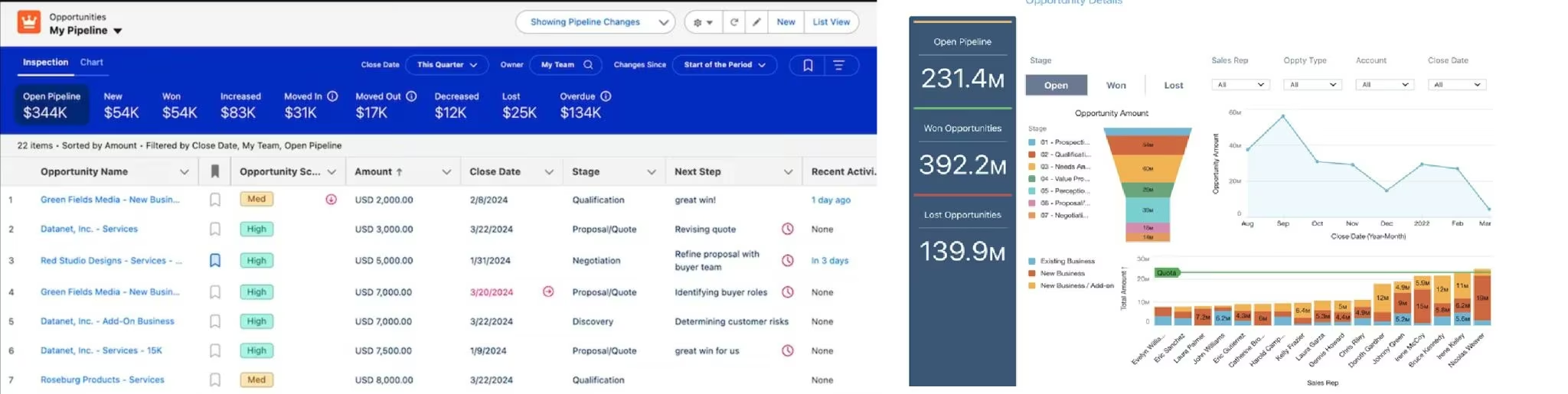
What it does: Salesforce Sales Cloud manages leads, accounts, contacts, opportunities, activities, forecasts, quotes, automations, permissions, integrations, and sales intelligence.
Best for: Large or growing sales organizations with complex processes, multiple roles, strict permissions, and people assigned to administer the platform.
Salesforce earns its position through depth rather than simplicity. It can support a straightforward lead-to-opportunity workflow, but its real strength appears when a company has several sales teams, territories, approval rules, product lines, forecasts, partner processes, and connected systems.
A national construction supplier, for example, might separate commercial accounts, contractors, distributors, and public-sector bids. Each group can require different stages, pricing approvals, record access, products, forecasts, and reporting. Salesforce gives an experienced administrator the controls to model that organization.
The range starts with Free Suite and Starter Suite, which make Salesforce more accessible to small teams than its enterprise reputation suggests. Pro adds more automation, customization, quoting, and forecasting.
Enterprise adds advanced pipeline management, API access, and deeper controls. Unlimited adds predictive AI, sales engagement, conversation intelligence, stronger support, and a full sandbox.
Agentforce 1 Sales adds Salesforce’s wider AI and data package.
Salesforce is a poor default choice when no one owns implementation. The Reddit discussion includes complaints about unnecessary fields, confusing workflows, and configurations built around management reporting.
Other commenters traced those failures to the setup rather than Salesforce itself. That doesn’t reduce the risk. A capable platform configured badly still creates a bad sales system.
Key Features
- Lead and opportunity management: Track prospects, accounts, contacts, deals, activities, and campaign relationships.
- Custom sales processes: Adapt stages, records, page layouts, permissions, and business rules.
- Forecasting and analytics: Give managers structured pipeline and revenue views.
- Automation: Build sales flows, routing, approvals, and repeatable actions.
- AppExchange and integrations: Extend the system with third-party apps and connected tools.
- Enterprise administration: Control roles, permissions, sandboxes, records, and connected systems.
Pros and Cons
Pros
- It can model complex sales organizations and approval structures.
- The product supports extensive customization and integration.
- Salesforce now provides free and starter options for smaller implementations.
- Enterprise, Unlimited, and Agentforce plans support advanced sales operations and AI use cases.
Cons
- A serious implementation needs capable administration and process ownership.
- Per-user pricing rises quickly at Enterprise, Unlimited, and Agentforce levels.
- Some integrations and advanced features carry added charges.
- Too much customization can slow representatives down and make future changes expensive.
What Users Say
Salesforce drew the sharpest divide in the Reddit discussion. Several sales representatives blamed compulsory fields, cluttered opportunity pages, and management-focused configurations for slowing them down. One user said they regularly worked with about a dozen fields but had to scroll through roughly 250 to find them.
Other participants said the platform itself wasn’t the main problem. They pointed to configuration, administration, upkeep, and user adoption as the difference between a helpful sales system and a cumbersome one. Well-configured accounts gave teams useful automation, reliable data, dashboards, and forecasting, while poor setups created extra clicks and records people stopped trusting.
Reviews on G2 reflect the same split: users value Salesforce’s automation, centralized data, and customization, but often mention setup complexity, cost, and a steep learning curve.
Pricing
Salesforce Sales pricing includes Free Suite at $0/month, Starter Suite at $25/user/month, Pro Suite at $100/user/month billed annually, Enterprise at $175/user/month billed annually, Unlimited at $350/user/month billed annually, and Agentforce 1 Sales at $550/user/month billed annually.
Pro Suite through Agentforce 1 Sales requires annual billing, while some add-ons and services cost extra.
Bottom Line
Salesforce earns its cost when your sales operation needs complex permissions, forecasting, automation, integrations, and administrative control. A small team that only needs contacts, deals, email history, and reminders will pay for far more system than it needs.
Other CRM Tools Worth Checking Out
5. monday CRM
monday CRM suits teams that hand a won deal straight to a delivery or operations board. Shared boards, automations, dashboards, quotes, and invoices keep the handoff in one workspace.
Pricing starts with Basic at $18/seat/month ($12/seat/month billed annually), Standard at $25/seat/month ($17/seat/month billed annually), and Pro at $41/seat/month ($28/seat/month billed annually); Ultimate uses custom pricing.
Plans require at least three seats, so the smallest Basic account costs $54/month for monthly billing or $36/month billed annually for all three seats.
It ranks below the main four because its strongest advantage is cross-functional work management rather than specialized sales depth.
6. Freshsales
Freshsales suits small teams that want phone, chat, and email inside the CRM. Its contact timelines, deal pipelines, scoring, and sequences reduce the need to switch between separate communication tools.
Pricing includes Free at $0/month for three users, Growth at $11/user/month ($9/user/month billed annually), Pro at $47/user/month ($39/user/month billed annually), and Enterprise at $71/user/month ($59/user/month billed annually). HubSpot offers a broader customer platform, while Zoho provides more customization at a similar starting cost.
7. Close
Close is built for outbound teams whose representatives spend most of the day calling, emailing, and texting prospects. Its shared inbox, power dialer, predictive dialer, workflows, and AI sales agent support that high-volume motion.
Pricing includes Solo at $19/user/month ($9/user/month billed annually), Essentials at $49/user/month ($35/user/month billed annually), Growth at $109/user/month ($99/user/month billed annually), and Scale at $149/user/month ($139/user/month billed annually).
Custom pricing is available for more complex requirements. It is too specialized to be the default CRM recommendation for the average small business.
8. Microsoft Dynamics 365 Sales
Microsoft Dynamics 365 Sales fits organizations that already manage email, documents, meetings, and internal work through Microsoft 365. Copilot assistance, opportunity summaries, dashboards, and Microsoft integrations keep sales work close to the tools those organizations already use.
Pricing is $65/user/month for Professional, $105/user/month for Enterprise, and $150/user/month for Premium, all paid yearly. Microsoft Relationship Sales uses custom pricing and requires at least 10 seats. Annual commitments and implementation work make it a narrower recommendation for companies already committed to the Microsoft product suite.
9. Creatio
Creatio fits larger companies that need to model and automate processes around their own operations. Its platform combines configurable workflows with separate Sales, Marketing, and Service products.
Pricing starts with Growth at $40/user/month plus Sales at $15/user/month, for a combined $55/user/month. Enterprise plus Sales costs $90/user/month, and Unlimited uses custom pricing. New customers face a $10,000 annual minimum and a standard three-year contract, which puts Creatio beyond the practical budget of most small CRM buyers.
10. Copper
Copper is the strongest fit for teams that want CRM records to sit close to Gmail, Google Calendar, and Google Drive. Its pipelines, project tools, automations, and reporting extend that Google-first workflow without forcing representatives into a separate daily workspace.
Pricing includes Basic at $29/seat/month ($23/seat/month billed annually), Professional at $69/seat/month ($59/seat/month billed annually), and Business at $134/seat/month ($99/seat/month billed annually).
When a Custom CRM Makes More Sense
An off-the-shelf CRM is the right choice when your sales process follows familiar stages, and you need common integrations immediately. Building a custom CRM makes more sense when the workflow is specific to your business, employees keep working around the standard fields, or per-seat costs force you to pay for features you don’t use.
A custom CRM can focus on the few records and actions that drive the business. A Texas roofing contractor might need property address, inspection status, estimate value, insurance notes, assigned crew, job date, and review request.
A Brooklyn real estate agent might need buyer criteria, preferred neighborhoods, viewing history, mortgage status, and follow-up dates. Neither business needs hundreds of unrelated fields.
Emergent is a CRM building platform that can make custom CRMs rather than an off-the-shelf CRM, so it doesn’t belong in the ranked CRM list. It fits when your company needs to create a CRM around its process instead of adapting its process to a packaged product.
Also read our guide on how to build a real estate CRM with Emergent to see what a custom CRM built around your process actually looks like.
A Realistic CRM Use Case for Emergent
A local service contractor used Emergent to build Pipeline/OS, a custom lead-management CRM with four drag-and-drop stages, live performance metrics, and one-click Google review requests. The contractor built it in one session without an internal development team.
That approach fits a service business with a simple, specific workflow that a large general-purpose CRM handles poorly.
What a Custom CRM Still Requires
Treat an AI-generated CRM as draft software until it has been reviewed and tested.
Before it holds real customer data, check user roles, record permissions, backups, required fields, duplicate handling, email actions, integrations, and every workflow that can change or delete information.
Human review is essential when the CRM stores personal, financial, health, legal, or payment data. It is also necessary when automations send customer messages, update production records, generate invoices, or trigger actions in external systems.
Also read our guide on how to build a CRM for a step-by-step walkthrough of what it takes to go from requirements to a working system.
Which CRM System Should You Choose?
HubSpot: Start here when you want a free CRM and expect sales, marketing, and service to share customer records.
Pipedrive: Use it when your sales stages are clear and representatives need a faster view of deals and next actions.
Zoho CRM: Pick it for deeper customization at a lower per-user price.
Salesforce: Reserve it for complex sales organizations with experienced administrators.
monday CRM: It fits when won deals must move directly into project or operations boards.
Freshsales: It works for small sales teams that want phone, chat, and email inside the CRM.
Close: It is built for outbound teams that depend on calls, texts, email sequences, and power dialing.
Dynamics 365 Sales: It fits organizations that already run their work through Microsoft 365.
Creatio: It serves larger companies that need deep process automation and can accept a larger contract.
Copper: It is strongest for teams working mainly in Gmail, Google Calendar, and Google Drive.
Custom CRM: Build one when packaged systems force your business into the wrong fields, stages, or pricing model.
Conclusion
The strongest CRM system examples solve different problems. HubSpot gives you the easiest free starting point, Pipedrive keeps sales activity clear, Zoho CRM provides the best balance of price and customization, and Salesforce supports the most complex sales organizations.
Prioritize the CRM your team will keep updated, your managers can trust, and your business can afford after the introductory plan ends.

Most AI app builders stop at prototypes. Emergent creates production-ready apps you can actually launch.
- Production-ready apps
- Web & mobile apps
- Deploy in minutes







