TL;DR
- An AI content creation agent can automate multiple tasks, including topic research, brief generation, drafting, editing and content scheduling.
- Start by defining content goals, target audiences, brand voice guidelines and the knowledge sources your agent can access.
- Build a workflow with clearly assigned roles, structured handoffs, human approval checkpoints and calendar-based triggers.
- Test the agent's output for accuracy, originality, readability and brand consistency before scaling the workflow.
- No-code platforms like Emergent can help users build and customize content creation agents without writing code.
Content work is often spread across different tools. While the brief lives in a Google Doc, research happens across multiple tabs, and feedback comes through emails or team conversations. A generic chatbot can help with individual tasks, but maintaining consistent instructions, brand voice, and context across tasks can still require manual effort.
An AI content creation agent can follow a structured workflow based on your instructions. For example, you can configure an agent to pull topics from a connected content calendar, work from the assigned brief, and evaluate drafts against a predefined review rubric.
By connecting research, briefing, drafting and review into one workflow, you can reduce repetitive coordination and make content production more consistent. This guide explains how to build an AI agent for content creation, one step at a time.
This guide walks you through building an AI agent in 8 simple steps, followed by the step-by-step building process on Emergent.
What is an AI Content Creation Agent?
An AI content creation agent uses Large Language Models (LLMs) to handle tasks such as editing, research and drafting. It follows instructions, processes information, and can use tools like web search, document retrieval or connections to CMS platforms like WordPress to complete assigned tasks.
A chatbot typically responds to user prompts, while a content creation agent can coordinate multiple tasks within a workflow. In practice, the two designs overlap, so the distinction is not always strict.
While an AI agent follows steps like:
- It plans and breaks down, for example, “publish a brief of post X” into outline, research, draft, and review tasks.
- The AI agent uses CMS platforms like WordPress. Starting with searching the web and reading through the documents, it can also push a draft to your CMS.
- The content creation agent revises and evaluates a draft itself before a human even sees it.
- However, LLMs don't automatically retain information across every interaction. Whether an agent remembers previous instructions or conversations depends on how its memory and context management are configured.
For content teams that need consistent and reviewable output, a structured workflow is often a practical starting point. Research, brief creation, drafting and review can follow predefined stages, while the agent can be given flexibility within specific tasks. This makes it easier to track outputs, identify errors and maintain editorial control, as per Anthropic.
But if you would rather start with a well-thought-out, structured template than a blank page, Emergent offers a content-creation agent builder. While doing that, you must follow the principles of building an AI agent.
How to Build an AI Agent for Content Creation? (Step-by-Step)
Below is the full process for creating a content-creation agent. Treat each sequence carefully, because every step creates the framework the next step needs.
Step 1: Define your content goals
Objective: Give the AI agent a specific role or job.
Input: A list of topics, business goals, target audience and relevant client or brand information.
Start by identifying the business outcome you want to support, such as organic traffic, lead generation or newsletter engagement. Then define the tasks the agent should perform to support that goal. For example, a search-focused workflow requires keyword-based inputs, while a thought leadership workflow may need interviews, expert insights and approved research.
Define how you will measure success before building the agent. For example, you might aim to reduce the time spent preparing a content brief from two hours to 30 minutes, while ensuring that every brief meets your editorial checklist. Track content performance separately through metrics such as organic traffic, leads or newsletter engagement.
The agent needs to understand your role, expertise, existing knowledge and content requirements. For example, an instruction like “Create short-form blogs on marketing automation for remote teams” gives the agent a clearer direction than simply asking for “marketing content.”
Step 2: Build Your Knowledge and Brand Voice
This is where things get interesting. Large Language Models (LLMs) can handle different writing tasks, but they may not understand how you write, think and communicate, especially what matters most to your audience.
- A guide for brand voice: Ensure your tone is concrete, for instance, “Friendly but direct.” Use short sentences without technical jargon, dry humor and no exclamatory marks.
- Identify best-performing examples: Then, collect five or ten pieces that represent your ideal output.
- Facts: Include approved positioning, testimonials, features, pricing, claims and success stories. These help the agent rely on verified information rather than making assumptions, reducing the risk of hallucinations. However, you still need to fact-check everything.
- A “not-to-be-used list”: Any overused or exaggerated AI phrases, clichés, or anything that has been flagged.
Keep your knowledge base updated with the latest approved documents, product information and pricing. Where sources conflict, instruct the agent to prioritize the most recent verified information from an authorized source.
Before moving on to the third step, try a test prompt like “Explain our product to a marketing director in no more than 150 words.” Compare the output with your approved brand examples. If the tone, terminology or messaging doesn't match, refine the guidelines before proceeding.
Step 3: Pick a Platform:
Let’s list three frameworks or platforms for turning this into a working agent:
- With no-code agent builders, you describe the workflow, and the platform helps assemble the AI agent and connect supported tools or knowledge sources. This can be a faster route for marketers and small teams. Depending on the platform, features may include hosting, integrations and workflow management.
- Low-code workflow tools offer visual editors alongside AI steps. These workflow tools provide more control than pure no-code.
- Code-first frameworks are another crucial option for developers to build APIs (Application Programming Interface) and agent frameworks directly. While this option offers maximum flexibility, it also comes with the cost of handling monitoring, hosting, error handling, and maintenance yourself.
Consider the following factors when choosing a platform to build your AI content creation agent:
- Easy integration with CMS platforms, Slack and email
- Data retrieval
- Features like scheduling and event triggers
- Web research and search tools
- Human-in-the-loop approvals
Cost and human time spent also matter when choosing a platform. According to Emergent's AI agent cost guide, platform costs can vary depending on the subscription, usage and complexity of the agent. Custom enterprise or multi-agent systems may involve additional development costs. Compare these expenses with the time required for setup, testing and ongoing maintenance.
If you're a marketer building your first content agent, a no-code platform may be the easiest starting point. Low-code tools can suit teams that need more control over integrations and workflows, while code-first frameworks are generally better suited to developers handling custom requirements.
Step 4: Define and Assign Agent Roles
Research, briefing, writing and reviewing are important stages of content creation. Instead of asking an AI agent to handle everything in a single step, divide the work into specialized roles. These can operate as separate agents or as stages within one workflow.
Each role handles a specific task and passes its output to the next stage of the workflow.
- The Researcher: In this role, the AI agent researches a particular topic using credible, relevant sources. It can also review competing pages to identify content gaps and topics that need further coverage.
The agent receives a structured document with source URLs and user search intent. You can also instruct the content creation agent to flag anything without a credible source.
- The Strategist: The briefer turns the research into an SEO optimized content brief: target keywords, outline H2s and H3s, user search intent, meta title, meta description, internal linking, and word count target.
- The Writer: It drafts the content exactly from the brief, following the voice guide and research. You can clearly lay out constraints, such as matching the voice example, following the outline, and flagging any claim that requires citation.
- The Editor: It reviews the draft and scores it against a predefined rubric covering brand voice, readability, factual accuracy, structure, keyword usage and brief compliance. If the score falls below the required threshold, the draft goes back to the writer for revision. Once it passes the automated checks, it moves to a human editor for final review.
For example, the Researcher can produce a document containing verified sources and key findings. The Strategist uses that document to prepare the brief, which the Writer follows to create the draft. The Editor then checks the draft against the brief and returns any required changes.
Depending on your requirements for building an AI agent for content creation, you can add more specific roles. The AI agent can also perform tasks like SEO optimization or fact-checking.
You can also build an AI SEO agent to handle search optimization and build an AI marketing agent to manage campaign workflows, helping you cover different aspects of content creation and promotion.
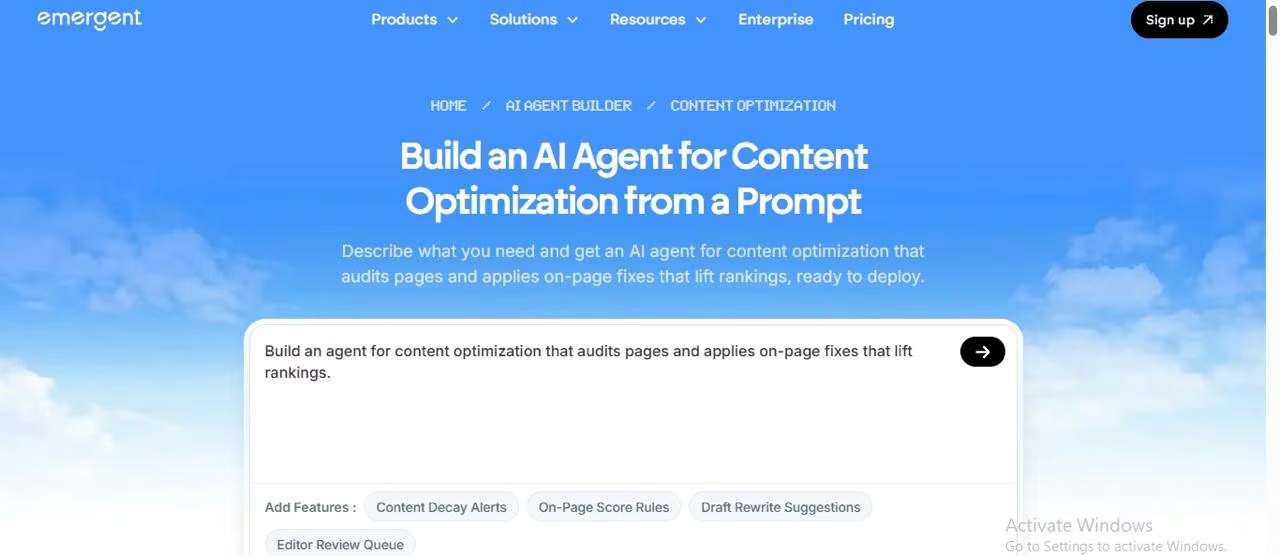
It can also become a repurposing agent that turns any post into different versions, including a newsletter, social media post or email message. Content creators can use Emergent’s content optimization agent builder for this use case.
Step 5: Build the Content Pipeline
After following the steps above, you must organize the tasks into a content pipeline. It is the sequence that takes a topic through research, briefing, drafting and review. A solid content pipeline looks like this:
- Topic intake: You can write a topic as a prompt, or the AI agent can pull it from your calendar.
- The Researcher: This agent role produces a sourced document after conducting in-depth research.
- Brief creation: In this step, the content creation agent turns raw research and statistics into a proper outline and brief.
- Drafting: After the brief reaches the writer, they produce the first draft.
- Automated reviewer: As mentioned above, the reviewer scores the draft and sends it back to the writer if revisions are needed. For high-stakes content, a human should also approve the brief before drafting begins.
- Human approval: Once the draft passes automated checks, a human editor reviews its accuracy, quality and compliance with the brief. The draft moves forward only after approval.
The approved content can then be prepared for manual publishing or transferred as a draft to a connected CMS, depending on the configured integrations and permissions.
Set a rule for handling incomplete or failed tasks. For example, if the researcher cannot find a reliable source for a claim, the agent should flag it for human review rather than passing it to the writer as verified information. Similarly, log and report failed integrations instead of letting the workflow continue unnoticed.
Step 6: Add a Human Review Step
AI and automation can speed up content production, but human editors remain essential for maintaining quality and accuracy. A human review gate is a non-negotiable step between “draft completed” and “published.”
- Create a review checklist: Reviewers must verify facts and statistics in the draft, confirm the brand voice, check for unsupported claims and ensure nothing violates step 1.
- Attach the evidence: Always ensure that you add the source links and the score given by the agent’s reviewer so your editor doesn’t have to start from scratch.
- Give structured feedback: Tag edits such as “voice,” “off-brief,” “accuracy,” and “structure.”
Large Language Model (LLM) generated claims require extra attention. Trace every claim back to its original source because LLMs often produce confident-sounding judgments.
Google's guidance on creating helpful, reliable, people-first content emphasizes expertise, usefulness and originality. Human reviewers should therefore check whether the draft offers genuine value to readers rather than simply repeating existing information. Firsthand experience, customer insights and original research can help strengthen the content.
Step 7: Connect a Trigger to your Content Calendar
A manually run AI agent does save you time. But the triggers make the pipeline run on its own.
- Calendar trigger: Connect the agent to your content calendar or spreadsheet using a supported integration. When a topic's status changes to “ready to draft,” a configured trigger or scheduled check can start the content pipeline.
- Schedule-driven: At the start of every week, the agent generates three topic ideas using an approved keyword database or a connected research tool like Semrush. You can then review the suggestions based on search demand, relevance and your content goals.
- Repurposing-driven: When a long-form blog or article is written and approved by the editor, the agent automatically writes its LinkedIn post, newsletter or a short Instagram thread.
Before activating a trigger, test it with a sample calendar entry. Check whether it starts the correct workflow, passes the required topic details and avoids creating duplicate drafts when the same entry is processed again.
Set guardrails on the agent. Limit the number of drafts that the agent can produce in a week, set spending limits or caps, and automate sending alerts if the score is unusually low. Start with a small cadence and scale only when quality holds.
Step 8: Test, Verify Quality, and Iterate
Your first content draft won’t necessarily be the best one. Treat your pilot test as a starting point. You can begin by generating 10 to 15 content pieces across different topics and formats.
Don't cherry-pick successful outputs; your goal is to understand how consistently the agent performs, including when given incomplete or challenging inputs.
- Create a simple scoreboard from 1 to 5, covering factual accuracy, brand voice, depth and originality, SEO optimization, editing effort, readability and structure. Define what each score means so you can evaluate drafts consistently.
- Set a minimum acceptable score before testing. For example, you might require an average score of 4 out of 5, with no unsupported factual claims or missing source references. Return any draft that fails these checks for revision, regardless of its overall score.
- Diagnose the draft at every step. If the draft is bland, add human insight, first-hand experience, and originality. If it is inaccurate or off-brand, fix the research, brand voice or guidelines.
- Track learnings by adding them to the list. For instance, if you see a pattern in all your successful posts, write it. If the editor keeps correcting the same things, add them to the “do not use” list.
- Track improvements by changing one thing at a time, so you know what caused an improvement or regression.
Now that you understand the key steps, let's put them into practice with Emergent. The following example shows how to describe a content creation workflow for a SaaS marketing team using a plain-language prompt.
Build Your Content Creation Agent With Emergent
Emergent's AI agent builder lets you create customized content workflows using natural-language instructions. You can configure research, content briefing, drafting, and editorial review stages without writing code, making it easier to build a content creation agent tailored to your team's requirements.
Here's how we created an AI Content Studio for a SaaS marketing team.
Step 1: Define the workflow
Open Emergent, select the Web app, and describe the application you want to build. We used a prompt requesting four stages:
- Research: Gather information and identify sources.
- Content brief: Prepare an SEO-focused outline and writing instructions.
- Draft: Generate content using the brief and brand guidelines.
- Editorial review: Evaluate the draft and incorporate human approval.
The prompt also specified inputs such as topic, primary keyword, audience and word count.

Step 2: Configure and generate the application
Emergent asked us to select research preferences, provide a sample article topic and choose login requirements.
Based on these inputs, it generated Synthetix AI Content Studio, displaying the four workflow stages, article records and review controls.
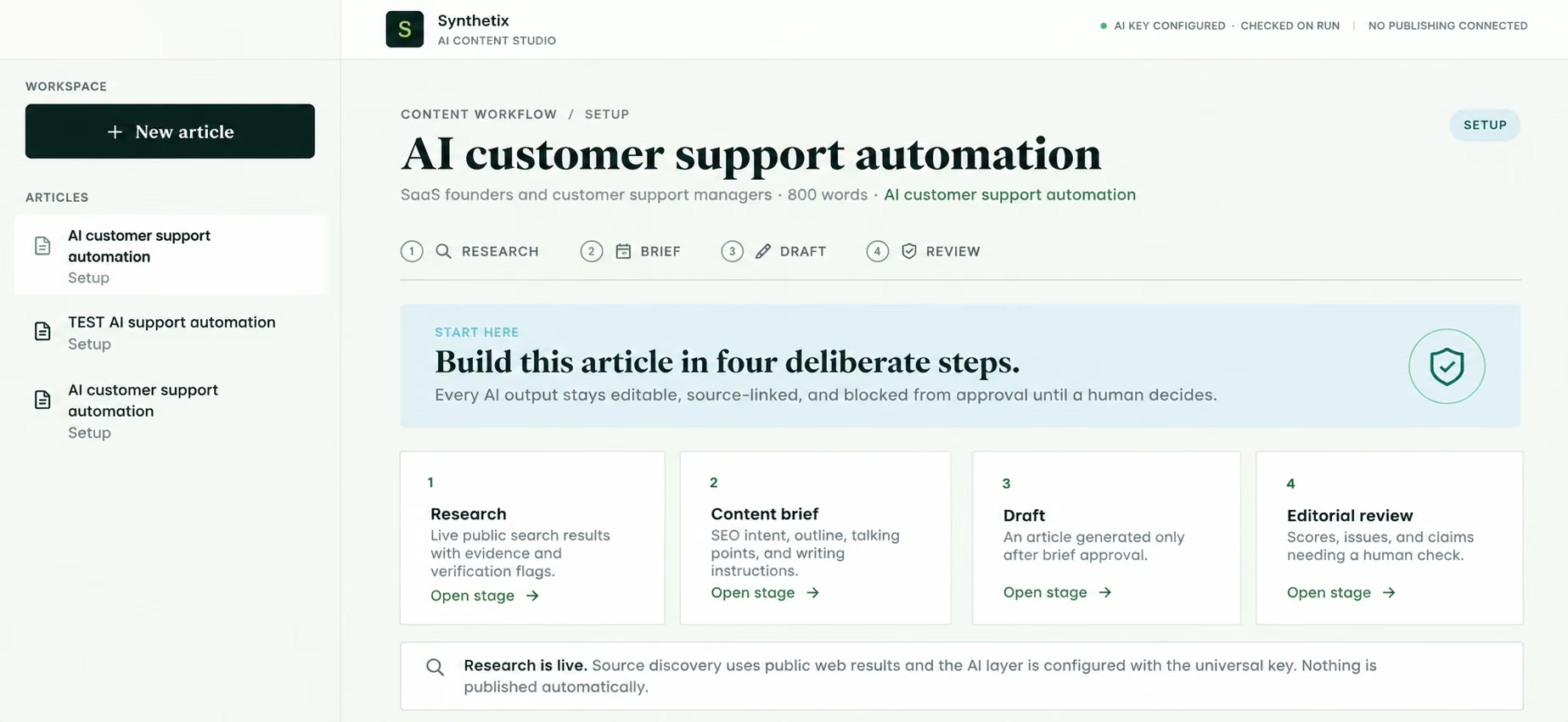
Step 3: Test before using it
Review the generated workspace and test each stage with a sample article. Check whether the application retrieves reliable sources, prepares a usable brief, generates a draft and supports human editorial approval.
In our demonstration, the workspace was generated successfully, but AI content generation could not be verified because the API key had no available usage budget. A complete workflow test is therefore necessary before production use.
Final Verdict
Building an AI agent for content creation starts with clear goals, reliable information and a structured workflow. You don't need a perfect prompt from the beginning. Start with a small task, test the results and improve the instructions as you learn what works.
No-code platforms can make the process easier, although advanced integrations may require additional configuration. Keep human editors involved in reviewing factual accuracy, brand voice and overall quality before publishing.
If you're ready to experiment, you can start with Emergent's AI agent builder and build a simple content workflow before expanding it to more tasks.
Start building with Emergent
Describe it. Build it. Launch it.
- End-to-End Creation
- No Code Needed
- Live in Minutes
Most AI app builders stop at prototypes. Emergent creates production-ready apps you can actually launch.
- Production-ready apps
- Web & mobile apps
- Deploy in minutes