



TL;DR
- Find out whether anyone else has the problem: Read what people already say about it, and count how many describe it the same way you do.
- Check who already serves it: Open the pricing pages and the review sites, and find out what the incumbents charge.
- Pressure-test the idea: Try to kill it. Ask for the strongest arguments against it and set a number that would make you walk away.
- Build the working app: One prompt is enough to get a link you can send to someone.
- Put it in front of a real buyer: Ask agents to use the summary in a live seller conversation, then find out whether they would pay for it.
Every idea looks good in your head. Building is the fun part, so most people skip straight to it and find out months later that the thing they made already exists, costs $15 a month, and has 77 reviews.
I wanted to know how to validate a business idea properly, so I ran the method on a real one. My idea was a tool that collects showing feedback from buyers' agents and turns it into a summary a listing agent can send to the seller.
By the end of this article, you'll have the four steps, the prompts behind them, and the point where I pivoted because of what the evidence showed me.
What You'll Need Before Starting
- An AI assistant that can search the web: I ultimately went with ChatGPT.
- An account on an AI app builder: I used Emergent.
- Roughly 11 credits on Emergent: The free plan includes 10 a month, so a build like this goes slightly past it.
- An idea specific enough to search for: "An app for realtors" is too vague. "A feedback tool for listing agents" gives you something to search. If you're still choosing what to build, start with the business model, not the feature.
Also read our guide on how to start a digital business for a tested step-by-step method before you start building.
How I Built This
I picked one idea and stayed with it the whole way through. I decided to validate a showing feedback tool aimed at US real estate agents, with a share link for the buyer's agent and a seller-ready summary for the listing agent.
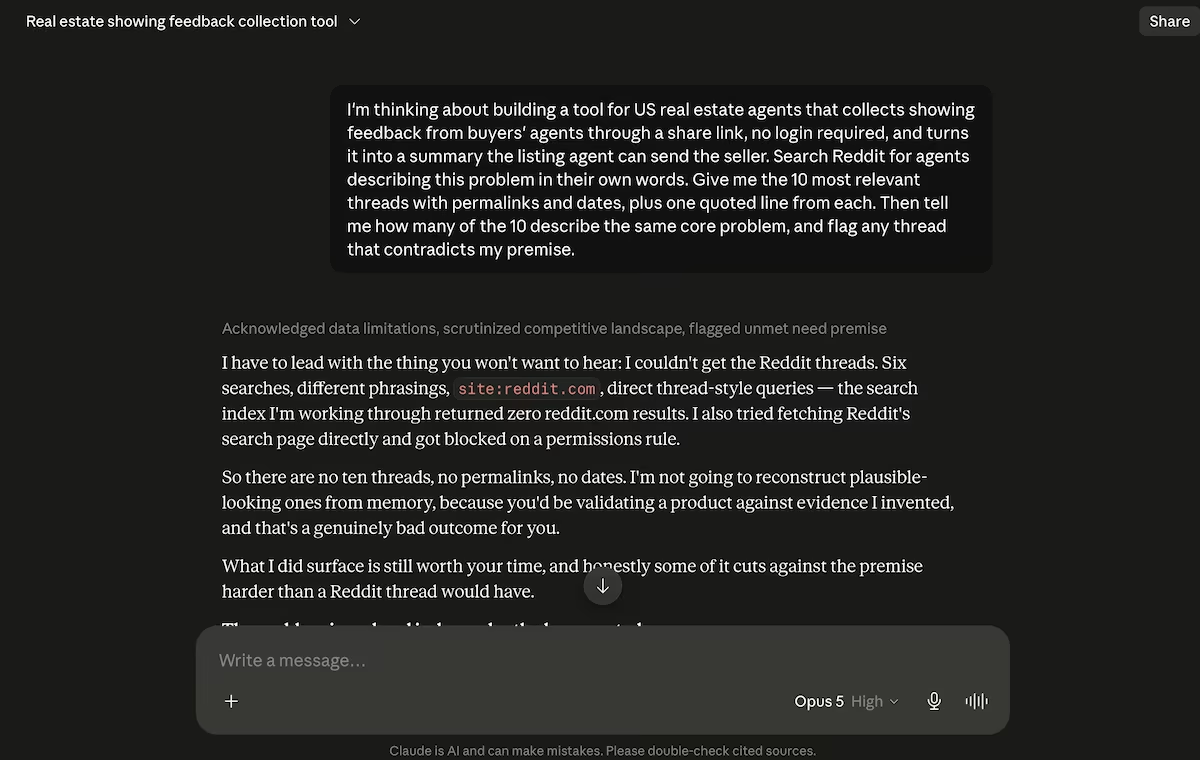
I normally use Claude for this kind of research. On the first prompt, however, it couldn't reach Reddit at all. ChatGPT returned 10 threads with permalinks in one pass, so I ran the remaining three prompts through ChatGPT and kept Claude for checking figures afterward.
How to Validate a Business Idea: Step by Step
Step 1. Find Out Whether Anyone Else Has the Problem
I started where the complaints already exist. Real estate agents talk to each other on Reddit constantly, and they don't soften anything, so r/realtors was the obvious place to look.
Here was my first prompt for ChatGPT:
I'm thinking about building a tool for US real estate agents that collects showing feedback from buyers' agents through a share link, no login required, and turns it into a summary the listing agent can send the seller. Search Reddit for agents describing this problem in their own words.
Give me the 10 most relevant threads with permalinks and dates, plus one quoted line from each. Then tell me how many of the 10 describe the same core problem, and flag any thread that contradicts my premise.
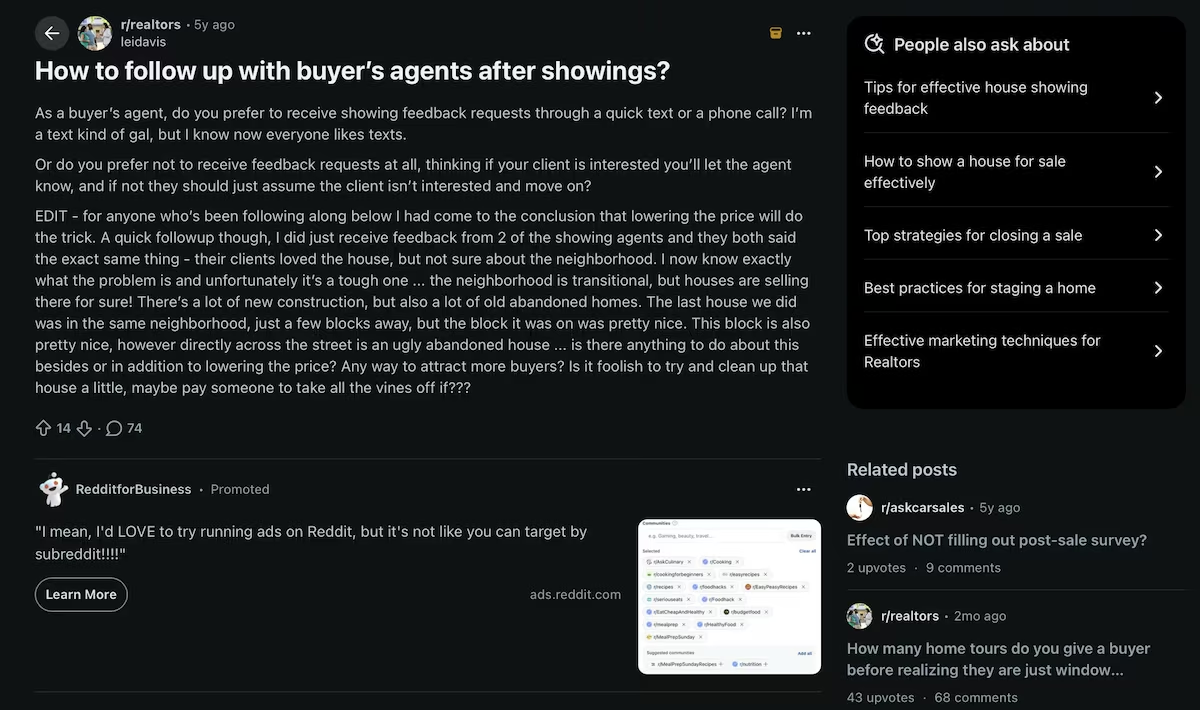
Seven of the 10 threads described the same problem: listing agents want feedback after a showing, and buyers' agents either ignore the request or send something too vague to use. One thread described an agent reporting getting feedback from three of 11 showings while already using a showing app, and asked what they were missing.
Two threads rejected the premise outright. One agent argued that the absence of an offer is the only feedback anyone is obliged to give. Another raised confidentiality, saying their brokerage told them not to pass on buyer comments without written authorization.
Two of the seven didn't dispute the problem but argued against my answer to it, since questions about the buyer's price ceiling ask an agent to give away their client's position.
Do this: Note the threads that agree and the threads that don't, and log them before you go any further. Even 10 minutes of reading will change how you run the rest of the test.
Step 2. Check Who Already Serves It
Knowing the problem is real doesn't tell you whether anyone is paying to fix it. Here was my second prompt, on the competition:
Same idea. Find the tools US real estate agents already use for showing feedback. For each one, give me what it does, the price from its official pricing page with the billing period, its rating and total review count on G2 or Capterra, and the two criticisms that repeat most in reviews. Finish with one sentence on what none of them do.
ChatGPT found several competitors. ShowingTime, owned by Zillow, sells its Appointment Center to agents at $15 a month.

Instashowing charges $15, $29, and $49 a month, dropping to $9, $19, and $39 on annual billing. Showly starts at $49 a month on its Founder plan, and $119 to $199 a month for a team of five to 10 agents. Annual billing brings the solo plan to $39, and the team plans to $95 and $159.
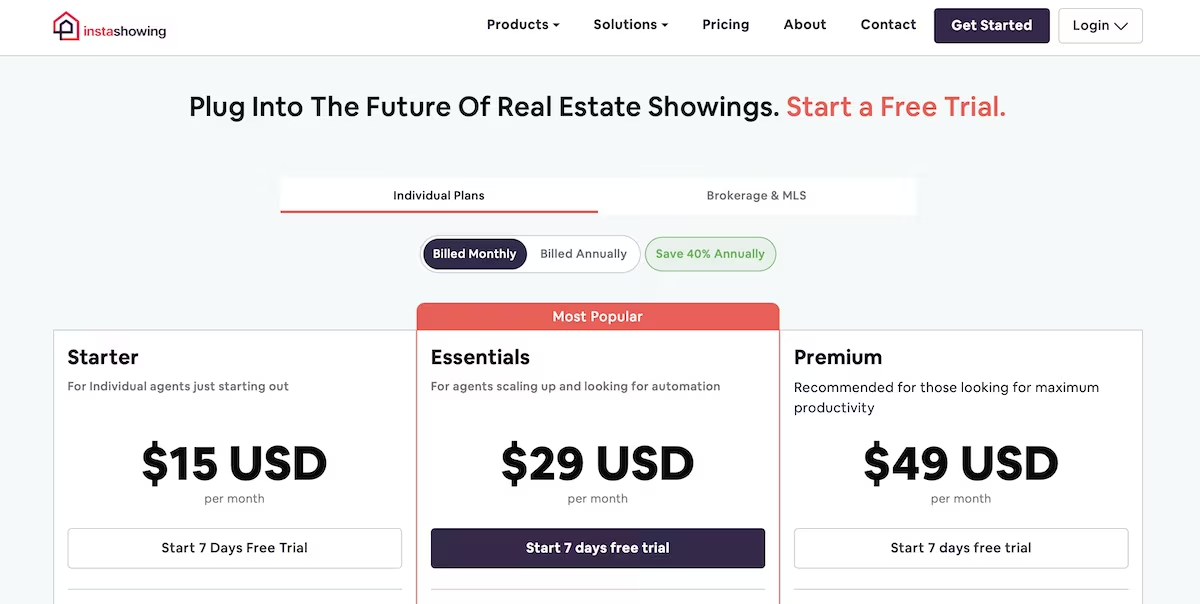
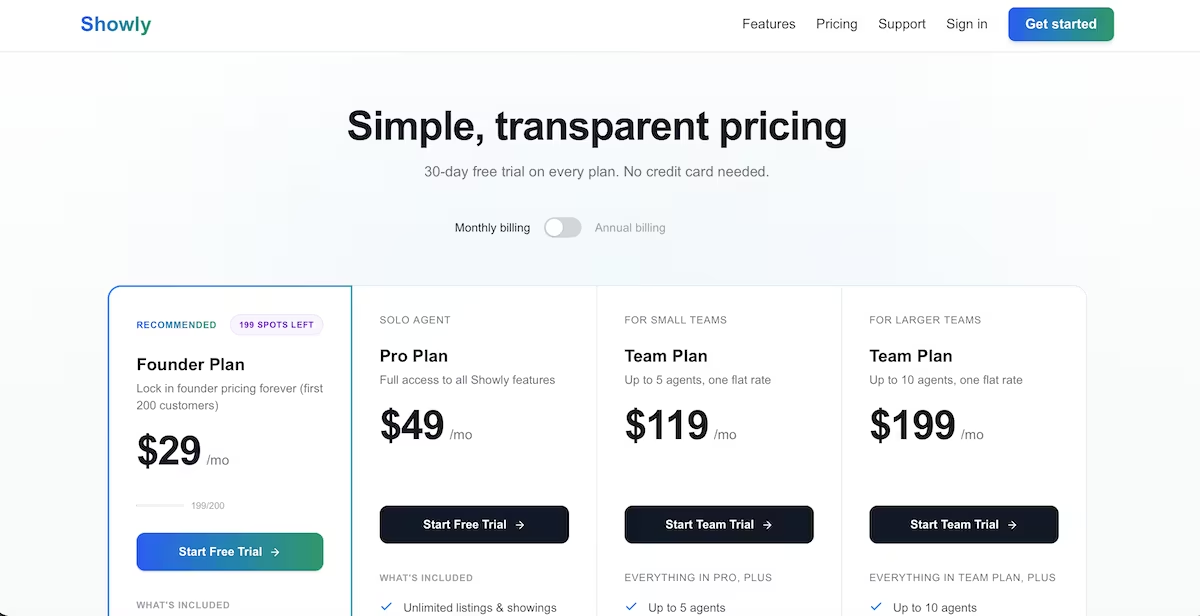
Then I opened the pricing pages myself to confirm ChatGPT's findings. Its research had reported Instashowing's entry plan at $29 with no cheaper tier. The actual page showed a $15 Starter plan. Every price in this article is one I opened and checked on the vendor's own page.
The reviews were interesting. ShowingTime's Appointment Center holds 4.4 out of 5 across 77 Capterra reviews, and one reviewer complained specifically that agents have to create an account instead of getting a link for one listing. Someone already paying for the alternative described the exact thing I was thinking of building.
Do this: Check anything the AI tells you against the source before you quote it.
Step 3. Pressure-Test the Idea
At this point, I had evidence that the problem was real and evidence that several companies were already selling into it. The pushback I'd found was aimed at my share link and at whether feedback is owed at all, so I asked directly what would kill this as a business.
So I asked for the case against:
Argue against this idea. Give me the five strongest reasons a showing feedback tool for US real estate agents fails as a business, with evidence for each. Then name the single piece of evidence that would kill it outright, and how I'd go and find that this week.
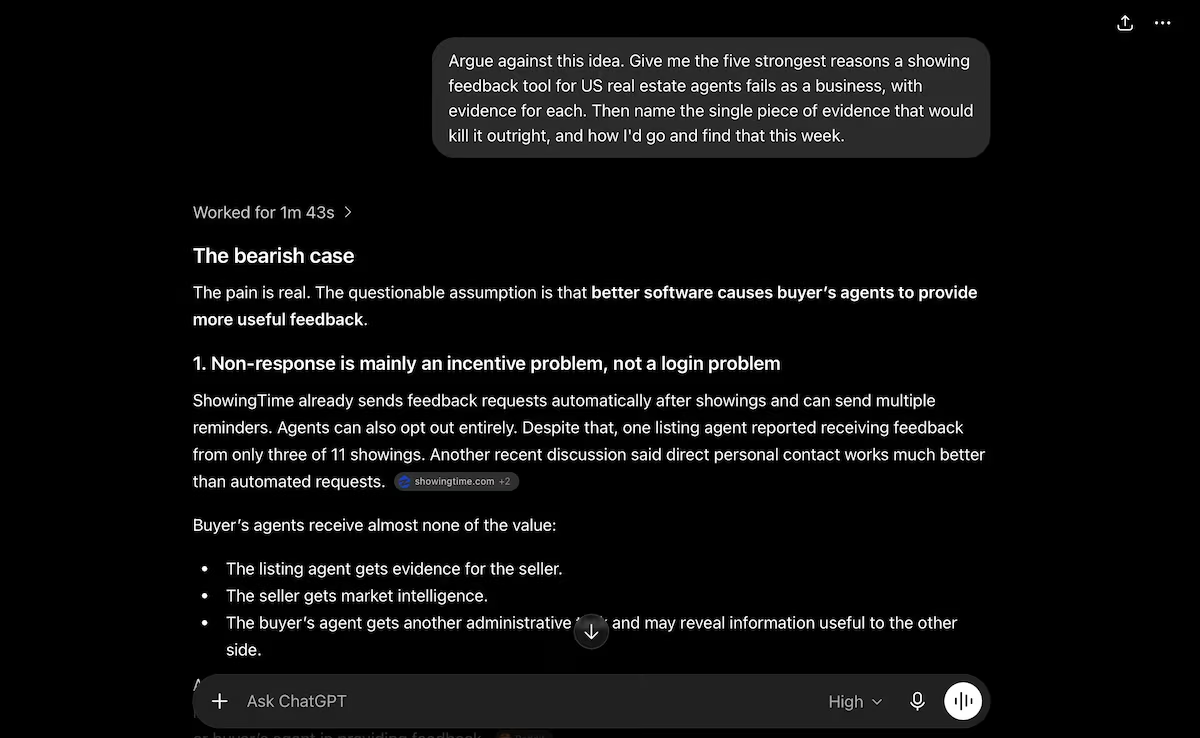
The strongest case against building it came down to where it sits. ShowingTime already knows when a showing took place, because it's connected to the multiple listing service (MLS) that scheduled it. My version asks the listing agent to type the property in first, which is more work than the tool they're already paying for.
ChatGPT's view was that this belongs inside the software that agents already use instead of being sold on its own. I don't think that kills the idea, but it does change what I'd build first. I'd already written my build prompt around the share link by that point, so I ran it as it was and let the app show me how much of that reasoning held up.
Do this: Ask what would prove you wrong before anything else. An AI assistant will back whatever you propose unless you tell it not to, so you have to ask for the case against it.
Step 4. Build the Working App
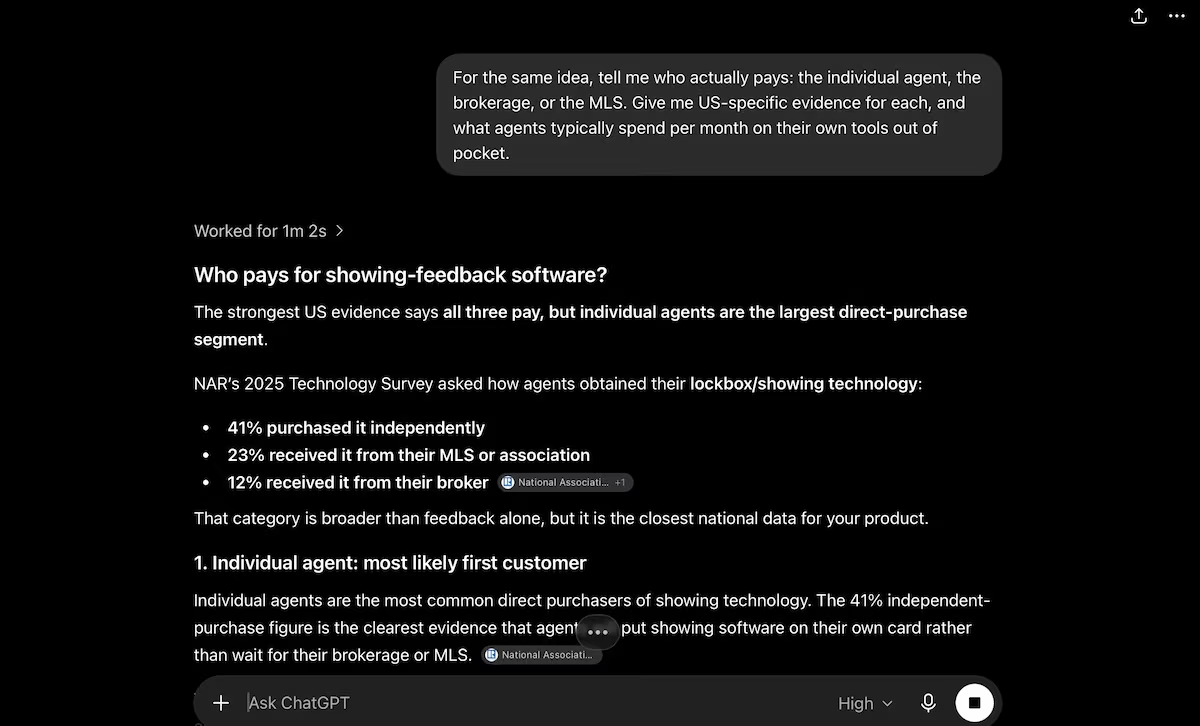
I ran a short fourth prompt asking who pays for this kind of software. NAR's 2025 REALTORS Technology Survey found that 41% of agents buy their own showing technology, behind only social media, cloud storage, and virtual tours.
Thirty-four percent of respondents spent an average of $50 to $250 a month on technology for their own real estate business over the past 12 months. That showed me that the market has money to spend.
At this point, I had enough to justify building something. I wanted an app I could send to an agent, and I wanted it done in a day. So I turned to Emergent.
What it does: Emergent takes a written description of an app, and its specialized agents split the build between them, with testing agents checking the work before anything ships.
Best for: Non-technical founders and small teams that want something real and shareable.
I opened Emergent and gave it a prompt that covered three screens: an agent screen that produces a share link, a public form with no login, and a property page with all responses. I also asked it to include a summary that the agent can copy and send.
Once the agents had finished building, I saw a preview of the app, which Emergent has named ShowingLoop. The build prompt covered three screens: an agent screen that produces a share link, a public form with no login, and a property page with all responses.
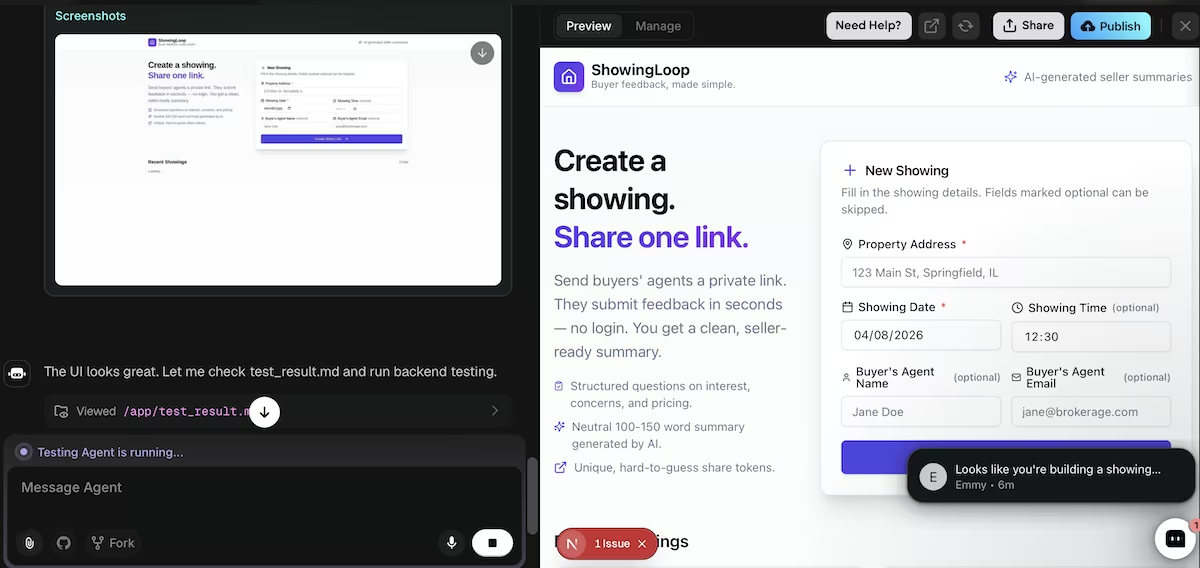
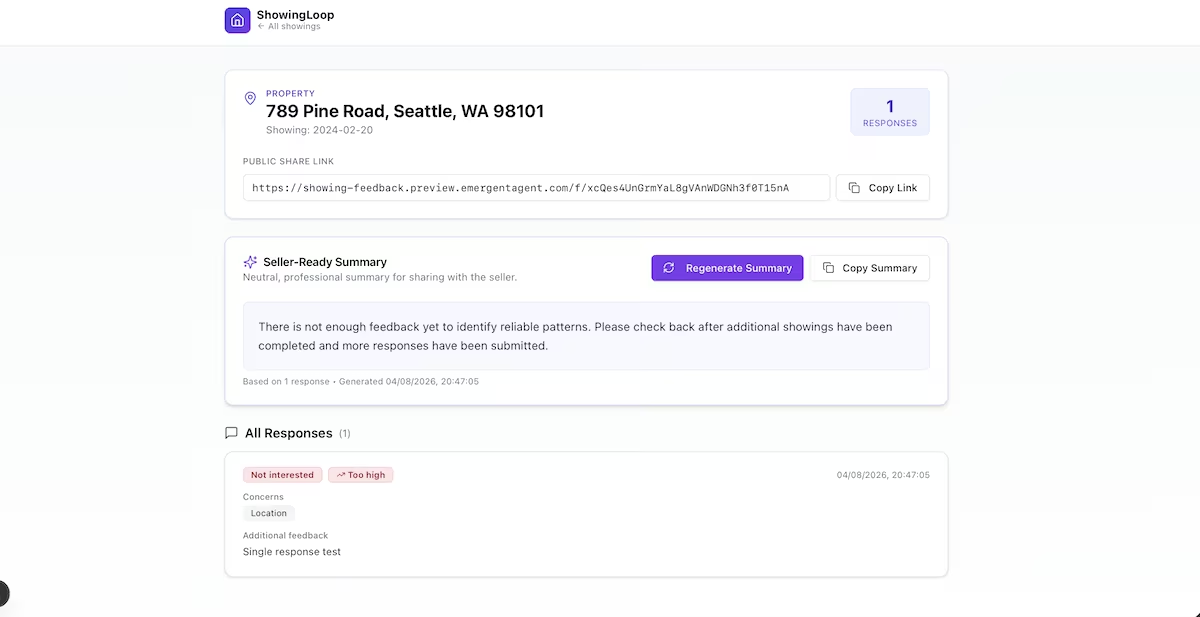
My prompt said that a summary based on fewer than two responses should say that there wasn't enough to go on. The testing agents checked that, along with whether the summary included anyone's email address and confirmed both. When I opened a property with one response, the page told me there wasn't enough feedback yet to identify reliable patterns.
The preview showed a page-loading error, and the preview URL itself returned a 502. Emergent also suggested four additions, one of which was a passcode on the property page. Without it, anyone with the URL can read every response.
Do this: Spell out the edge cases you care about in your prompt, then check the finished build against each one before you show it to anyone.

Step 5. Put It in Front of a Real Buyer
Everything above is research, and that doesn't determine whether or not anyone would pay. That only comes from an agent using the summary on a listing, which is the step I'd run next.
I'd keep it small. One agent with a listing that isn't moving, the link sent after the next three showings, and then a conversation about what they told the seller. If the summary came up in that conversation without me asking about it, there's something to build on, and if they went back to the phone instead, that's also valuable feedback.
The share link is the part I'd drop. Two of the threads I read rejected the idea of giving feedback at all, so a better-designed link isn't going to change anyone's mind. Whether the summary helps in a price conversation is the question I can answer with what's already built.
Do this: Decide what result would make you stop before you start. Mine is that if the summary never comes up when an agent talks about price with a seller, the share link was never the problem worth solving.
Key features:
- Design and development handled: Emergent takes care of the design and development work that would otherwise sit between your idea and something you can show someone.
- Universal LLM Key: Builds that call a model can use Emergent's own credential, so you don't need to bring a key of your own.
- Testing agents: They check the build against what you specify before it ships. In my build, they verified the low-response edge case I'd asked for.
- Deployment handled for you: The build ships with a live URL you can open in another browser, though my first preview needed a retry.
- Persistent database: Data entered on one device shows up for anyone else using the app.
Also read our guide on how to build an MVP app for a step-by-step walkthrough of what it takes to go from idea to something real users can try.
Common Mistakes to Avoid
- Quoting a price you haven't seen yourself: Research summaries get pricing wrong, and pricing pages change. Open the page and check for yourself before you enter any figures into your plan.
- Building the idea you started with: Four of my 10 threads argued against some part of what I'd planned. If nothing about your idea changes during research, you probably weren't listening.
- Reading complaints as demand: People complain about things they'd never pay to fix. Agents complaining about feedback and agents buying feedback software are two different groups.
- Skipping the argument against: The real weakness in my idea, that it belongs inside software agents already pay for, only surfaced because I asked for the case against it. Nothing in the first two steps would have found it.
What I'd Do Next
The seller summary is the part I'd build on, as that's what the threads kept returning to. Agents want something specific to show a seller who doesn't want to hear about the price, and the version I built already produces it.
If they'll pay for it, I have a starting point. If they won't, I've spent 11 credits and a day, which is the entire point of validating first. The same reasoning holds if you're building a SaaS business or anything else you plan to charge for. If you're still weighing what to build, there are other ways to make money with AI worth reading first.
How Emergent Makes Validating a Business Idea Easier
Doing research tells you whether people have the problem. By building something, you can find out whether your answer to it makes any sense to them. Emergent turns a written description into an app with a live URL, so you can go from one to the other fast.
11 credits buys a deployed app and a real answer to the question you started with, whether or not you keep building on it. The summary in my build ran on Emergent's own key, so I never opened a separate account or added a card just to test it. My first preview returned a 502, and I'd rather say that than pretend a first build is always clean.
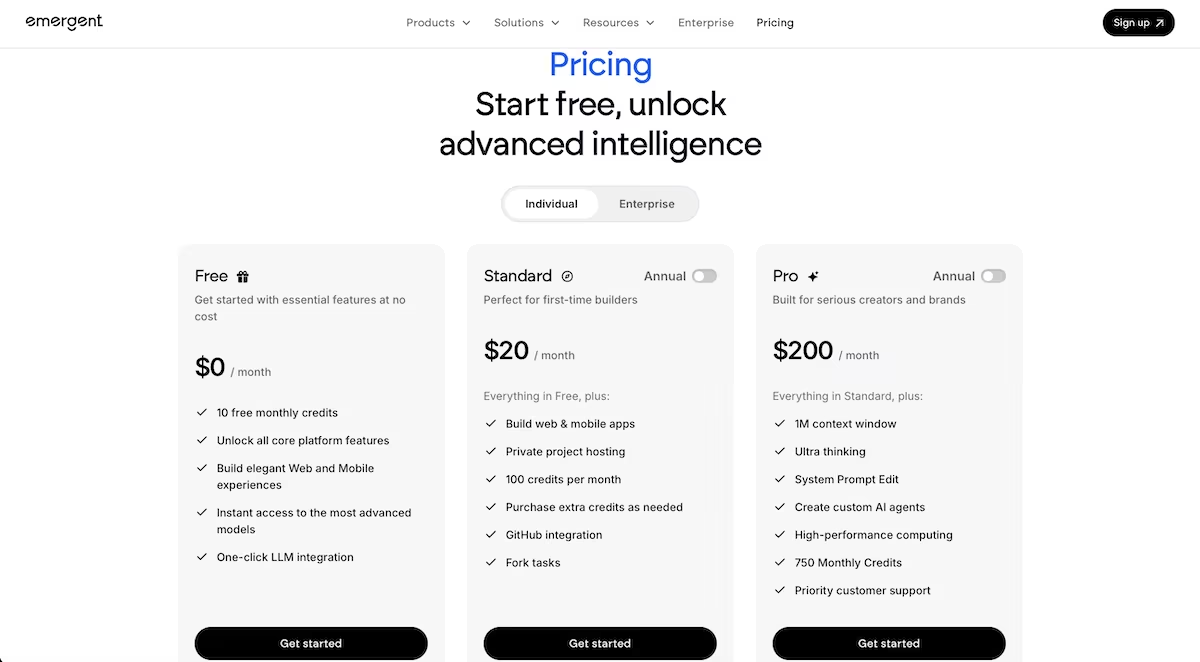
Emergent's pricing starts free with 10 credits a month, and the Standard plan is $20 a month billed monthly, or $17 billed annually, with 100 credits. That puts a build like mine just past the free plan, so budget the $20 for Standard even if you're only testing one idea.
You can also start builds from inside your AI chat through Emergent MCP, which connects Emergent to the assistant you already use if that's where you work.
If you've got an idea sitting in a notes app, try building a basic version of your app and find out what people say.

Describe what you want and Emergent builds it. A real, production-ready app you can launch the same day.
- One prompt to build
- Zero code required
- Deploy in minutes







