



TL;DR: HubSpot Vs Salesforce
- HubSpot: Best for small to mid-sized teams that want sales, marketing, service, and customer data in one easier customer platform. HubSpot's Customer Platform brings marketing, sales, service, content, data, and Breeze artificial intelligence (AI) tools together on its Smart CRM.
- Salesforce: Best for companies that need deep customization, advanced reporting, complex sales processes, and a larger enterprise ecosystem. Salesforce positions itself as an AI CRM with agents, customer data, and CRM apps on one platform.
- My Recommendation: Pick HubSpot when speed, adoption, and marketing-to-sales flow matter most. Pick Salesforce when your CRM needs to support multiple teams, products, regions, permissions, and custom revenue workflows.
Choosing between HubSpot vs Salesforce usually starts with a simple question: do you want a CRM your team can use quickly, or a CRM your business can shape around complex sales operations?
I treated this as a source-led comparison by auditing the official HubSpot and Salesforce product pages, live pricing pages, official comparison pages, admin commentary, and user discussions as of July 27, 2026.
Here’s my answer: choose HubSpot if you want faster setup, easier adoption, and stronger built-in marketing workflows. Choose Salesforce if your sales process needs deep customization, complex reporting, strict permissions, and a platform your revenue operations team can keep building on.
HubSpot Vs Salesforce: What’s The Difference?
HubSpot and Salesforce are both customer relationship management (CRM) platforms, but they solve different versions of the same problem.
HubSpot is a customer platform built around a Smart CRM, with connected hubs for marketing, sales, service, content, operations, commerce, and AI. It works best when you want one connected workspace that a sales or marketing team can adopt without heavy admin work.
Salesforce is an AI CRM platform built for scale, customization, sales operations, data management, and enterprise workflows. Sales Cloud, Marketing Cloud, Data 360, Agentforce, Slack, Tableau, and AppExchange give Salesforce a much wider surface area for companies with complex systems.
Choose HubSpot if you want a CRM that helps your team move faster with less setup.
Choose Salesforce if you need a CRM that can become the backbone of your sales, service, partner, data, and reporting operations.
How I Researched This HubSpot Vs Salesforce Comparison
I reviewed official vendor pages first, then understood buyer pain points and admin tradeoffs. Pricing and plan details come from HubSpot and Salesforce official pricing pages, not competitor blogs or review sites.
I also reviewed the search intent: HubSpot’s official comparison, Salesforce’s official comparison, Zapier’s comparison, RevOps Co-op’s admin-focused breakdown, and the Reddit thread the brief called out.
The pattern was clear: readers want a direct answer on ease of use, cost, customization, marketing, reporting, and long-term fit.
I cut third-party pricing claims because HubSpot and Salesforce pricing changes often enough that old comparison posts can mislead readers.
Why This Decision Usually Gets Hard
The HubSpot vs Salesforce decision gets hard because both tools can look right at different stages of your company.
A small team usually feels HubSpot’s value first. You can capture contacts, run marketing campaigns, track deals, automate follow-up, and keep sales activity in one place without hiring a dedicated admin. HubSpot’s official product pages center that value around a connected Smart CRM, Marketing Hub, Sales Hub, and Breeze AI agents.
A larger sales organization feels Salesforce’s value when the process stops being simple. Salesforce supports lead assignment, lead routing, lead scoring, duplicate blocking, account and opportunity management, custom apps, sales forecasting, reporting, APIs, revenue intelligence, and partner relationship management across higher-tier products and add-ons.
That matches the strongest user theme in the Reddit thread: HubSpot has a higher floor, while Salesforce has a higher ceiling. Admin-focused commentary says the same thing in cleaner terms: HubSpot is easier for straightforward workflows, and Salesforce is stronger when you need complex objects, account hierarchies, partner sales, or regulated processes.
Also read our guide on how to build your own CRM with AI for when neither platform fits your process and a custom build makes more sense.
HubSpot Vs Salesforce At A Glance
| Category | HubSpot | Salesforce |
|---|---|---|
| Best For | Fast sales and marketing adoption | Complex revenue operations |
| Worst Fit | Highly customized enterprise sales systems | Teams without admin support |
| Free Plan | $0/month, up to 2 users | $0/user/month |
| Starter Paid Plan | $20/user/month ($7/user/month billed annually) | $25/user/month ($25/user/month billed annually) |
| Sales Strength | Easy pipeline tracking and rep adoption | Deep sales process control |
| Marketing Strength | Strong built-in marketing tools | Enterprise marketing stack |
| Customization | Good for standard workflows | Best for complex workflows |
| Reporting | Strong for GTM visibility | Stronger for forecasting and sales ops |
| Admin Load | Lower | Higher |
| Best Choice | SMBs, agencies, service teams, startups | Mid-market, enterprise, complex sales teams |
HubSpot wins when the fastest path to adoption matters most. Salesforce wins when your CRM needs to model a complicated business.
Meet HubSpot: Features And Highlights
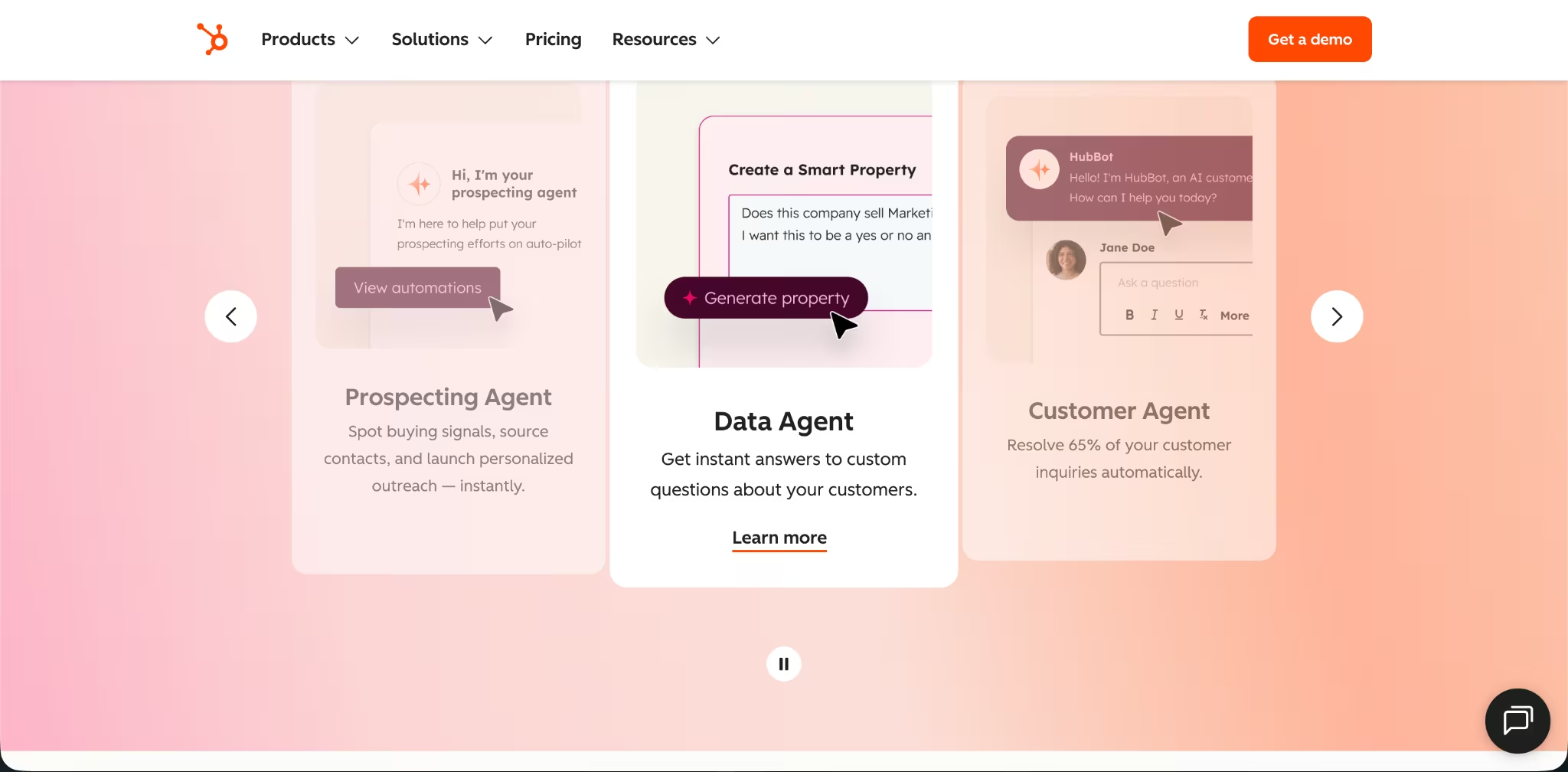
HubSpot is a connected customer platform with a Smart CRM at the center. Its core pitch is simple: your marketing, sales, and service teams work from the same customer record instead of stitching together separate tools.
Sales Hub handles contacts, deals, pipelines, sales automation, meeting scheduling, email tracking, quotes, forecasting, and sales workspaces. Marketing Hub handles email marketing, forms, landing pages, ads, reporting, marketing automation, campaign tools, and contact management.
Breeze adds AI agents for prospecting, content, customer support, and working with customer records, all inside the same platform your team already uses.
HubSpot Pricing
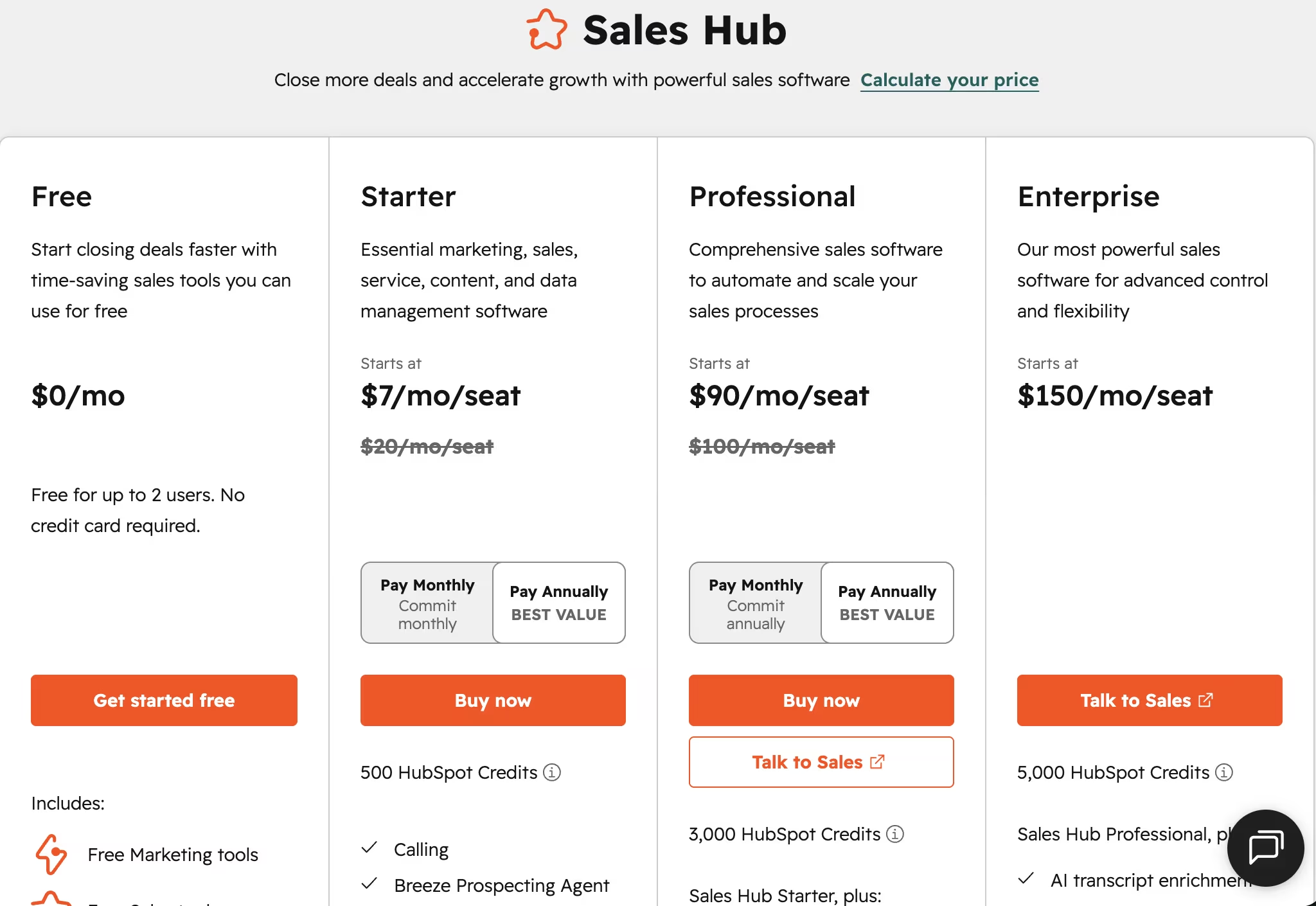
HubSpot Sales Hub has Free at $0/month, Starter at $20/user/month ($7/user/month billed annually), Professional at $100/user/month ($90/user/month billed annually), and Enterprise at $150/user/month. Professional has a required one-time onboarding fee of $1,500, and Enterprise has a required one-time onboarding fee of $3,500.
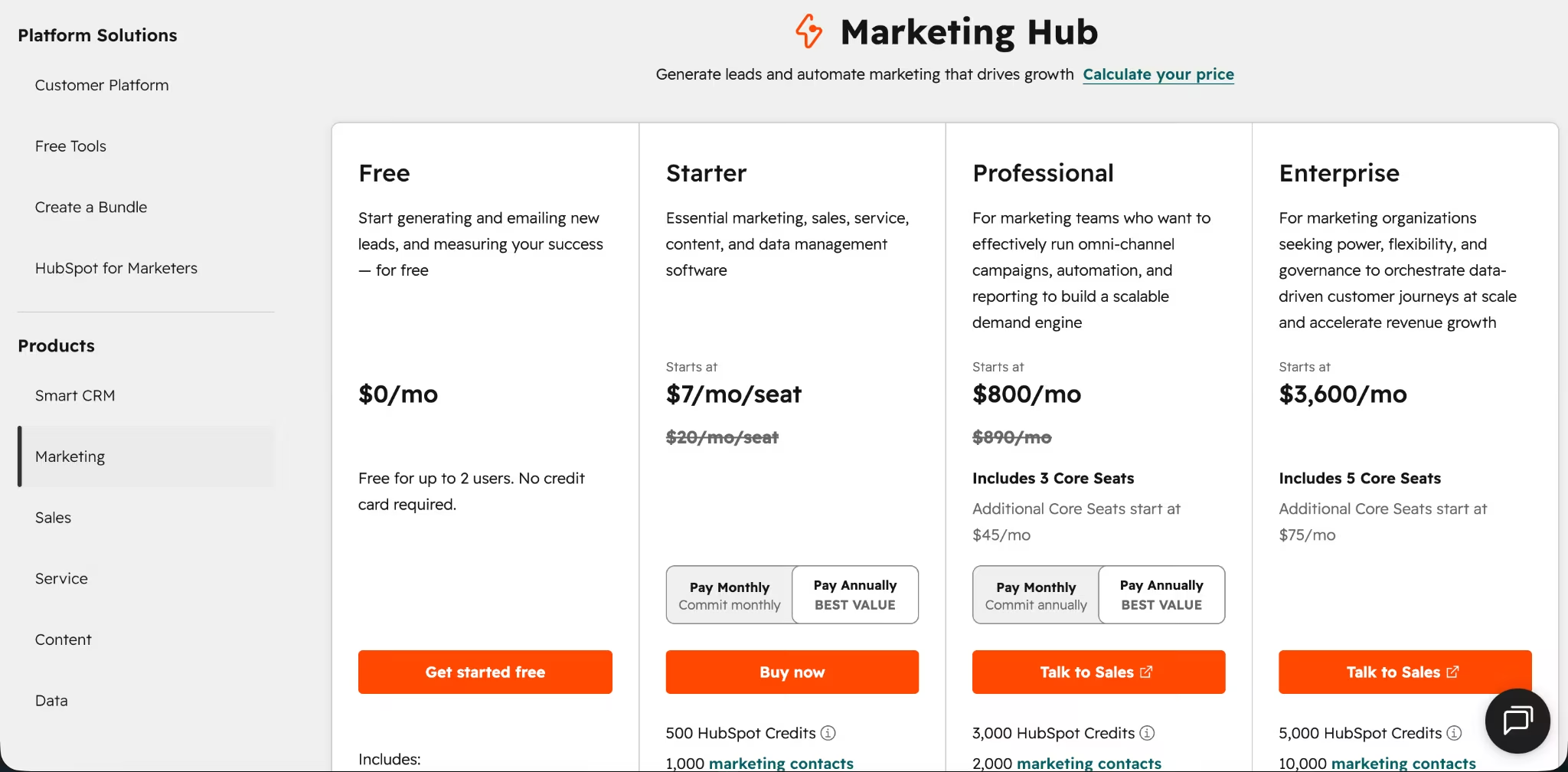
HubSpot Marketing Hub has Free at $0/month, Starter at $20/user/month ($7/user/month billed annually), Professional at $890/month ($800/month billed annually), and Enterprise at $3,600/month. Professional includes a required one-time onboarding fee of $3,000, and Enterprise includes a required one-time onboarding fee of $7,000.
Where HubSpot Wins
HubSpot is the faster setup here. If your team needs contact management, email campaigns, forms, lead capture, deal tracking, sales follow-up, and service workflows in one place, HubSpot gets you there with less setup work than Salesforce.
HubSpot also wins for teams that care about marketing and sales alignment. Marketing Hub and Sales Hub sit on the same Smart CRM, so your sales team can work from the same contact and company data your marketing team uses.
Choose HubSpot if you’re a founder, agency, service business, or growing sales team that wants a usable CRM without building a revenue operations department first.
Where HubSpot Loses
HubSpot starts to strain when your sales process needs complex architecture. Think of a company selling three products across five regions, with different approval rules, partner accounts, account hierarchies, and forecasts for each sales team.
If you need deep custom objects, advanced permissions, complex forecasting, multi-team sales motions, partner selling, strict data governance, or heavy back-office integrations, Salesforce gives you more room to build.
HubSpot also gets expensive as you layer on higher-tier hubs, onboarding, larger contact databases, and AI credit usage. The lower entry price helps small teams, but larger GTM teams still need to model the full cost across seats, hubs, contacts, onboarding, and add-ons.
Salesforce also has a stronger direct-review trail on its own marketplace and community pages, which makes it easier to read user feedback tied to specific apps, consultants, and implementation choices. HubSpot has plenty of third-party reviews, but it doesn’t surface the same kind of direct user-review layer in this comparison context, so you’ll need to rely more on external review platforms and admin commentary when pressure-testing buyer sentiment.
Also read our business app development guide for when HubSpot or Salesforce doesn't fit your workflow and custom software makes more sense.
Meet Salesforce: Features And Highlights
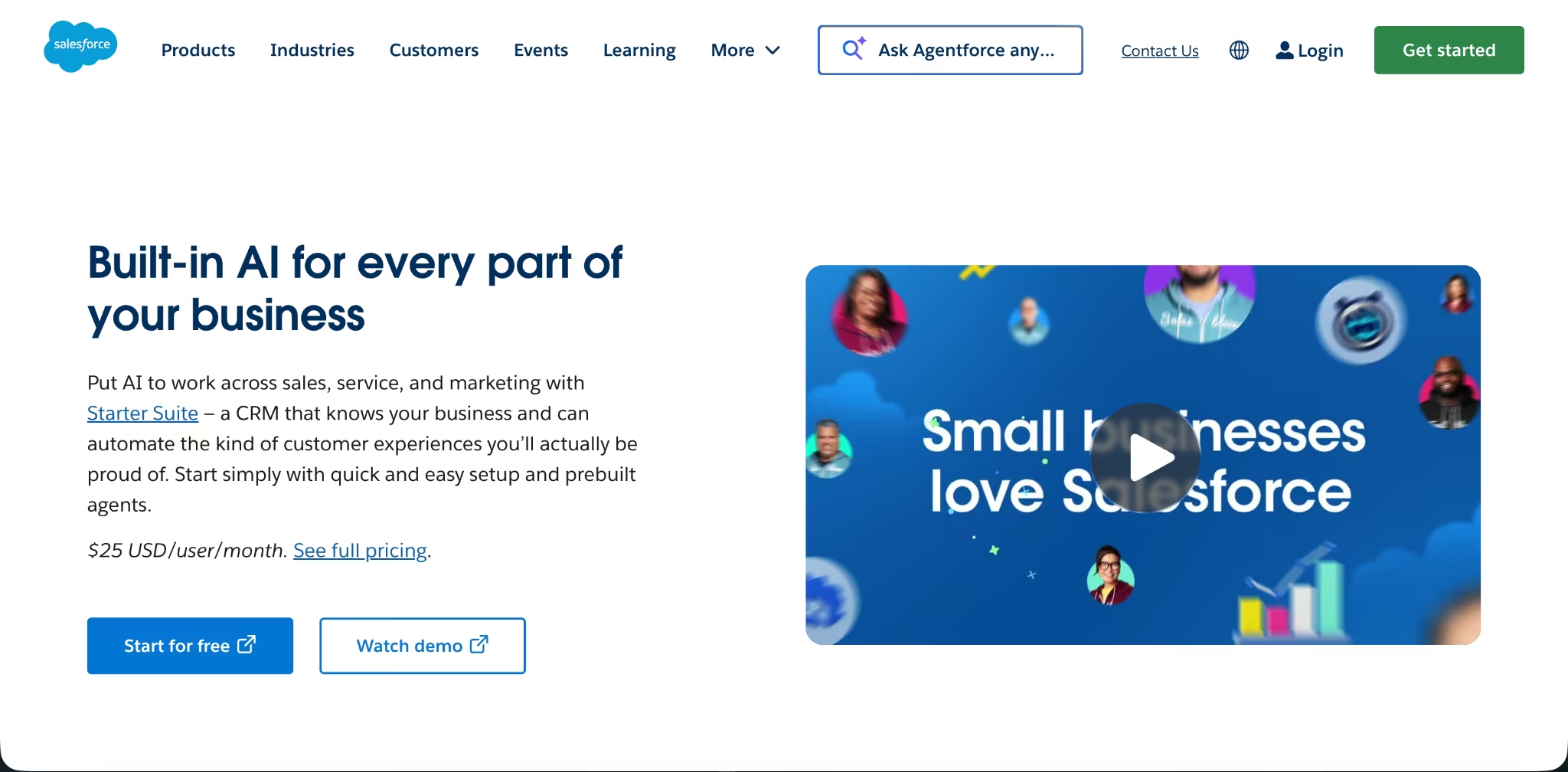
Salesforce is the stronger choice when CRM complexity is the point. Sales Cloud supports lead management, lead assignment, routing, scoring, account management, contact management, opportunity management, forecasting, custom apps, sales console apps, mobile access, reports, dashboards, and APIs.
Salesforce also has a broader platform around the CRM. Data 360 gives companies a governed data foundation, Agentforce adds AI agents, Slack supports collaboration, Tableau supports analytics, and AppExchange gives teams access to a large app and partner ecosystem.
That flexibility comes with more admin work. Salesforce pays off when you have revenue operations (RevOps), admins, consultants, or developers who can design the data model and keep the CRM clean.
Salesforce Pricing
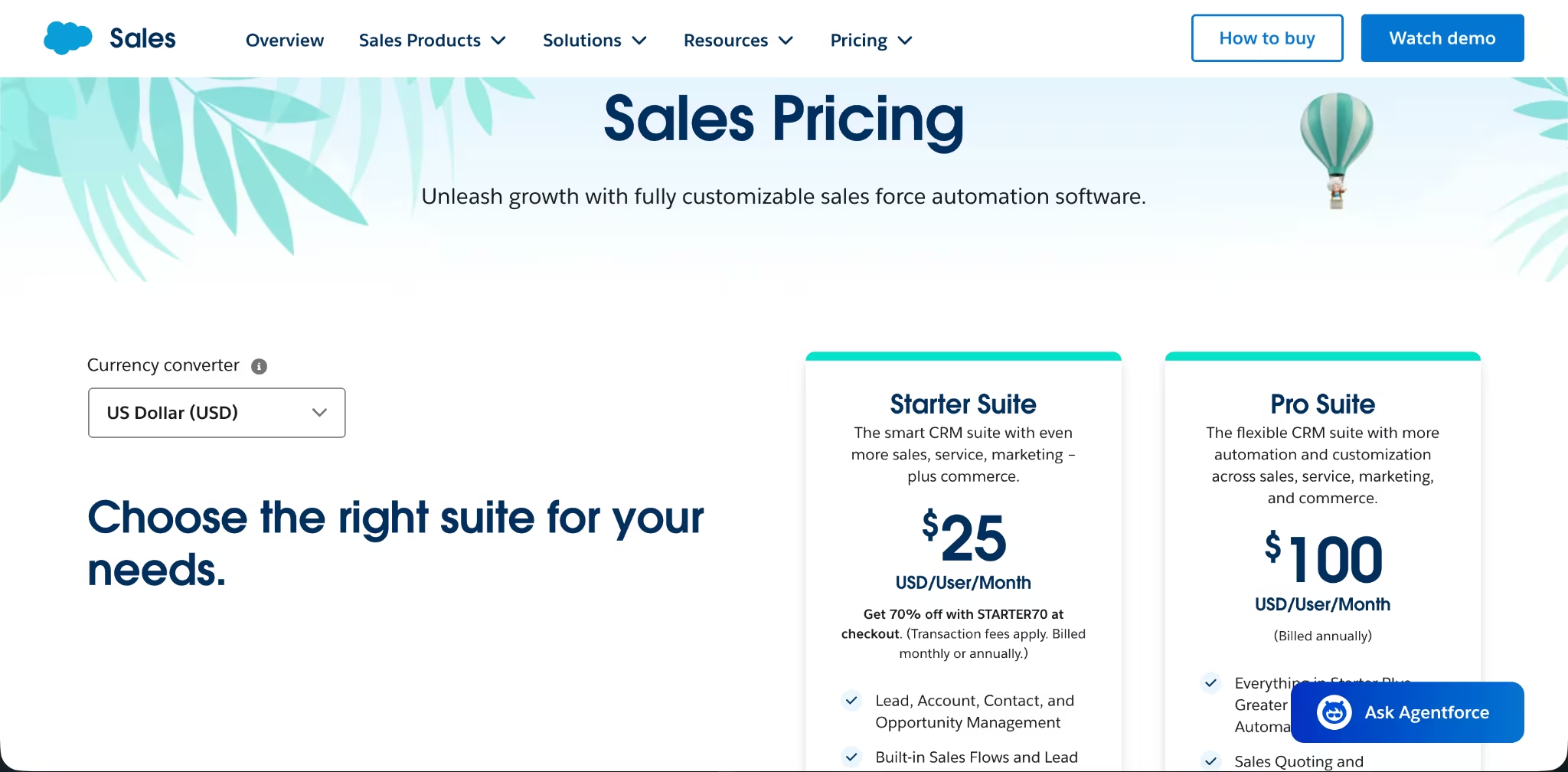
Salesforce Sales pricing has a Free Suite at $0/user/month, Starter Suite at $25/user/month, and Pro Suite at $100/user/month. Higher tiers run Enterprise at $175/user/month, Unlimited at $350/user/month, and Agentforce 1 Sales at $550/user/month, all billed annually.
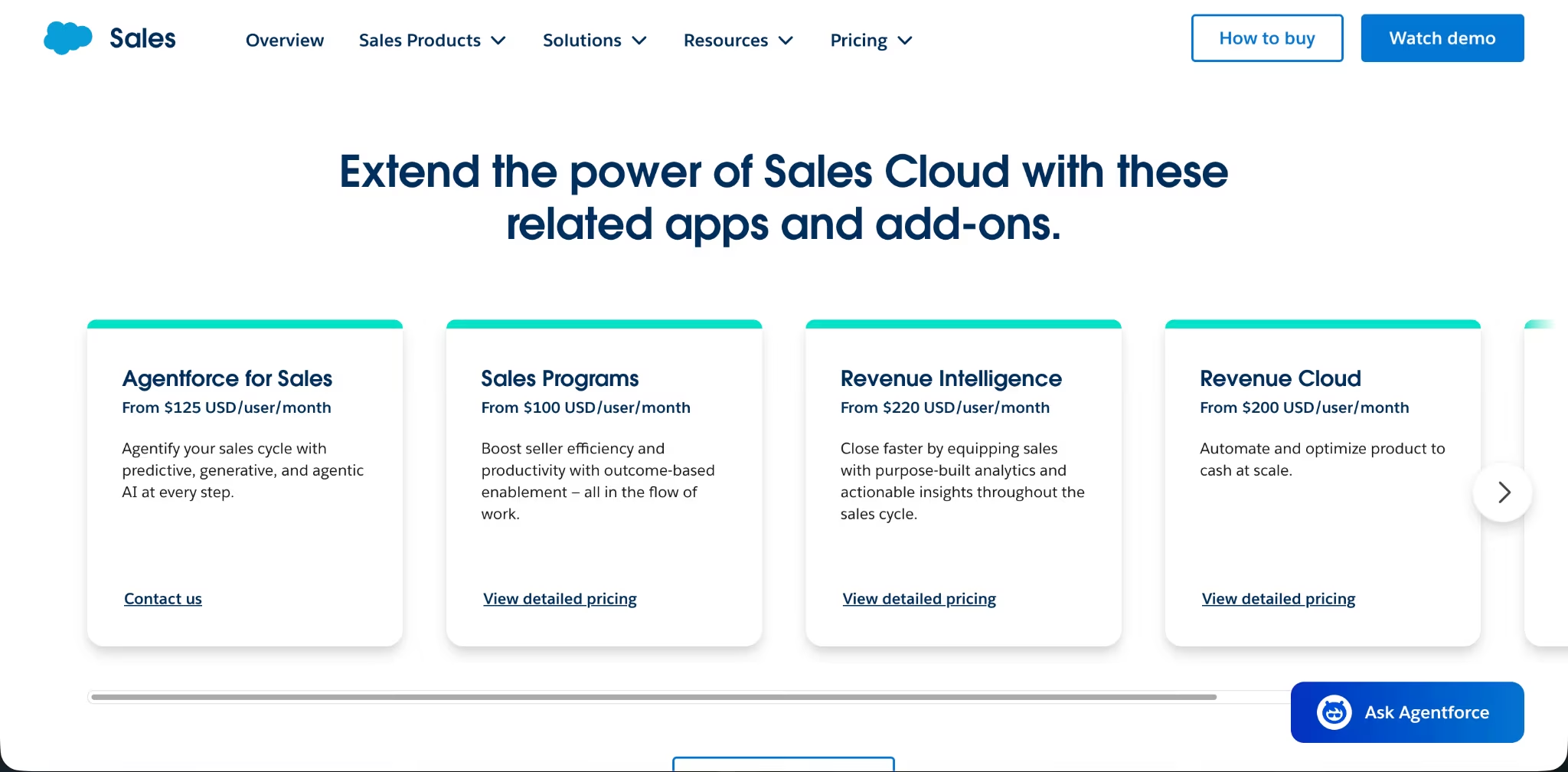
Salesforce add-ons include Agentforce for Sales from $125/user/month, Revenue Intelligence from $220/user/month, Revenue Cloud from $200/user/month, and Partner Relationship Management from $10/login/month. Standard Success Plan is included, Premier Success Plan costs 30% of net license fees, and Signature Success Plan is custom.
Where Salesforce Wins
Salesforce wins when your CRM needs to mirror a complex business. It gives you stronger tools for custom sales processes, account structures, lead routing, forecasting, reporting, automation, app extensions, data integrations, and enterprise governance.
Salesforce also wins for larger companies that already have admin support. If your team has a RevOps lead, Salesforce admin, or implementation partner, Salesforce gives them more control than HubSpot.
Where Salesforce Loses
Salesforce loses when you need a simple CRM your team can use quickly. The same flexibility that makes Salesforce powerful also creates setup work, admin decisions, and process design work before your team gets full value.
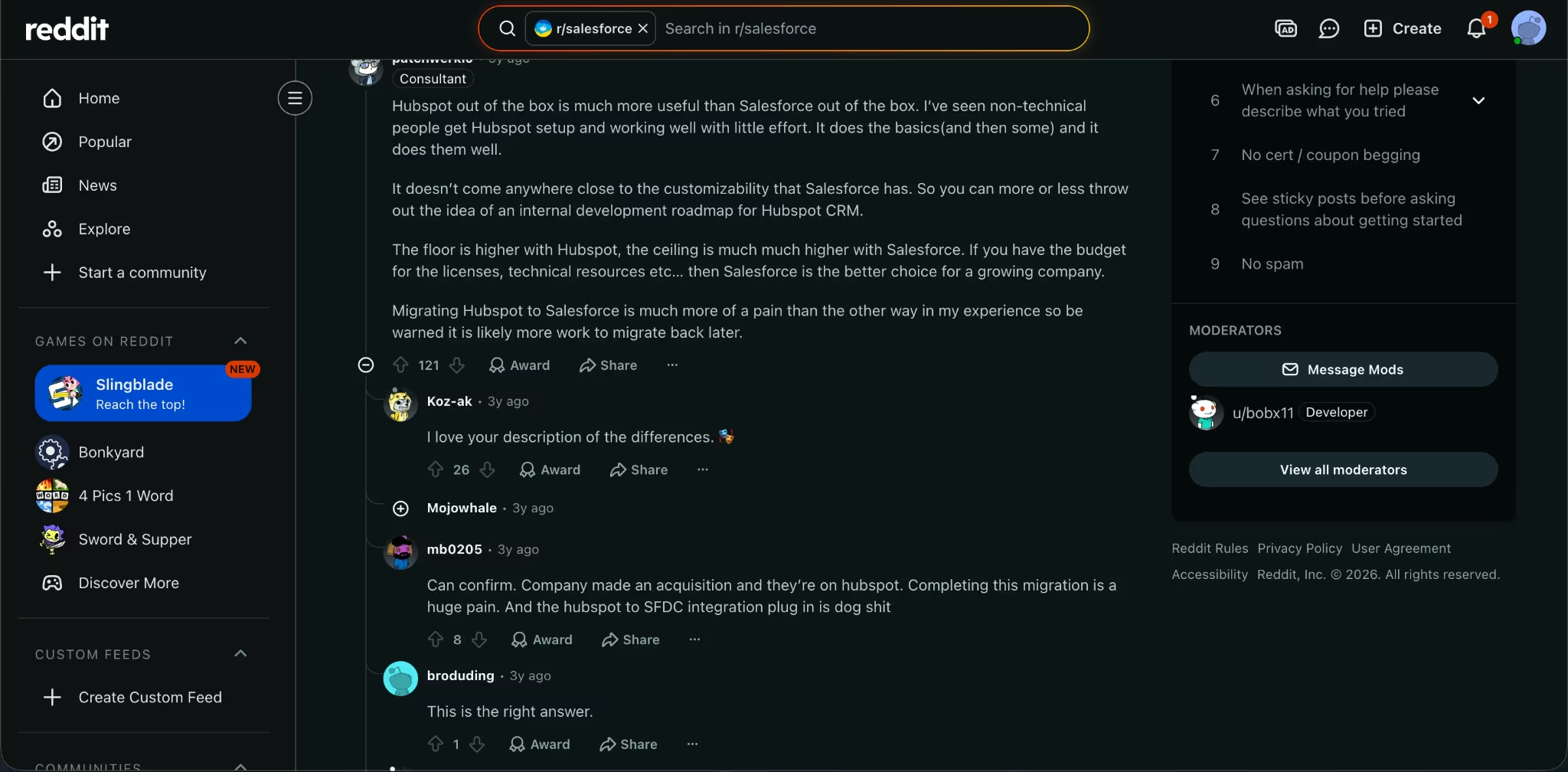
Many Reddit and admin commentary repeat the same warning: Salesforce is stronger, but it takes more work and cleaner process discipline. If your team doesn’t have that discipline, Salesforce can turn into an expensive database that reps avoid.
HubSpot Vs Salesforce: Feature-By-Feature Comparison
Sales CRM And Pipeline Management
Salesforce wins for complex sales CRM and pipeline management. Its Sales Cloud feature set goes deeper on lead management, lead routing, lead scoring, account and opportunity management, forecasting, custom sales processes, sales console apps, and reporting.
HubSpot wins when your sales process is simple enough that adoption matters more than architecture. Sales Hub gives you contacts, deals, pipeline tracking, sales workspaces, automation, prospecting tools, meeting tools, and customer records that are easier for a lean team to manage.
Winner: Salesforce for complex sales operations. HubSpot for fast sales adoption.
Marketing Automation
HubSpot is the stronger marketing automation pick for most small and mid-sized teams. Marketing Hub includes email marketing, forms, landing pages, marketing automation, campaigns, reporting, contact management, and AI tools tied to HubSpot’s Smart CRM.
Salesforce still wins for enterprise marketing teams that need a larger marketing stack tied into Salesforce data, service, commerce, and analytics. Salesforce’s marketing products fit companies with bigger teams, larger data systems, and more technical support.
Winner: HubSpot for most sales and marketing teams. Salesforce for enterprise marketing operations.
Customization And Data Model
Salesforce gives more control over customization. It gives you more control over objects, apps, permissions, process automation, reports, data structure, integrations, and advanced sales workflows.
HubSpot’s customization is enough for many growing teams, especially when your business follows a standard sales and marketing motion. Once you need unusual account hierarchies, partner channels, custom approval logic, or tightly governed data models, Salesforce is the better fit.
Winner: Salesforce.
Reporting And Forecasting
Salesforce gives sales leadership deeper reporting and forecasting when pipeline visibility matters. Sales Cloud includes forecasting, customizable reports and dashboards, sales console apps, pipeline inspection, and advanced data tools across higher-tier products.
HubSpot’s reporting works well when your goal is GTM visibility across marketing, sales, and service. It gives smaller teams cleaner access to campaign, contact, deal, and customer activity without the same admin lift.
Winner: Salesforce when forecasting depth matters most. HubSpot is better when you need simpler go-to-market reporting across marketing, sales, and service.
AI And Automation
Salesforce wins AI depth for enterprise teams. Agentforce, Data 360, and Salesforce’s AI CRM positioning give larger teams a broader platform for agents, data, CRM workflows, service, sales, and analytics.
HubSpot wins AI accessibility for teams that want AI inside daily marketing, sales, and support work without building a large AI operations layer. Breeze agents and assistants sit inside HubSpot’s customer platform, so smaller teams can use AI across prospecting, customer data, content, and support workflows.
Winner: Salesforce for enterprise AI architecture. HubSpot for practical AI adoption.
Also read our best AI agents for business guide for what else is worth trying when you need AI across your workflows beyond what either CRM offers.
Ease Of Use And Admin Load
HubSpot is the easier CRM to use. Its main strength is getting sales and marketing teams working from one CRM with less admin setup, fewer architectural decisions, and a shorter path from signup to value.
Salesforce needs more planning. You’ll get more control, but you’ll also need stronger ownership over fields, permissions, automations, objects, reporting rules, and data hygiene.
Winner: HubSpot.
Integrations And Ecosystem
Salesforce wins the enterprise ecosystem. Salesforce has the deeper enterprise app marketplace and partner network, with thousands of integrations, a large consultant ecosystem, and the Trailblazer community behind it. Sales Cloud also supports API and data connection options that make it easier to fit Salesforce into a larger enterprise stack.
HubSpot still has a strong app ecosystem for small and mid-sized teams, especially when your main stack is marketing, sales, support, content, and commerce. But if your company already runs on enterprise systems, Salesforce gives you more integration depth.
Winner: Salesforce.
Total Cost Of Ownership
HubSpot usually costs less to operate for small and mid-sized teams that don’t have dedicated CRM admins. The starter price is lower than Salesforce, and the simpler setup reduces the amount of internal admin work you need at the start.
Salesforce wins long-term value when complexity is unavoidable. If your CRM has to support multiple products, sales teams, regions, approval paths, partners, and reporting layers, paying for Salesforce admin work is part of buying the right system.
Winner: HubSpot for lean teams. Salesforce for complex teams with admin support.
What Real Users And Admins Keep Saying
The strongest user warning is about switching pain. HubSpot can carry a straightforward sales motion for a long time, but teams that later need account hierarchies, partner sales, complex permissions, or deeper forecasting often feel the Salesforce gap.
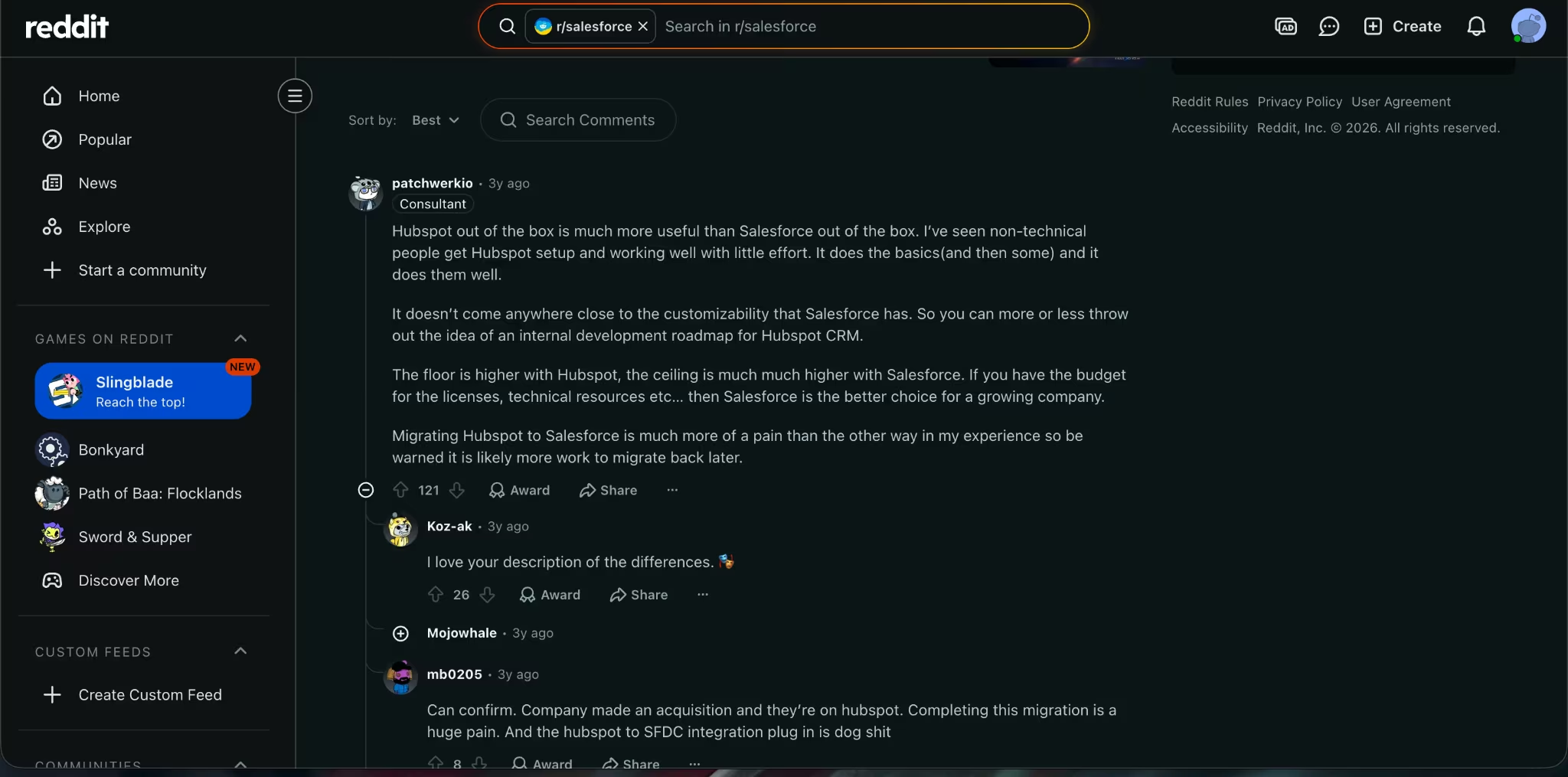
In a Reddit thread, one user framed it well: HubSpot gives non-technical teams a useful system faster, while Salesforce gives you more customization and a higher ceiling. Other commenters warned that switching away from Salesforce can create pain if your company later needs Salesforce-level complexity again.
Admin commentary from RevOps Co-op lands in the same place. HubSpot works well for straightforward sales processes, while Salesforce fits companies with account hierarchies, channel sales, partner accounts, and regulated workflows.
Which One Should You Choose?
Choose HubSpot if you want a CRM your team will actually use this quarter. It’s the better choice for:
- Startups and lean sales teams that need contact management, pipelines, email tracking, meetings, and follow-up without a heavy admin layer.
- Agencies and service businesses that want marketing, sales, and customer data in one place.
- Marketing-led teams that need forms, landing pages, email campaigns, automation, and sales handoff in the same system.
Choose Salesforce if your company has a complex sales process or can already see one coming. It’s the better choice for:
- Multi-team sales organizations with different products, territories, regions, or approval paths.
- Enterprise and partner sales teams that need account hierarchies, partner selling, custom permissions, and advanced reporting.
- Companies with RevOps support that can keep fields, automations, permissions, and reporting clean over time.
Build Your Own CRM When Neither Tool Fits
If neither HubSpot nor Salesforce fits your exact workflow, you can build your own CRM with Emergent instead of forcing your process into a rigid setup.
With Emergent, a consulting agency could build a CRM with a client onboarding dashboard, proposal tracker, and internal delivery app in one workspace. A real estate team could build a lightweight lead intake app for agents in the field, while still keeping Salesforce for pipeline control.
That gives you the structure of a CRM without making every team-specific workflow live inside HubSpot properties or Salesforce objects.
Also read our best custom business software tools guide for what else is worth trying when your workflow needs something built around your process rather than adapted to a platform.
Final Verdict
HubSpot is the better first CRM for most small and mid-sized sales and marketing teams. Salesforce is the better long-term CRM for companies that already need complex permissions, account structures, partner sales, forecasting, and admin control.
My recommendation: don’t buy the bigger system to feel safer. Buy the system your team can keep clean. If your process is still simple, choose HubSpot. If complexity is already part of the business, choose Salesforce before migration pain becomes the bigger cost.
Also read our guide on how to create a business app in an afternoon for when your workflow needs custom software that neither CRM can handle out of the box.

Most AI app builders stop at prototypes. Emergent creates production-ready apps you can actually launch.
- Production-ready apps
- Web & mobile apps
- Deploy in minutes







