InVideo is a leading AI video generator that lets users turn text prompts, scripts, and concepts into videos using templates, stock media, AI-generated content, voiceovers, and video editing features. But it may not be suitable for all. For some, the desire is more creative flexibility over specific clips; for others, the goal is realistic AI presenters, product-focused UGC ads or even business videos without dealing with a traditional workflow.
Fortunately, there are a number of AI video tools that have various methods for making videos. Runway emphasizes creative control and AI-generated video footage, Higgsfield offers multiple image and video models, HeyGen specializes in AI avatars and talking-head videos, and Pippit helps e-commerce businesses create product-focused ads. Another option is an Emergent video agent, which is more autonomous and can handle planning, scripting, narration and editing from a single brief.
Video maker features differ across platforms, depending on your needs, budget and creativity. This guide explores five of the best InVideo alternatives, including their main functions, pricing, pros and cons, and best fits, to help you choose the best tool for your business.
What is InVideo? What does it offer?
InVideo is popular because it offers you all those tools, plus templates, AI-generated scripts, text to video, stock media, and AI editing tools all in one place. For those who can afford it, its paid plans also provide access to 200+ image, video, and audio models. That combination works well for social media teams, marketers, or businesses that need fast video production. But generating everything without human context isn't captivating.
However, not all video production workflows are created equal, even with InVideo's extensive feature set. For businesses producing unique, product-specific commercials, you may still need to review selected visuals to ensure they accurately depict the product, keep scenes consistent, and adhere to branding.
Additionally, in advanced creative projects, models can be selected, credits can be managed, several versions of the project can be created, and clips can be manually cut. Likewise, enterprises focused on realistic AI presenters, e-commerce UGC, enhanced cinematic control, or end-to-end ad production might find specialized platforms better suited to their needs. Alternatives to consider include Runway, Higgsfield, HeyGen, Pippit and Emergent. If you want a wider view beyond video, our best AI tools for business guide covers other categories.
Let’s look at the five best alternatives to InVideo and how they can fill the gap users are trying to address.
Best InVideo Alternatives for Business Ads
For a quick and straightforward process, InVideo might be a good option. The five tools below serve different purposes; if your needs are more extensive, you can choose one of them. We begin with options for creative control, multiple models, presenters, and product ads, and end with the one designed for finished business ads.
The prices were verified on November 21, 2026, but plan prices are subject to change; please check each official website before purchasing.
1. Emergent Video Agent: Best InVideo Alternative for Finished Business Ads
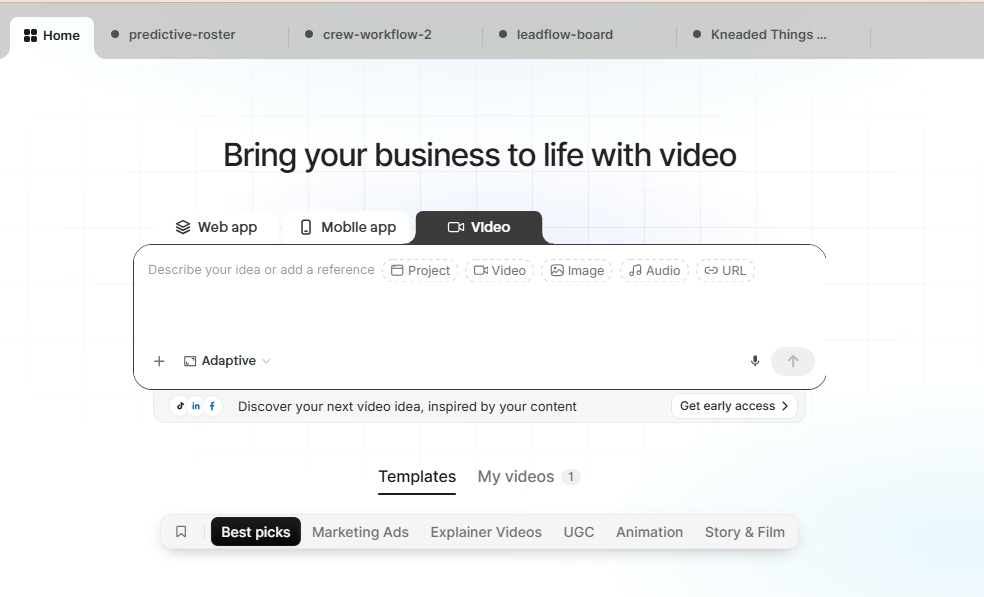
Emergent Video Agent is an AI video agent that plans, designs, and edits a full video from a brief. It is designed for small to medium sized business owners, founders, and nontechnical individuals who need video for business growth but aren't editors or developers.
Emergent isn't only a template-based video editor. It has 300+ templates to start from, but you can also describe your video idea in plain English and get the complete video back. You state your idea or imagination, and the agent handles the production process. You can review and preview the frames before you start creating. It’s part of Emergent, the platform 15+ million entrepreneurs use to create their applications and websites.
For a better experience, we created a video of a baker introducing her bakery to local clients. The process below gives users a hands-on experience and a better understanding of the outcome.
Key Features
- Prompt-to-finished-video workflow: Describe the ad you need, and Emergent will plan, record the audio, and edit the video.
- Script and frame review: Review the script and frames before creating, and edit out scenes without re-rendering the entire video.
- Real product footage: Instead of replacing product footage with generated images, Emergent can retain real footage of your product, app, or gameplay.
- A variety of video formats: Cinematic ads, UGC videos, talking-head videos, explainers, animations, micro dramas, motion design, and launch videos.
- 300+ templates: Templates that serve as starting points for the most common business video use cases.
- Up to 15-minute videos: Long enough for explainers or micro dramas, but not for short social videos.
- For explainers, Emergent researches the sources and provides a list of sources used.
- Use chat-based revisions: Make edits to the video in the chat, not on a timeline.
- Clarifying questions: If the question is unclear, Emergent doesn’t assume and asks a brief question with answer options.
- Build-and-grow workflow: Integrate an app or website built on Emergent, and the home page can recommend a video idea, such as launching a new app or website.
Emergent Pricing
Emergent’s plans include Free at $0/month with 10 monthly credits; the Standard Trial costs $2.95 and includes 100 credits today. The Standard plan costs $19.65/month and gives you 100 monthly credits, plus 150 bonus credits in the first month. Pro costs $200/month or $167/month when billed annually and includes 750 monthly credits.
2. Runway: Best for Creative Control and AI Video Tools

Runway provides generative video models and editing tools, along with agent workflows. Clips can be created with models (e.g., Gen-4.5), which may be third-party, or results can be manually tweaked using creative controls. It is ideal for creators, filmmakers, and teams familiar with a professional creative toolkit.
Pricing: Runway uses credits. The Free plan includes a one-time 125-credit grant. Standard costs $15/month ($12/month billed annually) and includes 625 credits monthly; Pro costs $35/month ($28/month billed annually) and includes 2,250 credits monthly; Max costs $95/month ($76/month billed annually) and includes 9,500 credits monthly. Gen-4.5 uses about 60 credits per five seconds of video.
Best fit: Use Runway instead of InVideo when you want a more hands-on experience manipulating clips and their movements, rather than just starting with a business template.
Limitation: The downside is that you have to use a creative suite, and you still need to turn the clips into a completed ad.
3. Higgsfield: Best for a Multi-Model Creative Studio

Alongside its creative tools, such as Cinema Studio, lip-sync, and voiceover features, Higgsfield offers a variety of video and image models, as well as ad-centric features. An ideal option for creators who love comparing models and want one subscription to access multiple.
Pricing: Higgsfield's own pricing guide provides details on individual plans: Starter is priced at $15/month (200 credits); Plus is priced at $49/month (1,000 credits); and Ultra is priced at $129/month (3,000 credits). Entry prices vary by region, and they also offer promotions.
Limitations: No credits per generation or model, and model and clip development is up to you. It's a lot of decisions for a non-technical business owner who merely needs an ad.
Best fit: For the largest selection of image and video models, Higgsfield is the better choice than InVideo.
4. HeyGen: Best for Avatar and Talking-Head Videos

HeyGen is based on AI presenters. Select a stock avatar, upload a script or create a digital twin of yourself, then create a video with your presenter. It's popular for training, onboarding, and sales explainers because of its translation and localization features.
Pricing: HeyGen’s Creator plan costs $29/month, or $24/month billed annually, and includes 600 credits monthly. Pro starts at $49/month for 1,000 credits, while Business starts at $149/month for 1,500 credits plus $20 per additional seat.
Best fit: Groups with a steadfast on-screen presenter. Use HeyGen over InVideo if your video features a talking-head presenter. If you're just looking for a presenter, you'll need something that surrounds them.
5. Pippit: Best for Product Ads and Ecommerce UGC

If you're considering CapCut, you should also consider Pippit, as Pippit is CapCut's marketing agent. It creates ad and UGC videos in a product's name from the product link or product assets, and outputs videos sized for social platforms and marketplaces, in a similar UGC/ad style.
Pricing: Pippit has a free plan with a limited credit allowance and paid plans that increase by credit levels. Different figures are listed on its pages for the amount of money it will allow to be given for free and for its entry plan, so check what is accurate for you at checkout.
Best fit for: Ecommerce sellers looking for numerous product ad variations quickly.
If your videos start from a product list and you need ad and UGC templates tailored to sell the product, choose Pippit over InVideo.
How Emergent’s AI Video Agent Builds a Video
Creating a live video on Emergent takes a few steps, including describing your idea, checking the frame and resolution, reviewing the scenes in between, and finalizing the video.
But an ideal build process can only justify its relevance, and to demonstrate that, we created a 15-second ad for an in-home bakery. It’s a small reel for an Instagram handle for a woman with a small home-based setup who sells baked goods at local markets. And the process begins with:
1. Describe your ideas
First, we prompted Emergent to develop a 15-second introductory video for the bakery brand Kneaded Things.
The prompt included fresh sourdough bread, golden croissants, pastries, and the kneading process. It was also required that only an individual appears in the video. Visuals were described as using warm lighting, a cozy bakery atmosphere, cinematic close-up shots, and joyful music.
You can also attach your website URL, an image, audio, or text to provide what’s needed for the video. You can also use your image as the main character.
After you enter a prompt, you can choose the resolution (720p or 1080p) or the format (square, landscape, portrait or social story). To get started with the templates, you can choose from the options available, including Marketing ads, Explainer Videos, UGC, Animation, or Story & Film.

2. Generate the bakery preparation scenes
From concept to final cut, the process takes step-by-step consideration of what you require in your video. Emerget generates video clips simultaneously based on your script and shows a preview of each action for better understanding.

In this example, the first segment of the video presents the baking process through close-up shots of a lady kneading dough.
Flour softly falls in the warm light, setting the tone for the actual bakery environment. This sets the tone for the craft of Kneaded Things.
3. Review the baking and product shots
Once the resolution and framing are set to move forward, it shows you the highlights of the final product. You can ask to add more features, like better lighting and more bakery products in the video. It offers room for alterations, like the woman's appearance being changed to a simple, mature look, which resembles the owner.

In this example, it's 15 seconds long, vertical (9:16), and in 480p, which is the highest quality this preview allows. That's half the 30 seconds you asked for, and it has better lighting and appearance.
4. Check the final video and brand presentation
The final short will feature your logo, smooth movement, and business highlights, along with the accurate slogans you added to your prompt.

In this example, the brand identity introduction in the last few frames of the video is shown against a soft, warm background.
The closing line of the video is:
"Kneaded with Love, Baked to Perfection."
It gives the brand an identity and ends with a message.
You can also create an introductory storytelling message for your clients. The Kneaded Things reel is ready to debut in local markets. To make your own, try Emergent's AI video generator and describe the video you want.

Who Should Choose Emergent?
Emergent Video Agent is ideal for:
- Anyone who owns a small-to-medium business and needs ads that sell.
- Founders starting an app, website, product, or service
- Aware teams that don't want to deal with templates or timelines.
- Companies that require UGC-style ads, movies, or explainers, or a launch video.
- Teams looking to advertise an application or website that leverages Emergent. Teams interested in advertising an application or website that utilizes Emergent.
Final Thoughts
InVideo remains useful for template-led editing, but business owners often need more than stock clips and a timeline. Runway suits hands-on creative control, Higgsfield offers multi-model experimentation, HeyGen excels at avatar videos, and Pippit is strong for ecommerce UGC. For a complete business ad from a brief, Emergent Video Agent is the standout choice.
Emergent plans, scripts, projects, and edits your video; lets you review frames before production; supports real product footage; and enables chat-based revisions. With cost-effective plans, it is ideal for founders and small businesses seeking polished ads without becoming video editors.
Describe it. Build it. Launch it.
- End-to-End Creation
- No Code Needed
- Live in Minutes
Most AI app builders stop at prototypes. Emergent creates production-ready apps you can actually launch.
- Production-ready apps
- Web & mobile apps
- Deploy in minutes