



Quick Verdict (TL;DR)
Stacker runs one plan, called Standard. It starts at $50/month for 250 credits and climbs to $2,000/month for 10,000 credits, plus a custom Enterprise tier on top.
The old per-seat pricing is gone. So is the confusion about which features you get for your money. Every credit tier unlocks the same feature set.
Your bill now depends on how hard your agents work. Light use stays close to $50. Constant automation can push you past $500 fast.
Stacker's pricing is simple to read: pick a credit tier, and every feature is included. The hard part is guessing how many credits your agents will use, and that only becomes clear once you're running a real app.
Stacker started as a template-based no-code tool. Today, it's an AI-first app builder, and its pricing has changed to match.
I pulled the current Stacker pricing page, built a client portal to test the credit system, and tracked exactly what drained my balance and what didn't.
Here's every plan, what eats your credits fastest, and whether $50 a month gets you a portal you'd ship.
Stacker Pricing Plans at a Glance
Stacker sells one self-serve plan, split into six credit tiers, plus a custom Enterprise plan for bigger teams. You pay for how much work your agents do each month.
| Plan | Price | Best For | What's Included |
|---|---|---|---|
| Free Trial | $0 ($100 in free credits) | Businesses who want to try Stacker first | $100 in free credits, every feature unlocked, no credit card required |
| Standard | $50–$2,000/month (by credit tier) | Businesses building and running AI-powered apps, portals, or internal tools | 250–10,000 credits/month by tier; unlimited agents, apps, and portals; white-label branding, custom domains, 2,000+ integrations, full automation and AI tools; no per-seat charges |
| Enterprise | Custom pricing | Large organizations with higher AI usage and security requirements | Everything in Standard, plus custom credit allocations, dedicated onboarding, SLAs, SSO, advanced access controls, custom integrations, and the option to bring your own LLM |
Standard is one plan with six credit tiers. Every tier unlocks the exact same features. You're paying for more credits to run the same agents on the same app. A higher tier just means more capacity.
Stacker Pricing Plans Breakdown
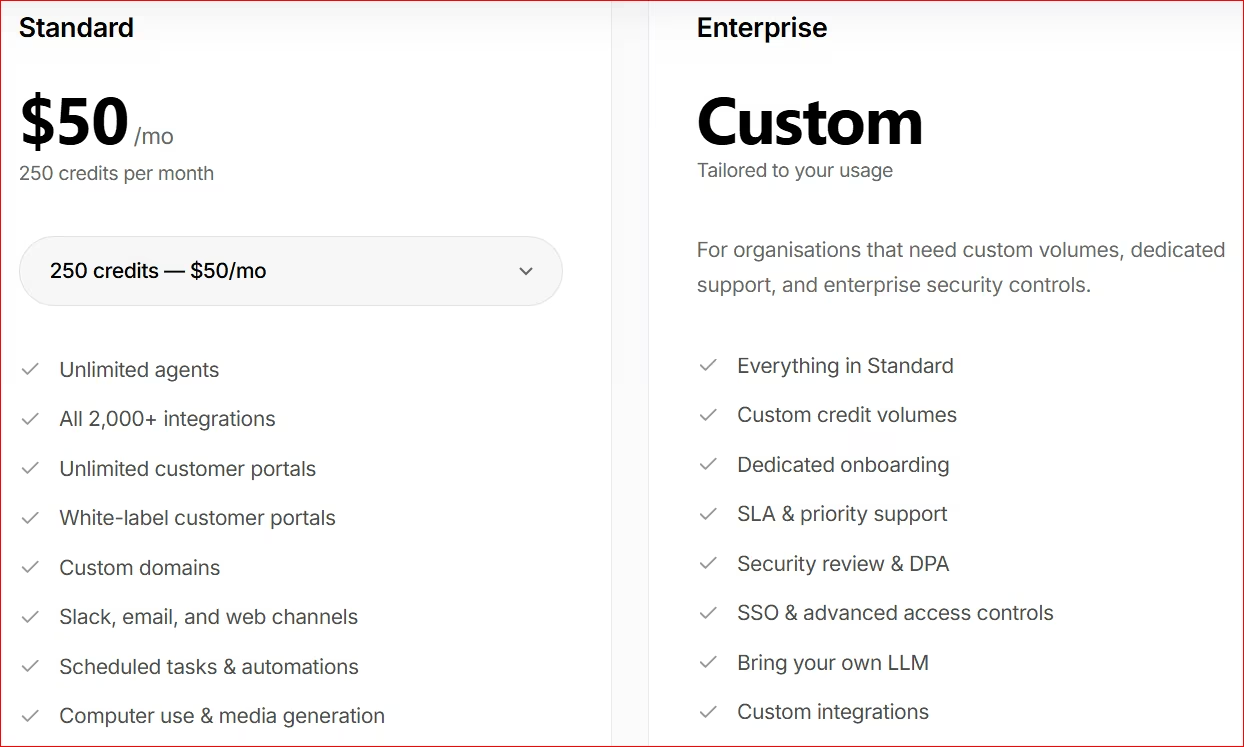
Stacker sells one paid plan, Standard, spread across six credit tiers, plus a custom Enterprise tier for teams that outgrow the highest self-serve option.
Free Trial: $0 ($100 in free credits)
What's included: Full access to Stacker, including building an app, connecting data sources, and running AI agents, backed by $100 in free credits.
Best for: Businesses that want to build and test a real app before paying for it.
Pros:
- You can wire up your real data and run a few automations to see how it handles your workflow.
- $100 in credits is enough to see how the platform handles your data and workflows.
- No credit card required to start.
Cons:
- Credits disappear fast if you build something complex and run several automations at once.
- You can't keep an app live in production once the trial credits run out.
Standard: $50 to $2,000/month
What's included: Six credit tiers under one plan. 250 credits for $50/month, 500 for $100, 1,000 for $200, 2,500 for $500, 5,000 for $1,000, and 10,000 for $2,000.
Every tier gets unlimited agents, apps, and portals, plus white-label branding, custom domains, 2,000+ integrations, and full automation, media, and knowledge tools. No per-seat pricing.
Best for: Businesses that want a client portal, an internal tool, or a CRM built fast, without hiring a developer or paying per user.
Pros:
- Every tier gets the full feature set. You pay for more credits.
- No per-user fees. Your costs don't rise just because your team or customer base grows.
- You can scale within the same plan instead of jumping straight to a custom Enterprise quote.
Cons:
- The price jumps hard between tiers ($50, $100, $200, $500, $1,000, $2,000). So you might pay for far more credits than you need.
- 250 credits is hard to judge before you know your real usage. A handful of complex tasks can burn through a tier quickly.
- Unused credits don't roll over. A slow month still costs the same as a busy one.
Enterprise: Custom Pricing
What's included: Everything in Standard, plus custom credit allocations, dedicated onboarding, SLAs, SSO, advanced access controls, custom integrations, and the option to bring your own LLM.
Best for: Large organizations running business-critical apps and automations that need more capacity, security, and support.
Pros:
- Credits match your organization's usage.
- Enterprise security and compliance features built for larger companies.
- Dedicated onboarding and priority support cut down implementation risk.
- Custom integrations and infrastructure options for more complex setups.
Cons:
- No public pricing. You need to talk to sales for a quote.
- Overkill for a small business or a team just getting started with an AI-built app.
- Your total cost depends on a negotiated credit allocation, which makes it hard to compare against fixed-price tools.
Which Stacker Plan Should You Choose?
Pick the credit tier that covers both building your app and keeping your agents running. Move to Enterprise only when you need scale or security that Standard can't cover.
Choose the Free Trial if you:
- Want to see how the credit system behaves on your own workflows before paying.
- Need to try a few workflows or integrations against your own company data.
- Are comparing Stacker against other AI app builders.
Choose Standard if you:
- Run a small or growing business that wants an AI-built app without hiring a developer.
- Want predictable pricing instead of paying per team member or per customer.
- Need unlimited apps and agents and just want more credits as you grow.
- Can estimate your monthly task volume well enough to pick the right tier from the start.
Choose Enterprise if you:
- Plan to run multiple apps or heavy agent activity across departments, past the 10,000-credit tier.
- Need SSO, advanced security, custom integrations, or dedicated support.
- Want a custom credit allocation.
- Have compliance or governance requirements a standard subscription can't meet.
Also read our best AI app builders guide for a broader look at what else is worth trying before you commit to Stacker.
Is Stacker Worth the Cost?
At $50/month, Stacker is worth it if you want an AI-built portal or CRM with agents that keep it running and you're fine with usage-based pricing. It's overkill if you just need a simple site or a native mobile app. It still focuses mainly on portals, and it builds them fast.
I gave Stacker a website URL and told it what kind of portal I wanted.
Ten minutes later, I had Lonertic: a working client portal with a project tracker, an invoices page, and a login screen, all live.
Ten minutes for a working app is impressive.
Credit usage depends entirely on how complex your tasks are. The table below breaks that down. Constant agent activity across dozens of workflows can quickly push you into higher tiers on the same Standard plan.
If the pricing does not fit, our Stacker alternatives guide covers seven options, sorted by why people leave rather than by feature count.
How Credits Are Spent
This determines which tier you'll likely land on.
| Task Type | Credit Cost | Examples |
|---|---|---|
| Quick tasks | 1–3 credits | Summaries, CRM updates, lookups, sending messages |
| Workflows | 5–15 credits | Multi-step automations, outbound emails, reports |
| Projects | 20–50 credits | Research, competitive analysis, media generation |
At 250 credits a month, you get 80 to 250 quick tasks, or 15 to 50 full workflows, before you're out. A single research or media-generation project can eat 50 credits on its own. A fifth of the entire $50 tier in one go.
Model your task mix before you commit to a tier. The $50 price assumes light, occasional work. If your agents run scheduled reports daily or touch dozens of records an hour, 250 credits won't be enough for a portal or CRM running around the clock.
Stacker is worth it if you:
- Want an AI-built app (client portal, internal tool, or CRM) with the agents that run it included.
- Can pick a credit tier that matches your real usage, so the Standard plan remains predictable.
- Need thousands of integrations without paying more as your team or customer base grows.
- Are fine building and customizing your app entirely through chat, with no visual editor as a backup.
Skip Stacker if you:
- Need a native iOS or Android app. Stacker's product is web-based.
- Want fixed monthly pricing that doesn't move with how many credits your agents burn.
- Want a visual editor or drag-and-drop option for making changes yourself.
$50/month is a fair entry price for a business that wants an AI-built portal or CRM fast, with agents included. But 250 monthly credits won't stretch far if you want every bell and whistle.
Also read our Stacker Review for a closer look at how the credit system and agent capabilities hold up in real testing.
Stacker Alternatives and Pricing Comparison
Stacker might not fit what you're building. Maybe you need more than a portal or CRM, or you don't want to stay locked into Stacker's platform forever. Here's how it stacks up against the tools people compare it to most.
| Tool | Starting Price | Best For | Standout |
|---|---|---|---|
| Emergent | $20/month ($17/month billed annually) | Non-technical founders building real web and mobile apps they own | Vibe coding for complete web or mobile applications you customize, launch, and own without managing infrastructure; 10 free credits to start, no card required |
| Stacker | $50–$2,000/month (by credit tier) | Businesses that want an AI-built portal or CRM with agents that keep running it | Unlimited apps and agents at every tier, no per-seat pricing, cost scales directly with usage |
| Softr | $25/month ($19/month billed annually) | Teams building a portal on top of existing Airtable, Google Sheets, or database data | Fast to launch a polished front end on data you already have, with a large template library |
| Adalo | $45/month ($36/month billed annually) | Founders who want a native iOS and Android app | App Store and Google Play publishing included from the Starter tier |
Softr and Adalo are more manual, visual-editor-based tools. If either one is a closer fit for what you're building, we cover both in more depth: Softr alternatives and Adalo alternatives.
Emergent sits closest to Stacker in build method. You describe what you want and AI builds it. But Emergent generates a full, ownable application beyond just portals and CRMs.
Emergent vs. Stacker: Which Should You Choose?
The main differences are in scope, ownership, and how predictable your bill is.
Stacker's Standard plan builds a portal or a CRM with custom domains starting at $50/month. Once your app is live, agents keep updating records, running automations, and acting across your connected tools.
That work burns credits fast.
Frequent edits and constant agent activity can push you into the $200, $500, or $2,000 tiers. You're also locked into Stacker's platform. There's no code to export and take elsewhere if you switch tools later.
Emergent, at $20/month ($17/month billed annually), does agentic coding for a full application, much more than a portal or a CRM. Describe a client portal, a full web app, or a native iOS/Android app in plain language, and Emergent's agent platform plans, codes, tests, and launches it.
It costs less to start, and the code is yours to take anywhere if you ever move off the platform.
Choose Stacker if you:
- Want AI agents that keep running and updating a live portal or CRM, rather than a full app you build and own.
Choose Emergent if you:
- Want to build and own a full web or mobile app, with code you can take anywhere.
- Prefer a lower entry price and code you own, plus 10 free credits to test before you pay a cent.
My Bottom Line on Stacker Pricing
Stacker's Standard plan is fairly priced at the entry tier. But the question is how many credits you'll need to build and maintain your app, and which of the six tiers you'll land on once your agents are running day to day.
Stacker is a solid, fairly priced choice if you want AI agents actively running your app and you're comfortable with usage-based pricing.
If you want a full application you own outright, at a lower entry price with full code ownership, start with Emergent instead.
You pay less to start ($20/month versus $50), and you own the code, so you're never locked to one platform.
Build the application you really own. See what you can create with Emergent.

Most AI app builders stop at prototypes. Emergent creates production-ready apps you can actually launch.
- Production-ready apps
- Web & mobile apps
- Deploy in minutes







