



FlowQuote was built by a general contracting business with no in-house development team. It runs the kind of operation where the same person prices the job, sends the quote, and later has to invoice for it, and where a written quote is the starting point for nearly every job that comes in. Working in a trade where most jobs start with that quote and end with chasing payment, they saw the same gap across small operators: the quote goes out in one tool, the client says yes over email or text, and then someone has to rebuild the same numbers as an invoice by hand, days later.
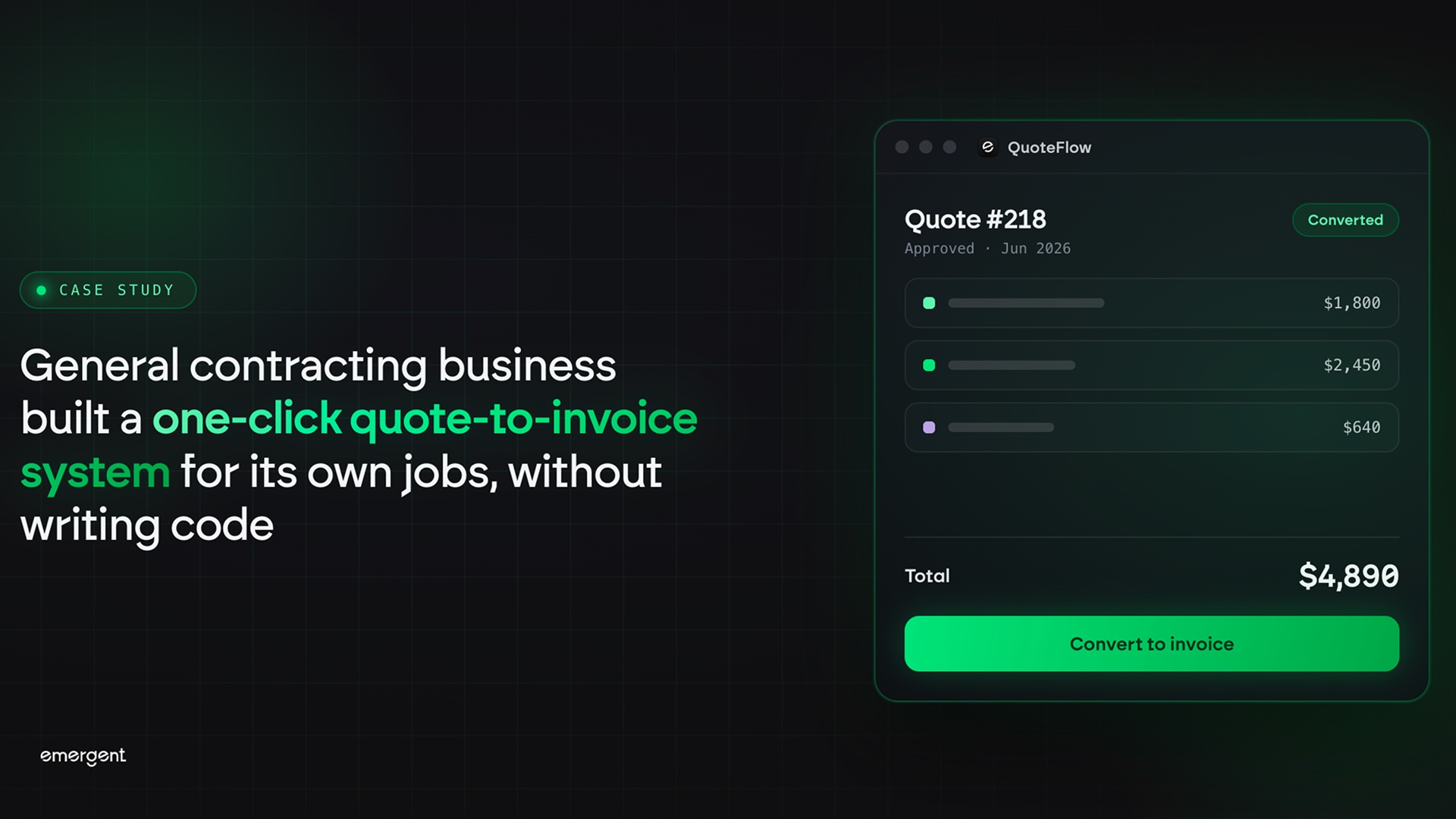
Using Emergent's invoice generator app builder, the team built FlowQuote, an admin pipeline that lets a contractor compose a quote, send a shareable approval link, and have the system generate the invoice automatically the moment the client accepts. The entire product went from concept to a live, deployed application in under an hour.
Also read our case study on how a general contractor built a lead-capture quote form and pipeline tracker without writing a line of code.
Challenges
The quote and the invoice are the same numbers, entered twice
For a small contracting business, the quote and the invoice describe the same job. The line items, quantities, unit prices, and totals are identical. But in most setups they live in two separate documents created at two separate times. A contractor writes a quote, the client approves it, and then someone opens a blank invoice and retypes every line. The work is duplicated, and every retype is a chance to transpose a number, drop a line item, or bill the wrong total. For a firm running dozens of small jobs a month, that double entry adds up to hours and introduces errors that only surface when a client disputes the bill.
There is no clean record of where each job stands
A contractor juggling several open jobs needs to know, at a glance, which quotes are still waiting on a client, which have been accepted, which invoices have gone out, and which have actually been paid. Without a single place to see this, that status lives in memory, in a text thread, or in a spreadsheet that is never quite current. Quotes get forgotten. Accepted jobs sit un-invoiced while the contractor moves on to the next site, and paid invoices get chased a second time by mistake. The business runs on a fuzzy picture of its own pipeline.
Getting a client to approve a quote takes too many steps
The moment a client is ready to say yes is the moment to lock the job in. But most approval flows put friction in the way. The client has to reply to an email, sign a PDF, or create an account on some portal before they can confirm. Each extra step is a chance to lose them to a delay or a competing bid. A contractor wants the client to see the price, click once, and have the job move forward, with no login and no back-and-forth.
Off-the-shelf billing software is priced and built for bigger firms
A contractor running a small trade business is not going to hire a developer or pay for an enterprise billing platform loaded with features they will never use. They need something simple that matches how they actually work: compose a quote, send it, get a yes, invoice it, mark it paid. Most tools either do far more than that at a monthly cost that does not make sense, or do far less and leave the contractor back in a spreadsheet. Building a custom tool the traditional way means a budget and a timeline that a small operator does not have.
Solution
A quote composer that prices the job as you build it
FlowQuote opens on a composer screen where the contractor enters the client name and email, then adds line items one at a time. Each line takes a description, a quantity, and a unit price, and the row total calculates on its own. An add-line control stacks as many items as the job needs, and a trash icon removes any line. A terms section sets a tax percentage and a valid-until date, with an optional notes field for scope or references.
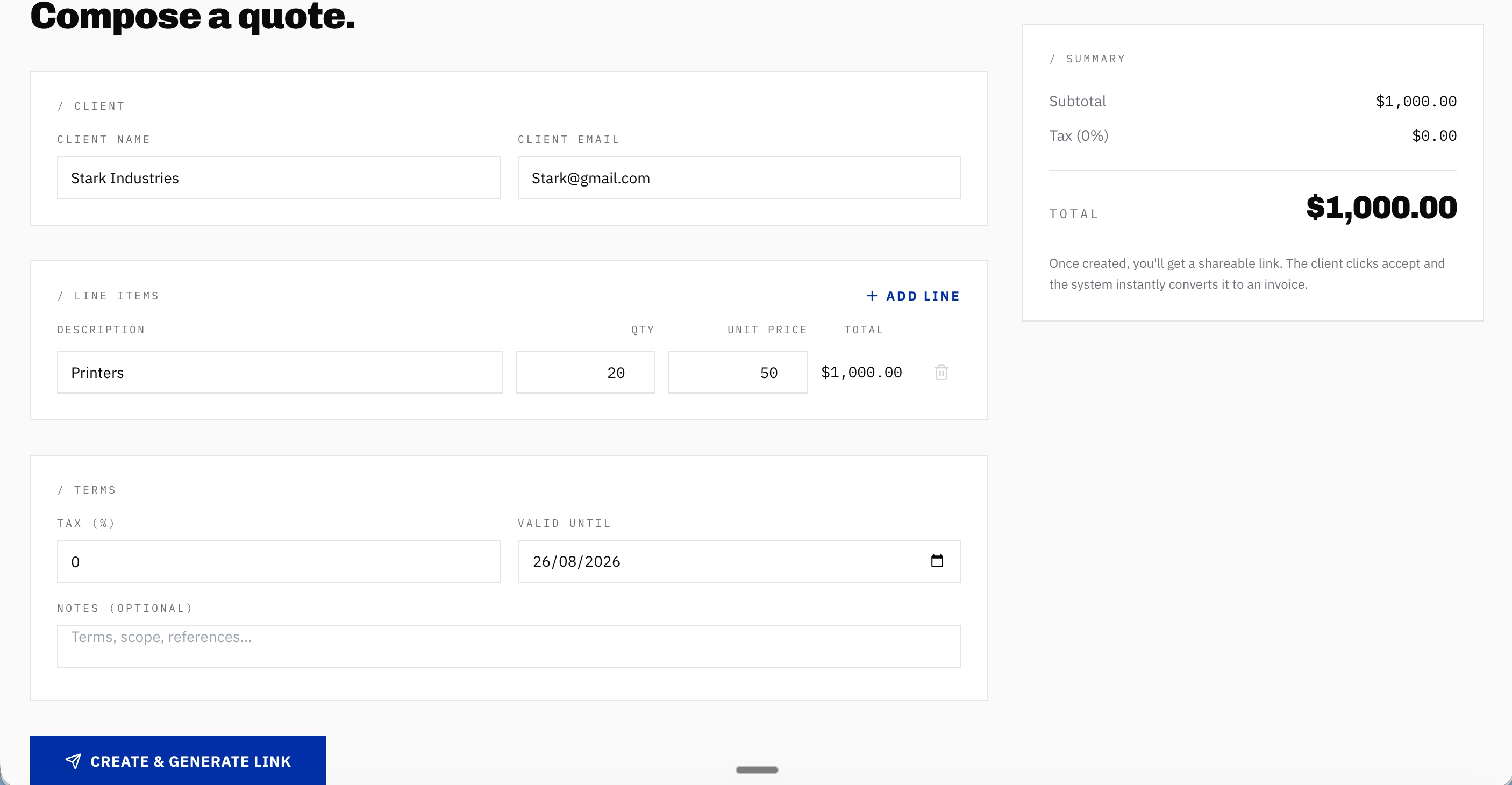
A live summary panel on the right recalculates the subtotal, the tax, and the grand total with every keystroke, so the contractor sees the exact number the client will see before the quote is ever sent. As soon as a quantity and unit price go in, the line total and the running grand total update on their own, with no separate calculation step. The quote is numbered automatically and saved to the pipeline the moment it is created.
A shareable approval link that converts to an invoice on one click
Every quote generates a shareable approval link that the contractor copies and sends to the client. The link opens a clean client-facing page titled "Review & approve your proposal," showing the line items, the totals, and the amount due, with an Accept and a Decline button. No login is required. A "how this works" note tells the client to review the items and click accept, and the page states plainly that accepting will generate an invoice and notify the supplier.
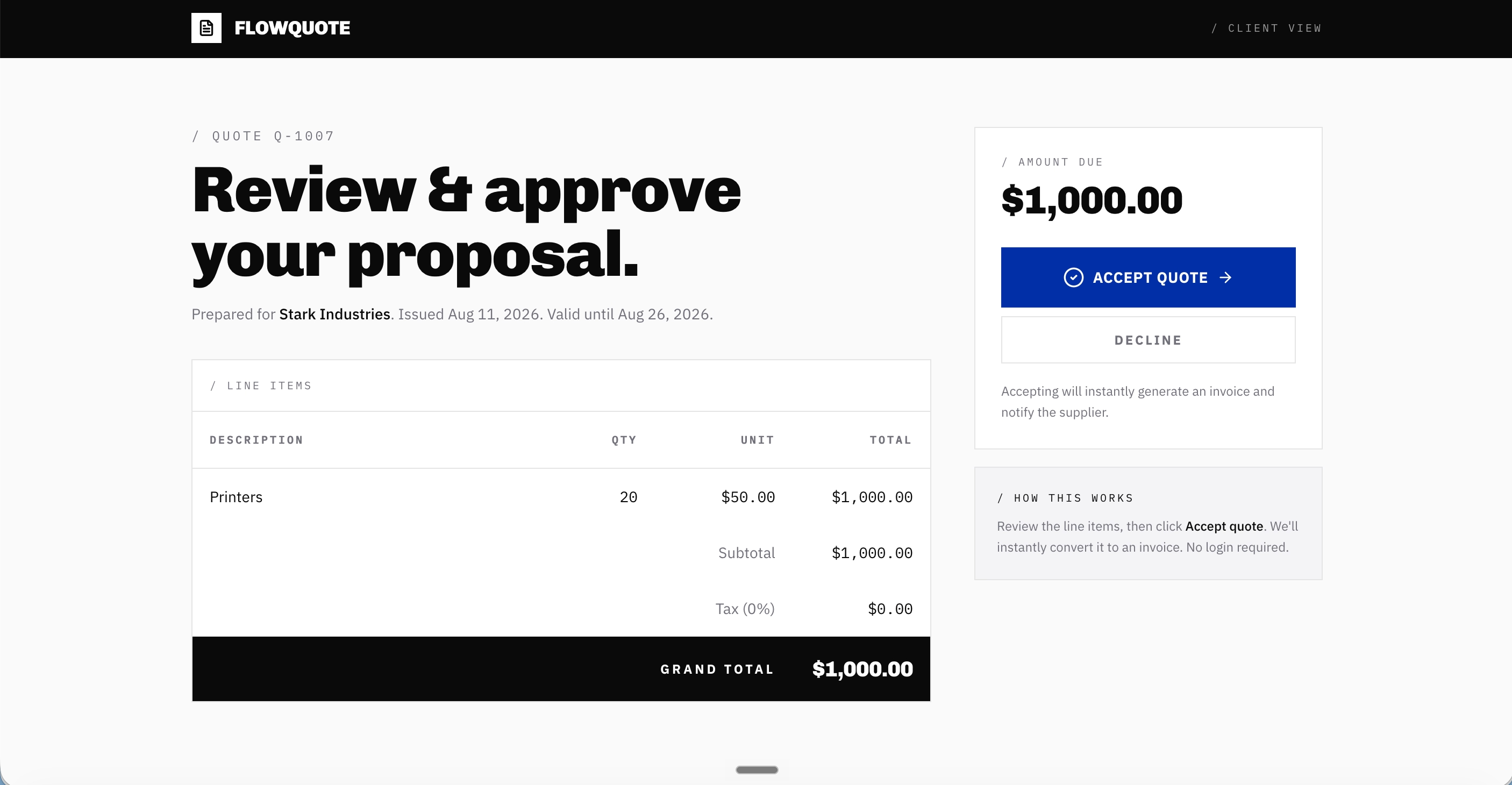
When the client clicks Accept, the system does the conversion itself. A confirmation banner appears reading "Quote accepted," naming the client, and displaying the number of the invoice it just generated. The invoice carries over the same line items, quantities, and totals from the quote, so nothing is retyped and nothing can drift.
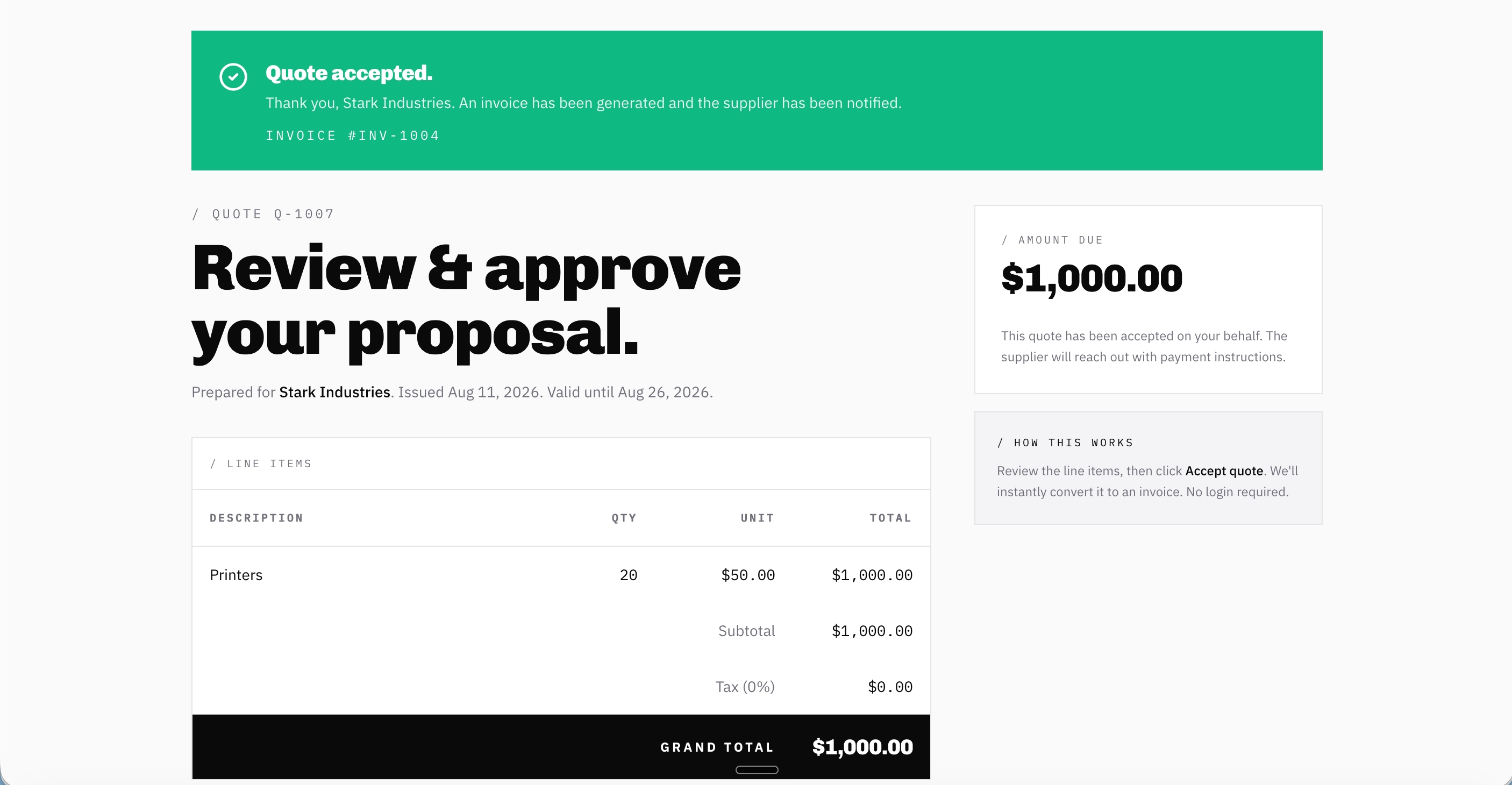
The accepted quote and the new invoice stay linked in both directions: the quote shows a "linked invoice" card, and the invoice shows a "view source quote" reference.
A unified dashboard that tracks every job from quote to payment
The dashboard presents a single pipeline view of every quote in flight and every invoice issued, filterable by all records, quotes only, or invoices only, with a search across number, client, and email. Each row shows the type, number, client, date, total, and a status badge, sent, accepted, declined, unpaid, or paid, so the contractor can read the state of the whole business in one scan.
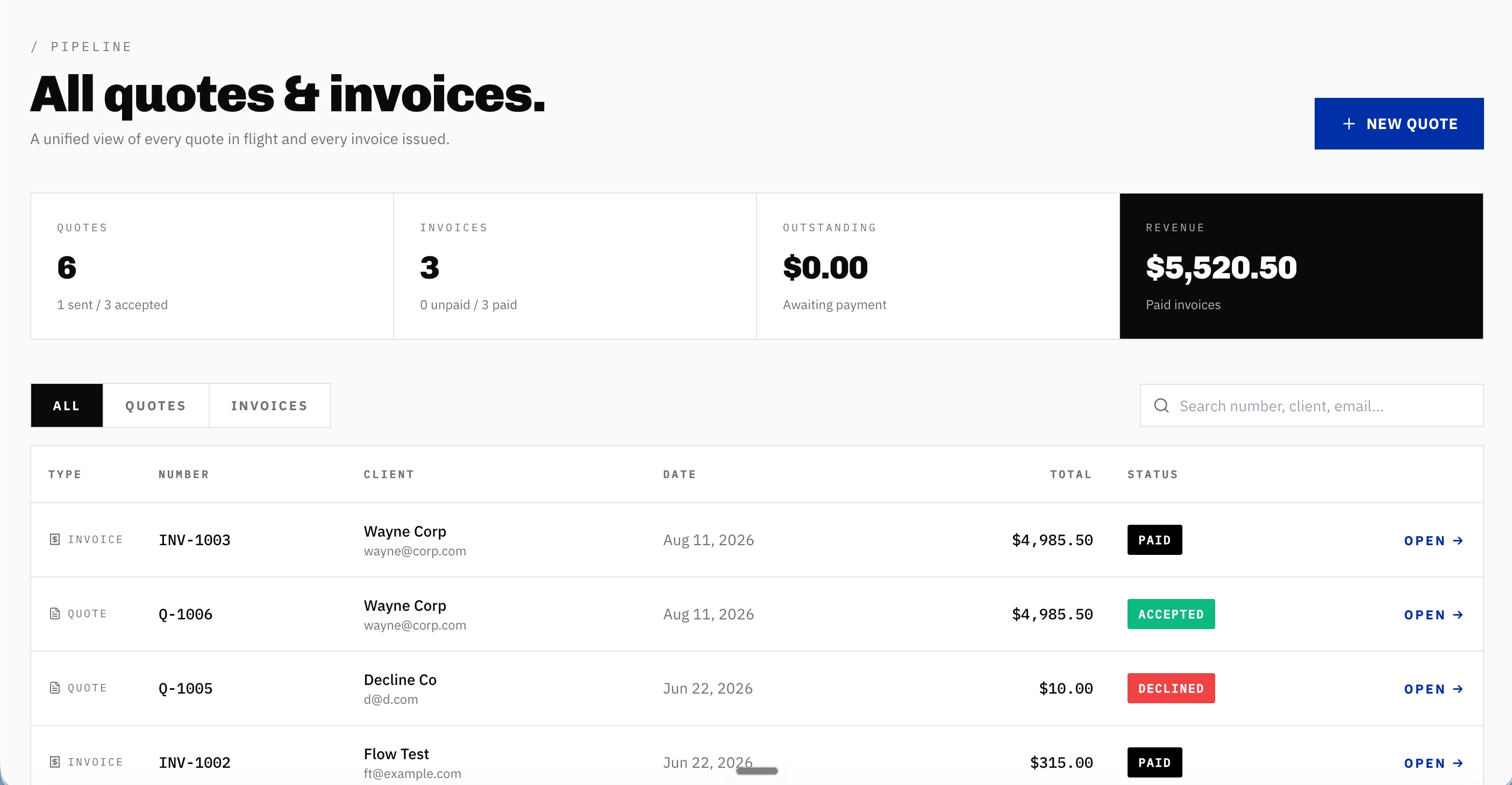
Four counters sit above the table: total quotes with a sent and accepted breakdown, total invoices with an unpaid and paid breakdown, outstanding balance awaiting payment, and revenue from paid invoices.
On the invoice screen, a Mark as Paid button records payment once the money arrives. Marking an invoice paid moves it out of the outstanding balance and lifts the revenue counter by the same amount instantly, so the two figures always reconcile. The numbers are never entered by hand; they are computed from the state of the pipeline itself.
Also read our case study on how a local service contractor built a lead pipeline CRM for their own business without writing a line of code.
Outcomes
Two to four hours a week returned to billable work
A contractor who was rebuilding accepted quotes as invoices by hand can expect to save roughly two to four hours a week once the conversion is automatic. The second round of data entry disappears entirely, because the invoice is generated from the quote the moment the client accepts rather than retyped days later.
Billing errors from retyping fall close to zero
Because the invoice inherits the quote's line items, quantities, and totals exactly, the mistakes that come from re-entering the same numbers, wrong totals, dropped lines, transposed prices, stop reaching the client. The figure the client approved is the figure the invoice bills, with no room for the two to drift apart.
Quote acceptance up by around 10 to 20 percent
The one-click, no-login approval flow typically lifts quote acceptance rates by around 10 to 20 percent compared with an email-and-PDF process. Removing the steps where clients stall, replying, signing, creating an account, means more quotes get a yes while the client is still deciding.
A same-day close on the gap between accepting a job and getting paid
Before FlowQuote, an accepted job could sit for days before anyone rebuilt it as an invoice, and a paid job could get chased a second time because no one had marked it settled. Now the invoice exists the instant the client accepts, and the dashboard's outstanding counter and paid and unpaid badges tell the contractor exactly which of their jobs still owe money and which are closed.
For this contractor, invoicing that used to lag the acceptance by days now happens at the same moment, and the outstanding figure is a live number they can trust rather than a guess reconstructed from memory.
A working tool built for a fraction of agency or developer cost
Commissioning a custom quote-to-invoice tool from an agency or a freelance developer would have meant a quote of its own, typically several thousand dollars for a simple build and well into five figures for anything with a client-facing approval flow and a live dashboard, plus weeks of back-and-forth and an ongoing bill for changes. This contractor built the whole thing themselves on Emergent for a fraction of that, with no agency retainer, no developer day rate, and no separate hosting to arrange. What would have been a project budget the business had to justify became a minor cost it barely had to think about.
Also read our case study on how a specialty contractor built a custom invoice app on Emergent for a fraction of the cost of custom development.
Conclusion
FlowQuote demonstrates what happens when the person who runs the jobs designs the billing tool. A contractor who knows that a quote and an invoice are the same numbers, who has felt the cost of double entry and forgotten follow-ups, and who understands that a client's yes has a short shelf life is the right person to build a pipeline that removes every step between the two.
The team described what they wanted in plain English on Emergent's invoice generator app builder, and the finished product, live line-item pricing, automatic quote numbering, a no-login client approval page, one-click quote-to-invoice conversion, bidirectional linking, payment tracking, and a self-calculating revenue dashboard, went from prompt to a live, publicly accessible application in under an hour. If you are a contractor or operator sitting on a product idea that solves a clear problem in your industry, Emergent can take you from description to deployment in the same session. Start building at emergent.sh.
Emergent turns your idea into a full-stack web or mobile app, no coding required.
 No coding required
- Web & mobile apps
- Deploys instantly



on Emergent today




