



AI agents for marketing are software that work toward a goal with less step-by-step input from you. They can sort leads, prepare email campaigns, or compile reports using your marketing tools. Unlike a chatbot that mainly responds to prompts, an agent can carry out a sequence of tasks.
The idea is simple, and an agent can deliver good results when used for the right task. Teams can see benefits quickly by starting with one regular task, such as following up with leads or preparing weekly reports. The main question is which task to start with.
This guide explains what an AI marketing agent does, how it can help, and which tools suit different tasks. It also explains when building your own agent makes more sense than buying one.
What Are AI Agents in Marketing?
An AI marketing agent is a system that takes a goal, breaks it into steps, and carries those steps out across your marketing tools. It reads results as it goes and adjusts.
Compare two requests. Ask an assistant for a win-back email, and you get one draft. Give an agent the goal “re-engage customers who stopped buying,” and it finds those customers, writes the sequence, sends it, and watches who replies.
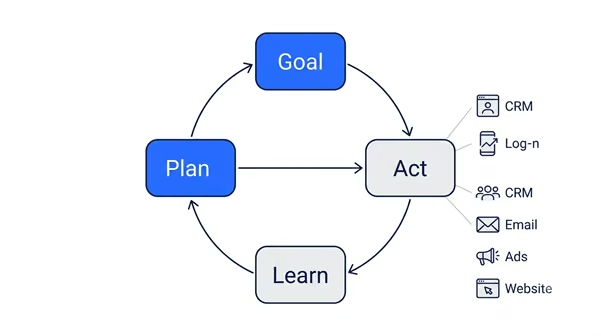
Most agents repeat the same four moves:
- You describe the goal in plain words.
- Agent splits your plan into smaller tasks.
- It works inside your CRM, email platform, ad accounts, or site.
- It checks what happened, chooses a better next step and learns from it.
Some vendors call a scripted chatbot an “agent.”, even when it follows fixed steps. To tell the difference, ask yourself: can the tool plan and take action without waiting for your instructions at every step? If not, it may just be an assistant with a different name.
When comparing marketing tools, you may find a chatbot advertised as an “agent,” even though it follows the same steps every time. Check what happens after you give it a task. Can it plan the next step and act on the results without waiting for your instructions? If not, it is closer to an assistant with a different name.
Also Read: Our AI agents vs chatbots guide for how the two differ in practice.
Benefits of AI Agents for Marketing Teams
The main benefit is giving a small marketing team more room to work without adding headcount. Agents can take on recurring tasks, leaving people more time to review performance and make decisions.
Picture a three-person team preparing for a product launch. Instead of spending most of the fortnight on routine work, the team can use agents to handle parts of the preparation and spend more time deciding which messages and campaigns deserve attention.
The benefits show up in a few ways:
- Less time goes into routine tasks, making time to review results and plan the next campaign.
- New leads can receive a quick reply outside working hours.
- Recurring tasks, such as weekly reports and follow-up messages, are less likely to be missed with steady execution.
- Teams can tailor messages to different audience segments without writing every version from scratch.
- Connected data can help teams understand how their email, advertising, and website activity relate to one another with a broader view of performance.
There is an honest limit here. An agent only acts on what it can see. If your customer data is messy or scattered, the agent inherits that mess and acts on it faster than a person would.
For a first project, choose one job and one checkpoint where a person approves the work. Before you start, check what it will really cost. Our blog on How Much Does It Cost to Build an AI Agent covers building, tooling, and upkeep in detail.
Examples of AI Agents for Marketing
The most useful examples are tools that already handle one marketing job well. Here is how five of them line up. Pricing models change often, so confirm current rates on each vendor’s page.
The pricing matters. Usage-based pricing is easier to predict at low volume. Per-seat pricing can make more sense when the whole team uses the tool regularly.
Lead capture and enrichment
A lead capture agent picks up new leads as soon as they arrive, fills in missing details, scores them, and routes them to the right person.
In practice, that means it:
- adds company name, role, and size from public data
- scores the lead against your ideal customer
- assigns it to a sales rep
- sends a first reply
- handles simple chat questions and hands off the hard ones
Consider: A lead fills out your website form at 9 p.m. on Sunday. Nobody from your team sees it until Monday morning, and by then, the lead may have contacted another company. HubSpot’s Breeze agents work within its CRM, making it easier to use customer data already stored there. If your team already uses HubSpot, you may not need to connect a separate CRM. If you’d rather own the scoring rules and routing, you can build a lead qualification agent that scores each lead and assigns it to the right rep.

SEO and content delivery
An SEO and content agent handles the road from keyword to live page. It researches terms, drafts, refreshes older posts, and publishes.
Typical tasks include:
- spotting keywords competitors rank for, and you do not
- building outlines and first drafts in your brand voice
- refreshing pages that are losing traffic
- adding internal links before publishing
Jasper is one option for teams producing content at scale. Its newer features also address how brands appear in AI-generated answers. Keep an editor involved in checking facts, search intent, and the final draft. If your SEO workflow needs custom steps, you can build an SEO agent to suit that process.

Campaign creation and optimization
Your team launches two versions of an email campaign, but one gets more clicks than the other. A campaign agent tracks these results and shifts more of the budget toward the ads and emails that perform better.
A campaign agent can,
- generate versions from a single brief
- split audiences by past behavior
- move spend to better-performing ads
- pause weak ads once they hit a limit you set
Salesforce’s agentic marketing tools work at this level across channels. One rule applies to any tool you pick: set a spending cap and require approval before the agent raises budget. An agent allowed to optimize freely can also overspend freely.

Social media management
A social media agent plans, writes, and schedules posts, then answers routine comments.
Its week usually looks like this:
- turning one article into native posts for each channel
- replying to simple comments in your voice
- flagging complaints for a human
- reporting which posts earned the most clicks
Ocoya is a popular low-cost option, especially for agencies handling several accounts. It covers social only, so it will not touch SEO or paid ads. Because a social agent speaks in public, test its reply rules before going live.
To build one around your own reply rules and escalation step, see the social media agent builder.
Reporting and performance insights
Many agencies need to share last week's performance on monday morning. Instead of collecting figures from several dashboards by hand, a reporting agent can gather data from connected tools and prepare a summary.
It can also:
- Combine advertising, email, customer, and website data.
- Flag sudden drops or spikes in performance.
- Answer questions like “Which channel drove the most signups last week?”
- Suggest what to test next based on the results.
If your team prepares a report deck every week, automating parts of that process can save time. HubSpot’s Data Agent helps teams research customer and prospect data and bring scattered information together. The bigger challenge is connecting marketing spend to revenue. As Jasper's 2026 research shows, proving AI's return on investment remains difficult for many marketers.

Build AI Agents for Marketing With Emergent
Ready-made agents each handle a specific job. If you use three different agents, you may end up managing three separate logins, and none may fit the way your team works.
Emergent takes a different route. Describe the agent you need in plain language, and Emergent builds the screens, backend, database, login, and integrations, then deploys it. Most AI app builders make it easy to generate something that looks like an app. Emergent is built to produce something that runs like a business.
Imagine your team managing leads, content, and reports without switching between several tools. With Emergent’s marketing agent builder, you can build tools for tasks such as:
- Collecting new lead details and displaying them on a live dashboard.
- Drafting content outlines and sending them for review.
- Combining ad, email, and customer data into a weekly report.
- Creating a client portal where each account can view only its own results.


A live dashboard displays key metrics, including total leads, hot leads, and approved replies. Starting with sample data and a single task keeps the setup simple and makes it easier to test the agent before expanding its role.

All leads appear in one table with their contact details, company size, score, and a Hot, Warm, or Cold label. Hot leads are sent to a sales rep, while the others are added to a nurture list. Each lead has a reply button, but the reply needs human approval before it can be sent. The team can also add new leads using the form on the left to test the agent with real data.
It connects to infrastructure you likely use already, including Stripe, MongoDB, Shopify, SendGrid, and Twilio. Not a prototype. Not a demo. A full-stack product with a real backend and code you own.
Ownership is the part worth underlining. Your code, your data, your deployment. Export it, change it, or host it yourself. If you are new to the idea, see how an AI agent builder works, then read our guide on how to build an AI agent to pick a job and map its steps. Emergent can help build the agent, but you still need to decide on your brand voice and budget. Have someone review the output before approving it, and start with one task.
Emergent may be useful for different types of users:
- Small business owners: Build an agent that fits your workflow instead of changing your process to suit several ready-made tools.
- Agencies: Create reusable agent templates for different clients, with a separate portal for each client.
- Solo builders: Build a marketing product that you can launch and test with real customers.

Most AI app builders stop at prototypes. Emergent creates production-ready apps you can actually launch.
- Production-ready apps
- Web & mobile apps
- Deploy in minutes

Most AI app builders stop at prototypes. Emergent creates production-ready apps you can actually launch.
- Production-ready apps
- Web & mobile apps
- Deploy in minutes





