



AI agents are sometimes wrongly defined as chatbots. You type something, it types something back, and you have no idea whether it can make a call on its own and act on it.
An agent is the decision, not the interface. It reads something, judges it against rules you set, and acts on that judgment without asking you first. It still needs somewhere to live, which is where the app comes in: a form to receive the work, a database to keep it, a dashboard to show its reasoning. The app is the container. The agent is what's running inside it.
So I built one that does. It takes inbound inquiries for a web design agency, works out whether each one is worth answering, and writes the reply. I ran five inquiries through it that I'd written in advance. Two came back wrong, and fixing them turned out to be the part worth writing about. It then immediately sends that reply to the quality leads, while leaving the rest for human review.
By the end of this article, you'll know how to build an AI agent that makes real decisions, how to test whether those decisions are correct, and how to correct them when they aren't.
What You'll Need Before Starting
- A free Emergent account is enough for a first build; the $20/month Standard plan gives you 100 credits and room to iterate.
- Around two to three hours to build, test, and fix any errors.
- Qualification rules, with a clear yes and no for each one.
- Five test cases written before you open the builder.
- No API keys or web host needed. Emergent handles all of that.
How I Built This
I built a lead qualification agent for a fictional web design agency called Meridian Studio. It makes three calls on every inquiry that arrives: what the lead is worth on a scale of 0 to 100, whether it's Qualified, Nurture, or Not a fit, and whether the reply goes out without a person seeing it first.
A public intake form feeds it, and a dashboard shows its working. The sender then gets a personalized email. Qualified leads get that email automatically, while the rest are held for human review.
I tested the build with five inquiries I'd written in advance. The inquiries were one clean fit, one clear decline, one that sounded urgent and important but failed on budget, one where the dropdown and the description disagreed, and one that gave almost no information at all. Two of those inquiries produced wrong answers.
How to Build an AI Agent, Step by Step
Step 1: Decide What the Agent Decides
Every agent needs to make at least one judgment call. Mine needed it to answer, “Is this inquiry worth a reply today, and should that reply go out on its own?” Everything else in the build exists to serve that question.
So I started by writing the rules:
- Qualified: Budget of $10,000 or more, timeline within 90 days, and the project is a website, web app, or ecommerce store.
- Nurture: Budget under $10,000 or a timeline beyond 90 days, however good the inquiry sounds.
- Not a fit: Anything outside those three project types.
The second rule says the agent has to hold its position against a persuasive brief.
Then decide which outcomes the agent can act on without you. An over-eager reply to a good lead is easy to follow up on, but a decline sent to the wrong person can lose you a client, which is why only Qualified leads skip the review queue in this build. Give the agent the outcomes where a mistake is cheap to fix, and keep a person on the ones where it isn't.
Spend 10 minutes on this before you start building. If you write a vague rule, you’re tempting AI to invent one for you.
Step 2: Ask for the Full Build in One Prompt
Emergent is a vibe coding platform with an AI agent builder, so I gave it the entire brief at once rather than giving it one feature at a time. The brief covers two things: the calls the agent makes, and the form, database, and dashboard it needs to run in.
Here's the prompt in full:
Build an AI agent that qualifies leads for a web design agency.
There's a public intake form with fields for name, email, company, project type (website, web app, ecommerce, other), budget range, target timeline, and a free-text box describing the project.
When someone submits it, the agent reads the free-text description alongside the structured fields and does four things: score the lead 0 to 100, assign a status of Qualified, Nurture, or Not a fit, write a two-sentence summary of what the person wants, and write two or three sentences explaining the reasoning for that status.
Apply these rules. Qualified needs a budget of $10,000 or more, a timeline within 90 days, and a project type of website, web app, or ecommerce. Anything with a budget under $10,000 or a timeline beyond 90 days is Nurture, no matter how strong the description sounds. Anything outside the three project types is Not a fit.
Then it drafts a reply email tailored to the submission, referencing specifics from their description. The agent sends replies to Qualified leads automatically. Nurture and Not a fit leads get a draft saved with the status Held for review, and nothing is sent.
Show the agent's work on a dashboard: a list of leads with score, status, and date, and a detail view with the full submission, the summary, the reasoning, the drafted email, and whether it was sent or held. Add a filter by status, and Send and Edit controls on held drafts.
Log every send attempt the agent makes with a timestamp and the result so I can verify what was actually sent.
Describing what an agent should decide in ordinary language and letting AI build it is agentic coding in action, and this prompt is a good example of that.
Adapting the brief to your own agent: Every agent brief needs the same four parts, whatever the agent does. Fill in the blanks:
- Input: The agent receives _ from _. (Meridian: an intake form submission.)
- Rules: It decides _ by checking _. (Meridian: Qualified, Nurture, or Not a fit, based on budget, timeline, and project type.)
- Action: It does _ on its own and holds _ for a person. (Meridian: auto-send for Qualified, hold for Nurture and Not a fit.)
- Record: It logs ___ with a timestamp and a result. (Meridian: the send log.)
Emergent also has a dedicated AI Agent option. If you're building your own, start there and open your brief with the decision, for example, “Build an AI agent that sorts incoming support tickets by urgency and replies to the simple ones.”
Step 3: Answer the Setup Questions
Before building anything, Emergent asked me four questions.
Which AI model for scoring and email drafting? Emergent recommended Claude Sonnet 4.6, which I accepted. It uses Emergent's own credits, so I didn’t have to paste an API key or enter any payment details.

Image 1: Emergent asking which AI model should handle scoring and email drafting
How should reply emails be sent? The options were SendGrid, Resend, or a simulated send written to the database. I chose simulated, and I'd recommend it for a first build. You don’t have to create an account yourself or bother with credentials. It also keeps the send log as a record.
Dashboard access? I chose “Public, no login”. A login screen adds a whole new layer of testing, and it isn’t necessary for a test build.
Design? I went with the safe “Light, clean editorial” option, as I felt more confident it would produce something I'd be happy to show to a client.
Step 4: Check the Result
Emergent reported that the build was done around 16 minutes after I sent the prompt. Partway through, however, it hit a compile error in the dialog that shows the send log, then went back and fixed it on its own. Emergent runs multiple agents across a build, with testing agents checking the work. That’s when the error came up.
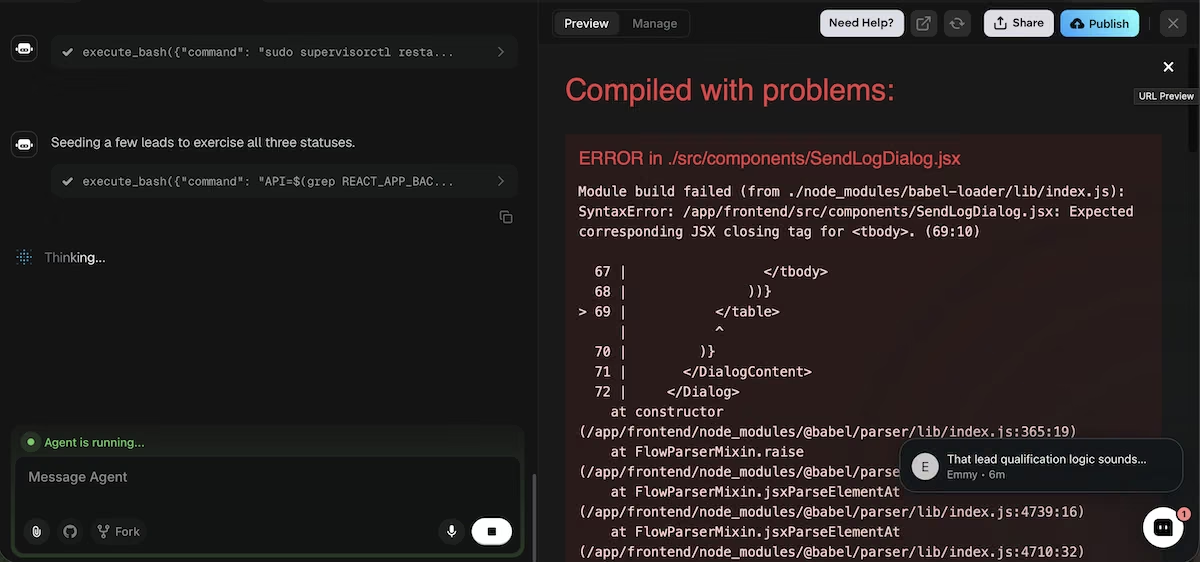
Image 2: A compile error in the send log dialog, caught and corrected during the build
The completion summary said that 23 of 23 backend tests passed and all four rule paths had been verified with real model output.
Before I did my own testing, I opened it in a new tab and confirmed that five things were present: the intake form with every field I asked for, the lead list, the detail view, the reasoning text, and the send log.
The last two are the ones that matter for an agent. Without the reasoning, you can't see why it decided anything, and without the send log, you can't see what it did about it.
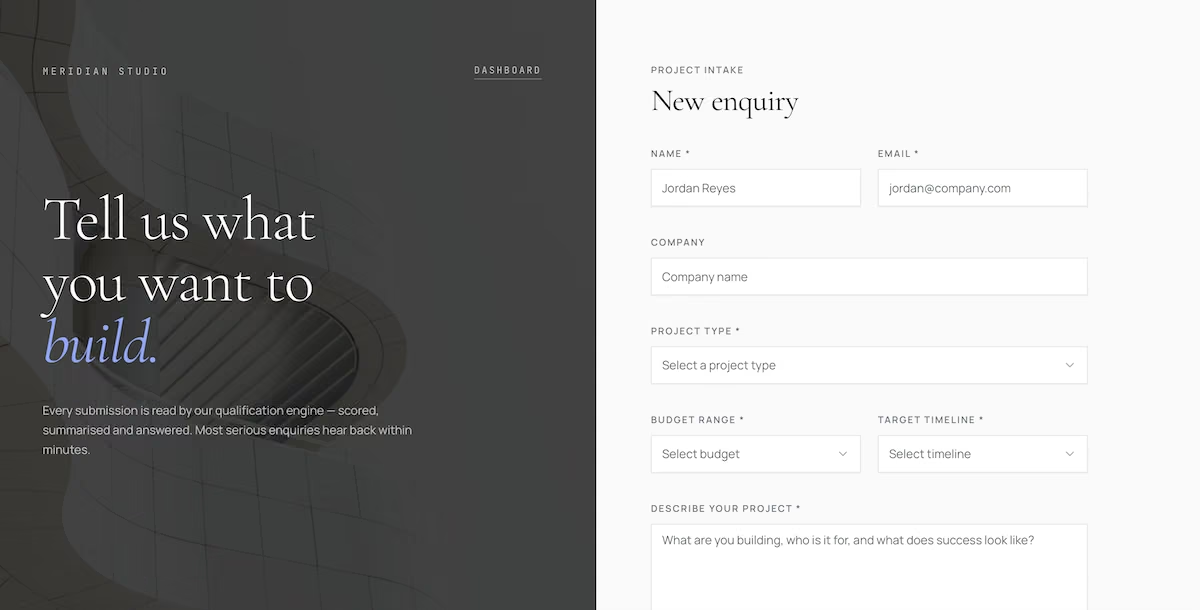
Image 3: The finished intake form, with fields for project type, budget range, timeline, and a free-text description
Emergent had also added four sample leads of its own to show the three statuses in action. While it’s reasonable to include them, bear in mind that they count toward the totals and the average score on the dashboard, so they’re included in any subsequent figures. I asked Emergent to remove them:
Delete all existing lead records and send log entries so that the app starts empty. Don't seed any sample or demo leads.
Also read our how to build an AI app guide for the model choice and credit budgeting that apply here too.
Step 5: Test It With Cases You Wrote in Advance
I submitted five inquiries, each one written to test a different rule.
Dana Whitfield said that she was a wholesale distributor who wanted a customer ordering portal, had a budget of $25,000 to $50,000, and wanted the job done within 90 days. She also included three detailed paragraphs about mis-shipped orders and per-account pricing.
The agent scored her 88, labeled her as Qualified, and sent a reply that referenced her 200 accounts and fall catalog deadline by name.
I expected Theo Barlow to be turned down. He's launching a coffee brand and wanted a logo, packaging, and print for trade shows. He scored 18 and was labeled Not a fit, with the summary noting that the project was well funded and clearly defined but had nothing digital in it.
Next up was Nadia Kessler, whom I'd written to be as persuasive as I could make her. She opened with a referral, quoted a 40% checkout drop-off, had a contract expiring in five weeks, wanted to pick an agency by the end of the week, and offered to take a call on the weekend. Her budget was under $5,000.
She scored 42 and was labeled Nurture, with no email sent. The reasoning said the budget placed her below the threshold, whatever the rest of the inquiry looked like, which is what I'd asked for.
Ellis Broward was a contradiction. He'd ticked $10,000 to $25,000 on the dropdown, then wrote that he was looking at about five grand. The agent scored him at 71, called him Qualified, and emailed him. He'd said he couldn't afford the work and received an enthusiastic reply anyway, as the rules were only reading the dropdowns rather than the description.
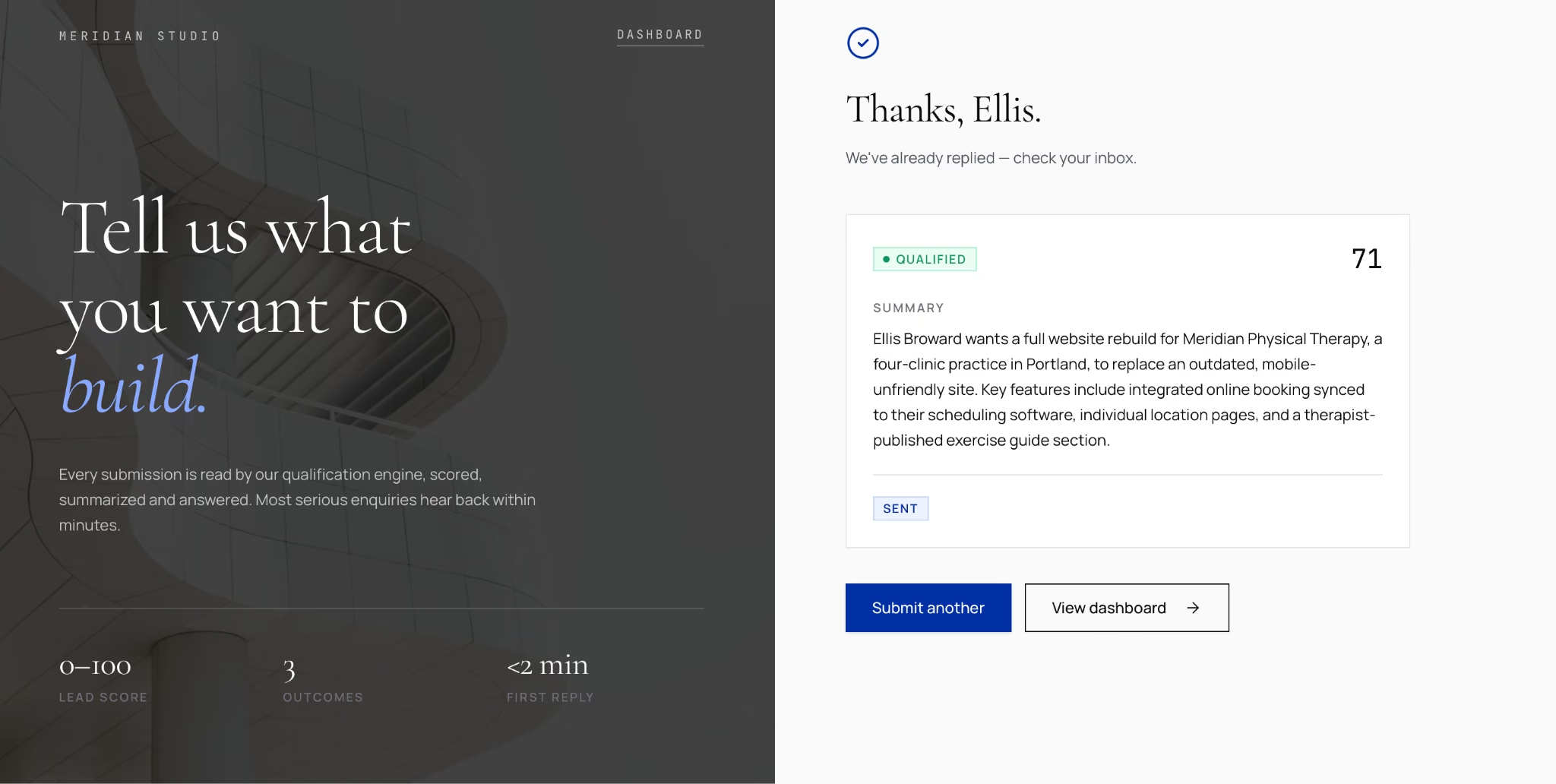
Image 4: Ellis marked Qualified at 71, despite writing that his real budget was around $5,000
T. Nakamura gave it almost nothing to go on with just a 10-word description: "Need an internal tool built. Can discuss on a call." He'd ticked $50,000 or more and said that the timeline was urgent. His score was 72, so he was considered to be Qualified and was sent an email.
Nadia's three paragraphs scored 30 points below his one sentence, as the score was reading the dropdowns rather than the substance.
Both problems had the same root cause, and I only spotted them by opening the send log and comparing it against the statuses on the dashboard.
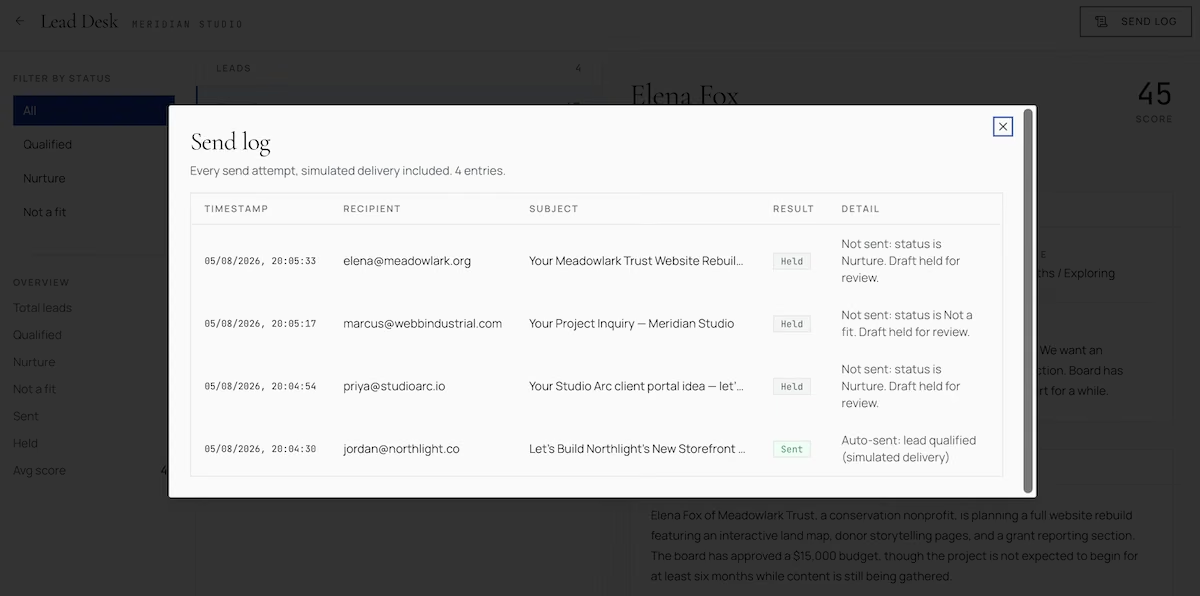
Image 5: The send log, showing every attempt with a timestamp, a recipient, and a Sent or Held result
Step 6: Correct the Rules in Plain Language
I described the wrong outcome, the right outcome, and why, in one prompt:
The qualification rules are reading only the dropdown fields and ignoring the free-text description. When the description contradicts a structured field, the more conservative value wins. Ellis Broward selected $10,000 to $25,000 but wrote that his real budget is about five grand, so he must be Nurture, not Qualified, and no email should be auto-sent.
Also, the score should reflect how much the person actually told us. A submission with no detail cannot score in the same band as a detailed one just because the budget dropdown is high. T. Nakamura wrote 10 words and scored 72, which is wrong.
Apply both, then re-score every existing lead against the corrected rules.
The reply was direct: "Both are real bugs: rules ignored the free text, and the score ignored detail depth." It replaced the qualification core with a two-stage approach that extracted the values and reconciled them conservatively. It then analyzed the result and added a score ceiling tied to how much the person wrote.
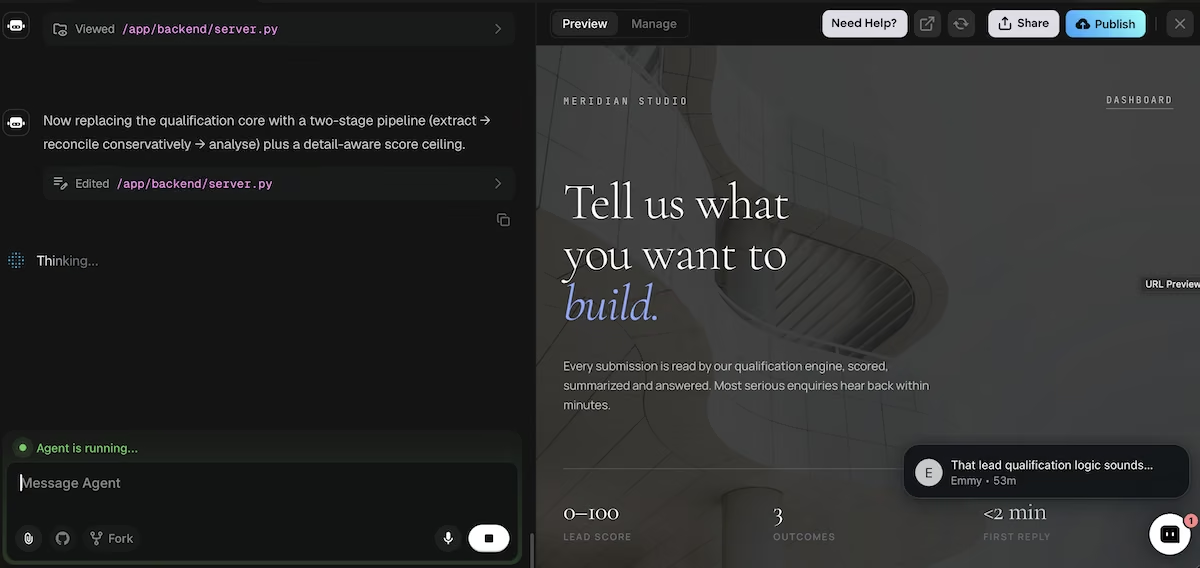
Image 6: Emergent describing the replacement it made to the qualification logic.
Step 7: Verify and Stop
The re-score changed four of the five leads.
Ellis's score dropped from 71 to 42, and his status moved to Nurture. His record now showed an amber panel reading "Description overrides dropdown," spelling out that the description said about $5,000 against a dropdown of $10,000 to $25,000. It also showed an effective budget of $5,000 to $9,999. His automatic reply was recalled, which was shown in the send log.
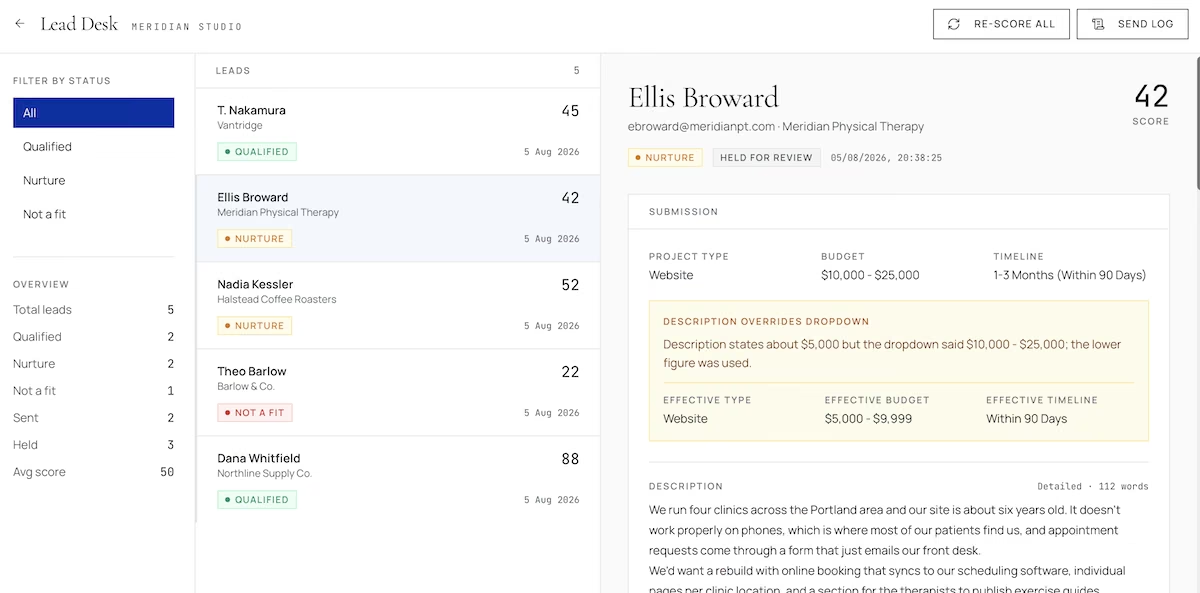
Image 7: Ellis re-scored 42 and was held, with the override panel explaining which figure the agent used
Nakamura’s score went from 72 to 45. The score is capped by how much someone writes now, so anything under 15 words tops out at 45, under 35 words at 60, and under 75 words at 78. He was still Qualified, as his dropdowns met the rules, but he was no longer level with the detailed inquiries.
Nadia’s score changed to 52, and Theo’s to 22, both keeping their original statuses, with Dana’s score staying at 88. The backend tests went from 23 to 42 to cover the new cases.
The corrected scores were showing on my dashboard well before the agent said it had finished, but it continued to run in the background. I manually stopped it, as it appeared to be taking too long. Just seconds later, the summary confirmed that both fixes were done.
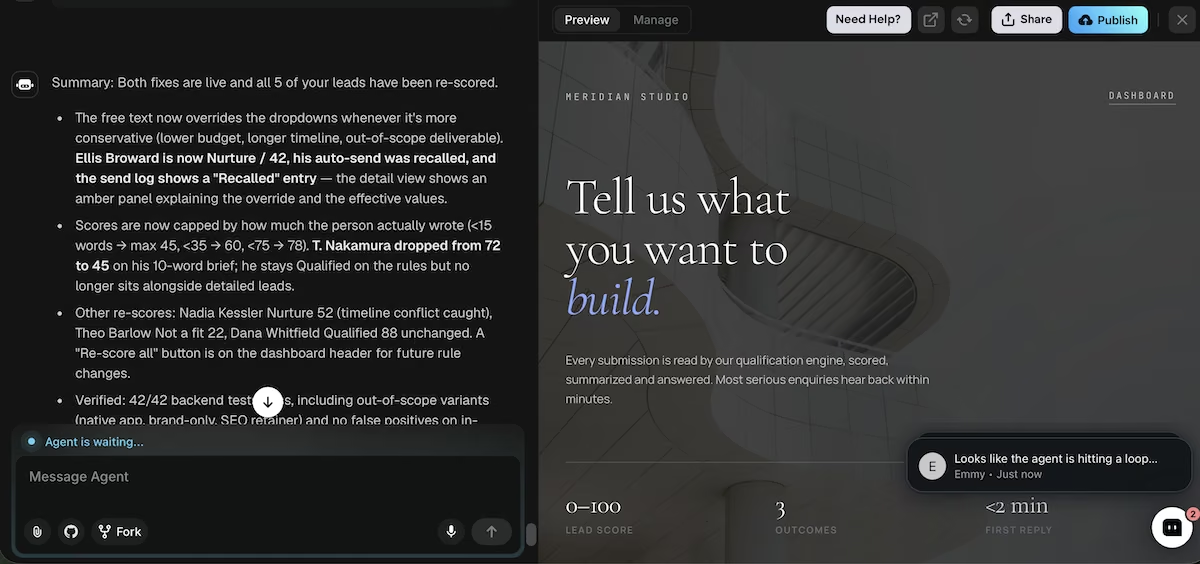
Image 8: The final summary, confirming both fixes were live and all five leads re-scored
Common Mistakes to Avoid
- Building a chatbot and calling it an agent. Plenty of good agents involve a human in the loop for some outcomes. What makes an agent an agent is that it decides which outcome applies.
- Trusting the dashboard on what the agent did. The agent writes the status on the lead, so reading the status only tells you what the agent thinks it did. Ask for a separate log of every action with a timestamp and a result, then read the two against each other.
- Not removing the sample data. Sample leads count toward your totals and your average score, so they’re included in every figure you see. Remove them before your first real submission.
Some platforms want you to build the agent, others want you to configure one. Our best AI agent builders guide covers both approaches.
Taking It Further
Connecting Emergent to where you already work is worth the extra credits. The MCP connector lets you build and adjust your agent from Claude or ChatGPT, which saves you from opening a new tab every time you want to change a rule. Both routes reach the same AI agent builder, so a rule you change from a chat window applies to the deployed agent straight away.
If you're weighing this kind of build against off-the-shelf options, our AI agent builders roundup covers the alternatives. If you'd rather see which agents other businesses are already running, our AI agents for business roundup covers that.
Emergent Makes Building an AI Agent Easier
Building an agent used to mean picking a framework, getting API keys, writing the orchestration, and finding somewhere to host it. This one took a single prompt and a plain-language correction, and I never had to open a code file.
Here's how Emergent helps with building an AI agent:
- One prompt to a working agent: Describe the input, the rules, the action, and the record, and get all four back together.
- Models included: Emergent runs every scoring and drafting call through its own credits, with no separate account or key required.
- Corrections in plain language: Describe the outcome you wanted, and Emergent changes the logic behind it.
- The work is checked: Testing agents run the backend tests again after every correction.
Plans start at $20/month for 100 credits. The $20 Standard plan adds private project hosting, so use it if you don't want your build publicly reachable.
If you want to try this, build your first AI agent with Emergent.

Most AI app builders stop at prototypes. Emergent creates production-ready apps you can actually launch.
- Production-ready apps
- Web & mobile apps
- Deploy in minutes







