Choosing an AI model means trading answer quality against cost, and a wrong pick wastes both. Claude Opus 5.5 high vs GPT-6.1 Sol low sits at the widest point of that trade. Anyone who plans to build an internal tool with AI faces it before the first prompt.
This guide compares each setting's strengths and cost to help you choose.
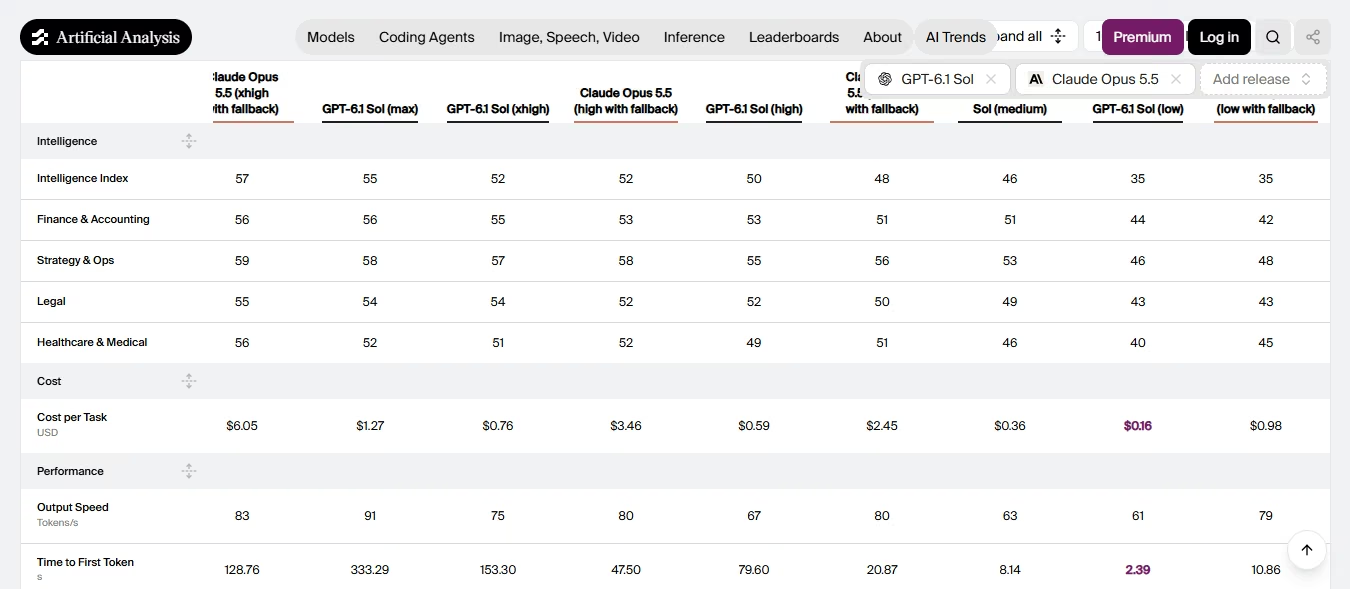
Opus 5.5 high scores 52 on the Artificial Analysis Intelligence Index, while Sol low scores 35. Sol is much faster, producing its first token in 2.84 seconds compared with 21.92 seconds for Opus, which takes about 8 times longer.
Artificial Analysis ran both models with the same test setup, so its scores compare like for like. Vendor tests use different setups, so each section below names its source. Intelligence, speed, price, and token-use figures in this article were checked on November 12, 2026.
Two Different Bargains: Deep Reasoning vs Instant Response
Opus 5.5 at high effort focuses on deeper thinking, while Sol at low effort offers faster responses at a lower cost. The better choice depends on your task.
Effort controls how much time a model spends thinking before answering. Both models offer low, medium, high, xhigh, and max settings. Opus 5.5 doesn't support turning off thinking, and Sol low still reasons before answering.
High is the third of five levels on Opus, and low is the first of five on Sol. For how each model’s results and cost change across its own ladder, see our Claude Opus 5.5 high vs low effort and GPT-6.1 Sol high vs low effort guides.
Table 1: Model snapshot, as of November 2026.
Artificial Analysis rounds Sol’s 1,050,000-token context window to 1M in its comparison table.
Anthropic offers Opus 5.5 in the Claude apps and on the Claude Platform, AWS, Google Cloud, and Microsoft Foundry. OpenAI offers Sol in ChatGPT Work and Codex for Plus, Pro, Business, Enterprise, and Edu users, plus its API. At launch, OpenAI said Sol was not yet in regular ChatGPT Chat.
You set low through the reasoning effort setting in the API.
The Intelligence Gap: What Opus’s High Effort Buys
In the Opus 5.5 vs GPT-6.1 Sol benchmarks, high effort puts Opus 17 points ahead of Sol low. On the Artificial Analysis Intelligence Index, Opus 5.5 high scores 52 and Sol low scores 35. The index blends seven tests covering coding, agents, knowledge work, and science.
Opus leads Sol low by 17 points at high effort. At low effort, both models score 35.
Table 2: Artificial Analysis Intelligence Index and capability scores (v5.0), as of November 12, 2026.
Engineering has the biggest gap at 16 points, while legal and finance have the smallest gaps at 9 points each.
Artificial Analysis ran Opus 5.5 with Anthropic’s default fallback on, the setting production users get.
Coding and Agentic Work: Where Each Model Pulls Ahead
Opus 5.5 high scored higher in all three coding and agent tests by Artificial Analysis.
Table 3: Coding and agent test results, as of November 2026.
- Terminal-Bench 4.0 tests multi-step engineering tasks in a command line.
- FrontierCode 2.0 tests agentic software work in open-source repositories.
- AutomationBench-AA tests business workflows that span connected apps.
Sol low completes about 3 out of 10 terminal tasks, while Opus high completes nearly 6 out of 10.
The gap matters more in agent workflows, where one failed step can affect the entire task. If you're planning to build agents, start with how to build AI agents from scratch.
OpenAI’s launch charts show Sol ahead of Opus 5.5 on AutomationBench, but those charts compare medium effort. Artificial Analysis finds the same pattern at medium, where Sol scores 63% and Opus scores 61%. Sol low does not carry that result.
Also Read: Claude Opus 5.5 benchmarks, a score-by-score look at where it leads and where it trails.
Research, Science, and Knowledge Reliability
Claude Opus 5.5 high effort performance leads on three of four research tests, and Sol low leads on one.
Table 4: Research and knowledge test results, as of November 12, 2026.
Terminal-Bench-Science shows the widest gap in this article. Sol low scores 11% on those scientific workflows, and Opus high scores 49%.
Document and physics tests look different. Sol low trails by 2 points on GDP.pdf and leads by 3 points on CritPt.
OpenAI reports that Sol’s low setting cut factual errors on hard prompts from GPT-6 Sol’s 11.4% to 7.7%. Anthropic reports that 16 of 18 Opus 5.5 reports cleared a test where any invented figure fails the run. That test covered several effort settings, not only high.
Both tests were run by the companies behind the models, so use the results as a guide. Speed and Latency: Why Sol Feels Instant
GPT-6.1 Sol low effort performance peaks on speed, with a first token in 2.84 seconds. Opus 5.5 high needs 21.92 seconds—about 8 times longer.
Table 5: Artificial Analysis, GPT-6.1 Sol vs Claude Opus 5.5 release comparison, accessed November 12, 2026.
Opus takes longer to start replying, particularly for short answers. After that, it generates tokens quickly.
Raising Sol’s effort removes the advantage. At high effort, Sol’s first token takes 34.91 seconds, which is longer than Opus high.
Both vendors sell a faster tier at double the standard price. Anthropic’s Opus 5.5 fast mode runs up to 2.5 times faster for $8 per million input tokens and $40 per million output tokens.
OpenAI announced GPT-6.1 Sol Ultrafast, which can generate tokens up to 8 times faster. The launch announcement did not include its pricing.
Results can vary by server load and region. Test it in your own setup to see how it performs.
Token Use and the Real Cost per Task
On Opus 5.5 vs GPT-6.1 Sol pricing, Sol low costs $0.16 per index task and Opus 5.5 high costs $3.46. That is about 22 times more.
Table 6: API rate cards, as of November 2026. Sources: Anthropic and OpenAI pricing.
The listed prices show only a 2x difference. Most of the remaining cost gap comes from token usage.
Across all index tests, Opus high used 56.1 million output tokens, compared with 8.18 million for Sol low. Both companies charge for thinking tokens at the same rate as output tokens. Based on these averages, 1,000 tasks would cost around $3,460 with Opus high and $160 with Sol low.
Table 7: Score and cost per task by effort level, as of November 2026. Source: Artificial Analysis.
Sol high scores 50 and costs $0.59. That's only two points below Opus's high score, but it costs just 17% as much. Higher Sol settings also mean longer wait times, so speed matters as much as price.
Three billing details also affect the cost:
- Cache reads: Opus charges $0.20 and Sol charges $0.10. Anthropic says cache reads account for most agent costs.
- Data location: Anthropic charges 1.1 times the regular price for US-only inference on Opus 5.5.
Artificial Analysis computes cost per task as a weighted average across its benchmark tasks. Treat it as a relative guide, not your invoice. For a wider view of budgets, see AI agent cost.
Also Read: Claude Opus 5.5 pricing for caching, batch, and US-only rates on the Anthropic side.
When to Choose Opus and When to Choose Sol
Choose Opus 5.5 at high effort for:
- Coding tasks that involve several files or long terminal sessions with multiple steps.
- Scientific, legal, or financial work where getting the answer wrong could cost more than the model itself.
- Creating final reports, spreadsheets, and slide decks, which Anthropic lists as key uses.
- Background tasks where users don't need an immediate response.
Choose Sol at low effort for:
- Live chat, support replies, and voice tools that need a fast first word.
- Large numbers of tasks, such as tagging, routing, and extracting data.
- Simple tasks you can check quickly, such as writing a regex or renaming a field.
- Projects with a fixed budget and a set cost limit for each task.
Dashboards show the split well. A daily summary line fits Sol low, and a quarterly analysis fits Opus high.
Read the safeguards before security work. Anthropic sends most cybersecurity tasks on Opus 5.5 to Opus 4.8.
A Practical Decision Framework
Before choosing a model, think about the cost of a wrong answer. Then try both on tasks you actually handle.
- Group your tasks into low, medium, and high risk based on the cost of mistakes.
- Decide how long you're willing to wait and how much you can spend each month.
- Test Opus 5.5 high and Sol low on 20 actual tasks.
- Use the same checklist to decide whether each result is acceptable.
- Calculate the cost of each accepted result by dividing the total spend by the number of accepted results.
- Use Sol low for low-risk tasks and Opus high for high-risk ones. Move Sol to medium if too many results fail your checks.
To build that routing yourself, an AI agent builder lets you describe which tasks go to which model and where a person reviews.
Here is the math with assumed numbers. Say Sol low costs $0.16 per task and passes 60% of checks, while Opus high costs $3.46 and passes 90%. Cost per accepted result is $0.27 on Sol and $3.84 on Opus.
Use your own pass rates, since these are examples. Rejected outputs also carry a second cost: the time it takes someone to fix them.
Retest after each release. OpenAI shipped GPT-6.1 Sol one week after GPT-6 Sol, and Anthropic launched Opus 5.5 a week earlier.
Conclusion
Use Opus 5.5 at high effort for difficult tasks that need several steps and accurate results. Sol at low effort is better for simple tasks that need quick answers at scale.
Opus scores 52 on the index, compared with Sol's 35, while Sol costs $0.16 per task compared with $3.46 for Opus.
Opus performs better in all coding and agent tests. However, Sol responds much faster, taking around 2.8 seconds compared with Opus's 21.9 seconds.
Before switching to Opus, try increasing Sol's effort level. This can improve its results, but it also increases the cost. Test both models on the same tasks using the same checklist to see which one works better for you.
Both Claude Opus 5.5 and GPT-6.1 Sol are live on Emergent. Emergent is a no-code app builder. Build custom internal software with the model that fits.
Describe it. Build it. Launch it.
- End-to-End Creation
- No Code Needed
- Live in Minutes

Most AI app builders stop at prototypes. Emergent creates production-ready apps you can actually launch.
- Production-ready apps
- Web & mobile apps
- Deploy in minutes