
TL;DR
- Effort level – low: Good for mundane tasks, data extraction, classification, basic content editing, and basic coding changes.
- Effort level – high: Suitable for complicated debugging, multi-step planning, analysis, and agentic tasks that involve several decisions.
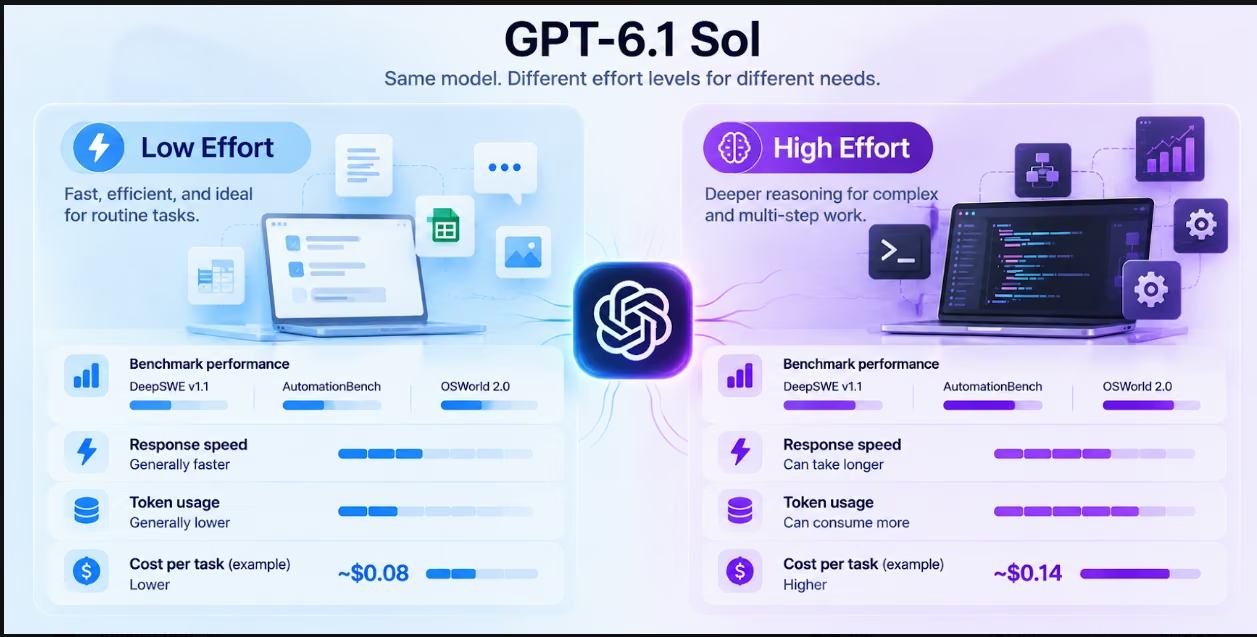
- Intelligence: Higher effort gives the model a bigger reasoning budget. On OpenAI's DeepSWE v1.1 coding benchmark, High scored 75.2% compared with 64.4% for Low. xhigh and max scored lower than High, at 71.9%.
- Speed: Usually, Low-effort tasks involve less reasoning tokens and help reduce the latency of the response. It really depends on the task and length of the output.
- Token usage: High-effort tasks may involve more reasoning tokens, resulting in an increase in the number of output tokens.
- Cost: Same token rates for both options apply here. The overall cost will differ because the number of tokens used is different.
- The best way: Use Low for routine, high-volume tasks. Start at Medium or High for coding and agent work, where Medium recovers most of High's gain at a lower cost.
GPT-6.1 Sol supports a variety of reasoning effort options, letting you choose which reasoning level works best for your application requirements in terms of quality, speed, and number of tokens consumed.
Is higher-effort reasoning really better? Does the extra effort of a more extensive reasoning process pay off in the context of each specific request?
Whether high-effort reasoning will be beneficial in your case largely depends on the type of request being made to the API. A request for classification doesn't require as much reasoning budget as debugging or organizing an agentic workflow of several steps. Requiring higher effort for every request will make it slower and potentially more expensive, but may not improve performance.
This guide provides information on comparing GPT-6.1 Sol high vs. low effort regarding reasoning, coding, agentic workflows, speed, token consumption, and cost.
Same Model, Two Reasoning Budgets: How the Effort Dial Works
GPT-6.1 Sol is designed for complex coding, computer use, and professional work. Its reasoning effort setting controls how much reasoning the model can apply before producing an answer or taking an action.
The setting does not switch the model to a different version. Instead, it changes the reasoning budget available to the same model.
GPT-6.1 Sol supports five reasoning effort levels. Unlike GPT-6 Sol, it does not support none or minimal, so requests using reasoning.effort: "none" must be updated (typically to low) and retested:
| Effort level | What it means | Best suited for |
|---|---|---|
| Low | Uses a smaller reasoning budget | Extraction, classification, simple edits |
| Medium | Provides a balanced reasoning budget | Everyday analysis, comparisons, planning |
| High | Allows deeper reasoning | Complex debugging, multi-step tasks |
| Extra High (xhigh) | Provides more room for demanding reasoning | Difficult technical and analytical work |
| Max | Uses the highest supported effort setting | The most challenging reasoning tasks |
The default reasoning effort for GPT-6.1 Sol is Medium. This gives developers a balanced starting point rather than automatically prioritising speed or maximum reasoning.
What changes when you move from Low to High?
The primary difference is the amount of reasoning the model can apply.
With Low effort, the model can handle straightforward requests without spending as many tokens working through possible approaches. This makes it suitable for high-volume workloads where tasks follow predictable patterns.
Higher efforts will afford more flexibility to the model as far as analyzing the problem, coming up with different strategies, and even undertaking various stages. This will be useful when dealing with tasks that have dependencies and ambiguities.
For example, consider two coding requests:-
• Low effort: Fix a spelling mistake in a button label or update a simple CSS property.
• High effort: Investigate a bug that affects several files, trace its cause, update the relevant code, and verify that the change does not break another feature.
Both requests involve coding, but the reasoning required is very different.
The same principle applies to research, document analysis, and AI agents. A straightforward extraction task may work well with Low effort. A workflow that requires interpreting documents, comparing information, and taking several actions may benefit from High effort.
The Intelligence Gap: What High Effort Actually Buys
The GPT-6.1 Sol high effort vs low effort comparison is not simply about producing longer answers. It is about giving the model more room to reason through difficult tasks.
Higher effort can improve performance when a problem requires multiple steps, careful evaluation, or more extensive planning. However, it does not guarantee a better answer for every request.
A model can complete a simple task accurately at Low effort. Increasing the reasoning budget may add processing time without changing the final result.
What OpenAI’s published evaluations show
OpenAI’s GPT-6.1 Sol announcement highlights improvements across software engineering, professional work, computer use, scientific research, and factuality.
Some of the published findings include:
| Evaluation | Published finding |
|---|---|
| DeepSWE v1.1 | GPT-6.1 Sol matches GPT-6 Astra on complex software-engineering tasks at roughly one-fifth of the cost |
| GDP.pdf | Approaches GPT-6 Astra's performance on professional document tasks at roughly one-fifth of the cost per task |
| AutomationBench | Scores 2.2 percentage points above Opus 5.5 at Medium effort, at roughly one-third of the cost |
| OSWorld 2.0 | Comes within 2.1 percentage points of GPT-6 Astra's score at maximum effort |
| Factuality evaluation | Reduces the share of difficult prompts containing a factual error from 11.4% with GPT-6 Sol to 7.7% with GPT-6.1 Sol at Low effort |
Most of these results compare GPT-6.1 Sol against other models rather than against its own effort levels. The exception is DeepSWE v1.1, where OpenAI's chart reports a score and cost for every effort level.
On a factuality evaluation built from deliberately difficult prompts, which OpenAI says are not representative of typical usage, GPT-6.1 Sol cut the share of responses with at least one factual error from 11.4% to 7.7% at Low effort. That is roughly a 32% reduction compared with GPT-6 Sol.
Sources: OpenAI – Introducing GPT-6.1 Sol and GPT-6.1 Sol API documentation. DeepSWE v1.1 score and cost per task by reasoning effort
| Effort | Score | Cost per task |
|---|---|---|
| Low | 64.4% | $0.17 |
| Medium | 73.0% | $0.42 |
| High | 75.2% | $0.65 |
| xhigh | 71.9% | $0.79 |
| Max | 71.9% | $1.57 |
Caption: DeepSWE v1.1 score and cost per task by reasoning effort. Source: OpenAI – Introducing GPT-6.1 Sol, Coding section, DeepSWE chart. Pricing as of September 2026.
Does High effort always mean higher intelligence?
Not necessarily. On DeepSWE v1.1, scores rise from Low to High and then drop. xhigh and max both scored 71.9%, below High's 75.2%, while costing $0.79 and $1.57 per task compared with $0.65 for High.
High effort becomes more useful when the model needs to: Compare several possible solutions.
Identify dependencies across multiple steps. Diagnose an issue with incomplete information.
Review complex documents or technical requirements. Plan and execute a workflow involving multiple tools.
Check whether an action could affect another part of a system.
The practical takeaway is to match reasoning effort to task complexity instead of treating High as the default choice for every request.
Also Read: GPT-6.1 Terra benchmarks for how the cheaper tier scores on the same kinds of tasks.
Coding and Agentic Work: Where the Gap Widens
Coding and agentic workflows are among the areas where reasoning effort can make a meaningful difference.
A simple code-generation request may need only a few instructions and a short response. A real software-engineering task can involve understanding an existing codebase, identifying dependencies, making changes across files, running tests, and fixing unexpected errors.
The second type of task requires more planning and verification. If you want to put the model behind a task like that, a coding agent builder lets you set the steps and where a person reviews the result.
Low effort for straightforward coding
GPT-6.1 Sol Low effort is a sensible starting point for coding tasks with clear requirements and limited dependencies. Examples include:
- Generating a basic function.
- Fixing a small syntax error.
- Updating a button label or page heading.
- Writing a simple SQL query.
- Creating a basic API request.
- Explaining a short code snippet.
These tasks usually have a clearly defined outcome. Additional reasoning may not materially improve the result.
High effort for complex software engineering
High effort is more suitable when a coding task involves several connected components or requires careful investigation. On DeepSWE v1.1, it scored 10.8 points above Low for $0.48 more per task.
Consider a request to fix an authentication issue in an application. The problem could involve frontend validation, backend permissions, session handling, and database access.
A successful fix requires more than changing one line of code. The model must understand how the components interact, identify the likely cause, and consider the consequences of a proposed change.
High effort can help with:
• Debugging across multiple files.
• Refactoring interconnected components.
• Investigating complex application errors.
• Planning architecture changes.
• Reviewing security-sensitive code.
• Working through long-running software-engineering tasks.
For teams developing applications with an AI app builder, the distinction matters. Straightforward changes can use a lower reasoning budget, while complex application logic and debugging may justify a higher one.
Agentic workflows need more than a quick response
AI agents frequently perform a series of actions that are all related rather than simply answering a query. They could look for data, go through documents, update records, call tools, and check to see if the task has been done.
An easy task like getting some fields out of a document doesn’t necessarily require much reasoning. A harder task involves comparing records, applying some business rules, updating the system, and then checking the results.
High effort can be useful when an agent must:
- Understand a multi-part objective.
- Break the objective into smaller steps.
- Select the appropriate tools.
- Interpret the results returned by those tools.
- Recover from unexpected outcomes.
- Verify that the final action matches the original request.
Teams exploring how to build AI agents from scratch should consider effort selection as part of workflow design. Not every agent action needs the same reasoning budget.
Speed and Latency: Why Low Effort Feels Instant
Effort in reasoning may have an effect on the time that it will take GPT-6.1 Sol to answer a request.
Low effort usually entails the use of fewer reasoning tokens. It will take less time to reason, which makes it more appropriate for work that needs quick responses.
High effort usually takes more time since the model can afford to spend some time reasoning about the question before providing an answer.`
However, effort level is not the only factor that affects latency. Response time can also depend on:
The length of the input prompt.
The number of output tokens generated. The complexity of the requested task.
The number of tool calls required. Network and service conditions.
Whether the request uses additional processing modes.
Low vs. High effort: Speed comparison
| Factor | Low effort | High effort |
|---|---|---|
| Reasoning budget | Smaller | Larger |
| Reasoning tokens | Generally fewer | Can use more |
| Response latency | Generally lower | Can be higher |
| Routine requests | Efficient | May add unnecessary processing |
| Complex requests | May need another attempt | Better suited to deeper reasoning |
| High-volume workloads | Useful for predictable tasks | Best reserved for tasks that justify it |
OpenAI does not publish a universal response-time figure for GPT-6.1 Sol Low versus High effort. Actual latency should be measured using representative workloads rather than assuming a fixed speed difference.
Does faster always mean better?
No. A faster response is useful only if it completes the task correctly.
For example, an agent that updates a customer record quickly but misses an important validation step creates more work than it saves. A slightly slower response that checks the relevant information may be more valuable.
The right setting depends on the consequences of an error. Use Low when the task is predictable and easy to verify. Use High when the cost of an incomplete answer or incorrect action is greater than the additional processing time.
Token Use and the Real Cost per Task
Reasoning effort can affect token consumption, which makes it an important consideration for API users.
GPT-6.1 Sol uses the same standard API pricing for Low and High effort. The per-token rate does not increase simply because the reasoning setting changes.
However, High effort can use more reasoning tokens. Since reasoning tokens are billed as output tokens, a request that uses more of them can cost more overall.
GPT-6.1 Sol API pricing
The standard API prices are:
| Token type | Price per 1 million tokens |
|---|---|
| Input tokens | $2.00 |
| Cached input tokens | $0.10 |
| Output tokens | $10.00 |
| Cache writes | $2.50 |
Cached input is priced at 5% of the standard input rate. Cache writes are billed at 1.25 times the uncached input rate.
These are standard API rates. Batch and Flex processing are priced at 50% of standard rates, while Fast mode costs twice the applicable standard rate. Ultrafast mode is priced at six times standard rates.
Also Read: GPT-6.1 Terra pricing for how a cheaper tier in the same family prices caching, Batch, Flex, and Fast mode.
How effort affects token consumption
The important distinction is between the price per token and the number of tokens consumed. For example:
A Low effort request may use fewer reasoning tokens and produce a shorter response.
A High effort request may use additional reasoning tokens to work through a more complex problem. A task requiring a long final response can consume substantial output tokens regardless of effort level.
The following example illustrates how different token consumption can affect the GPT-6.1 Sol cost per task.
| Cost component | Low effort example | High effort example |
|---|---|---|
| Input tokens | 20,000 | 20,000 |
| Output tokens, including reasoning | 4,000 | 10,000 |
| Input cost | $0.04 | $0.04 |
| Output cost | $0.04 | $0.10 |
| Estimated total | $0.08 | $0.14 |
This is an illustrative computation and not the measured average tokens consumed by GPT-6.1 Sol at any of the effort levels. This takes into account standard API rates, no caching of input, no writing to cache, and no extra costs for tools.
The above example explains why the cost per task should be considered rather than the comparison of token prices. The High Effort example costs more than the Low Effort example despite the same per-token rates.
How to reduce GPT-6.1 Sol cost per task
Several measures can be taken to minimize expenses without affecting the quality of tasks.
Use Low effort for tasks you can predict
Don’t use High effort on extraction, classification, and simple modifications of the content if Low effort guarantees a successful outcome.
Use High effort on more complicated tasks
Use extra reasoning where it helps to avoid mistakes, to prevent reattempts, or to improve multi-stage result.
Use prompt caching
For repeated requests which have the same context prompt caching is an effective way to save money. GPT-6.1 Sol input rate for prompt caching is $0.10 per million tokens.
Calculate cost per completed task
Cheaper attempt is not always the cheapest completed workflow. Sometimes, unsuccessful attempts of Low effort make High effort more cost-efficient.
For a deeper look at budgeting, see this guide to AI agent cost.
When Low Effort Is Enough and When It Is Not
The right GPT-6.1 Sol effort level depends on how much reasoning a task requires and how costly an incorrect result would be.
Low effort suffices in situations where the requirement is obvious, the output is known in advance, and verification is not a big challenge.
High effort pays off in cases where there is need for thorough analysis, multiple decisions and careful verification.
When to choose Low effort
Choose Low for tasks such as:
- Extracting names, dates, and figures from structured documents.
- Classifying support tickets.
- Summarising short and straightforward content.
- Rewriting paragraphs or correcting grammar.
- Generating simple code snippets.
- Performing routine data transformations.
- Handling repetitive workflows with clear instructions.
For example, an internal team that processes hundreds of support tickets may use Low effort to classify requests into predefined categories. The task follows consistent rules and does not require extensive reasoning for every ticket.
When to choose High effort
High effort is better suited to tasks such as:
- Debugging complex code.
- Comparing several technical approaches.
- Reviewing detailed business documents.
- Planning multi-step agent workflows.
- Investigating errors across multiple systems.
- Analysing conflicting information.
- Performing computer-use tasks with several dependencies.
For example, an agent tasked with reviewing an invoice, checking it against purchase records, identifying discrepancies, and preparing an approval recommendation has several connected decisions to make. High effort may help the model work through the process more carefully.
A quick comparison
| Task | Recommended effort |
|---|---|
| Extracting information from a document | Low |
| Classifying customer feedback | Low |
| Rewriting a short paragraph | Low |
| Generating a simple function | Low |
| Comparing software architectures | High |
| Debugging a multi-file application | High |
| Analyzing complex financial documents | High |
| Planning a multi-step agent workflow | High |
| Reviewing interconnected code changes | High |
These are starting recommendations, not strict rules. Medium may be the better choice for tasks that need some judgment but do not justify High effort.
A Practical Decision Framework
Choosing between GPT-6.1 Sol High and Low effort does not need to be complicated. Match the starting effort to the task type. For routine, predictable workloads, begin with Low and increase effort only if results fall short. For coding and multi-step agent tasks, start at Medium or High. On DeepSWE, Medium reached 73.0% at $0.42 per task compared with 64.4% at $0.17 for Low.
Use the following framework to make the decision.
| Question | If yes | Suggested effort |
|---|---|---|
| Does the task follow a predictable pattern? | The model has a clear route to the answer | Low |
| Is the expected output short and easy to verify? | Additional reasoning may not add much value | Low |
| Does the task involve several connected steps? | The model needs more room to plan | High |
| Does the task require complex debugging or analysis? | More reasoning may improve the result | High |
| Could an incorrect action create significant rework? | Additional verification may be worthwhile | High |
| Is the task moderately complex? | A balanced reasoning budget may be sufficient | Medium |
Match effort to the task, then validate the result
For routine, predictable workloads, begin with Low. For coding and multi-step agent tasks, start at Medium or High, then adjust based on measured task success, latency, retries, and total cost.
For example:-
Choose the starting level: Use Low for routine requests and Medium or High for coding and multi-step agent work. Evaluate the result: Check whether the response meets the accuracy and completeness requirements.
Identify the problem: Look for missing steps, incorrect assumptions, or incomplete analysis.
Adjust effort: Increase or decrease the reasoning budget based on the task's actual needs. Measure the outcome: Compare task success, latency, retries, and total token cost.
This approach avoids spending additional reasoning tokens on tasks that do not need them.
An AI agent builder is one way to build that effort choice into a workflow, so each step runs at the level it needs.
Evaluate performance using real workloads
Teams deploying GPT-6.1 Sol should test both settings on representative tasks rather than relying only on general recommendations.
Useful metrics include:
Task success rate: How often does the model complete the request correctly? Latency: How long does the complete task take?
Token consumption: How many input, cached input, and output tokens does it use? Retry rate: How often does the workflow need another attempt?
Cost per successful task: How much does it cost to complete the task successfully?
The last metric is particularly important for agentic applications. A setting that costs more per request may still be more economical if it reduces repeated attempts and failed workflows.
For teams that want to build an internal tool with AI, this type of evaluation can help determine where additional reasoning improves the application and where a lighter setting is sufficient.
Conclusion
The difference between GPT-6.1 Sol High and Low effort is based on how hard the task is, what kind of accuracy is needed, and the cost of doing things correctly.
Low effort is a good option for standard tasks, extraction of information, coding modification, and other regular actions. High effort is more appropriate for hard debugging, multi-stage tasks involving an agent, and more detailed tasks that need more reasoning. Medium can still be a helpful choice in some situations when certain judgment is required.
For teams building applications and AI-powered workflows, selecting the right reasoning effort can improve both development efficiency and operating costs. Emergent helps teams turn ideas into functional applications and internal tools using AI. Whether the goal is to build custom internal software or create an AI dashboard, the right development workflow can help move projects from planning to implementation.
The goal is not to use High effort for every request. It is to choose the reasoning level that delivers the best balance of quality, speed, and cost for each task. Explore Emergent’s AI app builder to see how AI can help accelerate application development.
Describe it. Build it. Launch it.
- End-to-End Creation
- No Code Needed
- Live in Minutes

Most AI app builders stop at prototypes. Emergent creates production-ready apps you can actually launch.
- Production-ready apps
- Web & mobile apps
- Deploy in minutes