




About a week into testing Glide, my app hit a wall on its own. I hadn't switched plans or clicked a single upgrade button. A meter I'd barely registered, called updates, had ticked past 250 on the Explorer plan, and to keep the app running, I had to turn on extra updates, which billed every edit past the limit at $0.02.
That sent me down a three-week rabbit hole. I tested both Glide Classic tiers and two GlideOS tiers, roughly eight to 10 hours in all, building small test apps on each and watching what moved the number at the bottom of the invoice.
No one walked me through this before I signed up, so here's the version I'd hand a friend. Glide pricing has a clear starting number, and two variables decide what you pay past it: update overages and who counts as a personal user.
Glide Pricing Plans: At a Glance
Glide runs two separate products today.
Glide Classic is the original app builder, built around tables and logic. GlideOS is the newer, AI-assisted builder. They live on separate accounts, with separate bills, and neither one migrates into the other.
Glide Classic (Apps) Plans
| Plan | Monthly Price | Best For |
|---|---|---|
| Free | $0 | A solo builder validating an idea |
| Explorer | $25/month ($19/month, billed annually) | Publishing a first live app to a small group |
| Maker | $60/month ($49/month, billed annually) | An internal tool for a team on personal email addresses |
| Business | $249/month ($199/month, billed annually) | Business or external users, or a larger one-off audience |
| Enterprise | Custom, contact sales | Large deployments with custom needs |
GlideOS Plans
| Plan | Monthly Price | Best For |
|---|---|---|
| Free | $0 | Testing GlideOS's AI-first builder |
| Solo | $25/month | A single builder who wants a database included |
| Team | $125/month + $10 per member | A small team building together in GlideOS |
| Enterprise | Custom, contact sales | Large-scale, security-heavy deployments |
Glide Pricing Plans Breakdown
Everything below splits into two groups, since the two products bill and behave differently. Glide Classic comes first, then GlideOS.
Glide Classic Plans in Detail
Free: $0/month
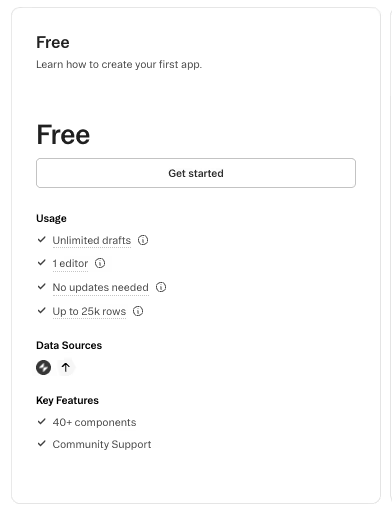
I started testing on Glide's free plan by building a test app called the Outreach Tracker. It's a simple contact log with a status column (Not Contacted, Contacted, Replied, Published) and a notes field. Every row was placeholder test data, dropped in by hand.
I typed about 40 rows straight into a Glide Table, enough to test the workflow, and stopped well short of the 25,000-row ceiling this plan allows.
Free doesn't charge for updates at all, which is why I tested it first. Since I hadn't connected Glide to anything external yet, whether a Google Sheet, Airtable, or any other outside source, the updates meter never moved.
Native Glide Tables cost nothing to edit, regardless of how often you touch them. That's the single most useful cost-control fact I found.
Free technically includes a small personal-user allowance, but since you can't publish anything on it, no outside user can actually sign in yet, so the personal-user math doesn't start to matter until Explorer.
What Free doesn't give you is a way to show anyone the app. You can build, edit, and iterate as much as you want, but there's no published, shareable link. The moment you want someone else to open it, even for a quick look, you're already past what this plan covers.
Free proves the rule from the safe side.
With nothing external connected yet, there's nothing here to push the updates meter, so the $0 price really is the whole bill.
What's included: 25,000 rows, one editor, unlimited drafts, and 0 published apps, all inside native Glide Tables with no update charges.
Best for: A solo builder testing an idea before spending anything.
Pros:
- Free forever, no trial clock running out.
- Zero update charges, since nothing here touches the updates meter.
- 25,000 rows of headroom before you'd need to upgrade for space alone.
Cons:
- No published or shareable app, so nobody outside your own editor can open it.
- One editor only, so you can't bring a teammate into the build.
Explorer: $25/month ($19/month, billed annually)

Explorer is where I ran the test method that shaped this piece:
"Build the same simple contact tracker twice. First, add the rows straight into a Glide Table by hand. Then rebuild the same table synced live from an external Google Sheet. Watch what happens to the updates counter in each version."
The Glide Tables version, the one I'd already built on Free, never touched the updates meter. The synced version was different. I connected the Outreach Tracker to an external Google Sheet set up to mimic an intake pattern, a sheet where new leads would land before flowing into Glide. The updates counter started climbing the moment I edited a row.
I crossed 250 included updates within about a week of normal back-and-forth syncing. Keeping the app running meant switching on overage billing at $0.02 per extra update. The charge was small in dollars, but it was the first evidence that the $25 base price wasn't the whole story.
I simulated ordinary admin work that week by marking a lead Contacted, fixing a typo in a note field, and moving a row from Replied to Published as a test outreach thread wrapped up.
None of those edits felt like they should cost anything on their own. Add them up across a week of normal use, though, and they're exactly what pushed the counter past 250.
Then I tried to publish a second app, the Content Idea Backlog, and hit a different wall entirely. Explorer only allows one published app. The limit had nothing to do with row count (I was nowhere near the 25,000-row ceiling) or the 100 personal users this plan includes. Explorer's real limit is that it only lets you publish once.
If you already know you'll need a second published app, Explorer only buys you time before you're back on Glide's pricing page.
What's included: Two editors, one published app, 100 personal users, 250 included updates at $0.02 per extra update, and up to 25,000 rows.
Best for: A builder ready to publish a first live app for a small group of testers.
Pros:
- Your first published, shareable app.
- 100 personal users included, plenty for an early test group.
- Predictable cost as long as everything stays inside Glide Tables.
Cons:
- Only one published app, so a second project needs an upgrade.
- Update charges begin once you connect an external source.
Maker: $60/month ($49/month, billed annually)
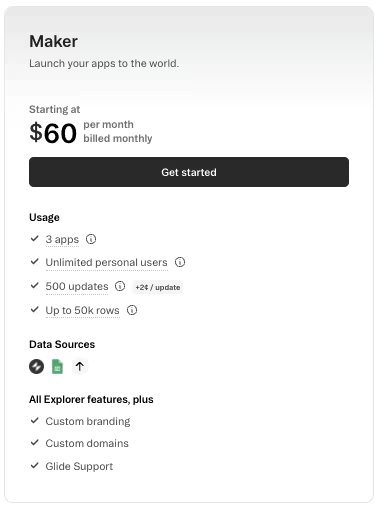
I upgraded to Maker specifically to publish the Content Idea Backlog, the second test app I'd built to check Glide's app-count ceiling. Maker allows three apps, and publishing the Content Idea Backlog used two of those three slots, alongside the Outreach Tracker.
With a second app published, I wanted to bring in a second tester.
I invited a colleague using a work email address to help update the Outreach Tracker, and the invite wouldn't go through as a personal user. Maker's unlimited-personal-user allowance only covers personal or education email domains, Gmail, Outlook, a school address, and similar. A work email needs Business or Enterprise instead.
If everyone on your team signs in with a personal inbox, Maker's unlimited-user allowance holds up exactly as advertised. Once one teammate has a work email, you're either working around it or paying for a higher plan.
The worked-math example at the center of my testing comes from Maker. It includes 500 updates a month at $60/month, with extra updates billed at $0.02 each, the same rate as Explorer.
Model a busier month with 5,000 chargeable updates, and you're 4,500 over the included allowance. At $0.02 each, that adds $90 in overages to the $60 base. On monthly billing, the total is $150 for the month.
Once regular syncing kicks in, the real bill climbs well past the $60 base price.
Maker is the plan I'd point most internal-tool builders toward. It's the sweet spot once you're past the personal-versus-business-user quirk, especially when your team's data stays inside Glide Tables and only occasionally syncs out.
What's included: Two editors, three apps, unlimited personal users on personal or education email domains, 500 included updates at $0.02 per extra update, and up to 50,000 rows.
Best for: An internal-tool builder serving a small team on personal or education email inboxes.
Pros:
- Three apps included, room to publish more than one tool.
- Unlimited personal users, provided everyone signs in from a personal or education domain.
- Update allowance doubles from Explorer's 250 to 500.
Cons:
- Work email teammates can't join as personal users.
- A busier month of syncing can push the bill well past $60.
Business: $249/month ($199/month, billed annually)
The per-user math turns concrete once you hit Business. I upgraded briefly and added a handful of test seats, enough to see the billing panel calculate the extra-user rate directly. It's $6 per user past the 30 included, on monthly billing.
Thirty included users sounds generous until you model a short-term spike.
Say you needed 50 users for a conference app, a short campaign, or anything that spikes past your normal team size. That's 20 users over the 30 included, at $6 each, or $120 a month in extra seats alone. That's before a single update overage, on top of the $249 base.
Business includes 5,000 updates a month, the most generous allowance among Classic's standard plans, but it's still capped. Model that same conference-app scenario syncing attendee sign-ups in from an external sheet: 8,000 updates in a busy month, 3,000 over the included 5,000.
At $0.02 each, that's $60 in update overage. Stack it on the $120 in extra seats and the $249 base, and a one-off event that looked like a flat $249 line item lands closer to $429 for the month.
The 30-user allowance can trap short-run, larger-audience builds like this. Do the per-seat math before defaulting to Business for something that only needs a big audience once.
Business also raises the row ceiling to 100,000 rows, but only for native Big Tables. If your data is still connected through an external spreadsheet, you're capped at 25,000 rows on every plan. The higher ceiling only kicks in once your data lives inside Glide's own Big Tables.
I also hit an honest friction point right after upgrading. The app dashboard still read Free, even though the charge had already gone through. Glide bills by team, and I'd upgraded the wrong one inside my account. Switching to the correct team fixed it right away, but it's an easy mistake to make once, and I made it.
What's included: 10 editors, unlimited apps, 30 included users at $6 per extra user on monthly billing, 5,000 included updates, and up to 100,000 rows on native Big Tables.
Best for: A business serving external or business email users, or running a larger one-off audience.
Pros:
- Unlimited apps and 10 editors, room for a full team to build together.
- The highest row ceiling of any Classic plan, once data lives in Big Tables.
- 5,000 included updates, more headroom than any other standard Classic plan.
Cons:
- The 30-user allowance gets expensive fast, past a short-term larger audience.
- Spreadsheet-connected data still caps at 25,000 rows on every plan.
Enterprise: Custom Pricing

Enterprise isn't a plan I paid for or tested hands-on. Glide prices it custom, contact sales only, with editors, users, updates, and rows scoped to whatever a larger deployment demands.
What's included: Custom editors, users, updates, and rows, scoped to the deployment.
Best for: A larger organization whose needs go past Business's fixed limits.
Pros:
- Every limit becomes negotiable, scoped to what your deployment needs.
- Support and onboarding built for a bigger deployment.
Cons:
- No public price, so you can't budget against a number until you talk to sales.
- Minimum commitments and seat counts are set in the contract, not published.
The Agency plan: One more Glide Classic plan exists, even though you'll probably never need it. It's gated to Certified Experts, bills once a year only, with no month-to-month option, with allowances scoped for agencies managing multiple client apps.
Don't mistake it for a cheaper Business alternative. It's built for agencies managing apps for other teams. Unless you're a Certified Expert yourself, skip it.
GlideOS Plans in Detail
GlideOS Free: $0/month
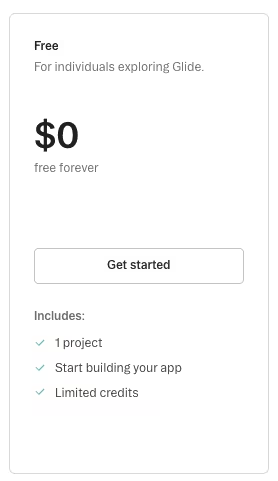
I tested GlideOS Free only long enough to confirm that it is a separate environment from Glide Classic. It includes one project and a limited monthly credit allowance, enough to poke around GlideOS's prompt-based interface without paying anything.
What's included: One project and a limited monthly credit allowance.
Best for: Testing whether GlideOS's AI-first builder fits your workflow before paying anything.
Pros:
- Free way to see GlideOS's different building approach.
- No commitment before you know if it's the right fit.
Cons:
- Capped at one project, enough only for a first look.
- Credits are limited, so heavier testing runs out fast.
GlideOS Solo: $25/month
To try GlideOS Solo, I built a small, separate idea-capture test app. I described what I wanted in a single prompt:
"Build a simple idea-capture app: one screen to jot down an idea, a tag field to sort it later, and a list view I can scan chronologically."
GlideOS generated the screen and the underlying database from that one description, no table to set up first, which is the opposite starting point from Glide Classic. The point of the test app itself was to confirm something the pricing pages don't make obvious. GlideOS and Glide Classic are entirely different products.
Each one runs on its own account with its own bill, and nothing migrates between them. If you've been building on Glide Classic and assume GlideOS is the next version, that assumption will cost you time. Anything built on Classic starts fresh in GlideOS.
The Outreach Tracker I'd already built on Glide Classic doesn't show up anywhere inside GlideOS. The two accounts don't share an import button, a login, or a single row of data.
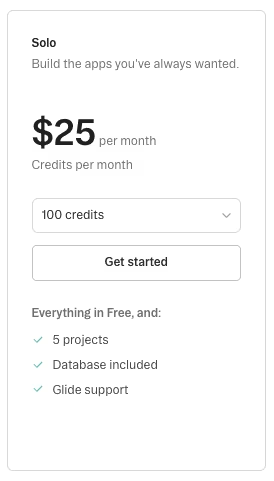
Solo runs $25 a month and includes five projects, along with a database built in. The credit tier is selectable from 100 to 10,000 credits per month, with $25 as the entry point on that scale. I kept the test app small and stayed on the entry tier the whole time.
I didn't put a number on how many credits any single action burns. GlideOS doesn't surface that clearly without deeper use than a small test app justifies, so I won't invent a per-action figure I can't back up.
Treating GlideOS as a drop-in upgrade from Classic is the mistake worth avoiding here. Weigh it on its own terms.
What's included: Five projects, a built-in database, and a selectable credit tier from 100 to 10,000 credits a month, with $25 a month as the entry tier.
Best for: A builder testing GlideOS as its own product, separate from any existing Glide Classic account.
Pros:
- A built-in database from the first tier up.
- Credit tier scales with you as usage grows.
Cons:
- No migration path from Glide Classic, so you start from zero.
- Per-action credit cost isn't transparent without heavier use.
GlideOS Team: $125/month + $10 per member
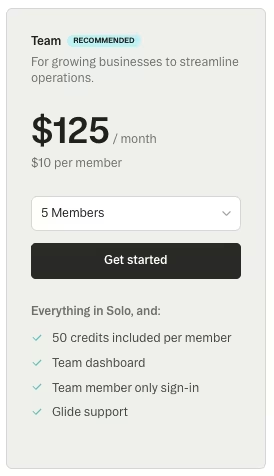
With GlideOS Team, the five-member minimum built into the plan's own signup didn't make sense for a small experimental test app. Team runs $125 a month plus $10 per member, with 20 projects and 50 credits included per member.
What's included: 20 projects, 50 credits included per member, and a five-member minimum, at $125 a month plus $10 per member.
Best for: A small team building together inside GlideOS, once you're past a single-builder test.
Pros:
- Multiple projects and members without hitting GlideOS Solo's single-seat scope.
- Credits scale per member, with no shared pool to run down.
Cons:
- The five-member minimum means you can't ease into Team with one or two people.
- Per-member credits don't pool, so a light user's unused credits are wasted.
GlideOS Enterprise: Custom Pricing

I did not test GlideOS Enterprise. It uses custom, contact-sales pricing and includes single sign-on (SSO), custom connectors, 90-day backups, and a dedicated success manager.
What's included: SSO, custom connectors, 90-day backups, and a dedicated success manager, at custom pricing.
Best for: A larger organization with security or compliance needs past what Team covers.
Pros:
- The plan can be scoped around the deployment's security, connector, backup, and support needs.
- Includes SSO, custom connectors, and 90-day backups out of the box.
Cons:
- No published price to plan against before contacting sales.
- Every feature is gated behind a sales conversation, with no self-serve option.
Which Glide Plan Should You Choose?
Testing turned up five real patterns, and each one points to a different plan.
Choose Free or Explorer if you:
- Are building solo or testing an idea before anyone else touches it.
- Are staying on Free with no outside users, or using Explorer with fewer than 100 personal users on personal email addresses.
- Haven't connected anything external yet, so update overage risk stays low.
Choose Maker if you:
- Are serving an internal team that mostly signs in with personal or education email addresses.
- Are ready to publish more than one app without upgrading again right away.
- Are comfortable budgeting for update overage once syncing starts.
Choose Business if you:
- Are serving business email users or people outside your own team.
- Are syncing external data at a volume past what Maker's 500 updates comfortably covers.
- Are running a larger one-off audience, with the 30-user cap and $6-per-seat math worked out ahead of time.
Choose Enterprise if you:
- Have already run the numbers on Business, and the per-user or per-update overage keeps landing past what a fixed budget can absorb.
- Need editors, users, updates, or rows custom-scoped past Business's fixed ceilings, built around your numbers.
- Are deploying at a scale where a negotiated contract and dedicated onboarding take priority over a published price.
Choose GlideOS over Glide Classic if you:
- Prefer GlideOS's prompt-driven building approach to Classic's table-and-logic style.
- Are starting fresh, since nothing migrates over from an existing Glide Classic app.
- Prefer credit-based pricing over Glide Classic's update-based model.
Is Glide Worth the Cost?
Glide is worth it for a team that already thinks in tables, needs an internal tool fast, and is willing to learn the update-and-user mechanics that decide the bill. It's the wrong fit if you need one flat monthly number, because paid Glide pricing always carries usage variables.
Glide is worth it if you:
- Have structured data already, or don't mind building your tables directly inside Glide.
- Need a working internal tool quickly, without a lengthy build process.
- Are willing to track update usage once anything external gets connected.
Skip Glide if you:
- Need every teammate or user to sign in with a business email on a lower-cost plan.
- Expect one flat number every month, regardless of usage.
- Plan to sync large volumes of external data from day one, without budgeting for overage.
Glide Alternatives & Pricing Comparison
Here's how Glide's starting price stacks up against three other builders chasing a similar problem.
| Tool | Starting Paid Price | Best For |
|---|---|---|
| Emergent | $20/month ($17/month, billed annually) | Prompting an app into existence with no starting spreadsheet |
| Adalo | $45/month ($36/month, billed annually) | A native mobile-app builder |
| Softr | $59/month ($49/month, billed annually) | Turning existing spreadsheet or Airtable data into a client-facing app |
Adalo is built for native mobile apps. Softr wraps structured data you already have somewhere else, like Airtable or a spreadsheet, into a client-facing app. Emergent works from a plain description, with no starting spreadsheet required. Among these, Glide is the one focused on turning an existing spreadsheet into a working internal tool in an afternoon.
Also read our best Glide alternatives guide for what else is worth trying when you need more than a spreadsheet-to-app tool.
Emergent vs Glide: Which Should You Choose?
I ran one more test alongside all this Glide testing. I gave Emergent a plain description of a similar small tracker, a contact list with a status field. I asked it to build the app with no starting spreadsheet and no table to import. One prompt produced a working version.

The pricing model runs on credits that burn when you generate or change the app. That's a different mechanic than Glide's per-update meter, which only charges once external data starts syncing in.
Emergent is better for: Building an app from a plain description, with no starting spreadsheet or table already in place. It also fits anyone who wants broader model and agent flexibility than a table-first builder offers.
Glide is better for: A team that already has structured data, a spreadsheet or a database, and needs an internal tool built quickly on top of it.
Use both if: You're building a working app in Emergent from a description, then using Glide to manage structured data that feeds into it over time.
My Bottom Line on Glide Pricing
After three weeks of testing four Glide Classic tiers and two GlideOS tiers, paying out of pocket for the paid plans, here's where I land on Glide pricing. The sticker price is the easiest number to find, and the least useful one for deciding whether Glide fits your budget.
If your data lives inside Glide Tables and your team signs in with personal or education email addresses, the numbers on Glide's pricing page are close to what you'll pay. At $60/month ($49/month, billed annually), Maker is still my first recommendation for most internal-tool builders.
Once you connect external data or bring in business email users, budget past the sticker price. The update-overage math and the personal-versus-business-user split decide your bill.
Keep Glide Classic and GlideOS separate in your head, too. They're not the same product, and they don't share data, so picking the wrong one to start on means starting over.

Most builders stop at a prototype. Emergent ships real web and mobile apps, with accounts, databases, and payments included.
- Production-ready apps
- Web & mobile apps
- Deploy in minutes







