



TL;DR
- Gather your work and copy first: Compile every project with its title, client, year, and category, plus your bio and services, before you open the AI builder.
- Draft the brief with Claude: Turn that list into a page-by-page spec.
- Paste the entire brief in one prompt: Describe all four pages at once instead of adding them one at a time.
- Answer the setup questions: Emergent asks questions such as how the form should send mail, which imagery to use, and how the site should look.
- Give it a mailbox: My build paused and asked for a real address before it would finish the contact form.
- Check the preview against your brief: Make sure everything you asked for is there and click every filter and link.
- Replace the placeholders, then publish: Swap the placeholder images and contact details, then deploy. Building fits inside the free 10 credits. Keeping the site live costs 50 credits a month.
You already have the work, and you know which pages you need. Building the site is the part that keeps sliding down the list.
So I built one from a single prompt and timed the whole thing. The result was a four-page portfolio for a fictional editorial illustrator, and it took 19 minutes from a prompt to the finished preview, including a stop partway through when the build paused to ask me a question.
Below is every step, the brief I used, the three decisions the tool asked me to make, and the two things I fixed once the pages loaded.
What You'll Need Before Starting
Here’s what you’ll need before creating your portfolio website:
- Your project list: Titles, client names, years, and a category for each piece. Eight to 12 projects is a comfortable number for a gallery with filters.
- Your copy: A short bio, a one-line description of what you do, and a short services list if you publish prices.
- A real email address: The contact form has to deliver messages somewhere, and a placeholder address that can't receive mail is what paused my build.
- Credits: My build used 7.92 credits, which fits inside the free plan's 10 monthly credits. Publishing is the part that costs: deployment is 50 credits a month per app, and the free plan can't deploy at all, so a site you actually put live needs a paid plan. Check the current figures on the pricing page before you start.
What I Built, and What It Cost
I built a complete four-page site for Nora Vance, a fictional freelance editorial illustrator based in Portland. I asked for a home page, a filterable gallery of 12 projects, a case study page for each one, an about page with priced services, and a contact form.
The whole thing came from one prompt on a paid Emergent account, with three setup questions along the way.
How to Build a Portfolio Website With AI: Step-by-Step
Step 1: Gather Your Work and Copy First
I wrote the project list before heading over to Emergent. I wanted 12 pieces, each with a title, a client, a year, and one of three categories: Editorial, Book Covers, or Brand.
Settle your category names at this stage. They become the filter buttons above your gallery, and renaming one afterward means going back through the buttons, the project cards, and every case study page, which is another round of prompting and more credits used.
Step 2: Draft the Brief With Claude
I asked Claude to turn the project list into a build brief, page by page, with six featured projects on the home page, 12 in the gallery, three filter categories, and five form fields.
You don't have to leave Emergent to do this. Emmy, the assistant on the chat icon at the bottom right of every page, asks what you're building, fills in what you left out, and turns your answers into a prompt you can build from. Emmy conversations are free and don't cost credits.
You can also stay in one place using the MCP connector, which starts an Emergent build from within your chat. Browse our setup guides for ChatGPT and for Claude.
Step 3: Paste the Whole Brief Into Emergent
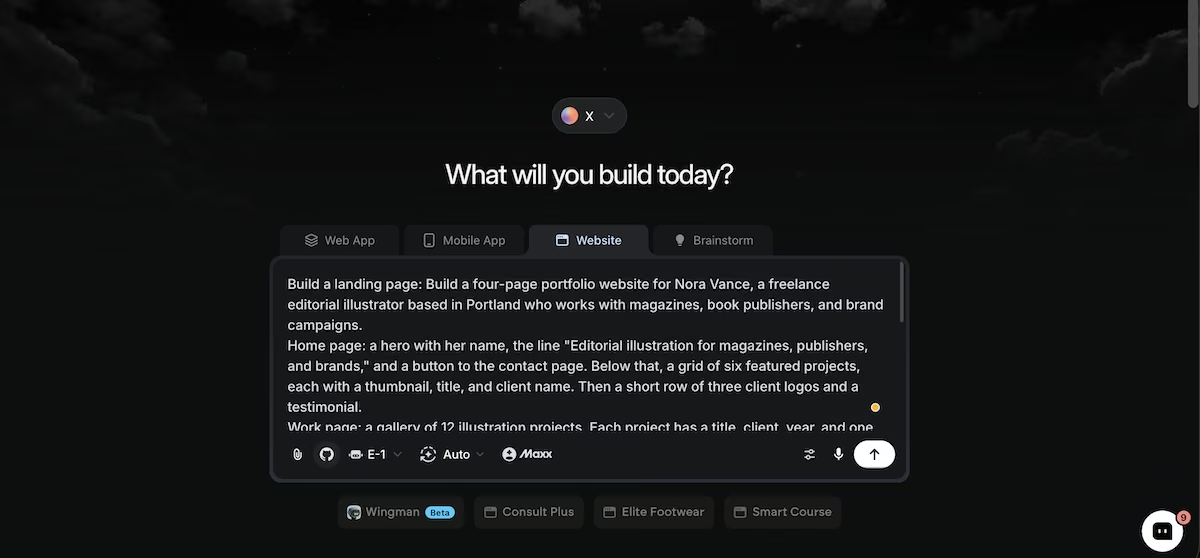
I pasted the full brief as a single prompt. Here's the opening and the Work page section, exactly as I sent them:
Build a four-page portfolio website for Nora Vance, a freelance editorial illustrator based in Portland who works with magazines, book publishers, and brand campaigns.
Work page: a gallery of 12 illustration projects. Each project has a title, client, year, and one of three categories: Editorial, Book Covers, or Brand. Add category filter buttons at the top so visitors can show only one category at a time.
Clicking any project opens its own case study page with a large image, the client name, the year, a two-paragraph description of the brief and the approach, and a link back to the gallery.
The home, about page, and contact sections followed the same pattern, and the last line asked for mobile navigation that collapses to a menu button.
Give it the full brief at once. A portfolio leans on repetition, so 12 case study pages built from one message come out matching each other, while pages added one at a time drift and cost credits to bring back into line.
Step 4: Answer the Setup Questions
Emergent asked three questions before it began building. The first was how the contact form should send submissions. I chose real email delivery through Resend. That route needs your own Resend account and API key, and a verified sending domain before it will deliver to production addresses. The alternative saves submissions to a database and shows the visitor a confirmation, but doesn't send an email.
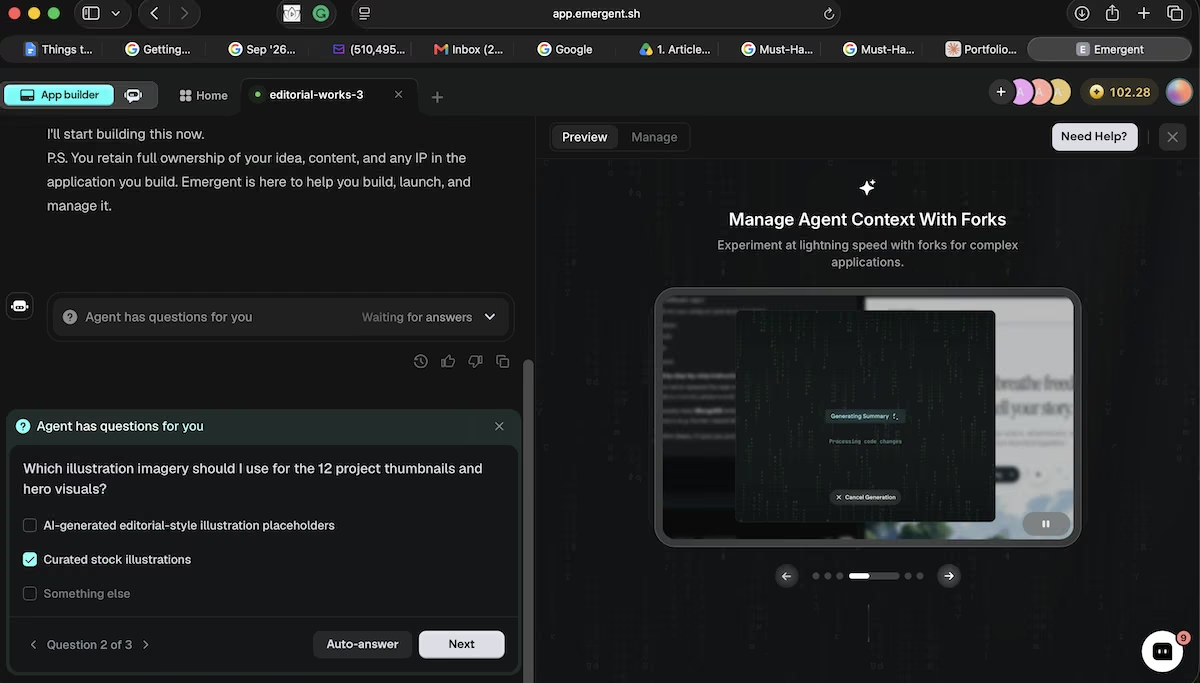
The second was which imagery to use for the 12 thumbnails and hero visuals: AI-generated illustration placeholders, or curated stock. I picked stock, since I'd be replacing the images anyway and would rather not spend credits on placeholders.
The third was the design direction, where I kept the clean, image-led brief and let Emergent choose the fonts and palette. It decided on a serif headline face and a burnt orange accent.
Step 5: Give the Form a Real Inbox
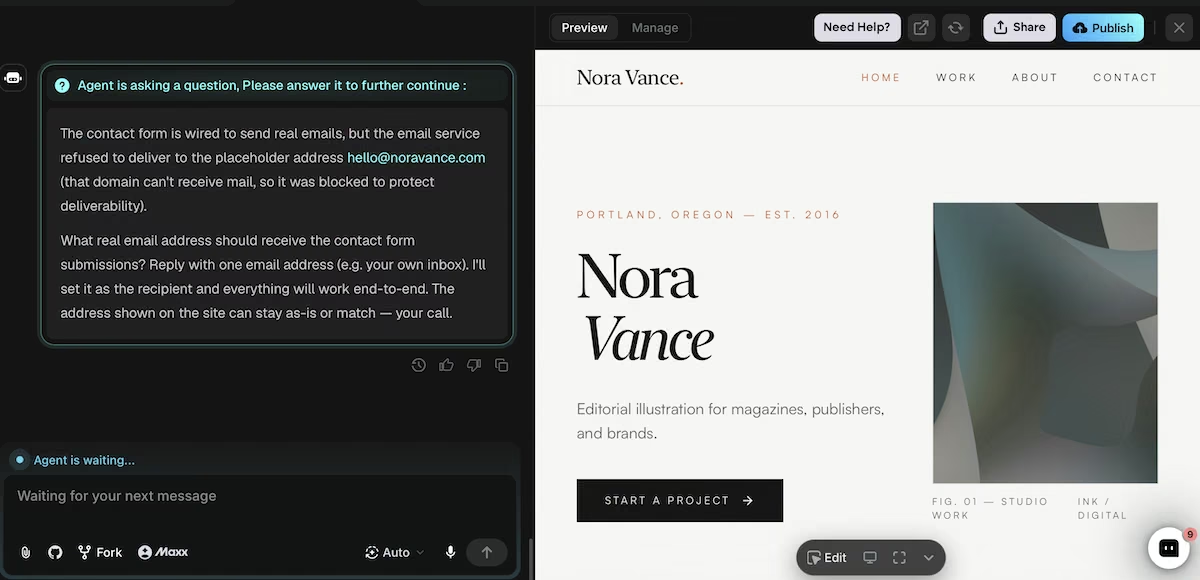
Partway through, the build stopped and asked me another question. The contact form was configured to send real mail, but the email service refused to deliver to [email protected], since that domain can't receive mail and delivering to it would damage the sender's reputation.
So it asked for a real email address to use as the recipient. Once I gave it one, it continued with the build. Make sure to have an email address ready before you start. The pause landed around 15 minutes into a 19-minute build, so an unattended run would have stalled there until I got back to the tab.
Step 6: Check the Preview Against Your Brief
Once Emergent reported the build finished, I went through the live preview with the brief open beside it.
The gallery contained all 12 projects with client and year on each card. Clicking Book Covers reduced the grid to four, and All restored the full set. Every project opened its own case study page with two columns, The Brief and The Approach, and the copy described that specific project rather than repeating a template.
The about page came in a little short of the 200 words I asked for, alongside a numbered manifesto section that wasn't in the brief at all. The services list showed four tiers, from $450 for an editorial spot illustration up to $6,000 for a brand campaign.
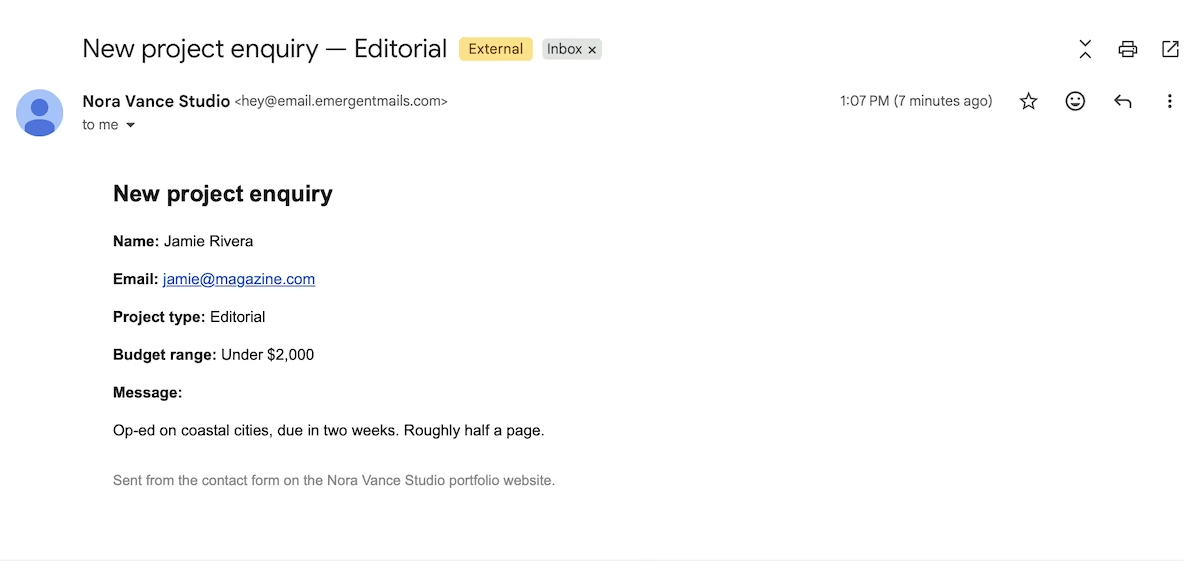
I submitted a test inquiry through the form, and it arrived in my inbox with every field listed, including both dropdown selections.
Emergent's own summary was more cautious: the email service had accepted the message and issued a delivery ID, but acceptance isn't delivery, and it had no way to verify the message landed. Send yourself a test before you publish. A contact form is the one thing on a portfolio that has to work.

Step 7: Replace the Placeholders and Publish
Two things needed fixing. The featured grid on the home page showed stock photographs rather than illustrations, which was a result of my answer in step four. The contact details, both the email address and the Instagram handle, were placeholders.
Emergent itself flagged both in the summary and listed them as the first two of four suggested improvements.
Fix the imagery before anything else. Stock photographs in a featured illustration grid contradict the work the rest of the site is trying to sell.
Once the placeholders are gone, publishing is three things. Run the Pre-Deployment Health Check, which reviews the build before it goes out. Deploy, which puts the site on a live address and costs 50 credits a month for as long as you keep it there. Then point your own domain at it.
Deploying and custom domains are both switched off on the free plan, so putting the site live is a paid step either way.
Budget for that before you start. A 7.92-credit build sits comfortably inside the free 10, but a portfolio nobody can visit isn't finished, and the 50 a month is what takes it from preview to live.

Common Mistakes to Avoid
Here are some of the most common mistakes I see:
- Using a placeholder email on the contact form: Mail services reject addresses on domains that can't receive mail, so the form either stalls or quietly fails to deliver.
- Leaving stand-in images in place. Swap every generated or stock visual before you publish. They're layout scaffolding, and a visitor reads them as your actual work.
- Publishing without submitting a test inquiry: A form that looks correct on the page can still fail at the delivery stage, and you'd have no way of knowing until an inquiry goes missing.
- Deciding your categories after the build: Renaming a category later means changing the filter buttons, the project cards, and every case study page. So confirm the names before you write the brief.
Emergent Makes Building a Portfolio Website Easier
A portfolio site repeats the same handful of patterns across every page, which suits an AI website builder that reads the whole brief before it starts. Describing four pages in one message gave me the same navigation, type, and layout on all of them.
Here's how Emergent helps with a portfolio website:
- One brief, whole site: Every page comes out of the same message, so nothing drifts between them.
- Filters included: Category sorting is part of the build rather than an add-on.
- Real email delivery: The contact form sends inquiries to your inbox, with the setup handled for you.
- Room to grow: Add a shop, a journal, or a client area to the same project later.
You can build your own portfolio site and see the first version before committing to anything.
Now you know how to build a portfolio website in an afternoon. Try Emergent and ship the one you've been putting off.

Most AI app builders stop at prototypes. Emergent creates production-ready apps you can actually launch.
- Production-ready apps
- Web & mobile apps
- Deploy in minutes







