



TL;DR
- An AI voice agent listens to your speech, understands commands, decides what to do and generates automated responses.
- In a traditional voice bot, the agent commonly uses speech-to-text (STT), an LLM, text-to-speech (TTS), orchestration, tools, and telephony or web audio.
- Latency is often the biggest trade-off. A highly professional technical agent may lack expertise if the process takes too long.
- In streaming, different stages run in parallel instead of waiting for one process to finish before passing it to the next.
- Interruption handling, turn detection, noise, context, and tool use are as important as what underlies the model.
- Developers can manually create the stack. Non-techy teams can use solutions like Emergent that let you create an app and a voice agent workflow with a simple prompt.
Building an AI voice agent no longer requires designing speech pipelines, integrating APIs, or maintaining a real-time backend. It’s about understanding where AI voice bots fall short.
As a builder or startup owner, you know latency and vocal strain can make voice chat unusable. Connecting speech recognition, an LLM, and voice generation brings all the pieces together.
A modern system can stream these stages so they overlap. We provide an AI voice agent builder that helps founders. Our AI voice agent reduces the time between when the user finishes the request and when they hear the agent respond. It understands that latency can never match urgency.
How to build an AI voice agent is a critical question for founders, developers, and technical professionals now, so your microphone gets more presses.
What Is an AI Voice Agent?
A voice agent is a software system that communicates with users through voice notes and can take action based on the conversation.
A basic voice agent may ask:
“What are your hours?”
An AI-powered voice agent will ask
“We are open till 8 PM. Would you like me to schedule an appointment?”
It can then check the calendar, schedule an appointment, confirm the details, and update the CRM. That ability to analyze and act on user input is what makes a voice agent useful for business workflows.
The common applications of an AI voice agent include the following:
- Customer support
- AI receptionists
- Appointment booking
- Lead qualification
- Sales calls
- Order status
- Customer surveys
- Internal help desks
- Call routing
- Follow-up calls
For example, a dental clinic voice agent could answer an inbound call, ask about the client’s preferences, schedule the meeting with the dentist and update the CRM with a qualified lead.
How an AI Voice Agent Works: The Stack
The easiest way to understand how to create an AI voice agent is to break the process into layers. The process splits into five layers, as discussed below:
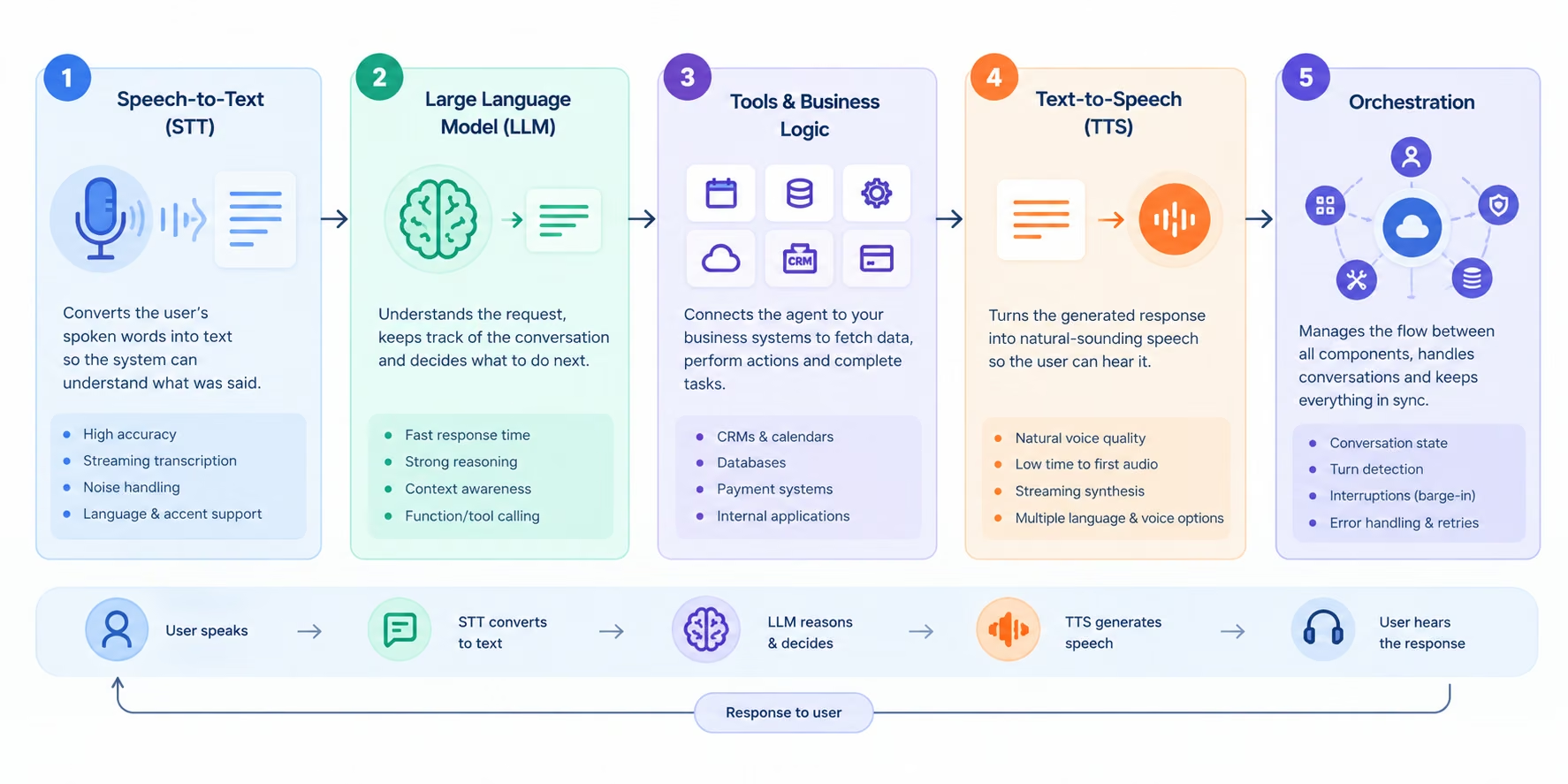
Speech-to-Text
The first layer translates the user's speech to text.
For example:
Audio: “Can you move my appointment to Friday?”
STT output: Can you move my appointment to Friday?
A real-time agent is more useful when it receives STT as it happens, rather than waiting until the end of the recording to process it. It can offer partial transcription while the individual is still talking.
Accuracy matters here. If a fast transcription system misinterprets names, addresses, order numbers, or dates, it can cause bigger issues downstream.
Large Language Model
The reasoning layer is the LLM. It is passed the transcript and conversation context. It then determines what the user wants and what it should do next.
For example:
User: Reschedule my appointment to Friday.
Agent:
1. Identify the appointment.
2. Check available Friday slots.
3. Ask the user to choose a time.
4. Update the appointment.
5. Confirm the change.
The LLM can also choose at its own discretion to trigger external tools.
Tools and Business Logic
This is where a voice agent goes beyond a conversational interface.
Tools can link to:
- Calendars
- CRMs
- Databases
- Payment systems
- Order-management systems
- Search APIs
- Internal business applications
The agent should never make up information related to a business system.
When the customer asks a relevant question, the agent should find out where the order is rather than let a guess run wild.
Text-to-Speech
TTS lets you output the generated response as speech. The goal is not a realistic voice. It should start generating something useful to listen to soon.
For streaming TTS, speech can begin while the user waits for the rest of the response to be generated, minimizing the feeling of waiting.
Orchestration
The orchestration layer brings everything together. It manages audio streams, conversation state, turn detection, tool calls, errors, interruptions, authentication, and session management. It is also often where a simple demo becomes a production engineering project.
The Real Challenge: Latency
For founders and business owners, latency should be a crucial concern before selecting a stack.
Imagine a user says: “I would like to book an appointment tomorrow.”
And your system waits for a complete audio recording, then the final transcript and then the full LLM and TTS response. It may get delayed, and the conversation may feel slow before anything plays in response.
A traditional sequential pipeline can feel like a lot of waiting, while the streamlined pipeline doesn't block the flow of conversation.
A Simple Latency Budget
Don't use a vendor's advertised latency as your users' actual latency. Measure the full mouth-to-ear distance in the environment where your agent will operate.
Time to first output is especially significant with voice agents because it represents how long a user waits for the agent to respond.
Streaming Is Critical
| Stage | What affects latency |
|---|---|
| User turn detection | Silence threshold, VAD, endpointing |
| STT | Model, network, audio processing |
| LLM | Model speed, prompt size, tool calls |
| Tool calls | API response time and number of calls |
| TTS | Time to first audio and synthesis speed |
| Network | Distance, connection quality, transport |
| Playback | Client buffering and audio handling |
Streaming minimizes unnecessary delays. Your system can start processing the first 100 words of the response instead of waiting for the LLM to finish generating it.
This depicts the processing flow: STT partial result, LLM tokens, TTS audio chunk, playback.
This can make the overall compute time feel faster without changing the total compute.
If you haven’t picked a platform, our best AI agent builders guide compares six, though voice adds requirements most of them don’t cover.
How to Build an AI Voice Agent: Step-by-Step
Founders asking “how to build AI voice agents” have more discussion than understanding of the process. Unlike the traditional way, an AI-powered tool can provide an easy runway, just by demanding a clear idea to ship your voice. Here's how it works from start to finish.
Step 1: Identify the purpose of the project
Do one task at a time. Define your users, the problem the agent will solve, what actions it can take, and when to hand off conversations to a human.
Step 2: Creating the Voice Stack
Select a voice user interface and underlying technologies. Install speech-to-text (STT) and text-to-speech (TTS) for high accuracy, speed, language, and scalability.
Step 3: Link business tools
Connect the agent to the systems it needs to access and use to accomplish tasks. These can range from CRMs, calendars, databases, payment processing, search tools or internal applications.
Step 4: Optimize Real-Time Conversations
Include turn detection, streaming and barge-in so the agent can respond quickly and handle interruptions easily. Optimize each stage to minimize delays throughout the entire voice path.
Step 5: Test and Deploy
Have real conversations before deployment. Test interruptions, background noise, unclear requests, tool issues, delays, wrong answers and escalation by human agents to verify that the agent works under real-world conditions.
Common Mistakes to Avoid
- Building The Demo Instead Of The System: A voice demo can work beautifully for five minutes, but it is not efficient. Production traffic is different, and you need monitoring, authentication, logging, error handling, and fallback behavior; the actual model can fill the gap.
- Optimizing Only Model Speed: A fast LLM cannot compensate the other components, including slow turn detection, slow APIs, poor network conditions, or delayed TTS. Ensure you measure the complete path.
- Ignoring Interruptions: Users interrupt people constantly. Handle interruptions as a normal part of conversation, not an exception.
- Making the Agent Too General: Quality over quantity matters. A narrow agent with five reliable actions is usually more trustworthy than a broad agent that attempts fifty actions poorly. Produce your best agent.
Code vs No-Code: Which Path Is Right for You?
Three practical ways to build voice agents with AI in 2026. It includes coding and non coding app building approach.
| Approach | Best for | Advantages | Trade-offs |
|---|---|---|---|
| Build from scratch | Developers and engineering teams | Maximum control | More engineering and maintenance |
| Compose APIs/frameworks | Product teams | Flexible and faster than building everything yourself | Still requires integration work |
| AI app builder: Emergents | Founders, operators, small teams | Fast prototyping and deployment | Less direct control over every implementation detail |
Individual STT, LLM, TTS, telephony, database, and orchestration components let a developer choose the specific pieces they want to use.
Alternatively, a non-technical founder could outline the desired application and leave the bulk of the implementation to an AI app builder.
There is no best approach.
If you're looking for customized audio processing or an unusual infrastructure setup, a traditional engineering approach might be more appropriate for your product.
To test an idea quickly, an AI app builder can reduce setup time.
A Faster Way to Build a Voice Agent: Emergent
Emergent is an AI agent builder that creates apps using natural language prompts. You specify what you want to build, and its AI agents will create the application logic, interface, integrations, and workflows. For calls, follow-ups, routing, scheduling, transcripts, and integrations, Emergent offers a dedicated voice-agent builder that lets you build agents.
This is especially useful when you don't want to spend weeks building a voice stack before testing the business idea.
Learn how to create a voice agent using Emergent.
The process is very simple.

Describe the Agent
Use a prompt to establish the agent's role.
For example:
Create an artificial voice receptionist for a dentist's office. It should answer incoming calls, request the patient's name and reason for calling, provide basic clinic information, verify and schedule appointments upon confirmation, and relay complex requests to a human. Include call logs, transcripts, an admin dashboard, and strong guardrails.
The more detailed the prompt, the more useful the first version will be.

Review the Generated Application
Emergent provides a "working app" that you can view and test.
The documentation explains how to develop an application from an idea, preview it, and refine it with more prompts.

Test the Voice Workflow
Do not stop if the agent successfully answers one question.
Test:
- Interruptions
- Incorrect information
- Unclear requests
- Booking changes
- Human escalation
- Tool failures
- Long conversations

Refine With Prompts
One benefit of a prompt-driven builder is that you can describe changes instead of editing each component.
For example:
If a caller requests to cancel an appointment, confirm their name and appointment information before confirming the cancellation. Don't cancel an appointment unless you've confirmed it.
You can repeat this with each iteration of application development.

When This Makes Sense
Emergent's value is especially clear when moving from idea to a working application, then to testing and deployment, without building each part of the software stack from scratch.
It has a voice-agent feature that enables real-time, voice-driven conversations, call handling, booking, follow-up automation, call logs and transcripts, telephony and tool integration.
It's also useful when the voice agent is just one component of a larger application. Instead of building a standalone voice bot, you can develop the agent experience, data layer, or backend workflow alongside the surrounding Web application.
This matters for business applications that need an employee interface and a customer voice channel.
Conclusion
The first step in creating an AI voice agent is understanding the conversation system. The user speaks, and STT processes it. The LLM determines what it means and what to do. Tools let the agent connect to real business systems. TTS speaks the answer back.
But the architecture isn't the only thing they need. The result is meant to be a conversation or a slow API call, depending on latency, streaming, turn detection, and interruption handling.
When you're building a highly customized voice infrastructure, you can craft the stack yourself for maximum control. If you want to turn an idea into a working business application quickly, an AI app builder can save you a lot of plumbing. Emergent does the latter: it describes the voice app's use and workflow, builds a functional version, tests it, and refines it until it's ready to deploy.
If that sounds like a strategy you're interested in, the next step is to create an AI voice agent using Emergent.

Most AI app builders stop at prototypes. Emergent creates production-ready apps you can actually launch.
- Production-ready apps
- Web & mobile apps
- Deploy in minutes







