



Landingi pricing comes down to four published numbers. Your actual bill depends on two things it doesn't show you: how many custom domains you need and how fast you burn AI credits.
I signed up for the Build plan 14-day free trial to create a landing page to promote an app, and I was presented with two routes: generate the page with Landingi's AI agent, Lunar, or use their classic drag-and-drop builder.
I went with the former, asking Lunar to build a landing page for promoting a mobile productivity app (Founder Focus) that helps founders organize tasks, manage projects, and improve concentration.
Lunar prepared a design system (colors, fonts, border types) and a plan (structure and content of the landing page) for my approval.
In under five minutes, it generated the page, which I could have edited further in the Editor Mode if I wanted.
Below, I break down price tiers and costs.
Landingi Pricing Plans: At a Glance
Here's how Landingi's four pricing tiers compare on price, usage caps, and ideal user profiles:
Landingi Pricing Plans Breakdown
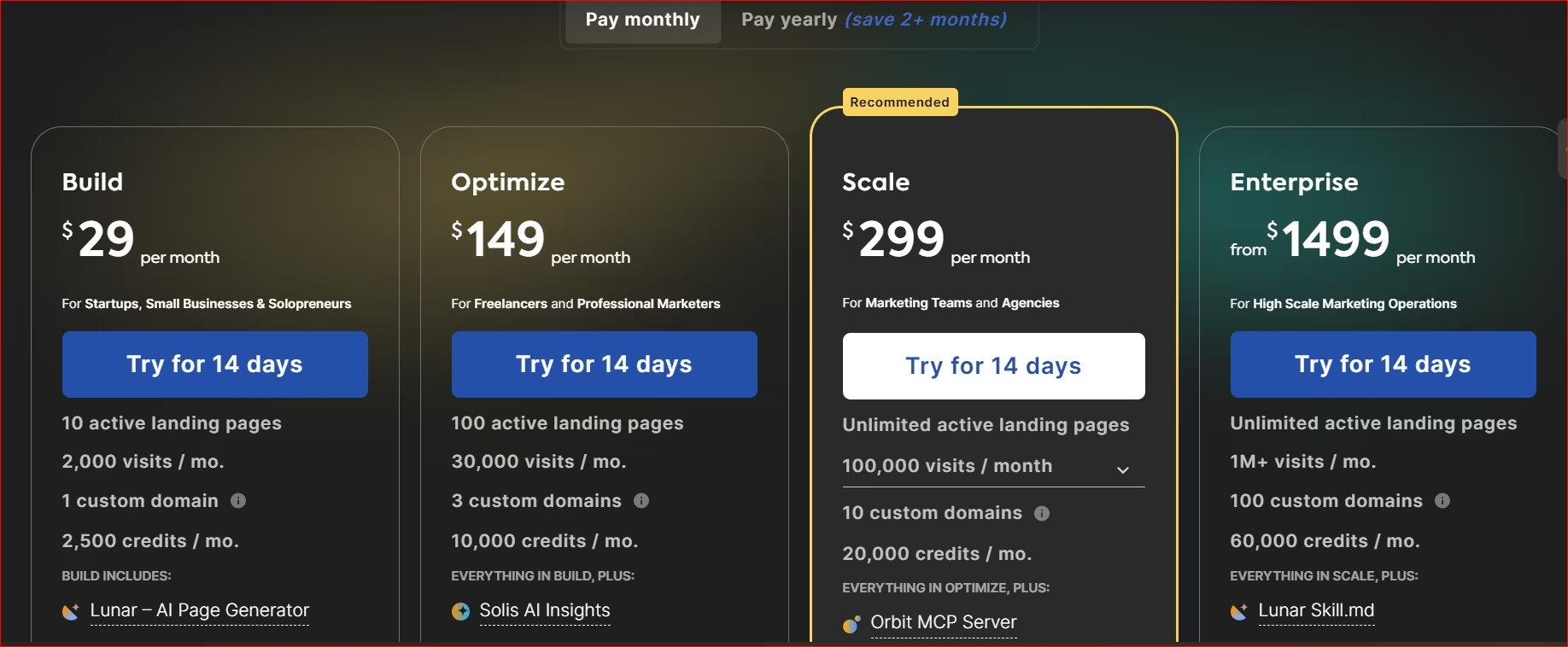
Build: $29/Month ($24/Month Billed Annually)
What's included: 10 active landing pages, 2,000 monthly visits, one custom domain, unlimited conversions, 5 user seats, and 2,500 AI credits per month. Includes access to the drag-and-drop editor and standard integrations.
Best for: Solo founders launching a single product, testing one campaign page, or validating an idea before scaling traffic.
Pros:
- Low entry cost: Great for non-technical creators building their first campaign page.
- Unlimited conversions on every plan: You never pay per-lead fees, even on the entry tier.
Cons:
- Missing key features: Lacks core conversion features like A/B testing, Smart Sections, and Solis AI Insights.
- Strict visit limits: The 2,000 monthly visit cap forces early upgrades once paid ads kick off.
Optimize: $149/Month ($119/Month Billed Annually)
What's included: 100 landing pages, 30,000 monthly visits, three custom domains, 10 user seats, 10,000 AI credits, server-side A/B testing, Smart Sections, Solis AI Insights, and pop-ups.
Best for: Active marketers, service business owners running paid campaigns, and founders optimizing traffic across multiple channels.
Pros:
- A/B testing: Test headlines and offers server-side, then push a winner to every page at once with Smart Sections.
- Generous traffic allowance: High visit limit covers steady ad spend without sudden overages.
Cons:
- Steep tier jump: Significant price increase from the Build tier.
- Three-domain cap: Custom domains stop at three. Each one after that adds $5/month, up to six extra.
Scale: $299/Month ($229/Month Billed Annually)
What's included: Unlimited landing pages, 10 custom domains, unlimited user seats, 20,000 AI credits, programmatic landing pages, sub-accounts, and access to Orbit MCP Server. Traffic is tiered and the price moves with it: $299/month for 100,000 visits, $499/month for 200,000, and $999/month for 500,000 (annual rates: $229, $379, $769).
Best for: Small dev shops, digital agencies building three to four client apps a month, and high-volume growth teams.
Pros:
- Unlimited pages: Build as many client pages as you want without watching a counter.
- Programmatic pages: Generate hundreds of city or keyword variations from one template.
Cons:
- Traffic tier decides the price: The $299 rate only covers 100,000 visits, 200,000 is $499 and 500,000 is $999, so you have to size it right before you buy.
Enterprise: $1,499/Month ($1,199/Month Billed Annually)
What's included: Unlimited pages, 1M+ monthly visits, 100 custom domains, unlimited user seats, 60,000 AI credits, Enterprise SSO (Google and Microsoft SSO come on every plan), custom SLAs, and domain whitelisting.
Best for: Large enterprise organizations requiring dedicated infrastructure, custom compliance, and advanced security.
Pros:
- Enterprise SSO and audit controls: Sign-on and role permissions a security team will actually approve.
- Multi-tenant control: Extensive domain and sub-account management for large client structures.
Cons:
- No published ceiling: $1,499 is the starting price, not the price, so you're in sales-call territory before you know the number.
What Landingi's AI Credits Really Cost
Landingi runs on credits, but far fewer features draw from them than the name suggests. According to Landingi's own help documentation, only three features consume credits:
- Lunar (the AI landing page generator)
- Programmatic Landing Pages
- AI-powered image background removal
Everything else that sounds "AI-powered," including the AI Assistant (copy generation and rewrites) and Solis AI Insights, doesn’t consume credits at all.
Your plan tier decides whether you can use those features at all. So on Optimize or higher, AI copy rewrites and Solis audits never draw down your credit balance.
That said, Lunar's exact credit cost per page isn't published. Landingi's own help documentation states that the exact credit usage depends on the scope of the generated page and isn't always displayed.
In practice, that means your Build plan's 2,500 monthly credits will stretch further for a single simple page and burn faster for a complex, multi-section one.
When you run out of credits mid-month, your published pages stay live. You simply lose access to Lunar, Programmatic Landing Pages, and background removal until your credits renew, or until you buy a top-up:
- 5,000 credits: $15
- 10,000 credits: $25
- 20,000 credits: $40
If you're leaning heavily on Lunar to generate pages and regularly buying a 10,000-credit pack ($25) on top of the Build plan ($29/month), that's $54 a month for 12,500 credits. Optimize costs more at $119/month billed annually, but it comes with 10,000 credits built in plus A/B testing and Smart Sections. Buy two top-ups in one month, and the gap closes fast.
Beyond credits, extra custom domains are the other add-on to watch: each domain past your plan's allowance is $5/month, and every plan caps how many you can add. Build allows one extra, Optimize up to six, and Scale up to 89.
Which Landingi Plan Should You Choose?
For most active marketers, Optimize is the right call. But the answer still depends on your current stage, how many client accounts or domains you manage, and whether you need conversion optimization tools right out of the gate.
Stay on Build while you're under 2,000 visits a month on one domain. Move to Optimize the day you start paid ads, or the second month you buy a credit top-up. Move to Scale when you pass three custom domains or 30,000 visits.
Move to Enterprise once you're running pages for more than 10 brands or client domains, need Enterprise SSO for a team that changes often, or your procurement process requires a custom SLA.
Below those lines you're paying for headroom you won't touch, and below roughly 20 domains, Scale plus $5-a-month extra domains still costs less than Enterprise.
The Real Cost of Landingi: Price Per Page and Per Campaign
The tier price is only half of what you'll want to know. The other half is what each landing page costs you, and what a full year runs on each plan.
The table below breaks down all four tiers on monthly versus annual billing:
What One Winning A/B Test Is Worth
If you run a single product launch on the Build plan ($29/month), your cost per page is manageable at under $3 per page. But once you cap out at 10 pages or hit 2,000 monthly visits, your unit costs spike unless you upgrade.
On the Optimize plan ($149/month, or $119/month billed annually at $1,428/year), hosting only 50 active campaign pages puts you at roughly $2.98 per page per month, double the $1.49 you'd pay if you filled all 100 slots.
The math below shows what server-side A/B testing could be worth in one plausible scenario, using assumptions you should swap for your own numbers.
Say you’re sending 10,000 visits a month to a page converting at 3%. That’s 300 leads, worth roughly $300 at $1 per lead. Nudge that to 5% with a winning A/B test, and the same traffic produces 500 leads, or about $500, a $200/month lift.
At that pace, the lift alone covers Optimize's $119-149/month cost within the first month.
Your numbers will depend on your traffic volume, lead value, and how much lift a real test produces. Use this scenario to sanity-check your own math before you commit to a plan.
Is Landingi Worth the Cost?
Landingi is easy to use, even for non-technical people. It's worth the money if you run active marketing campaigns. Its credit-based AI limits and tiered feature locks make it a worse fit for other business models.
Landingi is worth it if you:
- Run multiple ad campaigns that need continuous testing: Having access to A/B testing and Smart Sections at $119/month (annual) gives you strong control over campaign conversion rates without paying enterprise prices.
- Manage landing page portfolios for clients: Service providers and dev shops benefit from managing up to 10 custom domains and unlimited page builds under one dashboard.
- Need quick page generation for simple offers: The Lunar AI builder lets non-technical creators launch decent campaign structures in minutes without hiring developers.
Skip Landingi if you:
- Need one static page you'll never touch again: Build is fine for a few months of validating an offer. Paying $29/month forever to host a page you've stopped editing isn't, especially with a 2,000-visit cap. Move it to a standard site host once the test is done.
- Are building a full web app or product: Landingi builds marketing landing pages and stops there; it has no way to create application logic. If you need connected databases, user logins, or product logic, you'll need an AI app builder instead.
Landingi Alternatives and Pricing Comparison
See how Landingi stacks up against the alternatives:
Landingi vs Emergent: Which Should You Choose?
Pick Emergent if you still need to build the thing you're selling. Pick Landingi if the product already exists and you need pages to advertise it. Most people who need one will eventually need both.
Emergent is better for: Building full, functional web applications and SaaS products that customers can sign in to, pay through, and use. If your app needs to let customers sign in, store their data, assign different user roles, or take payments via Stripe, Emergent builds the whole thing for you from a plain-language description, no infrastructure decisions required. You own the code and can push it to your own GitHub repo from the Standard plan up.
Landingi is better for: Hosting dedicated marketing landing pages once you already have a live product and want to run focused paid ad campaigns. Its built-in server-side A/B testing and Smart Sections make it an option for running isolated conversion experiments on incoming traffic.
Use both if: You're launching a software product. Use Emergent to prompt, build, and deploy the working app, with sign-ins, data, and payments included. Then, plug in Landingi to run dedicated ad campaign pages and split-test headlines for your paid channels.
Want to build the product first? Try Emergent free with 10 monthly credits; no credit card required.
My Bottom Line on Landingi Pricing
Landingi gives non-technical creators a solid toolset for page creation, but its pricing structure penalizes you fast if you don't track your limits.
The $29/month Build plan works for validating a simple offer, but strict visit caps and 2,500 monthly AI credits force most active businesses onto the $149/month Optimize tier almost immediately.
If you run paid ad campaigns across multiple custom domains, Landingi's Optimize plan pays for itself through server-side A/B testing. But if you haven't built your app or core software yet, don't spend $149/month on marketing page hosting.
Build the product first, validate user demand, and then invest in dedicated campaign tools.

Emergent designs, writes, and publishes your whole site from one prompt. No templates, no drag-and-drop.
- Full site from one prompt
- Custom design, real pages
- Publish in minutes







