



TL;DR
- Showing feedback tool: For real estate listing agents chasing buyer's agents after a viewing.
- Inbound lead qualifier: For agencies reading inquiries that mostly aren't a fit.
- Equipment loan tracker: For small teams lending out equipment and losing track of it.
- Client project tracker: For agencies whose clients keep emailing to ask what's happening.
- Fixed-price audit service: For anyone selling a repeatable piece of expert work.
- Certification expiry tracker: For businesses whose staff hold certifications that lapse.
- Photo inspection app: For property managers and landlords recording conditions.
- Late payment chaser: For freelancers tired of writing reminders.
- Review request tool: For local trades looking to boost their online ratings.
- Purchase approval tracker: For small businesses approving purchase spend by email.
From the customer relationship management (CRM) tool you use in the office to your favorite streaming service you watch at home, Software as a Service (SaaS) is one of the most popular business models around. The market is huge and is still growing, which makes it an appealing opportunity for entrepreneurs today.
So why haven't more entrepreneurs built their own SaaS? It can sound intimidating. You might think you need to be a web developer, or even hire a team of them, to launch your own SaaS business. That used to be true. Now you can describe the product you want in plain English to an AI SaaS builder and have working software back the same afternoon.
Don't make the mistake of thinking you need to build the next Salesforce either. There are a growing number of micro SaaS tools out there, and thanks to AI SaaS builders, they're easier to build than ever. Several of the ideas below come from software I've built myself, including the fixed-price audit service in idea five, which I took from a single prompt through to a paying customer.
By the end of this article, you'll have 10 micro SaaS ideas in validated markets, with tips on how you can get started on one today.
What Makes a Micro SaaS Idea Worth Building
AI has made a micro SaaS one of the easiest businesses to build. Yes, you need an idea and a way of validating that idea, but that’s the case with any business. What’s changed with AI building tools is how easy it is now to build the actual thing you’re selling.
You don’t need to build anything complex or know how to code. As long as you’ve identified a genuine pain point, you have something to create a micro SaaS around.
The micro SaaS business model itself is an attractive one. With low overheads and recurring revenue, potential profits are high. That makes it ideal for solopreneurs and small businesses looking to get started on something that requires little upfront capital.
If you want to go more in-depth on this, the founder's guide to starting a SaaS business covers company setup and go-to-market. You can also read a breakdown of revenue models if you'd like to know more about selling a subscription vs one-off pricing. If you’re ready to be inspired by 10 ideas based on existing micro SaaS businesses, read on.
How I Chose These 10 Ideas
When deciding on the following 10 ideas, I started with three criteria. Each micro SaaS had to solve a problem for a specific type of buyer, be manageable enough for one person to run, and have a company already charging for something similar.
The first test was about how easily I could find people with the problem. Was there a subreddit where they complained about it? A Facebook group where the same question kept coming up? A Slack community where members vented about it?
The second test ruled out anything that requires a team. A micro SaaS product had to be small enough that one person could build it, support it, and still have time for sales and marketing.
The third test looked for a competitor. If there were no competition, it would be an indicator that the market isn’t willing to pay for it. I wanted to see similar products being sold.
Every product on this list can be built by describing it to Emergent in ordinary language, with the builder taking over from there. If you want more detail on what a first version involves, our seven-step MVP guide covers the entire process and provides a good companion to this article. For alternative tools, you can also read an additional roundup of the best AI app builders.
10 Micro SaaS Ideas: Quick Comparison
| 💡 Idea | 💰 Who pays | ⚠️ What makes it hard |
|---|---|---|
| Showing feedback | Listing agents | Incumbent owns the calendar |
| Lead qualifier | Agency owners | Rules must read free text |
| Equipment loans | Ops managers | Flag needs real logic |
| Client tracker | Agency owners | Per-user pricing at scale |
| Audit service | Consultants | You still do the work |
| Certification expiry | Compliance leads | Data entry up front |
| Photo inspections | Letting agents | Offline and image-heavy |
| Late payment chaser | Freelancers | Accounting tools include it |
| Review requests | Local trades | Platform rules on gating |
| Purchase approvals | Office managers | Email is free |
1. Showing Feedback Tool for Real Estate Agents
What it is: A tool that collects feedback from buyers' agents after a viewing and turns it into a short summary that the listing agent can send to the seller. The agent creates a link for a property, sends it to whoever attended, and every response arrives in one place.
How to start: Do some research on r/realtors before you build your first version and write the sales page. Agents are constantly discussing this problem, and they use particular wording when describing it. I ran a full validation on this idea separately, which goes deeper into the thread, the competitors, and what agents already pay.
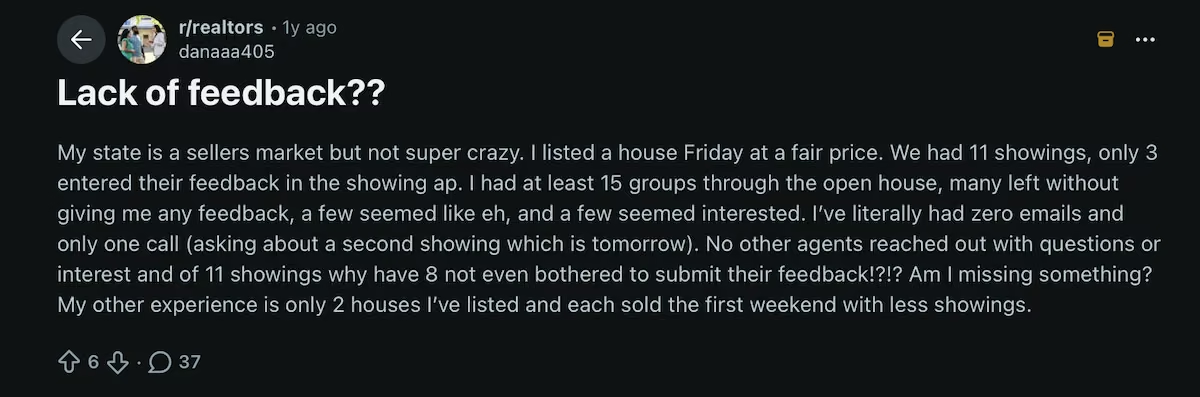
A listing agent on r/realtors describing the problem
Start by building three screens. One should be an agent view that generates a share link. The second should be a public form that opens directly from a link. The third should be a property page showing every response with a summary underneath. Sell to solo agents first, as they make their own software decisions.
Earning potential: ShowingTime, owned by Zillow, sells its Appointment Center at $15/month. Instashowing charges $15, $29, and $49/month, and Showly starts at $29/month, with a $49 solo tier and $119 to $199 for teams of two to 10.
If you priced your package at $19/month and sold to 300 agents, you’d have $5,700 in monthly recurring revenue (MRR). The National Association of Realtors found that 34% of agents spend between $50 and $250/month on technology for their own business.
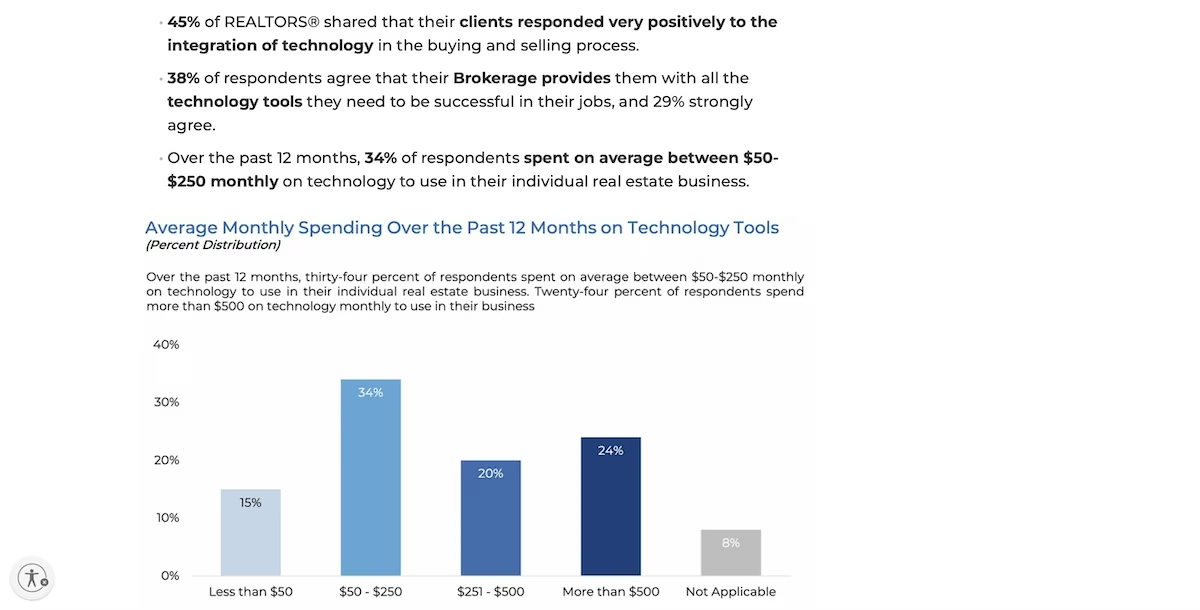
Bar chart showing that this is a market where agents clearly buy their own software
Practical example: A listing agent has a property with 11 showings and no offers, and the seller won't accept "the market" as an answer. They open the report, see that six of the eight responses mentioned the kitchen, and four mentioned the price. They then have something specific to show the seller when suggesting a price reduction.
Best for: Anyone already working in real estate or selling to agents.
2. Inbound Lead Qualifier for Agencies
What it is: A form on an agency's site that reads each inquiry, scores it against the agency's own rules, and sorts it into either qualified, worth nurturing, or not a fit. Replies are immediately sent to quality leads, and a draft is sent to the rest for the owner to review.
How to start: Get the rules from a real agency owner rather than deciding them yourself. Budget, timeline, and project type usually cover it.
Then write half a dozen deliberately awkward test inquiries, including one that selects a large budget in the dropdown and mentions a much smaller figure in the description. The main thing your product should do is reconcile the description against the dropdown.
Earning potential: Typeform prices its lead-generation tier, Growth Flow, at $266/month. Typeform sells scoring and routing on that plan, so the opening isn't that nobody does this, it's the price. A one-job tool at $49 undercuts a $379 platform for an agency that only needs the inquiry read.
Agencies already fund a form and CRM stack, so you're adding to an existing budget. At $49/month, 120 agencies produce $5,880 MRR, and the higher tier sells itself once an owner watches the software correctly reject something they'd have spent an hour of their time on.
Practical example: A four-person web studio receives nine inquiries a week, and roughly two are worth a call. The owner reads all nine. With the qualifier running, the two arrive flagged with a reply already sent, and the rest wait in a list with drafts attached.
Best for: People who like a hard logic problem.
3. Equipment Loan Tracker
What it is: A shared record of who borrowed which piece of equipment, when it's due back, and what's late. Two tables, plus a rule that flags any item past its return date.
How to start: Build the overdue calculation before you start building screens, and make sure that the software works it out from the return date and the item's status. If someone has to set the flag manually, the list won’t show anything as late.
Earning potential: Low-code platforms serving this space range from $23 to $359/month on Budibase, and dedicated asset tracking tools are priced similarly. A focused product at $29/month is $5,800 MRR with 200 customers. The pitch writes itself when one replacement lens costs more than three years of a subscription.
Practical example: A production company owns 40 pieces of equipment and maintains a spreadsheet updated by three people. A camera body goes out for a Tuesday shoot and returns two weeks later, by which point two other jobs have gone out without it. With the tracker running, the item shows as out, the due date has passed, and it appears at the top of the overdue list.
Best for: Anyone starting without an audience. The role is easy to find and the pain is easy to describe in a cold email.
4. Client Project Tracker With Client Logins
What it is: A portal where clients log in and see their own projects, tasks, and deadlines, while the team works from one internal board. Clients get visibility without gaining access to anything belonging to anyone else.
How to start: Choose a vertical niche, as broad project tools are one of the most crowded categories in software. Build client visibility first, so each client sees only their own records, and set the overdue flag to exclude work that's late but already finished. Test both by logging in as a client rather than trusting the permissions screen.
Earning potential: Softr's Basic plan costs $19/month billed annually. Pro is the first tier with app-user sign-in features at $99/month. Business costs $329/month and adds two-factor authentication and domain-restricted signup. If you charge each agency $59 a month, 100 customers would generate $5,900 in gross MRR before platform and operating costs.
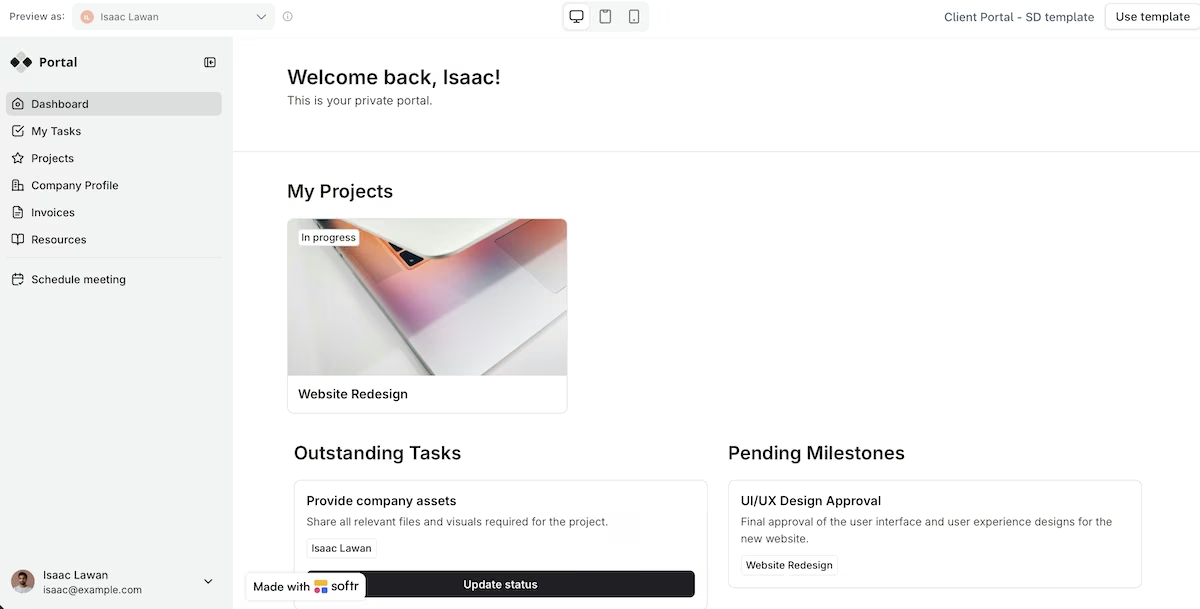
Practical example: A design studio has 12 clients, and most of them email every few days asking how their project is going. Each client now logs into their own page and sees three tasks in progress, with one overdue, with a note explaining why.
Best for: People who've worked on the agency side and know the questions clients most often ask.
5. Fixed-Price Audit Service
What it is: A site that sells a repeatable piece of expert work at a fixed price. The customer picks a package, pays by card, fills in a brief, and reads the finished document in their own account when it's ready.
How to start: Decide the packages and prices before building, as three tiers will need three buttons, three checkout paths, and three different outcomes. I built this exact service and took a card through the checkout, and the full build covers what it cost and how long it took.
Take payment before displaying the brief form, so clients don’t complete their details and then abandon the sale. Then pay for your own product with a test card and follow every step a customer would.
Earning potential: WebFX surveyed 250 US businesses and found that 43% pay between $101 and $750 for an audit. The survey comes from an agency selling audits from $8,600/month.
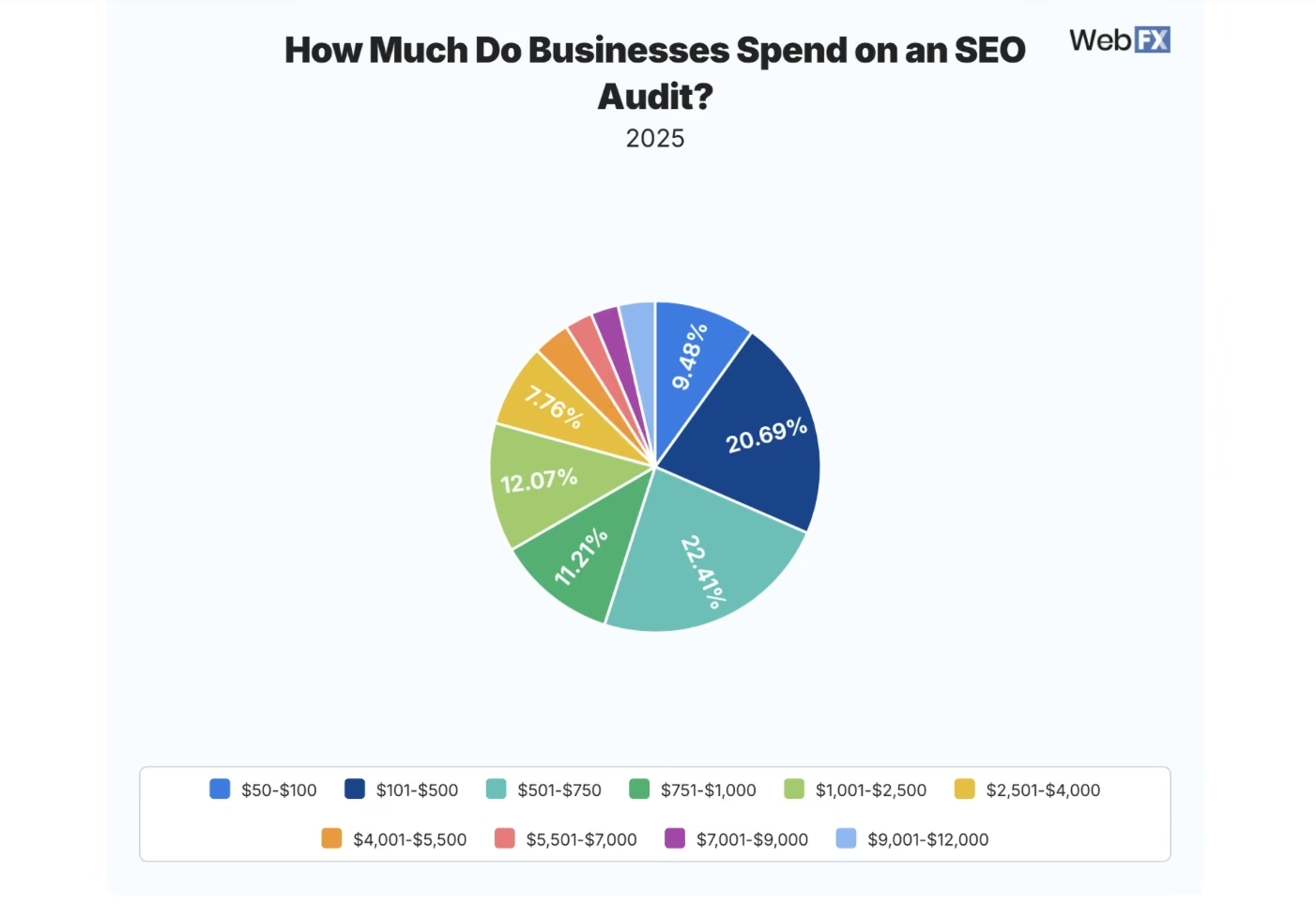
Pie chart showing how much businesses spend on an SEO audit
All three tiers fall within the same price band, so spread them further apart and include fixes in the top tier. Eight audits a month averaging $300 get you to $2,400, and that’s without a subscription offer.
Practical example: An independent restaurant gets plenty of traffic from Instagram and almost no bookings. The owner buys the middle package, submits a brief about the reservation flow and the menu saved as a photograph, and reads a document three days later listing five things to change in order of priority.
Best for: Consultants and specialists with an assessment they perform often enough to package.
6. Certification Expiry Tracker
What it is: A record of every ticket, license, and training certificate a team holds, with warnings before each one lapses. Alerts go out at 90, 30, and seven days, and anything already expired appears at the top.
How to start: Add a spreadsheet import first, as customers won't type in hundreds of certificates by hand. Then handle renewals properly, so a renewed certificate updates rather than remaining on the expired list.
Earning potential: Expiration Reminder starts at $49/month for 150 tracked items, rising through $99 and $179 to $399 for its top tier. All four plans include unlimited admin users.
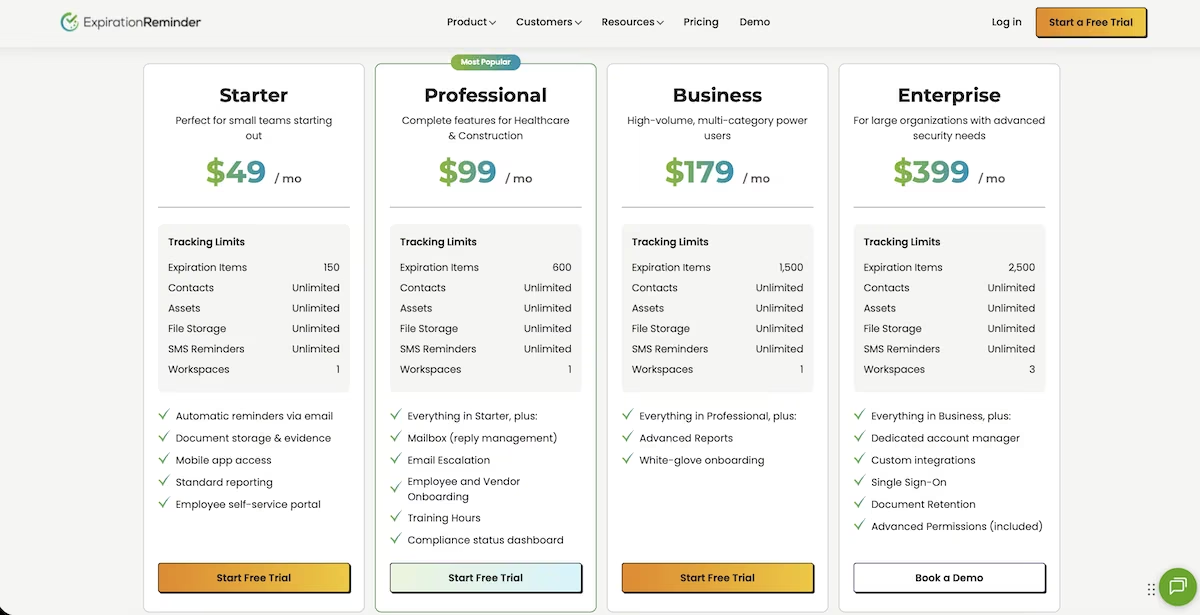
Expiration Reminder's four plans, starting at $49 a month for 150 tracked items
Pricing per employee rather than per company works better here, since larger employers hold far more certificates. At $2 per employee per month, 50 businesses averaging 40 staff each produce $4,000 in MRR.
Practical example: A nursing home administrator receives an inspection notice with two weeks' warning. Rather than opening a spreadsheet that hasn't been opened since March, they export a list showing three staff with training due next month and everyone else current.
Best for: People comfortable selling something boring. It may not sound exciting, but compliance software is a tool that makes sense to renew.
7. Photo Inspection App for Letting Agents
What it is: A room-by-room inspection app that pairs each photo with a checklist item and produces a report for the tenant to sign. Check-out appears beside check-in for the same property, so any differences are obvious.
How to start: Solve offline capture early. Properties have poor signal, and inspections generate hundreds of images, so photos need to save locally and sync afterward. Give every checklist item its own reference number, so the same item can be compared between visits. Start with one property type, as different types require different checklists.
Earning potential: InventoryBase sells unlimited reports from £35/month ($47) for one user and 100 properties, with custom-branded reporting from £25/month ($34) on top. zInspector and HappyCo serve the same problem in the US. At $3 per inspection with agents running 40 a month, 60 agents produce $7,200 monthly, and per-property subscriptions are easier to forecast.
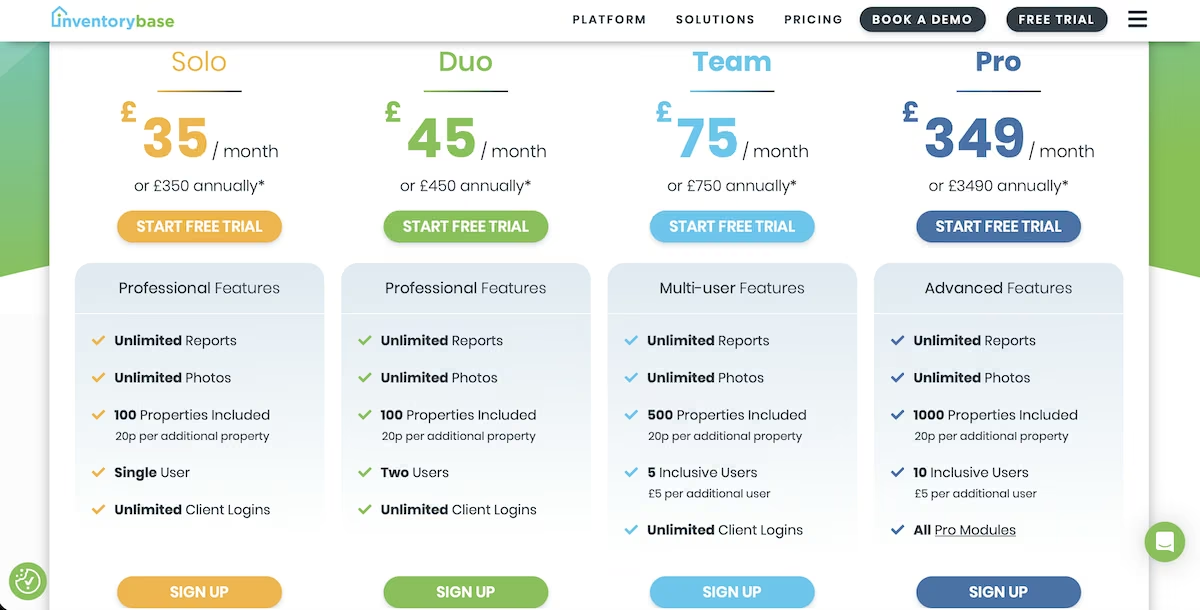
Inventory Base pricing, with unlimited reports from £35/month ($47)
Practical example: A tenant moves out, and the landlord wants to charge for a damaged countertop. The agent opens both inspections side by side, sees the mark recorded at check-in with a photograph and a date, and settles the dispute with a single email instead of losing it at arbitration.
Best for: Anyone who's worked in leasing or lost a deposit dispute personally.
8. Late Payment Chaser for Freelancers
What it is: A tool that watches unpaid invoices and sends reminders that get firmer over time. A light nudge at three days, something more direct at 14, and a formal notice at 30 that mentions late fees under state prompt-payment law.
How to start: Write the three emails first. Xero and QuickBooks already send basic reminders, so the wording is the only thing that separates your product from what freelancers already have.
Earning potential: zInspector and HappyCo serve this problem in the US, while Xero and QuickBooks bundle basic reminders into plans freelancers already pay for, so a paid chaser has to beat what they already get for free.
With 400 customers at $15/month, that’s $6,000 in MRR, and getting paid two weeks earlier covers the cost several times over.
Practical example: A freelance designer has three invoices outstanding and hasn't chased any of them. The sequence runs on its own: two clients pay after the second reminder, and the third receives a formal notice.
Best for: Anyone who wants something quick to build and quick to sell, and is happy competing on tone rather than features.
9. Review Request Tool for Local Trades
What it is: A tool that asks for a review by text and email the moment a job is marked complete, and tells the owner straight away when someone replies with a complaint, so they can fix it before it turns into a public one-star.
How to start: Read the review platforms' current policies on gating before you design anything, as a tool that filters bad reviews out of existence gets your customers penalized rather than you. The safer version sends the same request to every customer and tells the owner when someone replies with a complaint. Send it as soon as the job is marked complete.
Earning potential: NiceJob charges $75/month for its Reviews plan and $125 for Pro. Birdeye won't show a price until you book a call, and Podium lists $399 to $599 a month but still routes every plan through sales. That tells you who they're built for. At $29/month, 200 trade businesses produce $5,800 in MRR.
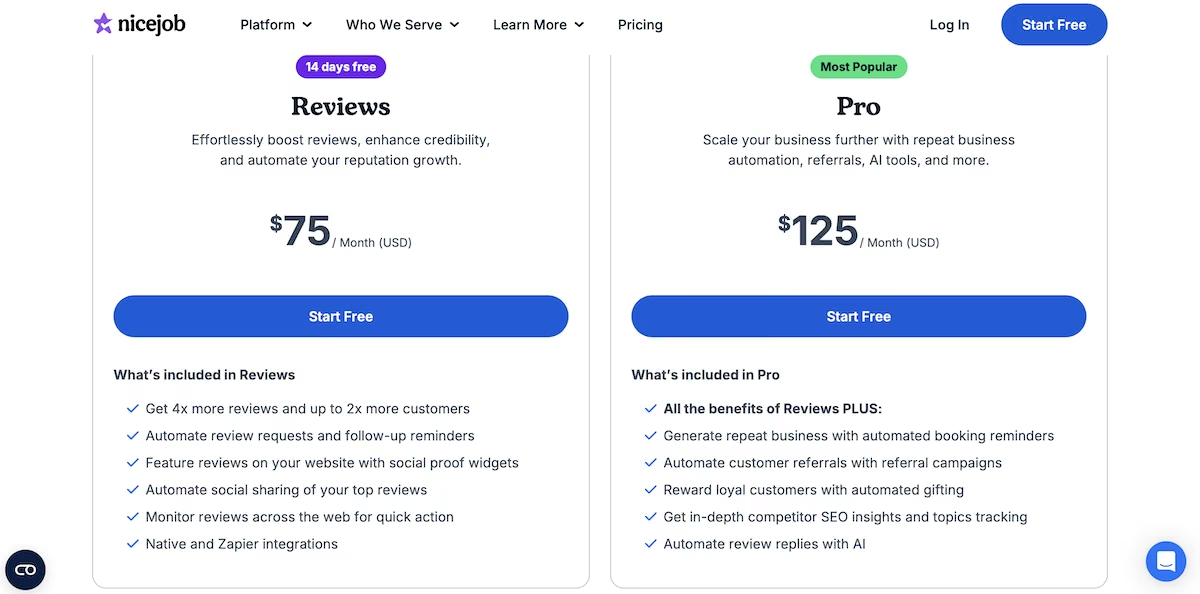
NiceJob's two plans, Reviews at $75 a month and Pro at $125
Practical example: An electrician has 11 Google reviews while a competitor two streets away has 200. He finishes four jobs a week but rarely asks for a review. Six weeks after signing up for the tool, he has 34 reviews and is appearing in Google’s local pack.
Best for: People with existing relationships in the trades. Tradespeople talk to each other, so a recommendation from another electrician goes a long way.
10. Purchase Approval Tracker
What it is: A request form for company spending. Anything above a set figure routes to a second approver, and each budget line shows the total committed against it.
How to start: Make sure the form takes under a minute to complete, as you're competing with forwarding an email, which costs nothing and takes 10 seconds.
Then handle amendments, as a request edited from $480 to $520 post-approval needs to route again. Build the audit trail from the start rather than adding it later.
Earning potential: Precoro starts at $499/month billed annually for its Core plan and $999 for Automation, aimed at companies with procurement teams. Charging $49/month for a 20-person firm gives you $5,880 in MRR with 120 customers.
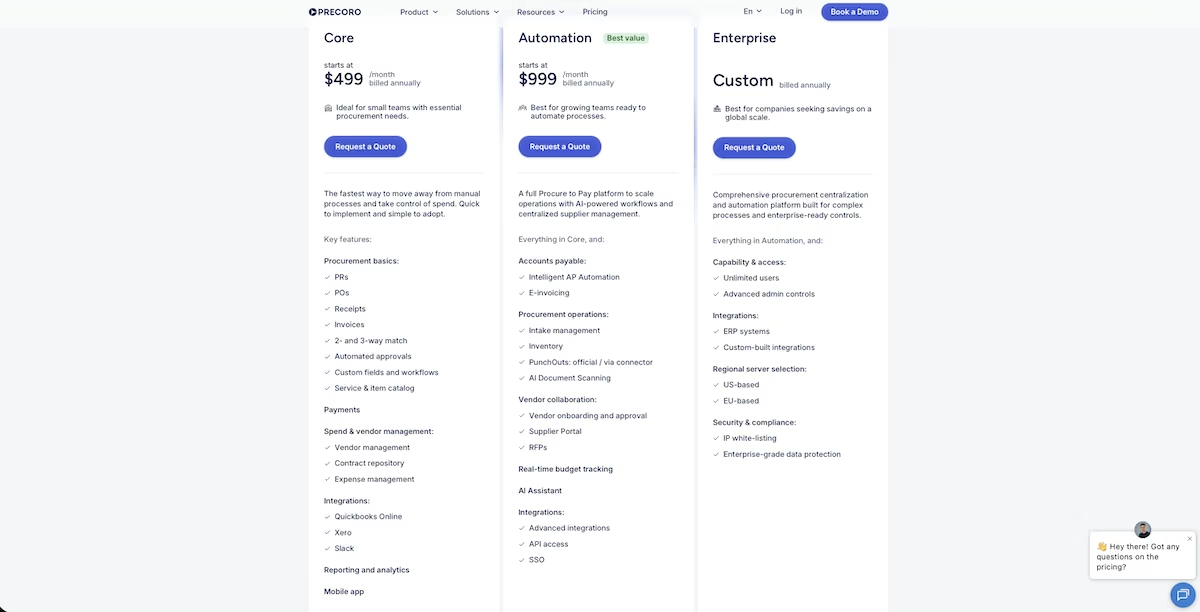
Precoro's Core plan at $499 a month, billed annually, priced for companies with procurement teams
Practical example: An office manager checks the company card each month and finds three purchases that were never approved, including a $600 software renewal. With the tracker running, anything over $500 requires a second signature, and the monthly total is visible from the fifth.
Best for: Anyone starting cold. The role exists in every company past a certain size, and the person doing it already knows the current process is failing.
An idea is only worth as much as what you can ship. Our how to build a SaaS product without coding guide covers taking one of these from a description to a working product.
Five Steps to Launching Your Micro SaaS
Yes, you’ll need an idea for a micro SaaS to start with. But what then? Here are the five steps to launching it into the world.
Step 1: Find a Paying Market
Build a landing page to explain your micro SaaS idea, describing the problem you’re addressing and how your SaaS solves it. Make sure to include a private beta signup button, and then put in some research time to find paying buyers. You can do this by exploring online communities, or if you have the budget, spend $100 on Facebook ads.
Step 2: Plan the Smallest Version That Solves the Problem
You only need to focus on the core features when creating the first version of your micro SaaS. So decide the smallest and simplest solution to the main problem you’re solving and build that. A tool like Figma will help you create a wireframe so you can map out your product before you start building.
Step 3: Build Your SaaS and Marketing Site
Here’s where you’ll execute. An AI app builder typically designs a landing page and a sign-up feature for you when building your app. You can tell the builder what you want and request changes along the way.
If you're staring at a blank prompt box, Emmy, Emergent's free built-in assistant, will ask questions about your idea and turn your answers into a prompt you can build from. It costs no credits.
If there's a specific marketing site you like the look of, show the builder, specifying exactly what you like about it.
How much detail you give matters more than how you phrase it. Image 9 shows the certification tracker from idea six written as one prompt, naming the staff and certificate tables, the rule that flags anything past its expiry date, and the alerts at 90, 30, and seven days. Describe the logic at that level, and the builder has what it needs on the first pass.
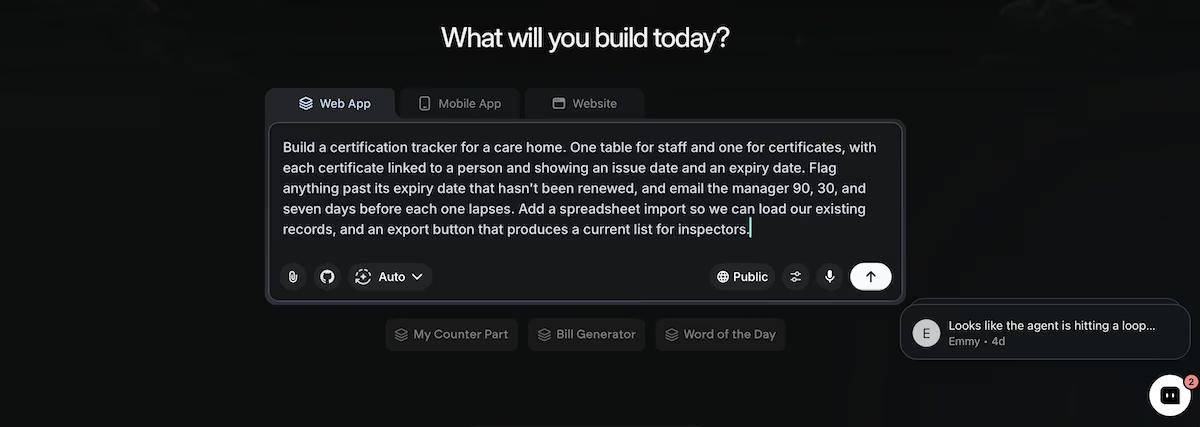
Describing a certification tracker to Emergent in one prompt, with the tables, the expiry rule, and the alert schedule specified up front
Step 4: Choose Your Support Tools
Your builder handles hosting on a paid plan, so what's left is everything around the product. You’ll need to set up email using a service like Google Workspace. The rest largely depends on how you like to work, but you might wish to include a tool such as ChatGPT for drafting, Notion to organize your data, and Canva for social media posts.
Step 5: It’s Time to Launch
Show the first version of your micro SaaS to a small section of your market and take note of any feedback you get. What features did they love? Were there any aspects of your site they struggled with? Then iterate to build your second version and repeat. Once you’re satisfied you have a winning product, set an official launch date for the wider market.
Five Common Micro SaaS Mistakes to Avoid
So what stops a micro SaaS business before it really gets going? Here are five common mistakes to avoid:
Building in the Wrong Niche
Building a micro SaaS for a broad market means you’ll be competing with large companies with funding and other backing. At the same time, if you go too narrow, you risk not having a sufficient number of potential buyers.
One approach you could take would be to build a micro SaaS tool similar to an existing one but in a different niche.
Not Looking at Your Competition
Do some research here, because competition is a good thing. If there are other micro SaaS tools out there successfully selling the same solution as yours, that’s validation. Look at the reviews, and especially notice those that are getting poor feedback, with specific points that could be improved upon. That’s your cue to build something better.
Building the Thing Before You Validate
It’s easy to get excited over a tool without even thinking of what problem it might solve. If you build and ship a micro SaaS that doesn’t solve a pain point, don’t be surprised if you end up without any buyers.
Spend some time validating by visiting Reddit, Facebook groups, and specific places where your audience hangs out. Look for what they’re complaining about and message them to get feedback on your idea.
Lacking the Right Skills
If you’re all marketing without any technical ability, you can still build a micro SaaS in the age of vibe coding. Only once you’ve validated your product and want to add more complex features do technical skills matter. At that point, you can bring on a technical co-founder to complement your marketing brain.
If you’re technical without any marketing chops, then either find resources online that can teach you, such as YouTube, or a marketing course on Coursera, and find 25 to 50 people and learn how to market your product. Or, again, you can bring on a co-founder to form a partnership.
Underestimating Expenses
It’s easy to underestimate the costs of building a micro SaaS if you do it the old-fashioned way. Expenses such as tools, hosting, and the big one (development) add up.
Building with a tool like Emergent takes the biggest line item off the list. You can start for free and see your first screens without paying anything, and a full first version sits inside the $20/month plan rather than a developer invoice.
How to Pick Your Micro SaaS Idea and Start
The above 10 ideas are each proven to have willing buyers and have produced revenue for similar tools. Of course, an idea remains just an idea until somebody builds it.
So do your own validation to define your ideal customer profile (ICP) and work out how you’re going to differentiate your product from the competition to stand out in the marketplace. Then get feedback and iterate.
In terms of your tech stack, Emergent's free plan includes 10 credits, enough to see how the builder works and get your first screens up. Builds that add logins or card payments, and anything you deploy, will need the Standard plan. The MCP connector lets you build straight from Claude or ChatGPT if that's where you already work.
Once you’ve chosen an idea, it’s time to start building. There may be other ways to make money with AI, but these 10 have validated competition and are affordable to get started with.

Most AI app builders stop at prototypes. Emergent creates production-ready apps you can actually launch.
- Production-ready apps
- Web & mobile apps
- Deploy in minutes







