



You pulled up Noloco's pricing page expecting to pick a plan in five minutes, and instead, you're staring at two seat types, a synced-rows counter, and a comparison table with more line items than most contracts.
Noloco, a no-code app builder, runs $0 to $319 a month across four plans, and which one you need depends on both how much data you're syncing and how many team members and clients need to log in.
I went line by line through Noloco's live pricing page, its plan-limit documentation, and the support guides that spell out what happens the moment you cross a row cap, a seat count, or a workflow-run limit.
The goal was to save you that homework. By the end of this breakdown, you'll walk away knowing exactly which plan fits your row count and client list, and exactly what Noloco charges once you outgrow a plan's limits.
Noloco Pricing Plans: At a Glance
Here's how Noloco's four plans stack up before extra seats or rows get added on:
| Plan | Price | Team Seats | Client Seats | Rows | Best For |
|---|---|---|---|---|---|
| Free | $0/month | 3 | 7 | 2,000 | Testing Noloco before committing |
| Pro | $149/month ($99/month billed annually) | 10 (+$6/extra seat) | 50 (+$1/extra seat) | 50,000 | A small team building its first client portal |
| Business | $319/month ($213/month billed annually) | 30 (+$10/extra seat) | 100 (+$1/extra seat) | 200,000 | An agency running several client-facing apps |
| Enterprise | Custom | Custom | Custom | Volume-based | Organizations that need SSO and a dedicated support manager |
Each number in parentheses is the monthly cost per extra seat past a plan's included count. On Pro, for example, an 11th team seat costs $6 more a month, and a 51st client seat costs $1 more a month.
Every plan, including Enterprise, comes with a 14-day trial of the Business plan's features, and Noloco doesn't ask for a credit card to start one.
Noloco Pricing Plans Breakdown
Every Noloco plan is built around the same two dials. How many people log in, and how much data they're working with. Free lets you test both on a small scale, Pro and Business turn those same dials up with different consequences once you hit a limit, and Enterprise removes the ceiling for a custom quote.
Free: $0/Month
What's included: Free gives you three team seats and seven client seats, 2,000 rows across unlimited apps, and 100 workflow runs a month. You also get 1GB of file storage, two user roles, and Nola, Noloco's AI assistant, which is free to every customer during its open beta.
Best for: Founders or ops leads who want to try a no-code app builder on their own data before deciding whether Noloco is worth paying for.
Pros:
- Unlimited apps, even on the free tier
- No credit card required to sign up
- Enough client seats (seven) to test a client portal with actual outside users
Cons:
- 2,000 rows fill up fast for an internal tool your team uses daily. Free doesn't connect to Airtable or any other external source, so every record your app runs on has to live in Noloco's own built-in database instead.
- No custom domain, so every app sits on a Noloco subdomain
- Free plan record limits have zero tolerance, unlike Pro and Business (more on what that means below)
Pro: $149/Month ($99/Month Billed Annually)
What's included: Pro steps up to 10 team seats and 50 client seats, with 50,000 rows and 25,000 synced rows to work with, plus 3,000 workflow runs a month and 20GB of storage. It also adds a custom domain, record- and field-level permissions, and custom code injection.
Best for: A small team that has outgrown Airtable's own interface and needs a branded portal clients can log into directly.
Pros:
- Field-level permissions, so you can hide sensitive columns from client-facing roles
- Connects live to Airtable, SmartSuite, and Stripe
- A small tolerance buffer on row limits before anything gets blocked
Cons:
- Extra client seats still cost $1 each
- 25,000 synced rows caps how many rows can stay live-connected to Airtable at once, and most established bases have more than that
- No HubSpot or SQL database connections. Those are Business-tier only
Business: $319/Month ($213/Month Billed Annually)
What's included: Business scales to 30 team seats and 100 client seats, with 200,000 rows, 100,000 synced rows, and 10,000 workflow runs a month, backed by 100GB of storage. It also unlocks unlimited user roles, priority syncing, and connections to HubSpot and SQL databases.
Best for: Agencies and multi-department businesses running several client portals off the same workspace.
Pros:
- Row limits auto-expand instead of blocking your app when you pass the cap
- Priority syncing, so external data source changes reach your app faster
- 100,000 synced rows, four times Pro's cap, so bigger Airtable bases can stay live-connected
Cons:
- The jump from Pro's $149 to Business's $319 is steep if you only need one or two of the Business-only features
- Auto-expansion isn't free. Every extra 25,000 rows costs $75 a month.
- 30 team seats sounds generous until an agency with several account managers hits the extra-seat fee of $10 each
Enterprise: Custom Pricing
What's included: Enterprise negotiates custom team and client seats and volume-based data limits, in addition to every integration Noloco offers. It adds SSO and enforces two-factor authentication, provides a dedicated support manager, offers a custom onboarding plan, and supports full white-labeling down to the domain and outbound email.
Best for: Organizations with compliance requirements (SSO, audit trails) or data volumes well past Business's ceiling.
You'll need to book a call with Noloco's sales team to get a quote. Noloco doesn't publish Enterprise numbers, so budget for a negotiation rather than a fixed price.
Where the Hidden Limits Kick In
The plans page shows the row counts, seat counts, and workflow run limits. It doesn't tell you what happens the moment you cross one, and that's the part that catches people off guard. There are four limits to watch, and each plan handles overages differently:
| Limit | Free | Pro | Business |
|---|---|---|---|
| Rows | Blocks immediately, no buffer | 10% tolerance, then blocks | Auto-adds 25,000 rows for $75/month, up to 350,000 total |
| Synced rows | Not available at all (no external connections) | 10% tolerance, then blocks | Auto-adds 25,000 rows for $75/month, up to 250,000 synced |
| Workflow runs | Blocks at 100 runs, no way to buy more | Auto-bills$50 per extra 1,000 runs | Auto-bills $50 per extra 1,000 runs |
| Team or client seats | Can't add extra seats. You have to upgrade | $6/extra team seat, $1/extra client seat | $10/extra team seat, $1/extra client seat |
The plans differ most in how they handle overages. Free blocks you the moment you hit any limit. Pro blocks on rows and synced rows, but auto-bills for extra workflow runs. Business rarely blocks anything and charges for the overage instead. If your usage swings month to month, that behavior can cost more than the sticker-price gap between plans.
Which Noloco Plan Should You Choose?
Choose Free if you:
- Want to prototype a client portal on your own data before paying anything.
- Run a small internal tool with fewer than 2,000 records and no more than 10 total users.
- Can live with the Noloco subdomain and the "Powered by Noloco" badge for now.
Choose Pro if you:
- Need a custom domain and field-level permissions for a client-facing app.
- Sync fewer than 25,000 rows from Airtable or SmartSuite.
- Have a small internal team (10 or fewer builders) plus a modest client list.
Choose Business if you:
- Run multiple client portals, or a single app with more than 50 active clients.
- Need HubSpot or a SQL database as a live data source.
- Would rather pay for automatic row overages than risk a hard block mid-project.
Choose Enterprise if you:
- Require SSO, enforced two-factor authentication, or a signed security review.
- Expect to exceed Business's row ceiling within the next year.
- Want one dedicated person at Noloco managing your account instead of a support queue.
Is Noloco Worth the Cost?
Noloco earns its price for one specific job. It turns a structured data source you already have into a portal your team and your clients can use, without hiring a developer.
Noloco is worth it if you:
- Already have clean data in Airtable, SmartSuite, or a SQL database and just need a face for it.
- Need granular, role-based permissions so clients only see their own records.
- Have outgrown Airtable's own Interfaces but don't want the overhead of a full custom build.
Skip Noloco if you:
- Don't have structured data yet. Noloco builds a frontend on top of data you already keep in Airtable or a SQL database, so you need that structure in place first.
- Need a public-facing consumer app, not an internal tool or client portal.
- Have unpredictable row and seat counts and would rather not find surprise overage charges on your invoice.
Noloco Alternatives & Pricing Comparison
Softr, Glide, Retool, and Emergent are the tools people compare against Noloco most. And they don’t price the same way. Retool charges per builder instead of a flat rate, which changes which tool is cheapest depending on your team size.
| Tool | Starting Price | Best For |
|---|---|---|
| Noloco | $149/month ($99/month billed annually) | Portals built directly on Airtable, SmartSuite, or SQL data |
| Softr | $59/month ($49/month billed annually) | Fast, block-based portals on top of Airtable or Google Sheets |
| Glide | $25/month ($19/month billed annually) | Turning a spreadsheet into a mobile-friendly app quickly |
| Retool | $12/builder/month ($10/builder billed annually), plus $7/internal user ($5 billed annually) | Developer-built internal tools with deep API and database access |
| Emergent | $20/month ($17/month billed annually) | Custom software built from a prompt, not wired to an existing dataset |
Softr and Noloco solve almost the same problem in different ways. Softr leans on prebuilt blocks and is faster to get a first version live, while Noloco's workflow engine and permission system give you more room to grow before you hit a wall.
Retool sits a level up in technical depth. It's a low-code tool built for developers who want direct database access and custom logic, and its per-builder pricing reflects that developer focus. It also charges a mandatory $7-a-month fee per internal user, or $5 billed annually.
Noloco and Softr skip that technical requirement entirely, which is why a non-technical team usually gets running faster on either of them instead.
What to Do When Noloco Can't Build What You Need
Noloco needs your data already sitting somewhere structured, like an Airtable base or a SQL database, before it can build anything on top of it. That one requirement rules it out for three common situations.
Need a mobile app, not just a web portal?
Noloco builds web apps only. Emergent is an AI app builder whose Mobile Agent can take a web app you've already built on Emergent and rebuild it as a native iOS or Android app, running on the same backend and database, so there's nothing to set up twice.
Don't have structured data yet?
Noloco needs an existing Airtable base, SmartSuite workspace, or SQL database to connect to before it can build anything. Emergent builds the database along with the rest of the app, so there's nothing to set up first.
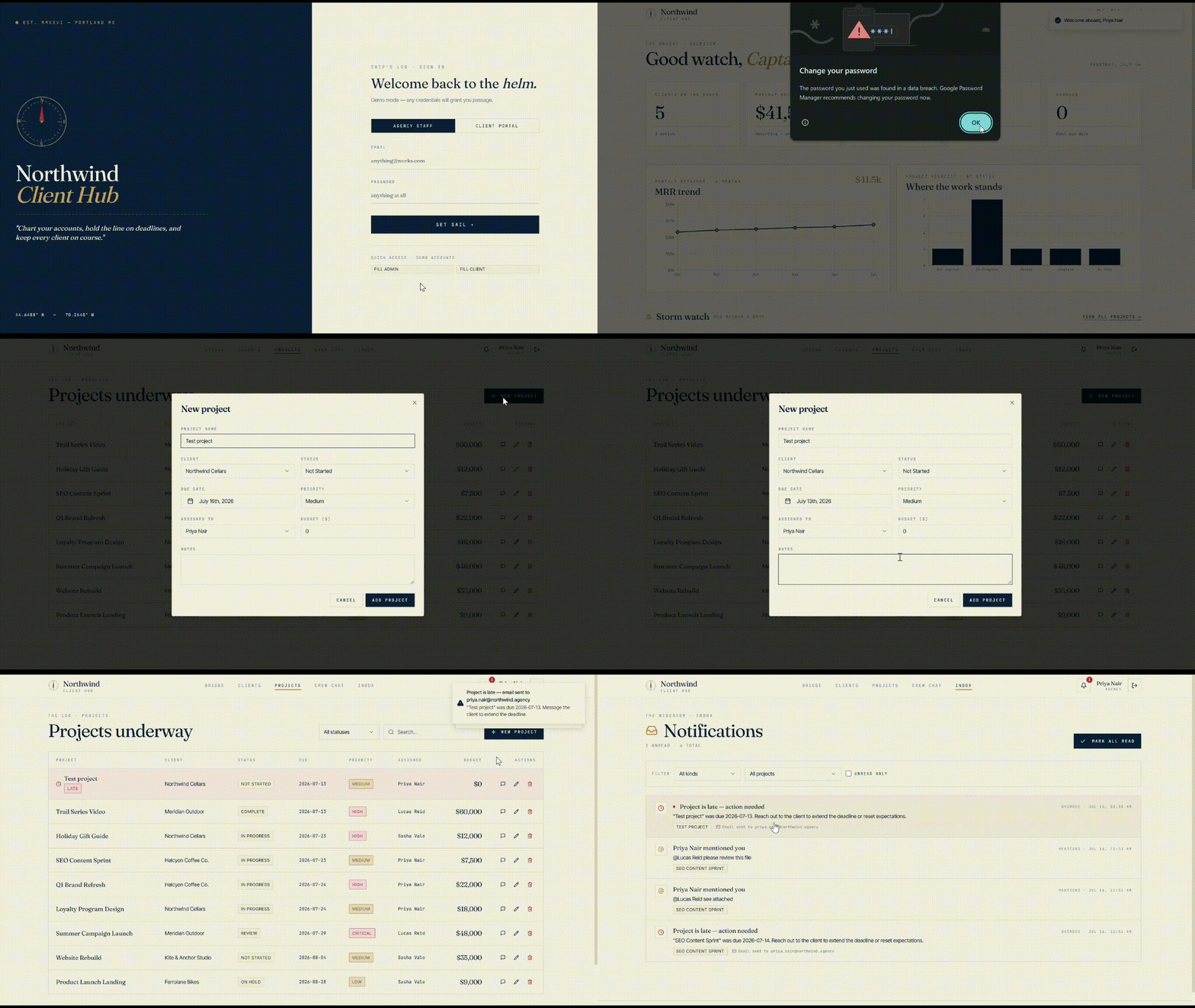
To test this, I described a client management tool called Northwind Client Hub to Emergent, with no data source connected anywhere. It asked whether to seed the tables with demo data or leave them empty with just the structure in place. I chose demo data, and the client list below is what it built from that description alone.

Need custom logic that goes beyond displaying and editing records?
Noloco's workflow engine covers a lot of ground, but it's still built around a data-driven portal. Emergent's vibe coding approach means you describe the logic you want, and agents build it directly into the app instead of around a preset data structure. On the same Northwind Client Hub build, I asked for one rule: flag a project once it passes its due date, and notify whoever's assigned to it. Agents built that logic directly into the app, and an email went out the moment a test project went overdue.
Noloco is the right pick for teams with existing data to work from. But these three gaps are where Emergent picks up the job Noloco was never built to do.
Describe the app you want to build, and Emergent handles the rest.
The Verdict on Noloco Pricing
Noloco's pricing is fair for what it does, but the plan you need depends less on team size and more on how much data you're syncing and how predictable that number is. Pro covers most small teams comfortably. Business earns its higher price the moment an overage bill beats a mid-sprint block.
There's one thing worth doing before you commit. Pull your actual row count from Airtable or wherever your data lives right now, and compare it against Pro's 50,000-row ceiling honestly. That single number decides more of this decision than any feature on the comparison table above.

Emergent designs, writes, and publishes your whole site from one prompt. No templates, no drag-and-drop.
- Full site from one prompt
- Custom design, real pages
- Publish in minutes







