




Someone lands on your photography website because they want to see your work. What happens next depends on the photography website features sitting behind the gallery.
Many website builders make it easy to create the visual side of a photography site. The harder part comes with everything around the gallery, such as performance, mobile layouts, client proofing, booking forms, sales, SEO, and accessibility.
I built a photography site with Emergent and worked through these key photography website features to see what each one does. I also looked at how you can check each one before you publish and what to ask your website builder to handle.
Fast, Optimized Galleries for Your Photography Website
Google uses Core Web Vitals to evaluate page experience, including Largest Contentful Paint (LCP), which measures how long it takes for the largest element on the screen. Google considers an LCP of 2.5 seconds or less a “good” result, measured at the 75th percentile of page loads rather than on a single test.
For photography websites, that benchmark becomes a particular challenge because your most important content is also your heaviest. A gallery full of high-resolution images can easily push load times well past the point where Google considers the experience good.
Image optimization keeps that from happening. WebP and AVIF cut file sizes by an order of magnitude without a visible drop in quality. Here's what that looked like on a real build.
I tested this with Emergent by building a basic photography site called “Clique Photos” with a homepage, gallery, and contact page.
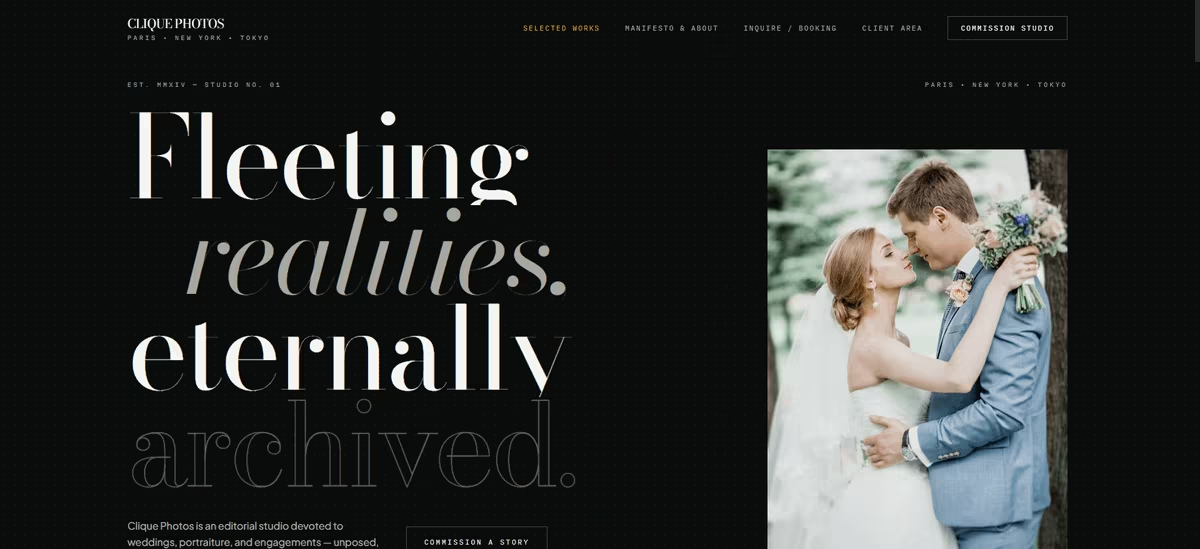
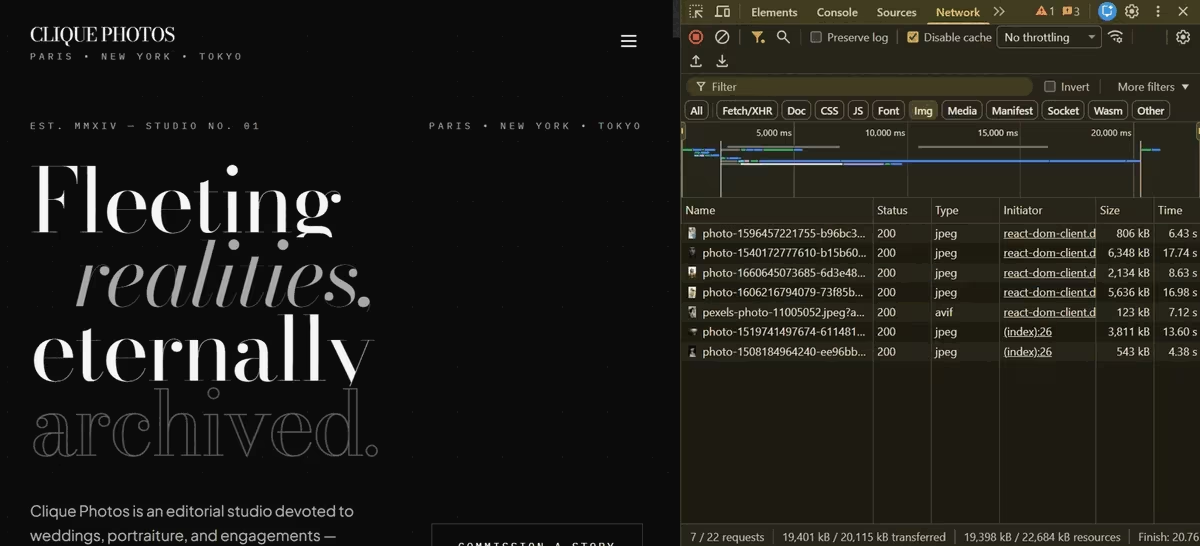
I gave it no image-optimization instructions. The seven gallery images totaled 19.4MB, mostly as large JPEGs, and one file alone weighed 6.3MB. The page took nearly 21 seconds to finish loading.
Then I gave Emergent one instruction: “Optimize every gallery image automatically, don't make me compress anything manually.” If you're staring at a blank prompt box and don't know where to start, Emmy, Emergent's free built-in assistant, will help you write one.
The same seven images came back as AVIF at just 285KB combined, a 98% reduction. The page finished loading in under four seconds, and I couldn't see a meaningful difference in image quality between the original and optimized versions.
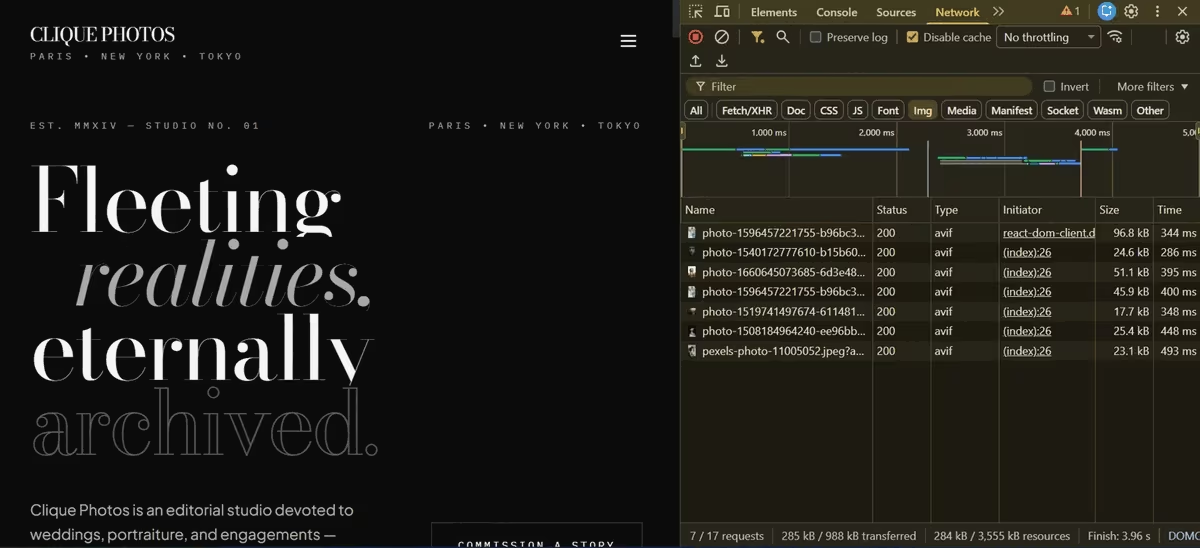
That change brings your gallery closer to the performance target Google sets for a good LCP score, while also delivering a good experience for your visitors.
Designing for the Phone First
People use “responsive” and “mobile-first” interchangeably. Responsive means your desktop layout adapts down to smaller screens. Mobile-first means you design for the phone, then expand.
That matters for photography sites because clients often open galleries on their phones. A bride might show her wedding photos to family, a client might open a proofing link with their partner, or someone might pull up your portfolio while recommending you. Your gallery needs to work well in those moments.
A desktop layout that simply shrinks can leave you with oversized navigation, awkward spacing, or too few images on screen. Your gallery should stay easy to browse at every width, with navigation itself covered in the next section.
I tested this in Emergent using its built-in device preview. I switched between desktop, tablet, and mobile views on the same build without changing the prompt. The gallery grid held together across all three: no broken breakpoints, no awkward wall of thumbnails, no rebuild needed.
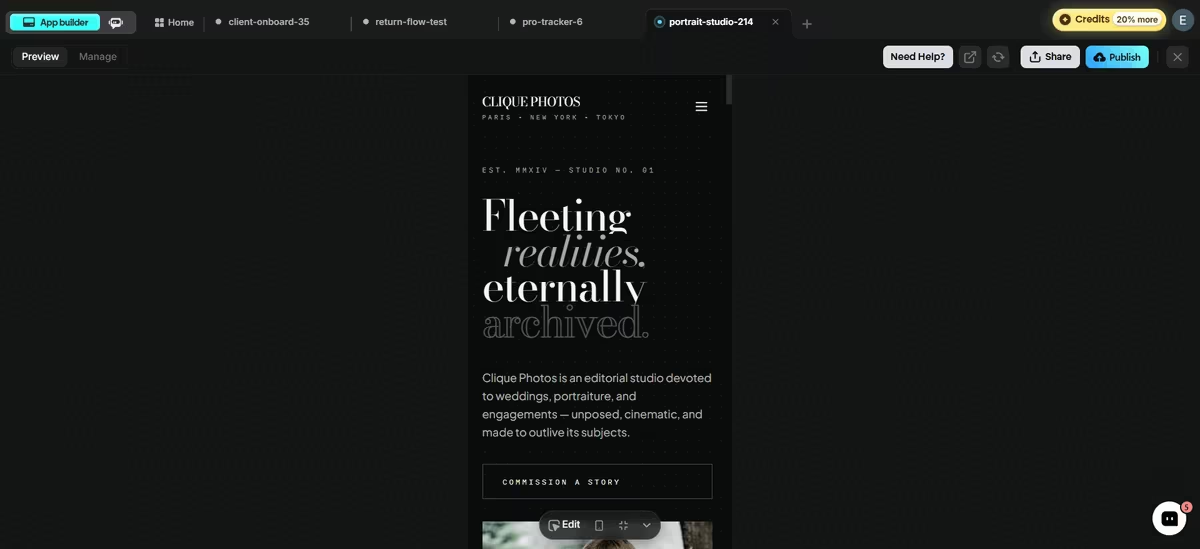
You can run the same check before you publish. Load your site on a mobile device and check the gallery, navigation, buttons, and spacing at each width. If everything still works without another round of prompting or rebuilding, you're good to go.
Want the same site as a phone app? Our app conversion guide covers that.
Clear Navigation
A gallery-first homepage still needs a way to get somewhere else. If a visitor loves your work but can’t quickly find your pricing, your about page, or a way to book you, the click-through rate on everything else in this list drops.
The pattern that shows up across ranking photography sites is short and predictable: a persistent header with five to seven links, typically Portfolio (with a dropdown for categories like Weddings, Portraits, and Elopements), About, Blog, Pricing or Investment, and a Book Now or Contact button styled differently from the rest of the menu so it reads as an action, not a link.
Sticky navigation, the kind that stays visible while a visitor scrolls, matters more here than on most sites, since photography homepages are usually one long scroll of images.
Our Emergent build already has sticky navigation working. What's missing is a Book Now button and a Portfolio dropdown. Here's the prompt to add both:
"Add a Book Now button to the navigation that stays visible while scrolling, styled distinctly so it stands out from the other links. Turn the Portfolio navigation item into a dropdown menu with Weddings, Portraits, and Elopements as sub-items, working on hover for desktop and on tap for mobile."
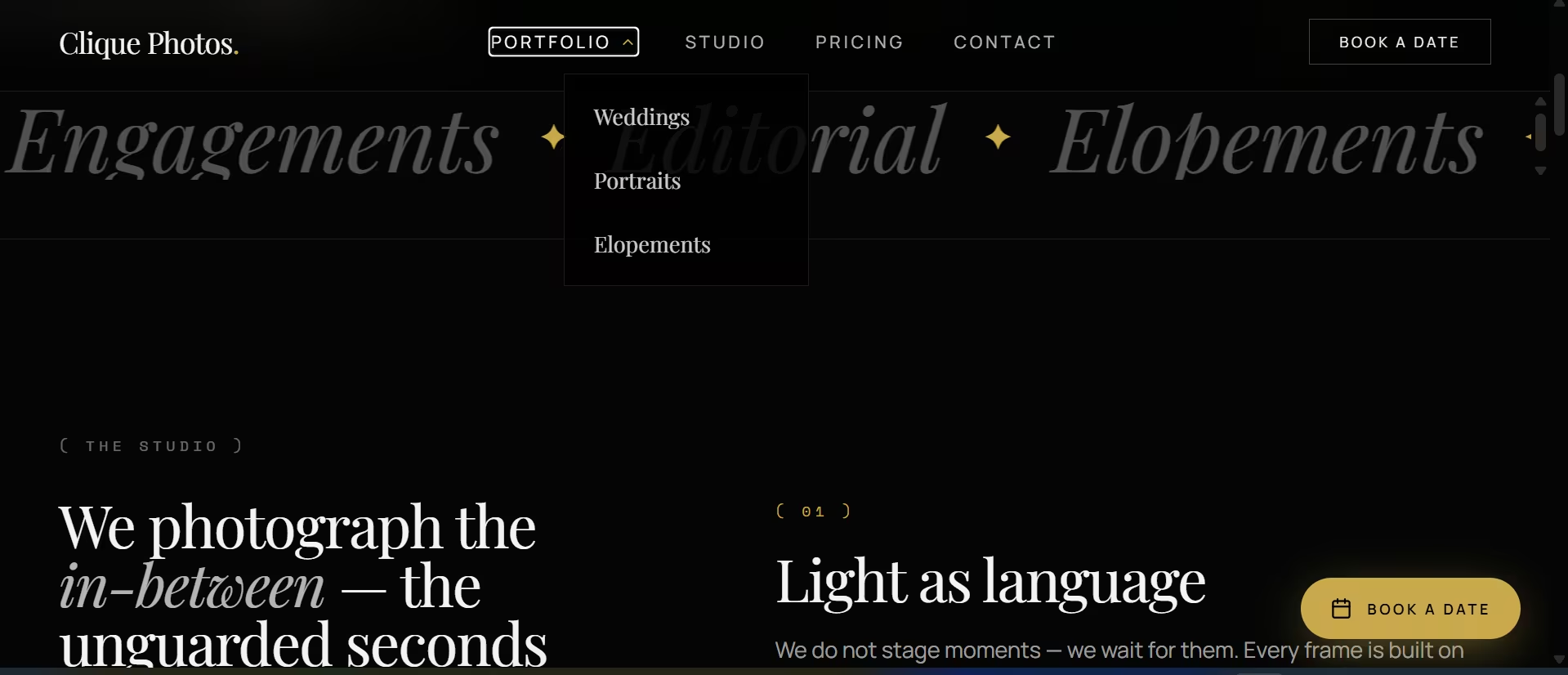
Once it’s built, check three things: whether the nav stays visible on scroll instead of disappearing, whether the Book Now button visually stands out from the other links, and whether the dropdown works on a touchscreen without a hover state to rely on.
An About Page That Builds Trust
Some photography-marketing guides call the About page the second most visited page on a portfolio site, after the gallery itself. That tracks: a couple deciding between five photographers isn’t just judging the work; they’re judging whether they want to spend eight hours with this person on the most important day of their life.
A gallery shows what you shoot. An About page has to answer who you are, what shooting with you is actually like, and why someone should trust you with the day. That means a real photo of you, a few sentences on your approach or style in plain language rather than brand-speak, and some form of social proof: press mentions, awards, or a client quote pulled from a review.
A prompt to try in Emergent: “Build an About page with a photo of the photographer, a short bio section describing my shooting style and approach, a press or as-featured-in strip, and a client testimonial block. End with a link to the booking form.”
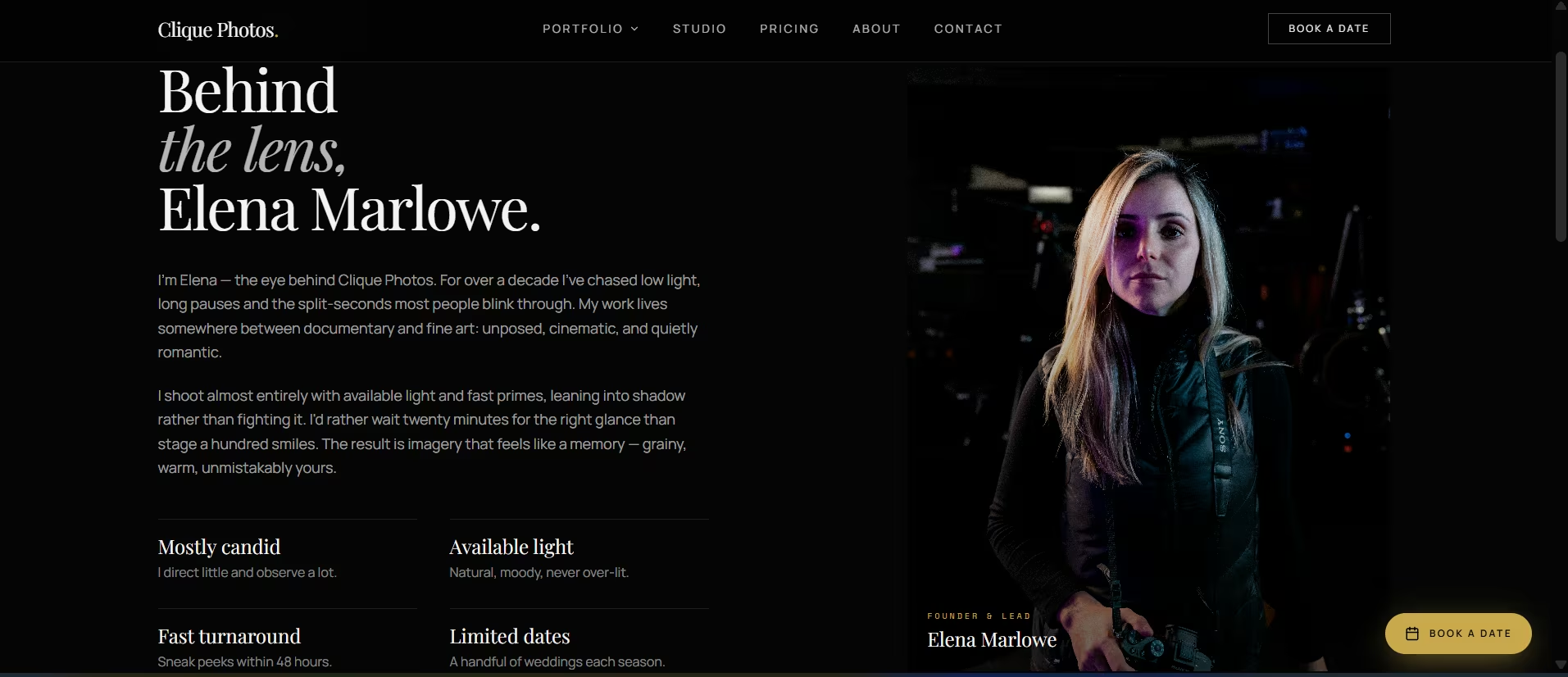
Check that the page ends with a real next step. A reader convinced by your bio shouldn’t have to hunt back through the nav to find your contact form.
Client Proofing and Private Galleries
When you deliver finished images to paying clients, don't make them choose photos from a Google Drive folder or send their picks through an email thread.
Drive gives you a place to store the files, but no way for the client to review and mark selections, and email buries those choices in a thread you end up tracking by hand.
A proofing gallery handles both sides of that workflow. Your client can open a private gallery, review the images, favorite the ones they want, and send those selections back to you. You get a clear list of approved images instead of a folder to sort through or an email thread to decode.
To show you what that looks like, I asked Emergent to add a client gallery to my Clique Photos website with this prompt:
“Add a private, password-protected client gallery. Clients should be able to select their favorite photos, mark selections, request downloads, and send me a message directly from the gallery page.”
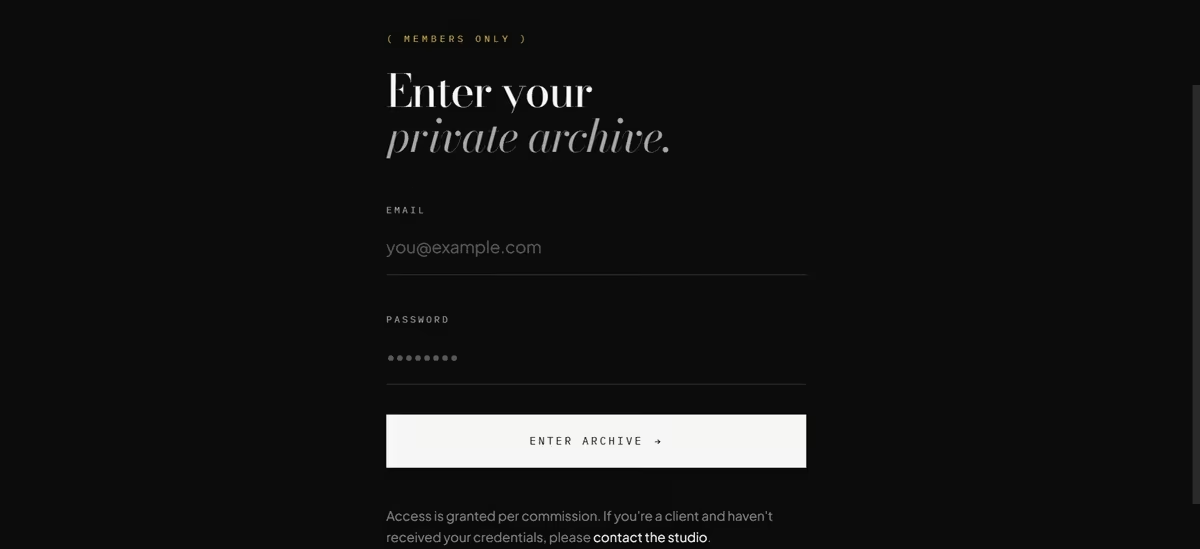
Emergent built the gallery behind an email-and-password gate labeled “Members Only,” with a fallback message for clients who haven't received their credentials.
Once logged in, each client gets a gallery for their shoot, a live selection counter, and a heart icon on every photo.
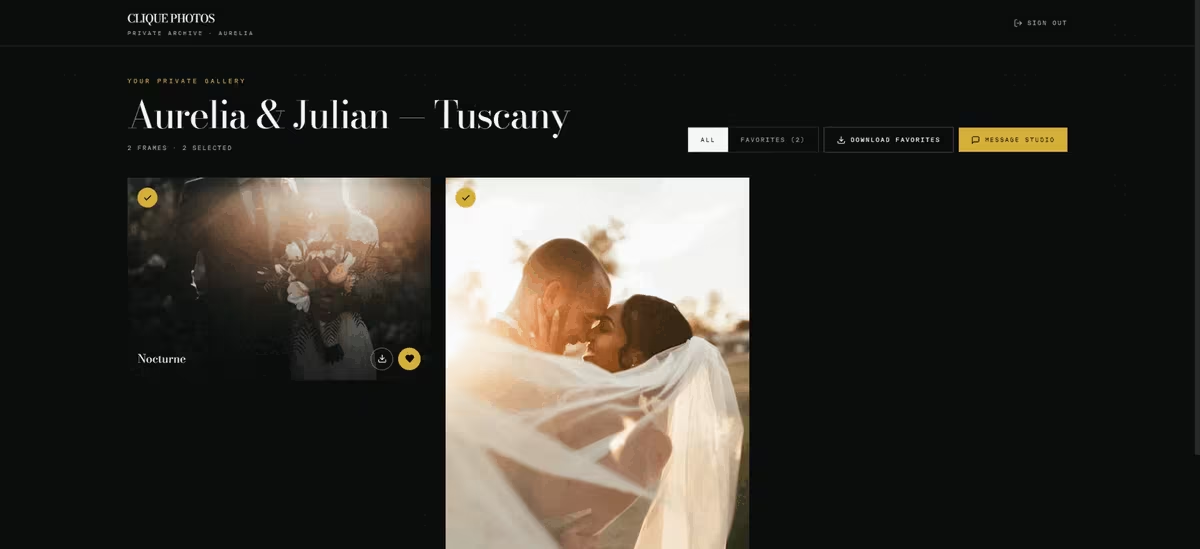
The Favorites tab filters the gallery down to the selected images. The client can then click Download Favorites to request their picks or Message Studio to contact you without leaving the gallery.
Booking or Inquiry Forms
A contact page with nothing but an email address puts the work of qualifying the inquiry on you. You have to ask when the shoot is, where it's happening, and what they plan to spend before you can tell whether you're a good fit.
At minimum, your website should collect those details upfront. A stronger setup connects to your calendar and lets clients book an available slot without the email back-and-forth.
I added the qualifying-question version to my Emergent photography website with this prompt:
“Add a contact form that asks for event date, event type, and budget before showing my contact info.”
The resulting form captured the client's name, email, shoot category, approximate date, venue and city, and budget range. It also included an open field where the couple could describe what they had in mind.
The sidebar next to the form added context too, like an availability window, a note that inquiries receive a personal response, and a direct email address as a fallback.
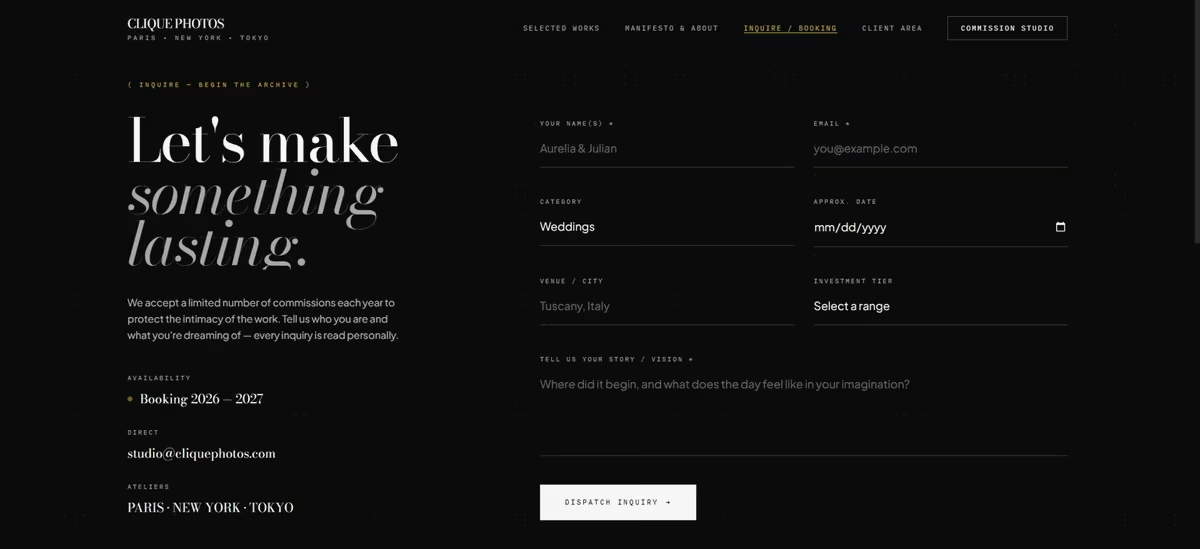
That gives you enough information to decide whether the inquiry fits your availability, services, and pricing before you reply. Instead of starting the conversation by asking for basic details, you can start with a real answer.
Once the inquiry volume makes scheduling the bottleneck, connect a tool like Calendly so clients book their own slot. That extra setup makes sense once your inquiry volume is high enough to justify it.
Print and Digital Sales
If you sell prints or digital images, your website should let clients buy them without leaving the gallery. Sending someone from your portfolio to a separate store, then asking them to find the same image again, adds friction to the transaction.
Your checkout should also handle payment securely and show the buyer exactly what they're purchasing and what it costs before they confirm the order.
One thing to check before you commit to a platform: whether the store and the gallery share the same image library. If they don't, you'll be uploading every photo twice.
A Blog That Targets What Clients Search For
Both of the top-ranking feature lists for this topic include blogging, and the reason isn’t content marketing theory. A blog is the only part of a photography site that can rank for the searches a gallery never will, things like “[venue name] wedding photographer” or “best time for golden hour engagement photos in [city].”
Galleries rank for your name. A blog can rank for what a stranger types into Google before they know your name.
The posts that work aren’t essays. Each real wedding or session becomes a post: a handful of the best images, the venue, and two or three practical details, like what worked about the light or the timeline. That gives you venue-specific and location-specific pages without inventing content, and it gives venues something to link to.
A prompt to try in Emergent: “Add a blog section with a grid of post previews, categories for Weddings, Engagements, and Portraits, and a single-post template that supports a title, a gallery of images, and body text.”
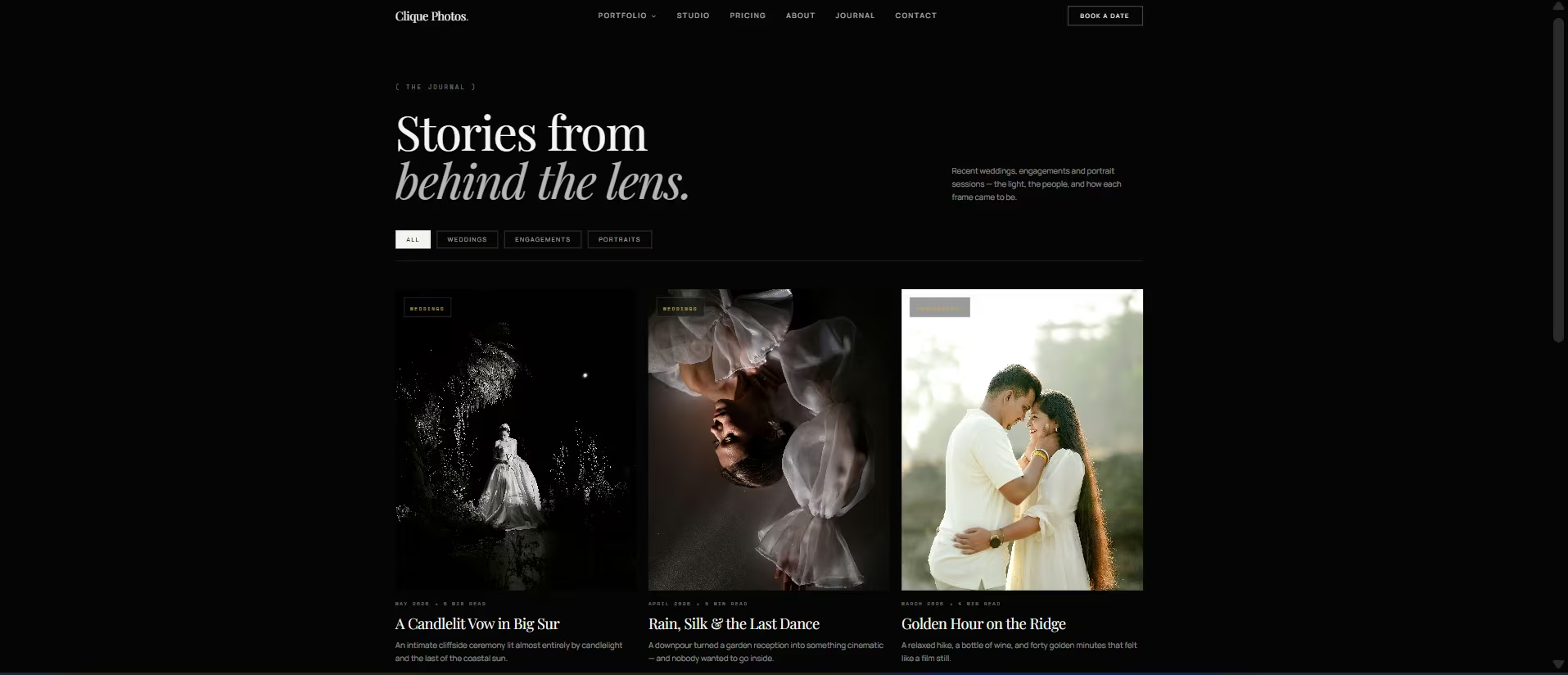
Once it exists, the habit matters more than the feature. A blog with three posts from a year ago won’t outrank anything. Plan on one post per real shoot, published close to the date.
Image SEO
Google can analyze images, but the text around them helps it understand what each photo represents and when it should appear in search. That includes the image's alt text, file name, and the content surrounding it on the page.
You have to provide that context, so your builder needs to give you somewhere to add and edit it. With a website builder like Emergent, prompt for four things specifically:
- Editable alt text: One description per image, written by you.
- Descriptive file names: Readable names you set, like aurelia-julian-tuscany-first-dance.jpg.
- Room for context: Space on the gallery page for the location, couple's names, event type, or shoot date.
- Image structured data: Ask for ImageObject schema on gallery pages, so Google can read the caption, credit, and license alongside the file.
For example, you should be able to describe a photo as “Aurelia and Julian's first dance at their Tuscany wedding” rather than accepting a generic description like “couple dancing.” The first gives search engines much more specific context about the image and the searches it could be relevant to.
Without control over those details, part of your image search visibility comes down to whatever defaults the builder picks.
Social Integration and Email Capture
A portfolio proves you can shoot. Social proof and an email list prove you’re active and give you a way to reach past visitors who aren’t ready to book yet.
Social integration means more than a footer icon that links out to Instagram. The stronger pattern embeds a live feed of your recent posts directly on the homepage or gallery page, so a visitor sees current work without leaving your site, and adds share buttons on individual galleries so a client can post their own favorites and tag you.
Email capture is the piece most photography sites skip entirely. A generic newsletter signup converts almost nobody. A signup tied to something specific like a location guide, a seasonal availability list, or a downloadable posing guide, gives a visitor who isn’t ready to book today a reason to hand over their email instead of leaving for good.
Accessibility Basics
Accessibility determines whether people can use your website at all, and it's a surprising number of “must-have feature” lists that never mention it.
Someone who is deaf needs captions to understand your wedding highlight reel. Someone with low vision needs enough contrast to read text over a bright photograph, or relies on alt text to understand an image.
If those visitors can't navigate your site, understand your work, or find your contact and booking options, you've lost them before they can become clients.
Photography websites need particular attention here because so much of the experience depends on images, video, and text layered over photos.
If you use video, add captions to prerecorded content with meaningful spoken dialogue. This requirement is defined in the Web Content Accessibility Guidelines (WCAG) 2.1, defined as WCAG 2.1 Success Criterion 1.2.2, a Level A requirement.
You also need enough contrast between text and its background. White text can become almost impossible to read when it sits over a bright part of a photograph. And every image needs useful alt text, which also supports your image SEO.
You can check much of this yourself using Chrome DevTools' Lighthouse accessibility audit. It checks things such as color contrast and missing alt attributes. For video, inspect the element directly and look for an actual track element with kind set to captions. A CC icon in the player doesn't necessarily mean the video has a caption track attached.
If the audit flags contrast problems or missing alt text, fix them before you publish.
Analytics That Track the Right Thing
To improve your website, you need to know which galleries attract attention, which pages lead people to contact you, and where visitors drop off.
You can do that for free with:
- Google Analytics (GA4): Shows what visitors do on your website. Set up events or conversions for actions that matter to your business, such as submitting your contact form, booking a call, or completing a purchase. That lets you see whether a homepage or gallery change moves the actions you care about.
- Google Search Console: Shows how people find your website through Google. You can see which search queries generate impressions and clicks, which pages appear in search, and whether Google has indexed the pages you want it to find.
With Emergent, you can ask it to connect both tools, then verify the setup yourself. Check the page source or browser tools for the GA4 tag, and confirm that Search Console shows your property as verified and receiving data.
Building These Features Without Hiring a Developer
Most template-based builders rely on plugins or paid add-ons for features such as client proofing, booking, and ecommerce. You can end up stitching several tools together, each with its own setup, subscription, and login.I built the fast gallery, mobile layout, client proofing gallery, and booking form in the same Emergent project. Each feature worked as part of the same website using Emergent's photography website builder, so I didn't have to build separate systems and connect them afterward.
For the full walkthrough of turning this checklist into an actual site, our photography website guide covers the build process step by step.
If you're ready to build a well-equipped photography website, sign up for free and start building.

Emergent designs, writes, and publishes your whole site from one prompt. No templates, no drag-and-drop.
- Full site from one prompt
- Custom design, real pages
- Publish in minutes







