



TL;DR
Thunkable builds a working native app from a prompt or from drag-and-drop blocks, and publishes it to the App Store, Google Play, and the web from one project.
Its AI writes real code behind the scenes, but when something goes wrong, you fix that code yourself.
Thunkable works well if you need a native mobile app and don't mind occasional code fixes. Skip it if you want plain English all the way through, or you're running more than one app at a time.
Thunkable builds a working native app from a prompt or from drag-and-drop blocks, and publishes it to the App Store, Google Play, and the web from one project.
Its AI writes real code behind the scenes, but when something goes wrong, you fix that code yourself.
Thunkable works well if you need a native mobile app and don't mind occasional code fixes. Skip it if you want plain English all the way through, or you're running more than one app at a time.
Thunkable’s AI Builder spent much of its early life in beta, promising a much faster way to turn an idea into a mobile app. Now that it’s officially launched, I wanted to see whether it actually holds up beyond the demo stage.
So I built a real estate app from scratch with Thunkable, starting with a prompt and then pushing into the parts that usually expose an AI builder’s limits: app logic, customization, integrations, and getting something close to production-ready.
I also compared the experience with other AI app builders and dug through feedback from founders and non-technical users who’ve shipped real apps with it.
Here’s where Thunkable works well, where it starts to fight you, and whether it’s a good choice for building a serious app in 2026.
What is Thunkable?
Thunkable builds iOS and Android apps without code. You either describe your app to the AI and it generates the screens and logic, or drag and drop through the classic Blocks editor.
Where many AI builders ship web apps wrapped to look like mobile ones, Thunkable produces genuine native apps for iOS and Android.
That native foundation gives Thunkable-made apps access to GPS, the camera, Bluetooth, push notifications, and offline storage. Field service tools and apps that need to work without signal benefit most.
Thunkable also connects to tools you already use. Airtable, Firebase, Google Sheets, Xano, Backendless, Webflow, RevenueCat, and Figma.
Thunkable Features
Thunkable has a decent feature list:
- Prompt-based building: Describe your app, and Thunkable's AI Project Generator builds the screens, layout, and logic. It plans structure, design, and data before writing anything.
- Discuss Mode: Talk through your idea with the AI before you build. Fewer mistakes upfront means fewer tokens spent fixing them later.
- Code editor for AI-built apps: Once the AI finishes, you can open the code directly. This means editing React Native files.
- Classic Blocks editor: Thunkable's original visual editor still lets you build logic without touching code. It didn't work during my testing.
- Direct publishing: Push your finished app to the App Store, Google Play, and the web from the same project.
- Version history: Thunkable automatically saves a version each time you submit an AI prompt so that you can review and restore earlier project states. Free users can restore the three most recent versions, while paid plans can restore any saved version.
Thunkable Pricing
Thunkable prices in five tiers. Tokens and published-app limits scale with each one.
| Plan | Price | Tokens | Key limits |
|---|---|---|---|
| Free | $0/month | 2,000 | 3 public projects, 5 screens per project, no publishing |
| Accelerator | $18/mo (annual) or $19/mo | 20,000 | 1 private project, publishing still locked |
| Builder | $37/mo (annual) or $59/mo | 50,000 | 10 private projects, 1 live published app, custom branding |
| Advanced | $99/mo (annual) or $189/mo | 100,000 | Unlimited private projects and published apps, priority support |
| Enterprise | Custom | Custom | Built for teams and larger organizations |
Thunkable uses hard tiers. You have to upgrade the plan if you hit your token, storage, or publishing cap.
The one-app cap on Builder isn't attractive. A freelancer shipping one app won't notice it, but a dev shop running several client apps at once will quickly outgrow it.
There's also no code export. If you leave the platform, you do so without your code, starting over from scratch.
Publishing requires your own developer accounts on top of what you pay Thunkable: a $99/year Apple developer account and a $25 one-time Google Play account.
As I stated above, fixing bugs can burn through a surprising number of tokens. If you debug a stubborn issue, it deducts from your monthly budget, whether it was the AI's mistake or yours.
Thunkable Reviews: What Real Users Are Saying
People love how fast they can get a real app running, but the frustration kicks in the moment they want to fix or customize something.
Pros
- No coding required to start: G2 reviewers point to the drag-and-drop system as proof you don't need a programming background to build something real.
- Real native features: Verified reviewers on Capterra highlight Thunkable's built-in access to mobile hardware and offline/cloud functionality.
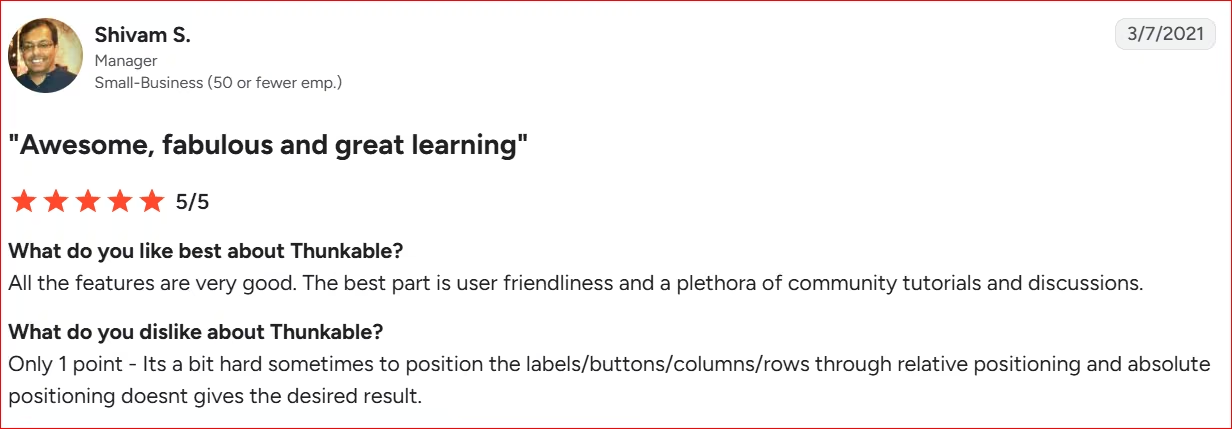
- Deep tutorial library: G2 reviewer Shivam S. points out “a plethora of community tutorials and discussions” as one of the best parts of using Thunkable.
Cons
- Fixing the AI's mistakes costs you twice: Thunkable's own community forum has become ground zero for this complaint. One user, sdmahaney_sla, burned 20,000 tokens in a single night trying to get the AI to fix a bug it caused itself.
- Generated code doesn't always work: Users on Trustpilot note that certain tasks can result in silent runtime errors or unhandled logic states that don't trigger clear error messages.
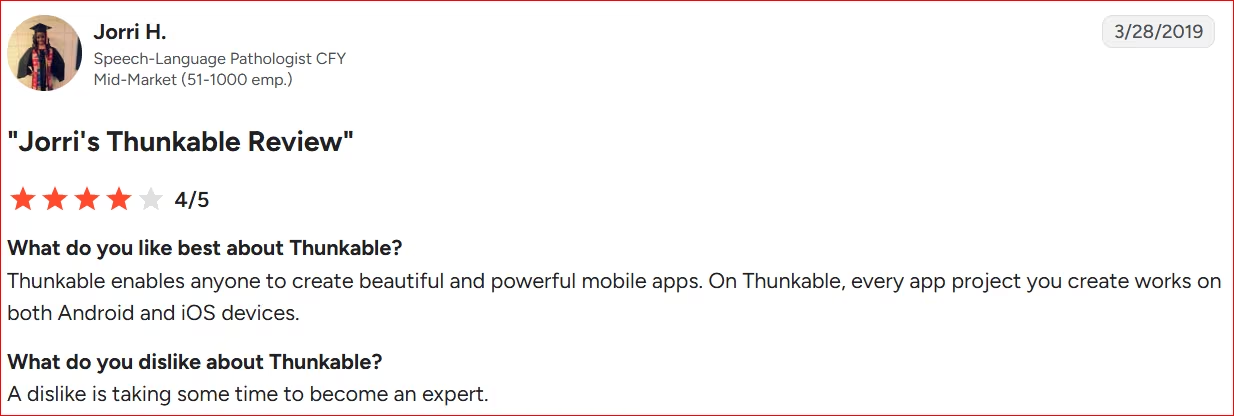
- The learning curve is still there: G2 reviewer Jorri H. puts it plainly: even with AI doing some of the heavy lifting, it still takes time to become an expert.
People agree Thunkable gets a real native app running fast. The real question is whether you can keep improving it without burning through tokens or ending up in code you didn't expect to touch.
My Personal Take on Thunkable
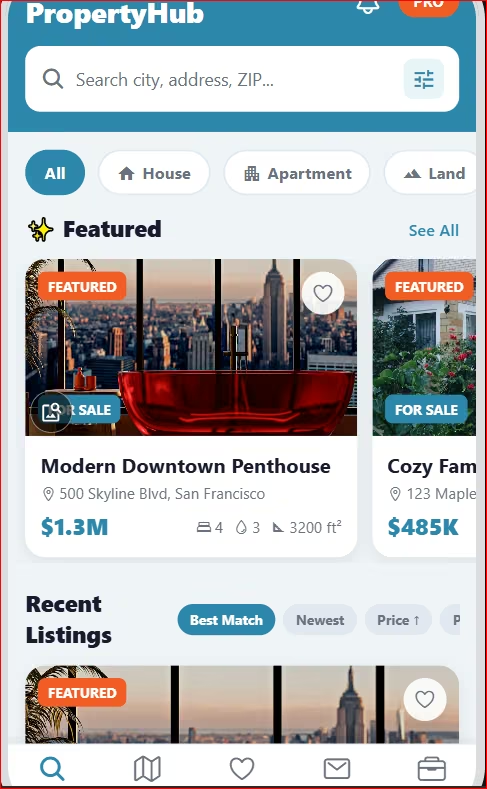
I built a simple real estate app to see how far one prompt could take me. It's easy to get started on Thunkable. They cut to the chase, with a box that asks you to enter your prompt and get to work, even before you register.
Once you enter your prompt, the app builder starts building your app.
In my experience, it repeatedly threw up errors before it finally started working. I can't say why, as it gave no reason.
Once it got going, it built the app in minutes.
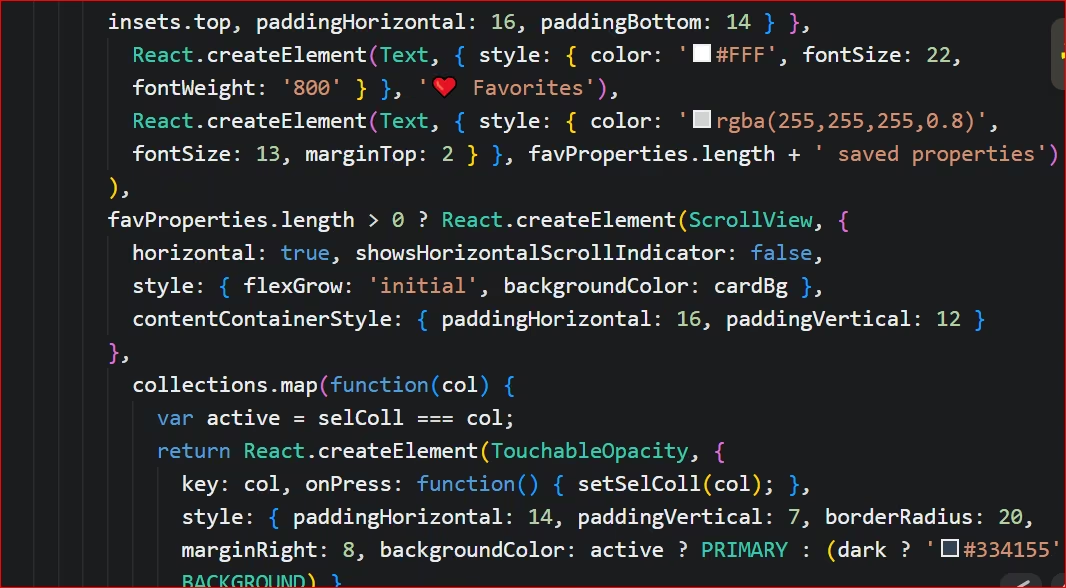
My major challenge began when I tried to tweak it. I got raw code instead of a chat window or even a design panel.
I spent the better part of an hour improving the app. I found my way, but non-technical founders won't love staring at syntax they can't read.
So while Thunkable builds the first draft fast, it takes significant time to make changes. Besides those initial errors, things were fine until after that first iteration. You'll likely struggle at that point if you can't code.
The drag-and-drop option didn't work in my case. And there's no clear instruction on what to do next. You have to figure things out yourself.
The native app quality holds up. If your app leans on real device features like GPS or Bluetooth, you'll be satisfied. But making changes afterward isn't something a non-technical builder can do easily.
Is Thunkable Right for You?
Thunkable fits founders who need a native mobile app and don't mind fixing code occasionally. It fits less well if you want plain English the whole way through, or you're running more than one app at a time.
Who will love it
- Founders who need real native features: GPS, Bluetooth, camera, or offline mode? Thunkable is built for exactly that.
- Solo builders shipping one app: The Builder plan's one-app limit won't slow down a freelancer or small business running a single product.
- Builders who don't mind opening code: An occasional code tweak isn't a dealbreaker if speed matters more.
Who should avoid it
- Non-technical founders who want zero code: Customizing anything past the first draft means opening real files.
- Dev shops running multiple apps: The one-app cap on Builder pushes you into a pricier plan.
- Anyone who wants predictable costs: Bug fixes and new features draw from the same token pool. So your bill depends on how smoothly the build goes.
Thunkable does not hand over exportable code, and our best Thunkable alternatives guide covers which two of 10 do.
A Better Alternative for Non-Technical Founders: Emergent
Emergent closes the gap between having an app idea and actually shipping one. You describe the product in plain English, and it builds the web or mobile app around that brief.
What does that mean for you?
- No coding background required: Describe what you want, and Emergent's AI app builder plans, builds, and refines it.
- Not boxed into mobile: Emergent builds web apps and can also produce cross-platform mobile builds, alongside installable web apps.
- No per-app ceiling: Thunkable caps Builder at one live app. Emergent doesn't structure its plans around a single-app limit. Useful if you're juggling more than one client or product.
- MCP connector to talk to your other tools: Emergent supports MCP, so it can plug into external services and pull real data into your build.
- You keep your work: Export your app, connect the other tools you already use, and leave whenever you want. No hostage situation
- Integrations: Emergent plugs into what you already use. Stripe for payments, Notion for data and dashboards, Figma for design-to-code, and GitHub for version control, all connected by prompt.
My Final Verdict
Thunkable earns its spot if you need a native mobile app and only need one app live at a time. It gets you from idea to generated app fast.
The challenge begins when you want to customize or fix something. That often means editing code, and non-technical founders may not be comfortable with it.
If you want to build more than one app using plain English, or need something beyond mobile, Emergent is built for that.
Ready to see what you can build without touching a line of code? Start building your first app on Emergent.

Most AI app builders stop at prototypes. Emergent creates production-ready apps you can actually launch.
- Production-ready apps
- Web & mobile apps
- Deploy in minutes







