



A website appearing from one prompt feels almost too easy. Then you start clicking around and notice the real work: Is the copy accurate? Does the form send? Does it still look good on a phone?
I ran into those questions when I built Northstar Ops, a fictional four-page consulting website, for my earlier guide on building a simple website. The first usable version took about 15 minutes. Including that first build, my active time through publishing was about 30 minutes, and the build itself used 13 credits.
That experience gives me a useful reference point for this AI website builder FAQ. Here are the questions I’d want answered before trusting an AI-built site with real visitors.
AI Website Builder Basics Questions
1. What is an AI website builder?
An AI website builder is a tool that turns information about your website into pages you can review, edit, and publish.
You might describe your business in a prompt or answer a few questions. The AI can then create a layout, navigation, draft copy, images, and page sections based on what you gave it.
With Emergent, you can describe the website in plain language and have its AI website builder create the pages and working elements from that description.
2. How do AI website builders work?
AI website builders take your instructions and use them to decide what the site should contain and how the pages should be arranged.
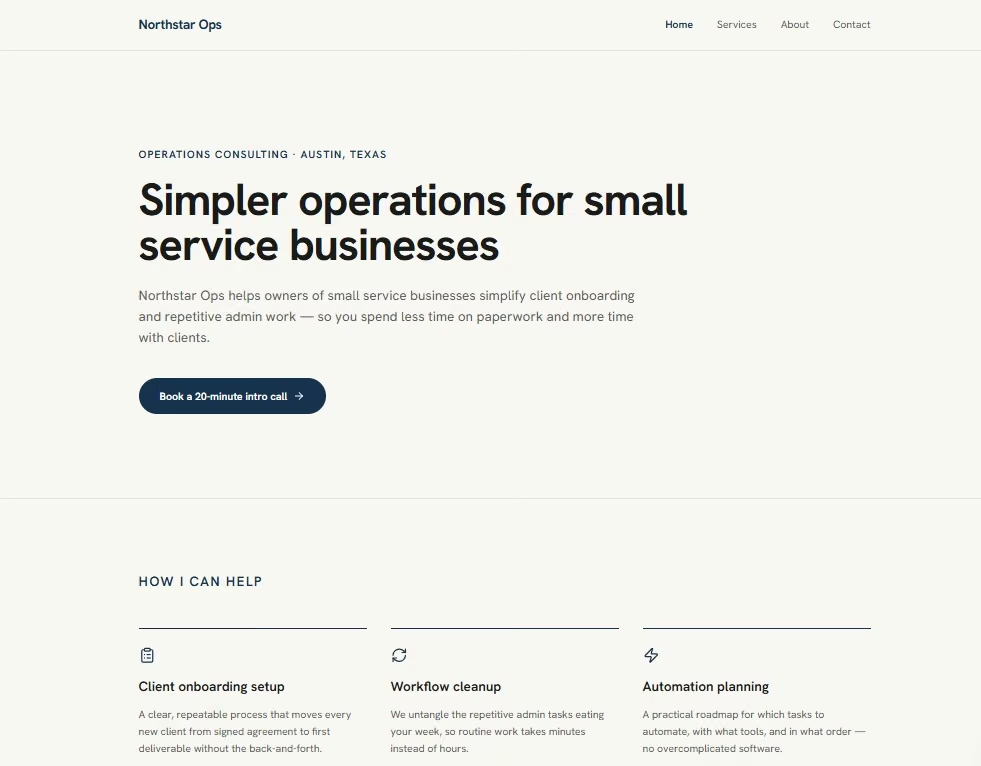
For example, you might ask for a four-page consulting site with Home, Services, About, and Contact pages. The builder can create that structure, write a first draft, and add the main page elements.
You then review what it made. If something needs changing, you edit it or give the AI another instruction.
3. What is the difference between an AI website builder and a traditional website builder?
The difference is where the first version comes from. A traditional website builder asks you to pick a template and arrange the sections yourself. An AI website builder creates the starting structure from your description.
That changes where you spend your time. You can move into reviewing copy, design, and functionality sooner instead of building each page from an empty canvas.
4. Are AI website builders worth using?
Yes, an AI website builder is useful when you want to get a small or medium website started quickly, and you’re willing to review the result.
I find them most useful for getting past the blank page. The first draft gives you something concrete to react to. You can spot weak copy, missing sections, and design choices much faster once they’re on a screen.
For a complex website with unusual workflows, expect more rounds of building and testing.
5. Can I use an AI website builder for a business website?
Yes. An AI builder works well for a business site when it supports the pages and actions your customers need.
Start with the real job of the website. A real estate agent may need listings, a clear bio, and a way to book a viewing. A contractor may need service areas, examples of past work, and a quote-request form.
Keep the first version focused. You can add extra features once you know why your visitors need them.
6. What types of websites can AI website builders create?
AI website builders can create portfolios, business websites, restaurant sites, landing pages, blogs, online stores, booking sites, and other multi-page websites.
Your builder needs to support the functions your site depends on. A consultant might need a contact form. A restaurant may need menu and booking pages. An online store needs products, checkout, and payment tools.
Emergent supports full pages and features such as forms, booking flows, lead capture, login pages, and interactive components.
AI Website Building and Editing Questions
7. Do I need coding skills to use an AI website builder?
No. You can build a website with many AI website builders without writing code.
You still need to make decisions. You’ll tell the builder what the website should do, review what it creates, and explain the changes you want.
Coding knowledge becomes useful when you want bigger technical changes or need to diagnose a complex problem. It isn’t a requirement for a simple first website.
8. What should I include in my first AI website prompt?
Your first AI website prompt should include six things: your business, your audience, your goal, the pages you need, a design direction, and any limits on what the AI should invent.
A useful starting structure:
- Business: What do you do?
- Audience: Who is the website for?
- Goal: What should a visitor do?
- Pages: Which pages do you need?
- Style: What should the site look and feel like?
- Limits: What shouldn’t the AI invent or add?
If the blank prompt box is slowing you down, Emmy is Emergent’s built-in chat assistant. You can describe a rough idea, answer its follow-up questions, and have it turn the conversation into a build-ready prompt. Emmy is free, doesn’t consume credits, and is available from the chat icon when you use Emergent in a desktop browser.
If you're ready to try it, our how to build a website with AI guide walks through the whole process.
9. Can I edit an AI-generated website after it’s built?
Yes. Editing is part of the normal AI website-building process.
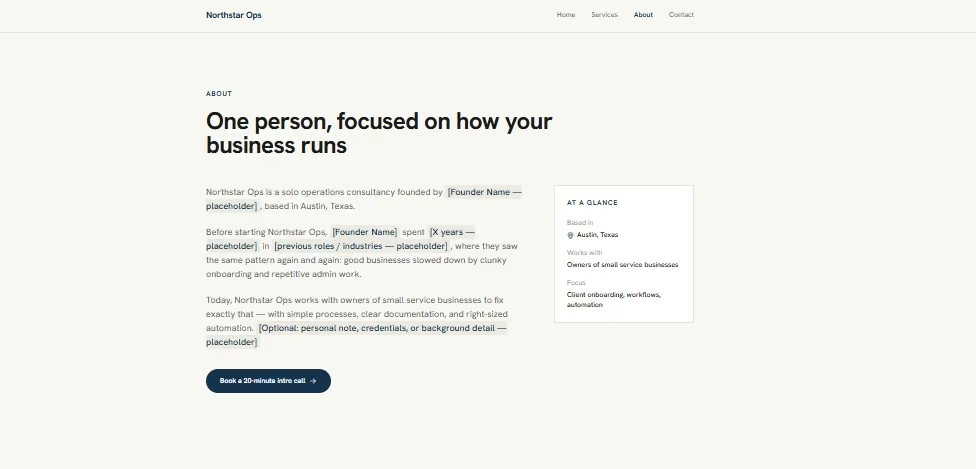
You can change text, images, colors, layouts, sections, and pages. The exact method depends on the builder. Some give you a visual editor. Prompt-based builders let you describe the change in plain English.
When I reviewed Northstar Ops, I corrected placeholder content, changed an inaccurate “Book” call to action, and removed a response-time promise that I hadn’t supplied. The site structure stayed intact.
10. Can AI website builders write website copy and create images?
Yes. Many AI website builders can create headlines, service descriptions, page copy, and images.
Read the generated copy before it goes live. AI can fill gaps with details you never supplied. Pay close attention to prices, dates, business claims, testimonials, locations, response times, and contact information.
I’d treat the generated copy as the first draft. Your knowledge of the business is what makes the final version accurate.
11. How long does it take to build a website with AI?
In my Northstar Ops build, a usable four-page first version took about 15 minutes. Editing, testing, and publishing brought my active build time to about 30 minutes.
Your time will change with the number of pages, the features you add, and how many revisions you make.
Mobile, Search, and Publishing Questions
12. Are AI-generated websites mobile-friendly?
Usually, yes. AI-generated websites are normally responsive, meaning they adjust to different screen sizes. Google recommends responsive web design for mobile-friendly sites.
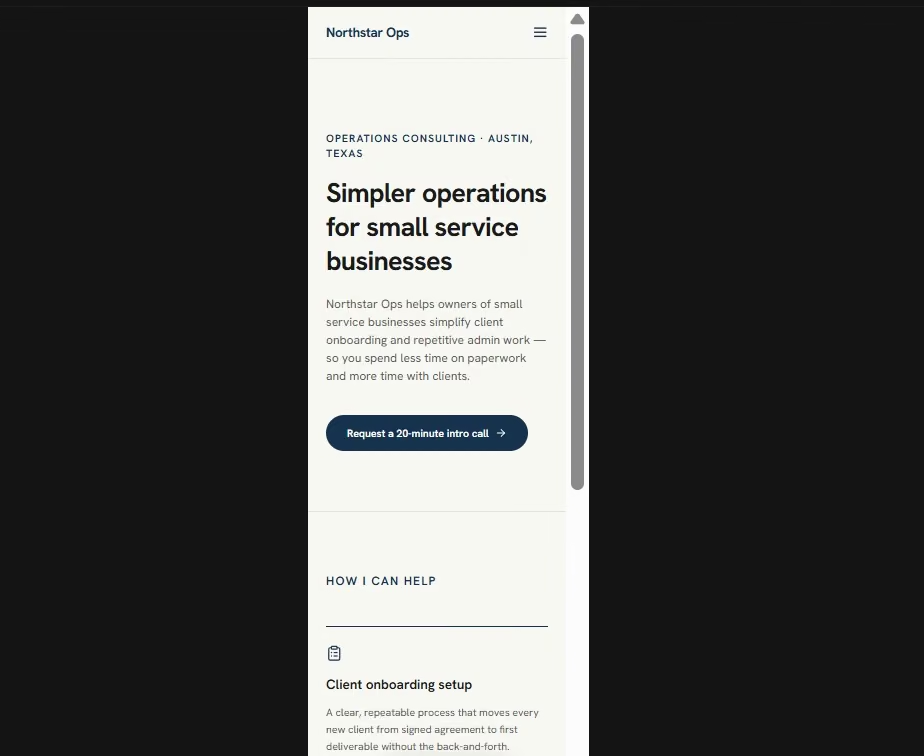
My Northstar Ops pages already fit 360px, 375px, and 390px screens without sideways scrolling. The mobile check still found small usability fixes for menu links, footer links, tap areas, and form-field text.
That’s why I wouldn’t stop at “responsive.” Tap the menu, press the buttons, fill in the form, and read each page on a real phone.
13. Can an AI-built website rank on Google?
Yes. AI-built websites can rank in Google Search. The way the website was created doesn’t give it a ranking advantage by itself.
Strong search performance still depends on useful content, clear pages, crawlable information, good mobile performance, and a site that serves the reader well. You can also track that performance in an SEO dashboard built with AI. Google’s own guidance asks creators to focus on helpful, reliable, people-first content, whether or not AI helped create it.
Check your page titles, search descriptions, headings, links, image alt text, and content before publishing.
14. Can an AI website builder publish my website for me?
Yes, some AI website builders handle publishing inside the same platform.
With Emergent, you can build the website, refine it through prompts, and deploy it to a live URL on a paid plan. You can keep updating the site after launch from the same project.
After publishing, I’d still open the public URL on a phone and a laptop. A live site can behave differently from the preview.
AI Website Builder Cost, Hosting, and Choice Questions
15. How much does an AI website builder cost?
Emergent has a Free plan at $0/month with 10 monthly credits, which covers trying the builder but not publishing. Deployments start on Standard, at $20/month ($17/month billed annually) with 100 credits per month. Keeping a site deployed also uses 50 credits a month.
My previous Northstar Ops website used 13 credits to build, from the first prompt to the finished pages.
16. Do AI website builders include hosting and custom domains?
Most do. Hosting keeps your website available online, and a domain name gives it an address such as yourbusiness.com.
Emergent can deploy a website to a live URL and supports custom domains on its paid plans. Standard also includes private project hosting.
Check domain and hosting terms before choosing a builder if you already own a domain or plan to move the site later.
17. How do I choose the best AI website builder?
Choose a builder based on what you want to create and how you want to work after the first draft.
Check these areas:
- Editing: Can you change the generated result easily?
- Website type: Does it support the site you need?
- Publishing: Can you get the finished site online without a long setup?
- Mobile use: Does the site work well on smaller screens?
- SEO controls: Can you edit titles, descriptions, URLs, and page content?
- Cost: Does the plan give you enough usage for building and revisions?
- Ownership: Can you keep or export your work if that’s important to you?
The right builder is the one that fits the website you’re trying to publish and gives you a workflow you’ll keep using.
Once the questions are settled, the next step is picking one. Our best online website builders guide compares six.
Final Take on AI Website Builder Questions
AI website builders can shorten the path from an idea to a website you can click through. The first version is the start of the job.
Give the AI a clear brief. Then do the review the AI can’t do for you, because you’re the one who knows what’s true about the business.
On Northstar Ops, that review is what caught the placeholder copy and the promise I never made.

Most AI app builders stop at prototypes. Emergent creates production-ready apps you can actually launch.
- Production-ready apps
- Web & mobile apps
- Deploy in minutes







