



A good first homepage can fool you. The real test starts when you ask the website to take a reservation, save it, apply a business rule, protect a staff page, survive an edit, and still work on a phone.
I tested those jobs on Emergent with Brims & Stone, a fictional neighborhood restaurant. The first preview arrived in about eight minutes. A preview failure cleared on its own after about three minutes.
After testing reservations, mobile layout, staff access, editing, and publishing, the full process took 30 minutes and used 30 credits. Emergent’s Free plan includes 10 monthly credits and does not include deployments, so publishing a test like this one needs a paid plan.
That test helped me narrow this list to seven AI website builder features you should check before choosing a platform.
What Is an AI Website Builder?
An AI website builder creates a website from instructions you write in plain language. You describe the business, pages, style, and visitor actions you need. The AI creates a first version for you to review and edit.
The category now covers a wide range of tools. Some focus on design and content. Others can create forms, booking flows, private pages, and dashboards as part of the website.
Emergent takes the second approach. Its AI website builder can generate full pages, forms, tables, booking flows, login pages, dashboards, design changes, and a live site from prompts.
For Brims & Stone, that meant the restaurant website could do more than display a menu. A guest could send a reservation request, and staff could manage that request from a private dashboard.
How I Tested These AI Website Builder Features
I gave Emergent one project with a clear business job. Brims & Stone needed a homepage, menu, hours and location, a reservation form, saved requests, and a staff dashboard.
Here was the main prompt:
“Build a mobile-friendly website and reservation app for a fictional neighborhood restaurant called Brims & Stone. Give it a warm, modern design with a homepage, menu, hours and location, and a reservation request form. The reservation form should collect the guest's name, email, phone number, date, time, party size, and optional notes. Save submitted reservations to a simple admin dashboard where staff can view each request and mark it as New, Confirmed, or Declined.”
I also asked for simple password access for staff, realistic fake restaurant details, and no payments or outside services.
On my build, Emergent came back with four follow-up questions about staff access, the visual style, reservation rules, and homepage content. I chose a cream, charcoal, and burnt-orange design with serif headlines.
The first preview appeared in about eight minutes. The preview briefly failed while the remaining files were being finished. It was working about three minutes later.
I then made one focused hero edit, submitted a normal reservation, tested the nine-person rule, checked the staff dashboard, tried an incorrect login, opened the mobile view, and published the site. The whole test took 30 minutes and used 30 credits in total.
7 Key AI Website Builder Features
1. Prompt-to-Site Generation
Emergent turned one detailed prompt into the main site structure, navigation, restaurant copy, menu, reservation form, and staff area.
That first result is important because it shows how well the builder understands context. If you ask for a local restaurant, you want restaurant pages and useful visitor actions. You shouldn't have to translate your idea into design or coding terms first.
A clear brief still helps. Tell the AI what you're building, who will use it, which pages you need, and what visitors should be able to do. Those details also make the rest of the process easier when you build a website with AI.
Emergent also has Emmy, its built-in web chat assistant. Emmy can ask follow-up questions and turn a rough idea into a build-ready prompt. It's free to use and doesn't consume credits. Emmy appeared when I started my test and offered help.
Emmy is web-only for now. It doesn't read your code or your account history, and it works from the context of your current project.
2. Design Control After the First Draft
Your first design will rarely be the final one. Emergent let me ask for one small change in plain language after the site was already working.
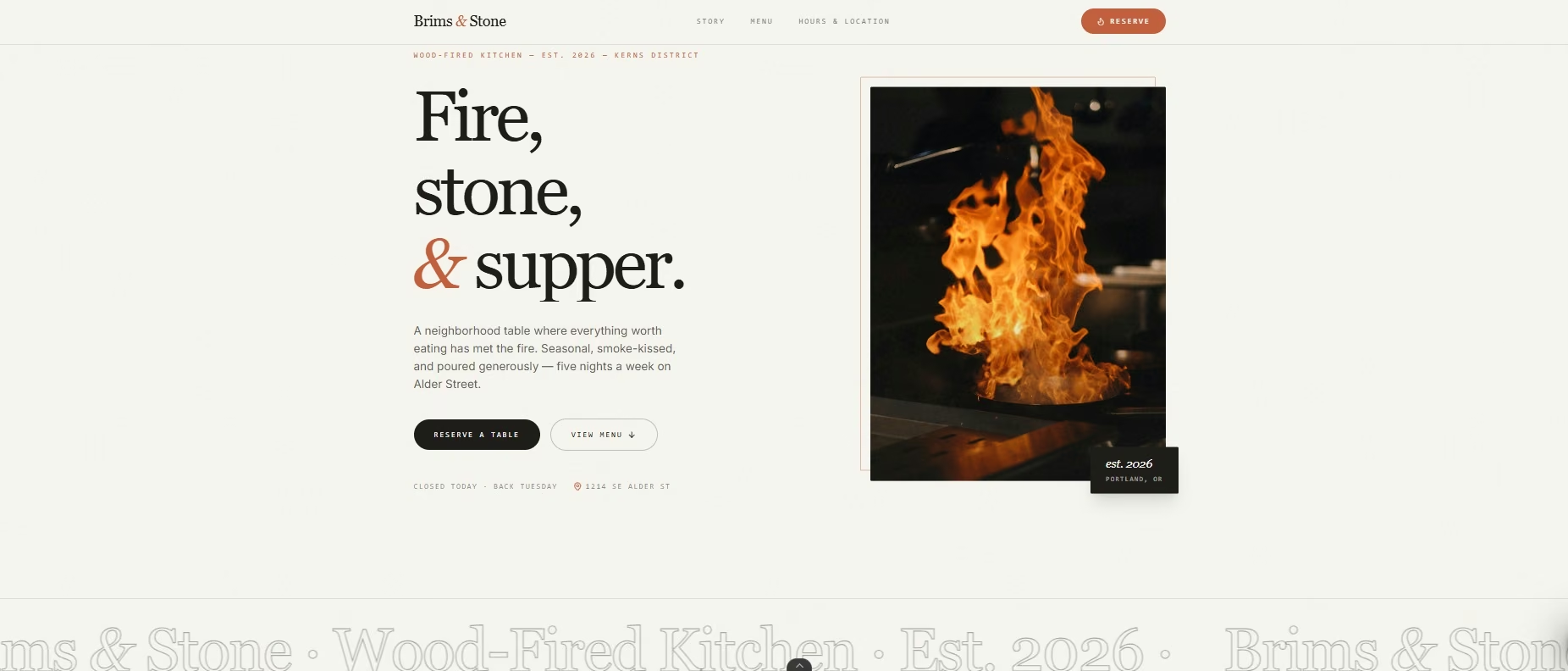
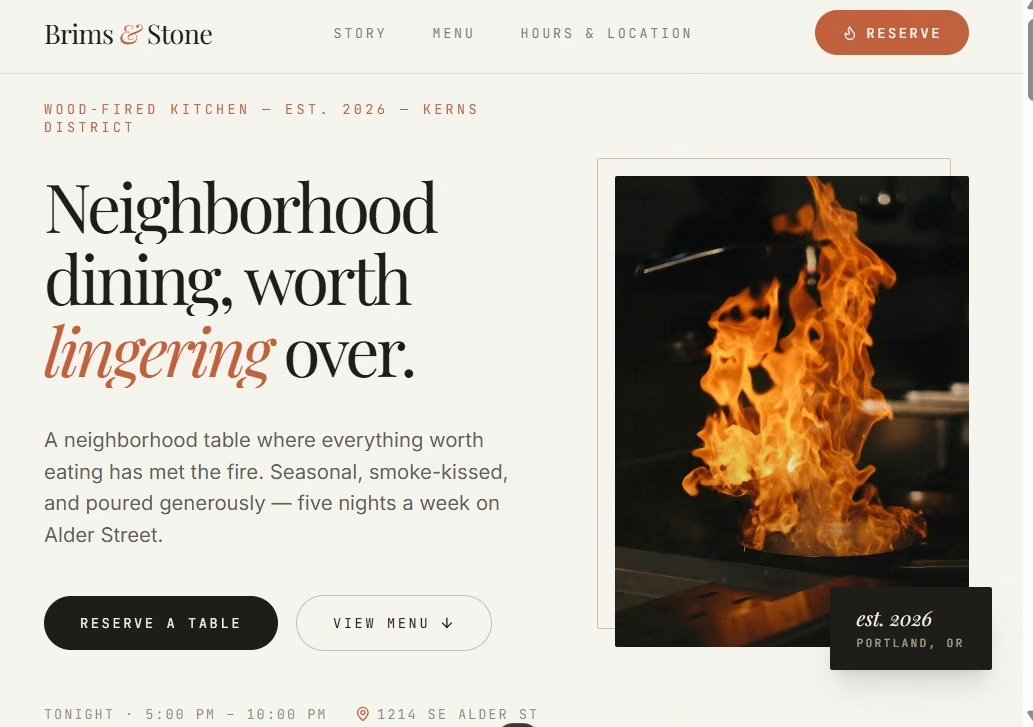
The original hero read “Fire, stone, & supper.” I changed it to “Neighborhood dining, worth lingering over.” The new copy fit the existing type, colors, image, and layout.
That test was more useful than asking for a full redesign. A good editing workflow should let you target one section and keep the rest of your work in place.
This is also where generic AI design starts to show. In the r/vibecoding thread “What’s the best AI for building websites?”, the original poster said the tools they had tried looked “so obviously AI generic.” Other replies recommended more detailed prompts and more editing after the first result.
Give the builder a clear style, then keep refining the parts that still feel generic.
3. Mobile-Ready Design
A website has to remain usable on a small screen. Emergent created a separate mobile layout without another design prompt from me.
The desktop navigation became a compact menu. Text and images stacked into one column. The story sections stayed readable, and I didn't see horizontal overflow.
Check the action that brings in customers too. For a restaurant, that means the reservation form. For a consultant, it could be a contact form. For a local contractor, it might be a quote request.
Open the real mobile preview and use the site. Google now uses the mobile version of a site’s content for mobile-first indexing, so the phone version also needs the same useful content and working actions as the desktop site.
4. Forms and Business Rules
Forms become far more useful when they can follow your business rules. Emergent built the reservation form with fields for name, email, phone number, date, time, party size, and notes.
A normal reservation for four guests went through and produced a confirmation screen.
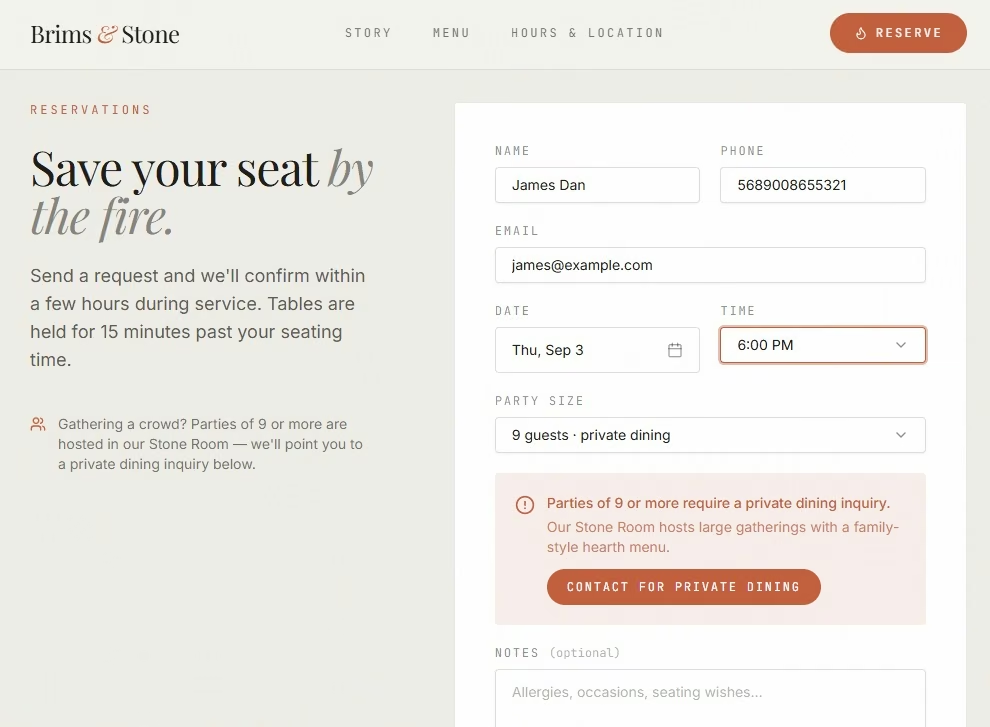
I also told the builder that parties of nine or more needed a private dining inquiry. When I selected nine guests, the form displayed that message and directed the guest toward private dining.
This kind of rule is useful well beyond restaurants. A consultant could route large projects to a different intake form. A contractor could send certain job types to a specialist. A property manager could ask different questions based on the type of request.
Emergent supports contact forms, booking flows, lead pages, private areas, and dashboards that you can add through prompts.
For restaurant sites specifically, read our best restaurant website builders guide.
5. Saved Data and Staff Workflows
If your website collects a request, check what happens next. Emergent saved the Brims & Stone reservation and displayed it in the staff dashboard.
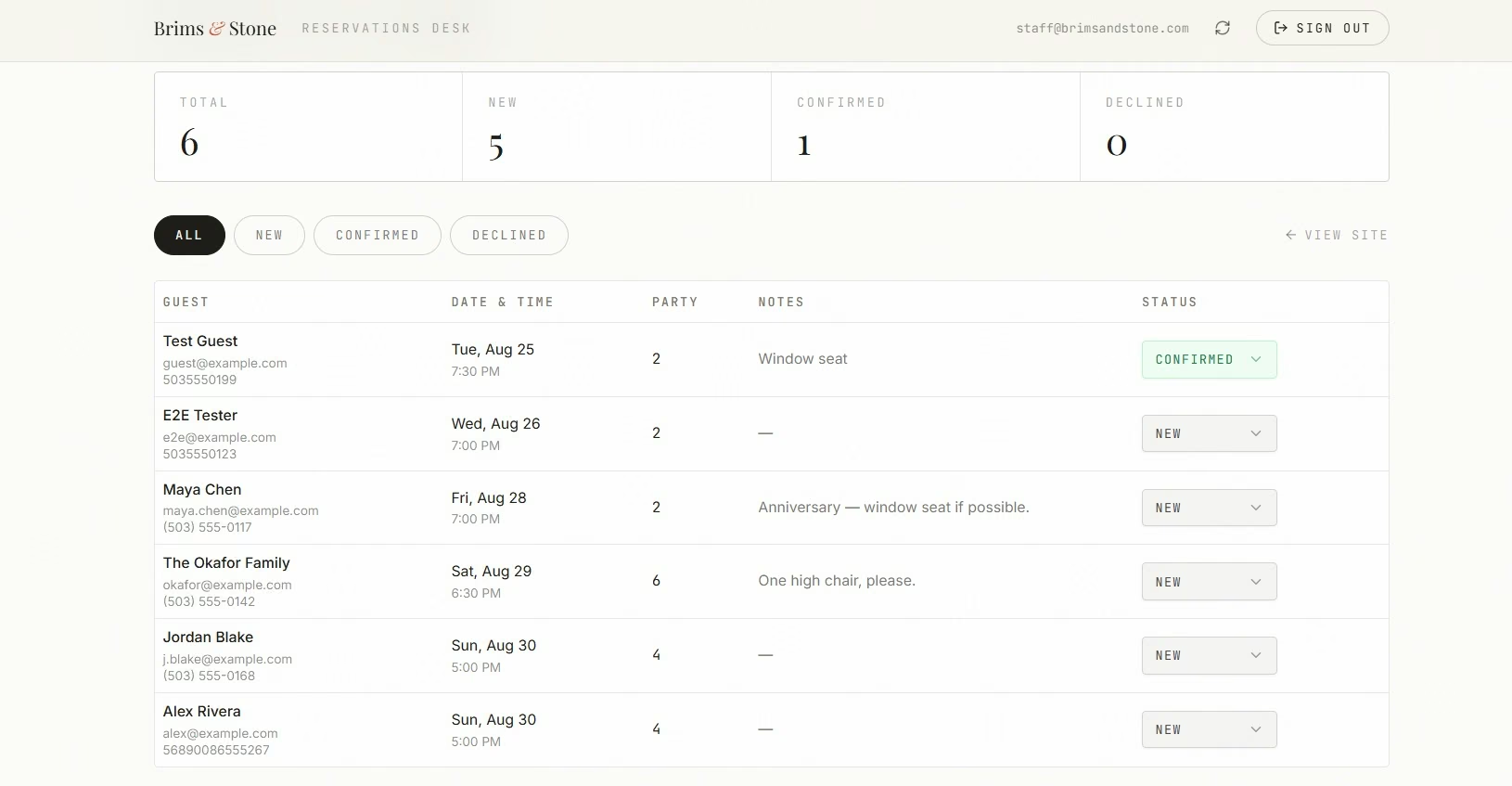
The dashboard showed the guest, contact details, date, time, party size, notes, and current status. Staff could mark requests as New, Confirmed, or Declined.
I changed a test reservation to Confirmed and refreshed the dashboard. The change stayed in place.
I also tried logging in as staff with the wrong password. The page returned an “Invalid email or password” message and kept the dashboard closed.
That gives a small business a complete customer-to-staff flow within a single project. The same idea works for quote requests, applications, consultation requests, and other forms where someone needs to review what comes in.
6. SEO and Easy Content Updates
Search engine optimization (SEO) starts with clear page titles, useful content, descriptive images, and pages that search engines can understand. Google’s SEO Starter Guide covers these basics in plain language.
Emergent lets you update page content through prompts, including page titles, headings, descriptions, and other on-page copy.
On Brims & Stone, I asked Emergent to rewrite the homepage title and description and tighten the H1 around neighborhood dining. The change applied to the live page without a rebuild, which matters because search copy changes over time.
Before launch, check the page title, description, headings, image text, business details, and links yourself. AI gives you a fast draft. Your review catches wrong details and weak copy.
7. Publishing and Future Changes
The final test is simple. Can you put the finished site online and keep working on it later?
Emergent published my Brims & Stone project after I finished the form, staff, mobile, and editing checks. I didn't need a separate publishing tool for that final step.
Emergent can publish a site to a live web address and supports custom domains. You can also return to the project and add pages, forms, booking flows, login pages, and other features through prompts.
Think about your next six months when you test this feature. A one-page site may need a booking form later. A service business may add another location. A consultant may add a client area.
Your builder should give you a clear path for those changes.
Benefits of Strong AI Website Builder Features
The biggest benefit I saw was speed across the whole job. Brims & Stone went from my first prompt to a live site in 30 minutes. That time included a preview fix, a copy change, reservation tests, staff checks, a mobile check, and publishing.
The second benefit is fewer handoffs. The public website and the staff reservation flow lived in the same project. I didn't have to connect a separate form builder or create a second admin tool.
There’s also a real-business example. In Emergent’s SSF Detail case study, the 15-person South Florida car detailing company rebuilt its website with Emergent in four days. SSF Detail later reported a 35% increase in lead form submissions compared with its old WordPress site.
That result comes from one company. Your traffic, offer, copy, and site quality will shape your own results.
If you're building for a small business, our AI website builders for small businesses guide narrows the field.
Limitations of AI Website Builder Features
AI website builders still need direction and review. My test exposed one issue during the initial build, when the preview failed before the remaining files were finished. It recovered in about three minutes.
Keep an eye on these three areas:
- Prompt quality: A vague request gives the builder more room to guess. Name your pages, audience, design direction, forms, and business rules before the build starts.
- Testing: Click the real buttons and submit the real forms. Check the phone view. Try the private area. A page can look finished while one important action is broken.
- Human review: Read every piece of generated copy before launch. Check names, prices, claims, contact details, hours, and any rule that affects a customer.
AI Website Builder Checklist
Before you choose a platform, run these seven checks on a small real project:
- First draft: Did the builder understand the business and create the pages you asked for?
- Focused edit: Can you change one section without disturbing the rest?
- Mobile view: Does the navigation, text, and layout stay easy to use on a phone?
- Customer action and business rules: Can someone complete your main form or request, and does it respond to a rule you set, such as sending a large party somewhere else?
- Saved requests: Once someone submits, can you and your staff find the request, review it, and change its status?
- Search basics: Can you change page titles, headings, and descriptions after the build?
- Launch: Can you publish the site and return later to make changes?
Once you know what to look for, our best online website builders guide covers which platforms deliver it.
How Emergent Handles Deeper Website Builds
Emergent fits a website project where visitors need to do something after they land on the page. You can describe pages, forms, booking flows, private areas, dashboards, and future changes through conversation.
My Brims & Stone project covered that type of workflow. A guest could request a table. A party of nine received a different path. Staff could sign in, find reservations, and change their status.
Publishing worked on the final check.
If your first project is still fuzzy, Emmy can help turn the idea into a clearer prompt before you start spending build credits.
Start building with Emergent.
Final Takeaway on AI Website Builder Features
The most useful AI website builder features help you move from an idea to a site people can use.
Start with prompt quality and design control. Then check mobile pages, forms, business rules, staff workflows, SEO controls, and publishing.
Most of all, test the real path your customer will take. A working reservation, quote request, booking, or contact flow tells you more than a polished homepage.

Most AI app builders stop at prototypes. Emergent creates production-ready apps you can actually launch.
- Production-ready apps
- Web & mobile apps
- Deploy in minutes







