



Most customer relationship management systems work until your sales process stops looking like the vendor’s demo. Then one field moves into a spreadsheet, approvals happen in Slack, and renewal dates end up in someone’s calendar.
I reviewed six leading no-code CRM builder platforms against the same business brief. I compared how each one handles contacts, pipelines, permissions, automation, reporting, integrations, pricing, and future changes.
The right choice depends on whether you’re wrapping an existing database, building an agency portal, creating a mobile tool, or turning a specific workflow into a custom product. This guide gives you one clear recommendation for each path.
Why Build a CRM Instead of Buying One?
Build a CRM when your workflow is the product.
A traditional CRM is the faster choice when you need ordinary contact records, deal stages, email tracking, and sales reports. HubSpot, Pipedrive, or another ready-made product already solves that job.
A no-code CRM builder makes sense when your process includes industry-specific records, unusual handoffs, client logins, approval steps, service delivery, subscriptions, or data that belongs in several connected tables.
The non-technical founder in this Reddit thread wanted a CRM for life insurance agents. The product needed dialing, automated messages, advertising workflows, several subscription levels, room to scale, and a path for developers to join later. That is an application design problem, not a matter of renaming three fields in an off-the-shelf CRM.
Use these questions to separate a real build requirement from feature envy:
- Does your process have stages a normal sales CRM cannot represent cleanly?
- Do clients, partners, or contractors need their own restricted views?
- Will the CRM trigger work in other systems?
- Do you plan to sell access to the CRM as software?
- Will a developer need access to the code or data later?
- Can you explain how customer data will be exported if you leave the platform?
When the answer is no across the board, buy a traditional CRM. When several answers are yes, build around the workflow you actually run.
How I Researched These No-Code CRM Builders
This is a source-based evaluation, not a claim that I completed six undocumented product tests.
I reviewed each platform’s official CRM or sales page, current pricing page, plan limits, data connections, permissions, automation options, publishing model, and independent review profile. I also reviewed the top-ranking CRM-builder pages and the Reddit discussion to see what non-technical founders are trying to solve.
I used this CRM brief as the common evaluation lens:
“Build a CRM for a 10-person service business with contacts, companies, a six-stage deal pipeline, lead capture forms, follow-up tasks, role-based access, a revenue dashboard, email or Slack notifications, and CSV export.”
The six deciding factors were:
- Data structure: Can you connect contacts, companies, deals, activities, and projects without duplicating records?
- Access control: Can sales reps, managers, clients, and administrators see different information?
- Automation: Can the CRM assign tasks, send alerts, and update records when a deal changes?
- Interface: Can your team use it without learning how the underlying database works?
- Real cost: What drives the bill: seats, app users, records, workflow runs, credits, or server workload?
- Handoff: Can you export data, connect other systems, or involve developers later?
6 Best No-Code CRM Builders: Quick Comparison
The table shows each tool’s free option and first relevant paid plan. Monthly pricing appears first, followed by annual pricing in parentheses.
1. Emergent: Best for a Fully Custom CRM Built Through Conversation

What It Does: Emergent helps you design, build, refine, and launch a custom web or mobile application through conversation.
Best For: Founders and operators whose CRM needs unusual records, logic, permissions, or workflows that portal-style builders cannot represent cleanly.
Emergent starts with your operating process rather than an existing spreadsheet or fixed CRM template. You describe the contacts, pipeline, dashboards, alerts, user roles, and integrations you need, then refine the application through follow-up instructions.
That distinction matters when the CRM needs to extend past sales.
A property-management CRM might connect owners, tenants, buildings, maintenance requests, contractors, leases, and renewal dates. An agency might connect prospects, signed clients, briefs, deliverables, approvals, invoices, and account health. Those are related business systems, not one flat deal board.
The Standard plan supports web and mobile apps, private project hosting, 100 monthly credits, extra-credit purchases, and GitHub integration.
That gives you a stronger handoff route than a closed visual portal when a developer eventually needs to inspect or extend the project. Emergent’s pricing is based on build credits, so a small internal tracker and a detailed multi-role CRM will not consume the same amount.
In one Emergent case study, a global industrial equipment manufacturer with more than 3,000 employees across four continents built a custom CRM in days. The new system connected dealer relationships, long sales cycles, site coordination, warranties, and after-sales service, replacing a six-figure annual CRM that did not match the company’s operating model.
Key Features
- Conversational building: Describe the CRM and request changes in normal language instead of configuring every screen manually.
- Custom workflow logic: Build processes around your sales, delivery, service, or renewal model.
- Web and mobile support: Create interfaces for office staff and people working away from a desk.
- Private project hosting: Move beyond a public experiment on the Standard plan.
- GitHub integration: Give a technical contributor a clearer path into the project.
- Custom agents and higher compute: Use the Pro plan for more demanding builds and automation.
Pros and Cons
Pros
- Best option here when your CRM must match a specific business process.
- You can begin from a written operating brief instead of a prepared database.
- Web, mobile, hosting, and GitHub options create a broader build path.
- The free plan lets you evaluate the workflow before paying.
Cons
- Credit usage makes the final build cost less predictable than a fixed database plan.
- A simple Airtable portal does not need this much flexibility.
- Customer data, permissions, payments, and production records still require human review.
- Repeated generation can take longer than editing a mature template.
What Reviewers Say
TechRadar’s July 2026 review praised Emergent for asking clarifying questions, presenting choices, and producing an attractive, usable application. Its test app took 17 minutes to generate, which the reviewer found slower than the competing tools used for the same task.
That is a useful tradeoff to understand: the conversational process gives you more guidance, but it is not always the fastest route to a first screen.
Pricing
Emergent offers Free at $0/month with 10 monthly credits, Standard at $20/month ($17/month billed annually) with 100 monthly credits, and Pro at $200/month ($167/month billed annually) with 750 monthly credits. Business and Enterprise plans use custom pricing.
Bottom Line
Emergent is the pick when the CRM has to become purpose-built business software. Choose Softr, Noloco, or Glide instead when you already have clean data and mainly need a controlled interface on top of it.
Also read our guide on how to build a CRM to see what it takes to go from operating brief to working product.
2. Zite: Best for a Custom CRM on a Visible, Real Database

What It Does: Zite lets you create business applications, databases, and workflows through prompts, then inspect and edit each part visually.
Best For: Non-technical teams that want AI to build a custom CRM without hiding the database or workflow logic behind a black box.
Zite gives you the speed of an AI app builder while keeping the underlying system visible. You can describe the CRM you need, including contacts, companies, deals, tasks, dashboards, permissions, and notifications. Zite generates the application and its database structure from that description.
The database is a core part of the product rather than a hidden generated system. Zite’s built-in database is powered by PostgreSQL and presents records through a spreadsheet-like interface. You can inspect tables, create linked records, change fields, filter views, import or export CSV files, and connect the database through its REST API and webhooks.
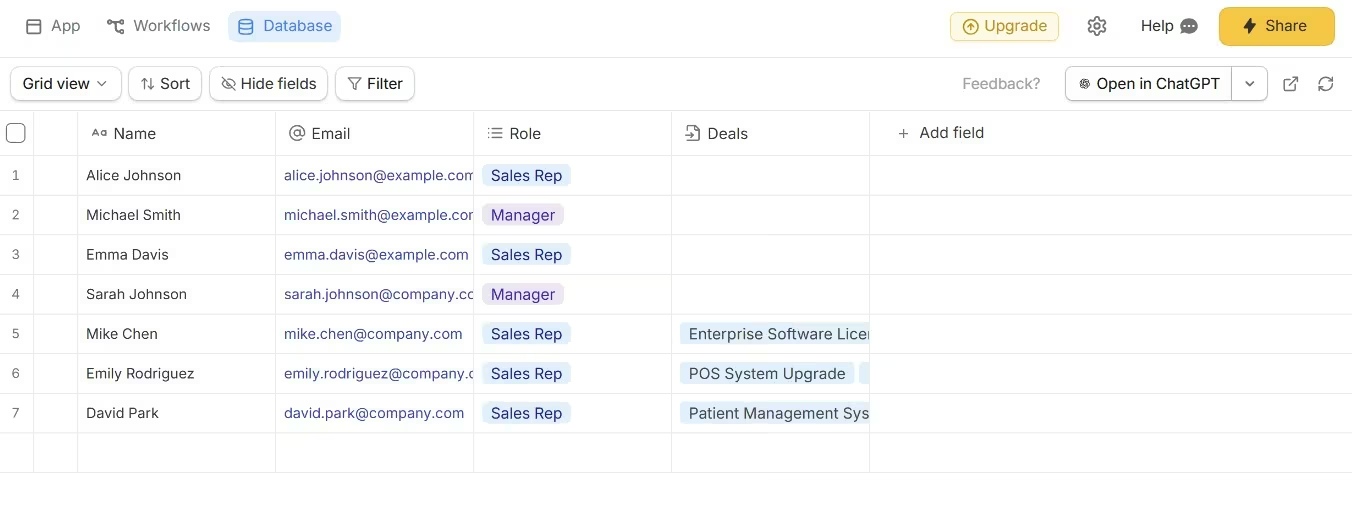
That visibility is important in a CRM. Your team can open the Companies table and see how it connects to Contacts and Deals. You can check whether each opportunity has the correct owner, inspect the data behind a dashboard, and fix a relationship without asking a developer to find the relevant file or database query.
Zite also exposes the app's logic through visual workflows. Instead of trusting that an AI-generated automation works, you can inspect its branches, review previous runs, see the inputs and outputs from each step, and test it before it goes live.
That gives an operations manager more control over processes such as lead assignment, follow-up reminders, deal-stage notifications, and account handoffs.
AI Fields make the database more useful than a passive list of customer records. You can ask a field to categorize an incoming lead, summarize notes, assign an urgency score, research a company, or enrich an account with current web information. AI Fields can run automatically when a record is added or when referenced data changes.
For example, a consulting agency could create an AI Field that reads a lead’s message and assigns an industry, service category, and priority score. Another field could research the company domain and add estimated company size. The sales team still sees and controls the resulting values inside the database.
Zite also avoids per-user pricing. Its Free, Pro, and Business plans include unlimited users, editors, applications, and databases. That makes it easier to roll the CRM out across sales, operations, and management without paying for every person who needs access.
Key Features
- Real built-in database: Work with actual tables, fields, relationships, formulas, records, views, and permissions through a familiar grid.
- AI-generated CRM structure: Describe your process and let Zite create the initial application, database tables, and relationships.
- AI Fields: Categorize, score, summarize, enrich, assign, or research records automatically.
- Visible workflows: Inspect application logic as a visual flow, test it, and review past runs.
- Database Agent: Ask questions about records, create tables and fields, analyze trends, and update data from beside the table.
- Unlimited users: Share applications and databases without adding a charge for each team member.
- Import and integration options: Import CSV files or data from systems such as Google Sheets and Airtable, then connect external services through workflows.
Pros and Cons
Pros
- The database remains visible and editable instead of sitting behind generated code.
- Spreadsheet-like editing makes the CRM approachable for non-technical teams.
- AI Fields can enrich and classify leads where the records already live.
- Visual workflows let you understand and troubleshoot CRM automations.
- Every plan includes unlimited applications, databases, users, and editors.
- The free plan includes 5,000 database records and 1,000 monthly workflow runs.
Cons
- AI building, the Database Agent, and AI Fields consume credits.
- Workflow runs have monthly limits separate from AI credits.
- Pro includes only one custom domain; unlimited custom domains require Business.
- Independent review coverage is still limited compared with Airtable, Softr, Glide, or Bubble.
- Advanced security, larger limits, and some integrations require higher plans.
What Reviewers Say
Zite’s independent review footprint is still small. G2 currently lists one Zite review, with a 4.5 out of 5 rating.
The reviewer praised the low-maintenance connection between website forms and an enterprise resource planning system, particularly the cleaner data and reduction in manual spam cleanup. One review is not enough to establish broad user consensus, so treat it as an early signal rather than a settled reputation.
Pricing
Zite offers Free at $0/month, Pro at $19/month ($15/month billed annually), Business at $69/month ($55/month billed annually), and Team at $300/month ($250/month billed annually). Enterprise pricing is custom.
Pro includes 100 monthly credits, 100,000 database records, 5,000 monthly workflow runs, and one custom domain. Business includes 200 monthly credits, 250,000 records, 50,000 workflow runs, advanced AI models, and unlimited custom domains.
Bottom Line
Zite fits teams that want AI to build the first version, but still need to see and control the database and workflow logic. It fits non-technical teams that have outgrown spreadsheets but do not want customer records trapped inside an opaque, generated application.
Choose Emergent when the CRM requires broader custom product behavior and a conversational path across the full build. Choose Airtable only when you primarily want a mature database workspace and do not need the AI-built application layer.
3. Softr: Best for Building a CRM on Existing Data

What It Does: Softr turns databases and business data into portals, internal tools, dashboards, forms, and CRM applications.
Best For: You already keep customer data in Airtable, Google Sheets, HubSpot, Notion, SQL, or another supported source and need a usable interface quickly.
Softr is the strongest pick for a CRM that begins with data you already trust. Connect the source, then add lead forms, contact pages, account views, a kanban pipeline, dashboards, and actions.
Its official CRM setup supports lead capture, contact and account records, workflow triggers, reporting dashboards, AI-assisted enrichment, logins, and role-based permissions. Softr can also store records in its own database when you do not have an external source.
This structure works especially well for a client portal attached to a CRM. Your internal team can see the full account history while each customer sees only their own projects, requests, files, or updates. That is harder to manage in a spreadsheet and unnecessary to custom-code when Softr’s permission model already fits.
The tradeoff is design and application logic. Softr gives you blocks, views, data relationships, workflows, and an AI builder, but the product still has an opinion about how business applications should be assembled.
That helps you launch faster. It also creates a ceiling when you want a highly distinct product interface or unusual multi-step behavior.
Key Features
- Connected data sources: Use Softr Databases, Airtable, Google Sheets, Notion, HubSpot, SQL databases, Supabase, and other supported systems.
- Pipeline views: Move deals through visual stages and filter them by owner, value, region, or status.
- Role-based access: Give representatives, managers, partners, and clients different views.
- Forms and workflows: Capture leads and trigger record updates, notifications, or task assignments.
- Dashboards: Present pipeline value, conversion rates, revenue, or team activity.
- Mobile access: Let your team update records from a phone without building a separate interface.
Pros and Cons
Pros
- Fastest option here for wrapping an existing database in a polished interface.
- Strong combination of forms, portals, dashboards, and permissions.
- Native database support removes the need for a separate Airtable subscription.
- The free plan supports 10 app users and unlimited applications.
Cons
- Detailed design changes can require workarounds or custom code blocks.
- User, record, workflow-action, and AI-credit limits all affect the real cost.
- Basic supports default user groups, while more advanced access models require higher plans.
- It is less suitable than Emergent or Bubble for an application with unusual product logic.
What Reviewers Say
Softr holds a 4.7 out of 5 score from 720+ G2 reviews. Reviewers consistently praise its ease of use, Airtable connectivity, support, and quick setup. G2’s review summary also identifies limited customization, missing features, and price as recurring concerns.
Pricing
Softr offers Free at $0/month, Basic at $59/month ($49/month billed annually), Professional at $167/month ($139/month billed annually), and Business at $323/month ($269/month billed annually). Enterprise pricing is custom.
Basic includes 20 app users, 50,000 Softr Database records, and 2,500 workflow actions. Professional raises those limits to 100 users, 500,000 records, and 10,000 actions, while Business supports 500 users, 1 million records, 25,000 actions, and unlimited user groups.
Bottom Line
Choose Softr when your CRM is mainly a structured portal around existing business data. Move to Emergent or Bubble when the application’s behavior matters more than the database interface.
4. Noloco: Best for Agency CRM and Client Delivery
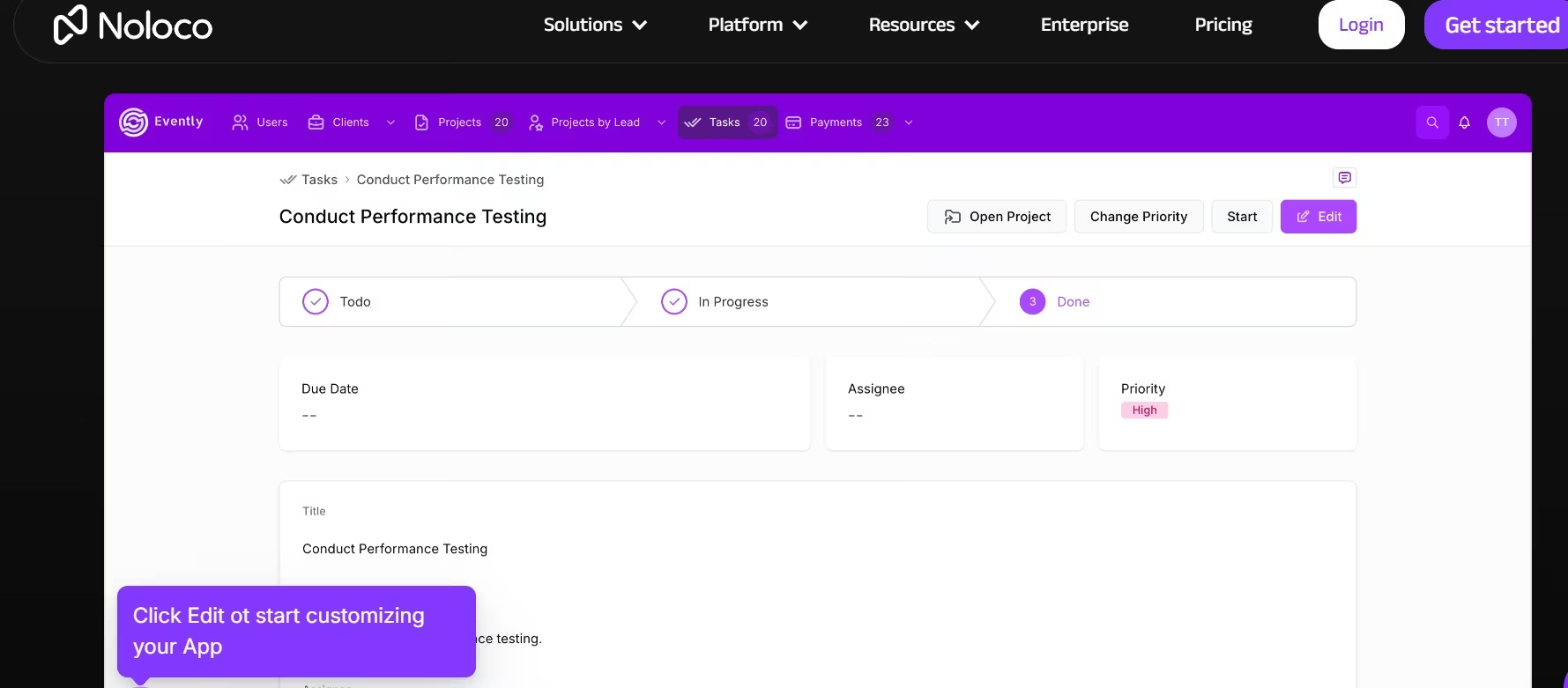
What It Does: Noloco combines CRM records, client portals, internal tools, workflows, dashboards, and detailed access controls.
Best For: Agencies and professional-service businesses that need to manage a prospect before the sale and continue managing the same account after it becomes a client.
Noloco earns its place because many agency CRMs break at the sales-to-delivery handoff. The deal closes, then the team creates a new client in a project tool, opens a folder, starts a Slack channel, and sends the customer to another portal.
Noloco lets you connect those stages. A lead can become a deal, a signed client, an active engagement, and a recurring account without losing the related contacts, files, comments, tasks, or billing context.
Its CRM product is explicitly aimed at agencies. It includes pipelines, connected client records, business-tool integrations, forms, workflows, charts, permissions, action buttons, comments, and mobile access.
The permission model is the main reason to choose Noloco over a plain spreadsheet database.
Pro includes record-level and field-level permissions, so a client can see one project while an account manager sees every project attached to the account. Business adds unlimited roles and broader data connections, including HubSpot and SQL.
Noloco is less convincing for a consumer-facing CRM product where the interface needs to feel completely unlike an internal business tool. It wins on connected operations, not visual experimentation.
Key Features
- Agency-ready CRM: Track leads, deals, clients, and service delivery in one connected system.
- Client portals: Give clients controlled access to records, files, tasks, and updates.
- Record and field permissions: Restrict entire records or individual data fields.
- Connected data: Use Noloco Tables or sync supported external systems.
- Workflows: Assign tasks, update statuses, and send notifications.
- Dashboards: Report on pipeline, delivery, workload, or account performance.
Pros and Cons
Pros
- Best match for agencies that need CRM and client delivery in one product.
- Clear separation between internal team seats and external client seats.
- Record-level and field-level controls support detailed access rules.
- Unlimited applications are included even on the free plan.
Cons
- Pro is considerably more expensive than the starter plans from Emergent, Zite, Softr, or Glide.
- Seats, clients, rows, synced rows, and workflow runs can all affect your upgrade path.
- Consumer-facing interfaces have less freedom than a custom application builder.
- Complex data relationships still require careful planning before you import records.
What Reviewers Say
Noloco has a 4.8 out of 5 score on G2, but the rating is based on 36 reviews. That is encouraging, though it represents a much smaller review pool than Softr, Glide, or Bubble.
Pricing
Noloco offers Free at $0/month, Pro at $149/month ($99/month billed annually), and Business at $319/month ($213/month billed annually). Enterprise pricing is custom.
Free includes three team seats, seven client seats, 2,000 rows, and 100 workflow runs. Pro includes 10 team seats, 50 client seats, 50,000 rows, 3,000 workflow runs, custom domains, and detailed permissions; Business raises capacity and adds HubSpot, SQL, and unlimited roles.
Bottom Line
Choose Noloco when winning the deal and delivering the work belong in the same system. Softr is the stronger choice for a more general portal, while Emergent gives you more freedom when the agency workflow needs custom application logic.
Also read our best custom business software tools guide for what else handles the full agency workflow when a portal builder isn't enough.
5. Glide: Best for Spreadsheet-Based and Mobile CRM Workflows
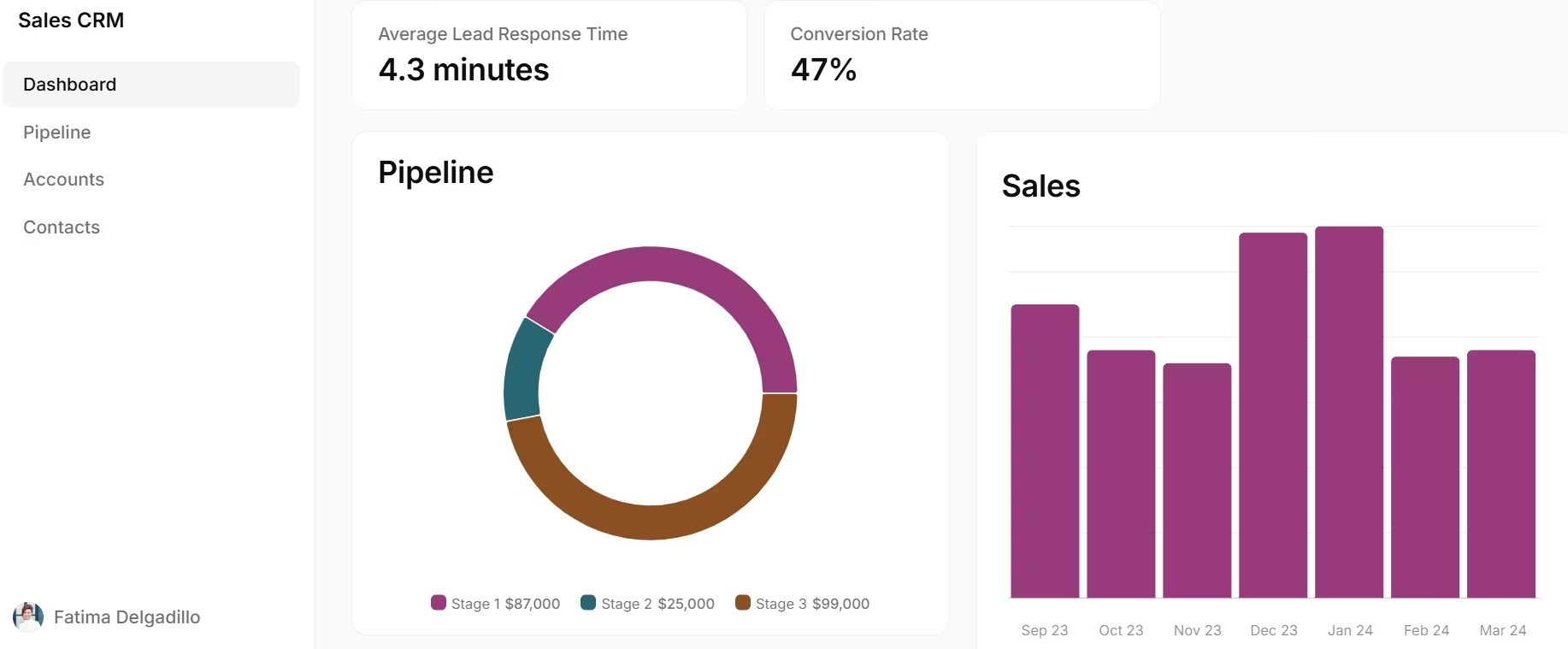
What It Does: Glide turns spreadsheet-style data into responsive internal applications, dashboards, directories, and mobile-friendly workflows.
Best For: Your contacts and deals already live in rows and columns, and sales or field staff need a cleaner way to use that information from a phone.
Glide is the best option in this list when mobility matters more than visual originality.
A roofing company could give field representatives a simple app for opening an account, logging a site visit, adding photos, updating the opportunity stage, and scheduling the next call. The office team can use the same data for pipeline reporting without asking field staff to edit a large spreadsheet.
Glide supports Glide Tables, Google Sheets imports and synchronization, CSV and Excel imports, and, on the Business plan, Airtable and Excel synchronization. Its Business tier also adds workflows, API actions, unlimited applications, 30 included users, 5,000 updates, and up to 100,000 high-scale rows.
The important Glide pricing detail is “updates.” Changes and synchronizations consume usage, so the number of records alone does not tell you what the application will cost. A CRM that imports data once behaves differently from a field app where 30 people update records all day.
Glide is much faster to understand than Bubble, but it offers less freedom over layout and behavior. Choose that trade intentionally. Your team is more likely to adopt a plain app that works on-site than a beautiful CRM that makes every update feel like desk work.
Key Features
- Spreadsheet connections: Build from Glide Tables, Google Sheets, Excel, CSV files, or Airtable.
- Mobile-friendly interfaces: Give field or sales staff a focused application instead of a raw database.
- User-specific data: Show people only the accounts or records assigned to them.
- Workflows and integrations: Trigger actions and connect external systems.
- Glide AI: Add AI-supported data and workflow features.
- Reusable components: Assemble forms, lists, details, charts, and action screens.
Pros and Cons
Pros
- Best option for teams that already think in spreadsheets.
- Strong mobile experience for field sales and service workflows.
- Fast learning curve for non-technical operators.
- The free plan supports unlimited drafts and up to 25,000 rows.
Cons
- Visual customization has a lower ceiling than Bubble or a custom Emergent build.
- Update usage and extra users can increase the final cost.
- Individual plans limit the number of published apps and included updates.
- Highly connected CRM logic can become difficult to maintain in computed columns.
What Reviewers Say
Glide has a 4.7 out of 5 rating from 800+ G2 reviews. Reviewers praise its ease of use, intuitive interface, and speed from idea to functioning application. The recurring criticism is limited customization, especially when the application needs a more distinctive visual design.
Pricing
Glide offers Free at $0/month, Explorer at $25/month ($19/month billed annually), Maker at $60/month ($49/month billed annually), and Business at $249/month ($199/month billed annually). Enterprise pricing is custom.
Explorer includes 100 personal users and 250 updates, while Maker includes unlimited personal users and 500 updates. Business includes 30 business users, 5,000 updates, unlimited applications, workflows, and spreadsheet synchronization.
Bottom Line
Choose Glide when the data already looks like a spreadsheet and the CRM needs to work well on a phone. Skip it when you are building a software product whose brand, interface, and custom behavior are part of what customers pay for.
Also read our guide on what is no-code app development to understand where spreadsheet-based tools like Glide fit in the broader build landscape.
6. Bubble: Best for Complex CRM Logic and Manual Control

What It Does: Bubble provides a visual editor, database, workflows, integrations, hosting, and web and mobile publishing for custom applications.
Best For: You are willing to learn a deeper builder because the CRM needs complex rules, a unique interface, subscriptions, or product behavior that simpler portal tools cannot handle.
Bubble gives you the most manual no-code control in this group.
You can create the database, design each page, define what happens after every action, set privacy rules, connect APIs, and control how the product behaves in different states. That is valuable when the CRM itself will be sold as software or when the workflow contains branching rules that do not fit a block-based portal.
For example, an insurance CRM could assign leads by territory and license type, calculate commissions, restrict policy records by agent, charge several subscription tiers, and trigger a different onboarding sequence for each plan. Bubble is built for that level of visual application logic.
The cost is learning time. Bubble’s flexibility comes from exposing more application concepts than Zite, Softr, Noloco, or Glide. A non-technical founder can learn it, but the first serious build demands planning around data types, privacy, reusable components, workflows, and workload consumption.
Bubble also uses workload units to represent server resources. The included workload differs by plan, and heavy queries or inefficient workflows can affect the application’s operating cost.
Key Features
- Visual interface editor: Build custom pages and reusable interface elements.
- Database and workflows: Define records, relationships, conditions, and multi-step actions.
- API connector: Integrate outside services and data.
- Privacy rules: Control access to data by role or condition.
- Web and mobile paths: Build web, iOS, and Android experiences.
- Version control: Use paid plans for recurring workflows, branches, and broader collaboration.
Pros and Cons
Pros
- Deepest manual no-code control in this list.
- Strong fit for a CRM sold as a software product.
- Supports detailed workflows, conditions, integrations, and permissions.
- Free development plan lets you build before paying to launch.
Cons
- Steeper learning curve than every other tool in this roundup.
- Poorly designed workflows can waste workload units.
- Database and privacy mistakes can create serious production problems.
- Simple internal CRMs take longer to build than they would in Airtable or Softr.
What Reviewers Say
Bubble has a 4.4 out of 5 rating from 160+ G2 reviews. Reviewers praise its flexibility and ability to create complex applications without traditional coding. The most consistent drawback is its learning curve, especially once a project moves beyond basic screens and workflows.
Pricing
For combined web and mobile applications, Bubble offers Free at $0/month, Starter at $69/month ($59/month billed annually), Growth at $249/month ($209/month billed annually), and Team at $649/month ($549/month billed annually). Enterprise pricing is custom.
Starter includes 175,000 monthly workload units, a live website, a custom domain, recurring workflows, and mobile build submissions. Growth raises capacity and adds premium version control, two editors, two-factor authentication, and custom branches; Team includes five editors, 500,000 workload units, and 25 branches.
Bottom Line
Reach for Bubble when you want to control nearly every part of the CRM and are ready to learn how applications work. Choose Emergent when you want a custom result through conversation rather than assembling every workflow yourself.
Which No-Code CRM Builder Should You Choose?
Choose Emergent when your CRM needs unique logic, connected operational workflows, or a path from written requirements to a custom web or mobile application.
Choose Zite when you want a custom CRM with a spreadsheet-like database, AI-assisted enrichment, and visible workflows your team can inspect.
Choose Softr when customer data already lives in another system and you need a polished CRM or portal around it.
Choose Noloco when you run an agency and want leads, clients, projects, and client access in one connected workspace.
Choose Glide when your CRM starts in a spreadsheet and sales or field staff need a focused mobile interface.
Choose Bubble when you are building a CRM product with detailed logic and want direct control over the interface and workflows.
Skip a custom CRM builder entirely when a standard sales tool already matches your process. Building creates maintenance work. Every new field, automation, integration, role, and dashboard becomes something your business must own.
Before importing real customer records, test access permissions with separate accounts, export a complete copy of the data, document every automation, and have a qualified person review anything involving payments, personal information, user roles, or production databases.
Final Verdict
Emergent is the best no-code CRM builder for a non-technical founder who needs a truly custom workflow. It gives you a direct route from an operating brief to a working application without forcing the CRM into a portal template.
Softr is the better answer when your data already exists. Zite wins when you want a real database, visible workflow logic, and no per-user fees. Noloco wins for agency operations, Glide for mobile spreadsheet workflows, and Bubble for founders who want to build every rule themselves.
The deciding question is simple: Are you presenting existing data, or creating a new software system?
Use Zite, Softr, Noloco, or Glide when the CRM centers on structured business data.

Most AI app builders stop at prototypes. Emergent creates production-ready apps you can actually launch.
- Production-ready apps
- Web & mobile apps
- Deploy in minutes







