



Bolt.new Review: Quick Verdict (TL;DR)
Bolt.new turns your idea into a working app in minutes. You describe it, watch it build, and publish with minimal setup.
But the token-based pricing and the gap between a working app and a production-ready product are sticky points. Larger builds burn through tokens fast, and you'll likely need technical help to polish and maintain the result.
It's a good fit for entrepreneurs validating an idea. If you want predictable costs and a smoother path to a business-ready app, weigh the Bolt.new alternatives too.
This Bolt review comes from building a real appointment app in Bolt.new, then digging through user reviews from founders who pushed it past the demo stage.
The question is what happens after the demo: your token bill and whether the app can run a real business.
What is Bolt.new?
Bolt.new builds web apps from plain-English prompts. You describe what you want, and it writes the code, sets up the environment, and shows a live preview in your browser.
Beyond static pages, Bolt builds full apps with sign-in, data storage, payments, and server-side logic. It also connects with GitHub, Figma, Stripe, and Expo.
Under the hood, Bolt runs on StackBlitz's WebContainers technology. That means it installs packages and runs your app directly in your browser, no local setup required.
Bolt.new Features
- Build from a prompt: Describe the app, and Bolt writes the interface, logic, and code behind it. Since the Bolt v2 update, it also runs a debugging pass on its own.
- Launch-ready basics built in: Sign-in, data storage, and server-side logic ship out of the box.
- Plugs into your stack: Import designs from Figma, take payments through Stripe, sync code to GitHub. Build mobile apps with Expo. Extend it further with MCP connectors for tools like Notion, Linear, and Jira.
- A real dev environment: StackBlitz WebContainers run a genuine dev environment in your browser instead of a slow remote workspace.
- Built for teams too: Teammates can join a project, and Plan Mode helps you map out changes before you make them.
Bolt.new Pricing
Bolt runs on tokens. The more code it writes and debugs, the more it costs.
- Free: $0/month. 1M tokens with a 300K daily cap. Good for testing, but you can't ship with it.
- Pro: $25/month for 10M tokens. Unused tokens roll over one extra month while you stay subscribed.
- Teams: $30 per member/month. Tokens are allocated per person.
- Enterprise: Custom pricing.
Token spend tracks project complexity and how many debugging loops the AI runs. You won't know your real monthly cost until you're deep into your project.
Want the full breakdown of what each plan actually covers? Read our Bolt.new pricing guide before you commit.
Bolt.new Reviews: What Users Are Saying
Here's what G2, Trustpilot, and Product Hunt reviewers actually say.
Pros
- Fast, seriously fast: G2 reviewers say Bolt turns a plain-English prompt into a working app in minutes. You validate an idea before you've spent a day on setup.
- Built for non-developers: You describe what you want and start refining right away. No manual config, no intimidation factor.
- No install required: Product Hunt reviewer, Naumaan Zahid, says everything runs in the browser, making it hard to beat for testing an idea.
Cons
- Tokens run out faster than expected: Reviewers on Trustpilot, G2, and Product Hunt all say that debugging loops and long back-and-forth chew through tokens faster than expected, and the cost is hard to predict in advance.
- Bigger projects get harder to manage: A G2 reviewer (Matthew E.) points to context issues and dependency problems that show up once a project grows past a simple build, including trouble syncing code cleanly back to a git repo.
- Support depends on AI, and humans are slow to step in: Trustpilot reviewers describe waiting days to weeks for a person to respond to billing or account issues.
Bolt is one of the fastest ways to get a working app live. Whether it holds up once you keep building is the real open question.
My Personal Take on Bolt.new
I was impressed by how fast it goes from idea to app.
I prompted Bolt to build a booking app for a barber shop with services, staff schedules, and Stripe checkout.
Twenty minutes later, I had a working dashboard: an appointment list, loyalty points, services, and a booking flow that took a real test payment.
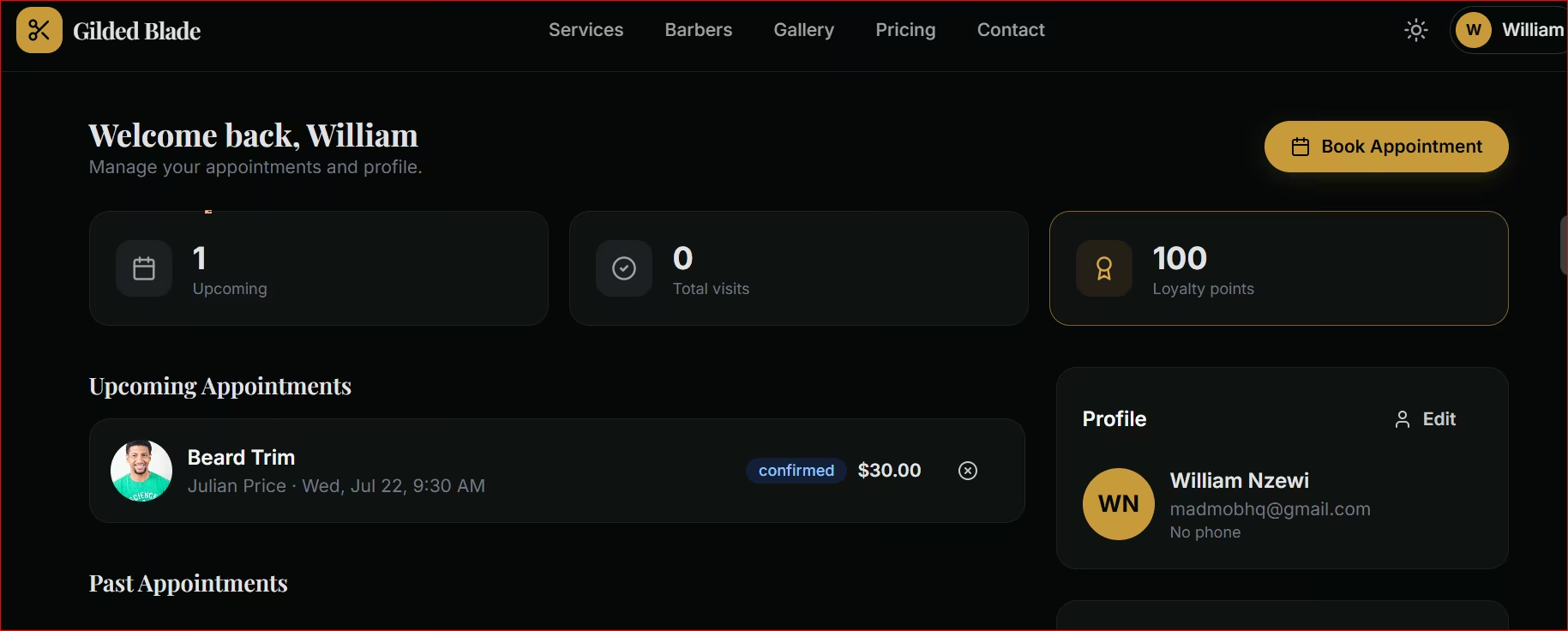
Speed is Bolt's biggest strength, and Stripe support out of the box is a real plus.
Where it became challenging was when I tried to extend it.
Extending the barber shop app (adding staff roles, syncing schedules, handling edge cases) took longer and burned more tokens than I expected. That matches what plenty of reviewers report.
If you're using Bolt to test an idea, go in expecting that. A fast first version, and real work ahead if you plan to run a business on it, especially once you're handling customer payment data or anything else that needs a closer security pass.
Is Bolt.new Right for You?
Bolt fits fastest for people who want an idea turned into something real, fast. It's less convincing if you want low ongoing costs or a business app that needs little hands-on work afterward.
Who will love it:
- Entrepreneurs validating a business idea: A consultant testing a booking tool, a real estate agent trying out a lead tracker. Build it, test it with real users, decide if it's worth pursuing further, without learning to code.
- Designers and "vibe coders" who like to iterate fast: Tweak layout and flow through conversation without hand-editing code.
- Developers who want a head start: Generate the scaffolding, then spend your time on the parts that need a human.
Who should look elsewhere:
- Anyone building long-term on a tight budget: Frequent changes over months add up under token pricing.
- Anyone expecting zero follow-up work: Reviewers still report needing real refinement, especially before handling anything regulated, like customer payment or health data, before serious use.
- Anyone who would rather spend time improving the product than managing prompts and token usage: A platform built around long-term app growth is a better fit.
A Better Fit for Non-Technical Founders: Emergent
If you want a real business app and don't want to think about token usage after the first version, Emergent is the better fit.
Emergent turns a plain-English description into a working app, the same way Bolt does. The difference appears when users start relying on it.
Emergent is built for founders who want to keep building, beyond validating an idea.
Here's how it looks in practice:
- Built for non-technical founders: Describe your app, and Emergent's system of specialized agents plans, builds, and refines it.
- Built to keep evolving: Where Bolt users report real work to grow past a working prototype, Emergent is built for apps that keep expanding as your business does.
- Credit-based pricing you can plan around: You can see where your credits went, so cost doesn't sneak up on you.
- Fits your existing tools: Emergent connects with GitHub, Figma, and Notion. So bringing in a developer or designer later doesn't mean starting over.
- You can export the code: Emergent apps ship with exportable code through GitHub. You're not locked into one platform if your business outgrows it.
Emergent's free plan gets you 10 credits to try it, no card required. Paid plans start at $20/month for 100 credits when you're ready to build for real.
My Final Verdict
Bolt is a strong pick if your goal is a working app, fast. But token costs and long-term upkeep matter more than build speed once your app is live and growing.
If you want that same speed with less to manage down the line, Emergent is built for that.
Try Emergent's web app builder to see how fast you can go from idea to working product.
Most builders stop at a prototype. Emergent ships real web and mobile apps, with accounts, databases, and payments included.
- Production-ready apps
- Web & mobile apps
- Deploy in minutes







