




TL;DR
- Bubble pricing splits into three tracks, with Starter running $32/month Web-only, $49/month Mobile-only, and $69/month for Web & Mobile, so quoting the wrong track can overstate the bill by $37 a month.
- Workload Units meter everything the app does once live, where a simple page load with one query costs 0.5 to 2 WU and a complex filtered search across many records costs 10 to 50 WU.
- The build moves the bill more than the tier does, since the same tracker app rewired with a constrained search and a slower recurring workflow cut Workload Unit consumption by about two-thirds on the identical Starter plan.
- Skipping the add-on tiers is the expensive path, because raw pay-as-you-go overage runs $0.30 per 1,000 Workload Units, double the $0.15 rate that comes with the cheapest Tier 1 add-on at $29 a month for 200,000 units.
- Free includes 50,000 Workload Units but blocks live deployment on every track, so the meter only starts moving once you upgrade to a paid tier and push to the live branch.
Bubble's sticker price looks like a normal subscription. The real bill depends on a usage meter called Workload Units, and it can drain faster than you'd expect. Mine emptied in nine days, three weeks before my billing reset.
I spent 16 days testing Bubble's pricing directly. I ran one Starter subscription plus one Workload Unit add-on I bought mid-test to keep the meter moving. On the Web-only track, I built the same small tracker app twice, once wired badly on purpose and once optimized. The gap between those two versions is where the real cost hides.
Below, I break down Bubble's current monthly prices across all three tracks and every tier. I also explain what Workload Units meter and what pushes a bill past the sticker price. By the end, you'll know which numbers to budget for before you build anything.
Bubble's Three Pricing Tracks
I nearly paid for a Bubble feature I didn't need, and I hadn't even built a single page yet. Bubble sells three tracks: Web only, Mobile only, and Web & Mobile combined. The paid self-service tiers have different prices for each track, while Free stays at $0 and Enterprise uses custom pricing.
I almost budgeted off the Web & Mobile Starter price out of habit. Partway through the test build, I realized the app was a browser-based internal tool with no native mobile requirement at all. That's a $37 a month difference for a capability it never needed.
Picking the wrong track is the easiest way to overpay when you compare Bubble against another tool. It can also make Bubble look cheaper than it is, if the price you quote belongs to a different track.
| Track | Starter Price |
|---|---|
| Web only | $32/month ($29/month, billed annually) |
| Mobile only | $49/month ($42/month, billed annually) |
| Web & Mobile | $69/month ($59/month, billed annually) |
Across the paid self-service tiers, Web only is the cheapest track and Web & Mobile is the priciest. Each track includes the same Workload Unit allocation for a given tier, but the supported app type and price differ.
Bubble Pricing Plans: At a Glance
The table below reflects Bubble's pricing page for the Web & Mobile track, since that's the version most price comparisons default to. If you only need a web app, the Web-only prices in the section above are your real starting point.
| Plan | Monthly Price | Best For |
|---|---|---|
| Free | $0 | Learning the interface or prototyping a data structure |
| Starter | $69/month ($59/month, billed annually) | A first build with light live usage |
| Growth | $249/month ($209/month, billed annually) | A small team building a customer-facing app |
| Team | $649/month ($549/month, billed annually) | A scaling product with more editors and workload |
| Enterprise | Custom, contact sales | Compliance or large-scale deployments |
Each plan's Workload Unit allowance shows up in the plan-by-plan breakdown below, and the mechanic behind it comes next.
What Are Bubble Workload Units, and How Do They Work?
I found out how fast Bubble's usage meter can move before I understood what was driving it. A Workload Unit (WU) is what Bubble meters for everything your app does once it's running.
Page loads, database searches, database modifications, file uploads, calls to external services, and scheduled workflow actions all draw from the same allocation. The plan-by-plan breakdown below lists the allocation for each tier.
Not every action pulls the same weight. Workload Unit costs vary by action; the rough ranges I've seen in practice:
| Action | Typical Workload Unit Cost |
|---|---|
| Database record create or modify | ~0.5 WU |
| Database record delete | ~0.1 WU |
| Simple page load (one database query) | 0.5–2 WU |
| Complex filtered search across many records | 10–50 WU |
| Scheduled workflow processing data in bulk | 20–100 WU |
That spread is exactly why two apps on the same plan can burn through Workload Units at wildly different rates. A page load running one indexed search costs a fraction of a page load running an unconstrained search inside a repeating group (the element that repeats a layout for every row of data) even though both look identical to a visitor.
Workload Units in Practice
I built the Price Drop Tracker's database and search page on Bubble's Free plan, Web-only track. I seeded it with about 3,000 dummy deal rows before I tried to test anything else. Free wouldn't let me deploy a version to watch at all.
I upgraded to Starter, $32/month ($29/month, billed annually), to push it to Bubble's live branch, the only way to watch the Workload Unit meter move. No real visitors ever touched it, just the dummy deal data and my own test traffic.
Then I wired the first version deliberately badly. The search page ran an unconstrained search across the whole Deals table every time someone touched a filter, inside a repeating group. I also scheduled a recurring workflow to check for new price drops every five minutes. Here's the exact test, in case you want to run your own version:
Build the same Price Drop Tracker twice on Bubble's Starter plan, Web-only track. First, wire the search page to run an unconstrained search across the whole Deals table on every filter change, inside a repeating group, and schedule the "Check for New Drops" workflow to run every five minutes.
Then rebuild the identical page using a search constrained to an indexed Category field with a capped result count, and move the recurring workflow to run every 30 minutes instead. Watch what each version does to the Workload Units meter on the App Metrics dashboard over the same test window.
The Workload Units meter on Bubble's App Metrics dashboard climbed fast. I hit the 75% usage notification inside a week. By day nine, I'd burned through the entire 175,000 WU included with Starter, three weeks before the plan would have reset on its own.
I bought a Workload Tier 1 add-on ($29 a month for 200,000 extra WU) to keep watching the mechanic without waiting out the reset.
Buying that add-on made more sense than jumping straight to Growth for more Workload Units. Growth's jump, to $134/month ($119/month, billed annually) on the Web-only track, buys a second editor and longer log retention I didn't need yet. The $29 add-on bought exactly the thing I was short on.
Then I rebuilt the exact same page. I constrained the search to an indexed Category field with a capped result count, so it no longer pulled the whole table, and I slowed the recurring workflow to every 30 minutes. After I made those changes, Workload Unit consumption fell by about two-thirds.
Both versions ran on the same Starter plan at the same price. The way I wired the app was the only thing that moved the Workload Unit meter. Starter's 175,000 monthly Workload Units is generous for a tightly built app and stingy for a lazily built one. The tier price turned out to be the smaller variable in what I paid.
What Extra Usage Costs
Bubble sells four add-on tiers once you outgrow your plan's included allocation:
| Tier | Extra Workload Units | Monthly Price | Overage Rate After |
|---|---|---|---|
| Tier 1 | 200,000 | $29/month | $0.15 per 1,000 WU |
| Tier 2 | 750,000 | $99/month | $0.14 per 1,000 WU |
| Tier 3 | 2,500,000 | $299/month | $0.12 per 1,000 WU |
| Tier 4 | 6,000,000 | $599/month | $0.10 per 1,000 WU |
Tier 4 is the largest published add-on. For anything above six million extra Workload Units, Bubble's pricing page routes you to a custom Enterprise quote under "Need more workload? Contact sales."
Extra file storage costs $3 per 100 GB a month. Bubble also fires a usage notification automatically at 75% and 100% of your plan's Workload Unit allocation, whatever track or tier you're on.
Two more costs live outside the Workload Unit meter entirely. Bubble's plugin marketplace carries thousands of paid plugins that bill separately from your subscription. Any third-party service you connect bills you directly too, whether that's a Stripe integration, a mapping service, or an email tool.
A raw pay-as-you-go overage rate also applies if you skip the add-on tiers entirely: $0.30 per 1,000 Workload Units. That rate kicks in automatically the moment you cross your plan's included allocation, unless you've disabled overages or bought a tier for a cheaper per-unit rate.
Bubble Pricing Plans Breakdown
Free: $0/month
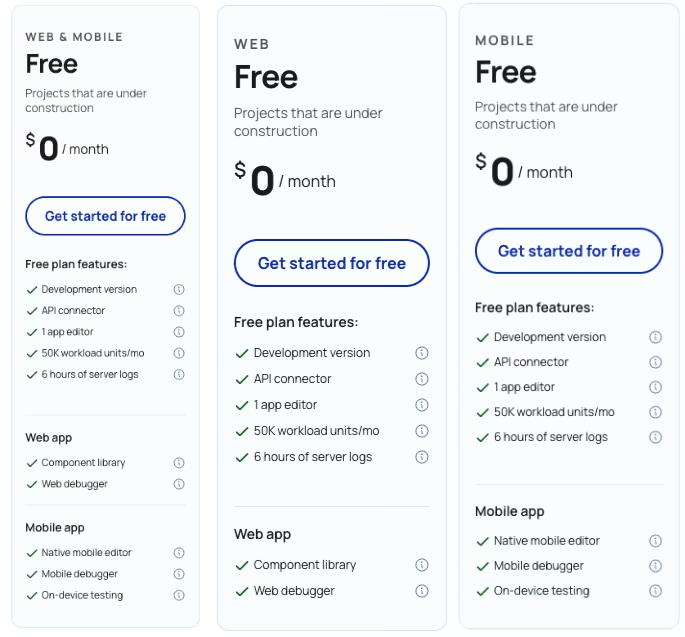
What's included: 50,000 Workload Units a month, one editor, six-hour server logs, and no live deployment on any track.
Best for: Learning Bubble's interface or shaping a data structure before you spend anything.
Pros: Full access to the visual editor and database at zero cost, plus enough room to build a multi-field data structure. It also runs on the same Workload Unit math every paid tier uses.
Cons: No live deployment at all, on any track. You can build everything and still have nowhere to push it to watch it run.
I shaped the Price Drop Tracker's Deals data type and first search page on Free. Its lack of live deployment then forced the upgrade, since nothing on the plan lets you watch live Workload Unit consumption.
Free is the right place to learn the editor and rough out a data model. Live running costs only appear once you deploy on a paid track.
Starter: $69/month ($59/month, billed annually)
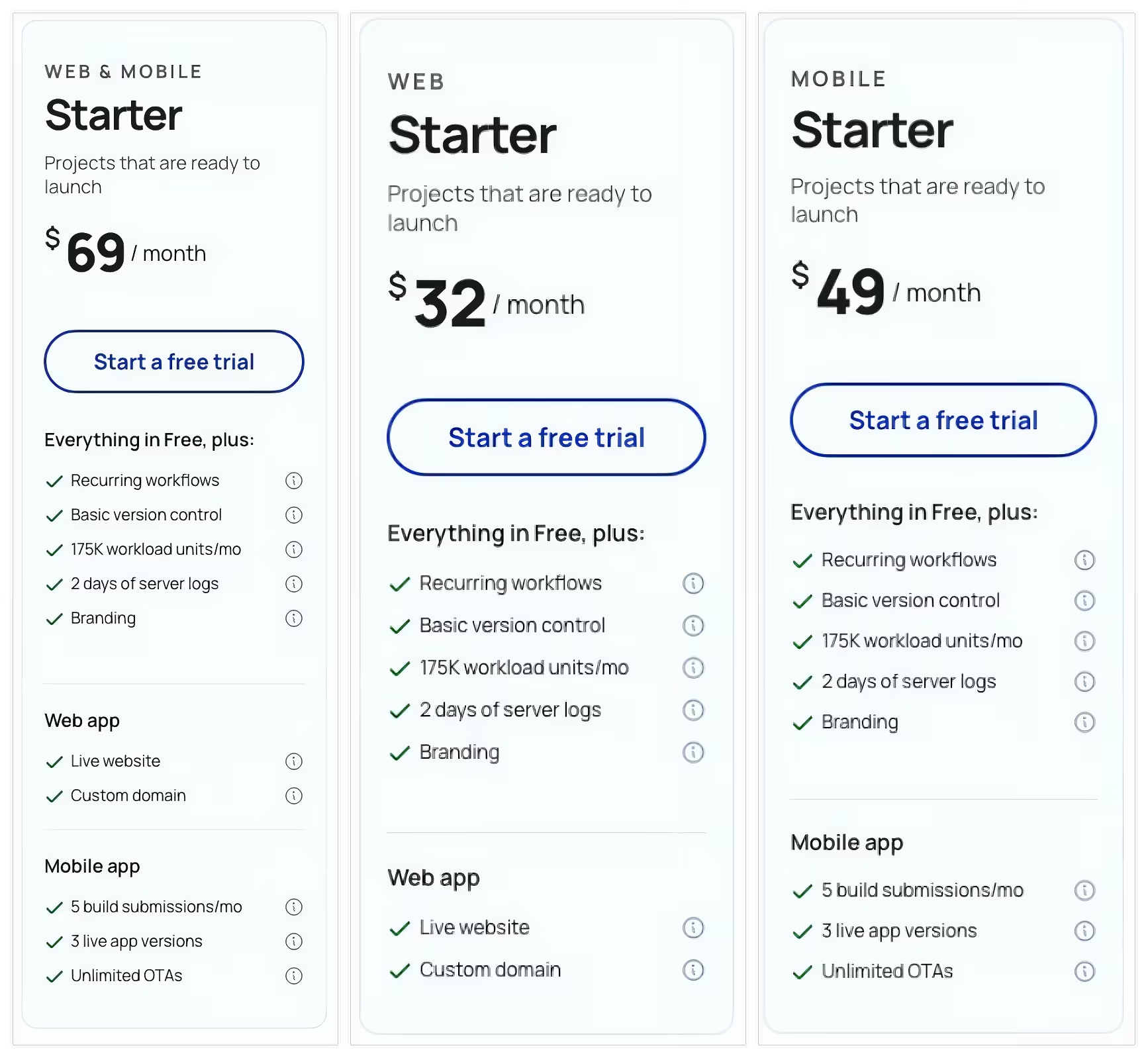
What's included: 175,000 Workload Units a month on the Web & Mobile track (the same tier runs $32/month ($29/month, billed annually) Web-only and $49/month ($42/month, billed annually) Mobile-only). You also get one editor, two-day server logs, five build submissions a month, and three live app versions. A 14-day free trial auto-converts to paid if you don't cancel first.
Best for: A first build with light live usage, once you've picked the track your app needs.
Pros: Enough Workload Units for a well-built small app to run for weeks without hitting a wall, plus a live branch to deploy to. There's also enough build submissions to iterate through a test cycle.
Cons: The trial converts to a paid subscription automatically, and Bubble does not refund that conversion. A lazily built page can burn through the whole monthly allocation in days.
This is the tier where the track choice cost me money. I'd almost budgeted the Web & Mobile Starter price, $69/month ($59/month, billed annually), before realizing the Price Drop Tracker never touched a phone. That made the Web-only track's $32/month ($29/month, billed annually) the relevant price.
I'd start every Bubble build on the Web-only track unless the app needs native mobile from day one.
A Workload Unit bill that grows faster than the app itself is usually a build problem, not a plan problem. Starter earns its price when you're validating an app with a working database and efficient workflows.
Growth: $249/month ($209/month, billed annually)
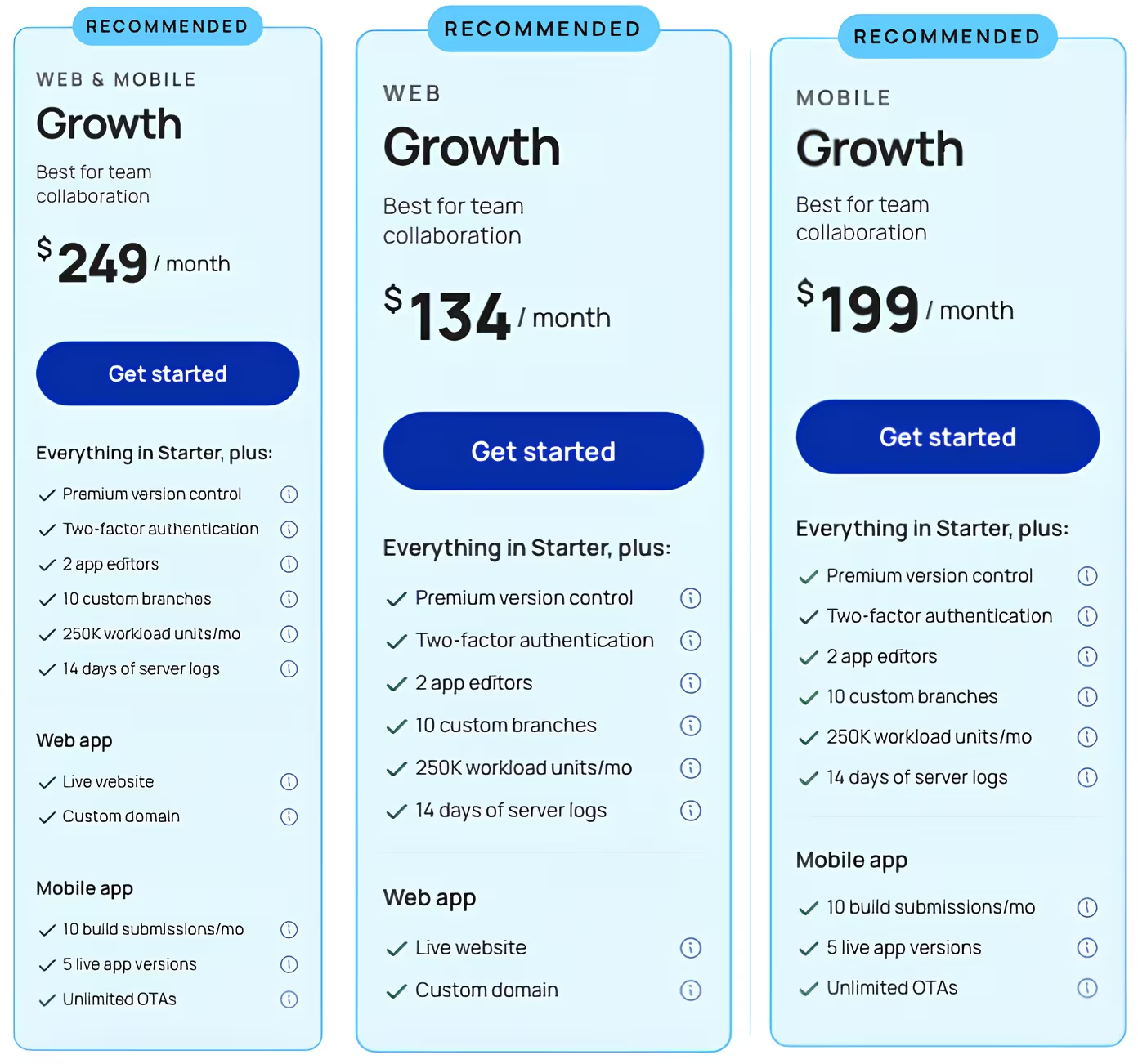
What's included: 250,000 Workload Units a month on the Web & Mobile track (the same tier runs $134/month ($119/month, billed annually) Web-only and $199/month ($169/month, billed annually) Mobile-only). You also get two editors, 14-day server logs, 10 build submissions a month, five live app versions, and two-factor authentication.
Best for: A small team running a customer-facing app that's outgrown Starter's editor count or Workload Unit ceiling.
Pros: Room for a second editor, longer server log retention for debugging, and enough Workload Units to absorb a traffic spike.
Cons: About four times Starter's Web-only price for features a single-editor test app doesn't need yet.
A one-person test build never needed a second editor or two-factor authentication, so I didn't push it through Growth the way I did Free and Starter. What's above comes straight from Bubble's current plan page.
Team: $649/month ($549/month, billed annually)
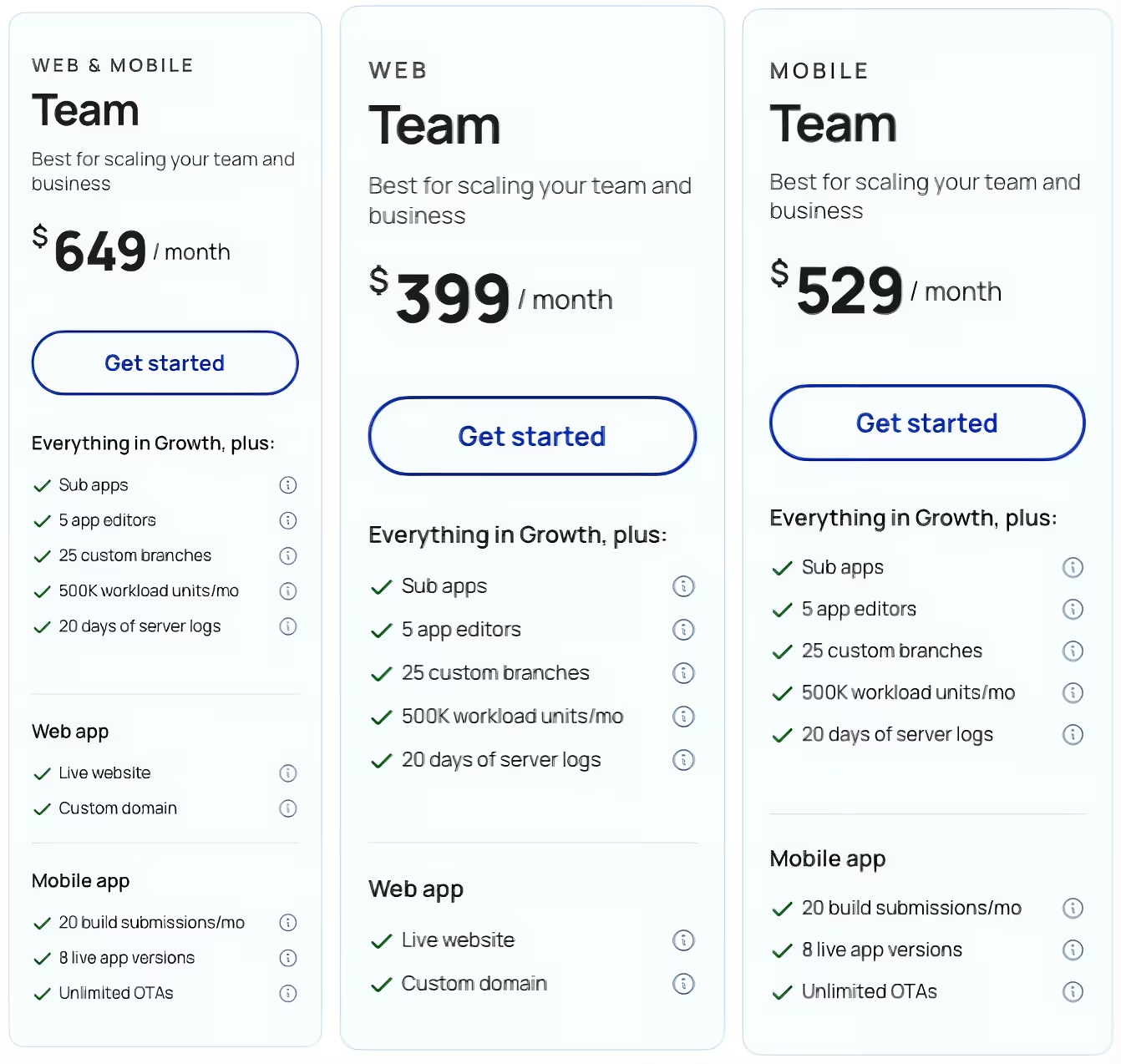
What's included: 500,000 Workload Units a month on the Web & Mobile track (the same tier runs $399/month ($349/month, billed annually) Web-only and $529/month ($449/month, billed annually) Mobile-only). You also get five editors, 20-day server logs, 20 build submissions a month, eight live app versions, and sub-apps.
Best for: A scaling product with a bigger team and enough usage that a single Workload Tier add-on wouldn't cover the gap.
Pros: Five editors working at once, 20 days of server logs, and enough Workload Units that most well-built apps won't need an add-on on top.
Cons: A steep jump from Growth for editors and version history a smaller team won't use.
Team went untested for the same reason as Growth, since five editors and 20 days of server logs are well beyond a solo build. These figures come from Bubble's plan page.
Enterprise: Custom Pricing
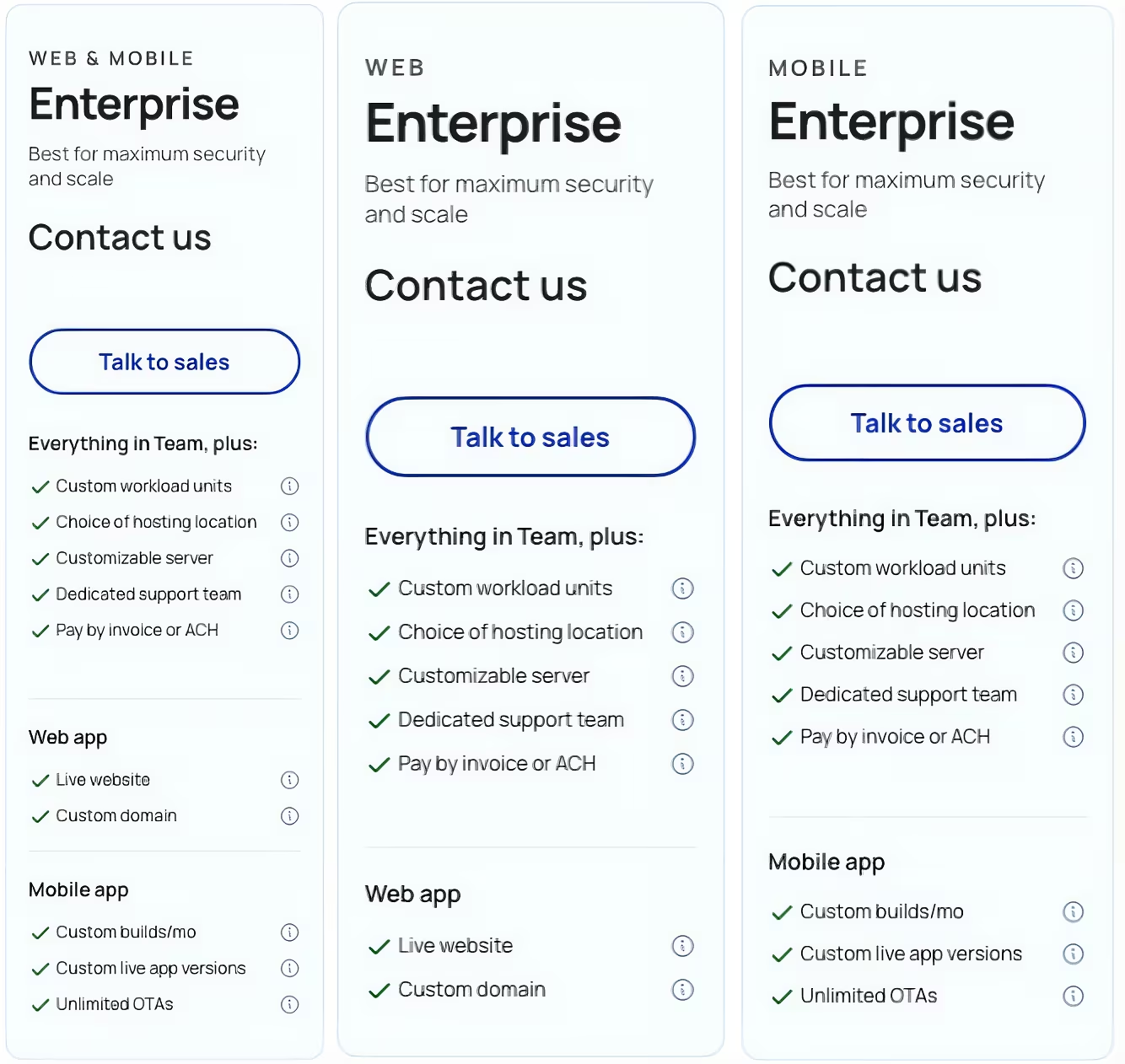
What's included: Custom Workload Units, a custom editor count, single sign-on (SSO), and dedicated infrastructure.
Best for: Compliance-heavy or large-scale deployments that need dedicated infrastructure and a custom contract.
Pros: Workload Units and infrastructure sized to the actual account, plus a custom editor count for a large team.
Cons: No published price. You'll need a sales conversation before you know what it costs.
Enterprise pricing is quote-only, so there was nothing to test hands-on. Bubble offers student and nonprofit discounts on its paid plans; you apply through Bubble with documentation. Bubble doesn't publish a fixed percentage, so confirm the current rate before citing one.
Which Bubble Plan Should You Choose?
Choose Free if you:
- Are still learning Bubble's interface or shaping a data structure before you spend anything
- Haven't decided yet whether your app needs Web, Mobile, or Web & Mobile
Choose Starter if you:
- Are launching a first build with light live usage, on whichever track your app needs
- Want to watch your own Workload Unit consumption from week one, before a bad habit gets expensive
Choose Growth if you:
- Are running a customer-facing app with a small team that needs a second editor
- Have outgrown Starter's Workload Unit allocation even on a reasonably well-built app
Choose Team if you:
- Are scaling a product with a bigger team and consistently higher usage
- Plan to move from Growth to Team when you would otherwise need several Workload Unit add-ons
Choose Enterprise if you:
- Need compliance features like single sign-on and dedicated infrastructure
- Are running at a scale that needs a custom, negotiated contract
Is Bubble Worth the Cost?
Whether Bubble is worth it comes down to one comparison: what you pay in Workload Units against what your app earns. A $400 monthly Workload Unit bill means something different depending on the app behind it.
An app earning $5,000 in monthly recurring revenue and paying around $400 in Workload Unit costs spends 8% of revenue on usage. At $4,000 in revenue and $600 in Workload Unit costs, that share rises to 15%, leaving a tighter margin.
The build moves that bill just as much as revenue does. My inefficient Price Drop Tracker and the optimized rebuild ran on the same plan, at the same price, with the same feature set, and the build was the only thing that changed between them. That single variable decided what the app cost to run.
Should You Audit Your Bubble App Before You Migrate?
Before migrating because of a growing bill, check the app's search and workflow patterns. The patterns that drive Workload Unit consumption up are specific and repeatable. My own inefficient test version recreated three of them on purpose:
- A nested search running inside another search
- A repeating group pulling in the whole database, unfiltered
- A recurring workflow left running every few minutes, well short of a half-hour cadence
Fixing them cut my test's consumption by about two-thirds. In a typical Bubble app, a careful audit can recover a meaningful chunk of Workload Units without touching a single user-facing feature. Migrating off Bubble is a bigger project than fixing a search query, so it's worth ruling out an architecture problem before you commit to one.
Bubble is worth it if you:
- Have an app that's in active use, with a database and workflows built reasonably tight
- Can treat a Workload Unit bill as a normal, budgeted cost of running the product
- Want one platform handling the interface, the database, and the automation together, without wiring separate tools yourself
Skip Bubble if you:
- Are watching a Workload Unit bill climb faster than the app's actual revenue
- Already know the app needs a feature or scale Bubble's workload model can't absorb cleanly
- Need a flat, predictable rate and want to avoid usage-based costs that move with traffic
Bubble Alternatives & Pricing Comparison
The comparison below is a neutral read. Every price is each tool's own live monthly figure, checked directly on its official pricing page.
| Tool | Starting Price | Best For |
|---|---|---|
| Emergent | $20/month ($17/month, billed annually) | Prompt-to-app builds |
| Adalo | $45/month ($36/month, billed annually) | Native mobile, no Workload Units |
| FlutterFlow | $39/month ($29.25/month, billed annually) | Exportable native Flutter code |
Also read our best Bubble alternatives guide for a deeper look at what else is worth trying beyond this comparison.
Emergent vs Bubble: Which Should You Choose?
I ran a small, separate test to see how Emergent would handle the same kind of app. I described a searchable deal list with a category filter in plain language, with no data type to define by hand first.

Emergent generated a working, deployable-for-testing version with its own database from that one description. Emergent also offers an MCP Connector for building apps straight from Claude or ChatGPT, if you'd rather start from one of those instead.
Bubble is a visual, drag-and-drop app builder. You define the Deals data type, wire the search, and configure the workflow by hand inside its editor. That gives you control over the app's structure and logic, but you do that setup yourself before a single page can search anything.
The pricing philosophies are different, too. Emergent's pricing burns credits on generation and edits. The Workload Unit mechanic that emptied my Starter plan doesn't exist on Emergent's side.
The core differences line up like this:
| Emergent | Bubble | |
|---|---|---|
| Starting price | $20/month ($17/month, billed annually) | $32/month ($29/month, billed annually) Web-only |
| Pricing model | Credits for generation and edits | Subscription plus Workload Units |
| How you build | Describe the app in plain language | Drag-and-drop editor, configured by hand |
| Best for | A working version fast | Detailed control, mature plugin marketplace |
Emergent is better for: Turning a plain-language description into a working version quickly. It creates the data structure from your prompt, with no usage-based meter to plan around.
Bubble is better for: Detailed control over app structure and logic, plus a plugin and template marketplace built over more than a decade.
Try Emergent free if that sounds like the better starting point for your next build.
My Bottom Line on Bubble Pricing
Bubble pricing looks simple on the page and gets complicated once an app starts running. The plan price is often only the starting point. Which track you pick, and how tightly the app itself is built, move that number more than any tier upgrade does.
If I were starting a new build today, I'd settle the track choice before picking a tier, since a wrong track is the cheaper mistake to catch early. I'd also watch the Workload Units meter from day one, long before an invoice could surprise me.
A tight build on Starter can beat a sloppy one on Growth, dollar for dollar, because the Workload Unit meter doesn't care what plan name is on the invoice. An audit of the app will often save you more than a higher tier would.
Most builders stop at a prototype. Emergent ships real web and mobile apps, with accounts, databases, and payments included.
- Production-ready apps
- Web & mobile apps
- Deploy in minutes







