On September 29, 2026, OpenAI engineered ChatGPT Dots, an always-on agent that can handle any task you give it. ChatGPT Dots is backed by frontier intelligence and powered by GPT-6 Astra. Dots has its own cloud computer to keep working 24/7 and learn from feedback on the tasks it completes.
ChatGPT Dots' website claims that Dots can be connected to more than 4000 applications. Your Dots will always be within your reach, as it is connected through ChatGPT, Slack, and even Teams. Users can ask questions, post queries, explore multiple ideas, and even hop on a call with Dot, such as a voice call, where you can discuss anything you like. The more you work with Dots, the more it will learn about you, your habits, preferences, thinking patterns, and what the definition of “Good” is to you.
ChatGPT Dots is bounded by permissions, approvals and auto-review. This puts Dots in a category of autonomous AI Agents but with a specific OpenAI architecture.
What is ChatGPT Dots?
ChatGPT Dots, often written as OpenAI Dots, are persistent AI Agents introduced at an event in San Francisco. OpenAI Dots are AI agents designed to maintain an ongoing working relationship with a customer, rather than handling isolated requests. Along with a broader category of personal AI assistants, Dots product architecture is specific to GPT-6 Astra, cloud execution, long-running responsibility, and plugins.
Dots' model is just one part of the entire system. GPT-6 Astra provides reasoning, tool access, execution, review and progress tracking, permissions, and persistence.
The idea goes further: OpenAI describes use cases where Dot follows customer feedback, updates launch material as scope changes, prepares changes to the tested code, or either returns when new data arrives or keeps an enterprise proposal current.
Inside Dot, you will get a glimpse of what work actually looks like. For example, a bug appears on Slack and Dot immediately begins investigating it. While the team focuses on customer feedback, Dot arrives with a new design and transforms it into a working application.
OpenAI Dots Vs. Regular ChatGPT
Regular ChatGPT is request-driven, while Dots is driven by responsibility. Here is a quick comparison between the two.
If you’re weighing Dots against other always-on agents, our Dots vs Muse vs Grok Bot comparison covers pricing, app connections, and safety side by side.
ChatGPT Dots Features and What Makes It Different
It is not simply a rebranded version of ChatGPT; rather, it is powered by GPT-6 Astra. Here are the features that make Dots different from other persistent AI models.
Here is a quick review of the features of ChatGPT Dots:
Dots turn feedback into tested fixes
Suppose you are a developer who is working on an application. Dots consistently reviews your work and monitors customer feedback for bug fixes, recurring requests, and smaller enhancements; it builds and tests them, then provides a complete PR with attached videos showing the changes. You don’t have to pause; keep working on the next major feature while keeping an eye on the fixes your dot prepares.
Dots work with you
Working with ChatGPT Dots is as simple as having a conversation with your colleague. Either you can message or call Dots in the ChatGPT interface. It is available on desktop, mobile, and as an application. Dots can also message you with progress updates, decisions, or questions that require your feedback or approval.
You can also message your dot in Teams and Slack, a feature already available on those platforms. Initially, you begin the project in ChatGPT, share the context with the Slack working team, and the rest of Dot will follow through.
You are the boss
Work performed by Dots in ChatGPT is protected by additional safety and privacy safeguards. So you can easily set guardrails, track progress, and stay involved in the decisions that require you.
Built-in Safeguards
Every dot runs on its own cloud computer, but your computer's contents and files stay safe until you decide to connect them to the cloud. Also, for signing in to websites, Dots can use saved passwords without exposing the password to the model.
Dot performs proactive research, which means when you are not working, Dot is still looking for ways to assist you. Proactive research is done when Dot connects the applications with the tools that are restricted to be “read-only.” Simply put, Dot cannot change app content, send messages on its own, or control your browser.
Access and Permissions
Users decide which applications can be accessed and managed using ChatGPT app controls. Dots start with custom or built-in rules, like when to act independently and when to ask for permission. Custom rules let you allow certain actions, block them, or require approval.
Built-in safety requirements are always applied, and in the Activity View, you can easily trace background work and progress.
ChatGPT Dots Review 2026: What Users are Saying
Users are showing frustration with OpenAI’s new launch, ChatGPT Dots. The always-on background agent’s users say that it failed to act independently and requires constant prompting rather than genuinely helping on its own.
The following reviews are from individual Reddit threads, and most were published just a month ago, after the launch of ChatGPT Dots.
A Review on ChatGPT Dots Functionality: A Negative Impression
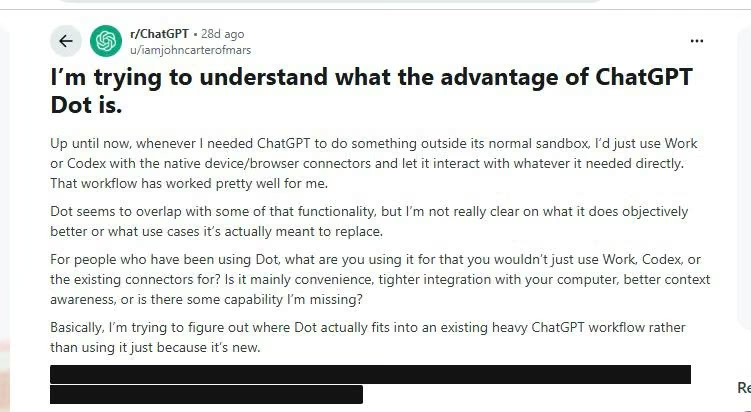
A user with the Reddit ID u/iamjohncarterofmars noted a major flaw in Dots' use case and major functionality overlap when he used OpenAI Dots instead of Work or Codex. He clearly said he only used ChatGPT when he needed something outside the sandbox.
The reviewer said: “Dot seems to overlap with some of that functionality, but I’m not really clear on what it does objectively better or what use cases it’s actually meant to replace.”
The same user also questioned other ChatGPT Dots users. He directly suggested they use Work or Codex. He was clearly confused and frustrated by the convenience Dots was providing.
A Review Saying Dots is Extremely Slow in Performance: A Negative Impression
A Reddit user with a ChatGPT Pro $100 subscription says that Dots is incredibly slow and lazy when it comes to performance. On top of that, the user said that Dots makes zero effort in searching and gives up quickly. According to his review, ChatGPT Dots repeatedly loses permissions.
In his own words, he stated, “Overall it's been working really poorly for me. Also, as I understood it, one of the main selling points of Dots was that they're proactive. Mine is not proactive at all.”
The user ends up confused about whether he is the one behind the issue or whether he needs to integrate some sort of application or something to make it work.

ChatGPT Dots Pricing
Here is a quick review of ChatGPT's pricing model, including features like OpenAI Dots.
ChatGPT Dot is available to both Pro and Business Premium customers in eligible markets. Also, Enterprise users, including Edu and Healthcare, can try the beta version of Dots when their workspace admin enables.
What counts against your usage limits
This is part that users must watch and read closely:
- Talking to your OpenAI Dot is free of limits, and conversations you do with the Dot do not count under ChatGPT usage limits
- Heavier background work will draw on a plan allowance, but OpenAI waived that for the first month after launch. That window closed in late October 2026, so the moment of writing sits right at the boundary. OpenAI has said it will publish per-plan usage terms afterward; check its pricing and help pages for the current position before budgeting.
- Work tasks by Codex and ChatGPT created by the dot count against usage limits.
- Extra dots are not priced as of now. According to OpenAI, you'll later be able to add more dots to increase speed and monthly allowance.
Use Cases of ChatGPT Dots
OpenAI’s launch examples include software development, scientific research, product launches, content production, invoicing, and sales. Here is a quick table of ChatGPT Dots use cases.
If you want the sales tracking built around your own pipeline, you can build a lead qualification agent that scores and routes each inquiry.
What are the Main Limitations of OpenAI Dots
Dots makes agents easier to use, but it can't eliminate agent unreliability. Here are some limitations, according to the official ChatGPT Dots website.
- Agents can still make mistakes, even in OpenAI Dots. OpenAI explicitly mentions on its official website that Dots can make errors. A model might miss context, reach an incorrect conclusion, or choose the wrong step.
- Persistent context can preserve assumptions, whether good or bad. Memory and continuity help only when the agent interprets them correctly. Explicitly tell the agent if the project changes its direction.
- Connected applications increase the chances of errors. A wrong answer in the dots chat is different from an incorrect action in a connected system. Make use of approval boundaries for consequential rights. If approval boundaries are the main worry, you can set them yourself with an AI agent builder and decide which actions need a human sign-off.
- If a sign says “Always-on,” it doesn’t mean unlimited. Tasks that are delegated to Codex and Work include allowances for deeper work. Design has recurring responsibilities around actual tasks.
Who Should Use ChatGPT Dots?
A decision rule serves better than a blanket verdict, because the right answer depends on what you would connect and how much risk you can tolerate.
- Founders and executives already on Pro. Yes, with tight rules. Set “ask before taking action” for anything that sends a message or touches your calendar, and allow the dot to earn autonomy on research and drafting first.
- Engineering leaders. The Codex hand-off makes Dots genuinely useful for bug triage, build monitoring and routing fixes. Create the Codex environment before you ask, and remember that spawned tasks draw on your limits.
- Enterprises. Use the beta to write Custom Rules and refine your Auto-review policy, not to grant production access. Specialist dots are the enterprise story, and they remain pilot-only.
- Regulated or client-confidential work. Wait. Coarse memory deletion, unpublished post-launch usage terms and the absence of an independent audit make a poor combination for data you can't unshare.
- European Pro subscribers. Dots are not an option on that plan. Business Premium is the workaround.
- Budget-conscious individuals. Meta Muse offers a free tier, and the closest ChatGPT alternative for delegating work today is ChatGPT Work, which does not require a dot.
If the free option sounds closer to what you need, our ChatGPT dots vs Meta Muse comparison shows where the two differ on access, apps, and approvals.
Conclusion
ChatGPT Dots represents a significant shift in what an AI assistant can do, and what it is expected to be. The model completely shifted from a tool you ask questions to a teammate you delegate your work to and speak with normally. For leaders spending a disproportionate number of hours each week on coordination and monitoring, the potential is considerable.
The product is also early, and the right posture is calibrated optimism. The prompt-injection results are impressive. The data on workarounds and scope drift reminds us that autonomy has to be earned and bounded. The pricing picture is incomplete, the memory controls are blunt, and there is no independent audit.
None of that is a reason to ignore Dots. But they are definitely reasons enough to begin small: a narrow dot with limited responsibilities and strict rules, and a review of what we did.
If you want to build an AI-powered application while implementing your idea, you can start with Emergent. Prioritize a well-defined problem, test with real users, and expand only when the app delivers measurable value.
Get started with Emergent.

Most AI app builders stop at prototypes. Emergent creates production-ready apps you can actually launch.
- Production-ready apps
- Web & mobile apps
- Deploy in minutes