




TL;DR
- ChatGPT dots: Best for research, documentation, project management, and business workflows in ChatGPT, Slack, and Teams.
- Meta Muse: Best for personal assistance, shopping, travel planning, and everyday tasks through supported services.
- Automation: Both can work in the background and complete multi-step tasks, subject to permissions and approvals.
- Security: Both offer permission controls and approval checks. Review each provider’s data and security policies before granting access.
- Pricing and availability: Features, usage limits, and regional access vary by plan and market.
ChatGPT Dots and Meta Muse are personal AI agents. You give them an objective, and they can plan work, use connected tools, make progress in the background, and return with results or questions.
The main difference is focus. Dots are built for continuous work in ChatGPT and connected workplace tools. Muse is built for personal assistance and everyday goal management through its app and, where available, WhatsApp.
This guide compares ChatGPT dots vs Meta Muse based on several factors and helps you choose the option best suited to your business. If you still aren't satisfied, you can build your tool on Emergent at a lower cost with a customized approach.
What Are ChatGPT dots and Meta Muse?
Traditional AI assistants answer questions, brainstorm, and generate content. Personal AI agents go further: they can carry out a task across steps, use tools, track progress, and ask for input when needed.
What are ChatGPT dots?
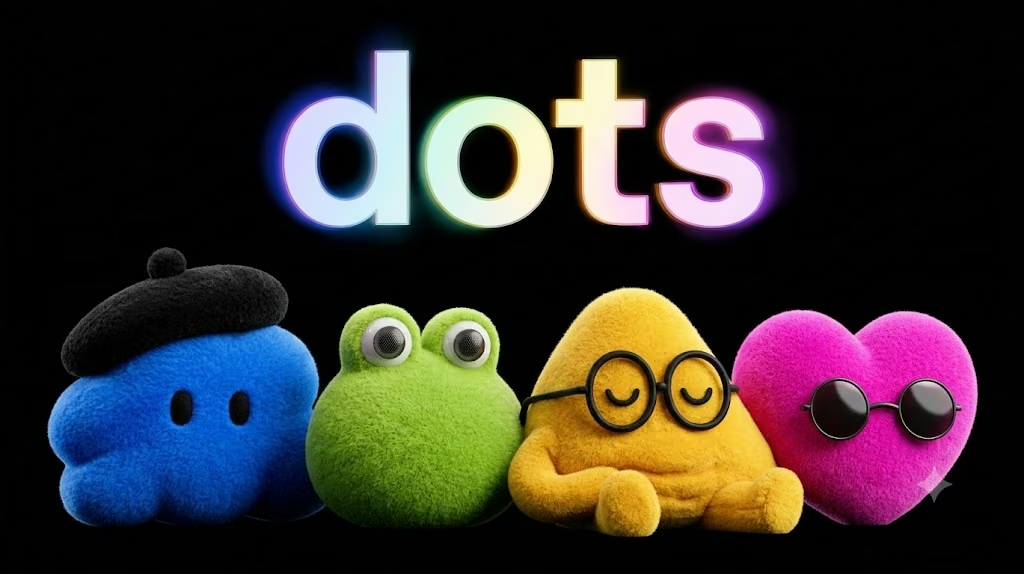
ChatGPT dots are OpenAI's always-on AI agent expertise. Dots run on GPT-6 Astra, each with its own cloud computer and browser. It can research, analyze information, create documents, develop computer programs, and monitor current projects.
Unlike a normal ChatGPT chat, a dot can process and work across chats. It can use relevant context from past conversations, recall preferences, and track progress as needs evolve.
If you're a content marketing manager, for instance, you can use your dot to track a new product launch, read connected project information, draft content, and mark up changes for your attention.
Dots can chat with each other via ChatGPT and other workplace channels like Slack or Microsoft Teams. They can also access connected plugins and tools, depending on the permissions you give.
Access is being released over time for eligible ChatGPT Pro and Business Premium users, while Enterprise access will be controlled by workspace admins. Availability depends on your plan, region, and workspace configuration.
What is Meta Muse?
Meta Muse is Meta's AI assistant that helps individuals with real-world tasks and goals. At launch, it's powered by Muse Spark and runs on a special cloud environment called Muse Secure VM.
You can give Muse instructions on what you want to do, and it'll plan, browse the Web, fill forms, and complete work. It may run in the background after you close the app and can be restarted when things change, or a permission is needed.
Muse also offers customization to help you. For example, if you save a recipe on Instagram, Muse can help you create a grocery list. It can also assist with dinner-party planning by considering what guests eat/don't eat.
Use Muse via its app and, where available, WhatsApp. Meta launched Muse in North America in September 2026 and made Muse available in Japan on October 23, 2026. Availability and features are subject to region.
ChatGPT dots vs. Meta Muse: Key Differences
Both can perform multiple actions and run in the background. But their integrations, usage purposes, and access levels vary.
| Feature | ChatGPT dots | Meta Muse |
|---|---|---|
| Developer | OpenAI | Meta |
| Underlying model at introduction | GPT-6 Astra | Muse Spark |
| Primary focus | Ongoing work and productivity | Personal assistance and everyday tasks |
| Working environment | Dedicated cloud computer and browser | Muse Secure VM with its own browser |
| Communication | ChatGPT, Slack, Microsoft Teams, and supported calls | Muse app and WhatsApp in supported markets |
| Integrations | Supported plugins and connected workplace tools | Connected apps and supported services |
| Background work | Continues tasks and tracks project changes | Continues tasks and advances personal goals |
| Memory | Uses relevant ChatGPT context, preferences, and saved notes | Uses information from interactions to personalize assistance |
| Human oversight | Permissions, custom rules, and approval checks | Access controls, approval checks, and activity audit trails |
| Availability | Gradual rollout to eligible plans and markets | Regional rollout, with subscription options for additional usage |
This is launch-era product differentiation, which may not last. Both are continuously improving their agents' functionality.
1. Features and Capabilities
ChatGPT dots: Designed for ongoing workflows
ChatGPT dots is designed for handling tasks that involve multiple prompts. Set a goal, link the appropriate tools and let the agent carry on in the meantime.
It has primary functions such as:
- Continuing to work on assigned tasks during conversations: Background task execution.
- Research and analysis: Collect data from authorized connected sources and analyze it.
- Create documents: Draft reports, proposals, and other documents.
- Software development: Use supported coding tools to create, explore, and test software.
- Context retention: Transfer relevant preferences and project information between conversations and supported communication media.
- Progress updates: Communicate progress, share obstacles, and seek decisions when necessary.
For instance, a sales manager can assign a dot to look at account details, create a Customer Proposal and monitor any outstanding requirements. When a new requirement comes up, the dot can work on it and raise unresolved questions.
The key difference is that the agent won't just respond and stop; it can respond to a changing assignment.
Meta Muse: Designed for personal assistance
Meta Muse is also multistep, though it positions the initial product around personal goals and basic tasks.
Its capabilities include:
- Goal planning: Convert a general goal into an action plan with specific tasks.
- Networking: Access the internet and fill out forms.
- Personalized support: Make suggestions more relevant by considering context and previous interactions.
- Task continuity: Continue working when you exit the app.
- Muse asks for approval before sensitive actions, such as sending an email or making a purchase.
- Shopping assistance: With supported services and payment integration, assist customers with shopping workflows.
Suppose you were to plan a vacation. You might ask Muse to search for suitable options, arrange a schedule, and process the booking. Depending on the integrations and permissions available, it might handle some steps on its own and require you to confirm others.
Meta has also launched a new family of personal and professional agentic models. According to Meta's October 2026 announcement, it will first power experiences for Muse subscribers. This should be verified separately from developer products, as it is also available in the consumer assistant.
2. Integrations and Ecosystem
Integrations will determine whether you need to change how you work, or whether the AI agent can work with your existing tools.
ChatGPT dots integrations
dots is an application that operates within the ChatGPT ecosystem and integrates with compatible workplace tools via plugins. OpenAI claims to have over 4,000 apps in its wider plugin ecosystem.
Talk to your dot via ChatGPT, Slack and Microsoft Teams. It applies to existing teams already communicating on the job.
Think about a product launch with marketing, sales and engineering. Connected information on your dot could help you prepare launch materials, track outstanding work and make the right decisions at the right time.
Access to every app and file does not automatically come with connecting a messaging channel. There are permissions for each connection.
Meta Muse integrations
The Muse app and messaging channels are built around easy, engaging interaction.
Its integrations make it possible to perform tasks that are integrated into everyday life, like e-mail, travel, shopping, and personal agenda. Meta has also announced integrations with Stripe's payment service Link, with other features promised or hinted at to be rolled out.
This makes Muse relevant for people who want an agent to handle their personal responsibilities but don't want to manage a complicated workflow.
Which method of integration is better? Dots is clearly targeted at users who work through multiple channels in the workplace. Muse is focused on the personal assistant. They don't automatically link to all services, so check your account's integration options before choosing.
3. Automation and Background Work
Either tool can continue functioning without any interaction. A key difference between an AI agent and a traditional chatbot is its ability to handle a wide range of tasks. Another key difference is that AI agents can perform a wider variety of tasks.
How ChatGPT dots handle automation
Dots can pursue a continuous assignment, respond to changes in associated data, and decide on the following action.
Let's say that you are making a monthly performance report. You might discuss your dot's review of what data sources are allowed, examine new statistics, write the report, and determine what information is missing. If new data comes in, it can go back to the analysis and produce an updated version.
It can help when several follow-ups or many dependencies are involved, and the changes recur.
How Meta Muse handles automation
Muse can turn a personal objective into actions and keep you moving toward it.
What if you are planning to have a weekly meal? Muse might help develop a menu, consider known preferences, make a shopping list and assist with the next steps using available services.
Its goal-oriented approach can also support travel planning and bill management.
But in both cases, the term automation does not imply complete independence. What the agent is approved to do, what the website allows it to do, and the task's complexity can all affect what the agent actually completes.
4. Privacy, Security and Human Control
AI agents can discuss your private details and make decisions for you. When evaluating ChatGPT dots vs Meta Muse, security and oversight are crucial.
ChatGPT dots security controls
OpenAI runs dots on separate cloud computers. Unless you choose to connect your personal computer and its contents, they remain separate.
dots also uses permission controls and custom rules to determine what it can do without anyone's assistance. Some actions require approval, and some sensitive actions must be controlled by you.
During non-interactive research, OpenAI says the tools are read-only. That is, background research cannot send messages or affect the content of connected apps via that path.
If you're using personal ChatGPT plans, your use of conversations and work to enhance the models depends on your data settings. By itself, OpenAI does not use content from ChatGPT Business, Enterprise, or Edu workspaces to improve the model.
Meta Muse security controls
Muse is hosted in a secure virtual machine in the cloud provided by Meta. It also has its own Sentinel agent to authorize Internet access and help enforce Internet security boundaries.
Muse asks for approval before potentially sensitive actions, provides an audit trail and lets you manage connected apps and their permissions. Muse uses secure storage to keep credentials, so it doesn't see actual passwords or payment methods.
Meta also states that its advertising systems do not share data with Muse conversations and data related to virtual machines. Any user can prevent interactions from being used to train Meta's AI models.
Meta has revealed plans to launch a “Confidential VM” with encryption known only to the user. This is an announced future capability, so don't assume that it will already be available to all Muse users.
Which is more secure?
From these descriptions alone, you can't determine which product is generally safer. Both companies talk about protection, but the specifics of how it works, along with account settings and controls, matter.
When onboarding an agent to a business system, verify permissions, data usage, audit features, and approvals. Do not grant access to tasks that do not require it, and review the consequences of actions before the action is completed.
5. Pricing and Availability
Prices and availability are subject to change and may vary, especially during a first deployment.
ChatGPT dots pricing
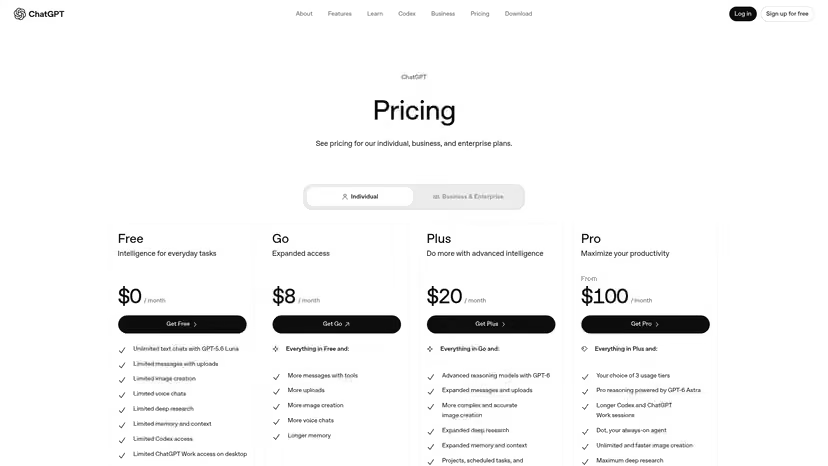
With supported ChatGPT Pro and Business Premium plans, an eligible user's first dot will be free, according to OpenAI.
Dots is also rolling out to Enterprise and Edu and Healthcare workspaces through administrator-enabled beta access. Plan eligibility is dependent on the region and plan.
OpenAI says conversations with your dot do not count toward ChatGPT usage. Tasks that the dot starts or manages in Codex or ChatGPT Work still count toward plan allowances.
So it's not necessarily a separate fee for the first dot; rather, the practical cost depends on your allowances for deeper work within your subscription.
Meta Muse pricing
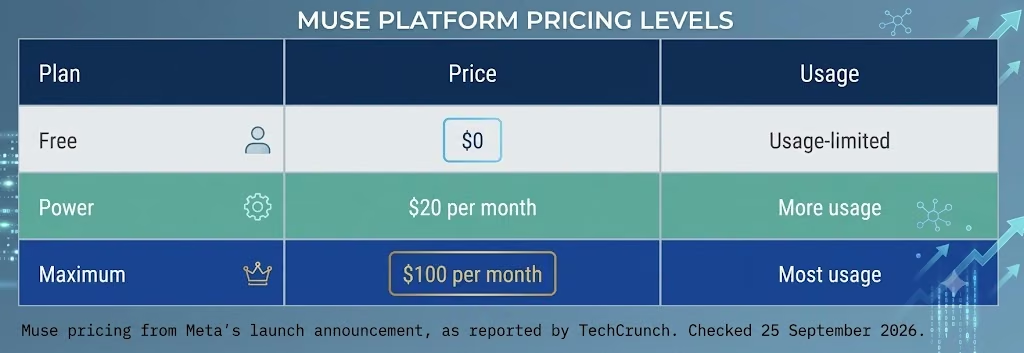
While casual users can use Muse for free, the company says subscriptions are for those doing more in-depth work.
Consumer access to Muse and the development of Muse models, however, are separate offerings. For instance, the API and coding product availability and pricing for Meta's Muse Wonder models vary.
When discussing the free consumer experience, don't simply equate it with a paid developer model without considering the products and usage restrictions.
Availability is a key factor for users outside the initial rollout areas. For the most up-to-date regional access information, see the official ChatGPT dots documentation and the Meta Muse website.
ChatGPT dots vs. Meta Muse: Which Should You Choose?
The right choice depends on the work you need to delegate, the tools you already use, and service availability.
| Your requirement | Better fit to explore |
|---|---|
| Managing ongoing projects through workplace tools | ChatGPT dots |
| Researching and preparing business documents | ChatGPT dots |
| Working across ChatGPT, Slack, and Teams | ChatGPT dots |
| Organizing personal goals and everyday errands | Meta Muse |
| Coordinating supported shopping and travel tasks | Meta Muse |
| Building workflows around developer APIs | Evaluate the relevant developer products from both companies |
| Automating a specialized business process | Compare both agents against a tailor-made workflow or custom application |
Matching is based on use cases; actual speed depends on task complexity, integration, permissions, and data quality for each agent.
When ChatGPT dots makes sense
If you want an agent to help you maintain project context, interact with linked business tools, and move assignments from one conversation to another, explore dots.
This could be especially useful for marketing teams, sales teams, project managers, researchers, and developers who regularly work through multiple steps.
When Meta Muse makes sense
If you want an assistant that can help you organize personal responsibilities, remember relevant preferences, and work toward goals involving everyday services, explore Muse.
It could benefit individuals who prefer speaking-based task management over a more structured work-stream approach.
What if neither meets your needs?
Your business might need a specific workflow, integrations, or approval process that a general-purpose agent might not offer.
For instance, a business might want a lead enrichment agent to gather prospect information, verify email addresses, and add leads to a CRM for a salesperson to follow up on. A content team could require a tool that can quickly draft content, ensure it's aligned with the brand, and go through an approval workflow.
In these cases, a custom application can provide a more controlled way to implement the process. Use a platform like Emergent to create the application that meets your needs, including the required interfaces, data flow and workflow logic.
Start by defining the task, then choose a way of approach that will enable the integrations, permissions, and review process that is required.
How to Evaluate an AI Agent Before Using It
Before adopting an AI agent, consider several factors when evaluating the system.
- Define a measurable goal: State the desired outcome, such as a reviewed report or an updated project plan.
- Check integrations: Ensure the agent has access to the necessary data and services.
- Set permissions: Grant only the access the agent needs for the job.
- Require approval for sensitive actions: Use review gates for external messages, purchases, and important data changes.
- Test exceptions: Include missing information, conflicting instructions, and changes.
- Measure the result: Evaluate accuracy, completion time, correction work, and the reliability of multiple tests.
Through this activity, you'll determine whether an agent saves you valuable time or just passes work on for you to review and correct.
For other agent options tested on real work, see our best AI agents for business guide.
Conclusion
ChatGPT dots vs Meta Muse isn't just a comparison of two AI models. It's a comparison of two different models for personal AI agents.
ChatGPT dots specializes in continuous usage of ChatGPT and supported workplace tools. Meta Muse focuses on personal assistance, everyday tasks and goal-driven automation. Both can run in the background, retain relevant context and ask for approval before taking action.
Neither is always the universal winner. Before choosing a solution, consider the workflow, integrations, privacy needs, region, and overall cost.
If you have more specialized requirements, you may want to think about whether you'd have more control over the workflow if you used a custom application. With Emergent’s AI agent builder, you can build an agent around your business process instead of adapting your process to a generic agent.
The best solution reliably completes useful work while keeping you in control.

Most AI app builders stop at prototypes. Emergent creates production-ready apps you can actually launch.
- Production-ready apps
- Web & mobile apps
- Deploy in minutes





