



Emergent vs Cursor comes down to the job you need the software to handle. Choose Emergent when you want to describe an app and move from idea to a hosted web or mobile product; choose Cursor when you already work with code and want precise control inside a repository.
I compared both tools closely, examining current product pages, pricing, documentation, security information, and product updates from both companies.
By the end, you’ll know which tool fits your skill level, starting point, deployment needs, and budget.
Emergent vs. Cursor: The Quick Answer
- Emergent: Best when you want to turn a written product brief into a complete app, with hosting and a path to web or mobile launch.
- Cursor: Best when you can read code and need an agent to understand, edit, debug, test, and review a repository.
My overall recommendation is Emergent for nontechnical founders, consultants, and operators building a product from scratch. Cursor is the stronger choice for professional development work inside code you already own.
Do Emergent and Cursor Actually Compete?
Emergent and Cursor overlap because both use artificial intelligence (AI) to help you build software, but they take responsibility for different parts of the work.
Emergent is a conversational app-building platform. You describe the product, screens, workflows, data, and integrations, then its agents handle the app structure, code, database, login flow, and deployment path. It supports web apps and mobile apps built with React Native and Expo, and paid plans can sync projects to GitHub for version control or a developer handoff.
Cursor is an AI coding agent and an integrated development environment (IDE). It learns a codebase, edits files, runs terminal commands, writes tests, reviews pull requests, and can send cloud agents to work in parallel. You still make technical decisions, review changes, and choose how the application is hosted.
That distinction explains the confusion in this Cursor community thread. The discussion repeatedly frames Cursor as a control-heavy coding partner and Emergent as a higher-level way to delegate more of the app. It also warns that complex builds still need clear planning and bug review. That is anecdotal feedback, but the category distinction is accurate.
Why Choosing the Wrong Tool Creates Extra Work
The first paid plan costs $20/month for both tools, so the subscription price does not separate them. The workflow does.
A founder who buys Cursor to avoid managing development still needs to review code, handle failed builds, configure credentials, choose hosting, and manage releases. Cursor can help with each technical task, but the founder remains responsible for the software process.
A developer who buys Emergent for fine-grained repository work can sync the code to GitHub, but Emergent keeps more of the generation process inside a conversational workspace. It fits a product-focused review, where you check screens, flows, data, and behavior. Cursor fits a code-focused review, where you inspect diffs, tests, dependencies, and terminal output.
Ask who should own the technical work after the first prompt. Choose Emergent when you want the platform to plan, build, test, and publish the app for you. Choose Cursor when you want to inspect the code, direct each change, and decide how the app is deployed.
How I Compared Emergent and Cursor
I checked each tool against the same seven questions:
- Can you start from a product idea, or do you need a repository?
- How much coding knowledge do you need?
- What does the tool produce?
- Who controls code changes?
- How do hosting and deployment work?
- Can you build or manage mobile apps?
- What will the free and paid plans cost?
I also treated a feature as useful only when it changes your workflow. “Multiple agents” has value when it reduces the steps between a brief and a working app, or when parallel agents can inspect, edit, and test separate parts of a repository. A label alone does not help you choose.
Emergent vs. Cursor: At a Glance
| Comparison | Emergent | Cursor |
|---|---|---|
| Best for | Idea-to-app building | Developer-led coding |
| Starting point | Product brief | Repository or project |
| Main output | Hosted app | Code changes and pull requests |
| Coding skill | Optional | Required for review |
| Hosting | Managed path included | Bring your own |
| Mobile | Expo/React Native builds | Edits mobile code |
| Code control | GitHub sync on paid plans | Direct repo control |
| Free plan | Yes | Yes |
| Starter paid plan | Standard: $20/month ($17/month billed annually) | Pro: $20/month ($16/month billed annually) |
| Main limitation | Credit use varies by build | Assumes coding knowledge |
The table uses current official product, pricing, GitHub, mobile, and deployment information from both companies.
Meet Emergent: From Product Brief to Working App
Emergent is stronger when you start with a business problem and want the platform to build the app, rather than hand you code suggestions. Describe a client portal, booking system, internal dashboard, marketplace, or mobile app in plain language, then review and refine the working version in the same conversation.
What Emergent Does Best
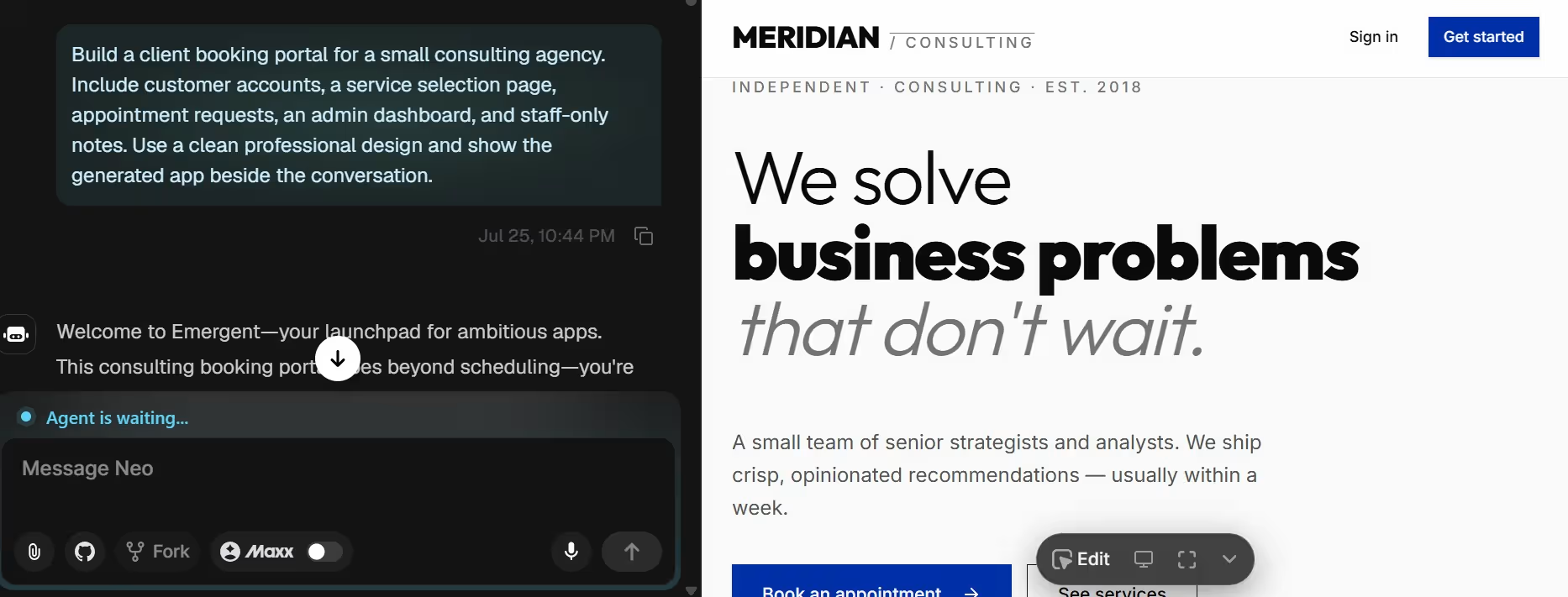
Emergent is strongest when you want the platform to take responsibility for the whole first build. You describe who will use the app, what they need to do, and what information the app should store. Its agents then build the screens, login flow, database, integrations, and hosted version in one workspace.
This workflow fits a founder who wants a working product rather than a code draft. A real estate operator, for example, can ask for a portal with property records, client accounts, appointment requests, and staff-only notes, then review the result instead of assembling each part manually.
Paid plans add more room and more control. Standard includes 100 monthly credits, private hosting, GitHub integration, and task forking. Pro raises the allowance to 750 credits and adds a 1 million-token context window, deeper reasoning, custom agents, and priority support.
Emergent’s end-to-end build process is useful when you know the workflow you need but don’t want to choose frameworks, configure servers, or manage a local development setup.
Where Emergent Falls Short
A single credit balance covers building, revisions, testing, integrations, and deployment. Every follow-up request draws from that balance, so an incomplete opening brief leaves fewer credits for finishing the app. Define the user roles, core screens, required actions, and saved data before the first build.
Emergent uses one React Native and Expo project to produce the iPhone and Android versions of your app. For a nontechnical founder, that means you can build both versions in one place, but you cannot choose Swift, Kotlin, or Flutter as the underlying technology. You will also need Apple and Google developer accounts before publishing to their stores.
Pricing
Free: $0/month. Standard: $20/month ($17/month billed annually); Pro: $200/month ($167/month billed annually). Business and Enterprise: custom pricing.
Meet Cursor: Deep Control Inside Your Codebase
Cursor is the stronger option when software development is already part of your work. It gives you an AI layer across files, terminal commands, debugging, tests, pull requests, and code review without removing your control over the repository.
What Cursor Does Best
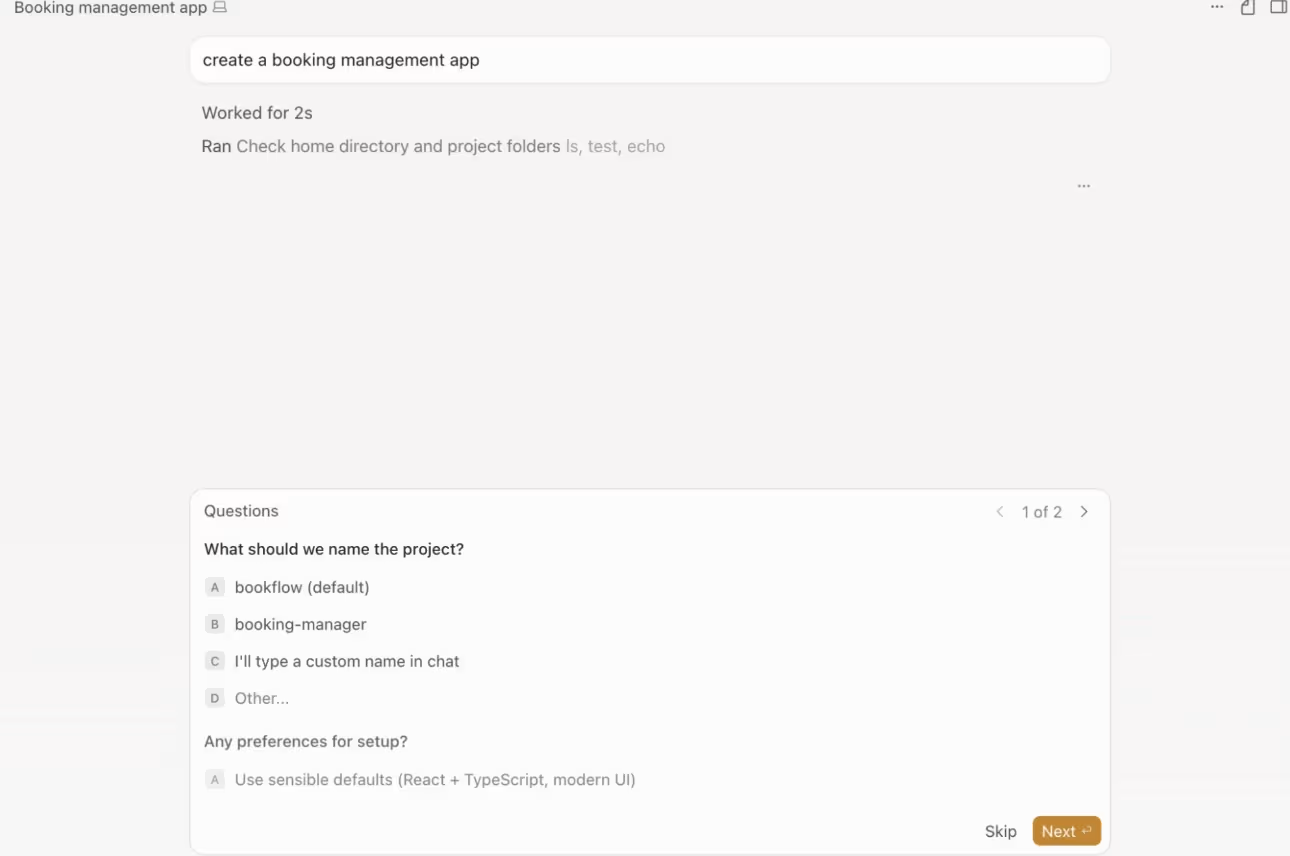
Cursor works inside your repository. Its agents can edit several files, run builds and tests, and show every proposed change for your approval.
You can direct that work from the desktop editor, browser, command line, GitHub, Slack, Linear, or JetBrains. The workflow stays centered on code, diffs, tests, and developer review.
This makes Cursor the clear winner for refactoring, debugging, test creation, and extending an existing product. You can inspect every diff, reject a change, update the prompt, or edit the code yourself. That level of control is valuable when a small change can affect several services, tests, or dependencies.
Cloud agents broaden the workflow. You can start work away from your main computer, run several tasks in parallel, and return to proposed changes or pull requests. Cursor remains a coding tool throughout that process, so you need enough technical skill to judge the result.
Where Cursor Falls Short
Cursor doesn't remove software engineering from the process. A nontechnical founder can type a product request, but the output still arrives as code, diffs, terminal activity, and repository changes. You need to spot faulty logic, resolve failed builds, manage credentials, and decide where the app runs.
Cursor also does not include managed application hosting as a core subscription feature. It can run deployment commands and work with your existing tools, but you choose and configure the hosting provider, data layer, domain, monitoring, and release process.
Its usage cost can rise beyond the subscription. Pro includes $20 of model inference usage, Pro+ includes $70, and Ultra includes $400, plus bonus capacity. Model choice changes how quickly that allowance is consumed, and on-demand usage continues after the included amount when you enable it.
Pricing
Hobby: $0/month. Pro: $20/month ($16/month billed annually); Pro+: $60/month ($48/month billed annually); Ultra: $200/month ($160/month billed annually). Teams Standard: $40/user/month ($32/user/month billed annually); Teams Premium: $120/user/month ($96/user/month billed annually); Enterprise: custom pricing.
With model usage affecting how quickly your included allowance runs out, Cursor Pricing 2026: Plans, Real Costs, and Is It Worth It takes a closer look at what you may actually spend.
Emergent vs. Cursor: Feature-by-Feature Comparison
Building a New App From an Idea
Emergent is the better starting point when you have an app idea but no existing project. You describe who the app is for, what it should do, the pages it needs, and the information it should save. Emergent then builds the first working version and gives you a path to publish it.
Cursor can start a new project, but you still need to choose how the app will be built and review the code it creates. This works better when you already understand software development.
Winner: Emergent.
Extending an Existing Codebase
Emergent can import an existing GitHub project and let you continue making changes through conversation. This gives you a simpler way to update an app without working through every file yourself.
Cursor gives you more control inside an existing project. It reads the current structure, updates several files, runs checks, and shows the changes before you approve them.
Winner: Cursor.
Publishing and Going Live
Emergent lets you publish the app from the same workspace. Once the build is ready, you can give it a permanent web address and connect your own domain without finding a separate hosting service.
Cursor helps you prepare and update the code, but it doesn't host the finished app. You or your developer still needs to choose where the app will run and manage the launch.
Winner: Emergent. It leaves fewer steps between a working build and a live app.
Code Control and Long-Term Maintenance
Emergent gives you control through conversation, previews, forks, and GitHub. That is enough for a founder who wants a working product and a clean handoff. It is less suited to a developer who wants to shape every implementation decision as the code changes.
Cursor gives you more control during every edit. You see the files, terminal work, tests, and proposed changes in the same development flow. Its agents can inspect a large repository and divide work across subagents, while you keep approval authority.
Winner: Cursor.
Web and Mobile App Support
Emergent builds one React Native and Expo project for iOS and Android and provides a path to App Store and Google Play submission.
Cursor can edit React Native, Flutter, Swift, Kotlin, and other mobile codebases, but it doesn't create or publish the mobile product for you.
Winner: Emergent. Choose Cursor only when control over the mobile technology is more important than a guided launch path.
Agents, Models, and Automation
Emergent coordinates specialized agents across planning, design, development, testing, and deployment. Pro adds custom agents, a 1 million-token context window, and deeper reasoning for larger builds.
Cursor gives developers more control over the models and tasks assigned to each agent. Subagents can review code, fix merge conflicts, generate tests, or prepare pull requests while you approve the repository changes.
Winner: Cursor. It gives developers more control over model choice and engineering automation.
Collaboration, Security, and Administration
Emergent fits mixed teams that include founders, operators, and developers. Business adds shared workspaces, co-editing, role-based access, and single sign-on. Enterprise adds audit logs, usage controls, and private-cloud deployment. SOC 2 Type I and ISO 27001 certifications provide a documented security baseline.
Cursor is built for engineering teams. Admins can centralize billing, enforce privacy mode, review usage, and share coding rules and agents. Enterprise adds tighter controls over repositories, models, networks, and audit logs.
Winner: Emergent for cross-functional app-building teams. Choose Cursor when collaboration stays inside engineering.
Pricing and Cost Control
Both tools have a free plan and charge $20/month for the first paid plan. Emergent’s Standard plan focuses that spend on 100 app-building credits, private hosting, mobile support, and GitHub integration. Cursor’s Pro plan focuses on coding-agent usage, codebase work, cloud agents, and developer tools.
Neither cost is fully flat in practice. Emergent credits vary with the size and number of build tasks; Cursor usage varies with model prices, tokens, and on-demand usage. Cursor gives you a detailed usage dashboard, while Emergent sells non-expiring top-up credits after the monthly allowance.
Winner: Tie. Both tools start at $20/month, and both can cost more as usage grows. Emergent spends credits across the app-building workflow, while Cursor consumes included model usage and moves to on-demand billing when enabled.
What Real Users Are Saying
The sharpest user discussions ask one question: do Emergent and Cursor solve the same problem? In a Reddit thread I reviewed, developers describe Cursor as the better fit when they want direct control over code, while Emergent appeals to people who want to delegate more of the build.
Emergent’s Cursor review, based on more than 40 developer opinions, reinforces this. Cursor earns praise for repository awareness and in-editor control, while criticism centers on pricing, usage limits, and the need to review complex output.
How to Choose Between Emergent and Cursor
Choose Emergent If:
- You start with a business process, customer need, or product brief.
- You want a web or mobile app without managing a local development setup.
- You need hosting, a database, login flows, and integrations in one build path.
- You want code in GitHub so a developer can take over later.
- You run a consultancy or small company without a dedicated engineering team and want to ship without one.
Choose Cursor If:
- You read and edit code as part of your work.
- You already have a repository or plan to manage one.
- You need refactoring, debugging, tests, pull requests, and code review.
- You want direct control over architecture, frameworks, hosting, and release steps.
- You need an agent that can work across desktop, terminal, browser, phone, and developer tools.
Use Emergent and Cursor Together If:
Use both when you need speed at the start and code-level control later. Build the first working version in Emergent, sync it to GitHub, then let a developer open the repository in Cursor for security review, custom logic, deeper tests, or infrastructure changes. GitHub creates the handoff point between the two workflows.
For example, a consultant can use Emergent to create a client booking portal with accounts, scheduling, and a hosted first release. A developer can then use Cursor to add a custom permission model, expand automated tests, and connect the app to the client’s existing deployment process.
If you want to see where each platform fits in the development workflow, Lovable vs Cursor vs Emergent: The 2026 AI App Builder Test offers a side-by-side look at their strengths and trade-offs.
Final Verdict: Emergent for New Builds, Cursor for Code Control
Emergent vs Cursor comes down to where the work starts. Emergent is the better first choice for nontechnical founders, consultants, agency owners, and operators who need a working web or mobile app. It covers more of the path from product brief to hosted version and provides a GitHub handoff when a developer needs to take over.
Cursor is the better choice when a developer already owns the repository and needs precise control over files, tests, architecture, and release work.
Start with Emergent when you want the platform to run more of the build. Choose Cursor when your next task starts inside code.

Most AI app builders stop at prototypes. Emergent creates production-ready apps you can actually launch.
- Production-ready apps
- Web & mobile apps
- Deploy in minutes







