




TL;DR
- Emergent: Best for building custom features, reservations included, without stacking separate apps
- SITE123: Best for the strongest free multi-location build outside Emergent, though card payment needs Professional
- Wix: Best for a fast AI-assisted start you finish by hand, since the free build leaves out location details and reservations stay locked until Core
- Canva: Best for the fastest free site to start from, if you're willing to manually wire up tools like Jotform to make reservations and ordering work
- GoDaddy: Best for a single-location site live in minutes, if you don't mind paying OpenTable and ChowNow separately
Every builder here produces something that looks like a restaurant website. Two things decide whether it works for a restaurant: whether a real order can be taken, and whether the platform's branding comes off the page.
I checked several free restaurant website builders, then tested the five that made the cut by hand for a working menu, a booking, online ordering, and whether the builder's branding could be removed.
You'll know which free plans work for a restaurant out of the box, and which ones need a paid upgrade before they do.
Why "Free" Restaurant Website Builders Aren't All Equally Free
They're not equally free because each free tier draws its own line between what's included and what isn't.
Some builders let you build and preview a complete site for free, but only let you publish it live once you upgrade.
Others build a feature's shell for free (a reservation form, an ordering button) while the part a customer needs (taking payment, confirming a booking) sits behind a separate paid account.
A few just cap how long "free" lasts, closer to a trial than a permanent plan.
A restaurant owner should judge a plan by one test: can a customer complete a booking or an order on it? The makers below each draw that line in a different place.
Read More: 5 Best Restaurant Website Builders in 2026 That Actually Drive Orders
How I Checked These Free Plans
Five is a small slice of the wider online website builder market, but I tested each one the same way, with one identical prompt.
"Create a website for Harvest Table, a farm-to-table restaurant group with a warm, earthy look in olive green and wood tones. I want one homepage, with each of the three locations, 220 Elm Avenue, 88 Harborview Road, and 5 Meadow Court, showing its own hours, address, a way to book a table, and a way to order food online for pickup. Seed each location's menu with placeholder dishes and prices I can edit later."
Each build ran independently, then I checked it by hand to confirm the menu, booking, and ordering worked.
Criteria checked per tool:
- Core function: An editable menu, a booking option that saves a submission, and online ordering in at least a limited form
- Access: Whether the free plan forces a subdomain or badge, and whether a custom domain can be connected without upgrading
- Scale: Whether the tool handles multiple locations on its own, and whether the site adapts to mobile
- Extras: Local SEO help (Google Business Profile, map embeds), POS integration, and visitor analytics
5 Best Free Restaurant Website Builders: Quick Comparison
The table below compares all five on what they're best for and where the free plan starts costing money.
Side by side:
| Builder | Best For | What Costs Money |
|---|---|---|
| Emergent | Custom features from one prompt | Publishing the site live (Standard, $20/month or $17/month billed annually) |
| SITE123 | Strongest free multi-location build | Card payment (Professional, $48/month on a 12-month plan) |
| Wix | Fast AI start, manual finish | Reservations and ordering (Core, $36/month or $29/month billed annually) |
| Canva | Fastest free build | Canva itself: nothing, but reservations and ordering need manually wiring up a third-party tool like Jotform, capped at 10 free orders a month |
| GoDaddy | Single-location site in minutes | Reservations and ordering (separateOpenTable/ChowNowaccounts) |
Pricing is accurate as of September 2026 and may have changed since.
The 5 Best Free Restaurant Website Builders
Emergent ranks first because its free tier builds a full site, reservations included, and only charges to publish it live. SITE123, Wix, Canva, and GoDaddy each gate a core feature behind a paid plan.
The full breakdown for each tool follows below.
1. Emergent: Best for Custom Features Without Stacking Separate Apps
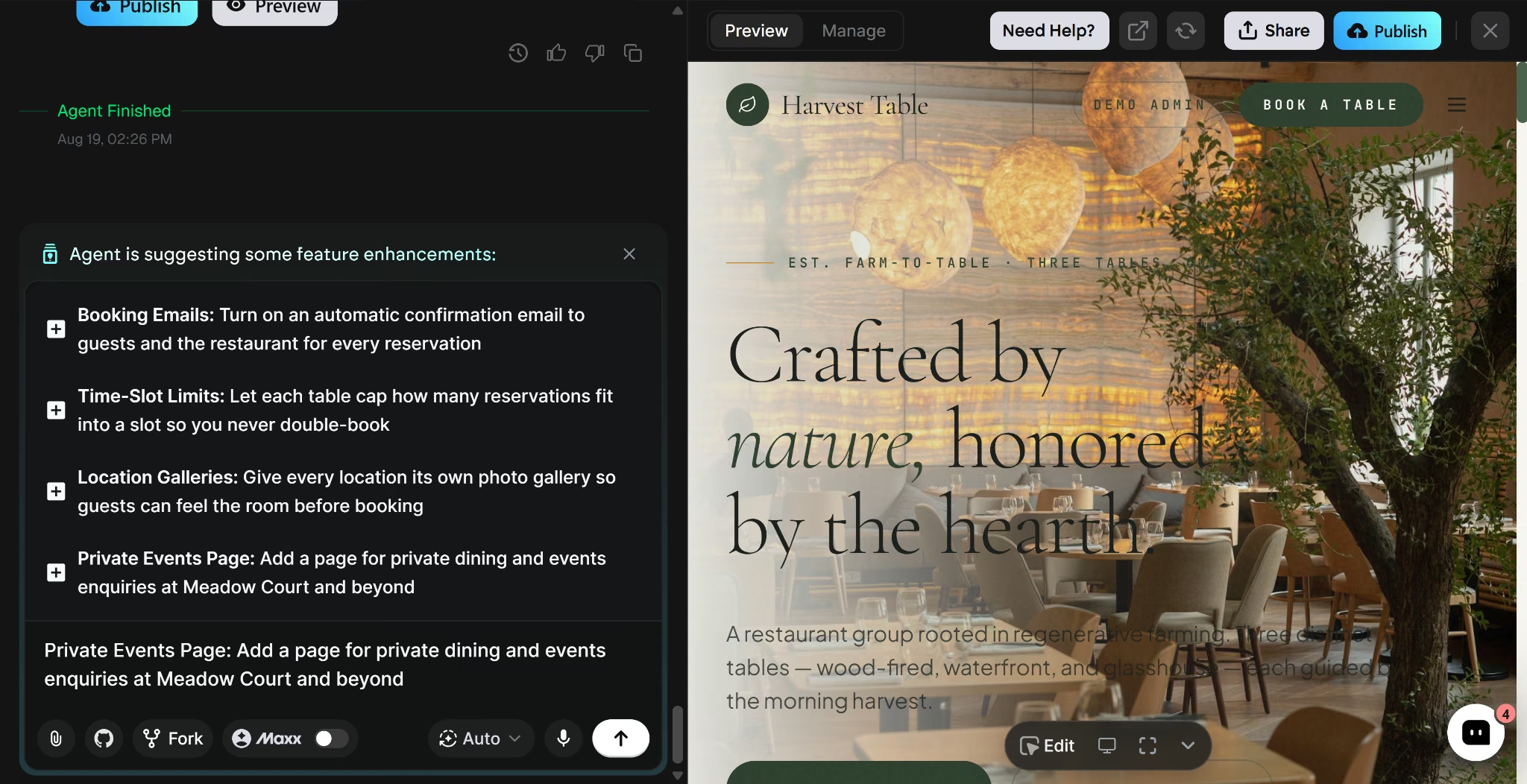
I gave Emergent’s restaurant website builder one written prompt, and it asked five follow-up questions before building, then generated a full restaurant site, building reservations, an admin panel, and multi-location support directly into that one build.
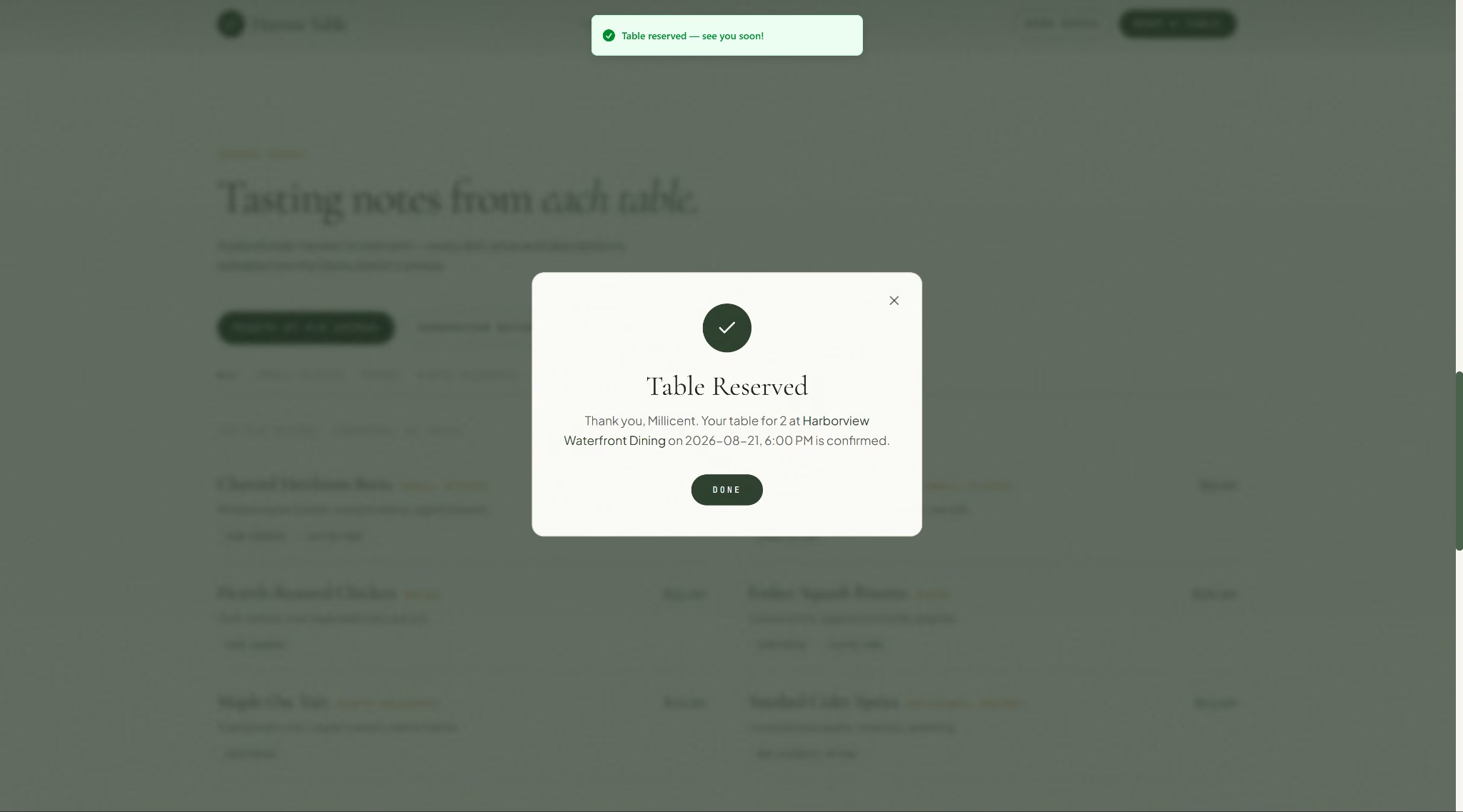
The site was live in 13 minutes, with each location's menu already seeded by category and dietary tag, and it used roughly 9.42 credits on my paid Standard account. Testing the reservation form confirmed it saves a submission and shows a confirmation screen.
Best for: Restaurants that want a specific feature built directly into the site from one description, instead of installing a separate app for it.
Key Features
- Visual editing: Click directly on text after a build finishes and describe a change
- Stripe and PayPal: Online payments and in-person card readers for ordering or point-of-sale
- Custom domain: Connect a domain you already own via DNS, once the site is deployed
Pros
- Reservations, admin panel, and multi-location setup all came from one prompt, no separate app market
- The reservation form saves and confirms submissions on the spot
Cons
- The free plan's 10-credit monthly cap is tight; the build alone used 9.42 credits, and staying live costs 50 credits a month, more than Free's allowance
- No built-in visitor analytics; the dashboard Emergent documents reports platform usage and sits on Enterprise
Pricing
Free plan: $0/month, 10 credits. Standard, at $20/month billed monthly or $17/month billed annually, is what most restaurants need to stay online. Higher tiers are on Emergent's pricing page.
Bottom Line
Emergent’s restaurant website builder is the only free tier here that includes reservations, an admin panel, and multi-location support before you pay a cent. The cost only shows up when you're ready to go live.
2. SITE123: Best for the Strongest Multi-Location Build Behind a Confusing Setup
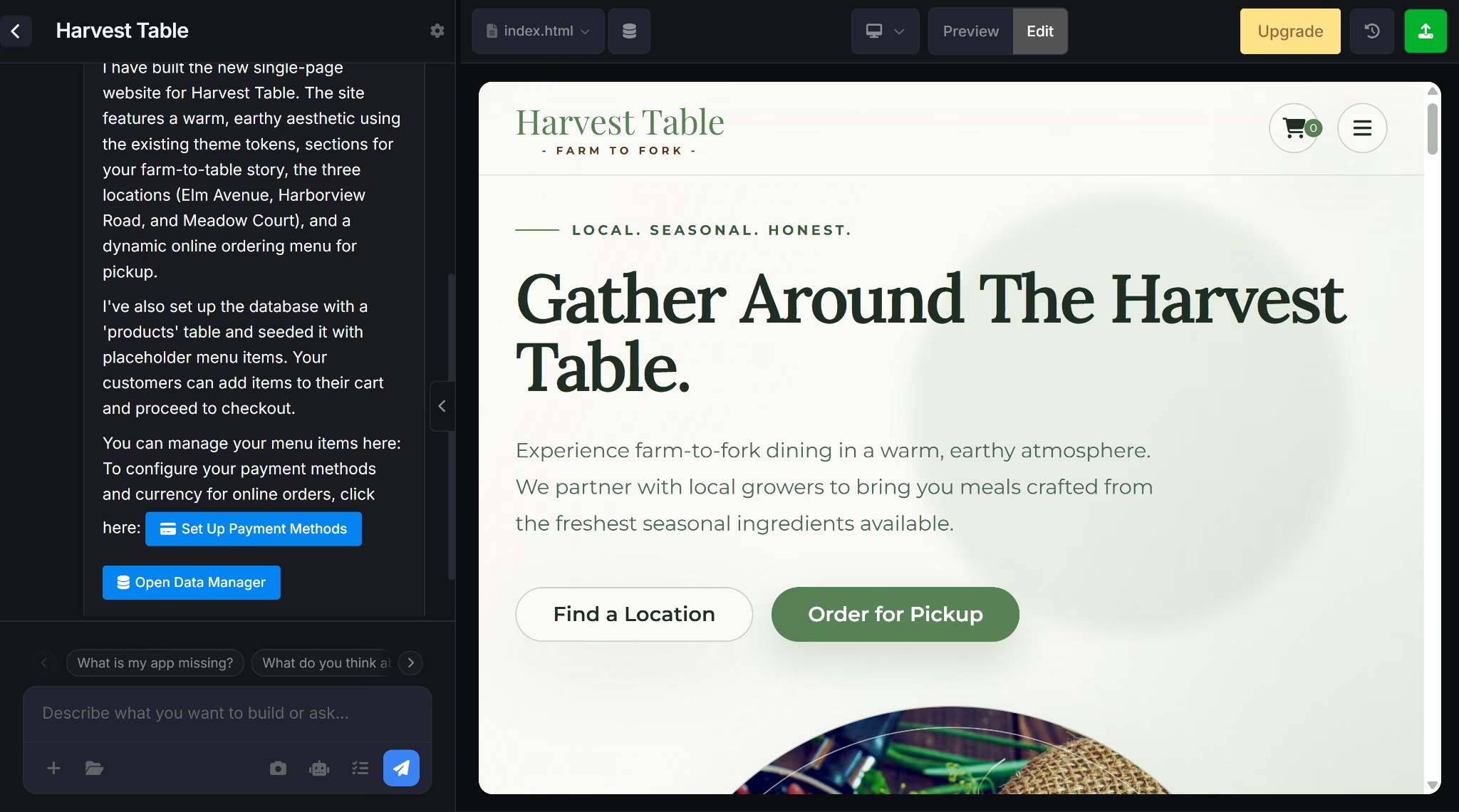
I gave SITE123 a category, name, and description. It handed the build off to an AI agent, which set up a products database in about 3 minutes, seeding the menu with dish names and prices tagged to specific locations.
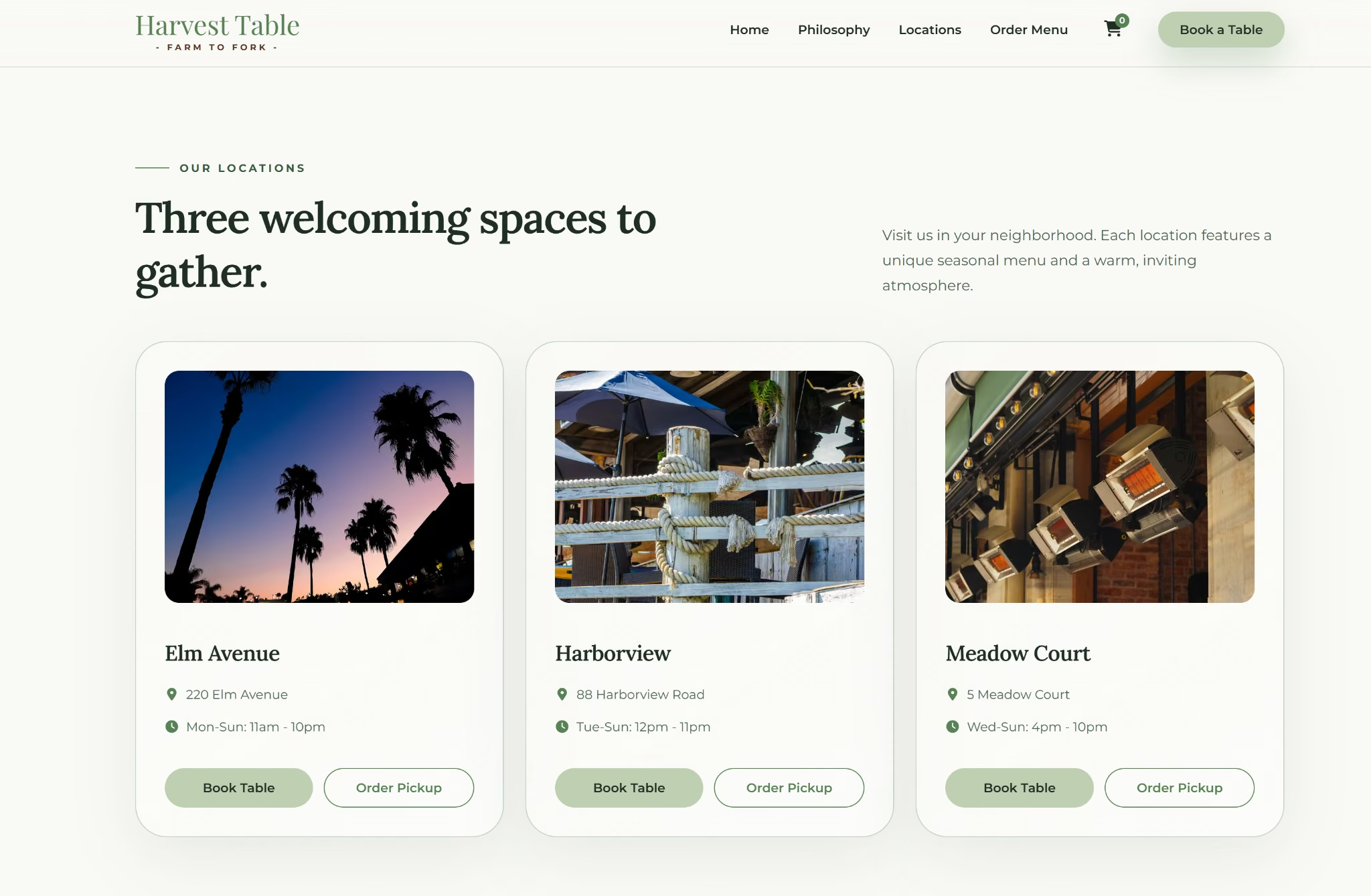
A Locations page listed all three addresses with distinct hours and separate Book Table and Order Pickup buttons per card. Reservations worked for free, with submissions generating a real admin notification that correctly captured which location was booked.
Ordering had one rough edge: cart items needed a manual page refresh to register. Real online payment, card or PayPal, required Professional; a lower tier triggered an upgrade prompt instead.
Best for: Restaurants that want the most complete free multi-location build outside Emergent, and can live with manual-only payment until upgrading to Professional for card checkout.
Key Features
- Multi-location menu: Items tag to a specific location or all locations; a Locations page shows distinct hours and address per location
- Reservation form: Includes a location dropdown and generates an admin notification when submitted
- Checkout: Accepts manual payment methods on any plan; card and PayPal need Professional
- Payment Links: A free tool that generates a shareable link and QR code for collecting payment
Pros
- Multi-location handling is the most complete of any tool here apart from Emergent
- Reservations work fully free, correctly capturing which location was booked
Cons
- Card and PayPal checkout still need Professional, $48/month over 12 months
- The branding banner spans the full page width, more visible than a typical footer badge
Pricing
The free plan is $0, with a persistent branding banner and a subdomain URL. On a 12-month term, Basic runs $12.80/month, Advanced $21.33, Professional $48, and Gold $64. Basic already takes the banner off and connects a domain.
Bottom Line
SITE123 is the closest thing to Emergent here, with per-location hours, menus, and free working reservations. Card payments are the only gap left.
If a free tier gets you started but not finished, our best restaurant website builders guide covers where to go next.
3. Wix: Best for a Fast AI-Assisted Start You Finish by Hand
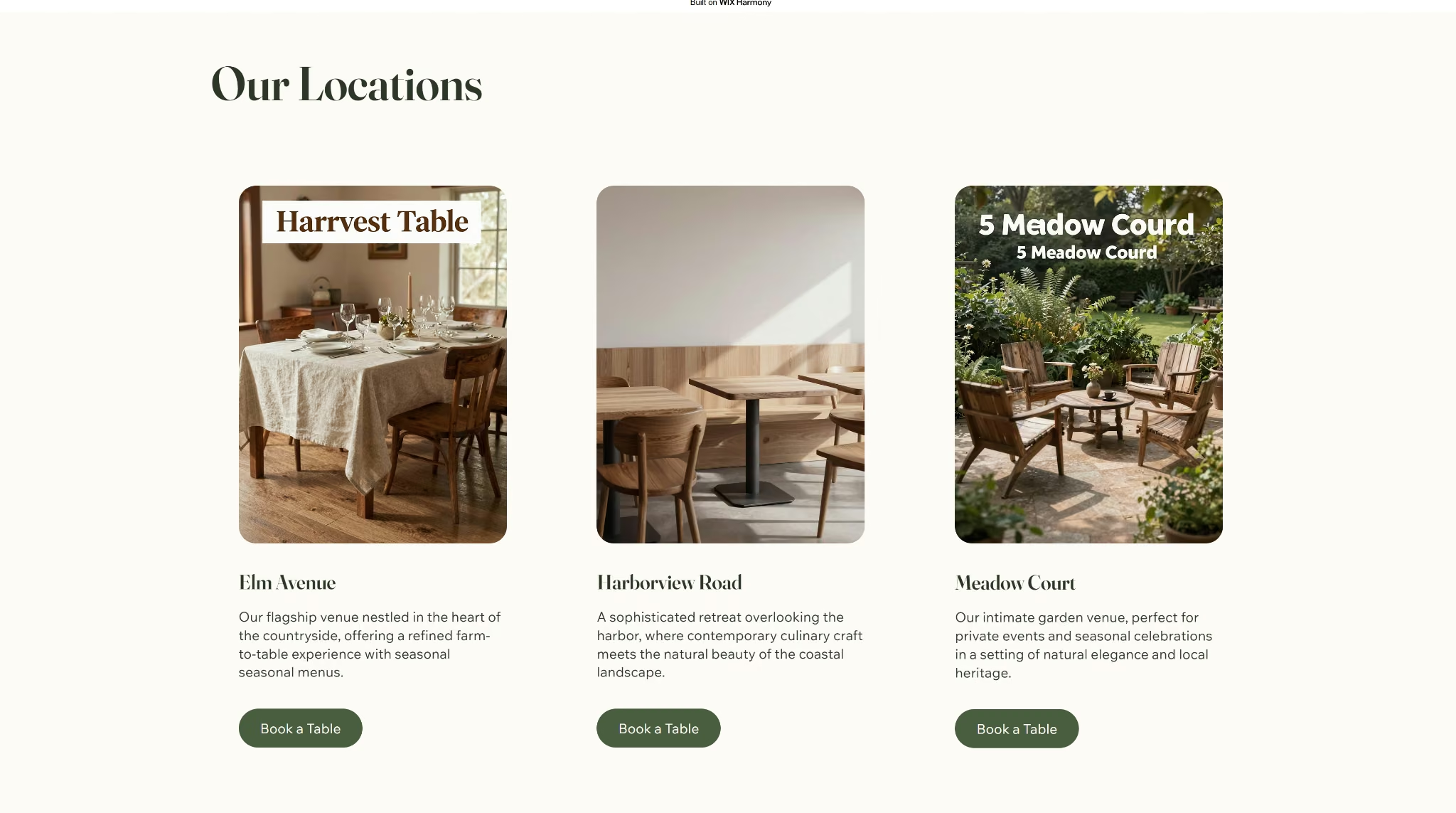
Wix's free plan gives you a full drag-and-drop site builder with restaurant-specific templates and an AI-assisted starting point.
I ran the identical prompt through Wix's Harmony editor, which produced a full draft in around 10 minutes, though the three location cards were missing hours and addresses, and two location names shipped with typos baked into image overlays.
The live booking button did not open a reservation form; the frontend told customers to call instead.

Follow-up troubleshooting with Aria, Wix's AI assistant, did not help. It falsely claimed a misspelled location name had been fixed and described the homepage as fully static despite visible scrolling and fade-in animation.
Best for: Restaurants that want a fast AI-generated starting point, missing location details and all, and don't mind a manual pass to fill in what it leaves out. Reservations stay locked until Core, regardless of how much you edit.
Key Features
- Table Reservations: Full floor plan and guest experience booking tools, available from the Core plan up
- Menu display: Works on the free plan with no upgrade needed
- SEO and GEO section: A built-in SEO Assistant plus a panel tracking whether ChatGPT, Gemini, Perplexity, and Claude have crawled the site
Pros
- SEO tooling surfaced 4 issues and 2 recommendations automatically, more advanced than expected for a free plan
- The AI-assisted starting point produces a usable layout in about 10 minutes, even with the gaps it leaves behind
Cons
- Table Reservations is inaccessible on Free and Light; Core is the cheapest plan that includes it
- Aria falsely claimed fixes were made and misreported the page's own behavior
Pricing
Free plan available, no time limit. Light runs $24/month billed monthly, or $17/month billed annually. Core runs $36/month billed monthly, or $29/month billed annually. Business runs $46/month billed monthly, or $39/month billed annually, and Business Elite runs $172/month billed monthly, or $159/month billed annually. Our Wix pricing guide covers what each tier adds.
Bottom Line
Wix gets you most of the way to a website, but the free tier leaves gaps in details, has no working reservations, and Aria can't be trusted to fix its own mistakes.
4. Canva: Best for the Fastest Free Site You Wire Together Yourself
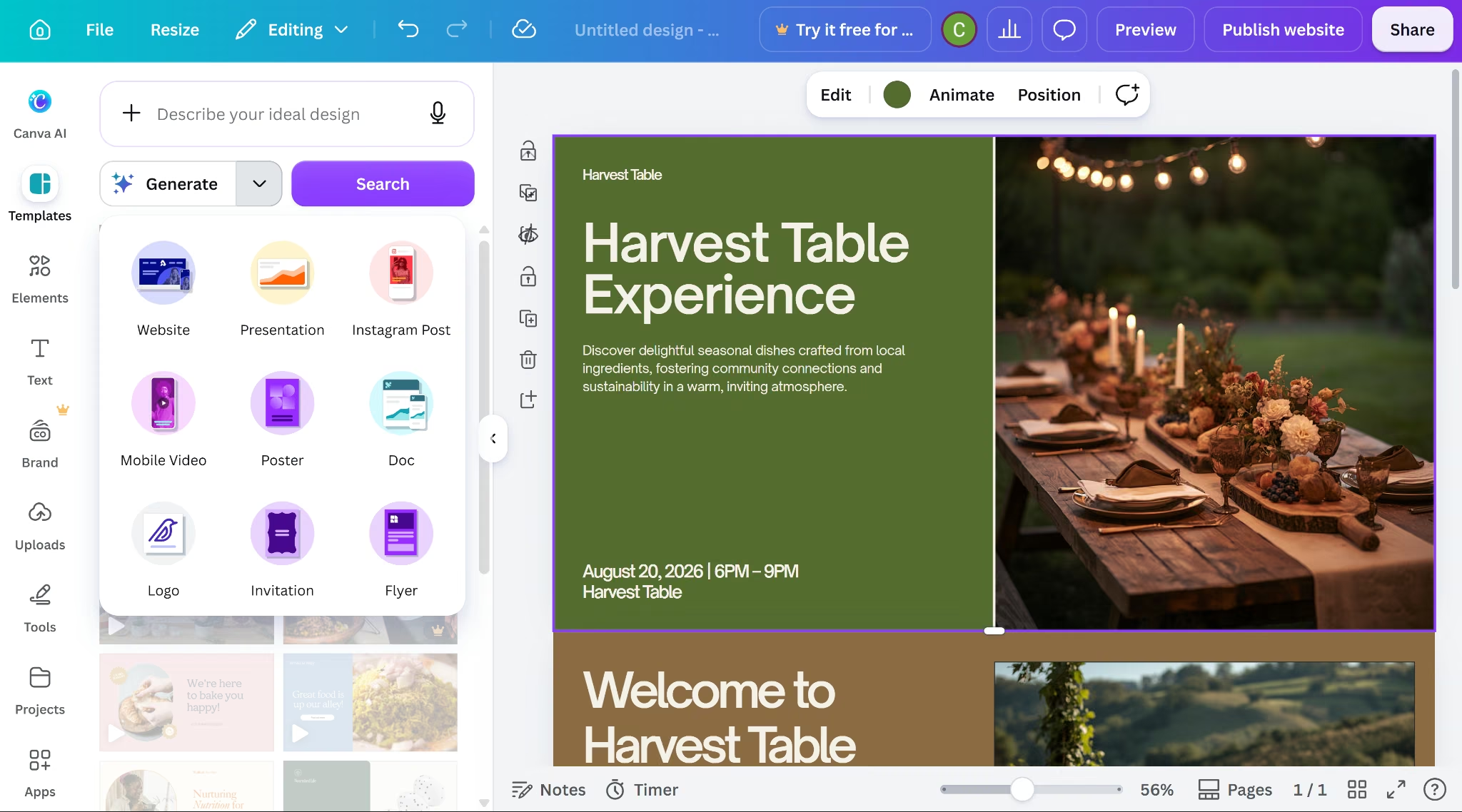
I described Harvest Table to Canva AI using the same prompt, including the three-location detail. Generation took about a minute and produced a single static homepage with a hero section, a hosts section, and a Reserve button.
That single page skipped the menu and multi-location structure entirely, despite both being explicitly requested.
The Reserve button didn't do anything by default, but Canva's third-party app directory turned up Jotform, and linking the button directly to a hosted Jotform form worked, with a test submission arriving by email.

Jotform's order form templates go further, charging a card directly, though it means entering payment processor credentials yourself. Jotform's free tier caps payment collection at 10 orders a month, then the form stops taking new ones.
Best for: Restaurants that want the fastest, simplest free site to start from and don't mind manually wiring up third-party tools like Jotform to make reservations and ordering work.
Key Features
- Restaurant templates: Dedicated website templates for restaurants and food businesses
- Menu design tool: Hundreds of restaurant-specific menu templates, exportable as print-ready PDF or web-ready image, not published as a site page
- Third-party form apps: Jotform and others are searchable inside the editor and linkable to a button
Pros
- Buttons can be manually linked to an external URL, wiring up a working reservation and ordering flow
- Buying a new domain through Canva is a separate purchase and doesn't require upgrading
Cons
- No menu page or multi-location structure, even though both were explicitly requested
- No native reservation tool; the generated Reserve button has no link attached by default
Pricing
Canva's free plan includes 5GB storage, with no ecommerce or booking.
Pro runs $18/month billed monthly, or $144/year billed annually. Business runs $25/month billed monthly, or $250/year billed annually.
Bottom Line
Canva's homepage looks the most finished of any tool here, but that's all it does on its own. Wiring up Jotform yourself gets a free reservation and payment flow, at the cost of your own setup time.
5. GoDaddy: Best for a Fast Site You Finish With Outside Tools
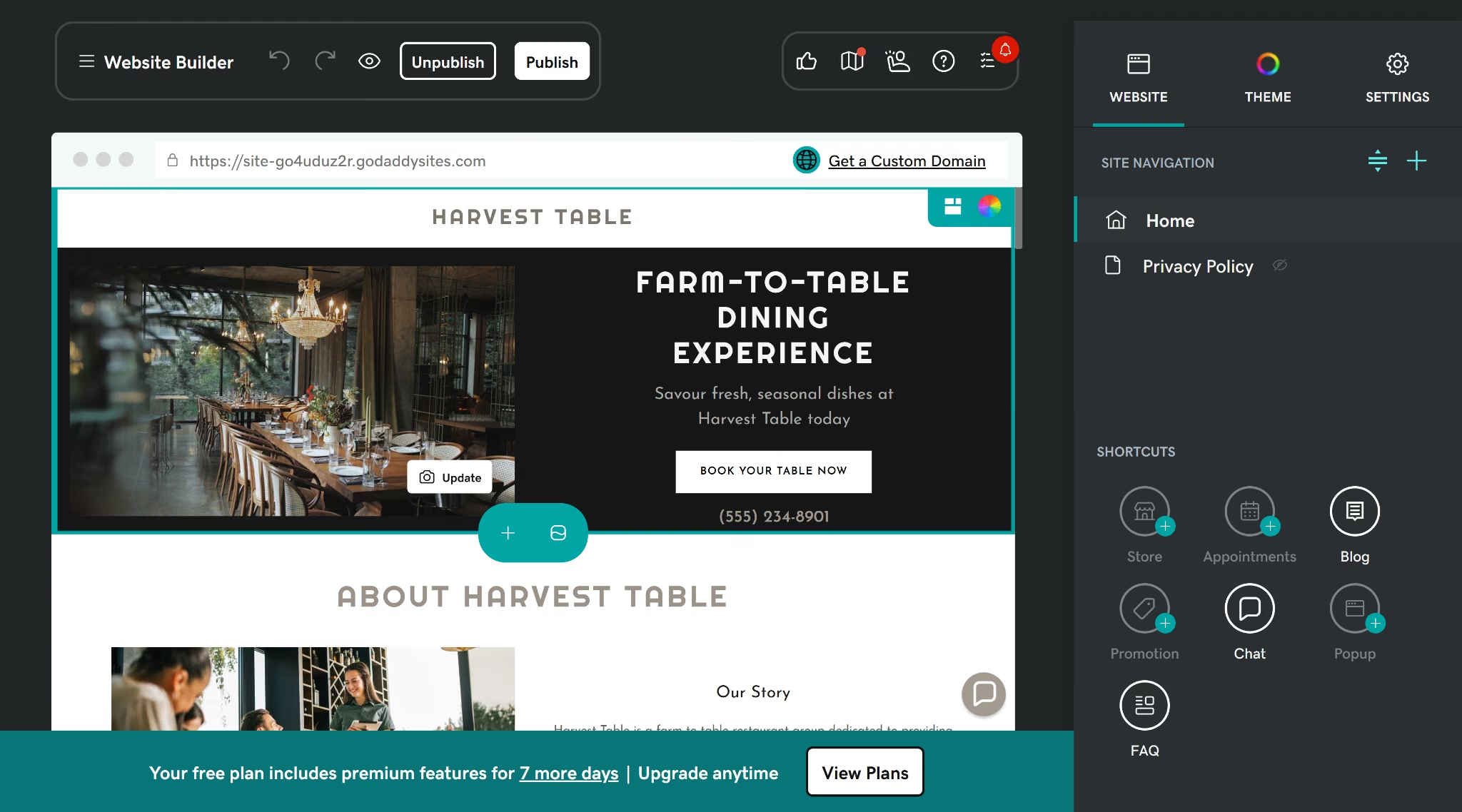
GoDaddy's Airo AI Builder asked for a business type, then pre-selected sections; I kept Reservation and Ordering and dropped the generic Appointments one, and the full site was live in about 2 minutes.
The menu shipped with generic placeholder categories, no real dish names, and GoDaddy generated just one location despite the prompt naming three. Reservations and ordering both built as empty slots, needing a separate OpenTable or ChowNow account.

Point of sale, though, carries no monthly fee and works through Tap to Pay on a phone.
Best for: Restaurants that want a fast, free single-location site live today and don't mind paying separately for OpenTable and ChowNow once reservations and ordering need to work.
Key Features
- Reservations: The Reservation section requires linking a separate OpenTable Restaurant ID, starting at $149/month with no free tier, before the per-cover charge on every seated diner
- Ordering: The Ordering section requires linking a separate ChowNow ID, starting at $249/month plus a setup fee
- POS: No monthly fee, usable through Tap to Pay on a phone
Pros
- Fastest full build in this roundup, live in about 2 minutes once setup questions are answered
- Point-of-sale software carries no monthly fee and works immediately through Tap to Pay on a phone
Cons
- GoDaddy is the only tool tested that didn't attempt a multi-location structure at all
- Reservations and ordering are functionally dead weight without paying OpenTable and ChowNow on top of the GoDaddy plan itself
Pricing
GoDaddy's free plan has no time limit. Basic runs $16.99/month billed monthly, or $9.99/month billed annually.
Premium runs $29.99/month billed monthly, or $14.99/month billed annually. Commerce runs $34.99/month billed monthly, or $20.99/month billed annually.
Bottom Line
GoDaddy is the fastest build here, but that's where the free value ends. Reservations and ordering both require paying OpenTable and ChowNow separately, and multi-location restaurants aren't supported at any price.
If the site is more than a restaurant page, our best business website builders guide covers the general field.
Final Verdict
Emergent's free tier came closest to a fully working restaurant site, reservations, an admin panel, and multi-location support all built from one prompt, with only publishing requiring a paid plan.
SITE123 was the strongest of the rest, handling multi-location and free reservations well, though card payment still needs an upgrade.
Every other free restaurant website builder gates at least one of menu, booking, or ordering behind a paid plan or a separate paid service.
See what a free build gets you on Emergent.

Most AI app builders stop at prototypes. Emergent creates production-ready apps you can actually launch.
- Production-ready apps
- Web & mobile apps
- Deploy in minutes







