



TL;DR
- Use GPT-6.1 Terra for cost-sensitive, high-volume work involving screenshots, documents, visual reasoning, and computer use.
- Use GPT-6.1 Sol for complex coding, multi-step professional workflows, and tasks that benefit from stronger reasoning.
- Terra costs $1 per million input tokens and $5 per million output tokens; Sol costs $2 and $10, respectively. Terra also supports a non-reasoning setting, while Sol starts at a low level.
- Terra posts strong published results on visual, computer-use, and selected coding benchmarks, but OpenAI still recommends Sol or GPT-6 Astra for the most complex coding tasks.
- Test both models on your actual workload, factoring in quality, task completion, latency, retries, and total token cost.
GPT-6.1 Terra suits cost-sensitive, high-volume tasks that require visual input and workflows that need quick computer use; GPT-6.1 Sol is better for complex coding, reasoning, and professional work. The main difference is their capabilities, speed and price. Terra’s standard API prices are 50% lower than those of GPT-5.6 Terra and GPT-6.1 Sol, but that doesn't mean Sol is a less viable starting point for more intensive, multi-step engineering tasks.
This comparison covers all official features, API pricing, published benchmark results, limitations and real-world use cases. It also helps you decide which to use when building AI systems.
What Are GPT-6.1 Terra and GPT-6.1 Sol?
GPT-6.1 Terra and GPT-6.1 Sol are OpenAI models optimized for different priorities. Terra emphasizes efficient visual understanding and computer use, while Sol emphasizes complex coding and professional workflows.
What is GPT-6.1 Terra?

GPT-6.1 Terra is a fast and cost-effective model for visual reasoning, computer use and natural writing. It can read technical drawings, compare product photos and catalog records, access application screens, and create and edit text.
Developers can access Terra via the OpenAI API with model ID gpt-6.1-terra. It's more affordable for apps that handle a high volume of documents, screenshots, or basic business processes.
What is GPT-6.1 Sol?

GPT-6.1 Sol is a coding, computer, and professional-use-friendly version of GPT. OpenAI says it offers performance that is near GPT-6 Astra at a lower cost than the flagship model.
Developers can use Sol via the API with gpt-6.1-sol. It can be used in a number of settings for reasoning effort, allowing developers to dedicate more reasoning to harder tasks to meet their specific needs.
GPT-6.1 Terra vs GPT-6.1 Sol: Key Differences
GPT-6.1 Terra is the lower-cost option, while GPT-6.1 Sol is a stronger starting point for demanding engineering and reasoning work. Both variants support long context and a tool-assisted workflow, so the comparison may come down to price and other requirements.
| Comparison factor | GPT-6.1 Terra | GPT-6.1 Sol |
|---|---|---|
| Primary focus | Visual reasoning, computer use, efficient writing | Complex coding and professional work |
| Standard input price | $1 per million tokens | $2 per million tokens |
| Standard output price | $5 per million tokens | $10 per million tokens |
| Context window | 1,050,000 tokens | 1,050,000 tokens |
| Maximum output | 128,000 tokens | 128,000 tokens |
| Reasoning settings | None, low, medium, high, xhigh, max | Low, medium, high, xhigh, max |
| Image input | Supported | Supported |
| Audio and video input | Not supported on the documented model endpoints | Not supported on the documented model endpoints |
| Tool calling | Supported through the Responses API | Supported through the Responses API |
| Best starting point | High-volume, cost-sensitive tasks | Complex, multi-step engineering work |
Specs and Standard API prices were extracted from OpenAI's model documentation. Cost differences might occur due to caching, processing types, long context, and tools used.
Terra offers the practical advantage of lower costs for repetitive tasks, while Sol is justified as more expensive for hard tasks that require reasoning.
GPT-6.1 Terra vs GPT-6.1 Sol: Benchmark Comparison
Terra's strengths include visual reasoning, computer use, and coding, though benchmark outcomes will not prove a single definitive winner. Helpful comparisons would include individual assessments and separate quantitative results from qualitative statements.
1. Terminal-Bench 4.0: Coding performance
GPT-6.1 Terra scores 50.3% on Terminal-Bench 4.0 at maximum reasoning effort, while GPT-5.6 Terra scores 21.5%. Despite this, OpenAI indicates that Sol remains preferable for the most complex coding tasks.
Terminal-Bench 4.0 tests a coding agent's ability to provide command-line answers to problems. This can include troubleshooting applications and resolving issues that arise while running a program.
The results show that Terra can handle substantial coding workloads. However, the results do not demonstrate that Terra is better than Sol. This evaluation does not include a numeric Sol score like the one cited in OpenAI's announcement.
2. Agents' Last Exam: Computer-use capabilities
Terra performs well with computers, but is focused on speed and cost. According to OpenAI, Terra outperforms GPT-5.6 Terra by 15 percentage points on Agents' Last Exam while costing one-third as much. On this metric, Terra performs on par with GPT-6 Astra at about one-tenth of Astra’s price per token.
Agents' Last Exam includes professional tasks involving software interaction and practical tasks. These include turning architectural drawings into 3D models and reviewing an animated film shot by shot to create a time-coded log.
If you want to automate repetitive desktop tasks, Terra's visual understanding and computer use are an effective place to start.
3. MMMU-Pro: Visual reasoning
GPT-6.1 Terra is a strong performer on MMMU-Pro, a multimodal understanding and visual reasoning task. According to OpenAI, Terra scores higher than GPT-5.6 Terra across all reasoning test settings and comes close to GPT-6 Astra and GPT-6.1 Sol.
This matters when an application needs to understand what is happening in a screenshot, technical diagram, or other visual context. However, benchmark results do not necessarily indicate accuracy across all document types and image quality.
4. OSWorld 2.1: Desktop automation
The OSWorld 2.1 test aims to verify whether an AI agent can perform a series of actions within desktop applications. In this test, OpenAI claims that Terra, at medium reasoning effort, outperforms the best result for GPT-5.6 Terra.
An agent may be required to review technical drawings, run software, and perform a series of tasks. Given its performance, Terra is a good candidate for such workflows.
Benchmark summary
| Benchmark | What it measures | Published finding |
|---|---|---|
| Terminal-Bench 4.0 | Command-line coding | Terra scores 50.3% at maximum reasoning effort |
| Agents' Last Exam | Professional computer-use tasks | Terra gains 15 percentage points over GPT-5.6 Terra at medium effort |
| MMMU-Pro | Visual reasoning | Terra nearly matches GPT-6 Astra and GPT-6.1 Sol, according to OpenAI |
| OSWorld 2.1 | Multi-step desktop tasks | Terra exceeds GPT-5.6 Terra's best score at medium effort |
Such conclusions were made in the context of Terra announcement by OpenAI. The provided resource does not give a precise score for both Terra and Sol in each benchmark; therefore, the numerical ranking is misleading.
For a score-by-score look at where Terra leads and where it trails, see our GPT-6.1 Terra benchmarks guide.
Benchmark verdict: Terra has excellent published results for visual and computer use tasks. Sol is still a good choice for coding tasks. Test both for the same tasks before selecting the production model.
For how the earlier GPT-5.6 generation compares, including its Sol, Terra, and Luna tiers, see our GPT-5.6 Sol vs Terra vs Luna breakdown.
GPT-6.1 Terra vs GPT-6.1 Sol: Pricing
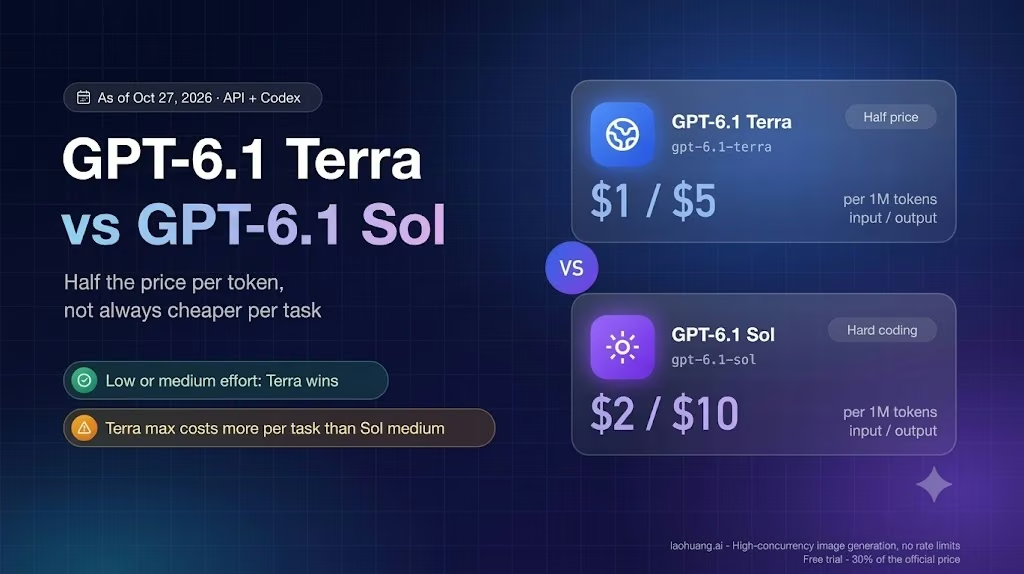
GPT-6.1 Terra is 50% cheaper per token used for input and output in comparison to GPT-6.1 Sol. The difference could be considerable when you have thousands of requests or responses.
Input tokens represent the text and other inputs the model supports. It generates content that is covered by output tokens. Cached input rates are used when eligible input is used more than once via prompt caching.
How much can you save using Terra?
Imagine a program that takes 1 million tokens as input and produces 200,000 tokens.
- GPT-6.1 Terra: $1 + $1 = $2
- GPT-6.1 Sol: $2 + $2 = $4
This example workload costs half as much with Terra. This excludes tool fees, cache-write charges, long-context pricing, and any provider-specific charges. Actual billing will be subject to pricing adjustments, if any, and token usage.
For rates on caching, Batch, Flex, and Fast mode, see our GPT-6.1 Terra pricing guide.
But cheaper tokens don't necessarily mean a cheaper task. Even though Sol costs more per token, using it for a difficult workflow might cost less overall because it requires fewer retries and/or produces less output.
Price verdict: Terra suits high-volume applications with strict budgets. When Sol delivers higher-quality performance that leads to better work or fewer costly mistakes, it is good value.
GPT-6.1 Terra vs GPT-6.1 Sol: Features
Both models accept text and image input, support long contexts and structured outputs, and can use tools through the Responses API. The primary distinction is that each model focuses on different tasks.
Reasoning and problem-solving
Sol is designed for complex coding and professional workflows. Works with low, medium, high, xhigh, and max reasoning effort.
There is no none option, but Terra supports those settings. This provides more flexibility for development tasks that require little or no additional reasoning. The higher the effort of reasoning, the better it may be on difficult problems, but the more latency and token use may be required.
Visual understanding and computer use
Terra is especially well suited to applications that are required to read what is on screen and respond to software interactions. These include reading invoices, matching product images, filling in application screen fields, etc.
Sol also supports computer use, but Terra is specifically optimized for fast, cost-efficient visual and computer-based work.
Coding and tool integration
Sol is designed for complex coding and professional workflows. Both models accept function calls and structured outputs, as well as web search, file search, code interpretation and computer use via the Responses API.
This enables the application functions to be linked to model reasoning. For instance, a model could extract data from a document, invoke a validation function and return the result in a predetermined JSON format.
Both models do not remove the need for software testing, permissions, validation or human review in high-impact workflows.
Context and output limits
The models have a context window of 1,050,000 tokens and an output of up to 128,000 tokens. These limits are useful for long documents, large code segments and multi-step tasks.
Just because a model has a large context window does not mean it will use all the information presented to it correctly. Even for the developers, it is still necessary to get the required information, organize prompts and analyze results.
GPT-6.1 Terra vs GPT-6.1 Sol: Speed and Efficiency
Both Terra and Sol offer ways to execute efficiently, but Terra focuses more on speed, while Sol focuses more on reasoning, where it's possible to make more impact than speed.
In OpenAI's maximum-effort comparison, Terra is over three times faster than GPT-6 Astra and GPT-6.1 Sol at completing tasks on Agents' Last Exam. This doesn't guarantee latency; it reflects a specific evaluation.
In production situations, three variables should be measured:
- Latency: How long does the model take to produce a meaningful result?
- Throughput: How many requests your system can process in a given time.
- How many tokens does each task in the task set need to complete successfully?
For interactive applications, a quick response is helpful. When an agent needs to troubleshoot or run a lengthy process, a more careful approach may be better. Evaluate both models with the same prompts, tools, and criteria.
Which GPT-6.1 Model Should You Choose?
Use Terra in cases where repetition and visual work are involved, and use Sol when you need to do heavy coding. You may want to consider using model routing if your application is a combination of the two.
| Your use case | Model to test first | Why |
|---|---|---|
| Invoice extraction | Terra | Lower token costs and visual understanding |
| Screenshot interpretation | Terra | Strong focus on visual reasoning |
| Repetitive browser or desktop tasks | Terra | Emphasis on efficient computer use |
| Complex software engineering | Sol | Designed for demanding coding workflows |
| Multi-step technical analysis | Sol | Focus on complex professional work |
| High-volume content processing | Terra | Lower standard API rates |
| Mixed-complexity AI application | Both | Route tasks based on quality and cost |
These are just starting points, not guarantees. A brief assessment of the performance of the different models on the tasks for which they are to be used will be conducted, and your model will be found to be the better one.
Can you use both models in one application?
Yes. You can create a system that lets Terra do routine work, and Sol handle more difficult work. This can reduce costs while preserving access to stronger reasoning for difficult cases.
For instance, an AI assistance app might use Terra to classify incoming requests and extract order data. It could refer more complex technical cases to Sol for further investigation. You still need routing rules, error handling, permissions and quality checks, etc., in your application.
Conclusion
The debate between GPT-6.1 Terra and GPT-6.1 Sol is about efficiency versus challenging reasoning tasks. Terra's strengths include lower API pricing and solid performance in visual reasoning and computer use. Sol is designed for complex coding and expert-level professional work.
Neither model is a perfect solution for every benchmark and use case. Self-evaluate results on your assignments, include retries and tool expenses in the analysis, and choose the model that meets your quality and cost objectives.
Next, build an AI-driven application with Emergent’s AI app builder, test the initial workflow, and tweak it to meet real users’ needs.

Most AI app builders stop at prototypes. Emergent creates production-ready apps you can actually launch.
- Production-ready apps
- Web & mobile apps
- Deploy in minutes







