




TL;DR
- GPT-6.1 Terra is optimized for visual reasoning, computer use, and screen workflows.
- GPT-6 Luna is designed for focused, high-volume tasks and offers substantially lower token pricing.
- Terra input tokens cost $1 per million, and Terra output tokens cost $5 per million. Luna costs $0.10 for input tokens and $0.50 for output tokens.
- Both models have a context length of 1,050,000 tokens and a maximum output length of 128,000 tokens; Luna’s documented maximum input is 922,000 tokens.
- For computer-interaction and visual-interpretation-dependent workflows, choose Terra. Use Luna for everyday jobs where cost efficiency is important.
GPT-6.1 Terra and GPT-6 Luna are members of the same model family, but they are optimized for different workloads. Terra emphasizes visual reasoning, precise computer use, and natural writing; Luna is designed for focused, high-volume tasks where cost efficiency matters most. OpenAI positions the models as complementary options within the GPT-6 family, not direct substitutes for every workload.
This guide will discuss the differences between the two based on price, benchmarks and features.
GPT-6.1 Terra: From Visual Understanding to Action
GPT-6.1 Terra is designed for tasks requiring the understanding and interaction with visual content and software interfaces. This combines visual reasoning, computer-use skills, and natural writing.
For instance, a company could use Terra to interpret a technical drawing, extract information from an invoice, or perform tasks in an accounting app. These tasks require more than generating a text answer. They might require interpreting a visual message and deciding what to do next.
Moreover, Terra allows long-context processing and customizable reasoning effort. Developers can adjust reasoning effort to balance output quality, latency, and cost.
GPT-6 Luna: An Economical Engine for Everyday AI Tasks
GPT-6 Luna is built to handle specific tasks businesses need to run at scale. The low token price makes it worth considering for classification, extraction, structured text generation and other repetitive workloads.
Consider a support platform that receives thousands of messages every day. Luna could categorize requests, extract key information, and produce draft responses. Developers should validate performance on a labeled dataset before deployment.
Luna also handles image input and longer contexts. However, not every job will cost less overall. The total cost may change based on retries, other tools, and human review.
The Head-to-Head Scorecard: Where Do They Actually Differ?
Terra’s strengths are visual reasoning and computer use, while Luna's strength is affordable token pricing. The context and output limits are the same for both.
| Comparison factor | GPT-6.1 Terra | GPT-6 Luna |
|---|---|---|
| Primary Focus | Visual reasoning, computer use, and writing | Focused, high-volume tasks |
| Input price per 1M tokens | $1.00 | $0.10 |
| Output price per 1M tokens | $5.00 | $0.50 |
| Cached input per 1M tokens | $0.05 | $0.01 |
| Context window | 1.05M tokens | 1.05M tokens |
| Maximum output | 128K tokens | 128K tokens |
| Image input | Supported | Supported |
| Reasoning effort | None to maximum | None to maximum |
| Computer-use positioning | Core strength | Not its primary positioning; verify workflow support |
| Best starting point | Visual and screen-based tasks | Cost-sensitive, repetitive processing |
References: GPT-6.1 Terra documentation, GPT-6 Luna documentation, and OpenAI API pricing. Normal rates apply; extra processing or tool fees may apply.
Standard rates apply to contexts of 272,000 tokens or fewer. Longer-context requests may be billed at different rates.
As shown in the table, the two models share many similarities. Hence, context limit alone will not help you decide between the two. Instead, consider model performance, supported tools, latency, and the overall cost of the process.
Benchmark Reality Check: What Do the Numbers Tell Us?
GPT-6.1 Terra’s published results improve on those of GPT-5.6 Terra, while GPT-6 Luna has released results in coding and other professional workloads. These results indicate their strengths, but you can't use scores from different tests to rank them directly.
Visual Reasoning and Computer Use
When you need to interpret images and manipulate software interfaces, Terra is the more direct application.
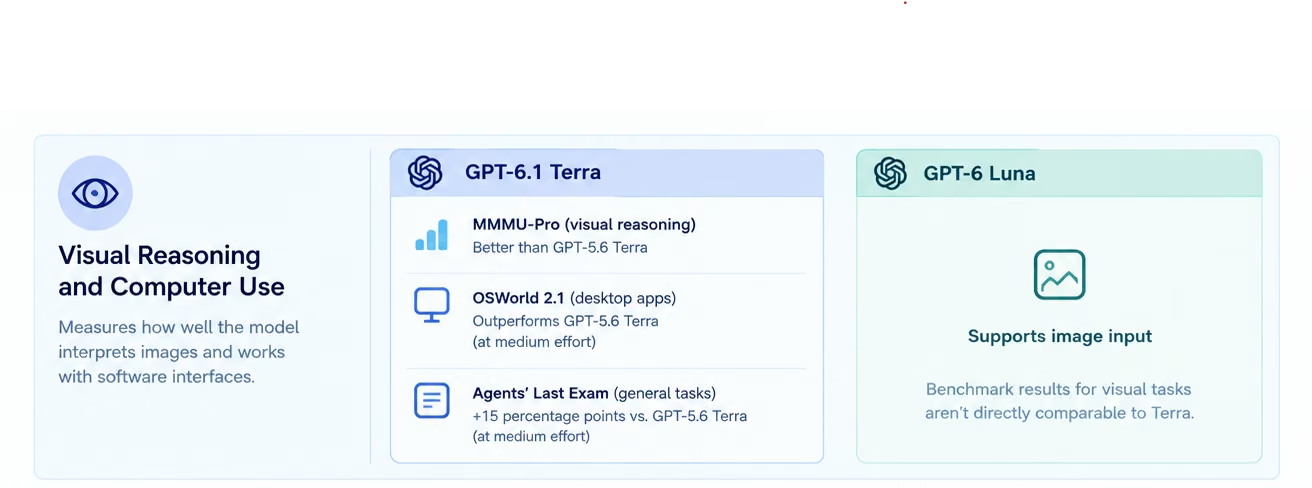
Across reasoning-effort settings, OpenAI says that GPT-6.1 Terra surpasses GPT-5.6 Terra in the MMMU-Pro benchmark for visual reasoning. On OSWorld 2.1, a multistep task evaluation in desktop applications, Terra also outperforms the previous model's best score at medium reasoning effort.
It also claims a 15-percentage-point advantage over GPT-5.6 Terra at medium effort on a standard benchmark of tasks, the Agents' Last Exam, at about one-third the price per task, according to OpenAI.
These results support Terra’s positioning. They don't indicate that Terra is superior to Luna on all visual tasks. That claim should be backed up by developers comparing the two models on representative examples.
Coding, Agent Tasks, and Problem-Solving
Both models can support coding workflows, but their benchmark results require context.
GPT-6.1 Terra achieved 50.3% accuracy on Terminal-Bench 4.0, which evaluates coding agents on command-line tasks at its peak effort. OpenAI claims this is more than double GPT-5.6 Terra's published result: 21.5%.
GPT-6 Luna has also shown its ability to code. For DeepSWE 1.1, OpenAI states that it achieves a score of 66.6% with the highest level of reasoning effort. That evaluation evaluates agents on long-horizon software-engineering tasks on real codebases.
These results use different benchmarks and settings, so you can't use them to rank Terra against Luna directly. Apply the test that best suits the application and run both models under similar conditions.
If you want to put either model to work on a coding task, a coding agent builder lets you describe the agent in plain language and test it on your own repository tasks.

Accuracy Under Pressure
OpenAI reports that GPT-6.1 Terra reduces factual errors on an internal set of deliberately error-inducing prompts. The rate dropped from 53.6% for GPT-5.6 Terra to 16.7% for GPT-6.1 Terra at low reasoning effort. The reported rate of Terra at full effort was 4.3%.
OpenAI also claims GPT-6 Luna delivers more accurate information than its predecessor. However, the internal evaluations do not provide a single accuracy rate for all applications.
Consider these results as results from specific tests and not guarantees. Use your data to determine factual accuracy, instruction adherence and failure rates before deployment.

Also read: GPT-6 Luna benchmarks, a look at how Luna’s scores hold up in independent tests.
The Cost of Intelligence: What Each Model Charges You
GPT-6 Luna costs 90% less per token than GPT-6.1 Terra at normal API prices. This difference can matter if the app handles many requests.
Input and Output Pricing at a Glance
| API usage | GPT-6.1 Terra | GPT-6 Luna |
|---|---|---|
| 1M input tokens | $1.00 | $0.10 |
| 1M output tokens | $5.00 | $0.50 |
| 1M cached input tokens | $0.05 | $0.01 |
| 1M input + 1M output tokens | $6.00 | $0.60 |
Source: OpenAI API pricing. These figures use standard token rates.
Luna's lower prices make it more favorable for projects that produce multiple similar results. Terra's higher prices may be justified by its unique abilities that increase completion rates.
A Realistic API Cost Calculation
Suppose 10 million input tokens and 2 million output tokens need to be processed.
- GPT-6.1 Terra: $10 for input plus $10 for output, totaling $20.
- GPT-6 Luna: $1 for input plus $1 for output, totaling $2.
In this example, Luna saves 90%, which is $18. This figure does not include tool calls, retries, caching, taxes and other charges that may apply.
Also read: GPT-6.1 Terra pricing, a breakdown of caching, Batch, Flex, and Fast mode rates.
When Paying More Can Make Financial Sense
The lowest-priced model is not always the lowest-cost option. When a more competent model does the job right the first time, it could save on retries and manual effort.
For instance, consider an invoice-processing workflow that requires interpreting complex visual layouts. If Luna struggles with those layouts and needs repeated corrections, the lower token price won't necessarily lower operating costs.
Consider the overall expense per task that is completed, rather than the amount per million tokens.
Beyond the Price Tag: Capabilities That Change the Decision
The most helpful difference in these AI models is how they will work in your workflow. Both support image input and have very long contexts, but different specializations dictate where to begin testing.
Working With Screens, Images, and Interfaces
The visual understanding-to-interaction workflows are a good starting point with Terra. Read technical drawings, understand application screens and perform repetitive software tasks.
Luna can also accept image input, so don't assume it can't process visual information. Try both models with pictures, layouts and behaviors your app needs.
Handling Long Documents and Complex Context
Both models have a 1.05 million-token context window. This ability is useful for lengthy documents, lengthy conversations, and tasks that involve lots of background information.
But a big context window does not ensure total recall or accurate reasoning on all inputs. Before using either model in production, test retrieval accuracy, conflicting information and performance on long documents.
Balancing Reasoning, Latency, and Reliability
Both models have modular reasoning effort so that developers can tune the effort used for a task. Higher effort can make tasks easier, but it may take more time and use more tokens.
For routine classification, less effort may be enough. For more complex visual interpretation or multi-step workflows, a higher setting might be better.
Repeat latency and task-success measurements under the same conditions. Don't assume one model is always faster than the other without measuring it on your workload.
Put Them to Work: Five Scenarios Worth Testing
Comparing Terra and Luna is easier when you refer to practical business tasks instead of a list of features.
1. Automating a Software Workflow With Terra
Use Terra as a candidate to interpret a screen and interact with an application. A test may request an agent to find an invoice, read it and fill out a form.
Track how often humans intervene, how accurately it completes the task, how well it recovers from interface changes, and how often it fails.
2. Processing Customer Messages With Luna
Luna is a viable solution for scalable support message classification, order extraction and drafting standard responses.
Send a sample of messages and measure classification accuracy, response quality and cost per request. Introduce escalation rules for unclear and sensitive cases.
3. Extracting Information From Business Documents
Both models are good options for document extraction. Luna may suit basic, text-heavy documents, and Terra should be tried when visual design or diagrams matter.
Match fields pulled from data with known data. Add pages with partial or non-standard information, formatting and unusual pages to the test set.
4. Building a Customer Support Assistant
Both Luna and Terra could help with routine text-based requests, but Terra could be especially useful when an agent needs to interpret screenshots or manipulate a software interface.
The right design depends on the support workflow. Get human sign-off for consequential actions and establish clear escalation routes.
To build the assistant itself, try the AI chatbot builder.
5. Routing Simple and Complex Requests
Route routine tasks to Luna and send more complex visual tasks to Terra, provided they are implemented to support both models and the required tools.
This can lower token costs while still using specialized capabilities. But routing is complicated, so balance the cost of maintaining and monitoring it with the benefits of routing.
If you want to build that routing layer yourself, an AI agent builder lets you describe the workflow in plain language, and the Universal LLM Key connects one app to GPT, Claude, and Gemini models.
The Decision Matrix: Which Model Fits Your Project?
Choose the model based on how well it meets the requirements of the particular job, not just the one with the cheapest API costs. Here is a quick list of factors to help you choose the best variant.
| Your requirement | Model to evaluate first | Why |
|---|---|---|
| High-volume text classification | GPT-6 Luna | Lower token costs |
| Structured text extraction | GPT-6 Luna | Economical for repetitive tasks |
| Screen-based automation | GPT-6.1 Terra | Specialized computer-use capabilities |
| Visual reasoning workflows | GPT-6.1 Terra | Strong focus on visual interpretation |
| Long-document processing | Both | Same published context limit |
| Complex coding tasks | Test both against alternatives | Benchmark and workflow fit matter |
| Mixed workloads | A combination | Route tasks by complexity and cost |
This matrix is a starting point, not a replacement for testing. Your data, latency needs, and reliability constraints may alter the result.
A Smarter Alternative to Choosing Just One Model
Luna's low cost can be paired with Terra's specialized capabilities. Sort out tasks and send them to the right model, not all models.
For example, a business application might send regular customer queries to Luna. It could escalate requests that involve screenshots or software interaction to Terra.
Use a small assessment sample. Track output quality, success rate, latency and cost. Provide alternative rules for failed requests and measure the routing system post-deployment.
This works best when tasks differ clearly in complexity. A single model setup may be easier if the savings aren't significant enough to offset processing or routing errors.
Final Verdict
In fact, GPT-6.1 Terra is a more natural starting point for visual reasoning and computer-use workflows. For specific, high-volume processing, GPT-6 Luna is the more cost-effective choice.
Standard Terra tokens cost 10 times as much as standard Luna tokens, but they may be worth it when they help users complete tasks. The context window and maximum output size are the same for both models, so they make no difference.
Test the models on your own problems before committing and compare accuracy, latency, reliability and total success cost per problem.
Use Emergent’s AI app builder to quickly prototype your application, test its core features and understand how an AI workflow can meet your requirements.

Most AI app builders stop at prototypes. Emergent creates production-ready apps you can actually launch.
- Production-ready apps
- Web & mobile apps
- Deploy in minutes





