




TL;DR
- Low-code vs no-code vs AI produced very different speeds to a first app, with no-code in Glide taking days, low-code in Appsmith taking weeks, and AI in Emergent reaching a working app in minutes.
- Code ownership is the sharpest divide, with no-code locking you to the platform, low-code granting partial code access, and AI development handing over full source with GitHub sync and low lock-in.
- At 20 seats the cost gap widens sharply, with Quickbase near $700 per month and Creatio near $1,500 per month plus a $10,000 yearly minimum, while Emergent stays $20 to $200 per month with no per-seat fees.
- A no-code or low-code tool with an AI add-on is not AI-native, since it only fills fields faster while still capping you at the platform's component ceiling that an AI-native builder avoids entirely.
- AI development wins for validating an idea fast, but low-code still wins for regulated data and large engineering orgs needing audit trails and access controls that AI does not produce on its own.
When it comes to building something online that doesn’t require advanced coding skills, there are three options: low-code, no-code, and AI.
However, they don’t all serve the same purpose or carry the same risks. They also don’t produce the same result in an enterprise environment.
I built the same simple app three ways: no-code in Glide, low-code in Appsmith, and AI in Emergent. The gap surprised me: same idea, very different time, cost, and control on each. Here’s how the three stack up, then what happened when I built with each.
Low-Code vs No-Code vs AI: At a Glance
| Dimension | No-Code | Low-Code | AI-Powered Development |
|---|---|---|---|
| Best for | Non-technical users, simple apps | Enterprise teams, complex integrations | Speed-focused builders, first versions through to production apps |
| Input method | Drag-and-drop visual builder | Visual builder + custom code | Natural language prompts |
| Learning curve | Days to weeks | Weeks to months | Minutes to hours |
| Speed to first app | Days | Weeks | Minutes to hours |
| Code ownership | None (platform-locked) | Partial (platform-dependent) | Full (real source code, GitHub sync) |
| Customization | Limited to platform components | High (code escape hatch) | Full (edits real, standard code) |
| Scalability | Platform-constrained | Enterprise-grade | Standard frameworks, no artificial ceiling |
| Vendor lock-in | High | High | Low to none |
| Cost at scale | Expensive (usage-based) | Very expensive (per-seat enterprise) | Affordable (standard hosting) |
| Compliance & governance | Basic | Strong (audit trails, access controls) | Needs an engineering review first |
No-Code Platforms
No-code platforms are built for users without any programming experience whatsoever. The no-code development platforms market is projected to reach $102.57 billion in 2030 at 22.7% compound annual growth rate (CAGR), according to The Business Research Company. But how do these tools work, exactly?
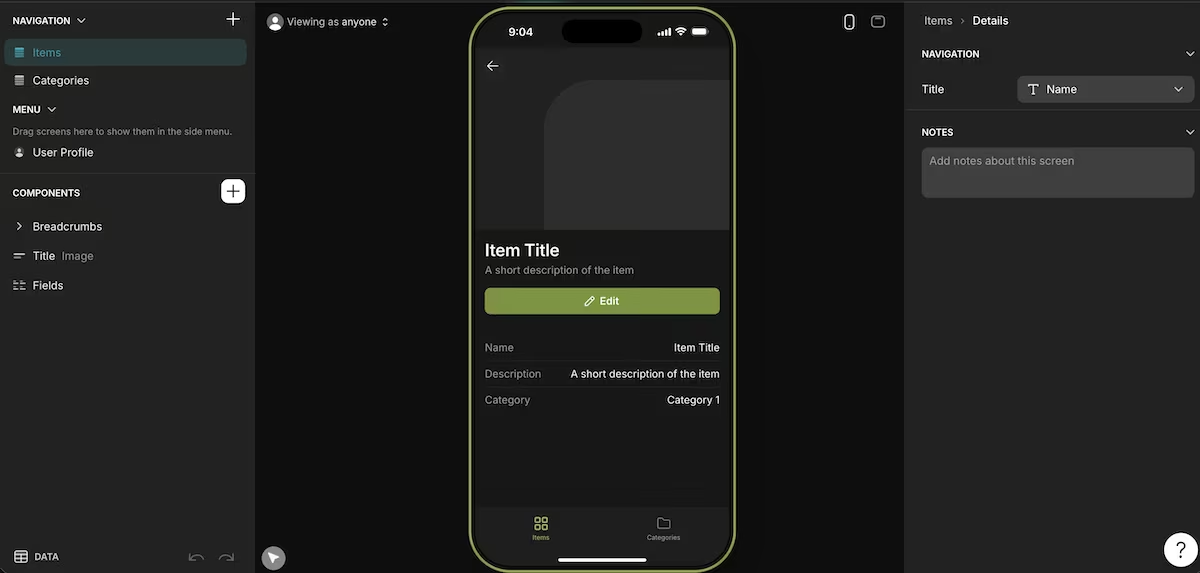
How No-Code Works
No-code lets you build through a visual interface, drag-and-drop forms, and pre-built templates that you can customize for your own purposes.
When I built a simple item tracker in Glide, I didn’t have to write any code at all, and I wasn’t required to do any technical configuration either.
In fact, I had a basic screen working in minutes. It wasn’t perfect, though, and I quickly hit the limits of what its components would let me change.
When No-Code Makes Sense
No-code tools are great when you know your workflow down cold, it’s a workflow you use often, and non-technical teammates (often called “citizen developers”) need to be the ones in control.
We’re looking at tools like inventory trackers, leave request systems, and internal dashboards. Any teammate can maintain them, so operations don’t stall waiting on an engineer.
No-Code Limitations
While a no-code tool is perfect for many workflows, there’s a limit to how much it can do. If your workflow becomes super complex or unique, templates suddenly become less adaptable.
And if you’re working with enterprise-grade use cases that ask too much of its design, scalability becomes a problem.
There’s also the factor of tying yourself to a single vendor. If you ever want to migrate to a different platform, it’s time-consuming, overly complicated, and often costs more than starting again.
Low-Code Platforms
Low-code targets two types of users. One is a professional with some technical knowledge who can’t configure everything alone. The other is a professional developer who wants to speed up the outcome.
Like no-code, the low-code market is on the rise. Fortune Business Insights projects the low-code market to grow from $48.91B in 2026 to $376.92B by 2034 at 29.10% CAGR.

How Low-Code Works
Like no-code, a low-code platform offers a visual environment with drag-and-drop interfaces and pre-built elements. The main difference is that low-code tools allow you to add custom code.
If you start building with low-code, you can build an entire enterprise application using prebuilt logic blocks and visual designers. Then you can add code whenever you need to add a custom function or specific integration.
Building a tool in Appsmith, I could drag components into place but still drop them into code for a custom query. So it was more powerful than no-code, although it did take a lot of setup to get there.
When Low-Code Makes Sense
Low-code beats no-code once you're working with a complex workflow, have both technical and non-technical teammates, and need the app to adhere to industry regulations or scale across multiple departments.
Low-code tools are a great choice for modernizing legacy systems, working with cross-departmental enterprise apps, and managing workflows with heavy compliance requirements.
They're also great for when business users and developers need to work together without either party writing everything from scratch. Overall, they’re a more powerful option than no-code and faster than standard coding.
Low-Code Limitations
The big one is cost. Enterprise-grade options such as Mendix and OutSystems come with high licensing fees. That puts them out of reach for small teams and early-stage businesses.
While you may not need a bachelor’s degree in computer science, you’ll need to dedicate some time to learning the platform. Developers who are used to writing code from scratch often struggle with the visual abstraction layer.
Same lock-in risk as no-code, and the deeper your custom logic, the more painful the eventual migration.
AI-Powered Development
AI-powered development is a method of building that allows you to talk to a platform in natural language. If you want a cooler name for it: in 2025, Andrej Karpathy, a founding member of OpenAI, gave us the term “vibe coding” to describe this exact process.
Karpathy has since called vibe coding passé, and now favors the term "agentic engineering," but there's no denying it caught on in a big way. AI building itself caught on just as fast. The AI code tools market, worth $9.35B in 2026, is projected to reach $29.96B by 2031 at 26.23% CAGR, per Mordor Intelligence.

How AI-Powered Development Works
You fire up an app-building tool and use plain English to tell it what you want. For those with an idea and no coding experience at all, it’s the obvious place to start.
When I started building with Emergent, I simply described what I wanted and watched it generate the actual source code. There was no component ceiling or configuration needed. I had a working app in minutes.
And when an error popped up, the solution was simple. I just told the tool exactly what the error was, and it figured out the problem. Then it fixed it, without me even needing to understand what it did.
When AI-Powered Development Makes Sense
AI development impresses with custom tools, where your edge is the workflow itself. A drag-and-drop tool won't build you a custom user experience with a complex scheduling system and a proprietary pricing engine on top.
If you want to fully own your codebase, iterate at will, and skip any long-term reliance on a vendor, AI development earns its place. A vibe coding tool like Emergent is especially strong, as it’s the equivalent of multiple employees working on your project at the same time.
AI-Powered Development Limitations
The AI writes all of the code, and nothing stops you shipping it without reading a line. The result usually runs fine, but the structure underneath can be disorganized, and security gaps can sit there unnoticed if nobody looked.
That matters most with regulated data. Apps handling health records or payment details need audit trails and compliance controls that AI development doesn't produce on its own. So you'll want an engineering review before launch. Everywhere else, weak structure just costs you time in maintenance.
For a new business choosing between a low-code tool and AI development, the trade-off is speed now versus structure as you scale. What works for a solo founder shipping a first version may not hold up for a 10-person team.
AI Add-Ons vs AI Native
No-code and low-code tools have added AI capabilities:
- Microsoft Power Apps has Copilot and AI Builder
- Google AppSheet has Gemini
- Mendix has Maia
- Airtable has AI fields and agents
However, a visual builder with AI isn’t the same as an AI-native tool. It generates screens faster and helps fill in fields, but you’re still capped by the platform’s component ceiling.
With an AI-native tool, the tool itself is writing the codebase, so you aren’t stuck in a vendor’s component library. A no-code tool with AI just speeds up how you put pre-built parts together. An AI app builder like Emergent lets you go beyond that.
Low-Code vs No-Code vs AI: The Real Cost
Take a 20-person team. A low-code tool like Quickbase starts at $35/user/month (billed annually), about $700/month before any platform minimum. Creatio’s Enterprise tier runs about $1,500/month for the same setup, plus a $10,000/year new-customer minimum. Emergent runs $20 to $200/month total, with no per-seat costs.
For no-code and low-code tools, the advertised price is per user, and those seats multiply fast once your whole team needs access. And for a new business, that can be the difference between being able to build a tool and not, because there’s simply no budget for it.
An AI development tool includes everything you need, including databases, hosting, and AI agents, and it offers it all under one price. With a tool like Emergent, there are no per-seat costs on top of the sticker price.
How to Choose the Right Approach
Choosing between low-code, no-code, and AI comes down to what you’re looking to build and how quickly you need to see the outcome.
Choose no-code if you:
- Need to launch apps without technical complexity
- Prefer a drag-and-drop style of building
- Want to quickly build basic apps
- Have limited coding knowledge or experience
Choose low-code if you:
- Need flexibility and scalability
- Work in team or enterprise environments
- Need extensive customization plus fast development
- Are building internal tools like CRMs, dashboards, and workflows
Choose AI development if you:
- Are happy to refine and review AI-generated code
- Need working apps with fast iterations and flexibility
- Are building innovative, experimental, and custom apps
- Want to use AI to transform your ideas into apps at speed
How to Switch Between Approaches
Whatever choice you make today doesn’t have to follow you for the rest of your business life. If you want to get started while keeping migration as an option, here are the most sensible routes to take.
Route 1: AI to No-Code
Start with an AI development tool to build and validate your idea. If it turns into a product with customers who need next-level branding, move the design to a no-code tool like Webflow or Bubble. Keep your AI development tool on hand for internal tools.
Route 2: AI to Low-Code
Keep the AI builder for workflow management, agents, and team collaboration. When you need custom business logic or deeper database integration, rebuild that piece in a low-code tool.
Route 3: No-Code or Low-Code to AI
If you start with a pricier route that gets harder to leave, i.e., no-code or low-code, and later want something more budget-friendly, you can switch to an AI tool. However, this is more complex than the other way around. So if you’re unsure, start with AI development.
Route 4: Run a Hybrid Setup
A common approach for experienced teams is to use no-code for customer-facing apps, low-code for enterprise integrations, and AI for internal ops, team workflows, and AI agents.
In the early stages, AI is usually enough on its own, even for customer-facing products. You may never need a no-code or low-code tool at all, but that option stays open if you do.
My Verdict
After building with low-code, no-code, and AI, I concluded that AI development is the way to go. You can describe what you want in plain English and get a working up and running in hours.
There’s a reason 84% of developers now use or plan to use AI tools in their development process, according to Stack Overflow’s 2025 survey.
AI development is particularly useful when you’re looking to build internal tools. You can also develop fully functional products for clients without committing months and a significant share of your budget to development.
For regulated data or a large engineering org, low-code still wins on controls. But for validating an idea fast, AI development is the way to go: a tool like Emergent is often the most flexible place to start, since you keep every other option open as you scale.
Most builders stop at a prototype. Emergent ships real web and mobile apps, with accounts, databases, and payments included.
- Production-ready apps
- Web & mobile apps
- Deploy in minutes







