



TL;DR
- Make vs n8n was tested by building the same three-feed Content Radar workflow twice and running each for two weeks, with Make reaching a working first run in 20 minutes against n8n's 40.
- Make's Core plan costs $16/month ($12/month, billed annually) for 10,000 credits, while n8n's Starter costs $24/month ($20/month, billed annually) for 2,500 executions.
- Make bills every scheduled check even when a feed returns nothing new, so three feeds polled every 30 minutes consumed just over 2,000 credits before a single article was summarized.
- The two-week run used just over 10,800 credits, about 800 past Core's allowance, so Make still finished cheaper at roughly $18 against n8n's $24, but only after a top-up priced 25% above plan credits.
- n8n's per-node log traced a malformed-XML failure in about 5 minutes, and its Community Edition self-hosts free, an option Make does not offer on any tier including Enterprise.
Watching a feed and logging results seems like a five-minute build. I ran that exact job in Make vs n8n for two weeks each, and the real differences only showed up under steady, everyday use.
So I built the same job twice. A test flow called Content Radar monitors three RSS feeds, has an AI draft a short summary and a relevance tag for anything new, and logs the results to a Google Sheet.
I locked the same three feeds, 30-minute check schedule, and AI prompt across both builds, so neither tool got an easier version of the job. Then I let each version run for two weeks of ordinary, unattended use instead of one clean demo run.
Two weeks is long enough for something to break in a way a five-minute demo never shows. That's where the real differences between these two tools surfaced.
By the end, you'll know what separates Make from n8n on a workflow like this one, and which one fits your own skill level and how far it needs to scale before you outgrow it.
Make vs n8n: What's the Difference?
Make is a fully cloud-hosted automation platform built around a visual, drag-and-drop canvas. You connect apps, map data between them, and never touch code unless you want to.
n8n is a node-based automation platform you can run in n8n's cloud or host yourself. It leans on code more, and JavaScript shows up fast. But it gives you full control over logic, data, and where your workflow lives.
Choose Make if: You're not a developer, you run a standard software as a service (SaaS) stack, and your automation volume is low to medium.
Choose n8n if: You're comfortable with code (or willing to learn it), you need self-hosting, or you're building complex, AI-agent-heavy workflows.
The first five minutes made the difference in ease obvious. Make handed me pre-built blocks to drag onto a blank canvas, while n8n opened with connected nodes and a code panel one click away.
How I Tested Make and n8n
I built one test workflow twice and called it Content Radar. It checks three RSS feeds from industry and competitor blogs every 30 minutes.
When a new post appears, an AI step drafts a two- to three-sentence summary and tags its relevance as High, Medium, or Low. It then logs the title and link alongside a combined Summary & Tag field holding both the summary and the relevance call, three columns in a new Google Sheet row.
Every AI step in both tools ran the exact same prompt:
"Summarize this blog post in 2-3 plain sentences, then add one line: Relevance to our content calendar: High, Medium, or Low, and why in 5 words or less. Post title: {{title}}. Post content: {{content}}."
I built each version once and let it run on that same three-feed, 30-minute schedule for two weeks, stepping in only to fix outright failures, not to tune performance. That way, the credit and execution numbers reflect ongoing, everyday use, the kind a single test click can't show.
I measured ease of use by the time from a blank canvas to a working first run. For cost, I tracked how much of each tool's monthly allowance the two-week test used.
Both workflows broke at least once during testing, so I also measured how long a real failure took to track down in each one.
I picked those three checks because they map onto the same skill-and-scale question this comparison keeps circling back to.
Ease of use shows how much runway a non-developer gets before hitting a wall, and cost at real volume shows whether the workflow stays affordable once it moves past a demo. Debugging speed shows what happens once something breaks, since every automation eventually does.
Both builds ran on a paid plan from day one, not a free trial with a lower ceiling. Make ran on Core; n8n ran on Starter, the entry paid tier on each platform for a workflow meant to run long-term. That was deliberate, since a free-tier cap would have been hit within days, well before the two-week window meant to show what steady, everyday use looks like.
Meet Make: Features & Highlights

Make runs entirely in the cloud through a browser-based canvas. You build workflows by dragging modules onto the canvas and connecting them, without configuring a server or Dockerfile.
Setting up Content Radar took about 20 minutes. I dropped in an RSS Watch module and connected it to an AI module running the locked prompt. Then I added a Google Sheets module set to add a new row. The whole thing clicked together the way Make's own pitch says it will.
The first successful run, one article through the AI summary step and into a new row, used 9 credits. Six of those went to the AI module alone. That told me early on that Make's cost comes mostly from the AI step itself, more than from the RSS trigger or the sheet write.
That showed up more clearly once the workflow had been running for a while, and not just from the articles it processed. Every scheduled check costs a credit, whether a feed has anything new or not, and three feeds checked every 30 minutes for two weeks add up to just over 2,000 credits in polling alone, before a single article gets summarized.
By the end of the two weeks, Content Radar had used just over 10,800 of Core's 10,000 monthly credits, about 800 over the plan. Make’s Core plan costs $16/month ($12/month, billed annually); going over meant buying a 1,000-credit top-up, priced 25% above plan credits, for $2 more that month.
Still, I was watching that number more closely than I expected to by day three, and by the end of the test, that instinct turned out to be right.
The scenario also failed twice in the first few days. Both times, a feed's RSS item had an empty description field, and the AI module choked trying to summarize nothing. Adding a filter that skipped items with blank descriptions fixed the problem.
For this small, single-purpose workflow, Make was faster to set up. Its execution log was also easy to read from start to finish, so I'd choose it first for the same job.
I'd still watch the credit meter closely, though. This test already went over its included credits, and a busier version, with more feeds or a heavier AI call, could push that further.
- Cloud-only: No self-hosting option, even on Enterprise.
- 3,000+ native integrations, the larger reported library, though n8n counts integrations and nodes differently.
- Code App on every paid tier now, at two credits per second of execution. This used to be Enterprise-only.
- Free plan available: $0/month, 1,000 credits, enough to learn the platform before you pay.
Also read our best Make alternatives guide for what else is worth trying when the credit meter or cloud-only constraint becomes a concern.
Meet n8n: Features & Highlights

n8n also opens on a canvas, but most nodes carry a code panel of their own.
The build used an RSS Trigger node, the AI node, a small Code node, and a Google Sheets node. Putting them together took closer to 40 minutes.
Most of that time went to understanding the RSS Trigger node's raw output before I could pass the right data downstream.
The extra step Make didn't need was a Code node that strips HTML tags out of the raw feed description text before the AI step tries to read it. n8n's built-in Code node turned that into a short, drop-in JavaScript snippet.
Over the two-week test, the workflow logged around 1,100 executions. That's comfortably inside n8n’s Starter plan's 2,500-a-month allowance, which costs $24/month ($20/month, billed annually).
The one real failure during testing came from a feed that briefly returned malformed XML. It took about 5 minutes to diagnose, because n8n's per-node execution log showed exactly which node choked and what data it had received right before it failed.
n8n's per-node log was its clearest advantage. It shows what each step received and produced, which made the failure quick to trace. For a workflow likely to grow beyond a handful of small feeds, I'd choose n8n for clearer debugging and execution-based billing.
- Self-hostable for free, via the open-source Community Edition, or n8n-hosted in the cloud.
- Over 2,000 integrations and nodes, a count that includes separate trigger and regular entries for the same app, so it isn't a like-for-like match with Make's connector count.
- Native Code steps built into every tier, no upgrade required.
- Free option is self-hosted: The Community Edition is free and open source, with no execution cap beyond your own server's capacity.
Make vs n8n: At a Glance
| Feature | Make | n8n |
|---|---|---|
| Best For | Non-developers automating a standard SaaS stack | Technical teams needing self-hosting or complex logic |
| Pricing | $16/month ($12/month, billed annually) | $24/month ($20/month, billed annually) |
| Key Strength | Visual builder with 3,000+ integrations | Self-hosting, native code steps, and AI-agent orchestration |
| Main Weakness | No self-hosting option, cost adds up even on empty checks | Steeper learning curve, JavaScript shows up fast |
| Ideal Team Size | Solo operators to mid-size teams on a managed stack | Teams with at least one code-comfortable member |
Make vs n8n: Feature-by-Feature Comparison
The two stack up like this, feature by feature, based on what happened when I ran the same workflow through both.
Ease of Use and Learning Curve
Make won this one before I'd even finished the first module. 20 minutes versus 40 is a real difference when you're getting one small workflow off the ground.
Analysis of Make:
- Drag-and-drop modules connect with visible lines, so the whole scenario reads like a flowchart at a glance.
- The deeper win showed up when Content Radar broke. A blank description field tripped up the AI module twice, and fixing it meant adding one filter, no new syntax required.
Analysis of n8n:
- The node canvas looks similar to Make's at first glance, but most nodes provide direct access to a code panel.
- The RSS Trigger node's output tripped me up more than anything else in that 40-minute build. Once its raw format made sense, the rest moved fast.
Winner: Make.
Integrations Breadth
Make reports 3,000+ native integrations, while n8n lists over 2,000 integrations and nodes. Because the companies count different units, the figures are directional rather than directly comparable.
Both platforms already had ready-made connectors for the two apps this build needed: an RSS watcher and Google Sheets. Neither tool made me hunt for a workaround here, though a niche CRM or a proprietary internal tool would put that to a real test in a way Content Radar's mainstream stack never did.
Analysis of Make:
- Each of those 3,000+ integrations represents one connected app, regardless of how many triggers it includes.
- Google Sheets, the one integration Content Radar needed, worked with zero setup beyond connecting the account.
Analysis of n8n:
- n8n's 2,000+ figure counts individual nodes, including separate trigger and regular versions of the same app.
- Where n8n has no native integration, its HTTP Request node, already part of its core node set, reaches almost any external service directly, closing most of the distance the raw numbers suggest.
For a mainstream SaaS stack like Content Radar's, both tools cover the required apps, so the reported difference did not affect this test.
Winner: Make on raw integration count, treated as directional rather than exact: the two figures measure different things, Make's connected apps against n8n's individual nodes.
Pricing and Cost at a Real Volume
Make's entry price is lower, and it stayed cheaper overall at Content Radar's tested volume, but only after buying a small credit top-up. It didn't stay inside its included allowance the way n8n did.
The billing models explain why. As the credit math already showed, Make bills even the empty checks. n8n counts only completed executions, so a check that finds nothing costs nothing there.
Analysis of Make:
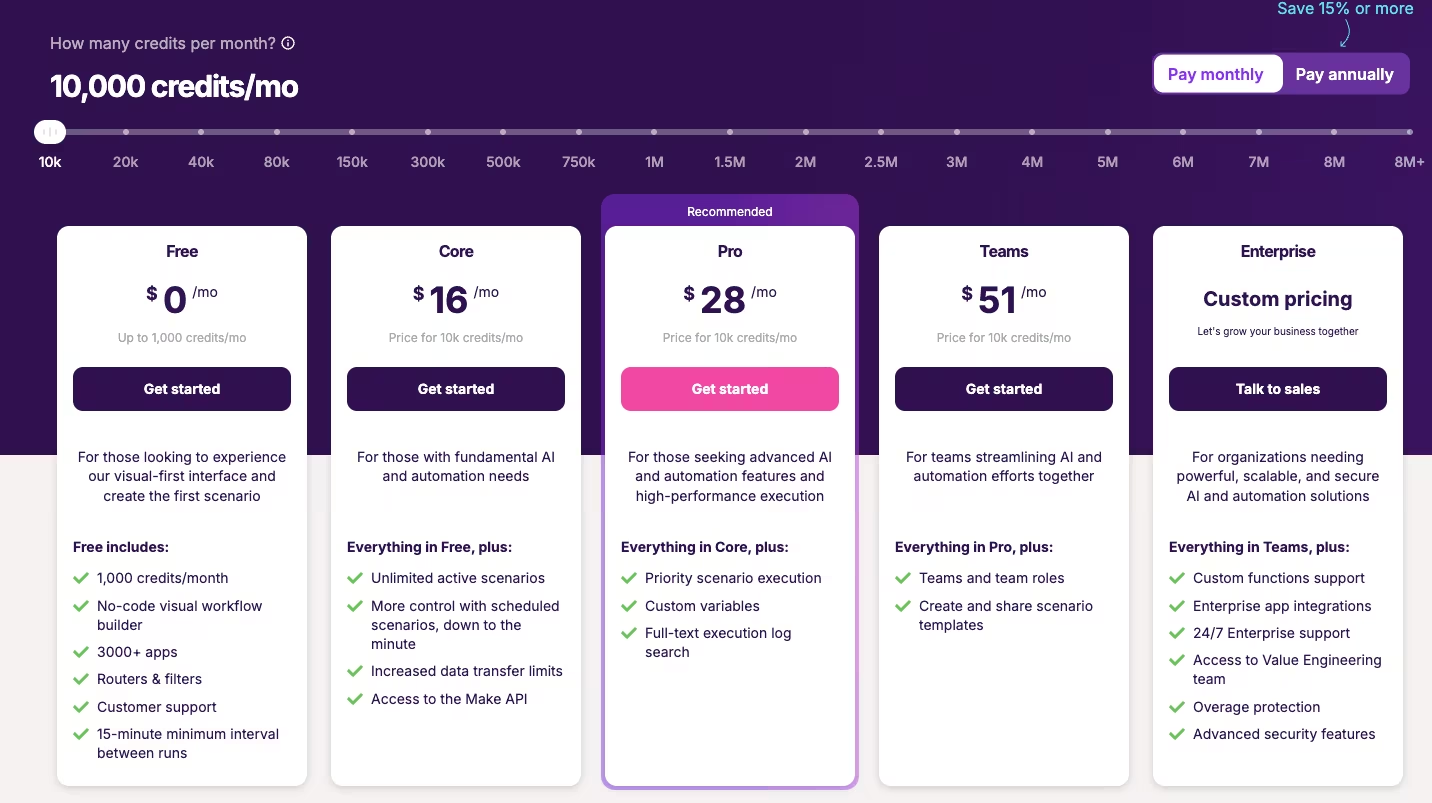
- Core costs $16/month ($12/month, billed annually) for 10,000 credits. The two-week Content Radar run used just over 10,800, about 800 over the plan, because the scheduled feed checks cost a credit each, even when they found nothing new.
- The AI step accounted for most credits in each run. Total usage depends on both the credits consumed per run and how often the workflow fires.
Analysis of n8n:
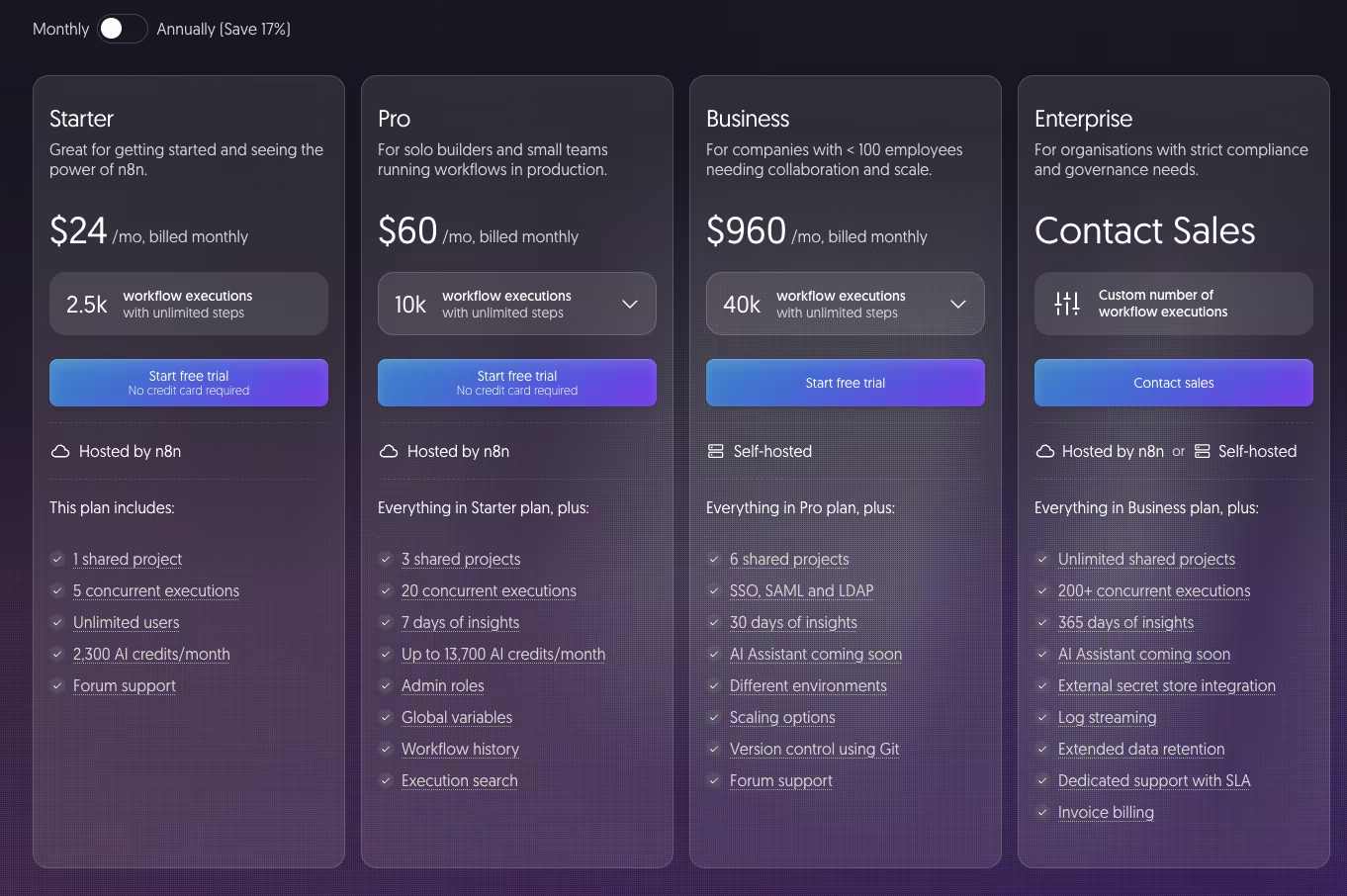
- Starter costs $24/month ($20/month, billed annually) for 2,500 workflow executions. Content Radar logged around 1,100 executions over the same two weeks.
- n8n bills per finished execution, and only when a feed actually has something new. A run with five steps and a run with 15 each count as one execution, while a higher run frequency increases the total.
Content Radar's numbers show Make still costs less overall in this test, about $18 total against n8n's $24, but it needed a top-up to get there, while n8n never came close to its ceiling.
Winner: Make at the tested volume, roughly $6 cheaper a month once the credit top-up is counted in. n8n becomes the stronger cost-control option once a workflow either adds credit-heavy steps or checks feeds often enough that empty polls start adding up, the way they did here.
Hosting, Self-Hosting, and Data Privacy
n8n has a clear hosting advantage. Make does not offer self-hosting on any tier, including Enterprise, and its scenarios run on Make's infrastructure.
Analysis of Make:
- Every scenario runs in Make's own cloud, on Make's own infrastructure, no exceptions.
- An "on-prem agent" only handles secure data access. The scenario itself still runs and processes workflow data in Make's cloud.
Analysis of n8n:
- The free Community Edition is fully self-hostable, with no credit ceiling and no per-step billing to track.
- Self-hosting keeps the n8n workflow engine on infrastructure you control. Data can still pass to connected services such as the AI provider and Google Sheets.
I tested n8n's hosted cloud version because running a server was outside this two-week comparison.
The workflow could later move to a self-hosted setup, but this test did not measure whether that migration would require changes.
Winner: n8n.
AI Agent and Orchestration Capability
AI-agent orchestration is where n8n's capabilities go furthest beyond simple app-to-app connections.
Content Radar used a simple AI sequence: one prompt in, one summary out. An AI agent can choose among several next steps based on the result and loop back when another attempt is needed, without you hand-wiring every branch in advance.
Analysis of Make:
- Make can chain AI calls together the same way Content Radar does, one AI module feeding the next step.
- Once the logic gets more complex than a simple chain, you're working inside Make's own proprietary functions and formulas, a narrower toolset than a mainstream coding language gives you.
Analysis of n8n:
- n8n's node-based logic and native Code steps make branching, looping, and multi-step AI-agent logic far more natural to build.
- For Content Radar, that flexibility was unnecessary. This test supports a narrower finding: n8n offers more direct code and branching controls than Make.
n8n's branching, looping, and code controls are built for exactly this agent-style logic.
Winner: n8n based on those available controls, though Content Radar did not test a complex agent workflow.
Customer Support & Community
Reading each tool's own execution log solved every one of Content Radar's failures, without a ticket filed or a forum post made.
But the support and community layer underneath is built completely differently between the two, and that gap gets real the moment a problem is too big to untangle alone.
Analysis of Make:
- Make's own community forum, hosted at community.make.com, is peer support only, with users swapping scenarios and troubleshooting tips with each other.
- Getting Make's own team involved means "technical support," gated by plan. Core, Pro, and Teams get it with escalating priority, and only Enterprise adds 24/7 top-priority help from senior specialists.
- That community backs itself up with a deep template library, more than 8,200 pre-built scenarios to start from, so you're rarely staring at a blank canvas.
Analysis of n8n:
- n8n's community forum is the default support channel, and it's large, with more than 40,000 members, and n8n's own support team is active on that same forum without a paid tier standing in the way.
- Paid support still exists. Enterprise adds direct email support with guaranteed response times, but the forum itself, and n8n's own team on it, cost nothing to use.
- n8n's own template library runs even bigger, with more than 11,000 community-built workflow templates, against Make's 8,200+.
Winner: n8n for free community access. Its forum includes n8n staff, while Make increases direct technical-support priority by plan.
What Real Users Are Saying
Make
“The ease of creating a scenario visually with the installed modules. Simply configure each module according to our needs. With the possibility of using AI modules to build useful solutions.“ Bruno F., G2

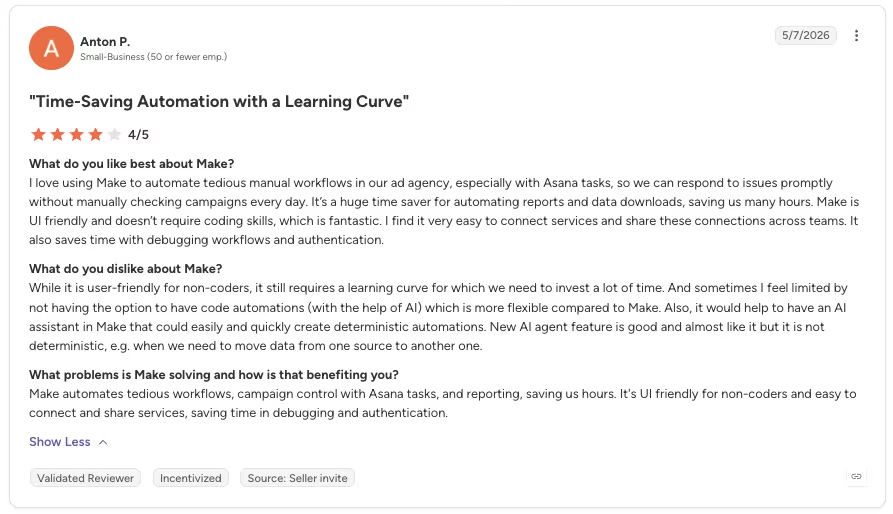
“It still requires a learning curve for which we need to invest a lot of time. And sometimes I feel limited by not having the option to have code automations (with the help of AI), which is more flexible compared to Make.” - Anton P., G2
n8n
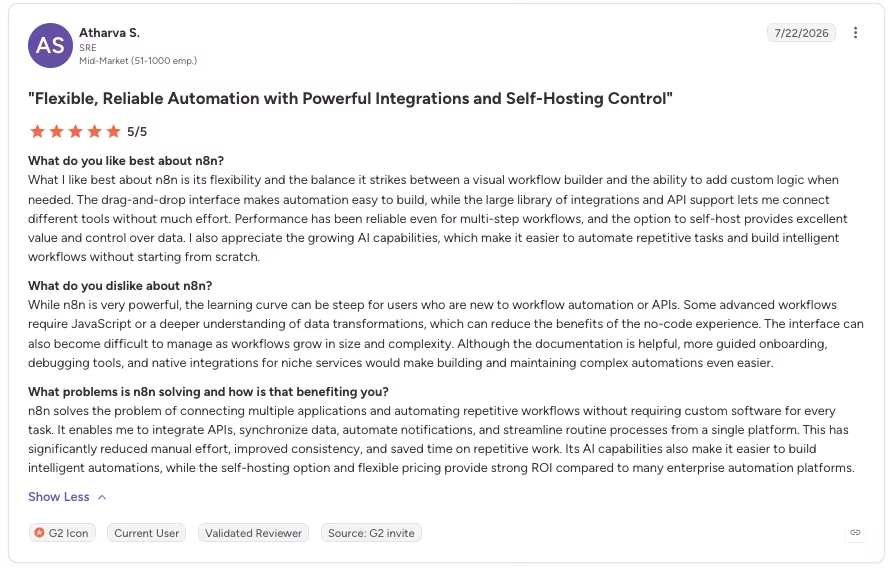
“What I like best about n8n is its flexibility and the balance it strikes between a visual workflow builder and the ability to add custom logic when needed.” - Atharva S., G2
“The downside for me is that it's not very straightforward when things go wrong. Debugging takes time, especially in bigger workflows.” - Kaleem A., G2
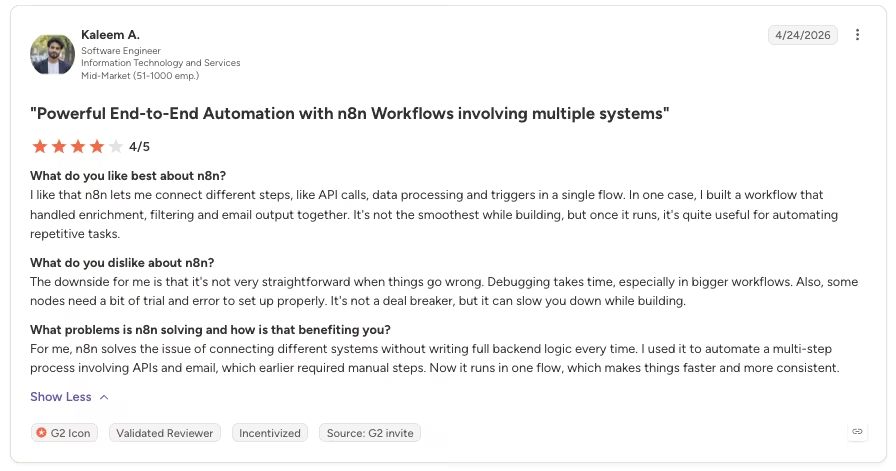
Want the full picture of what users are saying? Read our n8n Review for a closer look at what real users actually ran into.
How to Make Your Choice
Make and n8n fit different users. The better choice depends on your skills and how the workflow will run at scale.
Make Is Better For:
- Non-developers running a standard SaaS stack day to day
- Teams that want a fully managed cloud product with nothing to host
- Low-to-medium automation volume
- Fast, visual builds that don't require writing code
n8n Is Better For:
- Technical or semi-technical users comfortable with code
- Self-hosting or data-residency requirements
- Complex branching or AI-agent-heavy logic
- High-volume workflows where Make's per-step billing would get expensive
My Verdict
For Content Radar specifically, I'd reach for Make first. It was faster to build, and even after going over its included credits and buying a small top-up, it still came out cheaper than n8n for the month.
If the workflow grew into real branching logic, higher volume, or a need to self-host data, I'd move it to n8n without hesitating. Make fits the current Content Radar build, while n8n fits the larger version.
Next Steps: Try Make or n8n for Free
If you're non-technical and want to see a workflow running in an afternoon, Make's free plan (1,000 credits a month) is enough to build something like Content Radar and run a few tests.
Keeping it running on the same schedule this test used would burn through that free allowance in about a day, so that takes a paid plan.
If you already know you'll need self-hosting, complex logic, or room to scale past a demo, n8n's Community Edition has no license fee, but you still cover and manage the server.
Pick based on your current requirements. You can migrate or rebuild the workflow later if those requirements change.
How Emergent Helps Once Your Automation Needs a Real Front Door
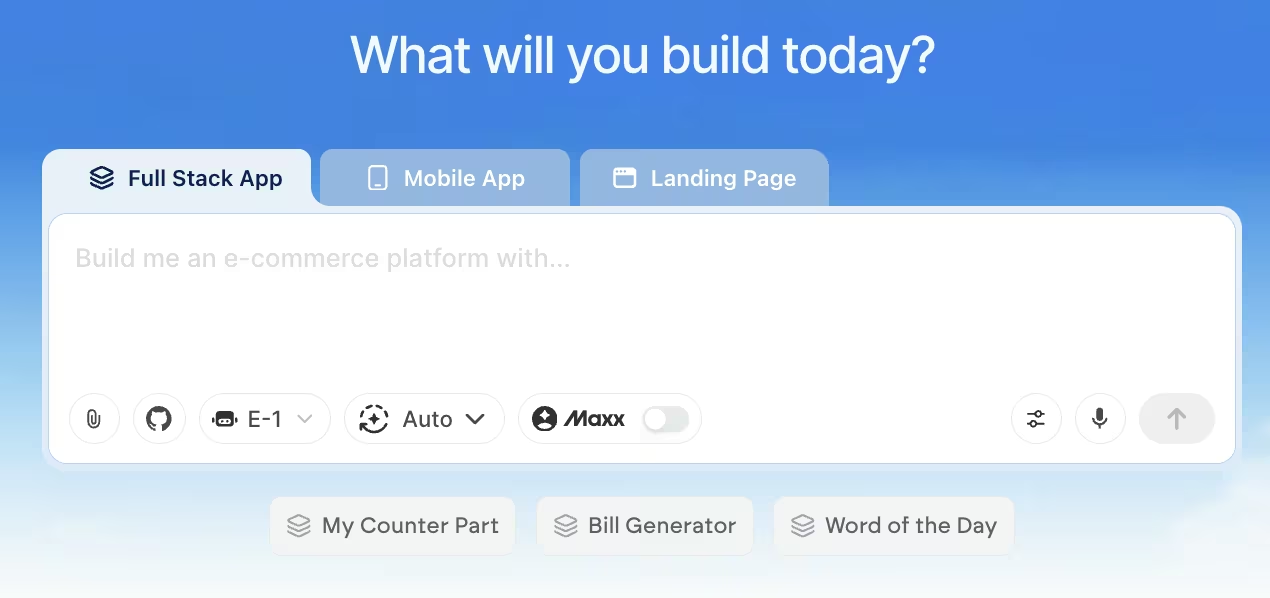
A Google Sheet works while one person checks Content Radar daily. Once people outside the immediate team need the feeds and relevance tags, they need a shared interface.
Make and n8n move and process data behind the scenes, while a separate app provides the screen people use to view it.
That's where an AI app builder like Emergent fits: point it at a dashboard showing the three feeds and relevance tags Content Radar logs. Its agents scope the build, put it together, and check the result before it goes live, so the team can check the data without opening the spreadsheet.
Make and n8n remain exactly as good at their own job of watching, summarizing, and logging. This comparison never asked either one to build a dashboard, too.
If your team outgrows a spreadsheet as the final destination, review Emergent for the interface. Its MCP connector covers projects that connect directly to other tools or AI models.

Most AI app builders stop at prototypes. Emergent creates production-ready apps you can actually launch.
- Production-ready apps
- Web & mobile apps
- Deploy in minutes







