


Restaurant website SEO gets interesting at the exact moment someone is hungry. They search “Italian restaurant in Brooklyn,” “brunch near me,” or “private dining Austin,” scan a few options, and decide where to eat.
I reviewed Google’s current search guidance and current restaurant SEO results before writing this guide.
My approach connects your local profile, website pages, menu, speed, structured data, reputation, and tracking, so you improve both discovery and the experience after someone clicks.
9 Restaurant Website SEO Tips to Help You Rank Higher
1. Complete Your Google Business Profile First
For a local restaurant, I’d start with Google Business Profile. It gives you control over the restaurant information people can see in Google Search and Maps.
Google says local results are mainly shaped by relevance, distance, and prominence. Relevance looks at how closely your profile fits the search. Distance uses the searcher’s location. Prominence includes signals such as links, reviews, and how well-known the business is.

Fill out the profile with accurate information.
Check these details:
- Business category: Choose the category that describes the restaurant accurately.
- Address and phone number: Match the details shown on your website.
- Opening hours: Add regular hours and update holiday or special hours.
- Menu: Add your menu or a link to the current menu page.
- Reservations and ordering: Connect the booking or ordering options you actually use.
- Photos: Show the food, dining room, exterior, and other details that help a diner decide.
Google’s restaurant Business Profile guide covers menu management, reservations, ordering, restaurant details, reviews, and performance tracking.
2. Use Keywords That Match How Diners Search
Restaurant keyword research gets much easier when you stop thinking in broad phrases like “best restaurant” and start with what you serve, where you are, and why someone is searching.
Google recommends using words people would use to find your content in prominent places such as the page title and main heading, as well as descriptive locations such as alt text and link text.
A neighborhood Italian restaurant could target searches around:
- Italian restaurant in Williamsburg
- Brooklyn private dining
- Italian catering in Brooklyn
- brunch in Williamsburg
- family-friendly Italian restaurant in Brooklyn
Create a page when you have enough useful information to answer that search well. One strong page with a clear purpose beats several thin pages repeating the same restaurant description.
If you’re still planning the site, map your main pages before you build the website. Give your menu, locations, catering, private dining, contact information, and reservation flow a clear place from the start.
3. Put Your Menu on a Text-Based Web Page
Your menu contains some of the most useful content on a restaurant website. It tells people what you serve, what dishes cost, and whether the restaurant fits what they want.
Google can index PDFs, so a PDF menu isn’t automatically invisible to search. Google currently lists PDF as a supported indexable file type.
I still prefer an HTML menu as the main version. You can update it quickly, link people directly to it, organize dishes into clear sections, and connect the page to your site structure and Restaurant structured data.
Keep a PDF if customers like downloading one. Treat the web page as the current menu.
Make the web menu useful:
- Use clear sections: Starters, mains, desserts, drinks, lunch, or other categories make scanning easier.
- Write dish names as text: Don’t lock every menu item inside an image.
- Add useful descriptions: Ingredients or preparation details can help diners choose.
- Keep prices current: An outdated menu creates a poor first visit before the customer reaches the restaurant.
- Add dietary information carefully: Include information your restaurant can stand behind.
Google Business Profile also lets restaurants create menu sections with dish names, descriptions, and prices or link to a preferred menu URL.
4. Create Pages for High-Intent Dining Needs
Your homepage has a big job. Asking it to rank for every service, occasion, and location usually leaves each topic underexplained.
Create a dedicated page when the diner needs specific information to make a decision.
That could include:
- Private dining
- Catering
- Group reservations
- Brunch
- Happy hour
- Delivery
- Takeout
- Seasonal events
A catering page should explain what you cater, where you serve, order size or package details, and how someone can inquire. A private dining page should answer capacity, room options, food choices, and how to book.
For restaurant groups, give each location a useful page with its own address, hours, phone number, neighborhood details, menu information, and reservation or ordering path.
5. Write Clear Page Titles, Headings, and Descriptions
A page title should help someone understand the result before they click it.
Google recommends descriptive, concise titles and warns against vague titles such as “Home.” It also recommends unique titles for individual pages.
For example, a homepage title might read:
“Luna Trattoria | Italian Restaurant in Williamsburg, Brooklyn”
A catering page could use:
“Italian Catering in Brooklyn | Luna Trattoria”
Use one clear main heading that matches the page topic. Then break the page into useful sections with H2s and H3s.
Meta descriptions deserve the same care. Google usually creates snippets from page content and can use the meta description when it gives searchers a more accurate summary of the page.
Write each description for that specific page. Skip long strings of keywords.
6. Make the Mobile Site Fast and Easy to Use
A restaurant search often happens while someone is already deciding where to go. Your mobile page should get them to the menu, directions, reservation button, or ordering flow quickly.
Start with the parts that usually create friction. Large food images, heavy videos, pop-ups, and third-party widgets can slow a page down.
Google’s Core Web Vitals track loading performance, responsiveness, and visual stability. For a good experience, aim for LCP within 2.5 seconds, INP of 200 milliseconds or less, and CLS of 0.1 or less.
Run your key pages through PageSpeed Insights. Check the homepage, menu, location pages, and any page used for reservations or orders.
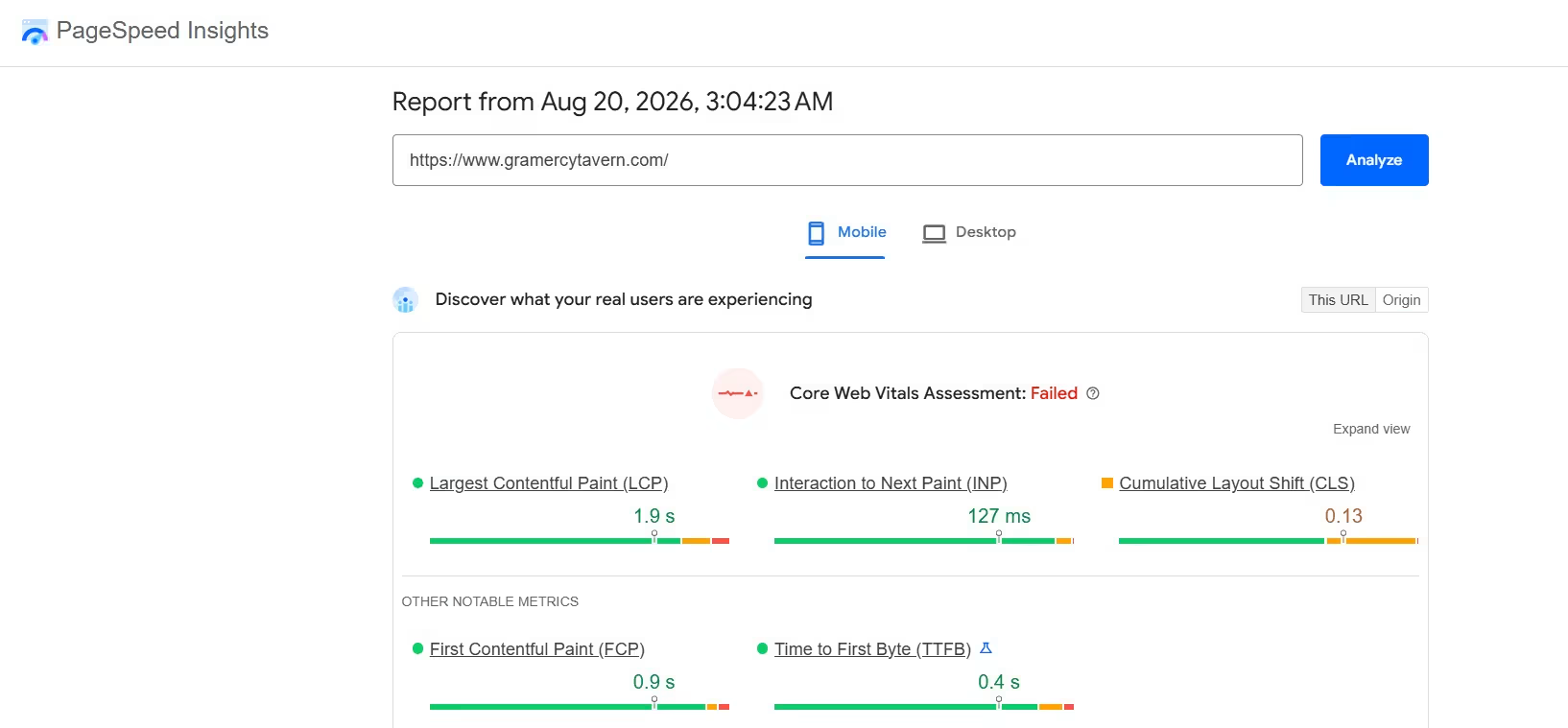
Then test the site on your own phone. Tap through it like a hungry customer would. Can you find the menu quickly? Is the phone number tappable? Can you get directions? Does the reservation form fit the screen?
Some of this depends on what your platform lets you change. Our best restaurant website builders guide compares five on exactly that.
7. Add Restaurant Structured Data
Restaurant structured data is code that gives Google business details in a standard format.
Google’s LocalBusiness documentation uses Restaurant as a specific business type and shows information such as name, address, phone number, cuisine, price range, opening hours, and menu URL.
You don’t need to guess whether the markup works.
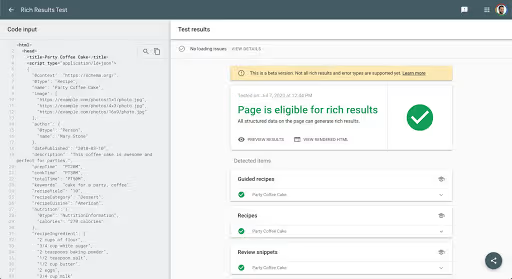
Validate the markup in Google's Rich Results Test before you publish, either by pasting the code or the URL, and fix any critical errors. Once the page is live, use URL Inspection in Search Console to confirm how Google reads it. For syntax checking beyond rich-result eligibility, the Schema Markup Validator covers the full schema.org vocabulary
Paste the published page into Google’s Rich Results Test. Google recommends fixing critical errors and then using URL Inspection in Search Console to see how Google reads the page.
If you run several locations, keep the structured information specific to each restaurant page.
8. Build Your Restaurant’s Local Reputation
Reviews help people decide whether to visit, and Google says review count, positive ratings, and websites linking to your business can contribute to local prominence.
Ask real customers for honest reviews after a visit or order. Reply when you have something useful to say.
Look for local link opportunities that make sense for the restaurant. A neighborhood organization, food festival, local news story, tourism site, charity partner, supplier, or event page can introduce your restaurant to people who already care about the area.
Keep your restaurant name, address, and phone number consistent across your website and the important profiles you control. That makes the information easier for customers to trust.
9. Measure What Happens After People Find You

I wouldn’t judge restaurant SEO from one ranking check. Track the trend and the customer action that follows it.
Google Search Console shows impressions, clicks, queries, pages, click-through rate, and average position. Google recommends focusing more on trends in impressions and clicks than on position alone.
Google Business Profile gives restaurants another useful layer. Restaurant performance metrics can include searches, menu clicks, and completed bookings.
Track these each month:
- Search visibility: Which queries and pages are gaining impressions and clicks?
- Menu interest: Are people reaching the menu after they find you?
- Local actions: Are calls, direction requests, and bookings increasing?
- Orders: Are direct website orders moving with organic traffic?
- Pages that need work: Which pages get seen in search and still attract few clicks?
If a page has high impressions and a weak click-through rate, review its title, description, and search intent first.
Which Restaurant SEO Fix Should You Do First?
I’d start with the problem closest to the customer’s failed action.
If people can’t find you locally: Complete your Google Business Profile, check your business information, and work on reviews and local visibility.
If people find you and leave: Fix the mobile experience, menu, hours, directions, and booking or ordering path.
If important pages don’t appear in Search: Check whether Google can access the page, review its title and internal links, inspect the URL in Search Console, and check your sitemap.
Google’s minimum technical requirements say Googlebot must be able to access the page, the page must return a successful HTTP status, and it must contain indexable content.
If traffic rises and bookings stay flat: Follow the path from search result to landing page to menu, reservation, or order. The weak point is usually visible once you track those actions separately.
Best Practices for Restaurant Website SEO
A restaurant site ages quickly because the business itself keeps changing. SEO work should follow those real changes.
Keep these habits in your routine:
- Update customer-facing details quickly: Change hours, menus, prices, booking links, and holiday information when the restaurant changes them.
- Use real local detail: Mention the neighborhood, service area, nearby landmark, cuisine, or dining occasion when it helps someone choose.
- Protect page quality: Publish a page because it answers a useful question, not because you found another keyword variation.
- Recheck major changes: Run another mobile, indexing, and structured-data check after redesigns, new locations, or major menu changes.
- Look at outcomes: Search traffic is useful. Reservations, orders, calls, and visits tell you whether that traffic is helping the restaurant.
Emergent Makes Restaurant Website SEO Easier
If you’re building a new site or replacing one that’s awkward to update, Emergent gives you a prompt-based way to create and change restaurant pages.
Its restaurant website builder supports menu pages, text and layout changes, mobile-first restaurant sites, reservation or ordering workflows, and SEO requirements you describe in plain English.
That means you can make a request such as:
Update the catering page for an Italian restaurant in Brooklyn. Use a clear page title and H1 around Italian catering in Brooklyn, add sections for corporate lunches and private events, keep the language natural, and preserve the current inquiry form.
You still need to review the result, check the restaurant details, and run the page through Google’s tools before treating the SEO work as finished.
If you’re unsure how to turn a rough request into a useful build instruction, the Emmy chat assistant can help inside Emergent. Emmy can turn a plain-language idea into a build-ready prompt and answer questions using context about the project you’re working on. It’s available across the Emergent web product and costs zero credits.
Once the site is live, keep Google Business Profile, Search Console, and your restaurant analytics in the loop. Those tools tell you how diners are finding and using the site.
We recommend our how to turn your website into an app guide if most of your traffic is already on phones.
Final Takeaway for Restaurant Website SEO
Restaurant website SEO works best when your search presence matches what diners need to do next.
Get the local profile right. Build useful pages around real searches. Keep the menu readable. Make the site fast on a phone. Add accurate structured data. Earn real reviews and local mentions.
Then watch how search visibility turns into menu views, calls, bookings, directions, and orders.
All of that gives you a restaurant SEO process you can keep improving instead of a one-time checklist.


Most AI app builders stop at prototypes. Emergent creates production-ready apps you can actually launch.
- Production-ready apps
- Web & mobile apps
- Deploy in minutes







