




SEO reporting goes beyond keyword reporting. You need to track how traffic is moving, what has changed since the last report, and how close you are to your client’s business goal. One way to do this is to maintain Google Analytics, Google Search Console, and other SEO tools.
The smarter move is to have an SEO Client Dashboard. It provides a central view of your client’s SEO information. So, instead of wasting time pulling information from different tools, you can have a centralized system. You can communicate performance through relevant metrics, charts, and explanations.
This enables consistent reporting and gives clients a clearer view of campaign progress. The key is to decide which SEO metrics to report to clients and how they can be best presented through the dashboard.
What Is an SEO Client Dashboard?
An SEO client dashboard is a reporting tool with a visual interface. It brings together key search engine optimization metrics in one place. Using it, SEO teams and their clients can monitor key SEO metrics like website visibility, organic traffic, rankings, conversions, etc.
An SEO reporting dashboard generally includes:
- Performance indicators: Key performance indicators highlight organic traffic, keyword rankings, impressions, and conversions.
- Visual reports: Visual reports show changes over time using visuals like charts, graphs, and tables.
- Comparisons: Compare performance across different timelines, like month-over-month or year-over-year.
- Business context: Business context provides notes that explain significant changes, completed work, and next steps.

What Are the Different Types of SEO Dashboards?
SEO dashboards do not follow a rigid interface. They can change depending on the client's needs and preferences. The right type depends on who will use it, what information matters to them, and how it can be best presented.
Client-facing SEO dashboards
As the name suggests, a client-facing SEO dashboard is built for the client. It presents SEO performance in a clear, accessible format. The goal is to provide business outcomes and important campaign indicators over technical detail.
Major indicators in these dashboards include organic traffic movement, landing page performance, lead flow, etc. The reports include brief explanations and comparisons, making it easy for clients to understand their SEO performance.
Internal SEO dashboards
Internal SEO dashboards focus on teams managing SEO campaigns. As they are used by SEO professionals, they are more technical. They track more granular aspects of SEO, such as keyword movements, technical issues, backlink changes, content performance, and opportunities for improvement.
Specialists use it to investigate key SEO metrics, such as traffic declines or why a page is declining. Because the goal is to understand what is working, what isn't, and why, the reports are also more detailed in an internal SEO dashboard.
Agency and multi-client dashboards
SEO dashboards are also used by agencies managing others’ SEO. As they usually have multiple clients, they need a multi-client dashboard. These dashboards let you monitor different websites, compare campaign progress, and identify accounts that need attention.
In a multi-client agency, it can be confusing to decide what to include in an SEO client dashboard. Usually, they include features like account-level summaries, campaign comparisons, reporting schedules, and alerts for significant changes.
Read more: Best SEO Dashboard Software 2026: 7 Tools Tested & Ranked
How SEO Client Dashboards Work
The overall working of an SEO dashboard is simple. It collects relevant data, organizes it into metrics, and presents the results visually. The exact setup of the dashboard can be customized; however, the basics usually remain the same:
Connect SEO data sources
First, connect the dashboard to reliable SEO data sources. Most common sources include:
- Google Analytics 4: It analyzes metrics like organic traffic, landing-page performance, engagement, and conversions.
- Google Search Console: It reports Google search results like search clicks, impressions, click-through rate (CTR), and average search position.
- Keyword tracking tools: They measure keyword performance, including keyword rankings, ranking changes, and search visibility.
- Backlink tools: They report on backlinking measures such as referring domains, new backlinks, lost links, and other link-related information.
- Site audit tools: They highlight crawl issues, indexability problems, and technical SEO findings.
Turn data into KPIs and visualizations
Once the key data sources are added, the next step is to turn that data into key performance indicators (KPIs) and their visualization. SEO KPIs for clients are measurable values used to evaluate progress toward a specific goal. Examples of SEO KPIs include organic traffic, leads, conversion rate, revenue and rankings for priority keywords.
Not every SEO metric is a KPI. A KPI is a metric that is specifically selected because it answers key questions like:
- Is organic traffic increasing?
- Are we getting more leads through search?
- Are our target keywords improving in rankings?
- Is SEO generating revenue?
KPI Visualization:
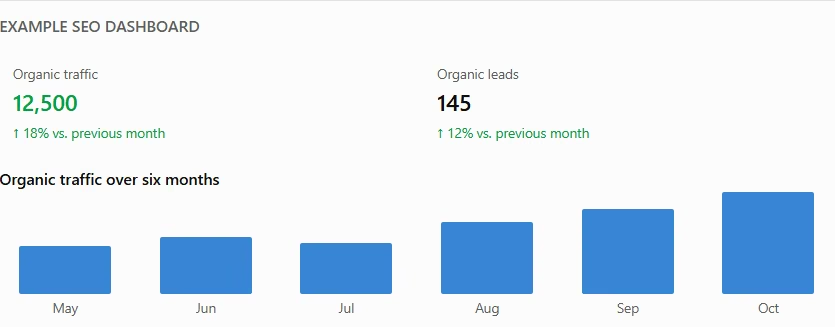
KPI visualization displays data in a way that is easy to understand and compare. Some common visualization examples include charts and graphs, tables, summary cards or figures, progress bars and trend indicators.
Add context and update the dashboard
Numbers can show where your SEO performance stands. They alone cannot provide context. If traffic drops, the client would want to know why, if it's seasonal, due to a technical problem, or changes in search visibility.
Adding context is therefore crucial. A good dashboard does it by:
- Adding short notes to explain important developments
- Comparing results with an appropriate baseline
- Identifying next steps to be taken
Who Is Actually Reading It?
An SEO client dashboard has diverse users. Each user has a different use for the dashboard. They can use the same underlying data, but they do not necessarily need the same level of detail. So, before you build a dashboard, consider how to present SEO results to clients.
- Business owners: They use the dashboard to know whether the SEO practices are contributing to leads, sales, revenue, or other business goals.
- Marketing managers: They require data to analyze campaign-level details, performance trends, and information that helps them coordinate marketing activities.
- CMOs and senior leadership: They usually need a precise report for an overview of progress, business impact, and major opportunities or risks.
- SEO specialists: They need more detailed information to investigate more granular aspects of SEO campaigns, like ranking changes, diagnose technical problems, and decide what to do next.
What to Put on an SEO Client Dashboard
One of the most important considerations when developing an SEO client dashboard is what to include. A simple trick is to include metrics that reflect the campaign's objectives. For instance, a dashboard for an e-commerce website should focus on organic revenue and purchases. Whereas a dashboard for a B2B company should focus on qualified leads and high-intent landing pages.
Business goals and headline KPIs
Business goals and headline KPIs are the main metrics for measuring SEO performance. They show whether SEO efforts are contributing to the client's business objectives. Whether there have been more leads, increased sales, or higher organic traffic.
They are based on the client’s goals. Usually, they include organic traffic, qualified leads, conversion rate, or revenue from organic search. Tracking them helps assess progress and identify whether the current SEO strategy is delivering the expected results.
Keyword rankings and search visibility
Keyword rankings and search visibility show how a website performs in search results for relevant queries. They help track changes in keyword positions, impressions, clicks, and click-through rate (CTR).
Monitoring these metrics helps identify keywords gaining or losing visibility and opportunities to improve search performance.
Organic traffic and landing pages
Tracking organic traffic reveals the visits or users that arrive at the client’s website through unpaid routes. Tracking landing pages identifies the landing pages with the most organic traffic.
Overall, they identify traffic trends and pages that perform particularly well. Reviewing these metrics can highlight successful content and pages that may need updates or further optimization.
Conversions and business outcomes
Conversions and business outcome metrics track actions visitors take after arriving through organic search. These may include form submissions, purchases, registrations, and demo bookings.
Monitoring these actions helps determine whether organic traffic is contributing to meaningful business results rather than simply increasing website visits.
Backlinks and off-page performance
Backlinks and off-page performance metrics track links from other websites, including new backlinks, referring domains, and lost links. They help monitor changes in the website's backlink profile.
Reviewing these metrics helps SEO teams evaluate link-building activity, identify potentially valuable linking opportunities, and investigate significant changes in the backlink profile.
Technical SEO health
SEO’s technical side reveals the website’s issues related to crawling, indexing, and page experience. As they directly impact user experience, they must be investigated and resolved. These can include broken pages, indexing problems, and Core Web Vitals issues.
Regularly monitoring technical SEO helps identify problems that may need attention before they affect search visibility or the user experience.
Key Benefits of SEO Client Dashboards
A well-optimized SEO client dashboard can make SEO performance tracking and reporting transparent and efficient. Some key benefits of having an SEO client dashboard include:
- Centralized information: It centralizes the information by bringing data from multiple SEO platforms into one view. This reduces the need to switch between tools.
- Clearer communication: Information is presented in a format clients can easily understand. So, crucial points get communicated without the need to interpret raw data.
- Consistent reporting: Reporting gets standardized and consistent. Metrics get reported in standardized formats across periods and accounts, making comparison easier.
- Less manual work: Information from multiple data sources is integrated automatically. This reduces the need for human intervention and lowers the risk of errors.
- Greater accountability: KPIs and metrics get agreed upon beforehand. This makes the review process easier and increases accountability.
Choosing the Right SEO Client Dashboard
When it comes to choosing an SEO client dashboard, the goal is not just to have a dashboard. The goal is to ensure the dashboard aligns with the SEO campaign and reporting requirements.
- Client Goals: The dashboard should be in alignment with the client’s goals. Identify the outcomes your client wants to track. Based on that, decide what your dashboard should highlight.
- Relevant Metrics: The metrics that the dashboard focuses on should be based on the SEO campaign and business objectives. Don't add metrics just for the sake of it. Only add those that are relevant.
- Integration and automation: The dashboard should be integrated with several data sources. Automation is also better, so data updates automatically and reduces manual effort.
- Customization and scalability: Customization and scalability are very crucial, especially for agencies with multiple clients. Each client has different requirements. The dashboard should be customizable and scalable accordingly.
- Cost and maintenance: SEO client dashboards are rarely a one-time expense. Compare subscription costs, account limits, and setup requirements.
You can also use AI to create your own SEO client dashboard. Creating an SEO client dashboard with AI is simple and straightforward with Emergent. Emergent’s AI Dashboard Builder lets you build real, working dashboards through natural language prompts. You can get charts, live data, and backend just from a prompt. No code needed.
If you want to lean how to build an SEO dashboard with AI, here is a setp-by-step guide for you.

Most AI app builders stop at prototypes. Emergent creates production-ready apps you can actually launch.
- Production-ready apps
- Web & mobile apps
- Deploy in minutes







