


.avif)
TL;DR
- Category pages: The money queries land here, so map keywords to page types before you touch a template.
- Crawl reach: If category pages don't link directly to every product, Google may never find some of them.
- Structured data: Price, stock, shipping, and returns stated in code make listings eligible for richer results.
- Filters: Combinations of them can spawn tens of thousands of near-identical URLs, so Google spends its crawling time on junk instead of your products.
- Product feed: Google's AI shopping surfaces read Merchant Center, so feed quality is now part of the job.
On most stores, ecommerce website SEO comes down to a few hundred category and product templates, and nobody has opened those templates in two years.
I've run SEO for online stores for five years, from single-product brands to catalogs past 10,000 products, and the diagnosis repeats itself.
The products are fine. The filters are generating 60,000 crawlable URLs, the descriptions came from the supplier, and nothing in the code tells Google the price or whether the item is in stock.
Work through the seven steps below in order, and the pages carrying your revenue get fixed first.
What Makes Ecommerce Website SEO Different?
Ecommerce website SEO is the work of getting a store's category and product pages to rank in search. It differs from regular SEO because a template generates the pages that make you money, and that same template generates thousands you never wanted indexed. Fixing one product page fixes one product page. Fixing the template fixes the catalog.
Online sales hit 17.1% of total US retail in the second quarter of 2026, with ecommerce sales up 12.2% year over year, according to the Census Bureau.
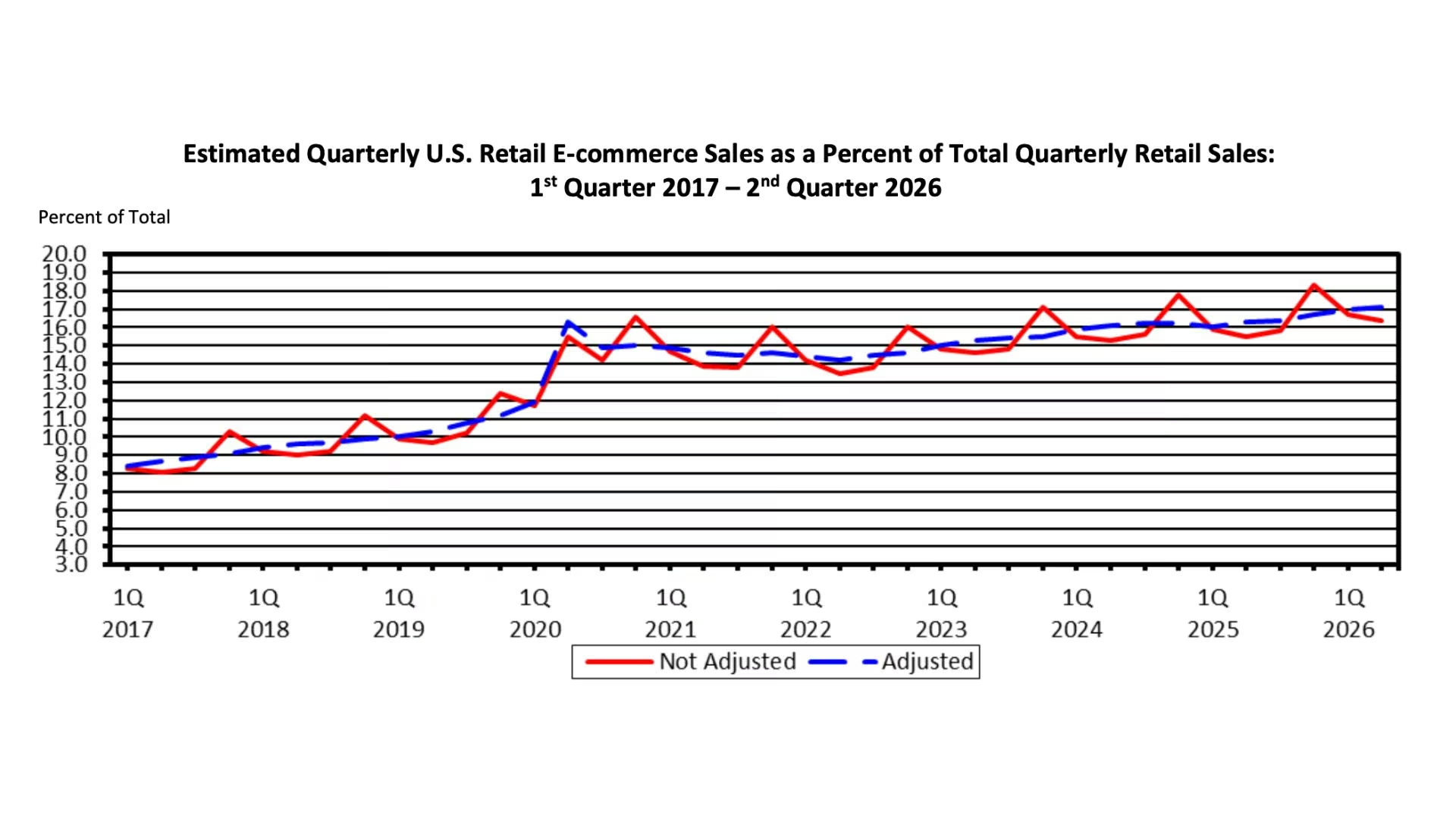
Source: US Census Bureau, Quarterly Retail E-Commerce Sales, Q2 2026
The bar is lower than most owners assume. Baymard Institute's 2026 benchmark logged 30,000+ manually rated usability scores across 155+ stores and found only 48% of leading US and European desktop sites rated "decent" or better. Half the field is beatable with basics.
What You'll Need Before You Start
Every step assumes you can see your own data and edit your own store templates:
- Google Search Console: Verified, with 90 days of query data.
- A site crawler: I use Screaming Frog to see the URLs Google sees, including the ones your filters invent.
- Template edit access: Your theme editor, or a developer who can ship changes this week.
- A Google Merchant Center account: Free, and increasingly the pipe feeding AI shopping results.
Time required: A weekend for the audit and keyword map, then four to six weeks of template work. In my experience, category pages start moving around week six, roughly as that work lands.
Ecommerce Website SEO: How to Rank
The order matters. Structured data on a page Google can't reach is wasted effort.
Step 1: Build Your Keyword Map Around Category Pages
Decide which page type owns which query. Category pages take the head terms buyers search before they know what they want ("men's trail running shoes"). Product pages take brand and model searches ("Hoka Speedgoat 6 wide"). Blog posts take questions that don't convert on a first click.
Put it in a spreadsheet, one row per page, one query per row. The value is catching the two category pages already competing for the same term, the most common self-inflicted problem I see.
Note: Your internal site search log lists what customers type when they can't find something, and it surfaces category pages you should have and don't.
Step 2: Give Googlebot a Path to Every Product
Google's ecommerce documentation says to link from menus to category pages, from category pages to sub-categories, and from sub-categories to every product, because "If category pages don't include direct links to all products in a category, Googlebot might not find all of your products by crawling alone."
Two details people miss. Make every product link a real link in the page's code, because if your theme moves shoppers with a button or a script, Google's crawler won't follow it. And treat internal links as a ranking signal you control.
Google's site structure guidance adds that "the more links a page has to it within a site, the higher the relative importance of the page to other pages on your site," so link best sellers from the homepage instead of burying them nine clicks deep.
Step 3: Rewrite the Product Pages That Already Get Impressions
Export your Search Console pages report, filter down to pages with a click-through rate under 1%, sort those by impressions, and work down the list. Those pages already rank somewhere and lose the click.
Supplier copy is the usual culprit, because every other retailer selling that item published the same paragraph. Replace it with what a buyer needs to decide: sizing against a known reference, materials, what the product doesn't do, and the total delivered cost.
Baymard found 67% of sites give no total order cost estimate near the buy section, and 89% don't respond to negative user reviews.
Google's product review guidance asks for the same thing: evaluate from the user's perspective and "explain what sets something apart from its competitors."
Step 4: Put Price, Stock, and Shipping Into the Page Code
Structured data is a small block of code stating facts about the page in a format Google reads directly, so it never guesses your price from the layout. Merchant listing markup requires three fields: the product name, an image, and the offer, with price and currency inside the offer.
The optional fields are where the gains sit. Tell Google whether the item is in stock, what the shipping costs are, how returns work, your average review score, the brand, and the product's ID numbers. That's the difference between a plain blue link and a listing showing four stars, free shipping, and a price.
Retrofitting that into a hand-built theme is usually a developer ticket. It's less work when the markup ships with the template, which is how an AI ecommerce website builder generates a catalog.
Then send a Merchant Center feed as well. Google's guidance on sharing product data says that "while uploading product data to Google Merchant Center isn't mandatory to appear in Google search results, it can enhance Google's understanding of your products."
Some SEO gains come from the store itself rather than the optimization. Our ecommerce website features guide covers what a store needs to have.
Step 5: Stop Your Filters From Eating the Crawl
Twelve filters across color, size, price band, and brand can generate tens of thousands of URLs showing variations of the same 40 products. On one apparel client's site, filter URLs outnumbered product pages by more than 20 to one, and Googlebot spent its days on combinations nobody had searched for.
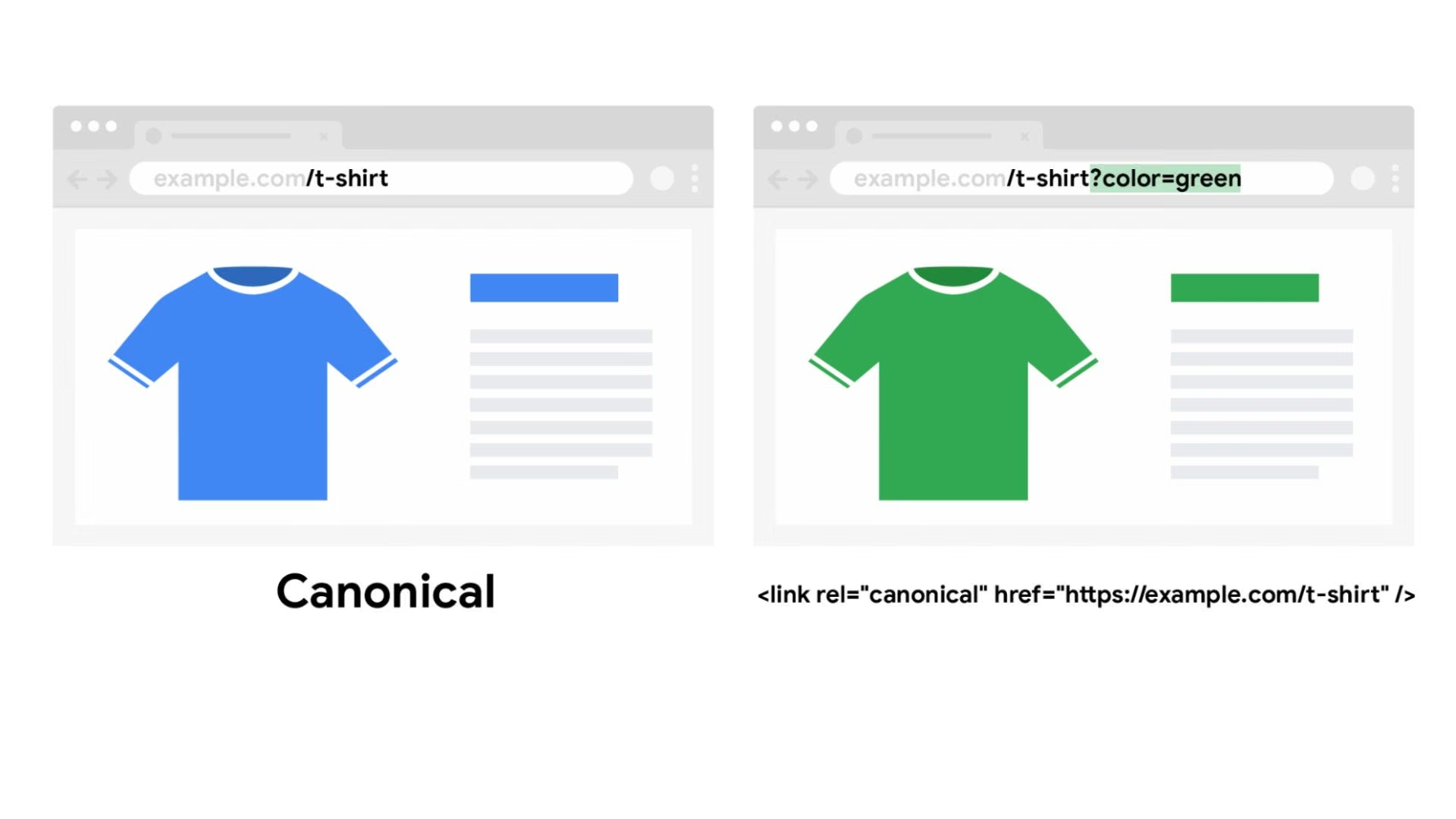
Google's URL structure guidance sets the rules. Filter links should spell out what they filter (?color=blue, never ?blue), should never carry tracking codes, and should read the same in your menus, your sitemap, and the canonical tag that tells Google which version is the real one.
Pagination has its own rulebook. Give every page in a series its own address, and never point page two back at page one. And since Google's crawlers "don't 'click' buttons," a "load more" category page needs crawlable links behind it.
We recommend our how to build a store website guide for the build side.
Step 6: Fix Speed at the Template Level
Google's Core Web Vitals thresholds are the target: your main image or headline on screen within 2.5 seconds, the page reacting to a tap in under 200 milliseconds, and nothing jumping around as it loads.
The same culprits keep showing up. Gallery images shipped at full resolution. A review widget loading a second copy of code your site already runs. A chat bubble and three tracking scripts fighting for the browser at once. Fix them once in the theme, and the speed score moves on every product page in the catalog.
Step 7: Earn Links and Reviews You Can Point To
Of the seven steps here, this one pays off slowest, so start with sources that already have a reason to mention you. Ask suppliers for a stockist listing. Chase unlinked brand mentions in press coverage. Publish the one piece of original data only you have, whether that's sizing research or durability testing.
Reviews do double duty. They lift conversion, and they fill in the review score from Step 4, which is what puts stars in your search listing.
Common Ecommerce SEO Mistakes to Avoid
These are the four I flag most often on stores over 500 products:
- Deleting out-of-stock product pages: You throw away the ranking and every link pointing at that URL. Keep the page live while the item's coming back, mark it out of stock, and show alternatives. Redirect only once it's discontinued for good.
- Blocking filters in robots.txt after they're indexed: That file tells crawlers where not to go, so blocking a page stops Google reading it at all, including the "don't index this" instruction on the page. Let it crawl, read the instruction, then block.
- Shipping category pages with no copy: A heading and a grid of 12 products rank for nothing. Two or three paragraphs on what buyers compare give the page something to rank with.
- Migrating platforms without a redirect map: Every migration I've seen skip URL-by-URL mapping lost traffic for a quarter or more.
How AI Search Changes Ecommerce SEO in 2026
Merchant Center is quietly becoming a ranking surface, and it's the change I've spent most of this year re-planning client work around. Google launched the Universal Commerce Protocol, an open standard for agentic commerce built with Shopify, Etsy, Wayfair, Target, and Walmart. It'll soon power checkout for eligible US retailers inside AI Mode in Search and the Gemini app.
Google has also announced dozens of new Merchant Center attributes "designed for easy discovery in the conversational commerce era," including product-question answers and compatible accessories, and it's rolling them out with a small group of retailers first.
So the feed attributes you skipped because they weren't required are the ones an AI answer needs to recommend you. Fill in materials, compatibility, care instructions, and dimensions. The Step 4 work feeds the classic rich result and the AI answer. One job, two channels.
AI is changing the store side as well as the search side. Our AI tools for ecommerce guide covers what's worth using day to day.
My Final Thoughts
Category pages are where the money is, and they're the most neglected pages in almost every catalog I open. Fix them first.
What's left is a keyword map, a crawl, a template edit, and a feed. None of it rewards whatever tactic went viral last week. The stores that win in 2026 will be the ones whose data is clean enough for a machine to quote.
Where Emergent Fits If You're Building the Store
Emergent covers the build side. It's an AI app-building platform made for vibe coding.
You describe the store in plain English and get back a complete, running shop:
- Get a storefront live the same day: Describe the store, answer the clarifying questions the build agents come back with, then click the Deploy button. On a paid plan, the site is live on an emergent.host address about 15 minutes later.
- Generate product pages from one description: Emergent builds your product pages and variants from a prompt, and you can ask it to structure headings and copy around your target keywords, so you're editing one template instead of 400 pages.
- Move to your own domain: Buy one through the built-in IONOS integration (a domain registrar, free for the first year), or point a domain you already own at the site. Custom domains are a paid-plan feature. Emergent's guide to buying and connecting a custom domain covers both routes.
- Take payments without a plugin stack: Mention checkout in your prompt and Stripe or Razorpay gets wired in. The money lands in your own payment account.
- Keep the code: You own what gets built and can export it, so a developer can pick up the technical work later.
The free plan includes 10 monthly credits, enough to build a first storefront and see whether the output is worth paying for.
Going live is a paid step: deployment starts on Standard at $20/month ($17/month billed annually) with 100 credits, and each deployed app costs 50 credits a month to keep running. Credits stretch further on a simple catalog page than on a store with custom checkout logic.
One caveat before you spend credits. Emergent builds and runs the store. It won't audit or repair the site you already have, and if that site already ranks, moving it for SEO reasons alone rarely pays for the risk.
An AI website builder earns its keep when you're building the store, or replacing one that never ranked.
Search brings people in once. If the next step is keeping them, our how to build an ecommerce app guide covers that build.

Most AI app builders stop at prototypes. Emergent creates production-ready apps you can actually launch.
- Production-ready apps
- Web & mobile apps
- Deploy in minutes

Most AI app builders stop at prototypes. Emergent creates production-ready apps you can actually launch.
- Production-ready apps
- Web & mobile apps
- Deploy in minutes





