
TL;DR
- Gemini 4 Hydrogen is Google's fast AI model for everyday coding and agentic workflows. Google released it on November 12, 2026.
- It takes text, images, audio, and video as input and writes text. Its context window holds 1M tokens.
- Four thinking levels (low, medium, high, and xhigh) let you trade speed for depth. High is the default.
- Google says it finishes tasks 2.5x faster than Gemini 3.8 Flash at the default setting.
- It scores 54 at xhigh on the Artificial Analysis Intelligence Index v5.0.1 (data checked on Nov 13, 2026).
- You can use it in the Gemini API, Google AI Studio, the Gemini app, Google Search, and Google Antigravity.
- It costs $1.50 per million input tokens and $7.50 per million output tokens.
Slow models can delay coding agents, while using larger models for every task costs more. Teams need a faster model for everyday work that can also handle complex tasks when needed.
Gemini 4 Hydrogen is designed for this purpose. Released on November 12, 2026, it is Google's fast AI model for everyday coding and agentic workflows. It has four thinking levels, from low for quick answers to xhigh for deeper reasoning.
At its highest thinking level, Hydrogen scores 54 on Artificial Analysis' Intelligence Index v5.0.1, ranking 16th among 78 models. We checked these scores on November 13, 2026.
What Is Gemini 4 Hydrogen?
Gemini 4 Hydrogen is a multimodal reasoning model from Google DeepMind. Google calls it a daily driver for agentic workflows. Its model ID is gemini-4-hydrogen.
In an agentic workflow, the model plans steps, calls tools, and checks its own results. It repeats until the job is done. Coding agents and research agents both follow this pattern.
Model Type and Purpose
Gemini 4 Hydrogen is part of Google’s Gemini 4 family, alongside the frontier models Gemini 4 Carbon and Gemini 4 Argon. Carbon and Argon handle complex tasks that need deeper reasoning over many steps.
Hydrogen focuses on completing tasks quickly across different agentic workflows, according to its model card.
It takes text, images, audio, and video, and it writes text. Google built it for repository coding, debugging, web development, multimodal knowledge work, and everyday writing and research.
How It Handles Complex Reasoning and Long-Running Tasks
Hydrogen does not need a bigger model for every hard step. You raise the thinking level instead.
The xhigh level gives Hydrogen its deepest reasoning setting. Google positions it for hard math, science, formal verification, and long software engineering tasks.
Long tasks can fit within its 1M-token context window, allowing the model to work with a large codebase or many documents at once.
It can also generate very long responses using background long decode. If a tool call fails or a search returns no results, it adjusts its approach and continues.
Where It Runs
Google launched Hydrogen across its developer, business, and consumer products on the same day. The access section below lists each one.
Key Features of Gemini 4 Hydrogen
Google highlights five strengths. Each one maps to a real workflow, so we cover them one by one.
Fast Coding and Software Development
Speed is Hydrogen's main advantage. Google says it completes tasks 2.5 times faster than Gemini 3.8 Flash at the default high setting. On Terminal-Bench 4.1, Hydrogen completes 57% of tasks, compared with 18.2% for Flash.
Two things help Hydrogen work faster:
- Only necessary changes. It edits the parts that need fixing and leaves other files unchanged.
- Reading files together. It reads and searches multiple files at once instead of opening them one by one.
In early tests, partners used Hydrogen for complex graphs, SQL, and data-heavy business tasks. It ran 2 to 2.8 times faster than 3.8 Flash and used 12% to 23% fewer tokens.
Improved Agentic Workflows
Agents can fail when they try to do too much or miss important steps. Google says Hydrogen reduces overreach by up to 81% and missed tasks by up to 79% compared with 3.8 Flash. It also scores 94% on Google's internal test for agent honesty.
Google also reports these safety improvements for people building agents:
- Unsafe actions and skipped steps are 12 times less common in tool-use and coding tests.
- When a task is blocked or cannot be completed, Hydrogen is up to 2 times less likely to break permission limits.
- It is more than 2.3x more resilient to indirect prompt injection on the Gray Swan IPI benchmark.
Hydrogen can also work as part of a team. Google Antigravity includes an Orchestrator that switches between Carbon and Hydrogen in one session.
- Carbon plans the architecture. Hydrogen writes and tests the code.
- On Terminal-Bench 4.0, Orchestrator reached near-Carbon task success. It used 24% less quota and finished 19% faster on average.
- For parallel work, Carbon coordinates while Hydrogen runs worker and verifier agents in isolated workspaces.
To build a lead-and-worker setup of your own, a coding agent builder lets you set the roles, the checks, and where a person reviews.
On arena.ai's Agent Arena, a live benchmark for multi-step tasks, Hydrogen ranks #5.
For background on how this kind of work differs from a code assistant, see our guide to what is agentic coding.
Multimodal Capabilities
Hydrogen reads text, images, audio, and video in one request. It supports agentic video understanding and pairs that with a 1M-token window, per the Google Cloud docs. That helps when a task spans a spec document, a chart, and a recorded meeting.
You can give Hydrogen related inputs together to help it understand the task better.
For example, share a screenshot of a broken page with its console log, a design mockup with the component code, a recorded demo with its bug report, or a chart image with the spreadsheet used to create it.
Google tested this skill on its new Multimodal Knowledge Agent benchmark. The benchmark covers end-to-end work over complex visual files. Hydrogen scores 53.4% in the model card.
Adaptive Thinking Levels
Hydrogen offers four thinking levels: low, medium, high, and xhigh. High is the default, and xhigh is new. Google says the levels scale smoothly and predictably, so you pay only for the depth a task needs.
Table 1: Gemini 4 Hydrogen by thinking level
| Thinking level | Intelligence Index | Time per task (minutes) | Output speed (tokens/sec) |
|---|---|---|---|
| xhigh | 54 | 13.7 | 188 |
| high | 51 | 7.9 | 179 |
| medium | 41 | 3.7 | 177 |
| low | 27 | 1.3 | 178 |
Source: Artificial Analysis, Intelligence Index v5.0.1, data checked on Nov 13, 2026.
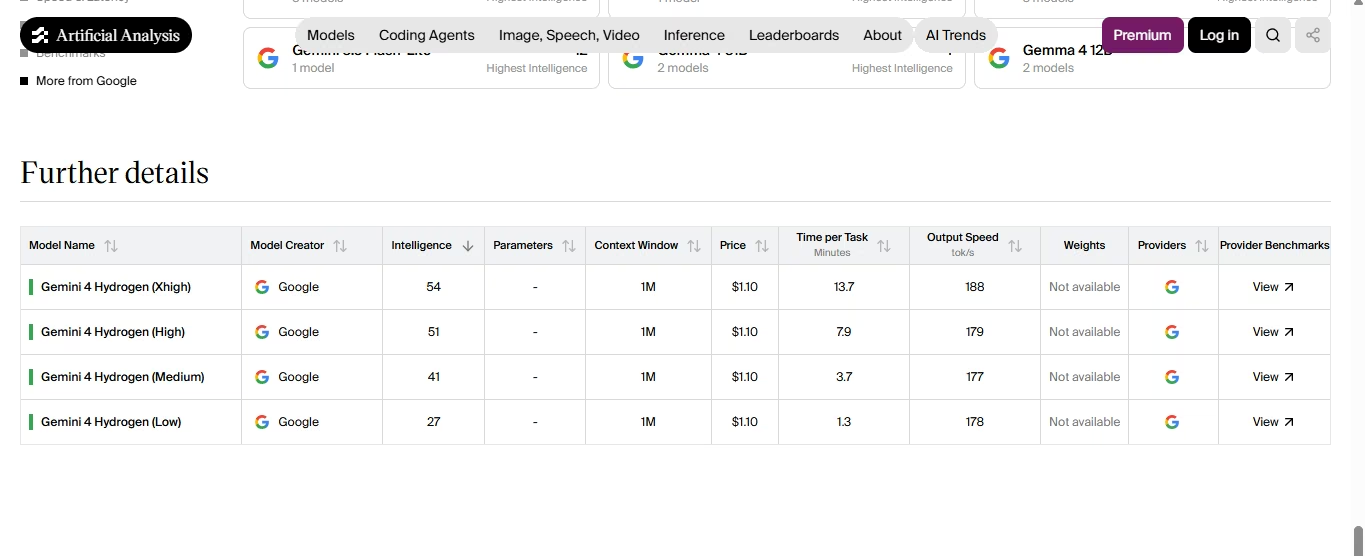
The model takes more time to answer when you choose a higher thinking level, even though its output speed stays nearly the same. Choose the level based on the task:
- Low: For quick edits, short answers, or while having many tasks to finish.
- Medium: Choose it when the task needs some reasoning but doesn't require much time.
- High: Keep this as your default for coding work that involves several steps or tools.
- xhigh: the hardest math, science, verification, and long engineering work.
Artificial Analysis puts the cost per Intelligence Index task at $3.16 for xhigh and $0.29 for low. That is an 11x spread. Time to first answer token runs 40.55 seconds at xhigh and 5.73 seconds at low.
Better Instruction Following
Hydrogen follows your preferred tone, format, and instructions throughout a conversation. Google says it can create ready-to-use emails, study guides, rewrites, and documents on the first try.
It can also turn large amounts of information into clear tables without leaving out important details. Reliability improves too. Hydrogen makes more than 5x fewer fabricated claims than Gemini 3.8 Flash, per Google. That matters when you ship code or send a report and cannot re-check every line.
What Makes Gemini 4 Hydrogen Different?
Hydrogen sits between speed and depth. Carbon and Argon go deeper. Hydrogen goes faster and closes much of the gap.
The index combines 9 evaluations, including Terminal-Bench 4.0, FrontierCode-AA 2.0, and HLE-Diamond. A higher score means stronger overall results.
Table 2: Intelligence Index scores across Google's recent models
| Model | Role | Highest Index score |
|---|---|---|
| Gemini 4 Carbon | Frontier model for deep, long-horizon reasoning | 60 |
| Gemini 4 Hydrogen | Fast model for everyday coding and agentic work | 54 |
| Gemini 4 Argon | Frontier model for deep, long-horizon reasoning | 50 |
Source: Artificial Analysis, Intelligence Index v5.0.1, data checked on Nov 13, 2026. Roles from Google's launch post.
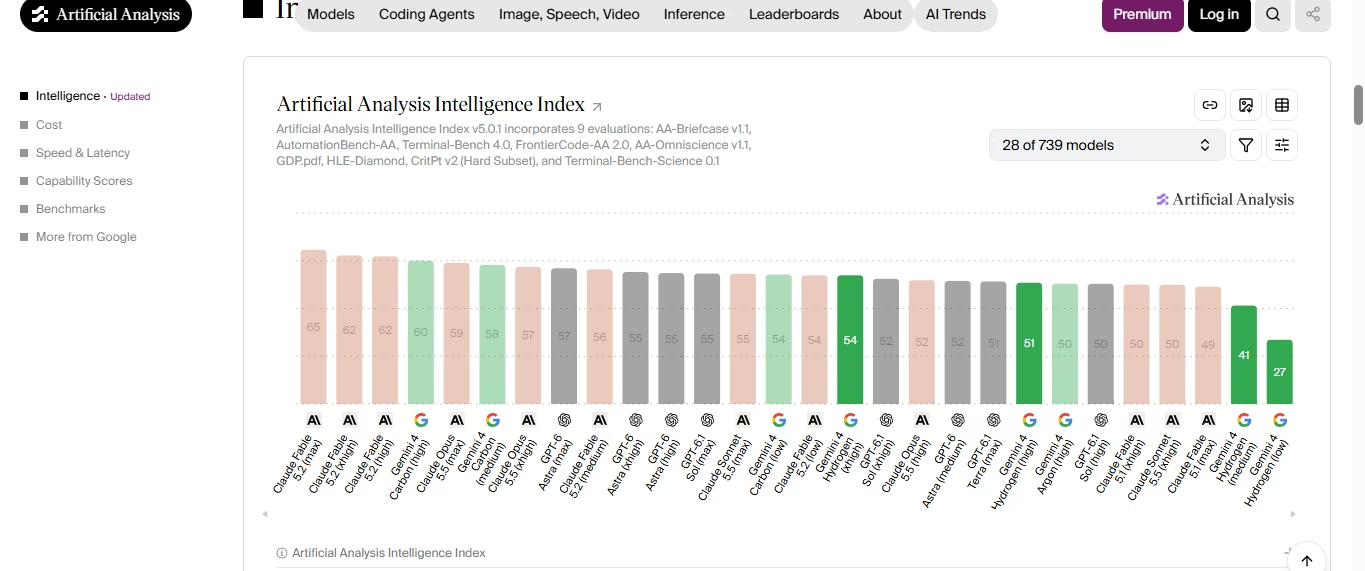
Four things make Hydrogen different:
- It beats Argon at its default. Hydrogen scores 51 at high against 50 for Argon.
- It adds xhigh. This new tier gives you a deeper setting without switching models.
- Its price stays flat. The rate does not rise as your prompt grows toward 1M tokens.
- Carbon still leads. Carbon scores 60, so deep architecture calls still fit it better.
Use Hydrogen for everyday tasks such as fixing bugs, adding features, running tests, and working on documents. Choose Carbon or Argon when a task needs deeper decisions about system design or when a difficult bug remains unfixed after several attempts.
Also Read: Gemini 4 Carbon vs Gemini 4 Argon for how the two frontier models differ.
What Can You Use Gemini 4 Hydrogen For?
Google's examples fall into four groups. Each one shows a different side of the model.
Writing and Debugging Code
Hydrogen handles issue resolution, debugging, rapid iteration, and codebase Q&A. Google reports it outperforms similar-tier models on SWE-sweep. That test asks a model to find and fix bugs without breaking existing code.
Android developers can also call it from Android Studio, which Google lists as a supported tool. A simple loop works well:
- Give it the failing test, error log, or issue text.
- Ask it to read the files involved and explain the cause.
- Ask for the smallest fix that keeps other behavior intact.
- Have it run the tests and report the result.
Name the files that are off limits, and state the test command up front. Clear limits help Hydrogen keep its edits small. Ask it to list its assumptions before it changes code.
Building Websites and Applications
Google says Hydrogen can create working layouts with more complete features using fewer prompts. It is designed for testing live UI designs, turning designs into code, and building interactive apps. Google shared four demos:
- Geminisland: Anyone adds to a shared voxel island from one prompt. Players then walk around the new structures in first person.
- E-commerce storefront: Paired with Google's front-end design skill in Antigravity, Hydrogen built a full storefront in one shot. It included a WebGL2 topographic shader, four-stage scrollytelling, and a live finish configurator.
- Lightning globe: Hydrogen built an interactive 3D globe with a Web Audio music engine. Real-time lightning strikes drive both.
- Water and glass visualizer: Hydrogen built a WebGL2 scene from pure math and SDF textures. It simulates refraction, reflection, dispersion, and absorption in real time.
Research and Data Analysis
Hydrogen can read large PDFs, spreadsheets, charts, audio files, and recorded videos. It uses this information to create reports with sources and well-organized documents. Its 1M-token output limit also allows it to handle long reports.
Google reports a #1 overall rank on the Vals Tax Agent Bench at 52.3%. Hydrogen also ties for #1 on the Vals Legal Research Bench at 55.8%. In Gemini in Google Sheets, Hydrogen turns financial data into interactive models that adjust to forecast scenarios. Google says outputs arrive over 30% faster than with earlier models in Sheets canvas.
Google also showed a playful test in Antigravity. Hydrogen turned a Google Sheet into an animated pixel canvas. It combined Python, native =LET(...) formulas, and conditional formatting.
Automating Repetitive Tasks
In the Gemini app, Hydrogen breaks a goal into steps, per Google's launch post. It pulls context from your uploads, Gmail, Google Drive, and Connected Apps like Airtable and Dropbox. It also calls the right tools more often, which cuts back-and-forth.
Google tested a longer chain in Antigravity. Hydrogen took a YouTube keynote video and a design template and built a multi-slide Google Slides deck. It then ran its own audit-and-fix loop to catch overlapping text and clean up layouts.
With a custom video-assembly skill and a creative brief, Hydrogen cut public-domain footage into one continuous edit with narration. The result was an archival reel about the element hydrogen. On AutomationBench-AA, which tests agentic workflows across SaaS apps, Hydrogen scores 76.1% in the model card. To build a workflow like that around your own apps, an AI agent builder lets you describe the steps in plain language.
Gemini 4 Hydrogen Specifications
Table 3: Gemini 4 Hydrogen at a glance
| Spec | Detail |
|---|---|
| Developer | Google DeepMind (Google) |
| Release date | November 12, 2026 |
| Model ID | gemini-4-hydrogen |
| Base model | Gemini 4 family model; Google positions it alongside Carbon and Argon |
| Input types | Text, images, audio, and video |
| Output type | Text |
| Context window | Unified 1,048,576-token limit that includes input and output tokens |
| Maximum output | Up to 65,536 tokens by default; up to 1,048,576 tokens through long decode, minus input tokens |
| Thinking levels | low, medium, high (default), xhigh |
| Knowledge cutoff | March 2026 |
| Tools | Function calling, code execution, URL context, computer use, and Google Search grounding |
| Price | $1.50 per 1M input tokens and $7.50 per 1M output tokens, flat across the window |
Source: Launch post, Cloud docs, Model card checked on Nov 13, 2026.

Use the flat rates to calculate the cost. For a 100K-token prompt, you pay $0.15. A 5K-token response costs an extra $0.0375. Context caching works on Hydrogen, and Artificial Analysis lists a 95% cache discount on input tokens.
Also Read: Gemini 4 Carbon pricing for how Google’s frontier model prices the same tokens.
Known Limits
Google lists these limits in the model card and Google Cloud docs:
- Hydrogen can still produce hallucinations.
- You may see occasional slowness or timeouts.
- It can use more tokens at higher thinking levels.
- Its knowledge cutoff is March 2026, and some domains run older.
- It does not support the Live API, model tuning, or RAG Engine. It also does not output images or audio.
How to Access and Use Gemini 4 Hydrogen?
Google rolled Hydrogen out globally on November 12, 2026. Where you use it depends on your role.
Table 4: Where you can use Gemini 4 Hydrogen
| Audience | Where to use it |
|---|---|
| Developers | Gemini API in Google AI Studio (all tiers) and Android Studio |
| Paid developers | Google Antigravity for Google AI Pro and Ultra subscribers |
| Enterprises | Gemini for business through the API or model dropdown, Antigravity, and Gemini in Google Sheets for eligible business plans |
| Everyone | Gemini app model dropdown, Google Search, and Gemini in Google Sheets for Google AI Pro and Ultra subscribers |
Free Gemini app users get Hydrogen through auto model selection when it fits the prompt. Here is how developers can start:
- Open Google AI Studio with the model set to gemini-4-hydrogen.
- Run your prompt at the default high level.
- Run the same prompt at a second level and compare time and cost.
- Call the model ID gemini-4-hydrogen in the Gemini API when you are ready to build.
To judge fit, build a small test set:
- Pull 10 real prompts from your work, such as open issues and slow tasks.
- Run each one at high and at one other level.
- Track time, token use, and how many outputs you ship unchanged.
Google Search also runs on Hydrogen for all users. Google's launch post lists three changes:
- Better intent matching. Multi-part questions, typos, and very specific requests are read more clearly.
- More visual answers. Responses are easier to scan and fit the question.
- Wider links. An upgraded query fan-out connects you to a broader range of sites.
If you are moving from Gemini 3.8 Flash to Hydrogen, change the model ID. Avoid using thinking_budget or the MINIMAL level, as both return an HTTP 400 error with Hydrogen, according to the Google Cloud docs.
Conclusion
You can choose how much time the model spends thinking about each task. The four levels let you choose between faster answers and deeper reasoning. High is the default, while xhigh is meant for the most difficult tasks.
Google says Hydrogen is 2.5 times faster than Gemini 3.8 Flash. At the xhigh level, it scores 54 on Artificial Analysis' Intelligence Index v5.0.1, based on data checked on November 13, 2026. It can process text, images, audio, and video, generate text, and handle up to 1 million tokens.
You can use it in the Gemini API, Google AI Studio, the Gemini app, Google Search, and Google Antigravity. It costs $1.50 per million input tokens and $7.50 per million output tokens.
Models like this are most useful once they’re in a real product, Emergent can help. It’s a vibe-coding platform where you describe your app in plain language and its AI agents help you build functional, deployable full-stack applications.
Describe it. Build it. Launch it.
- End-to-End Creation
- No Code Needed
- Live in Minutes
Most AI app builders stop at prototypes. Emergent creates production-ready apps you can actually launch.
- Production-ready apps
- Web & mobile apps
- Deploy in minutes