




Appy Pie Pricing: TL;DR
Appy Pie splits its pricing into two products, each billed separately. The App Builder runs Basic, Gold, and Platinum plans from $32 to $120 per app per month (or $16 to $60 billed annually), plus a custom Enterprise tier.
The Website Builder runs its own Starter and Grow plans on a separate bill.
The big issue is every app needs its own subscription. Build three apps, pay for three plans. There's no bundle and no account-wide discount.
$32 a month (or $16 billed annually) is fair for one simple app. Build more than one, and the per-app model starts to bite, even before the white-label add-on or app store fees.
Appy Pie pricing runs per app. Every app you build needs its own subscription, and that math changes quickly once you build more than one.
Removing Appy Pie's branding costs 2x your plan price. Apple and Google add their own fees on top. This breakdown covers every plan, the costs that aren't on the pricing page, and whether it's worth it.
Appy Pie Pricing Plans at a Glance
Appy Pie runs two pricing tracks. Each app or site needs its own subscription. The tables below cover both the App Builder and Website Builder plans.
App Builder
| Plan | Monthly Price (per app) | Best For |
|---|---|---|
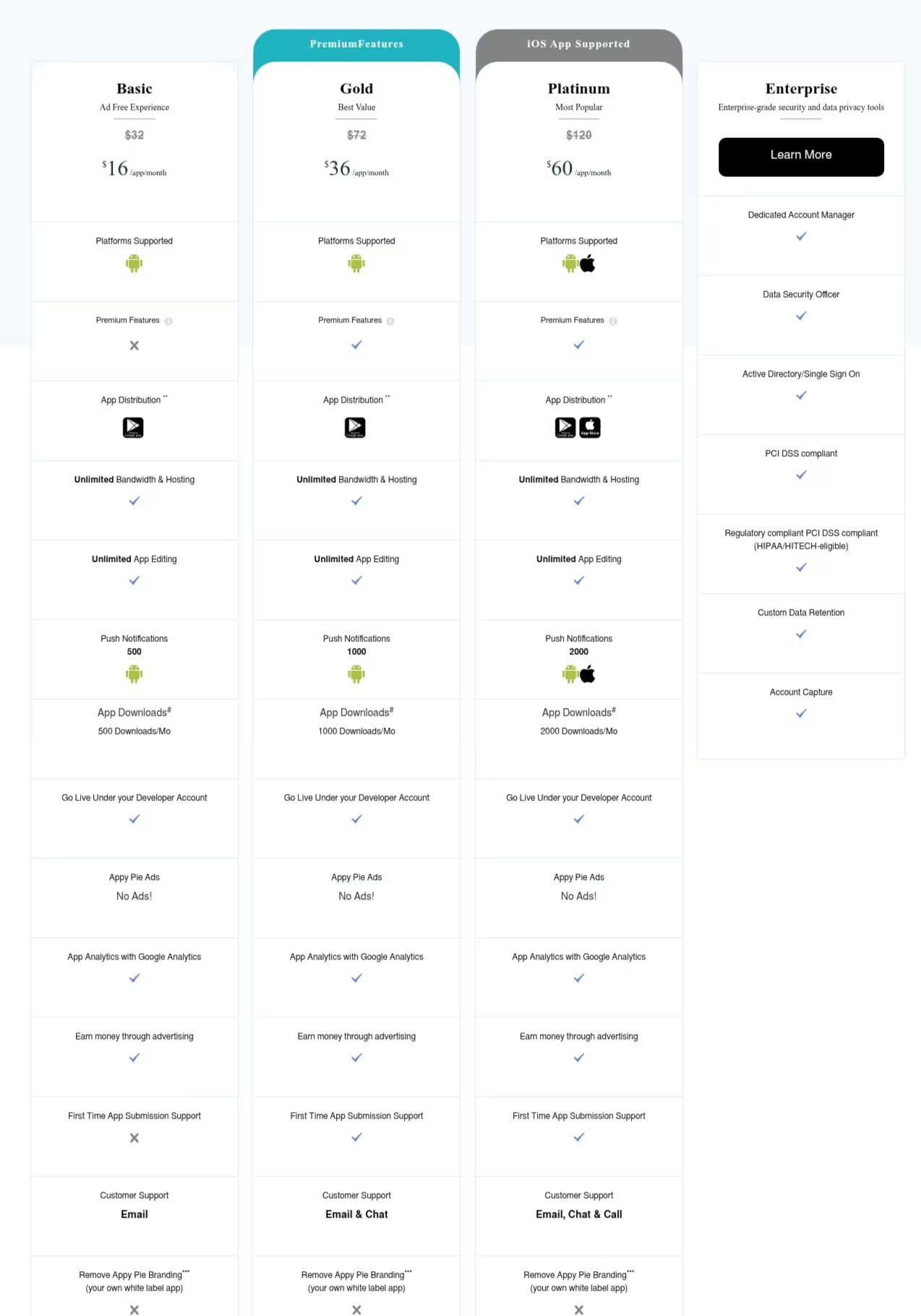
| Basic | $32/month($16/month billed annually) | Testing a single Android app |
| Gold | $72/month($36/month billed annually) | A single business app with more room to grow |
| Platinum | $120/month($60/month billed annually) | Publishing to both Android and iOS |
| Enterprise | Custom | Large organizations with compliance needs |
Website Builder
| Plan | Monthly Price | Best For |
|---|---|---|
| Starter | $36/month | A personal or small project site |
| Grow | $60/month | A small business site with commerce needs |
Worth repeating: every price above is per app or per site. Appy Pie doesn't offer per-account billing. A second app means a second Basic (or Gold, or Platinum) subscription on top of the first. A website runs on a completely separate plan from any app you build.
This article covers the Website Builder's pricing structure briefly, since the App Builder is where most of the per-app costs and hidden fees show up.
For the rest of this article, I'll focus on Appy Pie's App Builder.
Appy Pie Pricing Plans Breakdown
Basic: $32/Month per App
What's included: Android publishing, unlimited editing and hosting, 500 push notifications and downloads a month, email support, and optional AdMob or Appy Jump monetization. Your first app store submission is free.
Best for: A single, simple Android app. No iOS and no heavy traffic.
Pros:
- No caps on editing.
- Unlimited hosting and bandwidth.
- Cheapest way to get one app live on the Play Store.
Cons:
- Android only. iOS users can't open the app.
- 500 push notifications and downloads a month. Overage charges will kick in if you go over.
- Appy Pie's branding remains unless you pay 2x for the Add-On Package.
Gold: $72/Month per App
What's included: Everything in Basic, plus 1,000 push notifications, 1,000 downloads, and chat support added to email.
Best for: A business app outgrowing Basic's caps. Still Android-only.
Pros:
- Double the notification and download room.
- Chat support on top of email.
- Cheaper than Platinum if iOS isn't the goal.
Cons:
- Still no iOS, despite being Appy Pie's "Best Value" plan.
- Branding removal still costs double, same as Basic.
- More than double Basic's cost for higher caps, same capabilities.
Platinum: $120/Month per App
What's included: Everything in Gold, plus iOS support, 2,000 push notifications, 2,000 downloads, and phone support.
Best for: A business app going live on both the App Store and Google Play.
Pros:
- Publishes to iOS, the only tier that does.
- Highest usage caps, plus phone support.
- Cheaper than hiring a developer for the same feature set.
Cons:
- Two or three apps at this tier hike the cost. Each needs its own $120/month plan ($60 billed annually).
- Apple's $99/year fee and Google's $25 one-time fee sit on top of this price.
- The same white-label markup applies here too.
Enterprise: Custom Pricing
What's included: Everything in Platinum, plus unlimited apps and notifications, a dedicated account manager, SSO, and enterprise compliance coverage, including SOC 2 and PCI DSS certifications plus support for HIPAA-compliant and GDPR-aligned workflows.
Best for: Larger organizations running multiple apps with compliance needs.
Pros:
- No usage caps.
- Dedicated support and compliance coverage the self-serve tiers don't have.
- Priced to your actual usage.
Cons:
- No public pricing. You need a sales call to compare costs.
- Overkill for a solo founder building one or two apps.
- Still per-app underneath. More apps still cost more, just with room to negotiate.
Which Appy Pie Plan Should You Choose?
It depends on three things: how many apps you're building, which platforms you need, and how much traffic each app will see.
Choose Basic if you:
- Only need Android.
- Are testing one simple app (a loyalty card, an info app, a small store).
- Expect light traffic, under 500 notifications and downloads a month.
- Want the lowest entry cost and don't mind Appy Pie's branding.
Choose Gold if you:
- Are Android-only but outgrowing Basic's caps.
- Want chat support without paying for iOS.
- Expect moderate traffic, up to 1,000 notifications and downloads.
Choose Platinum if you:
- Need both the App Store and Google Play.
- Expect serious traffic and want phone support on standby.
- Are building a business app you plan to promote.
Choose Enterprise if you:
- Are running multiple apps across a team
- Need enterprise compliance coverage for your industry, including SOC 2 and PCI DSS certifications plus support for HIPAA-compliant workflows.
- Want a dedicated account manager instead of fixed monthly caps
Each plan covers one app. Building three means paying for three.
Is Appy Pie Worth the Cost?
$32 a month for a working Android app is a good deal, if that's all you need.
Appy Pie holds a 4.7/5 rating from roughly 1,391 reviews on G2, and users praise the ease of use and support, though a recurring complaint is that costs escalate unexpectedly over time.
The sticker price on the pricing page isn't the whole story, though.
Consider the following:
Per-app billing: A dev shop building 3 or 4 client apps a month, or a business that wants a customer-facing app plus a separate internal one, pays the full plan price for each. Five Platinum apps run $600 a month on month-to-month billing, or $300 a month billed annually.
Overage charges once you're popular: Push notifications and downloads are capped by tier. Go over, and you pay $0.001 per extra notification and $0.009 per extra download. An engaged app can easily blow through its cap.
White-labeling doubles your bill: Removing Appy Pie's branding isn't included in any tier. It's an Add-On Package priced at 2x your plan cost, charged on top of your subscription. A $120/month Platinum app (or $60/month billed annually) becomes $360/month, or $180/month billed annually, once you add it.
Onboarding runs out rapidly: You get three sessions with a Customer Success Manager. After that, it's $25/hour with a 10-hour minimum, a $250 charge if you need more hand-holding.
Appy Pie is worth it if you:
- Need just one simple app on Android, with no plans to add more.
- Don't mind the branding, or you've budgeted for the add-on.
- Have light, predictable traffic under the plan's caps.
Skip Appy Pie if you:
- Plan to build more than one app. Costs multiply with zero discount.
- Want branding removed without doubling your bill.
- Want one flat cost, not a bill that grows with fees and add-ons.
Want the full picture of what users are saying? Read our Appy Pie Review for a closer look at what builders actually ran into.
Appy Pie Alternatives and Pricing Comparison
Appy Pie isn't the only option if you're building a mobile app without hiring developers. Here's how it stacks up against a few others.
How the main app builders compare at a glance:
| Tool | Starting Price | Best For | Standout |
|---|---|---|---|
| Emergent | $20/month($17/month billed annually) | Non-technical founders building production-ready applications | Generates a complete web or mobile app you can customize, launch, and own, with no per-app fee. Pricing is credit-based, so a heavier build uses more credits than a simple one |
| Adalo | $45/month($36/month billed annually) | Founders who want a native iOS and Android app with a visual editor | Starter plan publishes to both app stores with a built-in database and no per-action fees. Caps you at one or two published apps depending on the tier. |
| Bubble | $69/month($59/month billed annually) | Founders building more complex apps with custom logic | More flexibility for advanced workflows, but costs scale with Workload Units. A busy app gets expensive fast. |
Adalo and Bubble both give you a drag-and-drop editor and let you assemble the app yourself.
Emergent is a vibe coding platform that lets you describe the app, and it gets built, tested, and made ready to launch, with no separate subscription for every app you create.
Glide and Softr are two more worth a look if you're comparing options, though neither focuses specifically on native mobile app publishing the way Appy Pie, Adalo, and Emergent do.
Also read our best Appy Pie alternatives guide for a deeper look at what else is worth trying beyond this comparison.
Emergent vs. Appy Pie: Which Should You Choose?
Both platforms are built for people without a coding background. The pricing model is where they begin to differ.
Appy Pie charges per app. Fast and cheap for one simple app, especially if Android is your only target. Add a second app, add iOS, or remove the branding, and the per-app fees start stacking. Five apps on Platinum run $600 a month on month-to-month billing, or $300 a month billed annually, before white-label charges.
Emergent runs $20 a month ($17 billed annually). There's no per-app model to plan around. You describe what you need, and Emergent's agents plan, build, test, and get it ready to launch. The code is yours, so you can take it with you if you leave.
Appy Pie also only builds PWAs (Progressive Web Apps) for the web, but it's your mobile app repackaged for a browser. It's not a real web app built from scratch.
Emergent builds actual web applications, dashboards, and internal tools.
Choose Appy Pie if you:
- Need one basic Android app and want the lowest entry cost.
- Won't scale past a single templated app.
- Don't mind staying inside Appy Pie's ecosystem long-term.
Choose Emergent if you:
- Want to own a production-ready app, web, mobile, or both, code included.
- Plan to build more than one app without paying per app.
- Want one flat monthly cost, no white-label add-on.
My Bottom Line on Appy Pie Pricing
Appy Pie's entry price is one of the cheapest ways to get a basic Android app live. The downside comes up when you want to scale to more than one app.
Add iOS, and you're at $120 a month per app, month-to-month ($60 billed annually). Add a second app, and you pay that again. White-labeling doubles your bill. Throw in onboarding hours and the supposedly "cheap" plan stops looking cheap.
If you want to build more than one app, or own your code, start with Emergent instead. You pay less to start, you're not locked into per-app billing, and you own what you build.
See what you can create with Emergent.

Most AI app builders stop at prototypes. Emergent creates production-ready apps you can actually launch.
- Production-ready apps
- Web & mobile apps
- Deploy in minutes







