



TL;DR
- FlutterFlow pricing runs $0 on Free, $39/month on Basic, $80/month for Growth's first seat, and $150/month for Business's first seat, with per-seat charges stacking on Growth and Business.
- The costliest step is the third editor: two-seat Growth at $135/month jumps to three-seat Business at $320/month, a 137% increase for one more collaborator.
- AI Generation runs on a separate quota from the plan price, and Free's cap is five lifetime requests total, not monthly, unlike every paid tier's fresh allowance.
- Each added Business seat stays $85, so the effective per-editor cost climbs from $67.50 on two-seat Growth to $106.67 on three-seat Business.
- The subscription understates the real bill: Apple's $99/year, Google's $25 one-time fee, and a data service like Supabase Pro at $25/month push a solo first-year floor to $592.
You build something in FlutterFlow, it works, and then a second person needs edit access or the AI quits generating halfway through a screen. That's the moment FlutterFlow's pricing stops being one number and turns into a puzzle.
FlutterFlow is a visual, drag-and-drop app builder. You lay out the screens yourself, add AI Generation for specific parts, and export real Flutter source code you can take anywhere. What you pay comes down to two things the plans don't lead with: how many editor seats you need and how fast you spend the AI Generation quota.
I spent about four weeks with FlutterFlow, roughly 14 to 16 hours of building, paying for every plan myself. I built a small book club app called Loop on Free, Basic, and Growth at two seats, then upgraded to Business for a day to confirm the exact seat-jump math. On Free, I used up all five lifetime AI Generation requests before I'd finished my second screen.
By the end, you'll know which of the five tiers fits your team, where the price jumps hardest, and how the two-editor cap and AI Generation quota shape your monthly cost.
FlutterFlow Pricing Plans: At a Glance
I didn't understand FlutterFlow's pricing structure until I was deep into testing. FlutterFlow pricing combines a base plan price with per-seat charges on Growth and Business. AI Generation runs on a separate request quota that caps how much you can generate.
The base plan price is the one FlutterFlow puts front and center. The other two are easy to miss until you hit them, which is exactly what happened to me.
| Plan | Price | Best For |
|---|---|---|
| Free | $0 | Solo prototyping, nothing to lose yet |
| Basic | $39/month ($29.25/month, billed annually) | Solo builders ready to publish |
| Growth | $80/month ($60/month, billed annually) + $55/month ($41.25/month, billed annually) (two-seat cap) | A two-person collaborating team |
| Business | $150/month ($112.50/month, billed annually) (first seat) + $85/month each ($63.75/month, billed annually) (seats two to five) | A three-to-five-person team needing branches and tests |
| Enterprise | Custom, contact sales | Compliance or large-org needs |
The per-seat add-on is simple to overlook if you only check the sticker price. The number climbs with every person you add to the project.
The Real Seat-by-Seat Cost on Growth and Business
| Seats | Growth Monthly Total | Business Monthly Total |
|---|---|---|
| one seat | $80 | $150 |
| two seats | $135 | $235 |
| three seats | Not available (Growth caps at two) | $320 |
| four seats | Not available | $405 |
| five seats | Not available | $490 |
FlutterFlow tracks AI Generation on its own meter, apart from the plan price. It's also a different quota than the AI Agents you can set up inside a project, and it's easy to confuse the two.
AI Generation & AI Agent Limits by Plan
| Plan | AI Generation Requests | AI Agents Allowed |
|---|---|---|
| Free | five lifetime | 0 |
| Basic | 50/month | one |
| Growth | 200/month | Unlimited |
| Business | 500/month | Unlimited |
| Enterprise | Custom | Unlimited |
That "five lifetime" row on Free is real. It's five requests total, spent once for the life of the account, while every paid tier gets a fresh monthly quota. I found that out the hard way.
FlutterFlow Pricing Plans Breakdown
Here's what each tier delivered when I built with it, starting with the plan that ran out on me fastest.
Free: $0/month
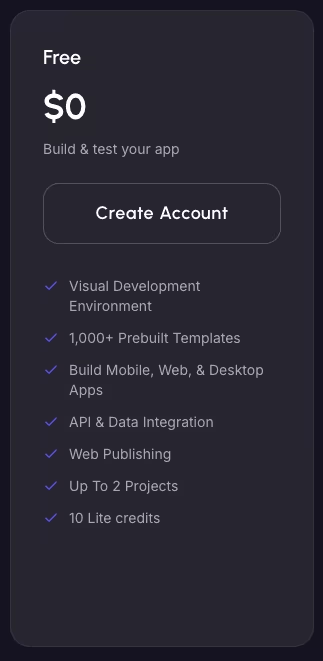
What's included: One editor, two projects, and one development environment. You also get five lifetime AI Generation requests, 0 AI Agents, and up to two free subdomains. This tier skips source-code export, app-store deployment, and payment integration.
Best for: A solo builder validating an idea before spending anything.
Pros: Full access to the visual editor at zero cost, plus enough room to prototype a small multi-screen app. There's no time limit on how long you stay on it.
Cons: The AI Generation cap turns testing FlutterFlow's AI features into a single session. There's no way to export code or deploy to app stores at this tier.
I built the first two screens of Loop, my test book club app, on Free. The first was Currently Reading, a screen with a book cover, a title, an author, and a progress note. The second was Members, showing who's in the club and whose turn it is to pick the next book. I ran this prompt to generate the first screen:
"Create a screen called Currently Reading that shows a book cover image, a title, an author name, and a short text field for a progress note."
FlutterFlow's AI Generation feature built the screen from that single description. Getting the layout to look right took three separate generation requests, adjusting the image placement and the progress note field until it read cleanly. That left two requests for the rest of the Members screen, and I ran out before I'd finished it.
Free also boxed me in on two fronts I confirmed firsthand. There's a hard cap at two projects, and no way to bring a second editor into Loop, even informally. Both limits held solid through the whole test.
The AI Generation quota, the two-project cap, and the single-editor limit make Free far more restrictive than its $0 price tag suggests. You can still build by dragging and dropping the interface by hand once the AI Generation requests are gone.
But the whole point of testing FlutterFlow's AI features disappears after five prompts. There's also no source-code export or app-store deployment at this tier.
Free is fine for a first look at the visual editor. Basic adds a monthly quota so you're not rationing prompts.
Basic: $39/month ($29.25/month, billed annually)
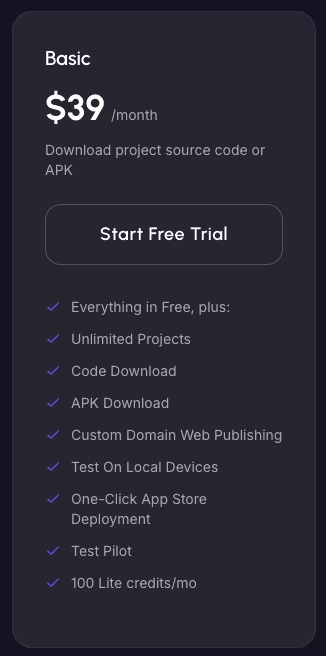
What's included: Unlimited projects and full source-code export. You also get the developer-facing extras: custom code expressions and config editing, programmatic access to your project's data, and an experimental connector (MCP) for hooking in AI tools. Most people won't touch these day-to-day, but they're there once you outgrow the visual editor. There's also 50 AI Generation requests a month, one AI Agent, and one development environment. GitHub push and VS Code sync start on Growth.
Best for: A solo builder ready to publish and own the code behind their app.
Pros: Full source-code export, a monthly AI Generation quota you can build a workflow around, and your first AI Agent.
Cons: Still capped at one editor and one AI Agent, so collaboration or a second AI Agent forces an upgrade.
I kept building Loop solo on Basic, adding a Discussion Notes screen over about 10 days of normal iteration. Basic's unlimited projects lifted Free's two-project cap, though that cap limited projects, not the number of screens inside Loop. I ran this prompt for the Discussion Notes screen:
"Add a Discussion Notes screen with a star rating field and a multi-line notes field, linked to the book that was marked finished."
Getting the star rating field and the empty states to feel right took several rounds of back-and-forth. By the time the screen worked the way I wanted, I'd burned 38 of Basic's 50 monthly AI Generation requests. That's a far more workable pace than Free's five-and-done ceiling.
Basic also added my first AI Agent, which I set up to auto-suggest the next book from unread titles logged in Members. I tried adding a second agent for RSVP reminders, but FlutterFlow blocked it.
The one-agent cap is tight if you plan to automate more than one workflow, so account for it before committing to Basic.
GitHub push and VS Code sync stayed locked at this tier too, but working solo, I didn't need them yet. I only needed those features once collaboration started on Growth.
Basic is where I'd recommend starting. A 50-request monthly quota is enough to iterate on your screens without rationing every prompt. Full source-code export also means you can work with the generated Flutter code outside FlutterFlow's editor. That export alone is why I'd point a serious solo builder here over Free, even before the bigger AI Generation quota factors in.
Growth: $80/month ($60/month, billed annually) (first seat), $55/month ($41.25/month, billed annually) (second seat, Growth's two-seat cap)
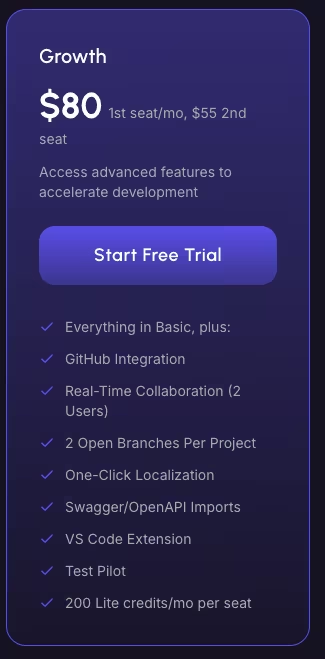
What's included: Up to two editors with real-time collaboration, plus GitHub push and VS Code sync. You also get up to two open branches, one automated test per project, and one additional development environment. The AI side adds 200 AI Generation requests a month and unlimited AI Agents. You can also buy up to four Single Project Collaborator Add-ons at $15 a month per pass.
Best for: A two-person team that needs to co-edit the same project in real time.
Pros: Real-time collaboration for two editors, a much bigger AI Generation quota, and unlimited AI Agents.
Cons: The two-editor cap is a hard wall. Moving past it requires a $15-a-month project add-on or an upgrade to Business.
Growth's price jumps before you've even added a second person. Basic runs $39 a month ($29.25 a month, billed annually). The moment you add one seat on Growth, the price jumps to $80 a month ($60 a month, billed annually), a 105% increase. Adding a second seat costs another $55 a month ($41.25 a month, billed annually), a further 68.8% jump, bringing two-seat Growth to $135 a month total.
That's where the collaboration testing started. I invited a second collaborator to co-edit Loop in real time. I ran this prompt with both of us in the project:
"Add a Meetup RSVP screen with a date picker, a location or video-link text field, and an RSVP status dropdown (Going, Maybe, Can't Make It)."
With two of us prompting at once, the AI Generation quota moved noticeably faster than it had solo. We burned 168 of the 200 monthly requests in nine days. That's more than 33 times Free's entire lifetime allowance.
When I tried inviting a third collaborator, Growth's two-editor cap kicked in immediately, with no warning first. FlutterFlow forced the upgrade decision right at editor three.
The only two ways past that wall are a Single Project Collaborator Add-on or a full upgrade to Business. FlutterFlow publishes a price for that add-on, $15 a month per pass, reassignable across collaborators or projects and good for one project at a time. Use the $15 add-on if the third collaborator only needs one project. Plan for Business if that person needs a full editor seat across projects.
Business: $150/month ($112.50/month, billed annually) (first seat), $85/month each ($63.75/month, billed annually) (seats two to five)
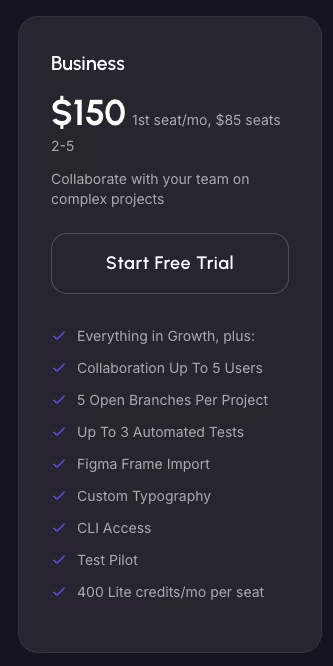
What's included: Up to five editors, up to five open branches, and up to three automated tests per project. You also get two additional development environments and Figma Frame Import (100 requests a month). The AI side scales to 500 AI Generation requests a month and unlimited AI Agents, plus up to 10 purchasable Single Project Collaborator Add-ons. Activity logging stays Enterprise-only, even here.
Best for: A three-to-five-person team that's outgrown Growth's two-editor cap.
Pros: Room for up to five editors, higher branch and test allowances, and Figma Frame Import for teams already designing there.
Cons: A steep jump from Growth for exactly one more seat, and still no activity log to trace who changed what.
I upgraded to Business for about a day, specifically to confirm what that third seat costs. Two-seat Growth runs $135 a month, $80 for the first seat and $55 for the second. Three-seat Business runs $320 a month, $150 for the first seat and $85 each for the second and third.
That's a $185 jump, a 137% increase, for exactly one more collaborator, the single costliest step in FlutterFlow's pricing ladder. A single extra editor, from two seats to three, more than doubles what you pay FlutterFlow every month.
Business rises from $150 for one seat to $490 for five seats, a 226.7% increase across the tier.
Each added Business seat still costs $85. The effective cost per editor is $67.50 on two-seat Growth and $106.67 on three-seat Business.
At five seats, Business averages $98 per editor, which is lower than its three-seat average but still above Growth's rate.
While I had Business open, I went looking for an activity log. I wanted to see who had changed what between the two Growth-tier editors I'd been testing with. There isn't one.
Activity logging is gated to Enterprise, and it's not included even on Business, despite Business being built for teams of up to five. I downgraded back to Growth once I'd confirmed both the seat-jump math and the activity-log gap. A third seat wasn't something the rest of testing needed.
Enterprise: Custom Pricing
What's included: Custom editors, branches, and AI Generation requests, unlimited automated tests, unlimited free subdomains, and the only tier with activity logging.
Best for: Compliance-heavy or large organizations that need a governed, custom contract.
Pros: Custom editor, branch, and AI Generation limits, plus the activity logging unavailable on the other tiers.
Cons: No published price, so you need a sales conversation before you know what it costs.
I didn't test Enterprise hands-on. It's sales-gated and custom-priced, so there's no plan a single tester can price out the way Free through Business can be.
If you’re comparing FlutterFlow beyond its pricing, FlutterFlow vs Adalo looks at how the two platforms differ in features, flexibility, and overall usability.
Which FlutterFlow Plan Should You Choose?
Team size decides which of these five tiers fits, more than anything else in FlutterFlow's pricing. Match each one to the scenario below, based on who's using it.
Choose Free if you:
- Are validating an idea and don't want to spend anything yet
- Can accept a hard five-request lifetime cap on AI Generation
Choose Basic if you:
- Are building solo and want to publish to an app store
- Need full source-code export so you can work with the generated Flutter code elsewhere
Choose Growth if you:
- Are working with exactly one other collaborator in real time
- Need a bigger AI Generation quota and unlimited AI Agents
Choose Business if you:
- Need three to five editors and are ready for the roughly $185-a-month jump past Growth's two-seat cap
- Want more branches and automated tests for a growing team
Choose Enterprise if you:
- Need activity logging to trace who changed what
- Have compliance or governance requirements that need a custom contract
Is FlutterFlow Worth the Cost?
Picking the right tier answers part of the question. Whether it's worth the cost is the other part, and that comes down to the seat-tier jump points and a stack of costs FlutterFlow itself never bills for.
A solo Basic subscription is only part of the first-year floor. Publishing to Apple's App Store adds Apple's $99-a-year Developer Program fee, and Google Play adds a one-time $25 registration fee. Against a year of Basic ($39 a month), that's a first-year floor of $592, before any database or hosting cost.
Apps that store data or run app logic need a service to handle that work. Firebase's free Spark plan covers light early use, and its pay-as-you-go Blaze plan only starts billing once you outgrow that free tier.
Supabase's Pro tier starts at $25 a month as an alternative to Firebase. If your app charges for anything, a subscription-management tool like RevenueCat adds another cost. It's free up to $2,500 in monthly tracked revenue, then a percentage above that.
These costs sit outside FlutterFlow's pricing, and which ones apply depends on the app's data, publishing, and subscription needs.
A Realistic Monthly Budget by Team Size
The solo first-year floor above is one scenario. The same stacking logic applies to FlutterFlow's own seat pricing, from a solo builder up through a five-person Business team, with Supabase's Pro tier standing in for the data-and-logic cost most builds eventually add.
| Team Size | FlutterFlow Subscription | + Supabase Pro ($25/month) | Monthly Floor |
|---|---|---|---|
| Solo builder | Basic: $39/month ($29.25/month, billed annually) | $64/month | $39-64/month |
| Two-person team | Growth, two seats: $135/month ($101.25/month, billed annually) | $160/month | $135-160/month |
| Three-person team | Business, three seats: $320/month ($240/month, billed annually) | $345/month | $320-345/month |
| Five-person team | Business, five seats: $490/month ($367.50/month, billed annually) | $515/month | $490-515/month |
In this table, team size changes the monthly total more than the $25 Supabase example. Moving from a two-person Growth team to a three-person Business team adds $185 a month before Supabase.
Add RevenueCat on top of any of these if the app charges for anything; same free-under-$2,500 deal, then a cut above that. Past five seats, FlutterFlow's per-seat structure stops publishing a number. The next step up is Enterprise's custom pricing.
FlutterFlow is worth it if you:
- Want direct visual control over the interface and are ready to own the Flutter code it generates
- Can plan your team size around the two-editor Growth cap and the seat-jump math to Business
- Are building toward native mobile deployment, beyond a web prototype
Skip FlutterFlow if you:
- Need more than two collaborators without budgeting for the jump to Business
- Want a single subscription that already includes hosting and app-store fees
- Are only testing an idea and can't justify Basic's $39 a month yet
FlutterFlow Alternatives & Pricing Comparison
If FlutterFlow's seat structure or AI Generation limits are the deciding factor, here's how three alternatives price out against it, plus where Emergent fits. Each price shows the month-to-month figure and the monthly equivalent when billed annually.
| Tool | Starting Price | Best For |
|---|---|---|
| Emergent | $20/month ($17/month, billed annually) | Prompt-driven builds with no visual canvas to configure |
| Adalo | $45/month ($36/month, billed annually) | Native mobile apps with a simpler visual builder |
| Bubble | $32/month ($29/month, billed annually) | Web-first apps with deep workflow customization |
| Glide | $25/month ($19/month, billed annually) | Spreadsheet- or table-first internal apps |
Also read our best FlutterFlow alternatives guide for a deeper look at what else is worth trying beyond this comparison.
Emergent vs FlutterFlow: Which Should You Choose?
Emergent gets its own comparison here because it's built differently enough from the other three that a single table row doesn't tell the whole story.
I ran a quick, separate test to see how Emergent would handle a similar small app. I described a members list with a status field for whose turn it was to pick the next book. I wrote it in plain language, with no visual canvas to configure by hand first. Emergent generated a basic working, testable version from that one description.

FlutterFlow is different by design. It's a visual, drag-and-drop app builder where you configure the interface yourself, then layer AI Generation on top for specific screens. It also exports Flutter source code you can take anywhere. Building Loop meant working inside that visual canvas from the first screen on.
The pricing philosophies split the same way. Emergent's Standard plan burns credits on generation and edits alone, so adding a collaborator costs nothing extra. FlutterFlow's AI Generation quota and its per-seat Growth and Business pricing are two separate systems, and neither exists on Emergent's side.
Emergent is better for: Describing an app in plain language and getting a working build. There's no visual canvas to configure and no seat count to plan around.
FlutterFlow is better for: Direct visual control over the interface, native mobile deployment, and owning the exported Flutter code.
Try Emergent free if that sounds like the faster starting point for your next build.
My Bottom Line on FlutterFlow Pricing
FlutterFlow pricing looks like four simple numbers on the page, $0, $39, $80, and $150. Add a third collaborator, and a $135-a-month Growth bill climbs to $320 a month on Business. That's for exactly one more seat, and each added Business seat stays at $85, keeping the per-editor cost above two-seat Growth.
If I were starting a FlutterFlow build today, I'd skip Free and budget for Basic from day one. Free's five-lifetime-request AI Generation cap turns testing the tool into a single afternoon. Basic's source-code export means you can keep working outside FlutterFlow later, even if you outgrow it. I'd also plan my team size before hitting Growth's two-editor wall, since moving to a third editor triggers the priciest jump.
Watch the seat count more than the sticker price. It's the number that decides what you'll pay.
Most builders stop at a prototype. Emergent ships real web and mobile apps, with accounts, databases, and payments included.
- Production-ready apps
- Web & mobile apps
- Deploy in minutes







