
Every company I've worked with has the same folder problem. The strategy doc sits in someone's Drive, the pricing rules sit in a Slack thread from March, and the one person who knows how refunds work is on leave until the 14th. So everybody asks everybody, all day, forever.
I've spent the last few months building internal tools instead of writing specs for them. When I wanted to learn how to build a knowledge base an AI could read and act on, I built one: a private store for my SEO strategy that checks itself against live search results.
Below is the seven-step process, the exact prompt I used, the five questions Emergent's build agent asked me before it wrote anything, and the parts I'd do differently.
What Is a Knowledge Base?
A knowledge base is a single searchable place where the answers to recurring questions live, so nobody has to interrupt a colleague to get one. Atlassian's guide calls it a self-serve online library covering a product, service, department, or topic, and it usually holds some mix of FAQs, how-to guides, policies, and troubleshooting steps.
The reason to bother: across a survey of 12,000 knowledge workers and 200 executives, leaders and teams waste about 25% of their time hunting for answers. That sounds inflated until you count your own Tuesday.
A machine-facing knowledge base is something software reads, meaning the documents an AI assistant checks before it answers a question. Atlassian calls these machine-readable knowledge bases, built to store content in a form software can parse directly.
The build in this guide is the second kind, which is where most of the interesting work sits right now.
What You'll Need Before You Start
You need less than the vendor pages suggest.
Here's the whole list:
- Source documents: Whatever you already have. Mine was a single SEO strategy PDF, roughly 12 pages.
- A list of 10 real questions: The ones people actually ask. Write them down before you build anything.
- An account on a builder or a help-center tool: I used Emergent. The free plan's 10 monthly credits are enough to try the prompt flow,but a build like this one (30 credits) and publishing it both need the Standard plan.
Time required: About 30 to 45 minutes from prompt to live URL, including the roughly 15-minute deploy wait, then a week or two of small edits once people start using it.
How to Build a Knowledge Base in 7 Steps
The first three steps apply to whatever tool you pick. The last four walk through the build I ran.
Step 1: Pick One Audience and One Job
Decide who's reading it and what single question-shaped problem it solves.
Customers troubleshooting a product need different content from new hires learning your refund policy, and both are different again from an AI that has to compare a document against live data.
My job was narrow: store my SEO strategy somewhere an AI could read it, then have that AI tell me where the strategy and the live search results disagree. One audience (me), one job (gap detection).
Skip this, and you'll write 40 articles that each half-serve three readers, then wonder why nobody uses the thing. The narrower the job, the faster the first version ships.
Step 2: Collect Your Source Material, Then Throw Half of It Out
Gather what exists, then delete aggressively. More documents make a knowledge base worse, because the retrieval layer has more chances to hand back something outdated.
One guide to building a knowledge base for AI models puts it as value over volume, which is the whole game. It also suggests breaking content up around the questions people ask instead of around how the document happens to be laid out, and that one change made the biggest difference in my own testing.
The cost of getting this wrong is real. Air Canada's support chatbot told a customer he could claim the bereavement fare after booking, which the airline's own policy didn't allow, and when he relied on it, a tribunal ordered the airline to pay.
The airline argued the chatbot was a separate legal entity responsible for its own actions. That argument went about as well as you'd expect.
Step 3: Decide Whether to Buy One or Build One
Buy when your knowledge base is a help center: public articles, a search box, a feedback widget. You'll be live in a day. Five tools cover most needs:
- Zendesk: A help center bundled with its support ticketing, so articles and tickets live in one place.
- Freshdesk: Freshworks' help desk, with a built-in knowledge base for customer self-service.
- Helpjuice: Standalone knowledge base software, for when you want the knowledge base without a whole help desk around it.
- Confluence: Atlassian's team wiki, better suited to internal docs than public help pages.
- Guru: Internal knowledge that surfaces inside the tools your team already uses.
Build when the knowledge base is a component inside something else. That was my case. I wanted stored context that a piece of software consults every time it runs an analysis, and help-center products don't do that.
If you're in the same spot, a knowledge base web app builder gets you a custom one without hiring a developer.
The tradeoff is worth naming. Building your own means no ready-made article templates, no built-in analytics on which pages get read, and the upkeep lands on you. What you get back is a knowledge base that participates in the work.
Read More: How to Build a Web App With AI: 7 Steps (2026)
Step 4: Turn Your Idea Into a Build-Ready Prompt
Write the prompt before you open the builder. This is where most first builds go wrong, because a vague prompt produces a vague app, and you spend credits discovering it.
I didn't write mine from scratch. Emergent is an app-building platform built for vibe coding, where you describe the thing you want in plain English and get back a complete working app with its screens, its stored data, and its sign-in already wired together.
It also has a built-in assistant called Emmy that sits in the bottom-right corner of every page, answers questions about your project, and costs no credits to talk to. I described what I wanted badly, she asked follow-up questions, and I asked her to turn the conversation into a prompt.
Here's what she gave me, word for word:
Build a full-stack SEO tool called "Local SERP Spy" that allows users to upload their existing business plan or SEO strategy as a PDF to serve as a private knowledge base, which the AI then compares against real-time local search data fetched via the Universal Key and Perplexity AI. The app should perform a live SERP analysis for a specific business category and city, generate a "Competitor Gap Report" that identifies discrepancies between the user's uploaded strategy and the top 5 ranking competitors, and present these insights through a sleek, dark-mode dashboard with comparison charts and actionable optimization tips.
If you don't have a Perplexity key, drop that clause before you paste. I didn't have one, and the agent built a path around it.
Notice how specific that is. It names the file type, the comparison logic, the output, and the look. The Universal Key it mentions is Emergent's single access key for talking to multiple AI models, so you don't have to go and buy one from each provider.
Step 5: Build the App and Answer the Agent's Questions
Paste the prompt in and pick your settings. I chose the Web app tab, set the agent to E-1, Emergent's slowest and highest-quality builder (the one it recommends for apps real customers will use), and set the model to Claude Opus 5.
Emergent offers several agents, and you pick whichever suits the kind of thing you're building, so it's worth asking Emmy which one fits before you spend anything.
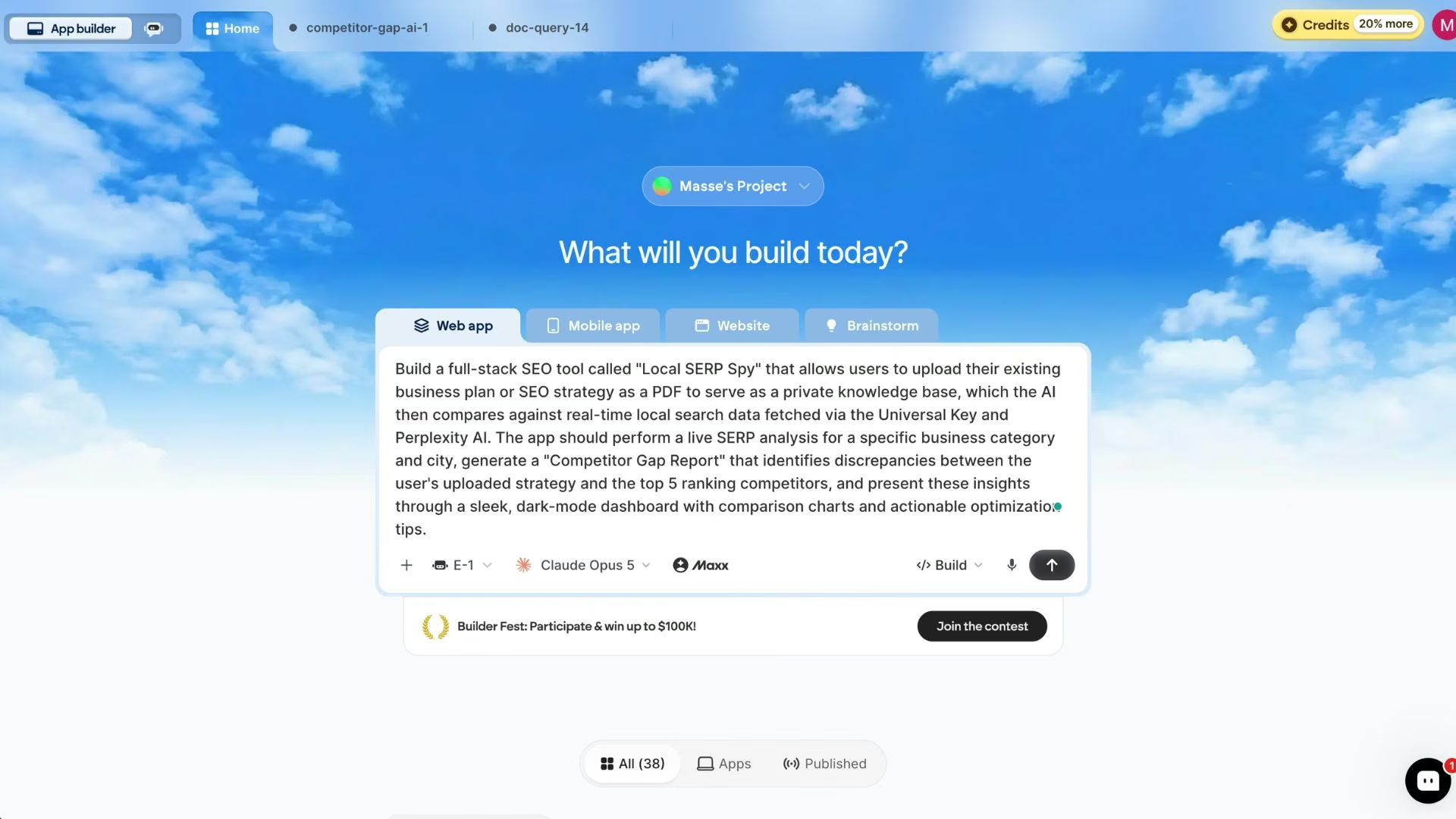
One thing to know if your screen looks different from mine: the build types you see in the prompt box depend on your plan, and higher plans add a Brainstorm tab.
Then the agent asked me five questions before writing a line. This part surprised me the first time I used the platform, and it's the bit that separates a usable first version from a rebuild:
- Live search data source: Universal Key with a model simulating real-time search
- Perplexity API key ready? No, Universal Key only for now (an API key is the access code a paid service gives you)
- Which model writes the gap analysis? GPT-5.5
- User accounts needed? Yes, Google sign-in
- Design preference for the dark dashboard? You decide
Answer these honestly, including the "I don't know" ones. Saying I had no Perplexity key meant the agent built a path that worked with what I had instead of stopping halfway through with a credentials error.
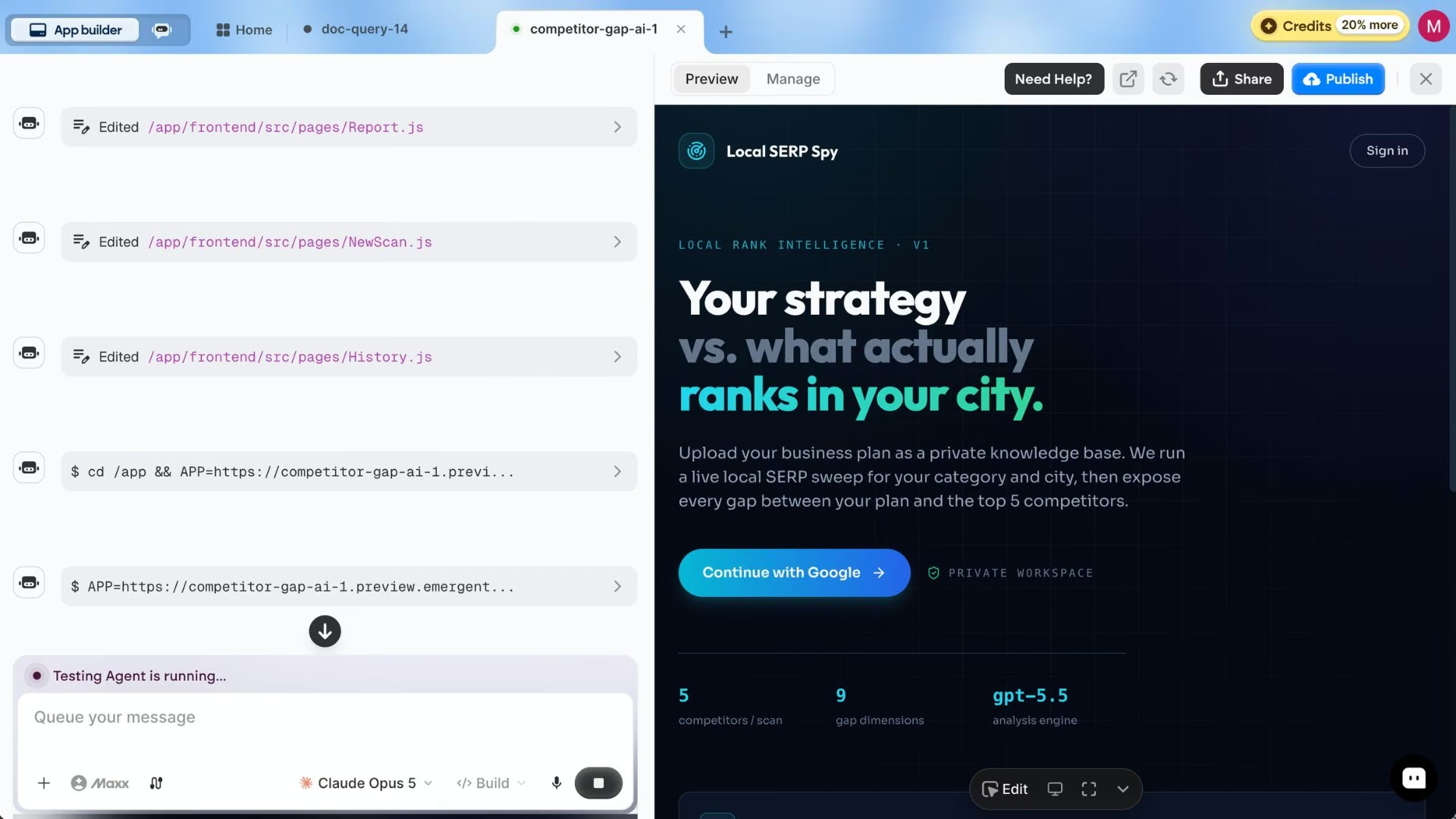
Once the build finishes, a preview shows up on the right side of the screen.
Step 6: Upload Your Documents and Test What Comes Back
Check every screen before you trust any of them. The first version came back with four, and I clicked through all of them in order.
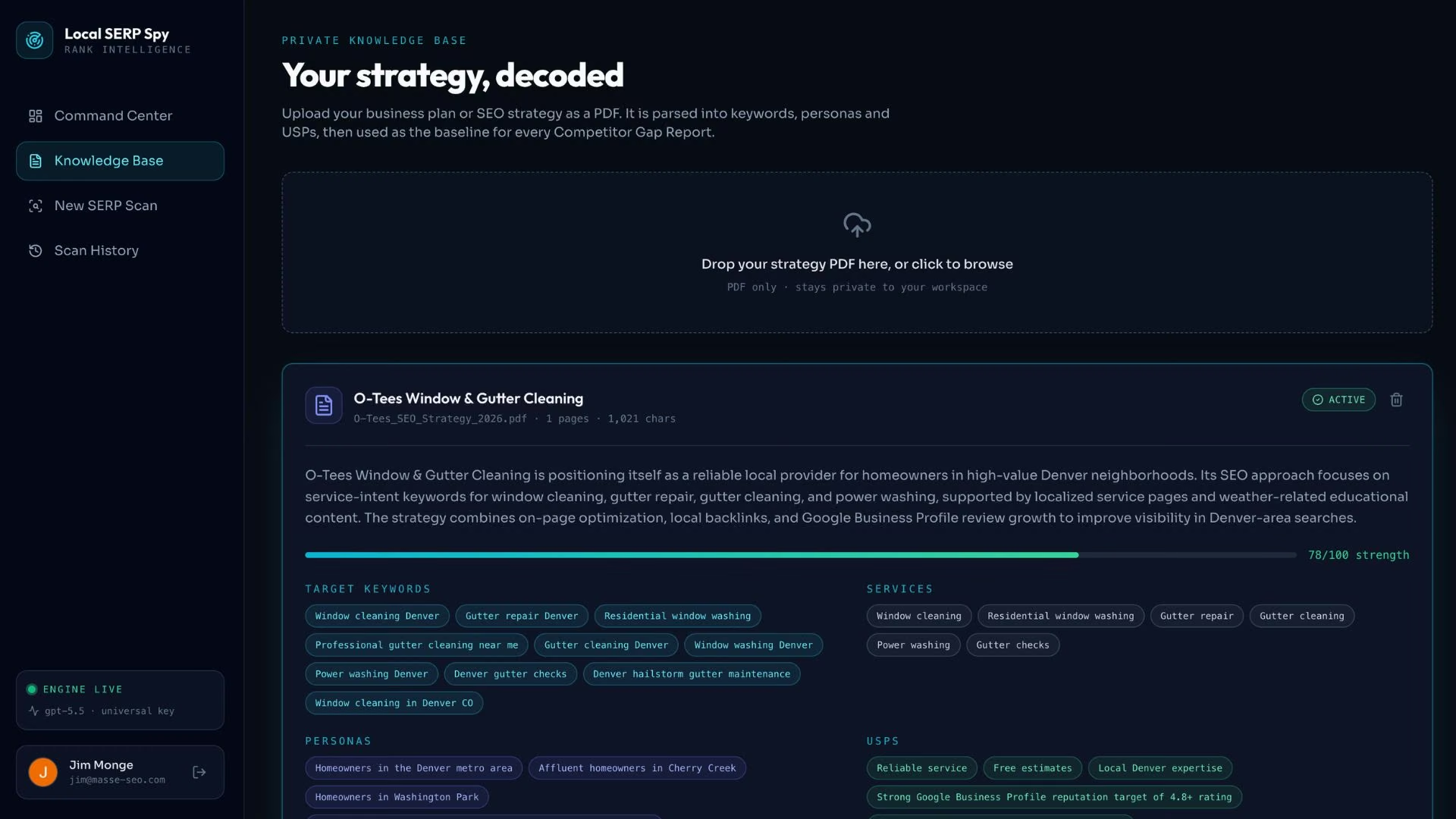
The landing page opens dark and quiet, with "Your strategy vs. what actually ranks in your city" as the hero line, three feature cards down the right side, and a Continue with Google button. I'll admit I liked it more than I expected to, and I hadn't specified anything beyond "dark mode."
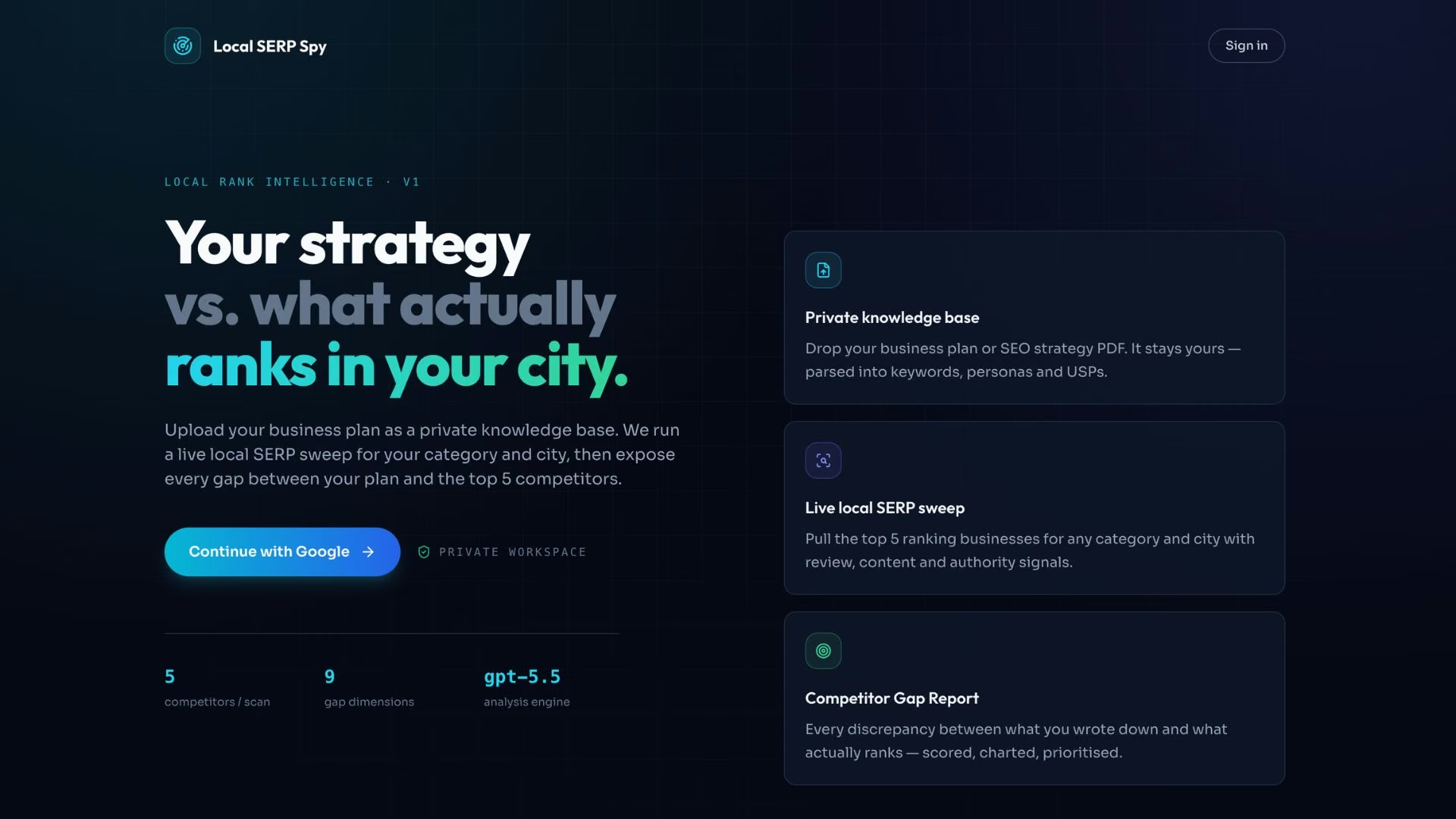
The Command Center is the post-login home: total runs, knowledge base status, and tips executed, all on one screen. It updated itself after every scan I ran, which I'd half expected to have to ask for in a second prompt.
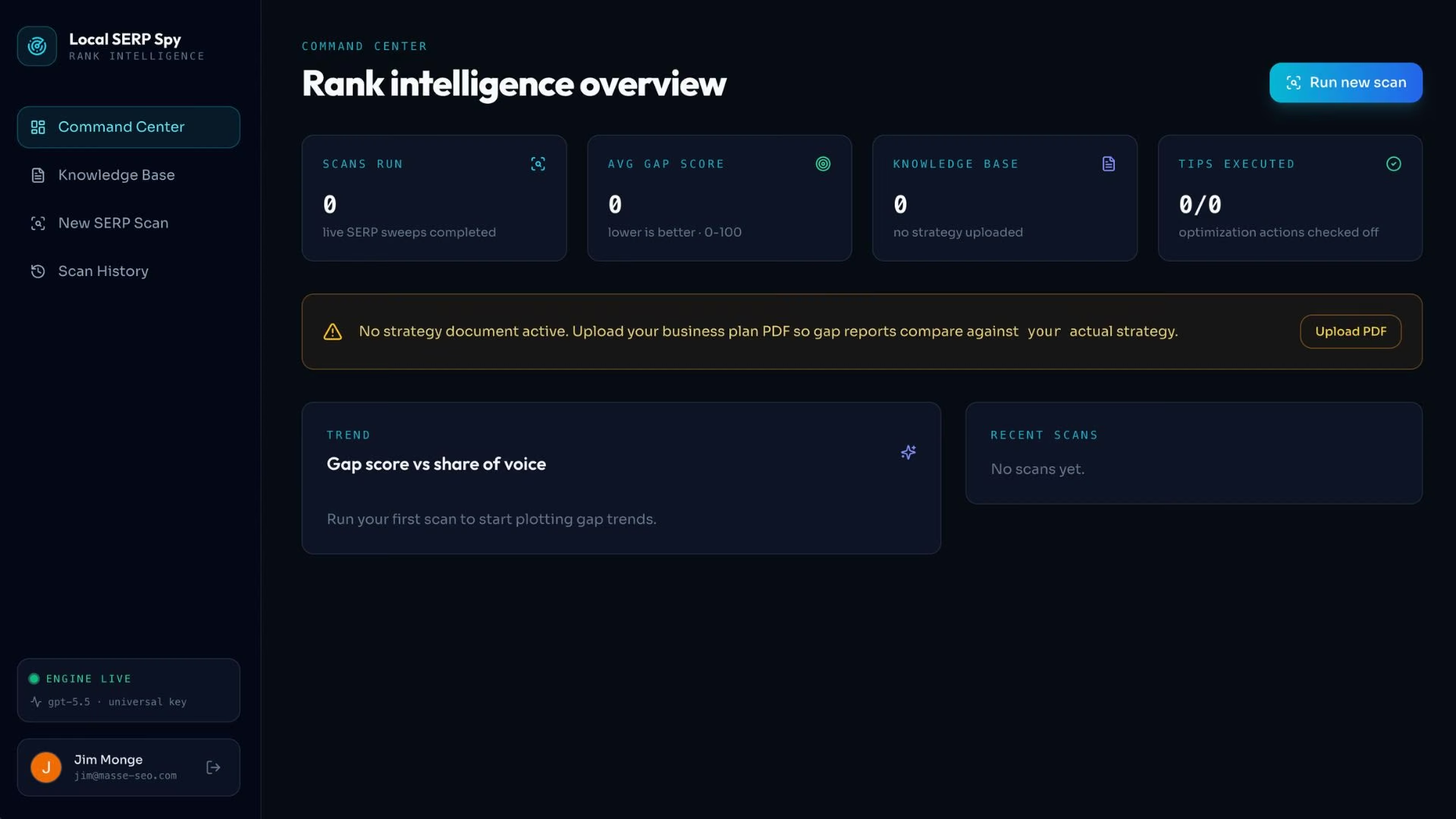
The Knowledge Base screen is the one that matters here. You upload your strategy document, the agent processes it, and it's stored as the baseline that every future report gets compared against. Uploading took a few seconds.
The real test comes after the upload succeeds: can it find what's in the document? Ask it your 10 questions now. Mine came back parsed into target keywords, services, personas, and selling points, with a 78/100 strength score for the strategy itself.
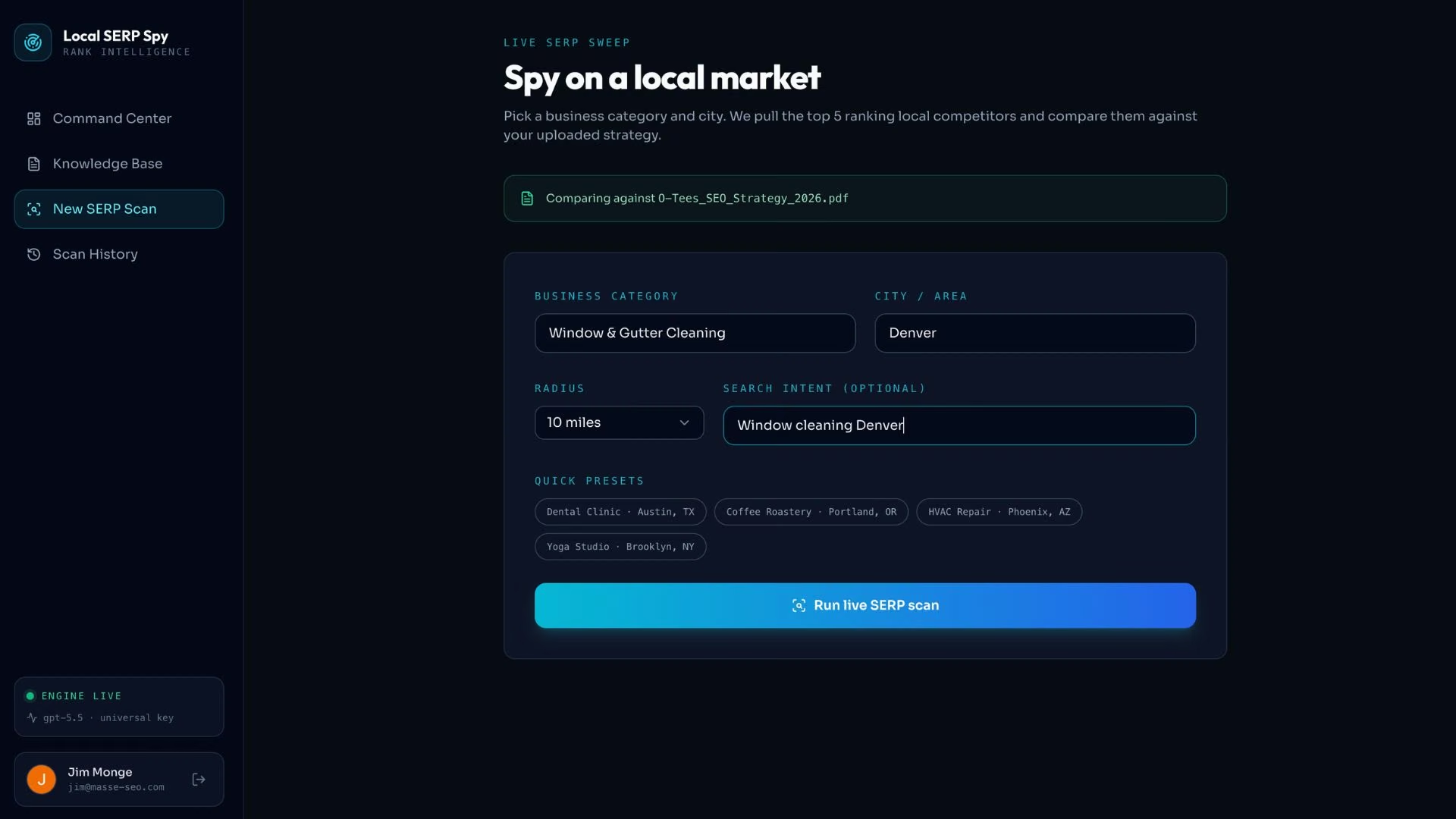
The SERP Scan screen runs the live check. I asked it for window and gutter cleaning services in Denver, and it pulled the current top five local competitors and measured them against my stored strategy.
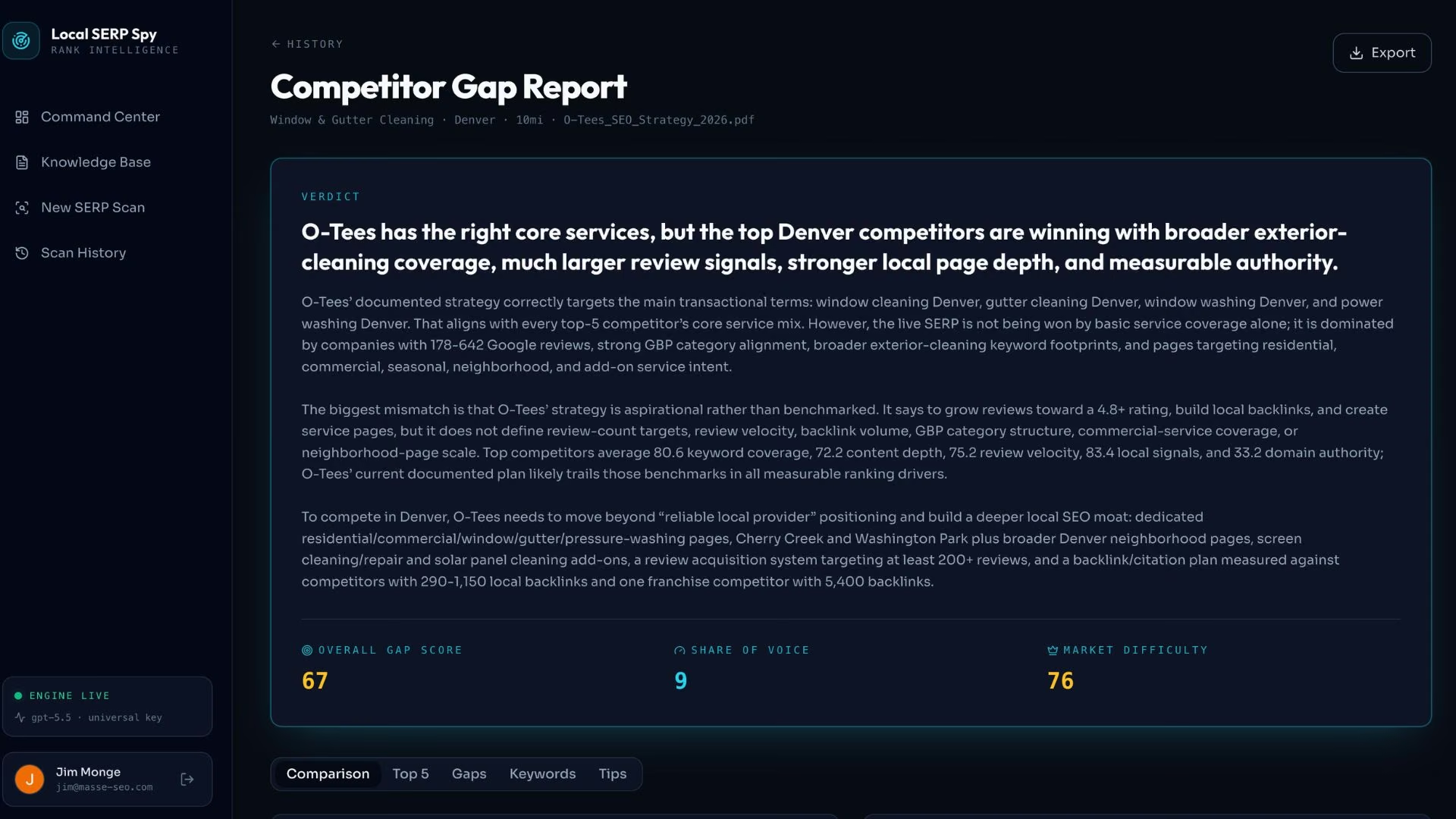
The Competitor Gap Report is where it lands: details, a summary, and a verdict on where my plan and the live results part ways.
Step 7: Publish It and Set a Review Schedule
Click Deploy and wait. The app goes live on its own emergent.host address in roughly 15 minutes, no server setup on your end.
Mine is at competitor-gap-ai-1.emergent.host, and you can point a custom domain at it two ways: buy a new one through the built-in IONOS integration, free for the first year, or connect one you already own. Custom domains start on the Standard plan.
One warning that applies specifically to knowledge base apps: the preview copy of your data and the live copy are two completely separate databases from the very first deploy, and they never share data.
Documents you uploaded while testing won't be in the published version. Upload your source files again once the app is live, then re-run your 10 test questions against production.
Then pick a review cadence and actually keep it. Monthly is fine for most teams. Every stale document in there is a wrong answer with a delay fuse on it.
Read More: How to Deploy Your First App on Emergent
Building a Knowledge Base for People vs. for AI
The two need different things from the same content, and the differences are small but sharp.
A knowledge base for people rewards good navigation: categories, breadcrumbs, a search box, related articles down the side. Readers skim, backtrack, and pick up context from whatever surrounds the answer.
A knowledge base for AI rewards self-contained chunks. Software pulls one passage and answers from that, so an article that only makes sense once you've read the previous three will produce a confidently wrong answer.
Write each section to stand on its own, keep one idea per section, and use the same word for the same thing every time. Atlassian found that 71% of teams aren't using AI to help them manage and find information, and messy source content is a big part of why.
If yours has to do both jobs, write for the machine and let people enjoy the clarity. It rarely works the other way around. A knowledge base chatbot is only ever as good as the chunks underneath it.
Knowledge Base Examples Worth Copying
Three live examples, each built for a different reader:
- Atlassian's knowledge base: A public library of troubleshooting articles for Atlassian's cloud and data center products. It's the classic human-facing model: organize by product, then let search do the rest.
- Emergent's docs: Grouped into a beginner's guide, features, building, deployment, and troubleshooting. Every page carries its own plan tables and caveats, so a page makes sense even when someone lands on it cold from search. That same trait makes it easy for an AI to quote.
- Local SERP Spy: The machine-facing one I built for this guide. Nobody reads its knowledge base directly. The app reads it every time it runs a scan.
Common Mistakes to Avoid
Five things I've watched go wrong, including a couple I've done myself:
- Uploading everything you own: Every extra document is another chance to retrieve the wrong one. Start with 10 documents and add slowly.
- Skipping the test questions: An upload that succeeds tells you nothing about whether the content is findable. Ask it things you already know the answer to.
- Letting two versions of a policy coexist: Conflicting sources are worse than missing ones, because the answer becomes a coin flip.
- Treating it as a launch instead of a habit: A knowledge base nobody prunes is a liability inside six months.
- Expecting polished PDF exports: If your plan is to generate formatted PDF reports out of the app, Emergent struggles here. Charts break across page boundaries. Build the knowledge base, then export the data and format it somewhere else.
Final Thoughts
Most knowledge base advice is stuck in 2015, when the only decision on the table was which help-center product to buy. The decision now is whether your documents are structured well enough for software to use them, because software is what's going to be reading them.
The build took 33 minutes and 30 credits, which is the part I keep coming back to. Your number will differ, because credits stretch a lot further on a simple page than on an app that uploads files and calls a model on every run.
A year ago I'd have scoped this as a two-week project and quietly never started it. The prompt did more work than the build did, and that's held true for every tool I've made this way. Vague input, vague app.
None of this replaces judgment about what belongs in there. The AI will happily store a document that's been wrong since last April and then defend it to your customers. Curation is still yours, and it always will be.
Build the smallest version that answers those 10 questions, put it in front of people, and let their questions tell you what to write next.
Should You Build Your Knowledge Base on Emergent?
Build it here if your knowledge base has a job beyond being read.
A few cases where something else is the better call: for a public help center with article templates and page analytics, buy Zendesk or Confluence; if you write code for a living and want to go faster, Cursor and Claude Code are built for that; and if all you need is a marketing site, Webflow will treat you better.
Emergent earns its place when the thing you're building has to run as software that people use.
- Get a private knowledge base live today: Describe what you need in plain English, and Emergent builds the upload screen, the storage, the sign-in, and the dashboard together, then puts it on a live URL in roughly 15 minutes.
- Store context your software can act on: Your uploaded documents become the baseline the app compares new data against, which is the part help-center tools don't do.
- Skip the model-shopping: The Universal Key connects your app to multiple AI models through one key, so you're not signing up with three providers before you can test an idea.
- Start small, then go live: Emergent's free plan includes 10 monthly credits. Publishing to a live URL requires Standard at $20/month ($17/month billed annually) for 100 credits, since the free plan can't deploy and each live app costs 50 credits a month. Pro is $200/month ($167/month billed annually) for 750 credits.
- Keep the code: GitHub integration is available from the Standard plan up, so the project moves with you if you outgrow the platform.
Try building your first app on Emergent and see how far your first 10 credits get you.
Most AI app builders stop at prototypes. Emergent creates production-ready apps you can actually launch.
- Production-ready apps
- Web & mobile apps
- Deploy in minutes
Most AI app builders stop at prototypes. Emergent creates production-ready apps you can actually launch.
- Production-ready apps
- Web & mobile apps
- Deploy in minutes