



Every quote you find for a portfolio website is either 'free' or 'it depends.' Neither tells you what you'll actually be paying a year from now. So I priced it properly. I pulled live pricing for the two builders most portfolios end up on, checked what freelancers charge, and built a real portfolio site with AI to see what that route costs from prompt to live URL.
Where the cost starts differs by route. Wix and Squarespace bill monthly from the day you upgrade, freelancers take a one-off fee and leave hosting to you, and an AI build stays free until you publish.
By the end, you'll know what each route costs in year one, what it costs in year three, and which one fits the work you're showing.
How I Priced This
The portfolio website price on a vendor's homepage and the one you're paying in year three are rarely the same number, so I checked both.
I built one site on Emergent and priced two alternatives against it. The build was a single-page portfolio for a fictional designer, Ava Mercer, with a six-project work grid, clickable detail views, an about section, and a contact form saving inquiries to a database.
I read every price off the vendor's own US pricing page in September 2026, checking the monthly and annual views both ways. Squarespace was showing a 30% promo code at the time; they rotate these, so check the current offer before you buy.
Portfolio Website Cost by Route
Wix and Squarespace
What it does: Both include templates, an editor, hosting, and a domain in one subscription. Wix also has a permanent free tier covering hosting on a subdomain; Squarespace gives you a 14-day free trial instead.
Best for: Designers and photographers who want a presentable site and no interest in how it's put together.
Wix's free plan costs $0 a month and includes hosting, the editor, and the template library. There are limits in the feature list, however, as Wix’s paid plans include a free domain for the first year while the free plan doesn't.
Set the free column against the paid ones, and the gap is a single line. Every paid tier lists a free domain for the first year. The free plan doesn't, and that one line is what moves most people onto a subscription.
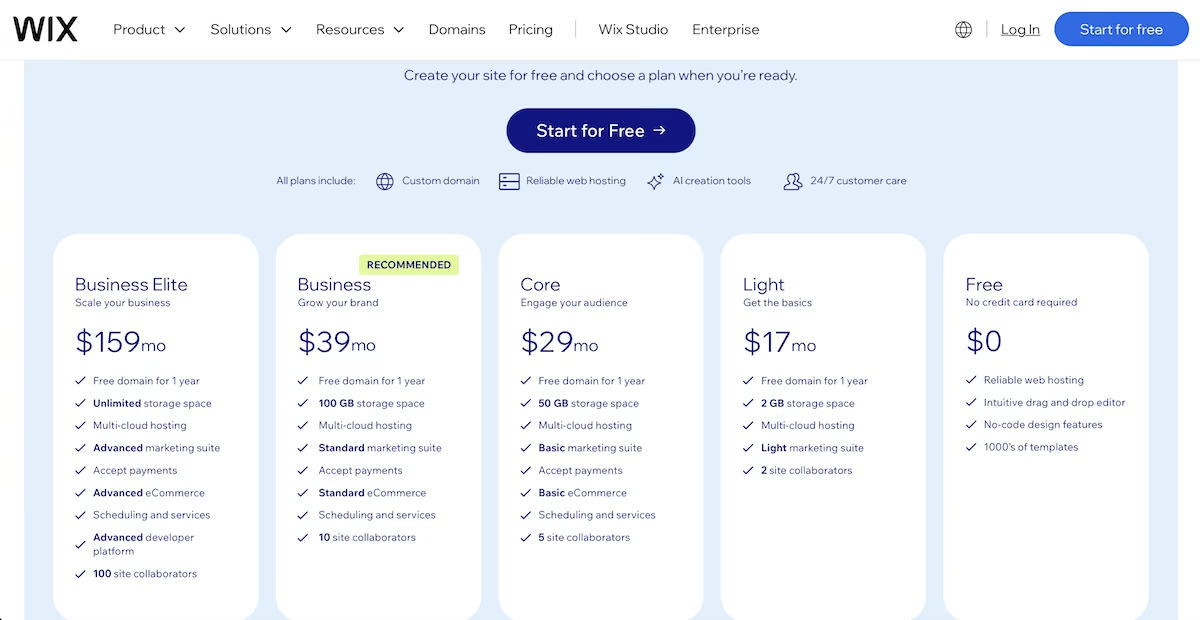
Wix's pricing page, showing the free plan alongside the four paid tiers.
On the paid tiers, Wix Light costs $17/month, Core is $29/month, and Business is $39/month. Business Elite is $159/month, but it's for stores, not portfolios. Squarespace starts at $25/month for Basic, with a 30% promo code showing at the time of writing.
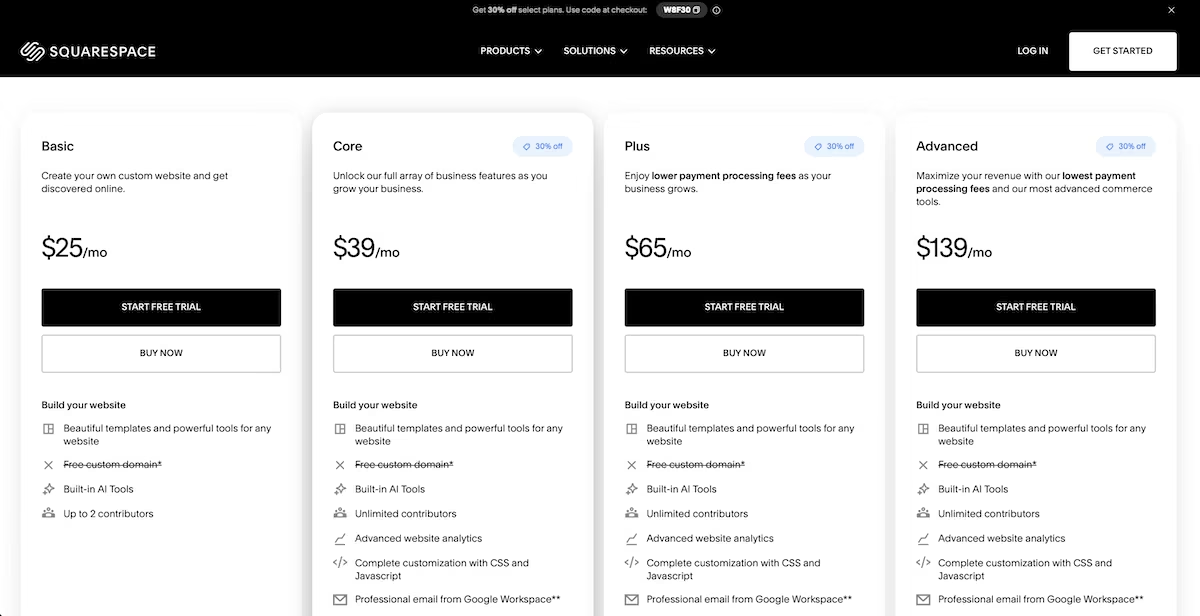
Squarespace's four plans on monthly billing, with the free custom domain line struck through on every tier. The domain is included only if you pay annually.
Wix Light comes to $204 a year. Squarespace Basic is $300 a year billed monthly, or $228 if you pay annually. Either way, three years on Squarespace runs $684 to $900, and the site stays on Squarespace with no export path if you want to move it.
Key Features:
- Free entry on Wix: Wix lets you publish on a subdomain at no cost. Squarespace runs a 14-day trial instead.
- Hosting included: Uptime, backups, and SSL come with the plan.
- Commerce add-ons: Higher tiers unlock print sales and bookings.
Pros and Cons
Pros:
- Predictable billing: One figure covers hosting, the editor, and support.
- Template libraries: Both offer hundreds of designs built for creative work.
- Photography templates: Squarespace handles large images well.
Cons:
- Recurring cost: The bill continues whether you update the site or not.
- Subdomain on the free plan: A custom address requires a paid plan.
- No code ownership: You can't export the site to host it elsewhere.
Pricing
Wix is $0 on the free plan and $17 to $159/month on the paid plans. Squarespace is $25 to $139/month, with promo codes appearing regularly.
Cost is only part of the decision. Our Wix vs Squarespace comparison covers how the two differ once the prices are close.
Hiring a Freelancer
What it does: A freelancer designs and builds the site for a one-off fee, usually on a platform you maintain yourself afterward.
Best for: People with a specific visual idea and a fixed budget who'd rather hand the execution to someone else.
A Fiverr search for portfolio websites returned more than 4,300 results when I checked in September 2026. Among the first listings, the cheapest package ranged from $20 for a template build to $839 from an agency offering design and development. Counts and prices shift with every search.
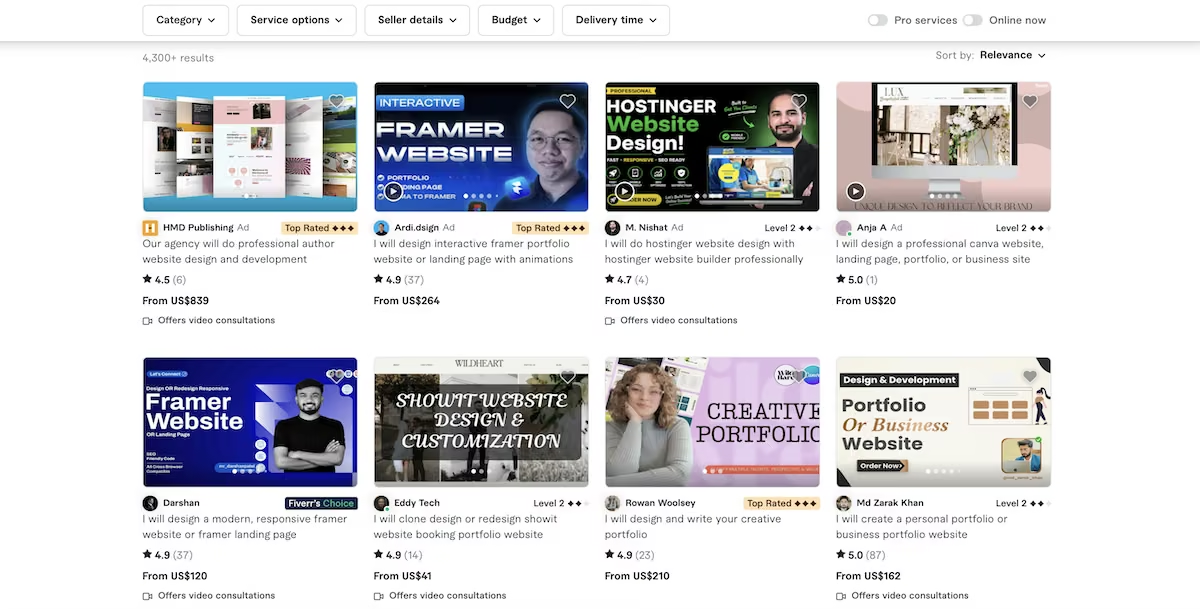
Fiverr's portfolio listings, with $20 template packages and an $839 agency build sitting on the same results page.
Those figures come from ad placements sorted by relevance, so the cheapest ones are usually a template with your images added rather than a custom build.
The $20 listing is a Canva build from a seller with one review behind it. The $839 one is an agency quoting for design and development together, Top Rated, with a portfolio of author sites. Same search, same screen, two completely different products.
Full agencies quote differently again, with custom portfolio builds commonly running from $500 into the low thousands depending on page count and whether photography is included.
Key Features:
- Fixed quotes: You agree on a deliverable and a price up front.
- Platform choice: Most build on Webflow, WordPress, or Squarespace.
- Tiered packages: Sellers offer three levels with different page counts.
Pros and Cons
Pros:
- Human judgment: A designer can interpret a rough brief and improve it.
- One-off payment: You pay for the build rather than a subscription.
- Hands-off process: You supply assets and review the result.
Cons:
- Build only: Hosting, the domain, and future changes are left to you.
- Revision limits: Extra rounds are chargeable in addition to the agreed price.
- Variable quality: Low prices can mean unpredictable results.
Pricing
Fiverr covers everything from budget template work to agency builds, so the price depends entirely on which end you hire from. Hosting and a domain are separate in every case.
Building It With AI
What it does: You describe the site and then specialized agents design, build the database and forms, test, and deploy it to a live address.
Best for: Anyone who wants a custom-looking site at subscription prices and would rather describe a change than learn an editor.
I gave Emergent's AI website builder one prompt covering the whole site, including the work grid, the detail views, the about section, and a contact form that needed to save submissions and show a thank-you message.
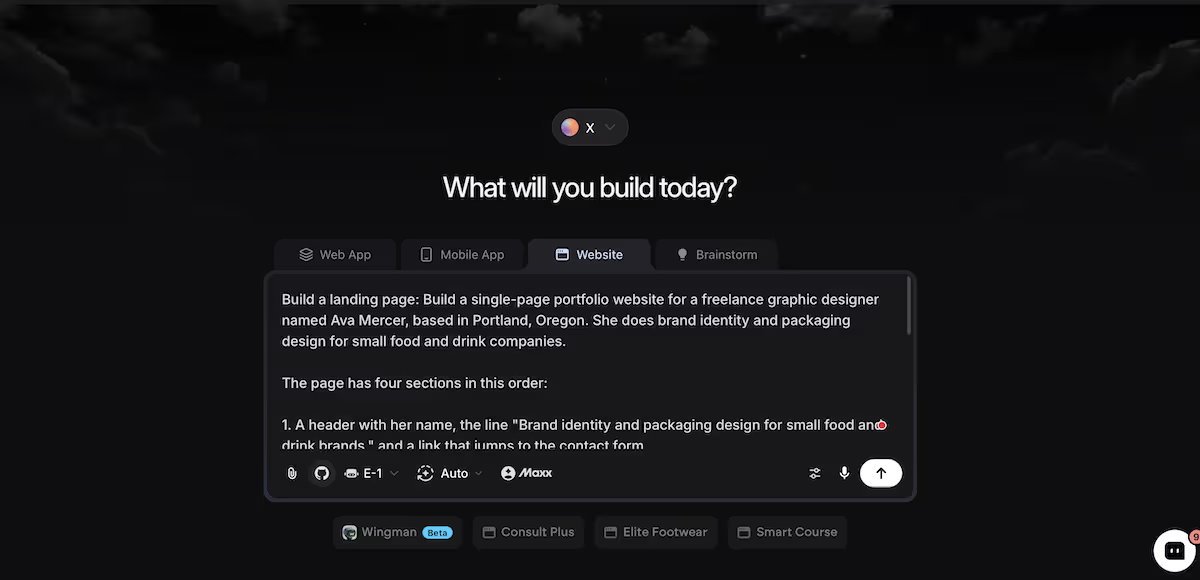
The full brief in Emergent's chatbox. I ran this on a paid account with 272.96 credits, then measured what it would have cost against the free plan's allowance.
Then the agents split the work. Eighteen minutes and 3.92 credits later, I had a finished site with a warm off-white background, a terracotta accent, and Cormorant Garamond headings over a sans-serif body. Each of the six project cards opened into a detail view with the year and the deliverables.

The finished work grid, with placeholder photography standing in for real client projects.
The contact form saved a test inquiry to the database and displayed it on the admin page, which the testing agents had already verified. Deploying took another 10 minutes and 0.20 credits, bringing the total to 28 minutes and 4.12 credits.
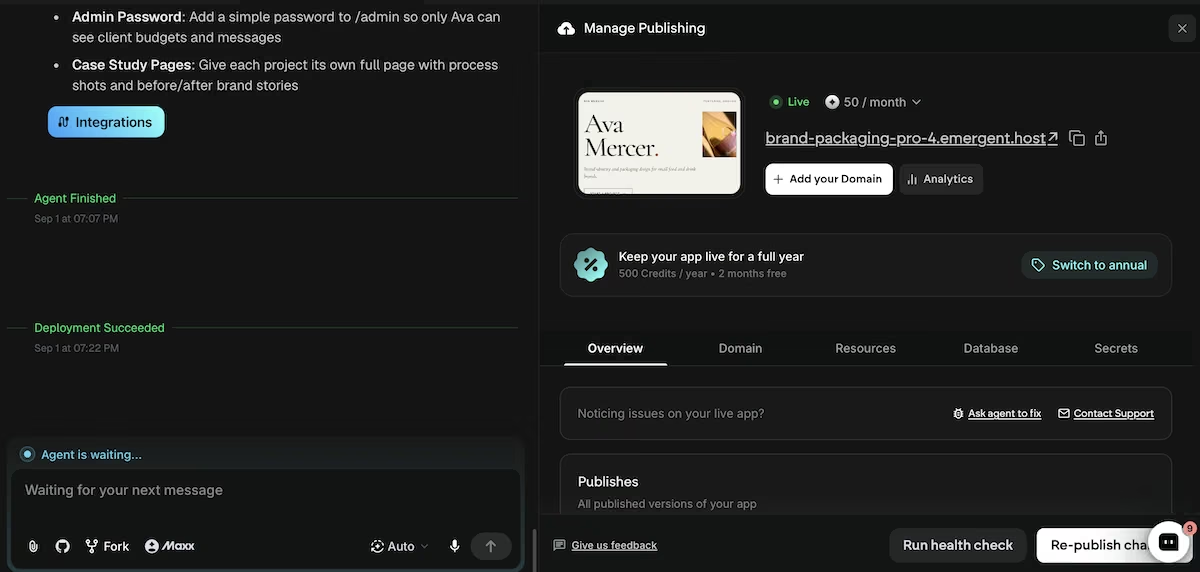
The deployed site, showing the live URL and the 50-credit-per-month hosting cost.
The free plan includes 10 monthly credits, so the build itself was well within the plan's limits. Publishing is where it stops: deployment needs a paid plan, and keeping the site live costs 50 credits a month. At that stage, I’d have to consider the Standard plan at $20/month, which comes with 100 credits.
Emergent's $20/month sits between Wix Light at $17 and Squarespace Basic at $25. The difference isn't the monthly figure; it's what the figure buys: hosting for a site whose code you can export, rather than access to an editor you'd have to rebuild if you ever left.
Key Features:
- Multi-agent builds: Specialized agents split the work; some shape the design, others handle the data and integrations, and testing agents check it before it ships.
- Database included: Contact forms and admin views come with storage.
- Code export: GitHub integration on paid plans lets you take the project elsewhere.
Pros and Cons
Pros:
- Custom design, template price: The output doesn't resemble a stock layout.
- Changes by description: Restructuring a page starts with a prompt rather than an editor session.
- Low build cost: Building a single-page site fits inside the free plan's 10 credits. Publishing it is what needs a paid plan.
Cons:
- Prompt quality counts: Vague briefs burn credits on work you'll have to redo.
- You still supply the work: The build generates the layout, the type and the colour, but every project image comes back as a placeholder until you drop your own in.
- Hosting eats half your credits: A live site costs 50 of the Standard plan's 100 monthly credits, so heavy editing can push you toward a bigger plan.
Pricing
The free plan includes 10 credits, Standard is $20/month with 100 credits, and Pro is $200/month with 750 credits. Hosting a live site costs 50 credits a month.
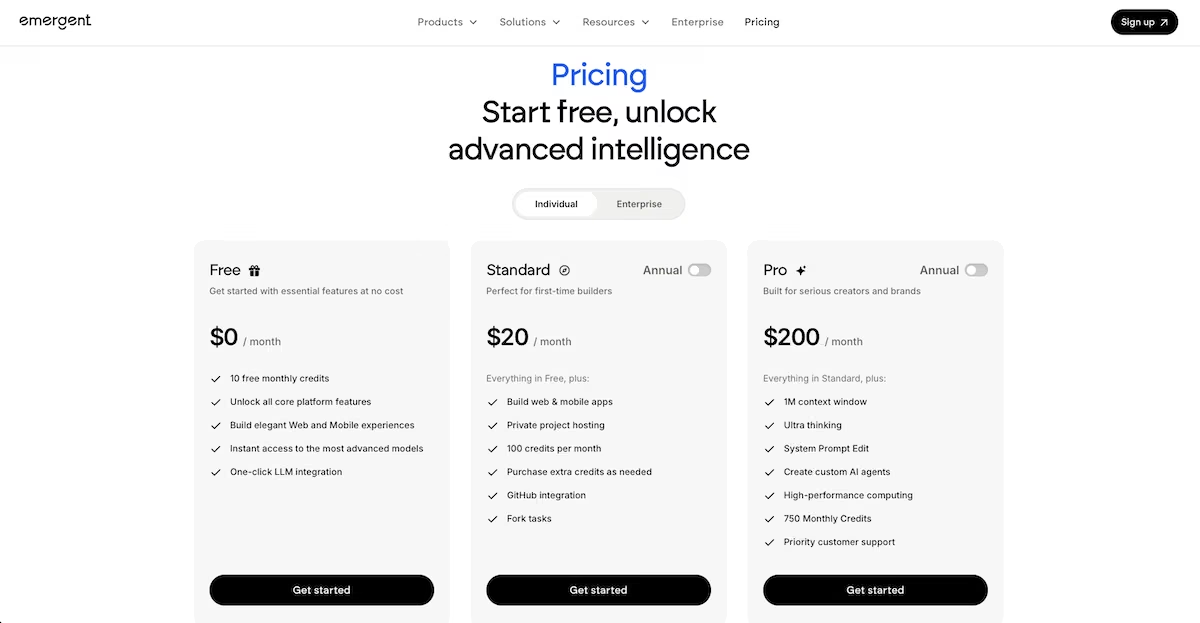
AI builders price differently, usually by usage rather than a monthly seat. Our best AI website builders guide covers how that math works out.
Costs You Won't See on the Pricing Page
The domain name Avamercer.com was available on Namecheap at $10.98 for the first year, down from a $14.98 list price, with a new-customer promo code taking year one to $6.79. Renewal is $18.48 a year after that.
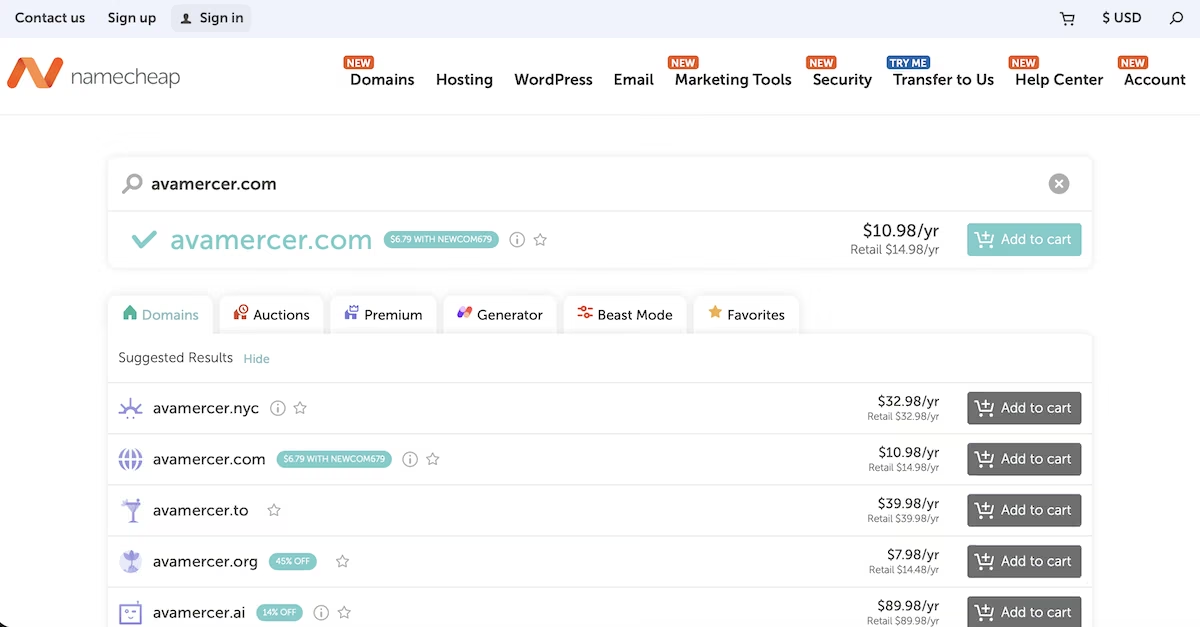
Namecheap's first-year price against the retail renewal for the same .com domain.
The renewal cliff. First-year rates lapse without warning. My domain came in at $6.79 with a promo code, then renews at full price every year after that.
The redesign. As your work changes, you’ll need to rebuild with a template on a subscription builder, or pay credits with AI.
Also read our cost to build a website guide, which prices six routes end to end.
Which Portfolio Website Route Should You Choose?
Choose Wix or Squarespace if you want to stop thinking about the site once it's live and you don’t mind the template look. Start on the free tier if you're still deciding whether you want a site at all. Our portfolio builder roundup covers how they compare on templates.
Choose a freelancer if you have a specific visual idea, a fixed budget, and you accept that you’d need to handle changes down the line.
Choose an AI build if your work changes often enough that you'll keep editing the site, and you'd rather describe a change than open an editor to make it. Emergent's portfolio builder is the pick here.
What Emergent Changes About the Cost
On Wix or Squarespace, you pay every month whether the site changes or not. With Emergent, the build is close to free, and the monthly charge covers hosting for a site with code that belongs to you.
Here's what the monthly figure hides. Three years of Squarespace Basic runs $684 to $900, and the site stays where it is. My Emergent build came to 3.92 credits, and the $20/month after that covers hosting for code you can export the day you outgrow it. Keeping it online with a custom domain is what costs $20/month on the Standard plan.
Try Emergent and find out what your own portfolio costs.

Most AI app builders stop at prototypes. Emergent creates production-ready apps you can actually launch.
- Production-ready apps
- Web & mobile apps
- Deploy in minutes







